
Build Single page application with React and Django Part 4- Create Endpoints to Manipulate Resources
Introduction
We have talked about some topics for building the React and Django web application in last few weeks.
The target for this week is to understand the process of creating endpoints in DRF (Django REST Framework).
Assume that our target is to create an endpoint for creating and getting users. We will import the User model from django.contrib.auth.models instead of defining a new model.
from django.contrib.auth.models import UserAgenda
This article includes the following topics.
- Overview
- URL and Parameters
- Model manipulation — Serializers
- Class-based view — APIview
- Class-based view — viewsets.ModelViewSet
About this series
The target of this series is to build a ReactJS single page application(SPA) with Django API server and deploy on Heroku.
- Part 1: Deploy Django application to Heroku and migrate PostgreSQL
- Part 2: Connect React App with Django App
- Part 3: Use JWT with DRF and tests endpoints on Travis-CI
- Part 4: this article
- Part 5.1: Exchange Facebook’s access token to JWT from Django/DRF
- Part 5.2: Exchange Github’s access token to JWT from Django/DRF
- Part 6: Create Django Application’s sitemap on Heroku for SEO
- Part 7: How to Refactor Function Components with HOC?
- Part 8: Static Rendering with Next.js and Django on Heroku
- Part 9: Access Redux on the Next.js page-level
- Part 10: Improve SEO with Pyppeteer in Django
- Part 11: Theming with Redux and styled-component
Overview
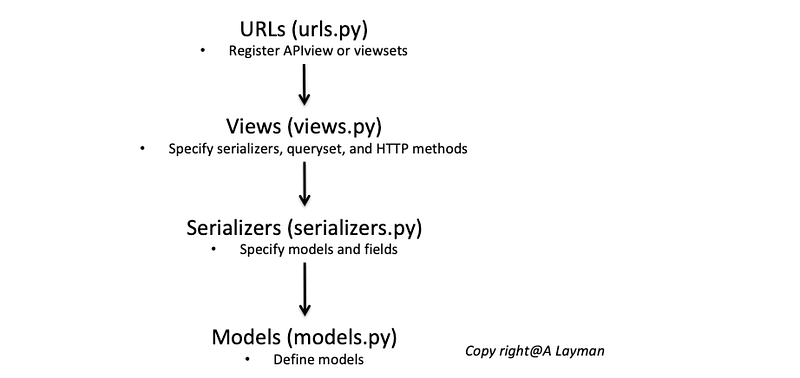
The roles between endpoints and the database includes models, serializers, views, and urls
URL and Parameters
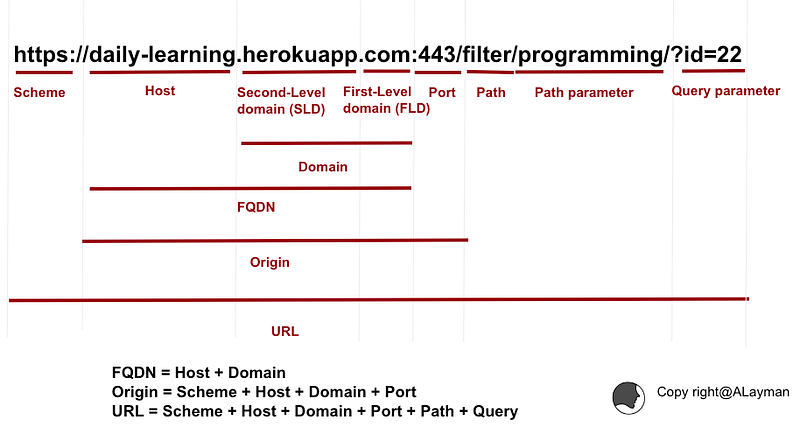
The URL of requests is consisted of the following parts. There are two types of parameter that could be retrieved.
- Path parameter
- Query parameter
In this section, let’s see how to capture them from URL and pass them into the function-based view .
Path parameter
urls.py: define theurlspatternslist
from django.urls import path
from . import views
...
urlpatterns = [
    path('getcar/<str:name>/<str:id>', views.carview, name='carview'),
]views.py: create the view function
from django.http import HttpResponse
def carview(request, name, id):
    return HttpResponse("Name:{} UserID:{}".format(name, id))
Query parameter
urls.py: define theurlspatternslist
from django.urls import path
from . import views
...
urlpatterns = [
    path('getcar/', views.cariew, name='carview'),
]views.py: create the view function
from django.http import HttpResponse
def carview(request):
    name = request.GET['name']
    id = request.GET['id']
    return HttpResponse("Name:{} UserID:{}".format(name, id))
Model manipulation — Serializers
Introduction
The Serializer is responsible to serialize the data to return data with the response. We have to assign two kinds of fields in the class.
1. model
Specify the model for this serializer
2. fields
Specify fields from the model. We can also specify fields from other serializers. It depends on the relationship between models
The example of serializers.py
from rest_framework import serializers
from django.contrib.auth.models import User
class UserSerializer(serializers.ModelSerializer):
class Meta:
model = User
fields = ('username',)class UserSerializerWithToken(serializers.ModelSerializer):
token = serializers.SerializerMethodField()
password = serializers.CharField(write_only=True)
class Meta:
model = User
fields = ('token', 'username', 'password')...Class-based Views — APIview
Introduction
The purpose of the class-based view is to provide a solution for more complicated application logic in a view.
There are a few different types we can use for views in DRF. The first type is APIview.
The example of views.py
There are few things we have to do in these method.
- Retrieve the queryset
- Specify the serializer
- Return the response with data
- For APIview, we have to override get, post, put, and delete method. We can set the permission in this class
class UserList(APIView):
    permission_classes = (permissions.AllowAny,)
def get(self, request, format=None):
users = User.objects.all()
serializer = UserSerializer(users, many=True)
return Response(serializer.data)def post(self, request, format=None):
serializer = UserSerializerWithToken(data=request.data)
if serializer.is_valid():
serializer.save()
return Response(serializer.data, status=status.HTTP_201_CREATED)
return Response(serializer.errors, status=status.HTTP_400_BAD_REQUEST)The example of urls.py
We have to use as_view method when registering the view in urls.py.
from django.urls import path
from . import views
...
urlpatterns = [
path('users/', UserList.as_view(), name='users')
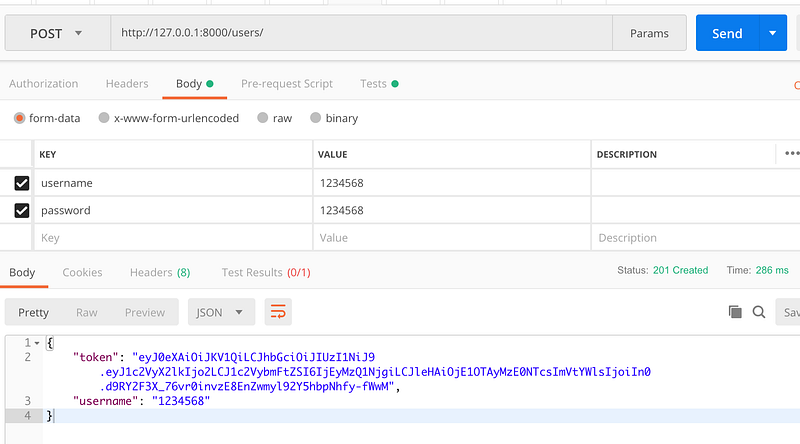
]Validate with Postman
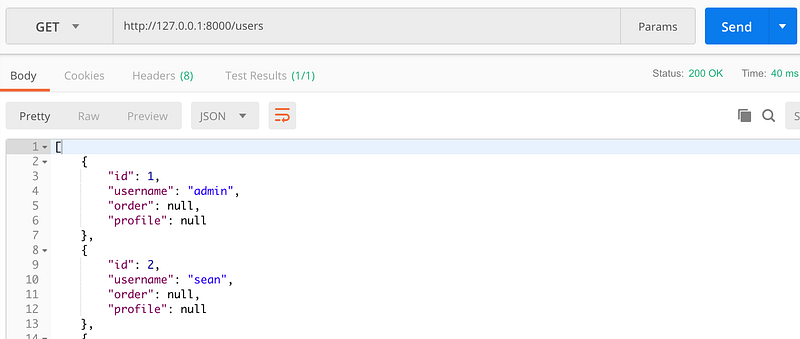
We create an endpoint for creating and getting users successfully
- Getting users
- Creating a new user
Class-based Views — viewsets.ModelViewSet
Introduction
Using viewsets.ModelViewSet is simpler than using APIview. We don’t have to override methods.
The example of views.py
There are few things we have to do in these classes
- Retrieve the queryset
- Specify the serializer
- Specify http methods
- We can set the permission in the class
from .serializers import UserSerializer, UserSerializerWithTokenfrom django.contrib.auth.models import User
from rest_framework import viewsets, permissions
class UserViewSet(viewsets.ModelViewSet):
permission_classes = (permissions.AllowAny,)
queryset = User.objects.all()
serializer_class = UserSerializer
http_method_names = ['get', 'put',]class UserViewSetForCreatingUser(viewsets.ModelViewSet):
permission_classes = (permissions.AllowAny,)
queryset = User.objects.all()
serializer_class = UserSerializerWithToken
http_method_names = ['post']The example of urls.py
We have to use router for registering viewset with the same prefix
from django.urls import include
from django.conf.urls import url
from .views import UserViewSetForCreatingUser, UserViewSet
from rest_framework.routers import DefaultRouter...router = DefaultRouter()
router.register(r'user', UserViewSet)
router.register(r'createuser', UserViewSetForCreatingUser)urlpatterns = [
url(r'^api/', include(router.urls)),
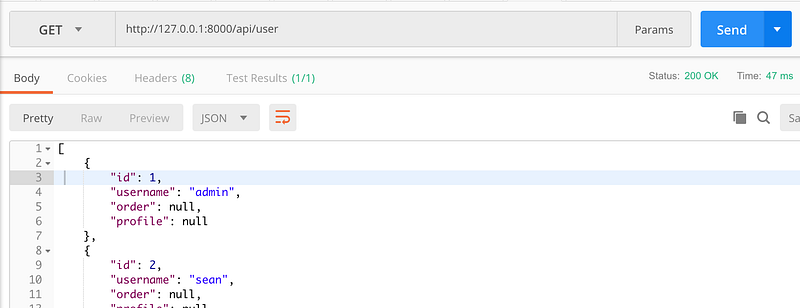
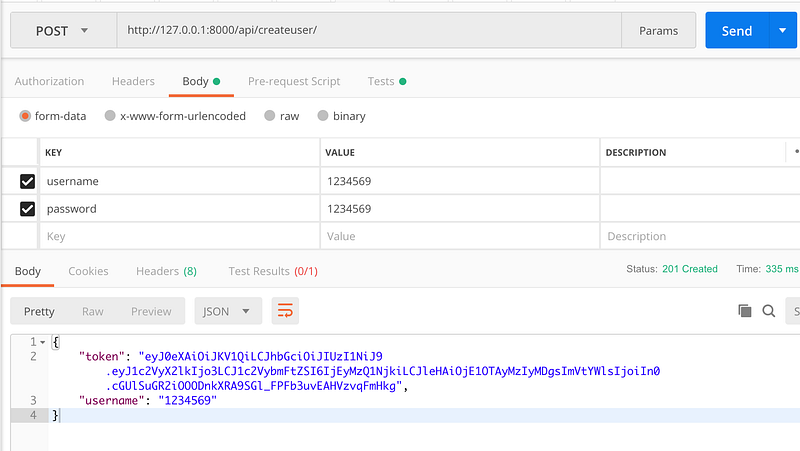
]Validate with Postman
We create an endpoint for creating and getting users successfully
- Getting users
- Creating a new user
References
- 详解Django DRF框架中APIView、GenericAPIView、ViewSet区别
- django rest framework apiview、viewset总结分析
- DRF的APIView、GenericAPIView、GenericViewSet的原理分析
Summary
Thanks for your patient. I am Sean. I work as a software engineer.
This article is my note. Please feel free to give me advice if any mistakes. I am looking forward to your feedback.
Please feel free to clap if this article can help you. Thank you.
You can also subscribe my page on Facebook.
Related topics
How to use the two-way binding in Knout.js and ReactJS?
Learn how to use SignalR to build a chatroom application
My reflection of
IT & Network:
Database:
Software testing:
Debugging:
DevOps:


