
Build Single page application with React and Django Part 5.2-Exchange Github’s access token to JWT from Django/DRF server
Introduction
We have introduced how to get the access token from Facebook and exchange to JWT in the the previous article.
Github is also a popular platform for social login. The target of this article is to understand how to get access token from Github. Then we want to exchange the access token to JWT from our local Django server.
Agenda
It includes the following topics.
- Overview
- Get authorized code form Github
- Get access token from Github
- Set Django/DRF server
- Validation with Postman
About this series
The target of this series is to build a ReactJS single page application(SPA) with Django API server and deploy on Heroku.
- Part 1: Deploy Django application to Heroku and migrate PostgreSQL
- Part 2: Connect React App with Django App
- Part 3: Use JWT with DRF and tests endpoints on Travis-CI
- Part 4: Create Endpoints to Manipulate Resources
- Part 5.1: Exchange Facebook’s access token to JWT from Django/DRF
- Part 5.2: this article
- Part 6: Create Django Application’s sitemap on Heroku for SEO
- Part 7: How to Refactor Function Components with HOC?
- Part 8: Static Rendering with Next.js and Django on Heroku
- Part 9: Access Redux on the Next.js page-level
- Part 10: Improve SEO with Pyppeteer in Django
- Part 11: Theming with Redux and styled-component
Overview
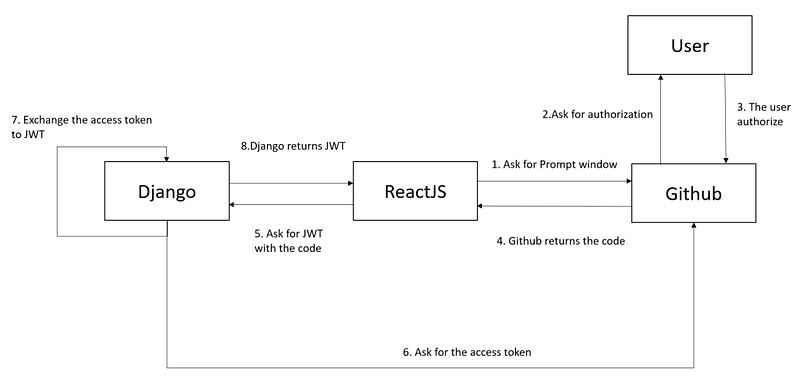
There are four roles, Django server, ReactJS client, Github authorize server, and the user.
1.Get Authorized code form Github
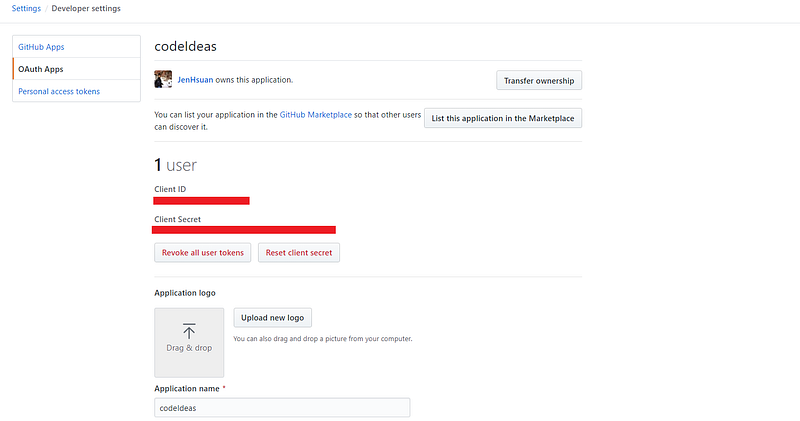
Create a new OAuth apps from Github
- Login Github. Select Settings -> Developer settings -> OAuth Apps -> New OAuth App
- Copy the Client ID and Client Secret from the page
Create a ReactJS to retrieve the access token from Facebook
1.Install required packages
npm install react-github-login2.Create a ReactJS component
import React from 'react'
import GitHubLogin from 'react-github-login';
import FacebookLogin from 'react-facebook-login';
const SignInForm = () => {
const ResponseGithubOnSuccess = (response) => {
console.log(response);
}const ResponseGithubOnFailure = (response) => {
console.log(response);
}
return (
<GitHubLogin
clientId="51b1a8ee5b7cad1e6a85"
redirectUri="http://localhost:3000/signin"
onSuccess={ResponseGithubOnSuccess}
onFailure={ResponseGithubOnFailure}/>
)
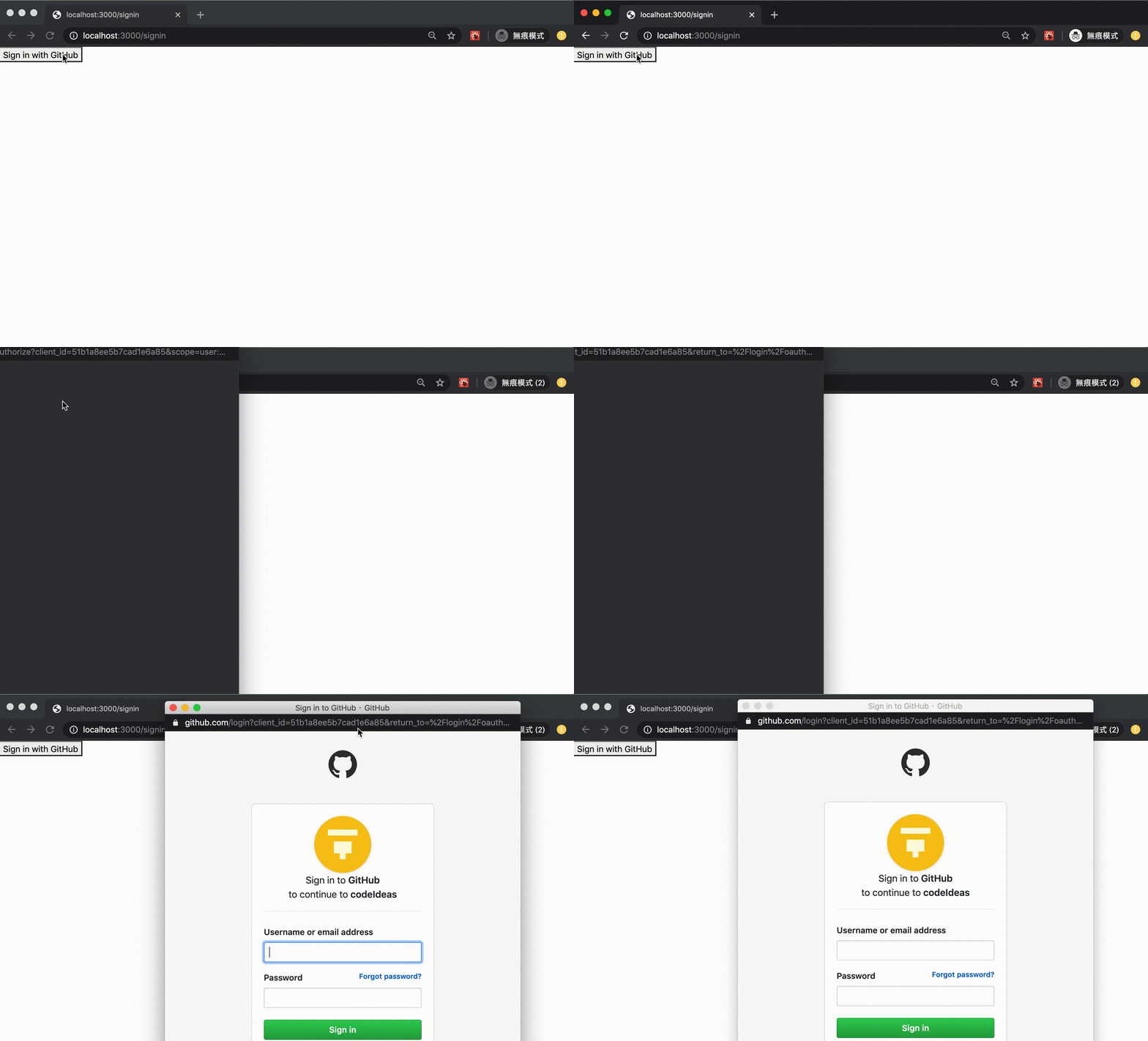
}3.We can use the component to get the authorized code from Facebook
2.Get Access token form Github
The next step is to get the access token from Github with the code, Client ID, and Client Secret. We can create an endpoint for the ReactJS component.
1.Add a new class in the views.py
2.Edit urls.py
from .views import social_auth_github
...
urlpatterns = [
path("api/get-github-access-token/", social_auth_github)
]3.Exchange the access token to JWT
1.Install required packages (same as Exchange Facebook’s access token to JWT from Django/DRF server for Social Login)
pip install python-social-auth
pip install social-auth-app-django
pip install social-auth-core
2.Edit settings.py
INSTALLED_APPS = [
    ...
    'social.apps.django_app.default',
    'social_django'
]
AUTHENTICATION_BACKENDS = [
'social_core.backends.github.GithubOAuth2',
'django.contrib.auth.backends.ModelBackend',
]SOCIAL_AUTH_GITHUB_KEY = os.getenv("SOCIAL_AUTH_GITHUB_KEY")
SOCIAL_AUTH_GITHUB_SECRET = os.getenv("SOCIAL_AUTH_GITHUB_SECRET")
SOCIAL_AUTH_GITHUB_SCOPE = ['email']GITHUB_CALLBACK='http://localhost:3000/signin'
SOCIAL_AUTH_GITHUB_USE_OPENID_AS_USERNAME = TrueMIDDLEWARE = [
...
'social_django.middleware.SocialAuthExceptionMiddleware'
]3.Edit serializers.py (same as Exchange Facebook’s access token to JWT from Django/DRF server for Social Login)
class SocialAuthSerializer(serializers.Serializer):
    provider = serializers.CharField(max_length=255, required=True)
    access_token = serializers.CharField(max_length=4096, required=True, trim_whitespace=True)
4.Edit views.py (same as Exchange Facebook’s access token to JWT from Django/DRF server for Social Login)
5.Edit urls.py (same as Exchange Facebook’s access token to JWT from Django/DRF server for Social Login)
from .views import social_authurlpatterns = [
    ...
    path("api/social-auth/", social_auth)
]
4. Validation with Postman
- Set provider as facebook on the body
- Set Content-type as application/json on the header
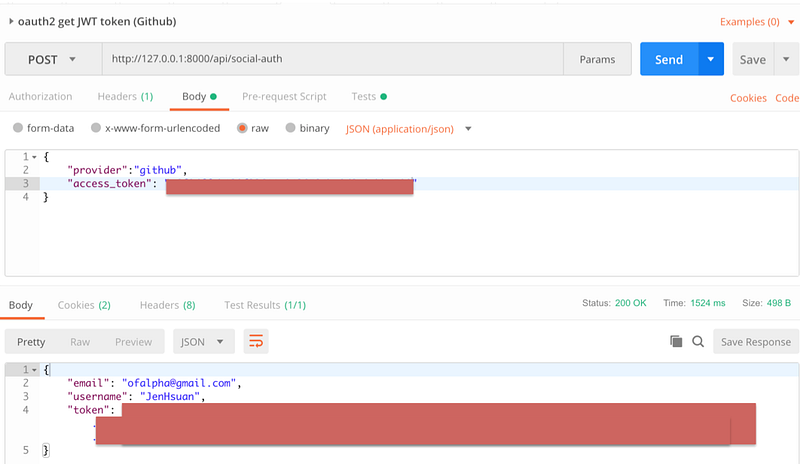
Then we will get JWT!
References
- Authorizing OAuth Apps
- Day 23:實作 OAuth 來使用 Github GraphQL API
- Day30 : Django 第三方登入 — 以Github為例
- 使用social_django进行github第三方登陆
- Authorizing OAuth Apps
Summary
Thanks for your patient. I am Sean. I work as a software engineer.
This article is my note. Please feel free to give me advice if any mistakes. I am looking forward to your feedback.
Please feel free to clap if this article can help you. Thank you.
You can also subscribe my page on Facebook.
Related topics
How to use the two-way binding in Knout.js and ReactJS?
Learn how to use SignalR to build a chatroom application
My reflection of
IT & Network:
Database:
Software testing:
Debugging:
DevOps:


