
Build Single page application with React and Django Part 7 — How to Refactor Function Components with HOC?

Introduction
This series is to build a SPA with ReactJS and Django. We have discuss a few topics on the part 1 to part 6. The next step is to get users from the search engine after deployment.
You can skip the introduction and proceed to the procedures if you like.
High-Order Component (HOC)
High-Order Component (HOC) is a skill to reuse the duplicated parts for ReactJS components. It just like a decorator added to the original functions. The basic of HOC is to use two properties from JavaScript, Carrying function, and High-Order function.
This article is a note to apply HOC for ReactJS components to subtract the duplicate parts.
Carrying function and High-order function
In JavaScript, we can use a carrying function to reuse the duplicate part of different functions. The structure of the carry function is a function with an inner function. It means that we can use do extra things besides the original function and generate a new function.
For example, we have two functions and we would like to use the carrying function to reuse the duplicate parts.
- Get data from AJAX, format data, and initialize a plot.
- Get data from AJAX, format data, and update the plot regularly.
About this series
The target of this series is to build a ReactJS single page application(SPA) with Django API server and deploy on Heroku.
- Part 1: Deploy Django application to Heroku and migrate PostgreSQL
- Part 2: Connect React App with Django App
- Part 3: Use JWT with DRF and tests endpoints on Travis-CI
- Part 4: Create Endpoints to Manipulate Resources
- Part 5.1: Exchange Facebook’s access token to JWT from Django/DRF
- Part 5.2: Exchange Github’s access token to JWT from Django/DRF
- Part 6: Create Django Application’s sitemap on Heroku for SEO
- Part 7: this article
- Part 8: Static Rendering with Next.js and Django on Heroku
- Part 9: Access Redux on the Next.js page-level
- Part 10: Improve SEO with Pyppeteer in Django
- Part 11: Theming with Redux and styled-component
Steps to use carry function
Step 1. Subtract the duplicate part to a function
The duplicate part of these two functions are to get the original data by AJAX and plot.
The only difference between them is how do they format the original data. We can treat the formatting function as parameter. It’s the high-order function property in JavaScript. The high-order function property means we are allowed to do following things.
- takes one or more functions as arguments
- returns a function as its result.
let finalData = [];const currying = (fn) => {
return async() => {
return await getKeepHealthyData(keepHealthyData => {
keepHealthyData.forEach(ele => {
let time = timeConverter(ele["updateTime"]),
cadence =ele["cad"],
name = ele["userId"];
fn(time, cadence, name)
})
Plotly.newPlot('graph', finalData, {
title:'Cadence(strides/min)'
});
})
}
}Step 2. Create independent functions for different parts.
The different part between two steps is the way to format data. We can create two functions.
- Format data for initializing the plot
let init = (time, cadence, name) => {
    finalData[name - 1] = {
        x: [time],
        y: [cadence],
        mode: 'mark',
        name: name
    };
}- Format data for updating the plot
const update = (time, cadence, name) => {
    finalData[name - 1]["x"]= [...finalData[name - 1]["x"], time];
    finalData[name - 1]["y"]= [...finalData[name - 1]["y"], cadence];
}
Step 3. Combine the carrying function to generate new functions.
// currying the init function
init = currying(init);
// Execute
init();// currying the update function
update = currying(update);
// Execute
update();High-Order Component (HOC)
It’s common to have duplicate code between pages like sign-in page and the sign-up page. Both of hem have user name field, password field, social login buttons. The only difference is they hit different endpoints when the user submit the form.
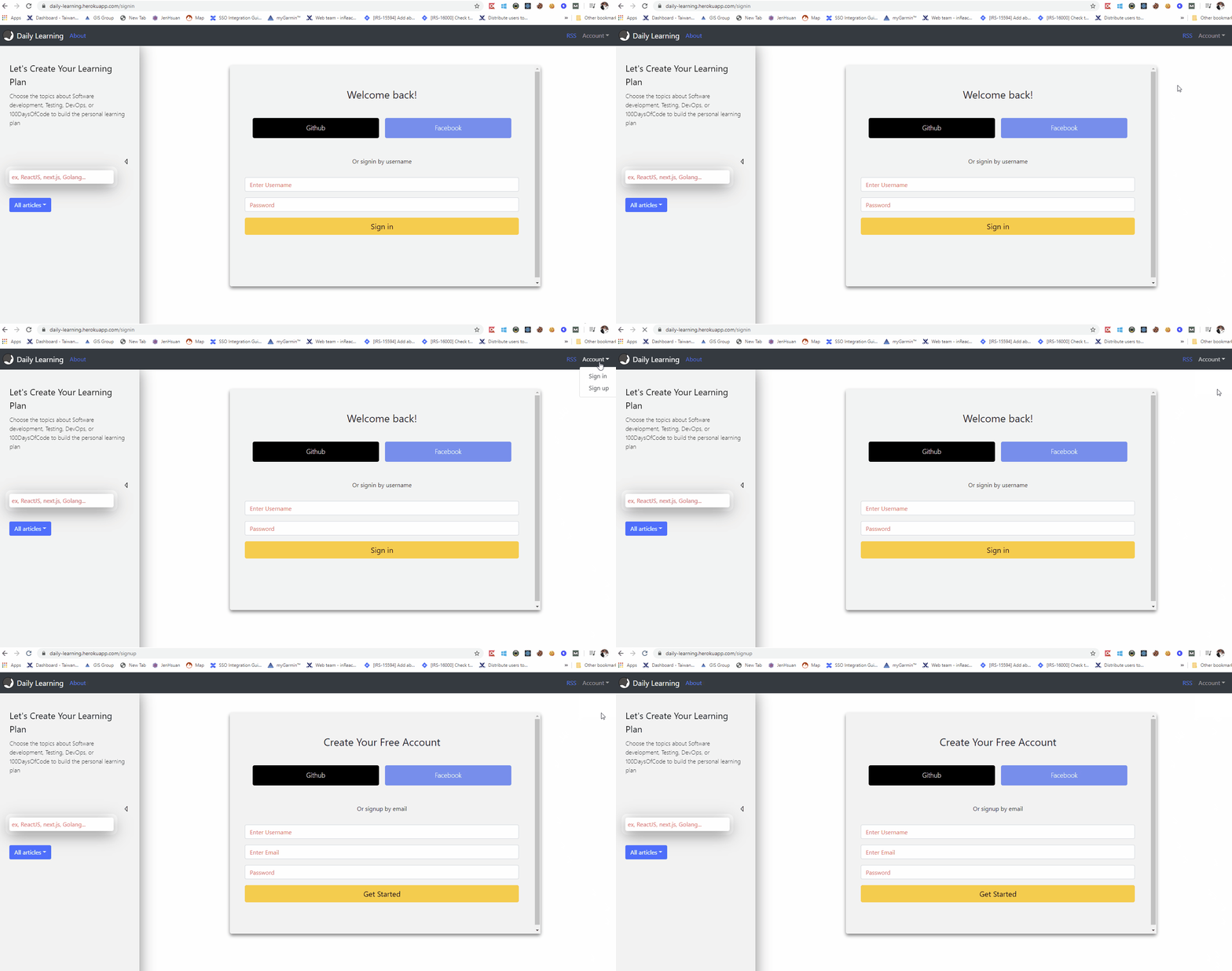
Try to use HOC to use the duplicate part to avoid duplicate code. The steps to use HOC follows the same steps as carrying function
Step 1. Subtract the common part to a wrapper component
There are the duplicate parts between the sign-in page and sign-up page that we can do in the wrapper component.
1.Following React hook stuffs
- Select global states from Redux (useSelect)
- Redirect the user to the menu page if authenticate success (useEffect)
- Function to handle sign in and sign out.
2. Callback functions for social logins
3. Callback functions to exchange the token from Facebook or Github to the JWT
The wrapper component will return the wrapped component and pass original props and callback functions in it.
Step 2. Create wrapped components for different parts.
The different part between the sign-in page and sign-up page is the callback function for submitting form.
The callback functions in the sign-in page has to hit the endpoint to login the user; The callback functions in the sign-in page has to hit the endpoint to register the new user.
Summary
Thanks for your patient. I am Sean. I work as a software engineer.
This article is my note. Please feel free to give me advice if any mistakes. I am looking forward to your feedback.
- The Facebook page for articles
- The latest side project: Daily Learning


