
Build Single page application with React and Django Part 10 — Improve SEO with Pyppeteer in Django
Introduction
In this article, we will discuss the solution for improving SEO with Pyppeteer for the Django server. Assume that we don’t have proxies originally and we don’t want to change the original architecture.
Even though the topic of SEO matters to the frontend side, we have to start from the server-side for the concept of the headless browser.
Phases of GoogleBot to process JavaScript sites
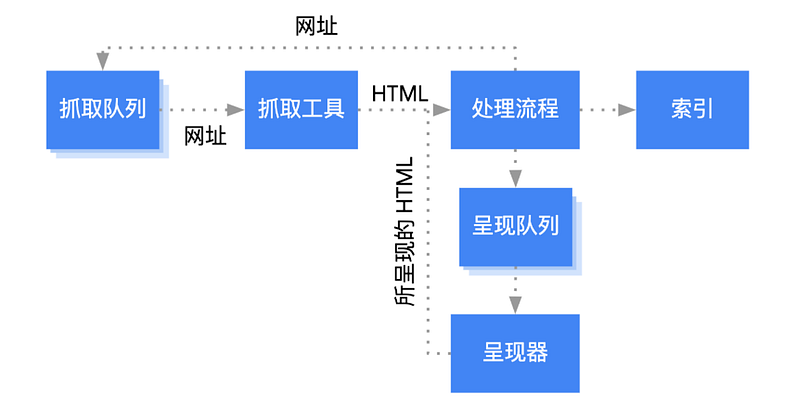
Before improving SEO, we have to understand how Googlebot processes Javascript sites. From the introduction of the Google Search Central, there are three phases of the Googlebot.
- Crawling
- Rendering
- Indexing
For sites that built NextJS or ReactJS, the initial HTML won’t contain the actual contents until the JavaScript bundles are executed. The JavaScript files are executed by the headless Chromium when the Googlebot has enough resources. Some bots couldn’t execute JavaScript so server-side-rendering or pre-rendering are still recommended ways for Better SEO.
What we do in the part.1 ~ part.9 is to understand how to build a prerendering website with Django and NestJS that we could render some critical things for SEO like header, footer, etc. However, we still store the content which is the most important for users on the server-side and retrieve them when we need it.
Besides pre-rendering, we also have to consider how to execute JavaScript bundles by ourselves when the Googlebot comes.
The introduction to Pyppeteer
Pyppeteer is the unofficial port of Puppeteer JavaScript (headless) Chrome/Chromium-browser automation library.
The main usage of this library is to manipulate the Chrome/Chromium browser for the purpose of web crawling or testing. Here, we will use it to render the full page with the content then return it back to the Goole bot.

About this series
The target of this series is to build a ReactJS single page application(SPA) with Django API server and deploy on Heroku.
- Part 1: Deploy Django application to Heroku and migrate PostgreSQL
- Part 2: Connect React App with Django App
- Part 3: Use JWT with DRF and tests endpoints on Travis-CI
- Part 4: Create Endpoints to Manipulate Resources
- Part 5.1: Exchange Facebook’s access token to JWT from Django/DRF
- Part 5.2: Exchange Github’s access token to JWT from Django/DRF
- Part 6: Create Django Application’s sitemap on Heroku for SEO
- Part 7: How to Refactor Function Components with HOC?
- Part 8: Static Rendering with Next.js and Django on Heroku
- Part 9: Access Redux on the Next.js page-level
- Part 10: this article
- Part 11: Theming with Redux and styled-component
Integrate Pyppteer to Django to render the full page
step 1. Install required packages
pip install pyaml ua-parser user-agents django-user_agents django-ipware appdirs importlib-metadata pyee pyppeteer typing-extensions urllib3 websockets zipp PyYAMLStep 2. Create utilities that we need
Create the util.py under the project folder for two functions.
- Check if it’s a bot by using functions from
django_user_agents.utils - Get entire page with
pyppeteerandasyncio. Visit the page, scroll to the bottom for the infinite scrolling, and return the content of the page
Step 3. Implement HTTP inceptor by using Middleware
By using Middleware, we were able to process the request before the view and process the response after the view. What we want to do here is to check if the request is from a Google bot.
- Create an interceptor.py under the application folder
- Modify the setting.py under the project folder
Step 4. Create a mirror API
It’s the alternative way if we don’t want to create another site for redirecting requests.
References
- 基于 puppeteer 的高性能 SPA SEO 解决方案
- 细说Django的中间件
- How Googlebot processes JavaScript
- Intercept every request in my Django app
Summary
Thanks for your patient. I am Sean. I work as a software engineer.
This article is my note. Please feel free to give me advice if any mistakes. I am looking forward to your feedback.
- The Facebook page for articles
- The latest side project: Daily Learning
Related topics
How to use the two-way binding in Knout.js and ReactJS?
Learn how to use SignalR to build a chatroom application
My reflection of
IT & Network:
Database:
Software testing:
Debugging:
DevOps:
About this series
Part 1. Deploy Django application to Heroku and migrate PostgreSQL
Part 2. Connect React App with Django App
Part 3. Use JWT with DRF and tests endpoints on Travis-CI
Part 4. Create Endpoints to Manipulate Resources
Part 5.1. Exchange Facebook’s access token to JWT from Django/DRF server for Social Login
Part 5.2. Exchange Github’s access token to JWT from Django/DRF server
Part 6. Create Django Application’s sitemap on Heroku for SEO
Part 7. How to Refactor Function Components with HOC?
Part 8 — Implement a Static Rendering Website with Next.js and Django on Heroku
Part 9 — Access Redux on the Next.js page-level


