avatarJ3

Free AI web copilot to create summaries, insights and extended knowledge, download it at here

3438

Abstract

a Science libraries</b> and <b>notebook</b> which are not installed yet in the Python 3.7.3 64 bit :/<b> HIT the blue Install button above…</b> Let’s see what will happen! :)</figcaption></figure><p id="eaed"><b>06#Step —</b> After all installations, run the cell again, and everything must be ok! See that the <i>Jupyter server</i> is working like a charm in my win!</p><figure id="5d24"><img src="https://cdn-images-1.readmedium.com/v2/resize:fit:800/1*Dmh5E3qm8Be4xQLubRnkBA.png"><figcaption>Fig 6. To complete this step, at the console, type: <b>python -m pip install — upgrade pip</b></figcaption></figure><figure id="ee87"><img src="https://cdn-images-1.readmedium.com/v2/resize:fit:800/1*vxdPCXXLk2xRCZJekB04Mw.png"><figcaption>Fig 7. And <b>pip-20</b> has installed successfully!</figcaption></figure><p id="82c2"><b>07#Step — </b>Hit button <i>Save notebook</i> and go to your<i> EX_01</i> directory and rename it to <i>ex_00_hello_world.ipynb</i>:</p><figure id="3482"><img src="https://cdn-images-1.readmedium.com/v2/resize:fit:800/1*LQP1t30GzTUWiD7VTsa24A.png"><figcaption>Fig 8. All set and done! Jupyter notebook has finally arrived to join us \o/ — After a lot of hard work!</figcaption></figure><p id="d84b">And that’s all!</p><p id="c281">As promised, the Jupyter notebook is up and running!</p><p id="d361">In the next PySeries episode, I will run some Python code for engineering calculations…Be there!</p><p id="6db3">Bye for now!</p><p id="a5d2"><a href="https://github.com/giljr/py4engineer">Download all Files from the GitHub Repo</a></p><h2 id="8db9">References & Credits</h2><div id="cbcb" class="link-block"> <a href="https://code.visualstudio.com/"> <div> <div> <h2>Visual Studio Code - Code Editing. Redefined</h2> <div><h3>Visual Studio Code is a code editor redefined and optimized for building and debugging modern web and cloud…</h3></div> <div><p>code.visualstudio.com</p></div> </div> <div> <div style="background-image: url(https://miro.readmedium.com/v2/resize:fit:320/0*6635uBQzbOfK0bqt)"></div> </div> </div> </a> </div><h1 id="de1a">Posts Related:</h1><p id="8199">00Episode#<b>PySeries </b>— Python — Jupiter Notebook Quick Start with VSCode — How to Set your Win10 Environment to use Jupiter Notebook (this one)</p><p id="81e0">01Episode#<b>PySeries </b>— Python — <a href="https://readmedium.com/python-for-engenniging-exercises-977fbe4d6d02">Python 4 Engineers — Exercises! An overview of the Opportunities Offered by Python in Engineering!</a></p><p id="f231">02Episode#<b>PySeries </b>— Python — <a href="https://readmedium.com/geogebra-plus-linear-programming-a51661c99590">Geogebra Plus Linear Programming- We’ll Create a Geogebra program to help us with our linear programming</a></p><p id="2544">03Episode#<b>PySeries</b> — Python —<a href="https://readmedium.com/python-4-engineers-more-exercises-5cbab729ef11"> Python 4 Engineers — More Exercises! — Another Round to Make Sure that Python is Really Amazing!</a></p><p id="a322">04Episode#<b>PySeries</b> — Python —<a href="https://readmedium.com/linear-regressions-the-basics-1a633f351ec2"> Linear Regressions — The Basics — How to Understand Linear Regression Once and For All!</a></p><p id="9241">05Episode#<b>PySeries</b> — Python — <a href="https://readmed

Options

ium.com/numpy-init-python-review-f5362abbaaf9">NumPy Init & Python Review — A Crash Python Review & Initialization at NumPy lib.</a></p><p id="fefd">06Episode#<b>PySeries</b> — Python —<a href="https://readmedium.com/numpy-jupyter-notebook-1182f78ab4e1">NumPy Arrays & Jupyter Notebook— Arithmetic Operations, Indexing & Slicing, and Conditional Selection w/ np arrays.</a></p><p id="63ec">07Episode#<b>PySeries</b> — Python — <a href="https://readmedium.com/pandas-intro-series-970e206e2ad5">Pandas — Intro & Series — What it is? How to use it?</a></p><p id="bf75">08Episode#<b>PySeries</b> — Python — <a href="https://readmedium.com/pandas-dataframes-7ba872dcbc30">Pandas DataFrames — The primary Pandas data structure! It is a dict-like container for Series objects</a></p><p id="86df">09Episode#<b>PySeries</b> — Python —<a href="https://readmedium.com/python-4-engineers-even-more-exercises-d0141e0b06d"> Python 4 Engineers — Even More Exercises! — More Practicing Coding Questions in Python!</a></p><p id="6e5c">10Episode#<b>PySeries</b> — Python — <a href="https://readmedium.com/pandas-hierarchical-index-cross-section-30783023a274">Pandas — Hierarchical Index & Cross-section — Open your Colab notebook and here are the follow-up exercises!</a></p><p id="39eb">11Episode#<b>PySeries</b> — Python — <a href="https://readmedium.com/pandas-missing-data-5142f3eda2b">Pandas — Missing Data — Let’s Continue the Python Exercises — Filling & Dropping Missing Data</a></p><p id="0ef4">12Episode#<b>PySeries</b> — Python — <a href="https://readmedium.com/pandas-group-by-3140d053b9c">Pandas — Group By — Grouping large amounts of data and compute operations on these groups</a></p><p id="a584">13Episode#<b>PySeries</b> — Python — <a href="https://readmedium.com/pandas-merging-joining-concatenations-a35bbe1a9dd5"><b>Pandas </b>— Merging, Joining & Concatenations — Facilities For Easily Combining Together Series or DataFrame</a></p><p id="158c">14Episode#<b>PySeries</b> — Python — <a href="https://readmedium.com/pandas-operations-4b8f7a4b4139"><b>Pandas </b>— Pandas Dataframe Examples: Column Operations</a></p><p id="5a9e">15Episode#<b>PySeries</b> — Python — <b>Python 4 Engineers </b>— Keeping It In The Short-Term Memory — <a href="https://readmedium.com/python-4-engineers-keeping-it-in-the-short-term-memory-4f9458016171"><b>Test Yourself!</b> Coding in Python, Again!</a></p><p id="fe58">16Episode#<b>PySeries</b> — NumPy — <a href="https://readmedium.com/numpy-review-again-f94f1c1c77e8">NumPy Review, Again;)<b> </b></a>— Python Review Free Exercises</p><p id="7459">17Episode#<b>PySeries</b><a href="https://readmedium.com/generators-in-python-8d3de173743e">Generators in Python<b></b></a><b><a href="https://readmedium.com/numpy-review-again-f94f1c1c77e8"><b> </b></a>— Python Review Free Hints</b></p><p id="8043">18Episode#<b>PySeries</b> — P<a href="https://readmedium.com/panda-review-again-baf0687b35de">andas Review…Again;)</a> — Python Review Free Exercise</p><p id="aa8a">19Episode#<b>PySeries</b><a href="https://readmedium.com/matlibplot-seaborn-python-libs-459f6666f35f">MatlibPlot & Seaborn Python Libs </a>— Reviewing theses Plotting & Statistics Packs</p><p id="325a">20Episode#<b>PySeries</b><a href="https://readmedium.com/seaborn-python-review-9e543b6b7a44">Seaborn Python Review</a> — Reviewing theses Plotting & Statistics Packs</p></article></body>

Python — Jupyter Notebook Quick Start with VSCode

How to Set your Win10 Environment to use Jupyter Notebook — #PySeries#Episode 00

Hi, at the end of this tutorial, your Jupyter notebook will run in your Win10.
Fig 1. Working with Jupyter Notebooks in Visual Studio Code

I have found this awesome code editor (Visual Studio Code V. 1.47.30) application to increase my productivity when coding, and with it, I was able to easily configure my Windows 10 platform to run the Jupyter notebook cells in python 3.

If you are interested in having a good tool to code in Jupyter notebook cells, be welcome :)

00# Step — Download Visual Studio Code (I’m using MS Win 10 Home Single Lang Edition — Version 10.0.18363) from:

https://code.visualstudio.com/

01#Step — Open VSCode, (1) Go to Extensions (Ctrl + Shift + X), type Python, on the search bar, choose Python, and (2) click the green button to Install MS Python Extension:
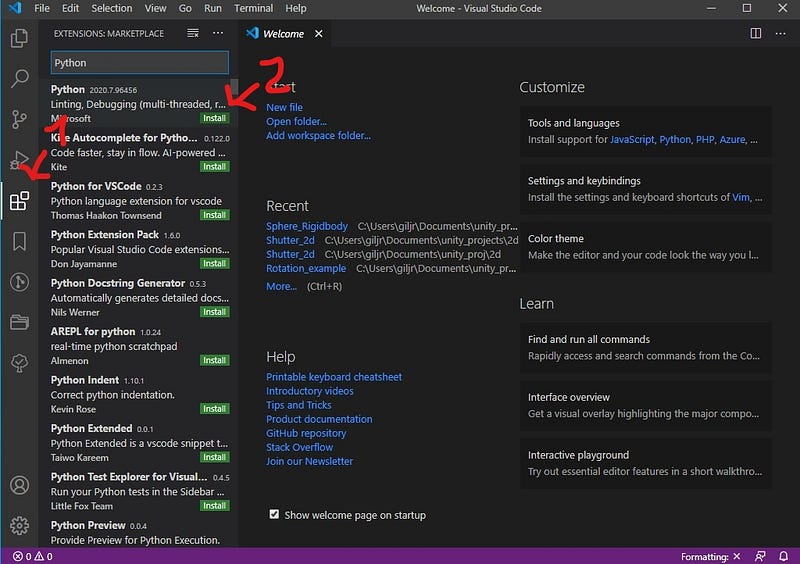
Fig 2. Python Extension includes rich support for Python Language, including IntelliSense, linting, debugging, code formatting, Jupyter notebook support, refactoring, variable explorer, test Explorer, snippets, and more!

02#Step — Create a folder for your Jupyter projects.

Mine is located in this directory:

C:\Users\giljr\Documents\Visual_Code_Projects\Jupyter

03#Step —Open it on your VSCode and create a folder; mine is called EX_00 (it will be overwritten by .ipynb):
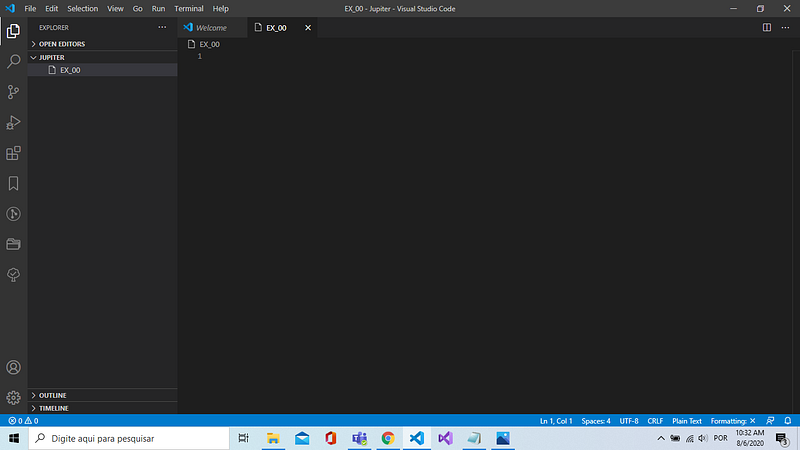
Fig 3. Preparing my environments, folder, and files for better organization, and later uploads it all to Git Repo :)

04#Step — Type F1, run Create New Blank Jupyter Notebook in the Command Palette ( Shift + Command + P ):
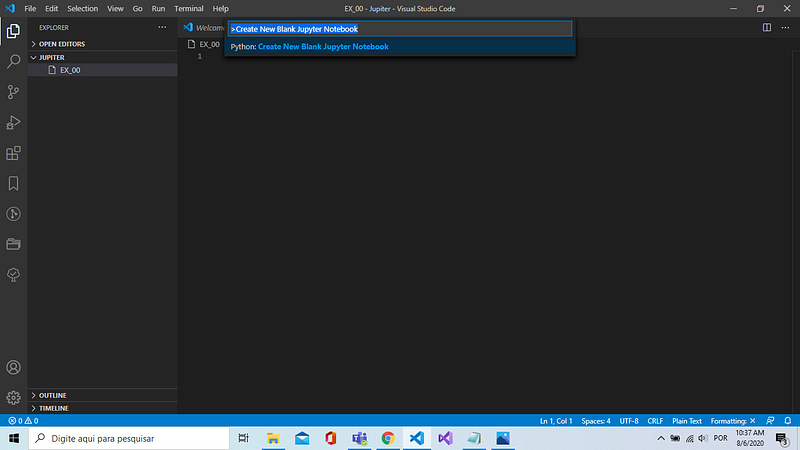
Fig 4. Running Create New Blank Jupyter Notebook in the Command Palette (Shift + Command + P)

05#Step — In Jupyter cell, type:

print("hello")
hit Ctrl + Enter

:/ Hit the Install blue-button anyway!
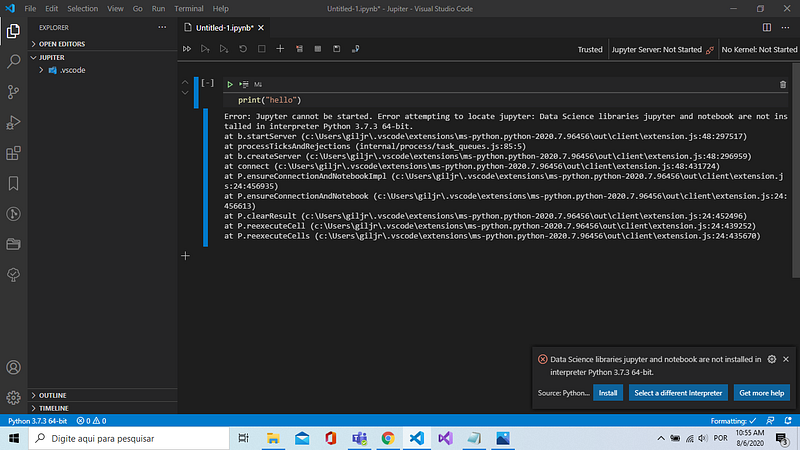
Fig 5. The Jupyter server is inactive…it must locate the Data Science libraries and notebook which are not installed yet in the Python 3.7.3 64 bit :/ HIT the blue Install button above… Let’s see what will happen! :)

06#Step — After all installations, run the cell again, and everything must be ok! See that the Jupyter server is working like a charm in my win!
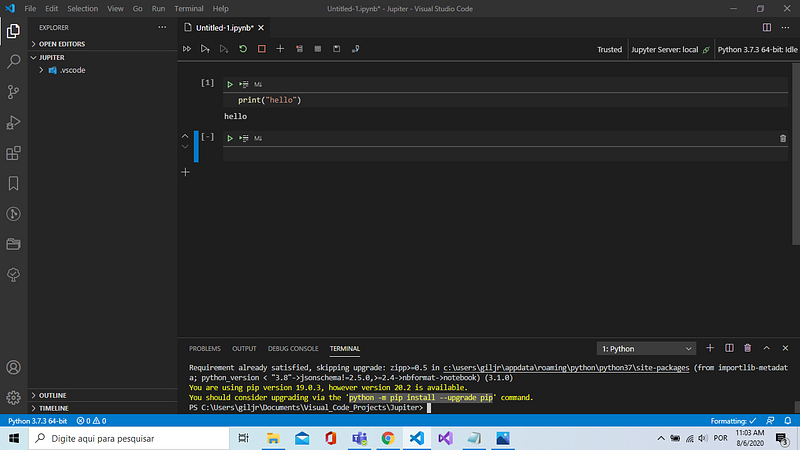
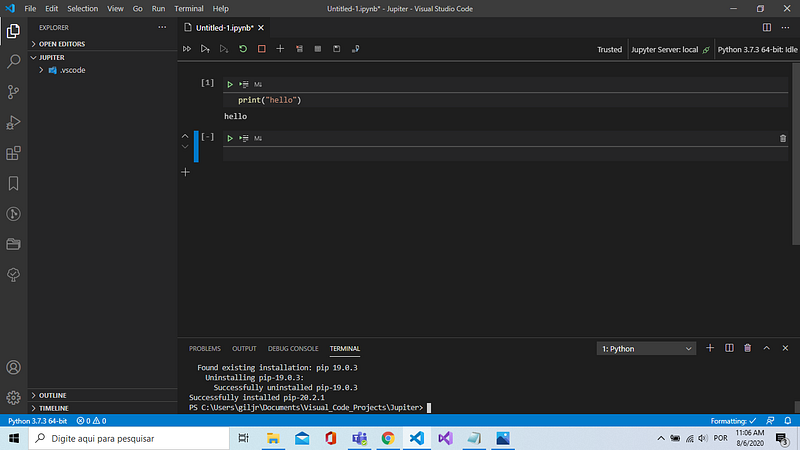
Fig 6. To complete this step, at the console, type: python -m pip install — upgrade pip
Fig 7. And pip-20 has installed successfully!

07#Step — Hit button Save notebook and go to your EX_01 directory and rename it to ex_00_hello_world.ipynb:
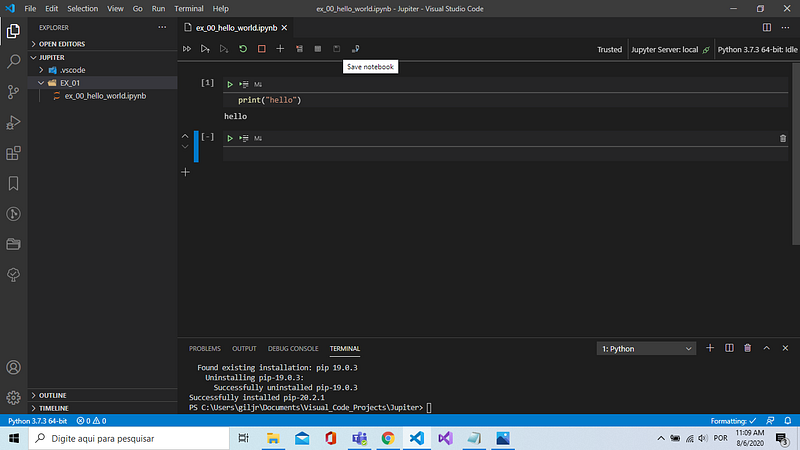
Fig 8. All set and done! Jupyter notebook has finally arrived to join us \o/ — After a lot of hard work!

And that’s all!

As promised, the Jupyter notebook is up and running!

In the next PySeries episode, I will run some Python code for engineering calculations…Be there!

Bye for now!

Download all Files from the GitHub Repo

References & Credits

Posts Related:

00Episode#PySeries — Python — Jupiter Notebook Quick Start with VSCode — How to Set your Win10 Environment to use Jupiter Notebook (this one)

01Episode#PySeries — Python — Python 4 Engineers — Exercises! An overview of the Opportunities Offered by Python in Engineering!

02Episode#PySeries — Python — Geogebra Plus Linear Programming- We’ll Create a Geogebra program to help us with our linear programming

03Episode#PySeries — Python — Python 4 Engineers — More Exercises! — Another Round to Make Sure that Python is Really Amazing!

04Episode#PySeries — Python — Linear Regressions — The Basics — How to Understand Linear Regression Once and For All!

05Episode#PySeries — Python — NumPy Init & Python Review — A Crash Python Review & Initialization at NumPy lib.

06Episode#PySeries — Python —NumPy Arrays & Jupyter Notebook— Arithmetic Operations, Indexing & Slicing, and Conditional Selection w/ np arrays.

07Episode#PySeries — Python — Pandas — Intro & Series — What it is? How to use it?

08Episode#PySeries — Python — Pandas DataFrames — The primary Pandas data structure! It is a dict-like container for Series objects

09Episode#PySeries — Python — Python 4 Engineers — Even More Exercises! — More Practicing Coding Questions in Python!

10Episode#PySeries — Python — Pandas — Hierarchical Index & Cross-section — Open your Colab notebook and here are the follow-up exercises!

11Episode#PySeries — Python — Pandas — Missing Data — Let’s Continue the Python Exercises — Filling & Dropping Missing Data

12Episode#PySeries — Python — Pandas — Group By — Grouping large amounts of data and compute operations on these groups

13Episode#PySeries — Python — Pandas — Merging, Joining & Concatenations — Facilities For Easily Combining Together Series or DataFrame

14Episode#PySeries — Python — Pandas — Pandas Dataframe Examples: Column Operations

15Episode#PySeries — Python — Python 4 Engineers — Keeping It In The Short-Term Memory — Test Yourself! Coding in Python, Again!

16Episode#PySeries — NumPy — NumPy Review, Again;) — Python Review Free Exercises

17Episode#PySeriesGenerators in Python — Python Review Free Hints

18Episode#PySeries — Pandas Review…Again;) — Python Review Free Exercise

19Episode#PySeriesMatlibPlot & Seaborn Python Libs — Reviewing theses Plotting & Statistics Packs

20Episode#PySeriesSeaborn Python Review — Reviewing theses Plotting & Statistics Packs

Python
Jupyter Notebook
Vscode
Vscode Extension
Python3
Recommended from ReadMedium