avatarJ3

Free AI web copilot to create summaries, insights and extended knowledge, download it at here

6292

Abstract

ng">'B4'</span>,<span class="hljs-string">'B5'</span>,<span class="hljs-string">'B6'</span>,<span class="hljs-string">'B7'</span>], })</pre></div><div id="af2d"><pre><span class="hljs-built_in">right</span></pre></div><figure id="74bc"><img src="https://cdn-images-1.readmedium.com/v2/resize:fit:800/1*9yS1StCFz5cMoMHni2fhBA.png"><figcaption></figcaption></figure><div id="7ffa"><pre>pd.<span class="hljs-built_in">merge</span>(left,<span class="hljs-literal">right</span>,how=<span class="hljs-string">'inner'</span>,<span class="hljs-keyword">on</span>=<span class="hljs-string">'key'</span>)</pre></div><figure id="0900"><img src="https://cdn-images-1.readmedium.com/v2/resize:fit:800/1*y9-gs5kt_MHFPksByx5DHA.png"><figcaption></figcaption></figure><h2 id="3b9d">Merging: Multiply keys</h2><p id="8ddb">DataFrames are now merged into a single DataFrame based on the <i>common values</i> present in the id <i>column of both</i> the DataFrames</p><div id="9320"><pre>left = pd.<span class="hljs-symbol">DataFrame</span>({<span class="hljs-string">'key1'</span>: [<span class="hljs-string">'K0'</span>, <span class="hljs-string">'K0'</span>, <span class="hljs-string">'K1'</span>, <span class="hljs-string">'K2'</span>], <span class="hljs-string">'key2'</span>: [<span class="hljs-string">'K0'</span>, <span class="hljs-string">'K1'</span>, <span class="hljs-string">'K0'</span>, <span class="hljs-string">'K1'</span>], <span class="hljs-string">'A'</span>: [<span class="hljs-string">'A0'</span>, <span class="hljs-string">'A1'</span>, <span class="hljs-string">'A2'</span>, <span class="hljs-string">'A3'</span>], <span class="hljs-string">'B'</span>: [<span class="hljs-string">'B0'</span>, <span class="hljs-string">'B1'</span>, <span class="hljs-string">'B2'</span>, <span class="hljs-string">'B3'</span>]})</pre></div><div id="62b0"><pre><span class="hljs-built_in">left</span></pre></div><figure id="3692"><img src="https://cdn-images-1.readmedium.com/v2/resize:fit:800/1*5QWweK1Ph1QhrCXH_bcNyw.png"><figcaption></figcaption></figure><div id="3fb7"><pre>right = pd.<span class="hljs-symbol">DataFrame</span>({<span class="hljs-string">'key1'</span>: [<span class="hljs-string">'K0'</span>, <span class="hljs-string">'K1'</span>, <span class="hljs-string">'K1'</span>, <span class="hljs-string">'K2'</span>], <span class="hljs-string">'key2'</span>: [<span class="hljs-string">'K0'</span>, <span class="hljs-string">'K0'</span>, <span class="hljs-string">'K0'</span>, <span class="hljs-string">'K0'</span>], <span class="hljs-string">'C'</span>: [<span class="hljs-string">'C0'</span>, <span class="hljs-string">'C1'</span>, <span class="hljs-string">'C2'</span>, <span class="hljs-string">'C3'</span>], <span class="hljs-string">'D'</span>: [<span class="hljs-string">'D0'</span>, <span class="hljs-string">'D1'</span>, <span class="hljs-string">'D2'</span>, <span class="hljs-string">'D3'</span>]})</pre></div><div id="010f"><pre><span class="hljs-built_in">right</span></pre></div><figure id="ded4"><img src="https://cdn-images-1.readmedium.com/v2/resize:fit:800/1*RcLuamv7ZbMD59yhF1sWxQ.png"><figcaption></figcaption></figure><h2 id="e5c1">Merging on Multiply keys</h2><figure id="a6bd"><img src="https://cdn-images-1.readmedium.com/v2/resize:fit:800/1*ZbI4ud3o2piU4Q1iS2AI0A.png"><figcaption></figcaption></figure><div id="6bb6"><pre>pd.<span class="hljs-built_in">merge</span>(left,<span class="hljs-literal">right</span>,<span class="hljs-keyword">on</span>=[<span class="hljs-string">'key1'</span>,<span class="hljs-string">'key2'</span>])</pre></div><figure id="4925"><img src="https://cdn-images-1.readmedium.com/v2/resize:fit:800/1*u9sktzekxdrbylC6UGSWNw.png"><figcaption></figcaption></figure><div id="f172"><pre>pd.<span class="hljs-built_in">merge</span>(left,<span class="hljs-literal">right</span>,how=<span class="hljs-string">'outer'</span>,<span class="hljs-keyword">on</span>=[<span class="hljs-string">'key1'</span>,<span class="hljs-string">'key2'</span>])</pre></div><figure id="99b0"><img src="https://cdn-images-1.readmedium.com/v2/resize:fit:800/1*V4UX0_569e7FYwo88xvBMA.png"><figcaption></figcaption></figure><div id="4426"><pre>pd.<span class="hljs-built_in">merge</span>(left,<span class="hljs-literal">right</span>,how=’<span class="hljs-literal">right</span>’,<span class="hljs-keyword">on</span>=[‘<span class="hljs-title">key1</span>’,’<span class="hljs-title">key2</span><span class="hljs-string">'])</span></pre></div><figure id="93dd"><img src="https://cdn-images-1.readmedium.com/v2/resize:fit:800/1*RKvx3W7IRRT5KGEvWof2YA.png"><figcaption></figcaption></figure><div id="043a"><pre>pd.<span class="hljs-built_in">merge</span>(left,<span class="hljs-literal">right</span>,how=<span class="hljs-string">'left'</span>,<span class="hljs-keyword">on</span>=[<span class="hljs-string">'key1'</span>,<span class="hljs-string">'key2'</span>])</pre></div><figure id="20ec"><img src="https://cdn-images-1.readmedium.com/v2/resize:fit:800/1*qDyfbHaF4qwGxidJ1x1wjQ.png"><figcaption></figcaption></figure><h2 id="5d43">Joining</h2><p id="46a9">Joining is a convenient method for combining the two columns of the two potentially <i>differently-indexed</i> DataFrame into a single result DataFrame;</p><p id="0e90">Same as Merging, except the key is an index, instead of columns</p><div id="bc0d"><pre>left = pd.<span class="hljs-symbol">DataFrame</span>({<span class="hljs-string">'A'</span>: [<span class="hljs-string">'A0'</span>, <span class="hljs-string">'A1'</span>, <span class="hljs-string">'A2'</span>], <span class="hljs-string">'B'</span>: [<span class="hljs-string">'B0'</span>, <span class="hljs-string">'B1'</span>, <span class="hljs-string">'B2'</span>]}, index=[<span class="hljs-string">'K0'</span>, <span class="hljs-string">'K1'</span>, <span class="hljs-string">'K2'</span>]) right = pd.<span class="hljs-symbol">DataFrame</span>({<span class="hljs-string">'C'</span>: [<span class="hljs-string">'C0'</span>, <span class="hljs-string">'C2'</span>, <span class="hljs-string">'C3'</span>], <span class="hljs-string">'D'</span>: [<span class="hljs-string">'D0'</span>, <span class="hljs-string">'D2'</span>, <span class="hljs-string">'D3'</span>]}, index=[<span class="hljs-string">'K0'</span>, <span class="hljs-string">'K2'</span>, <span class

Options

="hljs-string">'K3'</span>])</pre></div><div id="660a"><pre><span class="hljs-built_in">left</span></pre></div><figure id="d264"><img src="https://cdn-images-1.readmedium.com/v2/resize:fit:800/1*AJsK8PmOkxwB6zyQK_PqlA.png"><figcaption></figcaption></figure><div id="3ca9"><pre><span class="hljs-built_in">right</span></pre></div><figure id="e543"><img src="https://cdn-images-1.readmedium.com/v2/resize:fit:800/1*wJxr1-EVVe-A1pJ34vZoYQ.png"><figcaption></figcaption></figure><div id="1bcf"><pre><span class="hljs-keyword">left</span>.<span class="hljs-keyword">join</span>(<span class="hljs-keyword">right</span>)</pre></div><figure id="5948"><img src="https://cdn-images-1.readmedium.com/v2/resize:fit:800/1*Mkx1xlfPlkCZ3jWuroOn9w.png"><figcaption></figcaption></figure><div id="1124"><pre><span class="hljs-keyword">left</span>.<span class="hljs-keyword">join</span>(<span class="hljs-keyword">right</span>, how=<span class="hljs-string">'outer'</span>)</pre></div><figure id="c47e"><img src="https://cdn-images-1.readmedium.com/v2/resize:fit:800/1*YN2biNf_K0GK5mRVG-4O4Q.png"><figcaption></figcaption></figure><p id="f7fc">Colab File <a href="https://colab.research.google.com/drive/14gh3474kZ2CNXgxhiH6EQD6zlVM_f7IA?usp=sharing">link</a>:)</p><h1 id="57d5">Credits & References:</h1><p id="6cce">Jose Portilla — <a href="https://www.udemy.com/course/python-for-data-science-and-machine-learning-bootcamp/">Python for Data Science and Machine Learning Bootcamp </a>— Learn how to use NumPy, Pandas, Seaborn , Matplotlib , Plotly , Scikit-Learn , Machine Learning, Tensorflow , and more!</p><h1 id="5fc6">Posts Related:</h1><p id="458f">00Episode#<b>PySeries </b>— Python — <a href="https://medium.com/@J.3/python-jupiter-notebook-quick-start-with-vscode-916c43c10d9a">Jupiter Notebook Quick Start with VSCode — How to Set your Win10 Environment to use Jupiter Notebook</a></p><p id="e076">01Episode#<b>PySeries </b>— Python — <a href="https://readmedium.com/python-for-engenniging-exercises-977fbe4d6d02">Python 4 Engineers — Exercises! An overview of the Opportunities Offered by Python in Engineering!</a></p><p id="fd0b">02Episode#<b>PySeries </b>— Python — <a href="https://readmedium.com/geogebra-plus-linear-programming-a51661c99590">Geogebra Plus Linear Programming- We’ll Create a Geogebra program to help us with our linear programming</a></p><p id="3a3c">03Episode#<b>PySeries</b> — Python — Python 4 Engineers — More Exercises! — Another Round to Make Sure that Python is Really Amazing!</p><p id="612e">04Episode#<b>PySeries</b> — Python — <a href="https://readmedium.com/linear-regressions-the-basics-1a633f351ec2">Linear Regressions — The Basics — How to Understand Linear Regression Once and For All!</a></p><p id="c29b">05Episode#<b>PySeries</b> — Python — <a href="https://readmedium.com/numpy-init-python-review-f5362abbaaf9">NumPy Init & Python Review — A Crash Python Review & Initialization at NumPy lib.</a></p><p id="a3ce">06Episode#<b>PySeries</b> — Python — <a href="https://readmedium.com/numpy-jupyter-notebook-1182f78ab4e1">NumPy Arrays & Jupyter Notebook — Arithmetic Operations, Indexing & Slicing, and Conditional Selection w/ np arrays</a>.</p><p id="009d">07Episode#<b>PySeries</b> — Python — <a href="https://readmedium.com/pandas-intro-series-970e206e2ad5">Pandas — Intro & Series — What it is? How to use it?</a></p><p id="d765">08Episode#<b>PySeries</b> — Python — <a href="https://readmedium.com/pandas-dataframes-7ba872dcbc30">Pandas DataFrames — The primary Pandas data structure! It is a dict-like container for Series objects</a></p><p id="fff5">09Episode#<b>PySeries</b> — Python — <a href="https://readmedium.com/python-4-engineers-even-more-exercises-d0141e0b06d">Python 4 Engineers — Even More Exercises! — More Practicing Coding Questions in Python!</a></p><p id="4f80">10Episode#<b>PySeries</b> — Python — <a href="https://readmedium.com/pandas-hierarchical-index-cross-section-30783023a274">Pandas — Hierarchical Index & Cross-section — Open your Colab notebook and here are the follow-up exercises!</a></p><p id="a164">11Episode#<b>PySeries</b> — Python — <a href="https://readmedium.com/pandas-missing-data-5142f3eda2b">Pandas — Missing Data — Let’s Continue the Python Exercises — Filling & Dropping Missing Data</a></p><p id="e646">12Episode#<b>PySeries</b> — Python —<a href="https://readmedium.com/pandas-group-by-3140d053b9c"> Pandas — Group By — Grouping large amounts of data and compute operations on these groups</a></p><p id="34e0">13Episode#<b>PySeries</b> — Python —Pandas — Merging, Joining & Concatenations — Facilities For Easily Combining Together Series or DataFrame (this one)</p><p id="306a">14Episode#<b>PySeries</b> — Python — <a href="https://readmedium.com/pandas-operations-4b8f7a4b4139">Pandas — Pandas Dataframe Examples: Column Operations</a></p><p id="d74f">15Episode#<b>PySeries</b> — Python — <b>Python 4 Engineers </b>— Keeping It In The Short-Term Memory — <a href="https://readmedium.com/python-4-engineers-keeping-it-in-the-short-term-memory-4f9458016171"><b>Test Yourself!</b> Coding in Python, Again!</a></p><p id="bb2d">16Episode#<b>PySeries</b> — NumPy — <a href="https://readmedium.com/numpy-review-again-f94f1c1c77e8">NumPy Review, Again;)<b> </b></a>— Python Review Free Exercises</p><p id="7d81">17Episode#<b>PySeries</b><a href="https://readmedium.com/generators-in-python-8d3de173743e">Generators in Python<b></b></a><b><a href="https://readmedium.com/numpy-review-again-f94f1c1c77e8"><b> </b></a>— Python Review Free Hints</b></p><p id="4ed6">18Episode#<b>PySeries</b> — P<a href="https://readmedium.com/panda-review-again-baf0687b35de">andas Review…Again;)</a> — Python Review Free Exercise</p><p id="0021">19Episode#<b>PySeries</b><a href="https://readmedium.com/matlibplot-seaborn-python-libs-459f6666f35f">MatlibPlot & Seaborn Python Libs </a>— Reviewing theses Plotting & Statistics Packs</p><p id="3535">20Episode#<b>PySeries</b><a href="https://readmedium.com/seaborn-python-review-9e543b6b7a44">Seaborn Python Review</a> — Reviewing theses Plotting & Statistics Packs</p><figure id="e644"><img src="https://cdn-images-1.readmedium.com/v2/resize:fit:800/0*HiMyDd9jsbkMcQFK.png"><figcaption></figcaption></figure></article></body>

Pandas — Merging, Joining & Concatenations

Facilities For Easily Combining Together Series or DataFrame — #PySeries#Episode 13

print(“Hello Pandas — Merging Joining and Concatenating”)
import numpy as np
import pandas as pd

Preparing 3 DataFrames:

df1=pd.DataFrame({'A':['A0','A1','A2','A3'],
'B':['B0','B1','B2','B3'],
'C':['C0','C1','C2','C3'],
'D':['D0','D1','D2','D3']},
index=[0,1,2,3])
df2=pd.DataFrame({'A':['A4','A5','A6','A7'],
'B':['B4','B5','B6','B7'],
'C':['C4','C5','C6','C7'],
'D':['D4','D5','D6','D7']},
index=[0,1,2,3])
df3=pd.DataFrame({'A':['A8','A9','A10','A11'],
'B':['B8','B9','B10','B11'],
'C':['C8','C9','C10','C11'],
'D':['D8','D9','D10','D11']},
index=[0,1,2,3])

Concatenation

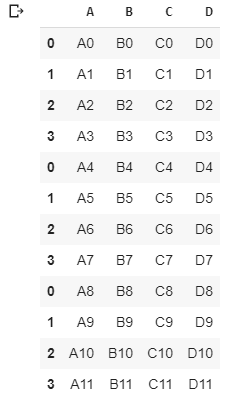
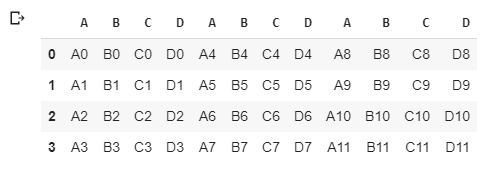
Basically glues together DataFrames; keep in mind that dimensions should match along the axis we are concatenation on. We can use pd.concat() and pass in a list of DataFrames to concatenation together.

Combine three DataFrame objects with identical columns:

pd.concat([df1,df2,df3])
pd.concat([df1,df2,df3], axis=1)
Merging: Single key

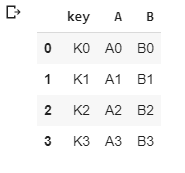
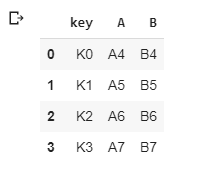
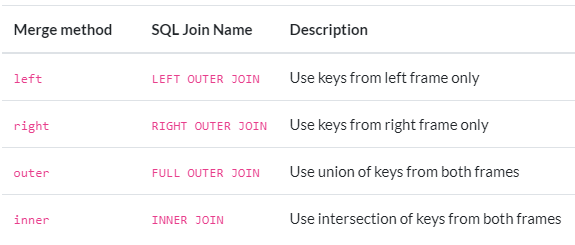
Merging allows us to merge DataFrames together using similar logic as mapping SQL.

2 More DataFrames:

left=pd.DataFrame({'key':['K0','K1','K2','K3'],
'A':['A0','A1','A2','A3'],
'B':['B0','B1','B2','B3'],
})
left
right=pd.DataFrame({'key':['K0','K1','K2','K3'],
'A':['A4','A5','A6','A7'],
'B':['B4','B5','B6','B7'],
})
right
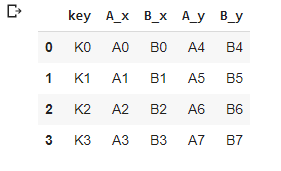
pd.merge(left,right,how='inner',on='key')
Merging: Multiply keys

DataFrames are now merged into a single DataFrame based on the common values present in the id column of both the DataFrames

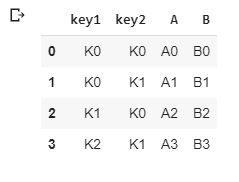
left = pd.DataFrame({'key1': ['K0', 'K0', 'K1', 'K2'],
'key2': ['K0', 'K1', 'K0', 'K1'],
'A': ['A0', 'A1', 'A2', 'A3'],
'B': ['B0', 'B1', 'B2', 'B3']})
left
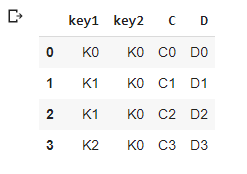
right = pd.DataFrame({'key1': ['K0', 'K1', 'K1', 'K2'],
'key2': ['K0', 'K0', 'K0', 'K0'],
'C': ['C0', 'C1', 'C2', 'C3'],
'D': ['D0', 'D1', 'D2', 'D3']})
right
Merging on Multiply keys
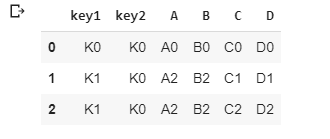
pd.merge(left,right,on=['key1','key2'])
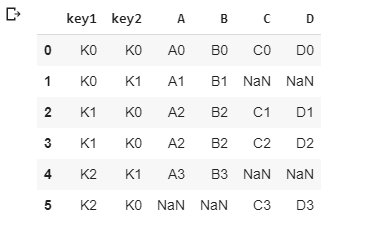
pd.merge(left,right,how='outer',on=['key1','key2'])
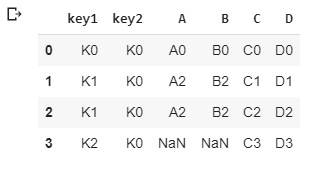
pd.merge(left,right,how=’right’,on=[‘key1’,’key2'])
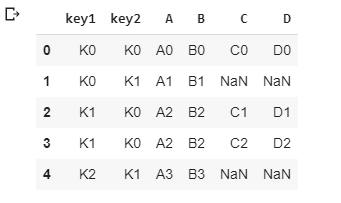
pd.merge(left,right,how='left',on=['key1','key2'])
Joining

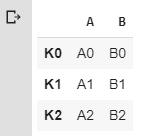
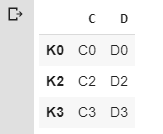
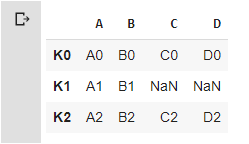
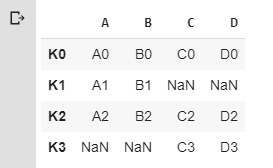
Joining is a convenient method for combining the two columns of the two potentially differently-indexed DataFrame into a single result DataFrame;

Same as Merging, except the *key* is an index, instead of columns

left = pd.DataFrame({'A': ['A0', 'A1', 'A2'],
'B': ['B0', 'B1', 'B2']},
index=['K0', 'K1', 'K2'])
right = pd.DataFrame({'C': ['C0', 'C2', 'C3'],
'D': ['D0', 'D2', 'D3']},
index=['K0', 'K2', 'K3'])
left
right
left.join(right)
left.join(right, how='outer')
Colab File link:)

Credits & References:

Jose Portilla — Python for Data Science and Machine Learning Bootcamp — Learn how to use NumPy, Pandas, Seaborn , Matplotlib , Plotly , Scikit-Learn , Machine Learning, Tensorflow , and more!

Posts Related:

00Episode#PySeries — Python — Jupiter Notebook Quick Start with VSCode — How to Set your Win10 Environment to use Jupiter Notebook

01Episode#PySeries — Python — Python 4 Engineers — Exercises! An overview of the Opportunities Offered by Python in Engineering!

02Episode#PySeries — Python — Geogebra Plus Linear Programming- We’ll Create a Geogebra program to help us with our linear programming

03Episode#PySeries — Python — Python 4 Engineers — More Exercises! — Another Round to Make Sure that Python is Really Amazing!

04Episode#PySeries — Python — Linear Regressions — The Basics — How to Understand Linear Regression Once and For All!

05Episode#PySeries — Python — NumPy Init & Python Review — A Crash Python Review & Initialization at NumPy lib.

06Episode#PySeries — Python — NumPy Arrays & Jupyter Notebook — Arithmetic Operations, Indexing & Slicing, and Conditional Selection w/ np arrays.

07Episode#PySeries — Python — Pandas — Intro & Series — What it is? How to use it?

08Episode#PySeries — Python — Pandas DataFrames — The primary Pandas data structure! It is a dict-like container for Series objects

09Episode#PySeries — Python — Python 4 Engineers — Even More Exercises! — More Practicing Coding Questions in Python!

10Episode#PySeries — Python — Pandas — Hierarchical Index & Cross-section — Open your Colab notebook and here are the follow-up exercises!

11Episode#PySeries — Python — Pandas — Missing Data — Let’s Continue the Python Exercises — Filling & Dropping Missing Data

12Episode#PySeries — Python — Pandas — Group By — Grouping large amounts of data and compute operations on these groups

13Episode#PySeries — Python —Pandas — Merging, Joining & Concatenations — Facilities For Easily Combining Together Series or DataFrame (this one)

14Episode#PySeries — Python — Pandas — Pandas Dataframe Examples: Column Operations

15Episode#PySeries — Python — Python 4 Engineers — Keeping It In The Short-Term Memory — Test Yourself! Coding in Python, Again!

16Episode#PySeries — NumPy — NumPy Review, Again;) — Python Review Free Exercises

17Episode#PySeriesGenerators in Python — Python Review Free Hints

18Episode#PySeries — Pandas Review…Again;) — Python Review Free Exercise

19Episode#PySeriesMatlibPlot & Seaborn Python Libs — Reviewing theses Plotting & Statistics Packs

20Episode#PySeriesSeaborn Python Review — Reviewing theses Plotting & Statistics Packs

Pandas Dataframe
Python3
Pandas Series
Numpy
Concatenation Merge Join
Recommended from ReadMedium