Pandas — Group By
Grouping large amounts of data and compute operations on these groups — #PySeries#Episode 12
print(~Hello Pandas — Group By lesson!”)Preparing the DataFrame:
import numpy as np
import pandas as pd
data = { 'Company':['GOOG', 'GOOG' 'MSFT', 'MSFT', 'FB', 'FB',
'Person':['Sam', 'Charlie', 'Amy', 'Vanessa', 'Carl', 'Sarah'],'Sales':[200,120, 340, 124, 243, 350]}
df = pd.DataFrame(data)
df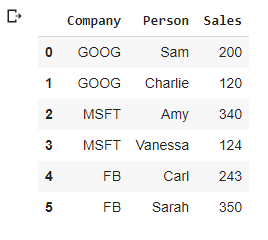
Aggregating Functions:
Allows you to group together rows based off of a column and perform an aggregate function on them.
df.groupby('Company')
byComp = df.groupby('Company')
byComp.mean()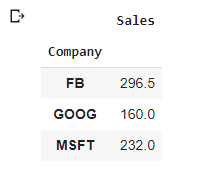
byComp.std()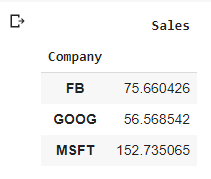
byComp.sum()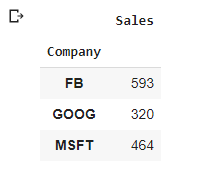
byComp.sum().loc['FB']Sales 593 Name: FB, dtype: int64In one single line!
df.groupby('Company').sum().loc['FB']Sales 593 Name: FB, dtype: int64df.groupby('Company').count()
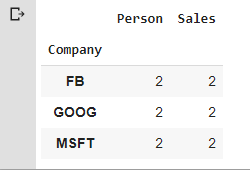
df.groupby('Company').max()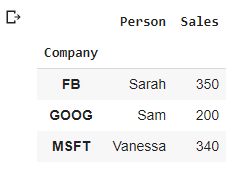
We probably use these aggregate functions with the numeric number (here is inverse of alphabet order:)
df.groupby('Company').min()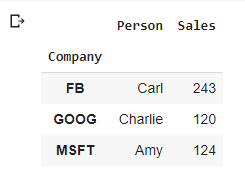
That will give you a bunch of information!
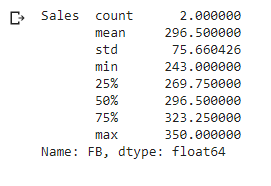
df.groupby('Company').describe()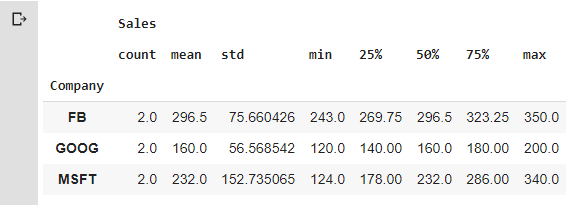
df.groupby(‘Company’).describe().transpose()[‘FB’]
Colab File link:)
Credits & References:
Jose Portilla — Python for Data Science and Machine Learning Bootcamp — Learn how to use NumPy, Pandas, Seaborn , Matplotlib , Plotly , Scikit-Learn , Machine Learning, Tensorflow , and more!
Posts Related:
00Episode#PySeries — Python — Jupiter Notebook Quick Start with VSCode — How to Set your Win10 Environment to use Jupiter Notebook
01Episode#PySeries — Python — Python 4 Engineers — Exercises! An overview of the Opportunities Offered by Python in Engineering!
02Episode#PySeries — Python — Geogebra Plus Linear Programming- We’ll Create a Geogebra program to help us with our linear programming
03Episode#PySeries — Python — Python 4 Engineers — More Exercises! — Another Round to Make Sure that Python is Really Amazing!
04Episode#PySeries — Python — Linear Regressions — The Basics — How to Understand Linear Regression Once and For All!
05Episode#PySeries — Python — NumPy Init & Python Review — A Crash Python Review & Initialization at NumPy lib.
06Episode#PySeries — Python — NumPy Arrays & Jupyter Notebook — Arithmetic Operations, Indexing & Slicing, and Conditional Selection w/ np arrays.
07Episode#PySeries — Python — Pandas — Intro & Series — What it is? How to use it?
08Episode#PySeries — Python — Pandas DataFrames — The primary Pandas data structure! It is a dict-like container for Series objects
09Episode#PySeries — Python — Python 4 Engineers — Even More Exercises! — More Practicing Coding Questions in Python!
10Episode#PySeries — Python — Pandas — Hierarchical Index & Cross-section — Open your Colab notebook and here are the follow-up exercises!
11Episode#PySeries — Python — Pandas — Missing Data — Let’s Continue the Python Exercises — Filling & Dropping Missing Data
12Episode#PySeries — Python — Pandas — Group By — Grouping large amounts of data and compute operations on these groups (this one:)
13Episode#PySeries — Python — Pandas — Merging, Joining & Concatenations — Facilities For Easily Combining Together Series or DataFrame
14Episode#PySeries — Python — Pandas — Pandas Dataframe Examples: Column Operations
15Episode#PySeries — Python — Python 4 Engineers — Keeping It In The Short-Term Memory — Test Yourself! Coding in Python, Again!
16Episode#PySeries — NumPy — NumPy Review, Again;) — Python Review Free Exercises
17Episode#PySeries — Generators in Python — Python Review Free Hints
18Episode#PySeries — Pandas Review…Again;) — Python Review Free Exercise
19Episode#PySeries — MatlibPlot & Seaborn Python Libs — Reviewing theses Plotting & Statistics Packs
20Episode#PySeries — Seaborn Python Review — Reviewing theses Plotting & Statistics Packs