only, some have video only, and some have both video and audio. And also they’re available in multiple formats. For video there is AVC (which is apparently H.254), VP09, and AV01. And for audio there’s Mp4a and Opus. I don’t know what Opus is but apparently it is noticeably better than Mp4a. So if you’ve ever gone to a YouTube download page and seen a million download options that’s why. Although I hide the redundant ones and just display the one with the lowest file size at that quality level (usually VP09 or AV01).</p><p id="b96b">It’s actually pretty cool to see AV01 as I talked about it <a href="https://readmedium.com/why-apple-adding-av1-support-is-a-big-deal-faa46a356f3c">here</a>. And it does compress videos a little better than VP09 and a lot better than AVC.</p><p id="d170">Also apparently YouTube does something called DRC, dynamic range compression (Not Democratic Republic of Congo). It makes the quiet sections louder and the loud sections quieter. Apparently people really hate it and I guess there must be a way to disable it because I have not been able to find a music video with DRC enabled. I’ve never heard anyone talk about this before though.</p><p id="e027">So now that we have the formats we can just download them. Each format has a download link oddly enough. I did not expect that. Just keep in mind that the YouTube download links expire in 6 hours.</p><p id="3fc9">Of course here we run into a problem. When I saw this I was like, “Great, let’s just download an audio-only track if we only want audio or a video+audio track if we want video.”</p>
<figure id="dd49">
<div>
<div>
<img class="ratio" src="http://placehold.it/16x9">
<iframe class="" src="https://cdn.embedly.com/widgets/media.html?src=https%3A%2F%2Fgiphy.com%2Fembed%2FMvioOPqhOm6b4BI0FQ%2Ftwitter%2Fiframe&display_name=Giphy&url=https%3A%2F%2Fgiphy.com%2Fgifs%2Ffallontonight-jimmy-fallon-tonight-show-MvioOPqhOm6b4BI0FQ&image=https%3A%2F%2Fmedia0.giphy.com%2Fmedia%2Fv1.Y2lkPTc5MGI3NjExa203NTd1dnVhNGpveHByMmxsOGRzZGxsejhsZzh2Zjk5N20xMTYwbSZlcD12MV9pbnRlcm5hbF9naWZfYnlfaWQmY3Q9Zw%2FMvioOPqhOm6b4BI0FQ%2Fgiphy.gif&key=a19fcc184b9711e1b4764040d3dc5c07&type=text%2Fhtml&schema=giphy" allowfullscreen="" frameborder="0" height="435" width="435">
</div>
</div>
</figure></iframe></div></div></figure><p id="9eda">If you do that you’re restricted to at most 720p 30fps. Or so I’m told. I haven’t been able to find a file with both video and audio over 360p. And some videos don’t have any video+audio tracks at all. So that means we’re going to have to download a video file and an audio file (preferably without DRC) and merge them together.</p><p id="e01b">And this is perhaps the first really big problem I ran into. If I was doing this locally it would not be that big of a problem because there’s a nice command line package called <code>FFmpeg</code> that will just do it for you. Unfortunately it’s a bit more complicated when you’re working with Node.js because you have to do a bunch of file manipulation stuff.</p><p id="12d8">I ended up deciding to just download the files from Google’s servers separately and then merge them locally. Apparently Flutter has a package called <code>FFmpeg-kit</code> that will do this. Unfortunately it only works on Android, iOS, and MacOS.</p><p id="fdbf">Although Android will not be getting YouTube downloading because Google is really strict about that.</p>
<figure id="eaa2">
<div>
<div>
<img class="ratio" src="http://placehold.it/16x9">
<iframe class="" src="https://cdn.embedly.com/widgets/media.html?type=text%2Fhtml&key=a19fcc184b9711e1b4764040d3dc5c07&schema=twitter&url=https%3A//twitter.com/EzraDuown/status/1776352074449530961/&image=" a
Options
llowfullscreen="" frameborder="0" height="281" width="500">
</div>
</div>
</figure></iframe></div></div></figure><p id="7c7c">In fact the app mentioned above, NewPipe, is not available on the Google Play store. So that means that the only platform able to benefit from YouTube downloading is iOS. There is no macOS version of the app but you can run the iOS app on an Apple Silicon Mac. Web users will be restricted to downloading audio or downloading 360p videos. Oh well. Maybe I’ll improve this feature in the future.</p><p id="cae5">And another problem. YouTube throttles some of the downloads. Not all of them though which is weird. I thought it was broken at first. Nope, it’s just that the downloads were really really slow.</p><p id="74fe">Although there’s a way around this too. Flutter has its own package for downloading YouTube videos called <code>youtube_explode_dart</code> and this one has gotten around the throttling issues. It’s listed as issue #180 and fixed in pull request 185.</p><figure id="c76e"><img src="https://cdn-images-1.readmedium.com/v2/resize:fit:800/1*R0QbSVVKcpNt1NDnlL-7Qg.png"><figcaption></figcaption></figure><p id="4a2c">And it works great now. Well, for the streams it supports. It doesn’t support all the streams. But it supports enough.</p><p id="7308">And, one more thing <code>youtube_explode_dart</code> doesn’t actually do everything <code>youtube-dl</code> does. <code>youtube-dl</code> actually gives you a lot more information on the actual files (such as if the audio is DRCed). So I’m still going to have to use it. But I can use <code>youtube_explode_dart</code> to actually download the files.</p><p id="8fe6">I do feel a little silly for wasting so much time on this feature. Like, I built an RSS reader to watch YouTube videos, not to download them. And the only people that can really take advantage of this feature are iOS users.</p><p id="9388">It’s funny. Everyone thinks iOS is the locked-down one. But in this one specific case Android is more locked down. Because if you look up YouTube downloaders on iOS there are pages and pages of them.</p><p id="0e6e">I could see myself taking advantage of this feature. Stratum 3.0.0 also introduces the ability to add external links. So I could find a YouTube video I like that I want to download and I could just download it.</p><p id="01c9">And this experience has taught me a lot about the inner workings of YouTube. Mostly the subtitles. I had no idea the method I was using to get subtitles before was so suboptimal. It works and there’s nothing wrong with it but it could be better.</p><p id="7e7d">I’m pretty happy with Stratum’s YouTube functionality now. I was happy with it before, to be honest, I just went down a ‘YouTube Rabbit Hole’. But I did have one more feature planned: automatic YouTube summary generation.</p><p id="5b0e">Because since adding YouTube summaries I’ve been watching a lot more YouTube. I mean summarizing a lot more YouTube. There are a lot of channels I’m interested in but can’t get to due to time restrictions. Like TED and DW News. Guess what? I follow both of those sources of news now and just read the summaries. But you know what I don’t like? Tapping on the button to generate the summaries.</p><p id="8a38">Well, those are some future plans. It will be expensive though, which is also why I’m planning to announce new pricing for Stratum soon.</p><p id="f6db">If you liked this post and would like to stay updated with my future articles consider using my RSS app Stratum on <a href="https://apple.co/3rZyh9B">iOS</a> and <a href="https://play.google.com/store/apps/details?id=com.amorfatite.keystone">Android</a>. Also check out my language learning app Litany (<a href="https://apple.co/45prCDA">iOS</a>, <a href="https://play.google.com/store/apps/details?id=com.amorfatite.litany">Android</a>).</p></article></body>
Geogebra Plus Linear Programming
We’ll Create a Geogebra program to help us with our linear programming — #PySeries#Episode 02
First, we’ve got this problem that comes from the math to your course guide from the Pingree school.
It is the tape’s verse CDs example:
Suppose you want to buy some tapes and CDs. Does anyone really buy tapes anymore? Anyway, you can buy up to 11 tapes; You can buy up to 7 CDS, but you want at least 3; You must get enough tapes or CDs to hold at least 10 hours of music; Each tape holds about 45 minutes of music and each CD holds an hour a tape costs $8 and a CD costs $12; So how many tapes and CDs should you buy to minimize your cost?
Let’s see the solution using Geogebra than in the end I will present the Python solution.
1# Define Your Variables:
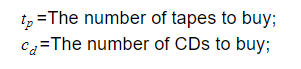
x=The number of tapes to buy;y=The number of CDs to buy;
2# Translate your constraints:
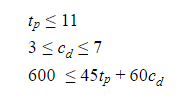
x<=113<=y>=7600<=45x+60y
3# Type your objective Function:
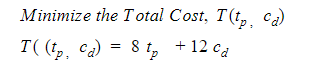
T(x,y)=8x+12y
4# Open a Geogebra New Activity session, Hit Geogebra, Create an Applet and get a name to your applet (mine is GeoPlusLinearProg):
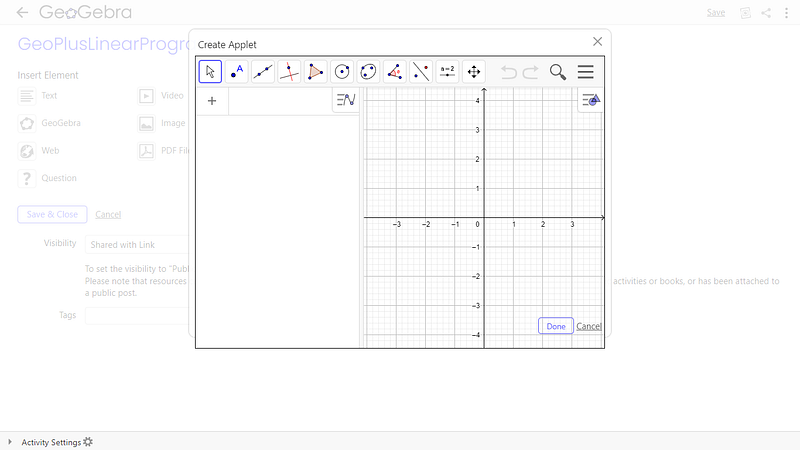
Fig 1. Opening and Creating New Activity in Geogebra App.
You can expand the applet according to your screen resolution:
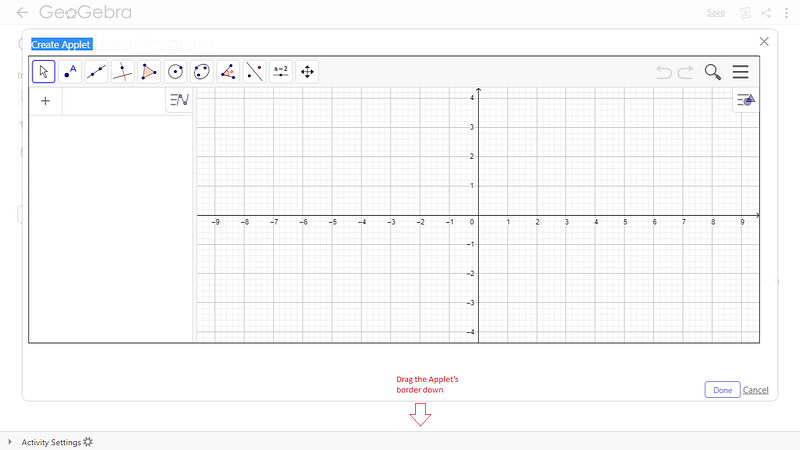
Fig 2. Expanding the Applet view!
Just fine!
5# On Geogebra, on the left, type the inequality as well as equality like this:
a: x <= 11b: x = 11c: 3 <= y <= 7d: y = 3e: y = 7f: 45*x + 6*y >= 600g: 3*x + 4*y = 40
The regions in the graph are presented, now configure them according to your taste, clicking on each inequality and changing the style and color properties. Here are my settings.
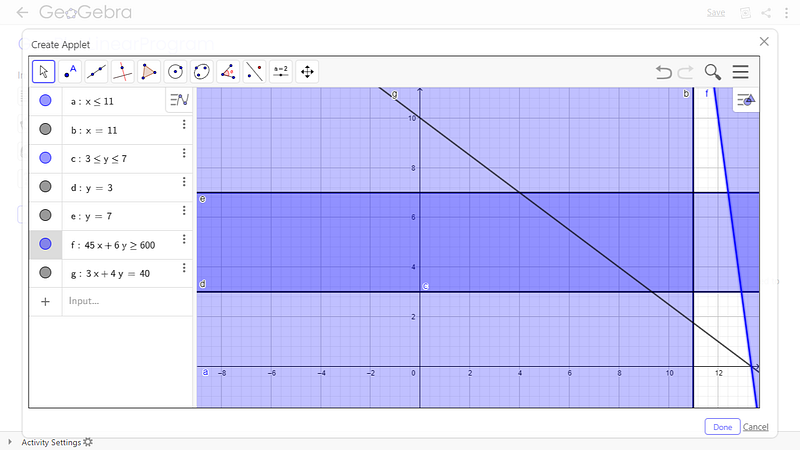
Fig 3. Entering all the constraints and equations.
6#Now, click Point > Intercept and create 4 points, in the region of interest:
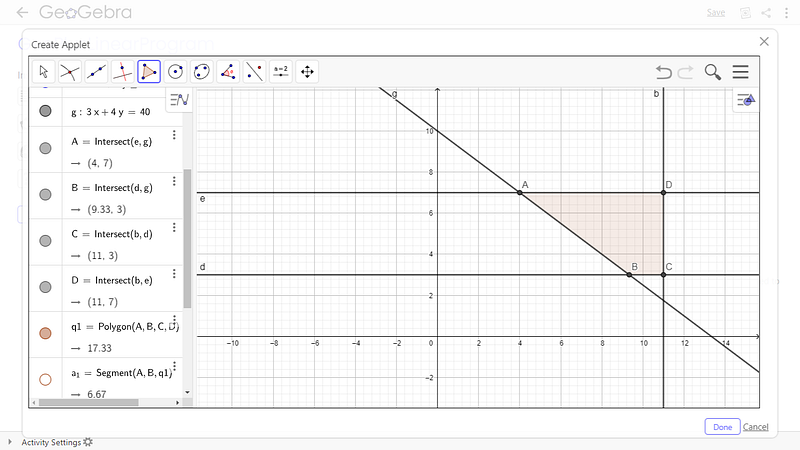
Fig 4. Separating the solution region.
7# On Geogebra, open a Spreadsheet and type (hamburger icon>View>Spreedsheet located at top-right):
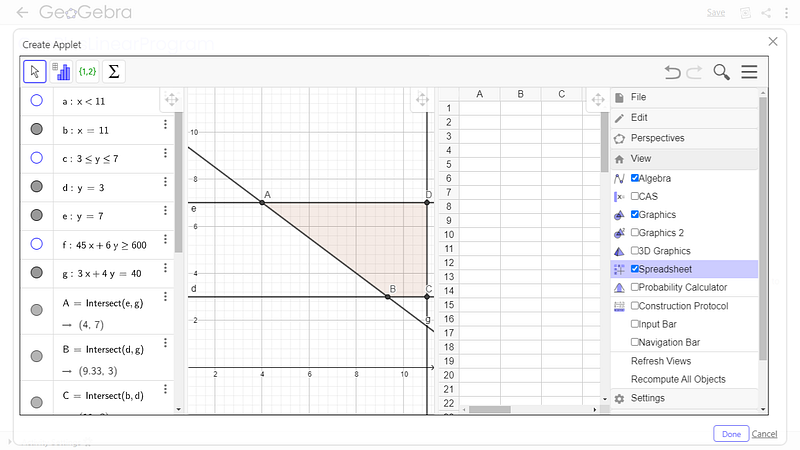
Fig 5. Delimiting each intercept points of the solution.
Now, in the spreadsheet type this (drag the little rectangle down):
Points - Total Cost, T
A =8*x(A2)+12*y(A2)
B =8*x(A3)+12*y(A3)
C =8*x(A4)+12*y(A4)
D =8*x(A5)+12*y(A5)
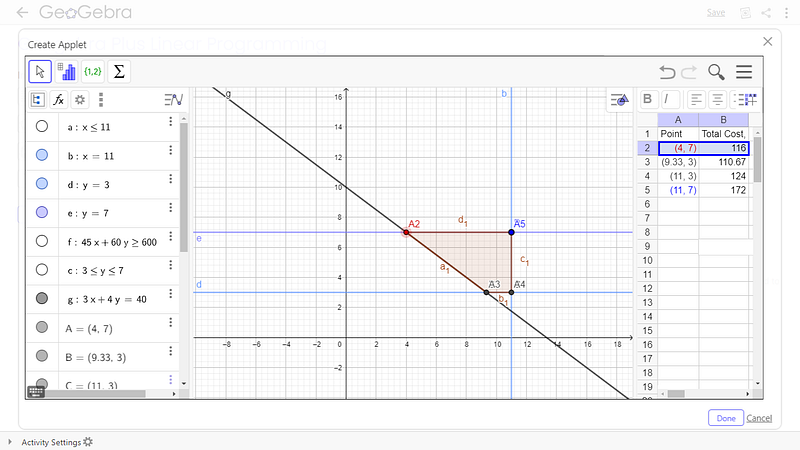
Fig 6. We found the region of the solution; Any of the combinations are valid; the lowest cost is 9.33 Tape and 3 CDs (A3)=$110.67.
Any of the vertices of the trapeze serve as an answer. I choose the second option(9 Tapes and 3 CDs).
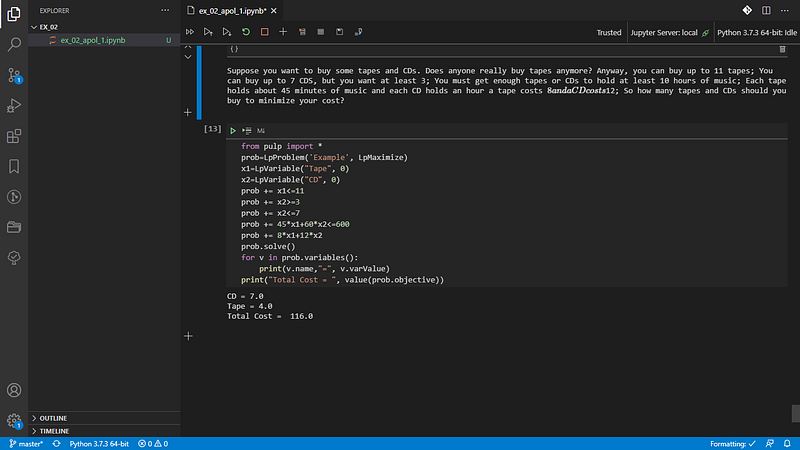
Let’s see what python decides …
8# Python Solution:
from pulp import *
prob=LpProblem('Example', LpMaximize)
x1=LpVariable("Tape", 0)
x2=LpVariable("CD", 0)
prob += x1<=11prob += x2>=3prob += x2<=7prob += 45*x1+60*x2<=600prob += 8*x1+12*x2
prob.solve()
for v in prob.variables():
print(v.name,"=", v.varValue)
print("Total Cost = ", value(prob.objective))
CD = 7.0Tape = 4.0Total Cost = 116.0
Fig 7. Using Visual Studio code App; please see this post about it: Python 4 Engineers — Exercises! linked bellow…
# Episode 01 #PySeries # An overview of the Opportunities Offered by Python in Engineering
And that’s all for now!
I hope you were impressed with the Geogebra app like I am!