avatarJ3

Free AI web copilot to create summaries, insights and extended knowledge, download it at here

6805

Abstract

ing <b>df[[‘W’,’Z’]]</b> — Getting multiples columns back!</figcaption></figure><h1 id="4563">Creating a New Column</h1><p id="781b">Just make some arithmetic on the right side with the series you want to create your column:</p><div id="05d4"><pre><span class="hljs-built_in">df</span>[‘new’] = <span class="hljs-built_in">df</span>[‘W’] + <span class="hljs-built_in">df</span>[‘Y’]</pre></div><div id="f3bf"><pre><span class="hljs-built_in">df</span> </pre></div><figure id="d115"><img src="https://cdn-images-1.readmedium.com/v2/resize:fit:800/1*R3cR4pea7os3zz1kLScqUA.png"><figcaption>Fig 5. Running <b>df[‘new’] = df[‘W’] + df[‘Y’]</b> — Creating a new row!</figcaption></figure><h1 id="69c6">Dropping Columns</h1><p id="e5ba">Pandas requires that you specify that you really want to modify your data in place (affect the original DB);</p><p id="b1ea">It is like so you do not accidentally lose information;</p><p id="da73">In case you’ve done a bunch of adjustments to your data, you don’t want to accidentally lose it, right?</p><p id="b6a5">This is like ‘commit’ in DB!</p><div id="c26a"><pre>df.drop(‘new’, <span class="hljs-attribute">axis</span>=1, <span class="hljs-attribute">inplace</span>=<span class="hljs-literal">True</span>)</pre></div><div id="d100"><pre><span class="hljs-built_in">df</span> </pre></div><figure id="f801"><img src="https://cdn-images-1.readmedium.com/v2/resize:fit:800/1*_NS3fpYP8tO2aJ7jyTm-wA.png"><figcaption>Fig 6. Running <b>df.drop(‘new’, axis=1, inplace=True) </b>— Dropping Columns!</figcaption></figure><h1 id="b35a">Dropping Rows</h1><p id="48fe">This time I am not doing this in place!</p><p id="1934">Note: <i>axis=0</i> is the default, so you don’t need to specify it here:)</p><div id="4279"><pre><span class="hljs-attr">dropped_df</span> = df.drop(‘E’, axis=<span class="hljs-number">0</span>) </pre></div><figure id="7e68"><img src="https://cdn-images-1.readmedium.com/v2/resize:fit:800/1*DPu_-46eyY1257Z1MxsTRg.png"><figcaption>Fig 7. Running <b>df.drop(‘E’, axis=0)</b> — Dropping without ’commit’ :) Now you can work w/ dropped_df object. If you specify <b>inplace=True</b> it will return no object :/</figcaption></figure><p id="9713">See that our DataFrame has not been affected yet by the last drop! We didn’t make it in place, remember?</p><div id="a903"><pre># <span class="hljs-built_in">Shape</span> returns a tuple <span class="hljs-keyword">dimension</span> (row, column) df.<span class="hljs-built_in">shape</span></pre></div><div id="b15a"><pre>(<span class="hljs-number">5</span><span class="hljs-punctuation">,</span> <span class="hljs-number">4</span>)</pre></div><p id="d120">See, <i>df</i> isn’t affected yet!</p><div id="b7ad"><pre><span class="hljs-built_in">df</span> </pre></div><figure id="0172"><img src="https://cdn-images-1.readmedium.com/v2/resize:fit:800/1*xWYwN_27GlXQ__lYLXP0_w.png"><figcaption>Fig 8. Running <b>df</b>, rescuing the DataFrame again!</figcaption></figure><h1 id="74ef">Selecting Rows</h1><p id="9549">There are two methods:</p><ol><li><i>LOC </i>-> <b>label</b>-BASE index</li><li><i>ILOC</i> -> <b>numerical</b>-BASE index</li></ol><p id="38d7">IT’S A LITTLE WEIRD HOW THE METHODS ARE CALLED IN PANDAS:</p><p id="c801">IT USES A SQUARED BRACKET!</p><p id="6d80">But that’s the way it works for Pandas!</p><div id="fa7d"><pre># This returns <span class="hljs-selector-tag">a</span> series of that ‘<span class="hljs-selector-tag">A</span>’ row! df<span class="hljs-selector-class">.loc</span><span class="hljs-selector-attr">[‘A’]</span></pre></div><div id="9d6e"><pre><span class="hljs-attribute">W</span> <span class="hljs-number">2</span>.<span class="hljs-number">706850</span> <span class="hljs-attribute">X</span> <span class="hljs-number">0</span>.<span class="hljs-number">628133</span> <span class="hljs-attribute">Y</span> <span class="hljs-number">0</span>.<span class="hljs-number">907969</span> <span class="hljs-attribute">Z</span> <span class="hljs-number">0</span>.<span class="hljs-number">503826</span> <span class="hljs-attribute">Name</span>: A, dtype: float64</pre></div><p id="18f3">Or alternatively, type the index of the row required!</p><div id="70fd"><pre><span class="hljs-comment"># This is a numerical-BASE index locator = iloc</span> <span class="hljs-attribute">df</span>.iloc[<span class="hljs-number">0</span>]</pre></div><div id="7533"><pre><span class="hljs-attribute">W</span> <span class="hljs-number">2</span>.<span class="hljs-number">706850</span> <span class="hljs-attribute">X</span> <span class="hljs-number">0</span>.<span class="hljs-number">628133</span> <span class="hljs-attribute">Y</span> <span class="hljs-number">0</span>.<span class="hljs-number">907969</span> <span class="hljs-attribute">Z</span> <span class="hljs-number">0</span>.<span class="hljs-number">503826</span> <span class="hljs-attribute">Name</span>: A, dtype: float64</pre></div><h1 id="6bfa">Returning a Single Value</h1><div id="24b4"><pre><span class="hljs-comment"># INDEXING</span> df.loc[‘<span class="hljs-keyword">B’, </span>‘Y’]</pre></div><div id="b3b1"><pre><span class="hljs-deletion">-0.8480769834036315</span></pre></div><p id="f0fd">Returning the same as previous, just locating it.</p><div id="404f"><pre><span class="hljs-comment"># Grab the element on the second row (‘B’) </span> <span class="hljs-comment"># and in the third column (‘Y’), right?</span></pre></div><div id="3c28"><pre><span class="hljs-attribute">df</span>.iloc[<span class="hljs-number">1</span>,<span class="hljs-number">2</span>]</pre></div><div id="ae2f"><pre><span class="hljs-deletion">-0.8480769834036315</span></pre></div><h1 id="8c67">Returning a SUB-SET of the DataFrame</h1><p id="8628">Just pass two lists of the rows and columns you want!</p><div id="4be3"><pre><span class="hljs-comment"># Please, get used to the SQUARED BRACKET :/</span></pre></div><div id="6419"><pre>df.loc<span class="hljs-string">[[‘A’, ‘B’],[‘W’, ‘Y’]]</span></pre></div><div id="37f7"><pre>WYA2<span class="hljs-number">.7068500</span><span class="hljs-number">.907969B0</span><span class="hljs-number">.651118</span><span class="hljs-number">0.848077</span></pre></div><figure id="ec1b"><img src="https://cdn-images-1.readmedium.com/v2/resize:fit:800/1*3Mv83P3qiZ6iX1WfMkzbAQ.png"><figcaption>Fig 9. Running <b>df.loc[[‘A’, ‘B’],[‘W’, ‘Y’]]</b> — Creating a data sub-set!</figcaption></figure><p id="bec7">And that’s it!</p><div id="177f"><pre><span class="hljs-keyword">print</span>(“Ok, we’re going <span class="hljs-keyword">to</span> <span class="hljs-keyword">stop</span> here <span class="hljs-keyword">for</span> now <span class="hljs-built_in">and</span> <span class="hljs-keyword">continue</span> the discussion in the <span class="hljs-keyword">next</span> PySeries Epis

Options

ode!” )</pre></div><p id="d734">Ok, we’re going to stop here for now and continue the discussion in the next PySeries Episode!</p><div id="6521"><pre><span class="hljs-meta"># https:<span class="hljs-comment">//medium.com/jungletronics/pandas-dataframes-7ba872dcbc30</span></span> <span class="hljs-keyword">print</span>(‘Thank You for reading This post!. Bye!’)</pre></div><p id="a2e2">Thank You for reading this post! Bye!</p><p id="fe47">We’re gonna be alright. Live From home!</p><p id="8c03">The code bundle for this episode is available at:</p><p id="14c0">GitHub Repo <a href="https://github.com/giljr/py4engineer/blob/master/EX_07/ex_07_pandas_2.ipynb">link</a></p><p id="1183">Colab <a href="https://colab.research.google.com/drive/1HoQ_b5YqAZOLdX_HiRxB3IngcEn-uRBP?usp=sharing">Link</a></p><h1 id="1160">Credits & References:</h1><div id="9afd" class="link-block"> <a href="https://pandas.pydata.org/pandas-docs/version/0.23.4/generated/pandas.DataFrame.html"> <div> <div> <h2>pandas.DataFrame - pandas 0.23.4 documentation</h2> <div><h3>Two-dimensional size-mutable, potentially heterogeneous tabular data structure with labeled axes (rows and columns)…</h3></div> <div><p>pandas.pydata.org</p></div> </div> <div> <div style="background-image: url(https://miro.readmedium.com/v2/resize:fit:320/)"></div> </div> </div> </a> </div><p id="6bdb">Jose Portilla — <a href="https://www.udemy.com/course/python-for-data-science-and-machine-learning-bootcamp/">Python for Data Science and Machine Learning Bootcamp </a>— Learn how to use NumPy, Pandas, Seaborn , Matplotlib , Plotly , Scikit-Learn , Machine Learning, Tensorflow , and more!</p><h1 id="607c">Posts Related:</h1><p id="2370">00Episode#<b>PySeries </b>— Python — <a href="https://medium.com/@J.3/python-jupiter-notebook-quick-start-with-vscode-916c43c10d9a">Jupiter Notebook Quick Start with VSCode — How to Set your Win10 Environment to use Jupiter Notebook</a></p><p id="1489">01Episode#<b>PySeries </b>— Python — <a href="https://readmedium.com/python-for-engenniging-exercises-977fbe4d6d02">Python 4 Engineers — Exercises! An overview of the Opportunities Offered by Python in Engineering!</a></p><p id="d794">02Episode#<b>PySeries </b>— Python — <a href="https://readmedium.com/geogebra-plus-linear-programming-a51661c99590">Geogebra Plus Linear Programming- We’ll Create a Geogebra program to help us with our linear programming</a></p><p id="da04">03Episode#<b>PySeries</b> — Python — <a href="https://readmedium.com/python-4-engineers-more-exercises-5cbab729ef11">Python 4 Engineers — More Exercises! — Another Round to Make Sure that Python is Really Amazing!</a></p><p id="f6d8">04Episode#<b>PySeries</b> — Python — <a href="https://readmedium.com/linear-regressions-the-basics-1a633f351ec2">Linear Regressions — The Basics — How to Understand Linear Regression Once and For All!</a></p><p id="b9b8">05Episode#<b>PySeries</b> — Python — <a href="https://readmedium.com/numpy-init-python-review-f5362abbaaf9">NumPy Init & Python Review — A Crash Python Review & Initialization at Numpy lib</a>.</p><p id="75ba">06Episode#<b>PySeries</b> — Python — <a href="https://readmedium.com/numpy-jupyter-notebook-1182f78ab4e1">NumPy Arrays & Jupyter Notebook — Arithmetic Operations, Indexing & Selection, and Conditional Selection</a></p><p id="a547">07Episode#<b>PySeries</b> — Python —<a href="https://readmedium.com/pandas-intro-series-970e206e2ad5"> Pandas — Intro & Series — What it is? How to use it?</a></p><p id="8690">08Episode#<b>PySeries</b> — Python —Pandas DataFrames — The primary Pandas data structure! It is a dict-like container for Series objects (this one)</p><p id="f1a4">09Episode#<b>PySeries</b> — Python — <a href="https://readmedium.com/python-4-engineers-even-more-exercises-d0141e0b06d">Python 4 Engineers — Even More Exercises! — More Practicing Coding Questions in Python</a>!</p><p id="112a">10Episode#<b>PySeries</b> — Python — <a href="https://readmedium.com/pandas-hierarchical-index-cross-section-30783023a274">Pandas — Hierarchical Index & Cross-section — Open your Colab notebook and here are the follow-up exercises!</a></p><p id="d6bb">11Episode#<b>PySeries</b> — Python — <a href="https://readmedium.com/pandas-missing-data-5142f3eda2b">Pandas — Missing Data — Let’s Continue the Python Exercises — Filling & Dropping Missing Data</a></p><p id="bdbd">12Episode#<b>PySeries</b> — Python — <a href="https://readmedium.com/pandas-group-by-3140d053b9c">Pandas — Group By — Grouping large amounts of data and compute operations on these groups</a></p><p id="656b">13Episode#<b>PySeries</b> — Python — <a href="https://readmedium.com/pandas-merging-joining-concatenations-a35bbe1a9dd5">Pandas — Merging, Joining & Concatenations — Facilities For Easily Combining Together Series or DataFrame</a></p><p id="125e">14Episode#<b>PySeries</b> — Python — <a href="https://readmedium.com/pandas-operations-4b8f7a4b4139">Pandas — Pandas Dataframe Examples: Column Operations</a></p><p id="f203">15Episode#<b>PySeries</b> — Python — <b>Python 4 Engineers </b>— Keeping It In The Short-Term Memory — <a href="https://readmedium.com/python-4-engineers-keeping-it-in-the-short-term-memory-4f9458016171"><b>Test Yourself!</b> Coding in Python, Again!</a></p><p id="deea">16Episode#<b>PySeries</b> — NumPy — <a href="https://readmedium.com/numpy-review-again-f94f1c1c77e8">NumPy Review, Again;)<b> </b></a>— Python Review Free Exercises</p><p id="fd6d">17Episode#<b>PySeries</b><a href="https://readmedium.com/generators-in-python-8d3de173743e">Generators in Python<b></b></a><b><a href="https://readmedium.com/numpy-review-again-f94f1c1c77e8"><b> </b></a>— Python Review Free Hints</b></p><p id="60f2">18Episode#<b>PySeries</b> — P<a href="https://readmedium.com/panda-review-again-baf0687b35de">andas Review…Again;)</a> — Python Review Free Exercise</p><p id="9509">19Episode#<b>PySeries</b><a href="https://readmedium.com/matlibplot-seaborn-python-libs-459f6666f35f">MatlibPlot & Seaborn Python Libs </a>— Reviewing theses Plotting & Statistics Packs</p><p id="3bfc">20Episode#<b>PySeries</b><a href="https://readmedium.com/seaborn-python-review-9e543b6b7a44">Seaborn Python Review</a> — Reviewing theses Plotting & Statistics Packs</p><p id="f1aa">31 Episode#<b>PySeries</b> — Pandas — DATAFRAMES —<a href="https://readmedium.com/pandas-dataframes-377cc20dd119"> When should I use pandas DataFrame?</a>#PySeries#Episode 31</p><figure id="4311"><img src="https://cdn-images-1.readmedium.com/v2/resize:fit:800/1*dTgdsw2k8lHGbX5c23WTyA.png"><figcaption></figcaption></figure></article></body>

Pandas — DataFrames

The Primary Pandas Data Structure! It Is a Dict-Like Container for Series Objects— #PySeries#Episode 08

Hello, let’s see Pandas AGAIN!

This time, DataFrame!

Fig 1. Pandas is a fast, powerful, flexible, and easy to use open-source data analysis and manipulation tool, built on top of the Python programming language.

Here are the topics for our study about Pandas Series:

.Series
.DataFrames (this one:)
.Missing Data
.GroupBy
.Merging, Joinning, and Cocarenating
.Operations
.Data Input and Output
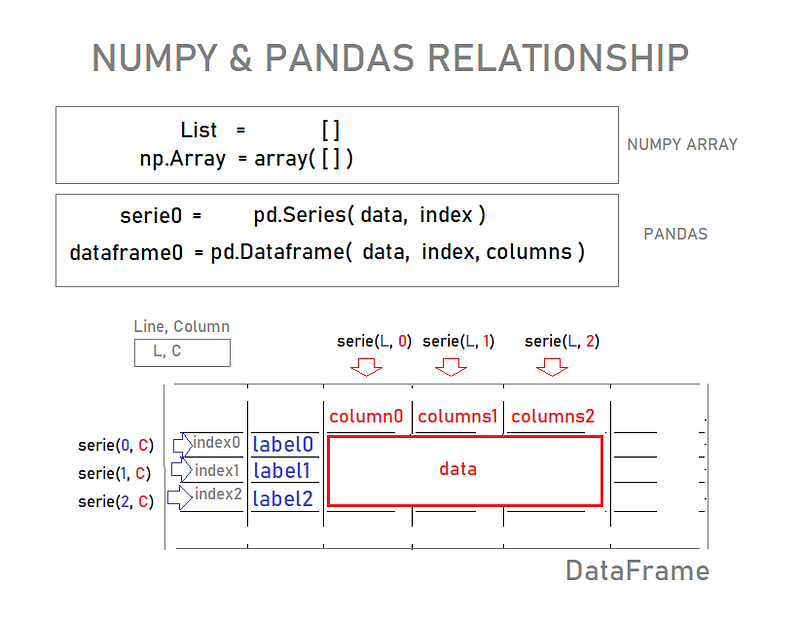
Fig 2. Numpy & Pandas Together!

The second topic will be this one: DataFrames!

DATAFRAMES

The primary Pandas data structure!

Can be thought of as a dict-like container for Series objects.

import numpy as np
import pandas as pd

And for our database creation:

from numpy.random import randn

Let's seed it, so our data is the same (in case you want to follow me:)

np.random.seed(101)

How To Create a DataFrame

For the purpose of our studying, here is how:

DataFrame(Data, xLabel, yLabel):

df=pd.DataFrame(randn(5,4), ['A','B','C','D','E'], ['W','X','Y','Z' ])

Note: to work on your code you may need to retype the single quotes (´), compatible with your system;)

Now call the object:

df
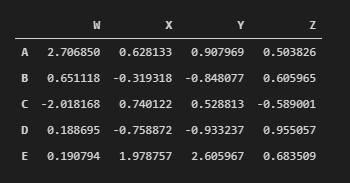
Fig 3. Here is the table that can be better viewed, right?

Each of these columns and row is Series themselves!

INDEXING & SELECTION IN PANDAS

Using Brackets Notation:

Just pass in the column name, ie ‘W’:

df[‘W’]
A    2.706850
B    0.651118
C   -2.018168
D    0.188695
E    0.190794
Name: W, dtype: float64

See what type of object df is:

type(df['W'])
pandas.core.series.Series

See ‘W’ is just a Series!

And The DataFrame itself?

type(df)
pandas.core.frame.DataFrame

The df itself is the DataFrame!

Using SQL Notation:

Note: not recommended, because we can confuse with the real method of df object!

So, always use the bracket Notation when it comes to rescuing series from df :)

Anyway, here you have it!

# This is SQL Notation: Not recommended :/
df.W
A    2.706850
B    0.651118
C   -2.018168
D    0.188695
E    0.190794
Name: W, dtype: float64
# Use Bracket Notation [] instead :)

Getting Multiple Columns back!

Pass in a List, please!

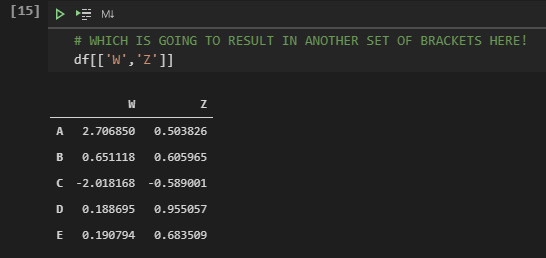
# WHICH IS GOING TO RESULT IN ANOTHER SET OF BRACKETS HERE!
df[[‘W’,’Z’]]
Fig 4. Running df[[‘W’,’Z’]] — Getting multiples columns back!

Creating a New Column

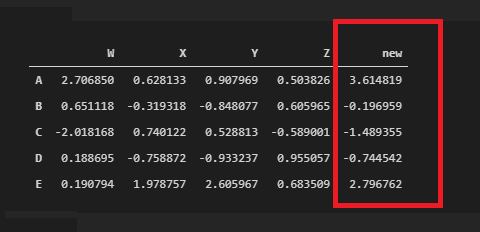
Just make some arithmetic on the right side with the series you want to create your column:

df[‘new’] = df[‘W’] + df[‘Y’]
df
Fig 5. Running df[‘new’] = df[‘W’] + df[‘Y’] — Creating a new row!

Dropping Columns

Pandas requires that you specify that you really want to modify your data in place (affect the original DB);

It is like so you do not accidentally lose information;

In case you’ve done a bunch of adjustments to your data, you don’t want to accidentally lose it, right?

This is like ‘commit’ in DB!

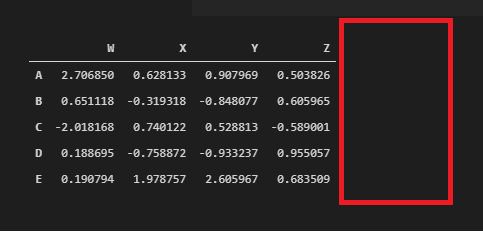
df.drop(‘new’, axis=1, inplace=True)
df
Fig 6. Running df.drop(‘new’, axis=1, inplace=True) — Dropping Columns!

Dropping Rows

This time I am not doing this in place!

Note: axis=0 is the default, so you don’t need to specify it here:)

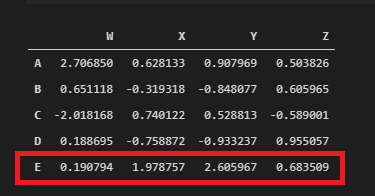
dropped_df = df.drop(‘E’, axis=0)
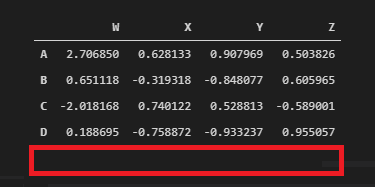
Fig 7. Running df.drop(‘E’, axis=0) — Dropping without ’commit’ :) Now you can work w/ dropped_df object. If you specify inplace=True it will return no object :/

See that our DataFrame has not been affected yet by the last drop! We didn’t make it in place, remember?

# Shape returns a tuple dimension (row, column)
df.shape
(5, 4)

See, df isn’t affected yet!

df
Fig 8. Running df, rescuing the DataFrame again!

Selecting Rows

There are two methods:

  1. LOC -> label-BASE index
  2. ILOC -> numerical-BASE index

IT’S A LITTLE WEIRD HOW THE METHODS ARE CALLED IN PANDAS:

IT USES A SQUARED BRACKET!

But that’s the way it works for Pandas!

# This returns a series of that ‘A’ row!
df.loc[‘A’]
W    2.706850
X    0.628133
Y    0.907969
Z    0.503826
Name: A, dtype: float64

Or alternatively, type the index of the row required!

# This is a numerical-BASE index locator = iloc
df.iloc[0]
W    2.706850
X    0.628133
Y    0.907969
Z    0.503826
Name: A, dtype: float64

Returning a Single Value

# INDEXING
df.loc[‘B’, ‘Y’]
-0.8480769834036315

Returning the same as previous, just locating it.

# Grab the element on the second row (‘B’) 
# and in the third column (‘Y’), right?
df.iloc[1,2]
-0.8480769834036315

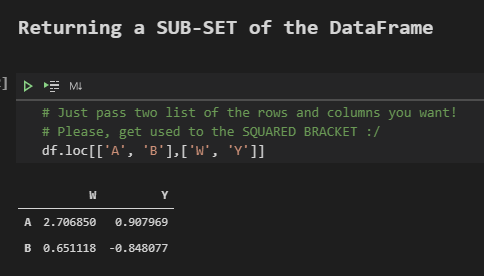
Returning a SUB-SET of the DataFrame

Just pass two lists of the rows and columns you want!

# Please, get used to the SQUARED BRACKET :/
df.loc[[‘A’, ‘B’],[‘W’, ‘Y’]]
WYA2.7068500.907969B0.6511180.848077
Fig 9. Running df.loc[[‘A’, ‘B’],[‘W’, ‘Y’]] — Creating a data sub-set!

And that’s it!

print(“Ok, we’re going to stop here for now and continue the discussion in the next PySeries Episode!” )

Ok, we’re going to stop here for now and continue the discussion in the next PySeries Episode!

# https://medium.com/jungletronics/pandas-dataframes-7ba872dcbc30
print(‘Thank You for reading This post!. Bye!’)

Thank You for reading this post! Bye!

We’re gonna be alright. Live From home!

The code bundle for this episode is available at:

GitHub Repo link

Colab Link

Credits & References:

Jose Portilla — Python for Data Science and Machine Learning Bootcamp — Learn how to use NumPy, Pandas, Seaborn , Matplotlib , Plotly , Scikit-Learn , Machine Learning, Tensorflow , and more!

Posts Related:

00Episode#PySeries — Python — Jupiter Notebook Quick Start with VSCode — How to Set your Win10 Environment to use Jupiter Notebook

01Episode#PySeries — Python — Python 4 Engineers — Exercises! An overview of the Opportunities Offered by Python in Engineering!

02Episode#PySeries — Python — Geogebra Plus Linear Programming- We’ll Create a Geogebra program to help us with our linear programming

03Episode#PySeries — Python — Python 4 Engineers — More Exercises! — Another Round to Make Sure that Python is Really Amazing!

04Episode#PySeries — Python — Linear Regressions — The Basics — How to Understand Linear Regression Once and For All!

05Episode#PySeries — Python — NumPy Init & Python Review — A Crash Python Review & Initialization at Numpy lib.

06Episode#PySeries — Python — NumPy Arrays & Jupyter Notebook — Arithmetic Operations, Indexing & Selection, and Conditional Selection

07Episode#PySeries — Python — Pandas — Intro & Series — What it is? How to use it?

08Episode#PySeries — Python —Pandas DataFrames — The primary Pandas data structure! It is a dict-like container for Series objects (this one)

09Episode#PySeries — Python — Python 4 Engineers — Even More Exercises! — More Practicing Coding Questions in Python!

10Episode#PySeries — Python — Pandas — Hierarchical Index & Cross-section — Open your Colab notebook and here are the follow-up exercises!

11Episode#PySeries — Python — Pandas — Missing Data — Let’s Continue the Python Exercises — Filling & Dropping Missing Data

12Episode#PySeries — Python — Pandas — Group By — Grouping large amounts of data and compute operations on these groups

13Episode#PySeries — Python — Pandas — Merging, Joining & Concatenations — Facilities For Easily Combining Together Series or DataFrame

14Episode#PySeries — Python — Pandas — Pandas Dataframe Examples: Column Operations

15Episode#PySeries — Python — Python 4 Engineers — Keeping It In The Short-Term Memory — Test Yourself! Coding in Python, Again!

16Episode#PySeries — NumPy — NumPy Review, Again;) — Python Review Free Exercises

17Episode#PySeriesGenerators in Python — Python Review Free Hints

18Episode#PySeries — Pandas Review…Again;) — Python Review Free Exercise

19Episode#PySeriesMatlibPlot & Seaborn Python Libs — Reviewing theses Plotting & Statistics Packs

20Episode#PySeriesSeaborn Python Review — Reviewing theses Plotting & Statistics Packs

31 Episode#PySeries — Pandas — DATAFRAMES — When should I use pandas DataFrame?#PySeries#Episode 31
Pandas
Python3
Data Science
Numpy
Pandas Dataframe
Recommended from ReadMedium