avatarJ3

Free AI web copilot to create summaries, insights and extended knowledge, download it at here

7664

Abstract

"hljs-attr">df.index</span> = [<span class="hljs-string">'1°_dia'</span>,<span class="hljs-string">'2°_dia'</span>, <span class="hljs-string">'3°_dia'</span>,<span class="hljs-string">'4°_dia'</span>,<span class="hljs-string">'5°_dia'</span>,<span class="hljs-string">'6°_dia'</span>,<span class="hljs-string">'7°_dia'</span>,<span class="hljs-string">'8°_dia'</span>,<span class="hljs-string">'9°_dia'</span>,<span class="hljs-string">'10°_dia'</span>,<span class="hljs-string">'11°_dia'</span>,<span class="hljs-string">'12°dia'</span>]</pre></div><div id="a39b"><pre><span class="hljs-attr">df.columns</span> = [ <span class="hljs-string">'Ice_Cream_Sales'</span>, <span class="hljs-string">'Temperature°C'</span> ]</pre></div><div id="afde"><pre><span class="hljs-built_in">df</span></pre></div><figure id="1105"><img src="https://cdn-images-1.readmedium.com/v2/resize:fit:800/1*Tmem-zx-8_Y488v_M511-Q.png"><figcaption>DATAFRAME: Ice Cream Sales vs Temperature.</figcaption></figure><p id="22dc">6# Pandas DATAFRAMES — Using Brackets Notation:</p><p id="8bb5">DATAFRAMES — The primary Pandas data <i>dict-like container</i> structure!</p><p id="60c9">Getting specific Column LIKE THIS: df[‘Specific_column’]…</p><div id="0bae"><pre># DATAFRAMES Can <span class="hljs-keyword">be</span> thought of <span class="hljs-keyword">as</span> <span class="hljs-keyword">a</span> dict-like container <span class="hljs-keyword">for</span> Series objects

Here I <span class="hljs-keyword">am</span> passing the Column NAME <span class="hljs-keyword">as</span> <span class="hljs-built_in">string</span>:</pre></div><div id="1e26"><pre><span class="hljs-built_in">df</span>[<span class="hljs-string">'Temperature_°C'</span>]</pre></div><div id="2973"><pre><span class="hljs-number">1</span>°<span class="hljs-variable">_dia</span> <span class="hljs-number">215</span>

<span class="hljs-number">2</span>°<span class="hljs-variable">_dia</span> <span class="hljs-number">325</span> <span class="hljs-number">3</span>°<span class="hljs-variable">_dia</span> <span class="hljs-number">185</span> <span class="hljs-number">4</span>°<span class="hljs-variable">_dia</span> <span class="hljs-number">332</span> <span class="hljs-number">5</span>°<span class="hljs-variable">_dia</span> <span class="hljs-number">406</span> <span class="hljs-number">6</span>°<span class="hljs-variable">_dia</span> <span class="hljs-number">522</span> <span class="hljs-number">7</span>°<span class="hljs-variable">_dia</span> <span class="hljs-number">412</span> <span class="hljs-number">8</span>°<span class="hljs-variable">_dia</span> <span class="hljs-number">614</span> <span class="hljs-number">9</span>°<span class="hljs-variable">_dia</span> <span class="hljs-number">544</span> <span class="hljs-number">10</span>°<span class="hljs-variable">dia</span> <span class="hljs-number">421</span> <span class="hljs-number">11</span>°<span class="hljs-variable">dia</span> <span class="hljs-number">445</span> <span class="hljs-number">12</span>°<span class="hljs-variable">dia</span> <span class="hljs-number">408</span> <span class="hljs-built_in">Name</span>: Temperature°C, dtype: int64</pre></div><p id="fdf8">What type of object is it?</p><div id="150c"><pre><span class="hljs-keyword">type</span>(df['<span class="hljs-type">Temperature</span>°<span class="hljs-type">C</span>'])</pre></div><div id="9e31"><pre>pandas<span class="hljs-selector-class">.core</span><span class="hljs-selector-class">.series</span>.Series</pre></div><p id="71f8">…or like this: df[[‘List_of_Columns’]]:</p><div id="f693"><pre><span class="hljs-type">#</span> <span class="hljs-built_in">Here</span> <span class="hljs-built_in">I</span> <span class="hljs-variable">am</span> <span class="hljs-variable">passing</span> <span class="hljs-variable">the</span> <span class="hljs-variable">Columns</span><span class="hljs-operator">'</span> <span class="hljs-variable">LIST</span><span class="hljs-operator">:</span></pre></div><div id="fd5d"><pre>df[[<span class="hljs-string">'Temperature°C'</span>,<span class="hljs-string">'Ice_Cream_Sales'</span>] ]</pre></div><figure id="1f18"><img src="https://cdn-images-1.readmedium.com/v2/resize:fit:800/1*yXSKJ4iPK98ogJ5r9u7nSw.png"><figcaption>This is a DATAFRAME object!</figcaption></figure><div id="1829"><pre><span class="hljs-comment"># We’ve got a DATAFRAME object:</span></pre></div><div id="dfd9"><pre><span class="hljs-keyword">type</span>(df)</pre></div><div id="91cc"><pre>pandas<span class="hljs-selector-class">.core</span><span class="hljs-selector-class">.frame</span>.DataFrame</pre></div><p id="31fd">Returning a SERIES object:</p><div id="c9df"><pre>df.Ice_Cream_Sales</pre></div><div id="36ff"><pre><span class="hljs-comment"># Returning a SERIES object</span></pre></div><div id="f2cb"><pre>df.Ice_Cream_Sales</pre></div><div id="3ac6"><pre><span class="hljs-attribute">1</span>°_dia <span class="hljs-number">14</span>.<span class="hljs-number">2</span> <span class="hljs-attribute">2</span>°_dia <span class="hljs-number">16</span>.<span class="hljs-number">4</span> <span class="hljs-attribute">3</span>°_dia <span class="hljs-number">11</span>.<span class="hljs-number">9</span> <span class="hljs-attribute">4</span>°_dia <span class="hljs-number">15</span>.<span class="hljs-number">2</span> <span class="hljs-attribute">5</span>°_dia <span class="hljs-number">18</span>.<span class="hljs-number">5</span> <span class="hljs-attribute">6</span>°_dia <span class="hljs-number">22</span>.<span class="hljs-number">1</span> <span class="hljs-attribute">7</span>°_dia <span class="hljs-number">19</span>.<span class="hljs-number">4</span> <span class="hljs-attribute">8</span>°_dia <span class="hljs-number">25</span>.<span class="hljs-number">1</span> <span class="hljs-attribute">9</span>°_dia <span class="hljs-number">23</span>.<span class="hljs-number">4</span> <span class="hljs-attribute">10</span>°_dia <span class="hljs-number">18</span>.<span class="hljs-number">1</span> <span class="hljs-attribute">11</span>°_dia <span class="hljs-number">22</span>.<span class="hljs-number">6</span> <span class="hljs-attribute">12</span>°dia <span class="hljs-number">17</span>.<span class="hljs-number">2</span> Name: Ice_Cream_Sales, dtype: float64</pre></div><p id="719c">Returning a DATAFRAME object:</p><div id="c8cc"><pre>df<span class="hljs-string">[[‘Ice_Cream_Sales’]]</span></pre></div><figure id="5e69"><img src="https://cdn-images-1.readmedium.com/v2/resize:fit:800/1*j8J9bkw8cx5ES0niXNo7MA.png"><figcaption>This is a DATAFRAME object!</figcaption></figure><p id="baed">7# Creating a New Column (X.Y):</p><p id="ccff">Making a Multiple Operation with DATAFRAMES:</p><div id="c490"><pre><span class="hljs-built_in">df</span>[<span class="hljs-string">'X.Y'</span>] = <span class="hljs-built_in">df</span>[ <span class="hljs-string">'Temperature°C'</span>] * <span class="hljs-built_in">df</span>[<span class="hljs-string">'Ice_Cream_Sales'</span>]</pre></div><div id="d3db"><pre><span class="hljs-built_in">df</span></pre></div><figure id="944d"><img src="https://cdn-images-1.readmedium.com/v2/resize:fit:800/1*z_a_eqG6bwDxMIY1q6j1Fg.png"><figcaption></figcaption></figure><p id="0ce1">8# Dropping Columns:</p><p id="0255">When <b>inplace = True</b>, the data is modified in place, which means it will return nothing, and the dataframe is now updated.</p><p id="a111">When <b>inplace = False</b> (DEFAULT), which is the default, then the operation is performed and it returns a copy of the object. You then need to s

Options

ave it to something.</p><div id="62e6"><pre>df.drop(<span class="hljs-string">'X.Y'</span>, <span class="hljs-attribute">axis</span>=1, <span class="hljs-attribute">inplace</span>=<span class="hljs-literal">False</span>)</pre></div><figure id="645a"><img src="https://cdn-images-1.readmedium.com/v2/resize:fit:800/1*CxJCRRfriOmuEdkdBtswmg.png"><figcaption></figcaption></figure><div id="ec51"><pre><span class="hljs-built_in">df</span></pre></div><figure id="5a4e"><img src="https://cdn-images-1.readmedium.com/v2/resize:fit:800/1*U7gpLmHGMR366k_qvxXA4Q.png"><figcaption></figcaption></figure><div id="55ba"><pre>df.drop(<span class="hljs-string">'X.Y'</span>, <span class="hljs-attribute">axis</span>=1, <span class="hljs-attribute">inplace</span>=<span class="hljs-literal">True</span>)</pre></div><p id="e12e">Now:</p><div id="7a67"><pre><span class="hljs-built_in">df</span></pre></div><figure id="705e"><img src="https://cdn-images-1.readmedium.com/v2/resize:fit:800/1*q5SsGBSFWOU5mUHvANQEDQ.png"><figcaption></figcaption></figure><p id="f76f">9# Dropping Rows:</p><div id="a70f"><pre>df.drop(<span class="hljs-string">'12°_dia'</span>, <span class="hljs-attribute">axis</span>=0)</pre></div><figure id="6d2c"><img src="https://cdn-images-1.readmedium.com/v2/resize:fit:800/1*2flavVY2eF5YN9Fm3-0Sww.png"><figcaption></figcaption></figure><div id="39a8"><pre>df.<span class="hljs-built_in">shape</span></pre></div><div id="43d6"><pre>(<span class="hljs-number">12</span><span class="hljs-punctuation">,</span> <span class="hljs-number">2</span>)</pre></div><p id="f729">Now with inplace attribute:</p><div id="a5b9"><pre>df.drop(‘12°_dia’, <span class="hljs-attribute">axis</span>=0, <span class="hljs-attribute">inplace</span>=<span class="hljs-literal">True</span>) df</pre></div><figure id="8ffb"><img src="https://cdn-images-1.readmedium.com/v2/resize:fit:800/1*mpZcHlmPpBYomH31RW_NHA.png"><figcaption></figcaption></figure><div id="2475"><pre>df.<span class="hljs-built_in">shape</span></pre></div><div id="8b22"><pre>(<span class="hljs-number">11</span><span class="hljs-punctuation">,</span> <span class="hljs-number">2</span>)</pre></div><p id="7aab">10# Selecting Rows — There are two methods:</p><p id="79ff">LOC -> <b>LABEL</b>-BASE index</p><p id="a1e6">ILOC -> <b>NUMERICAL</b>-BASE index</p><div id="a718"><pre># Calling the <span class="hljs-number">11</span>th <span class="hljs-built_in">day</span> (loc)<span class="hljs-symbol">:</span> LABEL-<span class="hljs-built_in">BASE</span></pre></div><div id="cd7f"><pre>df<span class="hljs-selector-class">.loc</span><span class="hljs-selector-attr">[<span class="hljs-string">'11°dia'</span>]</span></pre></div><div id="0db4"><pre><span class="hljs-attribute">Temperature</span>°C <span class="hljs-number">445</span>.<span class="hljs-number">0</span> <span class="hljs-attribute">Ice_Cream_Sales</span> <span class="hljs-number">22</span>.<span class="hljs-number">6</span> <span class="hljs-attribute">Name</span>: <span class="hljs-number">11</span>°dia, dtype: float64</pre></div><p id="b654">Now:</p><div id="57c2"><pre># Calling the <span class="hljs-number">11</span>th <span class="hljs-built_in">day</span> (iloc)<span class="hljs-symbol">:</span> NUMERICAL-<span class="hljs-built_in">BASE</span></pre></div><div id="c7c8"><pre>df<span class="hljs-selector-class">.iloc</span><span class="hljs-selector-attr">[10]</span></pre></div><div id="75b2"><pre><span class="hljs-attribute">Temperature</span>°C <span class="hljs-number">445</span>.<span class="hljs-number">0</span> <span class="hljs-attribute">Ice_Cream_Sales</span> <span class="hljs-number">22</span>.<span class="hljs-number">6</span> <span class="hljs-attribute">Name</span>: <span class="hljs-number">11</span>°_dia, dtype: float64</pre></div><p id="1539">11# Returning a Single Value:</p><div id="007f"><pre># Calling the <span class="hljs-number">9</span>th <span class="hljs-built_in">day</span> (loc)<span class="hljs-symbol">:</span> label-<span class="hljs-built_in">BASE</span></pre></div><div id="ed73"><pre>df.loc<span class="hljs-string">[['9°_dia'],['Ice_Cream_Sales']]</span></pre></div><figure id="85bd"><img src="https://cdn-images-1.readmedium.com/v2/resize:fit:800/1*lSUY0KSOuUiOSk0dm0u42g.png"><figcaption></figcaption></figure><div id="6f8b"><pre># Calling the <span class="hljs-built_in">Row</span> <span class="hljs-number">9</span>th x <span class="hljs-built_in">Column</span> 'Ice_Cream_Sales' <span class="hljs-built_in">day</span> (iloc)<span class="hljs-symbol">:</span> Numerical-<span class="hljs-built_in">BASE</span></pre></div><div id="9f67"><pre><span class="hljs-attribute">df</span>.iloc[<span class="hljs-number">8</span>,<span class="hljs-number">1</span>]</pre></div><div id="84d4"><pre><span class="hljs-attribute">23</span>.<span class="hljs-number">4</span></pre></div><p id="63c6">12 # Returning a SUB-SET of the DataFrame:</p><div id="5855"><pre>df.loc[[<span class="hljs-string">'7°_dia'</span>,<span class="hljs-string">'8°_dia'</span>, <span class="hljs-string">'9°_dia'</span>],[<span class="hljs-string">'Ice_Cream_Sales'</span>]]</pre></div><figure id="dcfd"><img src="https://cdn-images-1.readmedium.com/v2/resize:fit:800/1*-mJqAk5QuhQiRQmWKC9nBA.png"><figcaption></figcaption></figure><div id="0573"><pre><span class="hljs-comment"># Saving into a variable:</span></pre></div><div id="93aa"><pre>df2 = df.loc[[<span class="hljs-string">'7°_dia'</span>, <span class="hljs-string">'9°_dia'</span>],[<span class="hljs-string">'Ice_Cream_Sales'</span>]]</pre></div><div id="4917"><pre>df2</pre></div><figure id="e35c"><img src="https://cdn-images-1.readmedium.com/v2/resize:fit:800/1*knet1D4PcTumDxL7eMNWfg.png"><figcaption></figcaption></figure><div id="88dc"><pre># Discovering the <span class="hljs-keyword">type</span><span class="hljs-symbol">'s</span> <span class="hljs-keyword">Variable</span>:</pre></div><div id="db94"><pre><span class="hljs-keyword">type</span>(df2)</pre></div><div id="3958"><pre>pandas<span class="hljs-selector-class">.core</span><span class="hljs-selector-class">.frame</span>.DataFrame</pre></div><p id="9de8">13 # J3 signing-off ;):</p><p id="8935">I WISH YOU ALL THE BEST!</p><div id="0c4e"><pre><span class="hljs-function"><span class="hljs-title">print</span><span class="hljs-params">(<span class="hljs-string">"That's it! This is another example for PySeries#Episode 08"</span>)</span></span></pre></div><p id="300a">OK! That’s all!</p><p id="6e28">I hope you enjoyed that lecture.</p><p id="c889">If you find this post helpful, please click the applause button and subscribe to the page for more articles like this one.</p><p id="e584">Until next time!</p><p id="2363">I wish you an excellent day!</p><p id="5455"><a href="https://colab.research.google.com/drive/1g5MX0252z5A3-JWeE7fIA-pd52-R4Cqz?usp=sharing">31_pandas_dataframe_practice.ipynb</a></p><h1 id="4ddb">Credits & References</h1><p id="724f">Based on: <a href="https://youtu.be/N1vOgolbjSc">Support Vector Machines: A Visual Explanation with Sample Python Code</a> by Alice Zhao</p><h1 id="1d1f">Related Post:</h1><p id="8522">08 # PySeries#Episode 08 — <a href="https://readmedium.com/pandas-dataframes-7ba872dcbc30">Pandas — DataFrames</a> : The Primary Pandas Data Structure! It Is a Dict-Like Container for Series Object</p><figure id="76cc"><img src="https://cdn-images-1.readmedium.com/v2/resize:fit:800/1*OhEnAFKFrpopR6C5DbOmcQ.png"><figcaption></figcaption></figure><figure id="4bfe"><img src="https://cdn-images-1.readmedium.com/v2/resize:fit:800/1*dTgdsw2k8lHGbX5c23WTyA.png"><figcaption></figcaption></figure></article></body>

Pandas — DATAFRAMES

When should I use pandas DataFrame?#PySeries#Episode 31

Let’s see Pandas' DATAFRAMES again! Google collab notebook link:)

Pandas DATAFRAMES: The Primary Pandas Data Structure!
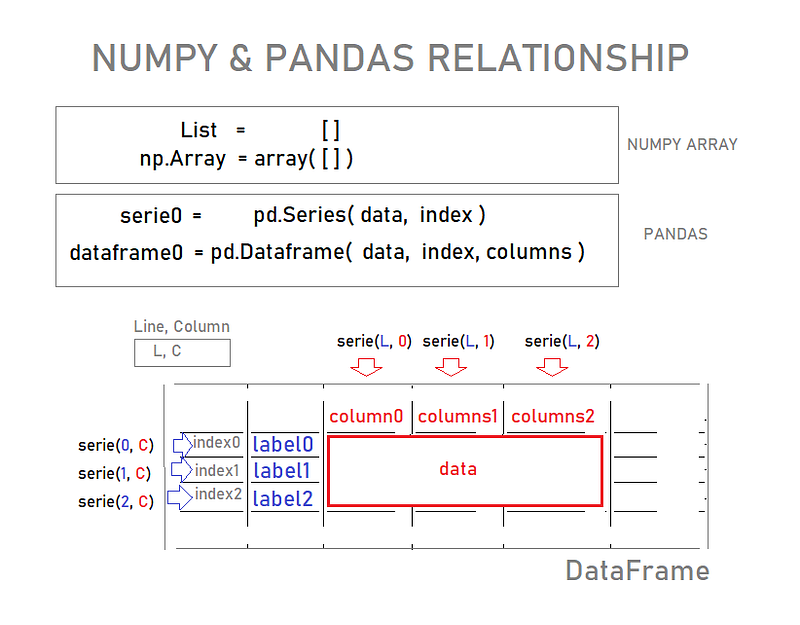
Fig 0. Numpy & Pandas together!

When should I use pandas DataFrame?

The Pandas DataFrame is a structure that contains two-dimensional data and its corresponding labels.

DataFrames are widely used in data science, machine learning, scientific computing, and many other data-intensive fields.

What Follows Example of how to use it:

Please, open your collab notebook and follow me:

01# First thing first. Importing the libraries:

import numpy as np
import pandas as pd
%matplotlib inline
import matplotlib.pyplot as plt
plt.style.use('seaborn-whitegrid')
import numpy as np

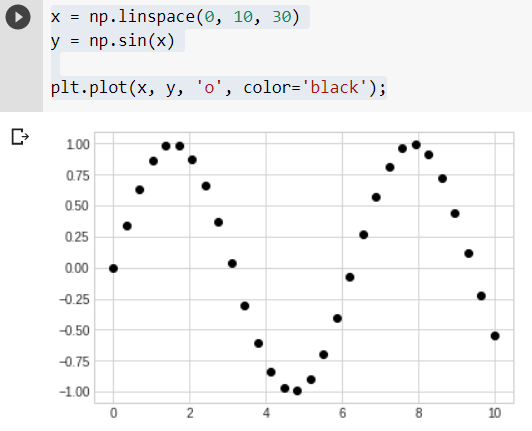
02# Let’s create a simple Graphic now:

Getting acquainted with PANDAS DATAFRAME:

x = np.linspace(0, 10, 30)
y = np.sin(x)
plt.plot(x, y, 'o', color='black');

3# Now here is a Real Problem:

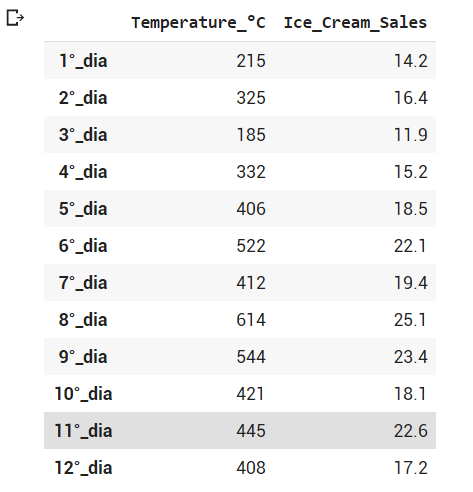
Suppose a local ice cream shop keeps track of how many ice cream they sell versus the noon temperature on that day.
Here are registers for 12 days in a roll:
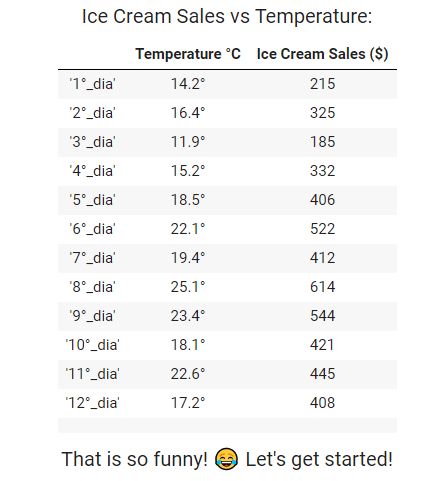
4# Let’s Plot the Graph & Make a Linear Regression:

Creating The Graph’s Axis From Numpy Arrays(x & y):

from scipy import stats
# Defining x & y Axis as Numpy Array
x=np.array([215,325,185,332,406,522,412,614,544,421,445,408])
y=np.array([14.2,16.4,11.9,15.2,18.5,22.1,19.4,25.1,23.4,18.1,22.6,17.2])
# Linear Regression
a,b,correlation,p,error=stats.linregress(x,y)
print('Regression line: y=%.2fx+%.2f'% (a,b))
print('Correlation Coefficient: r=%.2f'% correlation)
# Plotting the Graph
plt.plot(x,y,'o',label='Original data')
f=a*x+b
plt.plot(x,f,'r',label='Regression Line')
plt.ylim(10, 30)
plt.legend()
plt.title("Ice Cream Sales for The Last 12 Days")
plt.xlabel('Sales')
plt.ylabel('Temp °C')
plt.show()
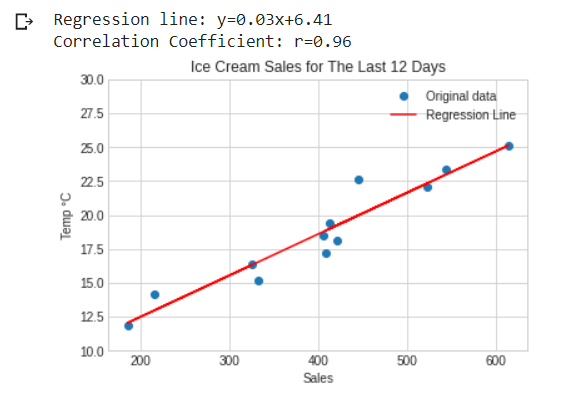
Ice Cream Sales vs Temperature; Regression line: y=0.03x+6.41; Correlation Coefficient: r=0.96.

🍦As you can see, the temperature 🍧 boosts the sales for the ice screen 🍨

5# Now Pandas DATAFRAMES Operations:

DATAFRAMES Can be thought of as a dict-like container for Series objects.

Creating Pandas DATAFRAMES From Dictionary (X & Y):

# Creating Pandas DATAFRAME by passing Disctionary to Pandas Dataframe METHOD:
d = {'X': [215,325,185,332,406,522,412,614,544,421,445,408], 'Y': [14.2,16.4,11.9,15.2,18.5,22.1,19.4,25.1,23.4,18.1,22.6,17.2]}
df = pd.DataFrame(data=d)
df.index = ['1°_dia','2°_dia', '3°_dia','4°_dia','5°_dia','6°_dia','7°_dia','8°_dia','9°_dia','10°_dia','11°_dia','12°_dia']
df.columns = [ 'Ice_Cream_Sales', 'Temperature_°C' ]
df
DATAFRAME: Ice Cream Sales vs Temperature.

6# Pandas DATAFRAMES — Using Brackets Notation:

DATAFRAMES — The primary Pandas data dict-like container structure!

Getting specific Column LIKE THIS: df[‘Specific_column’]…

# DATAFRAMES Can be thought of as a dict-like container for Series objects
# Here I am passing the Column NAME as string:
df['Temperature_°C']
1°_dia     215 
2°_dia     325 
3°_dia     185 
4°_dia     332 
5°_dia     406 
6°_dia     522 
7°_dia     412 
8°_dia     614 
9°_dia     544 
10°_dia    421 
11°_dia    445 
12°_dia    408 Name: Temperature_°C, dtype: int64

What type of object is it?

type(df['Temperature_°C'])
pandas.core.series.Series

…or like this: df[[‘List_of_Columns’]]:

# Here I am passing the Columns' LIST:
df[['Temperature_°C','Ice_Cream_Sales'] ]
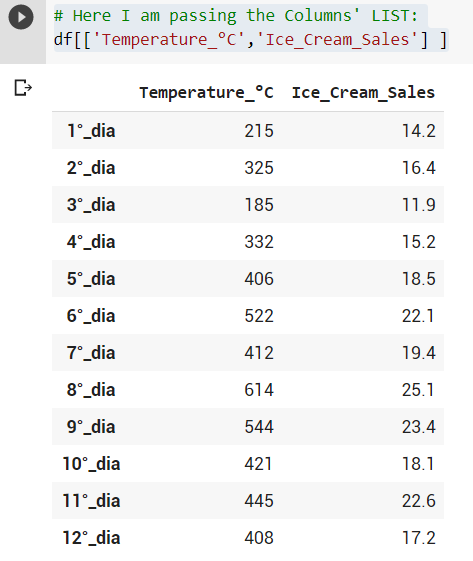
This is a DATAFRAME object!
# We’ve got a DATAFRAME object:
type(df)
pandas.core.frame.DataFrame

Returning a SERIES object:

df.Ice_Cream_Sales
# Returning a SERIES object
df.Ice_Cream_Sales
1°_dia     14.2
2°_dia     16.4 
3°_dia     11.9 
4°_dia     15.2 
5°_dia     18.5 
6°_dia     22.1 
7°_dia     19.4 
8°_dia     25.1 
9°_dia     23.4 
10°_dia    18.1 
11°_dia    22.6 
12°_dia    17.2 Name: Ice_Cream_Sales, dtype: float64

Returning a DATAFRAME object:

df[[‘Ice_Cream_Sales’]]
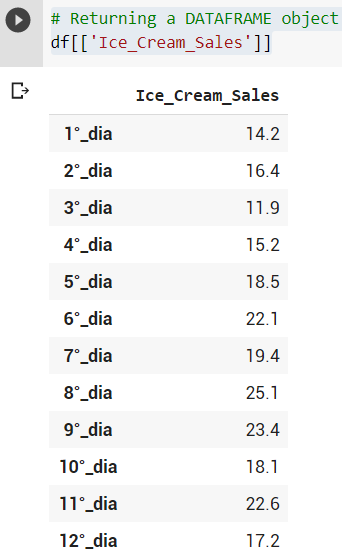
This is a DATAFRAME object!

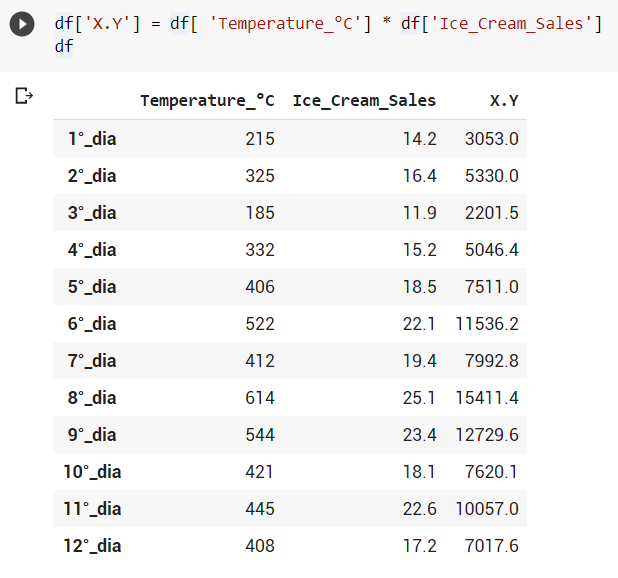
7# Creating a New Column (X.Y):

Making a Multiple Operation with DATAFRAMES:

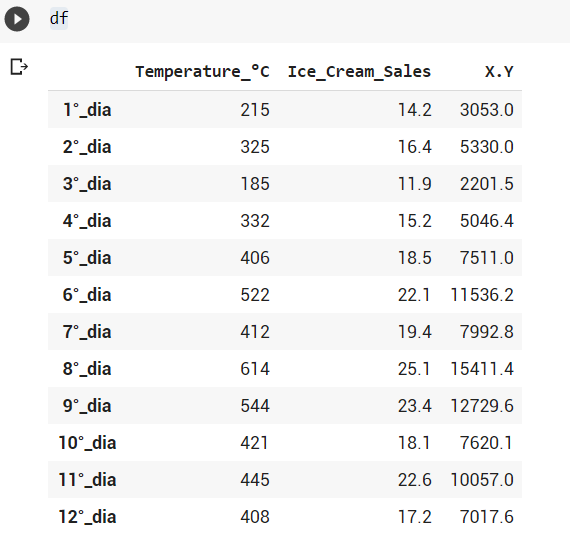
df['X.Y'] = df[ 'Temperature_°C'] * df['Ice_Cream_Sales']
df

8# Dropping Columns:

When inplace = True, the data is modified in place, which means it will return nothing, and the dataframe is now updated.

When inplace = False (DEFAULT), which is the default, then the operation is performed and it returns a copy of the object. You then need to save it to something.

df.drop('X.Y', axis=1, inplace=False)
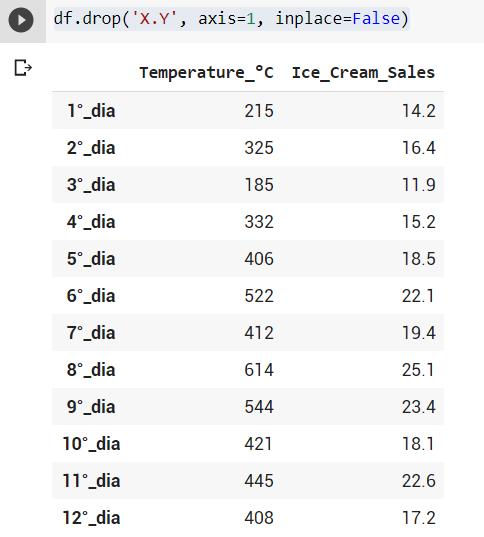
df
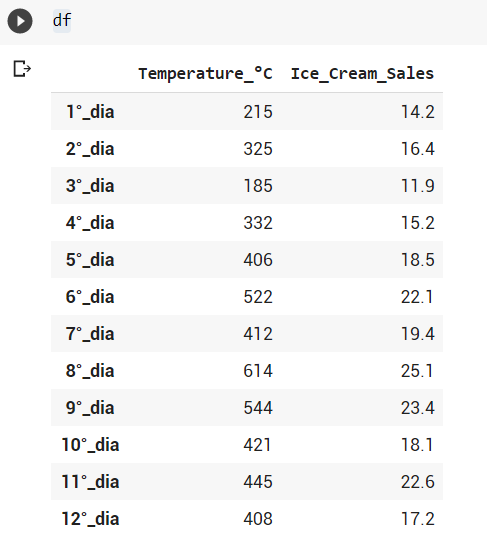
df.drop('X.Y', axis=1, inplace=True)

Now:

df

9# Dropping Rows:

df.drop('12°_dia', axis=0)
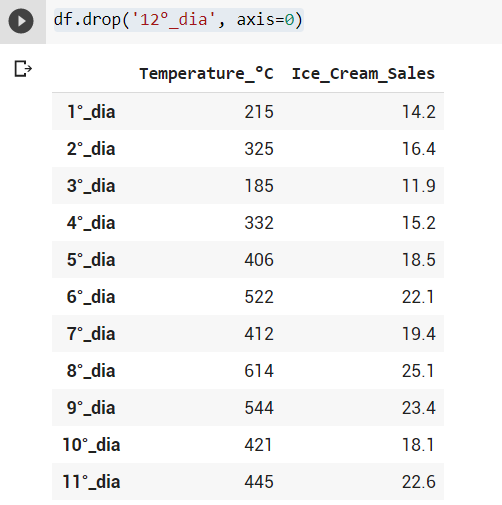
df.shape
(12, 2)

Now with inplace attribute:

df.drop(‘12°_dia’, axis=0, inplace=True)
df
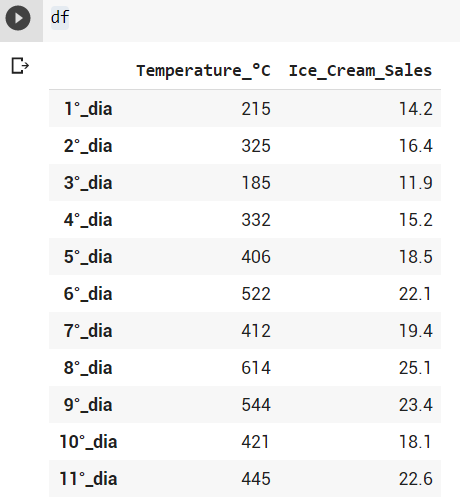
df.shape
(11, 2)

10# Selecting Rows — There are two methods:

LOC -> LABEL-BASE index

ILOC -> NUMERICAL-BASE index

# Calling the 11th day (loc): LABEL-BASE
df.loc['11°_dia']
Temperature_°C     445.0 
Ice_Cream_Sales     22.6 
Name: 11°_dia, dtype: float64

Now:

# Calling the 11th day (iloc):  NUMERICAL-BASE
df.iloc[10]
Temperature_°C     445.0 
Ice_Cream_Sales     22.6 
Name: 11°_dia, dtype: float64

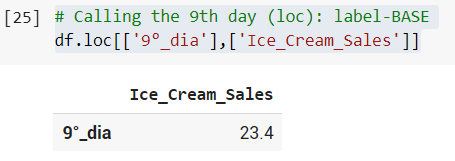
11# Returning a Single Value:

# Calling the 9th day (loc): label-BASE
df.loc[['9°_dia'],['Ice_Cream_Sales']]
# Calling the Row 9th x Column 'Ice_Cream_Sales'  day (iloc):  Numerical-BASE
df.iloc[8,1]
23.4

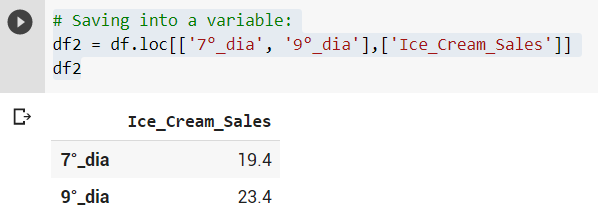
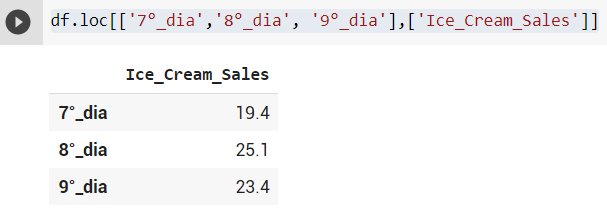
12 # Returning a SUB-SET of the DataFrame:

df.loc[['7°_dia','8°_dia', '9°_dia'],['Ice_Cream_Sales']]
# Saving into a variable:
df2 = df.loc[['7°_dia', '9°_dia'],['Ice_Cream_Sales']]
df2
# Discovering the type's Variable:
type(df2)
pandas.core.frame.DataFrame

13 # J3 signing-off ;):

I WISH YOU ALL THE BEST!

print("That's it! This is another example for PySeries#Episode 08")

OK! That’s all!

I hope you enjoyed that lecture.

If you find this post helpful, please click the applause button and subscribe to the page for more articles like this one.

Until next time!

I wish you an excellent day!

31_pandas_dataframe_practice.ipynb

Credits & References

Based on: Support Vector Machines: A Visual Explanation with Sample Python Code by Alice Zhao

Related Post:

08 # PySeries#Episode 08 — Pandas — DataFrames : The Primary Pandas Data Structure! It Is a Dict-Like Container for Series Object

Pandas
Pandas Dataframe
Python3
Colab
Pandas Tutorial
Recommended from ReadMedium