avatarJ3

Free AI web copilot to create summaries, insights and extended knowledge, download it at here

5293

Abstract

ent"># You don’t need the constant-specifier </span> <span class="hljs-comment"># as long as you put them in the correct order</span></pre></div><div id="0475"><pre>pd.Series<span class="hljs-comment">(my_data, labels)</span></pre></div><div id="e789"><pre><span class="hljs-attribute">a</span> <span class="hljs-number">10</span> <span class="hljs-attribute">b</span> <span class="hljs-number">20</span> <span class="hljs-attribute">c</span> <span class="hljs-number">30</span> <span class="hljs-attribute">dtype</span>: int64</pre></div><h2 id="0487">Or finally, what’s really cool:</h2><h2 id="b7b7">Pass in the DICTIONARY:</h2><div id="b305"><pre><span class="hljs-comment"># Pandas takes the key as an INDEX, and the dictionary </span> <span class="hljs-comment"># values as our DATA.</span> <span class="hljs-comment"># So that’s a nice and fast way to quickly create a SERIES!</span></pre></div><div id="7bbd"><pre>pd.Series<span class="hljs-comment">(d)</span></pre></div><div id="75f5"><pre><span class="hljs-attribute">a</span> <span class="hljs-number">10</span> <span class="hljs-attribute">b</span> <span class="hljs-number">20</span> <span class="hljs-attribute">c</span> <span class="hljs-number">30</span> <span class="hljs-attribute">dtype</span>: int64</pre></div><h2 id="176c">A Series can hold pretty much almost any type of data object of Python as its data points and, more interesting than that is we can pass in built-in functions like sum(), print(), and len(), etc</h2><h2 id="22a2">It can even hold references of these functions as data points :)</h2><p id="1865">pd.Series(data=[sum, print, len])</p><h2 id="bdf4">We probably never actually use this, but this demonstrates the flexibility of the PANDAS Series as far as holding different object types!</h2><p id="9073">(Jose Portilla — <a href="https://www.udemy.com/course/python-for-data-science-and-machine-learning-bootcamp/?utm_source=adwords&amp;utm_medium=udemyads&amp;utm_campaign=Python_v.PROF_la.EN_cc.ROW_ti.7380&amp;utm_content=deal4584&amp;utm_term=_._ag_85724077624_._ad_437497333662_._kw__._de_c_._dm__._pl__._ti_dsa-774930046209_._li_1001666_._pd__._&amp;matchtype=b&amp;gclid=CjwKCAjw19z6BRAYEiwAmo64LXql5c39WYBtT7Ejjq8ubwagaBl0OzrIECa53ORMjLop3jJUcOcD-BoCGdQQAvD_BwE">Python For Data Science course</a>)</p><h1 id="ffd6">Arithmetic with Series</h1><p id="92c3">Series (DATA, INDEX)</p><div id="a571"><pre>ser1=pd<span class="hljs-selector-class">.Series</span>(<span class="hljs-selector-attr">[1,2,3,4]</span>, <span class="hljs-selector-attr">[<span class="hljs-string">'USA'</span>, <span class="hljs-string">'USSR'</span>, <span class="hljs-string">'GERMANY'</span>, <span class="hljs-string">'JAPAN'</span>]</span>)</pre></div><div id="d2eb"><pre>ser1</pre></div><div id="c6b5"><pre><span class="hljs-attribute">USA</span> <span class="hljs-number">1</span> <span class="hljs-attribute">USSR</span> <span class="hljs-number">2</span> <span class="hljs-attribute">GERMANY</span> <span class="hljs-number">3</span> <span class="hljs-attribute">JAPAN</span> <span class="hljs-number">4</span> <span class="hljs-attribute">dtype</span>: int64</pre></div><p id="11da">Other Series follows:</p><div id="39e3"><pre>ser2=pd<span class="hljs-selector-class">.Series</span>(<span class="hljs-selector-attr">[1,2,5,4]</span>, <span class="hljs-selector-attr">[<span class="hljs-string">'USA'</span>,<span class="hljs-string">'USSR'</span>, <span class="hljs-string">'ITALY'</span>, <span class="hljs-string">'JAPAN'</span>]</span>)</pre></div><div id="1575"><pre>ser2</pre></div><div id="02b2"><pre><span class="hljs-attribute">USA</span> <span class="hljs-number">1</span> <span class="hljs-attribute">USSR</span> <span class="hljs-number">2</span> <span class="hljs-attribute">ITALY</span> <span class="hljs-number">5</span> <span class="hljs-attribute">JAPAN</span> <span class="hljs-number">4</span> <span class="hljs-attribute">dtype</span>: int64</pre></div><p id="ed32">How to Recovery the Series:</p><div id="297a"><pre><span class="hljs-comment"># To rescue the data pass in the INDEX</span></pre></div><div id="e17b"><pre>ser1<span class="hljs-selector-attr">[<span class="hljs-string">'USA'</span>]</span></pre></div><div id="f79d"><pre>1</pre></div><p id="8f07">Or pass in the INDEX like this:</p><div id="e6e5"><pre>ser1.USA</pre></div><div id="f2b0"><pre>1</pre></div><h2 id="1062">Arithmetic</h2><div id="4c2e"><pre># We can <span class="hljs-keyword">do</span> arithmetic operations <span class="hljs-keyword">with</span> the Series too:</pre></div><div id="9426"><pre><span class="hljs-attribute">ser1</span> + ser2</pre></div><div id="0175"><pre><span class="hljs-attribute">GERMANY</span> NaN <span class="hljs-attribute">ITALY</span> NaN <span class="hljs-attribute">JAPAN</span> <span class="hljs-number">8</span>.<span class="hljs-number">0</span> <span class="hljs-attribute">USA</span> <span class="hljs-number">2</span>.<span class="hljs-number">0</span> <span class="hljs-attribute">USSR</span> <span class="hljs-number">4</span>.<span class="hljs-number">0</span> <span class="hljs-attribute">dtype</span>: float64</pre></div><p id="d147">That’s it for Pandas Series!</p><p id="6d55">In the next e

Options

pisode let’s discuss <b>DataFrame!</b></p><p id="f625">Stay tuned!</p><p id="39ff">Bye, for now, o/</p><p id="6ba4">GitHub Repo <a href="https://github.com/giljr/py4engineer/blob/master/EX_06/ex_06_pandas_1.ipynb">link</a></p><p id="b310">Google Colab link [TODO: THE LINK FOR COLAB GOES HERE!]</p><h1 id="3bf6">Credits & References:</h1><p id="f499">Jose Portilla — <a href="https://www.udemy.com/course/python-for-data-science-and-machine-learning-bootcamp/">Python for Data Science and Machine Learning Bootcamp </a>— Learn how to use NumPy, Pandas, Seaborn , Matplotlib , Plotly , Scikit-Learn , Machine Learning, Tensorflow , and more!</p><h1 id="a2de">Posts Related:</h1><p id="54d8">00Episode#<b>PySeries </b>— Python — <a href="https://medium.com/@J.3/python-jupiter-notebook-quick-start-with-vscode-916c43c10d9a">Jupiter Notebook Quick Start with VSCode — How to Set your Win10 Environment to use Jupiter Notebook</a></p><p id="c556">01Episode#<b>PySeries </b>— Python — <a href="https://readmedium.com/python-for-engenniging-exercises-977fbe4d6d02">Python 4 Engineers — Exercises! An overview of the Opportunities Offered by Python in Engineering!</a></p><p id="d3b9">02Episode#<b>PySeries </b>— Python — <a href="https://readmedium.com/geogebra-plus-linear-programming-a51661c99590">Geogebra Plus Linear Programming- We’ll Create a Geogebra program to help us with our linear programming</a></p><p id="33d2">03Episode#<b>PySeries</b> — Python — <a href="https://readmedium.com/python-4-engineers-more-exercises-5cbab729ef11">Python 4 Engineers — More Exercises! — Another Round to Make Sure that Python is Really Amazing!</a></p><p id="2b34">04Episode#<b>PySeries</b> — Python — <a href="https://readmedium.com/linear-regressions-the-basics-1a633f351ec2">Linear Regressions — The Basics — How to Understand Linear Regression Once and For All!</a></p><p id="76b0">05Episode#<b>PySeries</b> — Python — <a href="https://readmedium.com/numpy-init-python-review-f5362abbaaf9">NumPy Init & Python Review — A Crash Python Review & Initialization at Numpy lib</a>.</p><p id="eb1a">06Episode#<b>PySeries</b> — Python —<a href="https://readmedium.com/numpy-jupyter-notebook-1182f78ab4e1"> NumPy Arrays & Jupyter Notebook — Arithmetic Operations, Indexing & Selection, and Conditional Selection</a></p><p id="e321">07Episode#<b>PySeries</b> — Python — Pandas — Intro & Series — What it is? How to use it? (this one)</p><p id="d8f8">08Episode#<b>PySeries</b> — Python — <a href="https://readmedium.com/pandas-dataframes-7ba872dcbc30">Pandas DataFrames — The primary Pandas data structure! It is a dict-like container for Series objects</a></p><p id="1929">09Episode#<b>PySeries</b> — Python — <a href="https://readmedium.com/python-4-engineers-even-more-exercises-d0141e0b06d">Python 4 Engineers — Even More Exercises! — More Practicing Coding Questions in Python</a>!</p><p id="73fd">10Episode#<b>PySeries</b> — Python — <a href="https://readmedium.com/pandas-hierarchical-index-cross-section-30783023a274">Pandas — Hierarchical Index & Cross-section — Open your Colab notebook and here are the follow-up exercises!</a></p><p id="7fe7">11Episode#<b>PySeries</b> — Python — <a href="https://readmedium.com/pandas-missing-data-5142f3eda2b">Pandas — Missing Data — Let’s Continue the Python Exercises — Filling & Dropping Missing Data</a></p><p id="0fa0">12Episode#<b>PySeries</b> — Python — <a href="https://readmedium.com/pandas-group-by-3140d053b9c">Pandas — Group By — Grouping large amounts of data and compute operations on these groups</a></p><p id="660e">13Episode#<b>PySeries</b> — Python — <a href="https://readmedium.com/pandas-merging-joining-concatenations-a35bbe1a9dd5">Pandas — Merging, Joining & Concatenations — Facilities For Easily Combining Together Series or DataFrame</a></p><p id="3dfb">14Episode#<b>PySeries</b> — Python — <a href="https://readmedium.com/pandas-operations-4b8f7a4b4139">Pandas — Pandas Dataframe Examples: Column Operations</a></p><p id="d7f9">15Episode#<b>PySeries</b> — Python — <b>Python 4 Engineers </b>— Keeping It In The Short-Term Memory — <a href="https://readmedium.com/python-4-engineers-keeping-it-in-the-short-term-memory-4f9458016171"><b>Test Yourself!</b> Coding in Python, Again!</a></p><p id="56e8">16Episode#<b>PySeries</b> — NumPy — <a href="https://readmedium.com/numpy-review-again-f94f1c1c77e8">NumPy Review, Again;)<b> </b></a>— Python Review Free Exercises</p><p id="be46">17Episode#<b>PySeries</b><a href="https://readmedium.com/generators-in-python-8d3de173743e">Generators in Python<b></b></a><b><a href="https://readmedium.com/numpy-review-again-f94f1c1c77e8"><b> </b></a>— Python Review Free Hints</b></p><p id="7a7f">18Episode#<b>PySeries</b> — P<a href="https://readmedium.com/panda-review-again-baf0687b35de">andas Review…Again;)</a> — Python Review Free Exercise</p><p id="8cbf">19Episode#<b>PySeries</b><a href="https://readmedium.com/matlibplot-seaborn-python-libs-459f6666f35f">MatlibPlot & Seaborn Python Libs </a>— Reviewing theses Plotting & Statistics Packs</p><p id="3d24">20Episode#<b>PySeries</b><a href="https://readmedium.com/seaborn-python-review-9e543b6b7a44">Seaborn Python Review</a> — Reviewing theses Plotting & Statistics Packs</p></article></body>

Pandas — Intro & Series

What it is? How to use it? — #PySeries#Episode 07

What is PANDAS?

  1. Pandas is an open-source library build on top of NumPy;
  2. Pandas allows for analysis and data cleaning and preparations;
  3. Pandas excels in performance and productivity;
  4. Pandas also has built-in visualization features;
  5. Pandas can work with data from a wide variety of sources.

Fig 1. Pandas is a fast, powerful, flexible, and easy to use open-source data analysis and manipulation tool, built on top of the Python NumPy programming language.

Data Science topics with Pandas:

Here are the topics for our study about Pandas:

.Series (this one:)
.DataFrames
.Missing Data
.GroupBy
.Merging, Joinning, and Concatenating
.Operations
.Data Input and Output
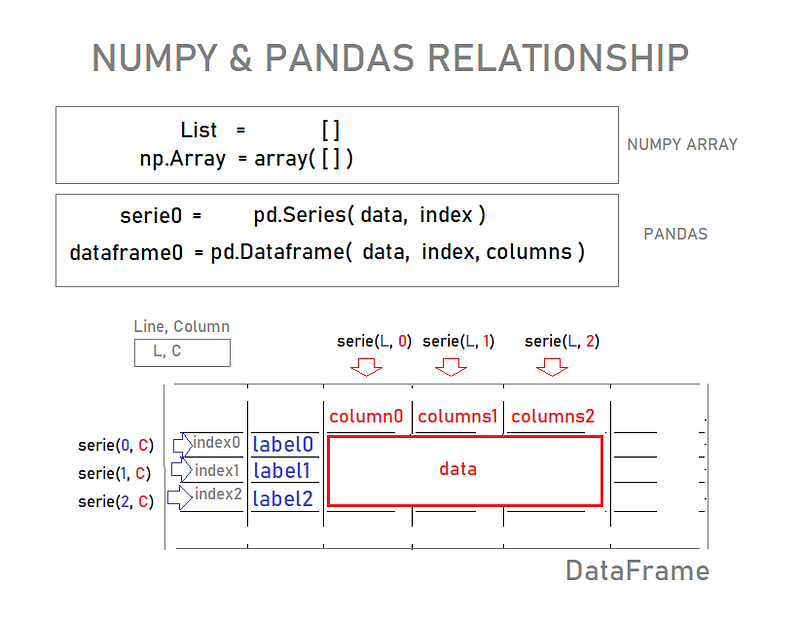
Fig 1. Numpy & Pandas Together!

The first topic will be the Series:

SERIES

We will need these four object in Python to open a Series in Pandas:

LIST
DATA
ARRAY
DICTIONARY

Get your Jupyter Notebook (or Google Colab) and type:

# Pandas is build on top of NumPy
import numpy as np

Pandas needs NumPy because it is built on top of it.

Now initialize Pandas itself like this:

# To start up PANDAS package
import pandas as pd

Let`s get down to code; Here is our List:

labels=['a','b','c']

And our other three separate Python Object: data, NumPy array, and a dictionary:

my_data=[10,20,30]
arr=np.array(my_data)
d={'a':10,'b':20, 'c':30}

HOW TO CREATE A SERIES

First, we’ll need theses four Python Object:

  1. LIST
  2. DATA
  3. ARRAY and
  4. DICTIONARY

Then we pass in our DATA to the Series Method:

# Series : It look a lot as np array, except that here 
# it’s very distinguish we have an INDEX and the actual DATA,
# that is, it is an indexed array:)
pd.Series(data=my_data)
0    10
1    20
2    30
dtype: int64

Or our DATA together w/ LIST (labels):

# Now I specify that INDEX is iguals to the LIST labels
# Now I have a label-INDEX Series
pd.Series(data=my_data, index=labels)
a    10
b    20
c    30
dtype: int64

In this very order: 1º DATA then 2º INDEX: Series (DATA, INDEX)

# You don’t need the constant-specifier 
# as long as you put them in the correct order
pd.Series(my_data, labels)
a    10
b    20
c    30
dtype: int64

Or finally, what’s really cool:

Pass in the DICTIONARY:

# Pandas takes the key as an INDEX, and the dictionary 
# values as our DATA.
# So that’s a nice and fast way to quickly create a SERIES!
pd.Series(d)
a    10
b    20
c    30
dtype: int64

A Series can hold pretty much almost any type of data object of Python as its data points and, more interesting than that is we can pass in built-in functions like sum(), print(), and len(), etc

It can even hold references of these functions as data points :)

pd.Series(data=[sum, print, len])

We probably never actually use this, but this demonstrates the flexibility of the PANDAS Series as far as holding different object types!

(Jose Portilla — Python For Data Science course)

Arithmetic with Series

Series (DATA, INDEX)

ser1=pd.Series([1,2,3,4], ['USA', 'USSR', 'GERMANY', 'JAPAN'])
ser1
USA        1
USSR       2
GERMANY    3
JAPAN      4
dtype: int64

Other Series follows:

ser2=pd.Series([1,2,5,4], ['USA','USSR', 'ITALY', 'JAPAN'])
ser2
USA      1
USSR     2
ITALY    5
JAPAN    4
dtype: int64

How to Recovery the Series:

# To rescue the data pass in the INDEX
ser1['USA']
1

Or pass in the INDEX like this:

ser1.USA
1

Arithmetic

# We can do arithmetic operations with the Series too:
ser1 + ser2
GERMANY    NaN
ITALY      NaN
JAPAN      8.0
USA        2.0
USSR       4.0
dtype: float64

That’s it for Pandas Series!

In the next episode let’s discuss DataFrame!

Stay tuned!

Bye, for now, o/

GitHub Repo link

Google Colab link [TODO: THE LINK FOR COLAB GOES HERE!]

Credits & References:

Jose Portilla — Python for Data Science and Machine Learning Bootcamp — Learn how to use NumPy, Pandas, Seaborn , Matplotlib , Plotly , Scikit-Learn , Machine Learning, Tensorflow , and more!

Posts Related:

00Episode#PySeries — Python — Jupiter Notebook Quick Start with VSCode — How to Set your Win10 Environment to use Jupiter Notebook

01Episode#PySeries — Python — Python 4 Engineers — Exercises! An overview of the Opportunities Offered by Python in Engineering!

02Episode#PySeries — Python — Geogebra Plus Linear Programming- We’ll Create a Geogebra program to help us with our linear programming

03Episode#PySeries — Python — Python 4 Engineers — More Exercises! — Another Round to Make Sure that Python is Really Amazing!

04Episode#PySeries — Python — Linear Regressions — The Basics — How to Understand Linear Regression Once and For All!

05Episode#PySeries — Python — NumPy Init & Python Review — A Crash Python Review & Initialization at Numpy lib.

06Episode#PySeries — Python — NumPy Arrays & Jupyter Notebook — Arithmetic Operations, Indexing & Selection, and Conditional Selection

07Episode#PySeries — Python — Pandas — Intro & Series — What it is? How to use it? (this one)

08Episode#PySeries — Python — Pandas DataFrames — The primary Pandas data structure! It is a dict-like container for Series objects

09Episode#PySeries — Python — Python 4 Engineers — Even More Exercises! — More Practicing Coding Questions in Python!

10Episode#PySeries — Python — Pandas — Hierarchical Index & Cross-section — Open your Colab notebook and here are the follow-up exercises!

11Episode#PySeries — Python — Pandas — Missing Data — Let’s Continue the Python Exercises — Filling & Dropping Missing Data

12Episode#PySeries — Python — Pandas — Group By — Grouping large amounts of data and compute operations on these groups

13Episode#PySeries — Python — Pandas — Merging, Joining & Concatenations — Facilities For Easily Combining Together Series or DataFrame

14Episode#PySeries — Python — Pandas — Pandas Dataframe Examples: Column Operations

15Episode#PySeries — Python — Python 4 Engineers — Keeping It In The Short-Term Memory — Test Yourself! Coding in Python, Again!

16Episode#PySeries — NumPy — NumPy Review, Again;) — Python Review Free Exercises

17Episode#PySeriesGenerators in Python — Python Review Free Hints

18Episode#PySeries — Pandas Review…Again;) — Python Review Free Exercise

19Episode#PySeriesMatlibPlot & Seaborn Python Libs — Reviewing theses Plotting & Statistics Packs

20Episode#PySeriesSeaborn Python Review — Reviewing theses Plotting & Statistics Packs

Numpy
Python3
Pandas
Machine Learning
Data Science
Recommended from ReadMedium