avatarJ3

Free AI web copilot to create summaries, insights and extended knowledge, download it at here

12913

Abstract

="213b"><pre>dict_items([('key1', <span class="hljs-number">1</span>), ('key2', <span class="hljs-number">2</span>)])</pre></div><p id="236a">Values:</p><div id="9a8e"><pre>d.values<span class="hljs-comment">()</span></pre></div><div id="2cd9"><pre><span class="hljs-function"><span class="hljs-title">dict_values</span><span class="hljs-params">([<span class="hljs-number">1</span>, <span class="hljs-number">2</span>])</span></span></pre></div><h2 id="edb5">LIST</h2><div id="0b9a"><pre><span class="hljs-attr">lst</span> = [<span class="hljs-number">1</span>,<span class="hljs-number">2</span>,<span class="hljs-number">3</span>]</pre></div><p id="825c">Pop & Append Methods:</p><div id="1ceb"><pre><span class="hljs-attribute">item</span> <span class="hljs-operator">=</span> lst.pop()</pre></div><div id="339a"><pre><span class="hljs-built_in">item</span></pre></div><div id="50ad"><pre>3</pre></div><div id="c0d1"><pre><span class="hljs-attribute">lst</span></pre></div><div id="d0f2"><pre><span class="hljs-string">[1, 2]</span></pre></div><div id="b5e2"><pre><span class="hljs-attribute">lst</span>.append(<span class="hljs-number">3</span>)</pre></div><div id="7df8"><pre><span class="hljs-attribute">lst</span></pre></div><div id="0faa"><pre><span class="hljs-string">[1, 2, 3]</span></pre></div><h2 id="da4c">IN word</h2><div id="669e"><pre><span class="hljs-string">'x'</span> in [<span class="hljs-string">'x'</span>,<span class="hljs-string">'y'</span>, <span class="hljs-string">'z'</span>]</pre></div><div id="35ae"><pre><span class="hljs-literal">True</span></pre></div><div id="fe3d"><pre><span class="hljs-string">'w'</span> in [<span class="hljs-string">'x'</span>, <span class="hljs-string">'y'</span>, <span class="hljs-string">'z'</span>]</pre></div><div id="a633"><pre><span class="hljs-literal">False</span></pre></div><h2 id="c194">TUPLE UNPACKING</h2><p id="6363">Python tuples are immutable means that they can not be modified in the whole program.</p><p id="b2c2"><b>Packing and Unpacking a Tuple</b>: In Python, there is a very powerful tuple assignment feature that assigns the right-hand side of values into the left-hand side. In another way, it is called the unpacking of a tuple of values into a variable. In packing, we put values into a new tuple while in unpacking we extract those values into a single variable.</p><div id="a18b"><pre>x = [<span class="hljs-comment">(1,2)</span>,<span class="hljs-comment">(3,4)</span>,<span class="hljs-comment">(5,6)</span>]</pre></div><div id="3068"><pre><span class="hljs-attribute">x</span>[<span class="hljs-number">0</span>][<span class="hljs-number">0</span>]</pre></div><div id="04e4"><pre>1</pre></div><div id="1f6b"><pre><span class="hljs-attribute">x</span>[<span class="hljs-number">0</span>][<span class="hljs-number">1</span>]</pre></div><div id="404d"><pre>2</pre></div><p id="6222">Using for loop:</p><div id="d8eb"><pre><span class="hljs-keyword">for</span> <span class="hljs-built_in">item</span> <span class="hljs-keyword">in</span> x: print(<span class="hljs-built_in">item</span>)</pre></div><div id="a4c2"><pre>(<span class="hljs-number">1</span><span class="hljs-punctuation">,</span> <span class="hljs-number">2</span>) (<span class="hljs-number">3</span><span class="hljs-punctuation">,</span> <span class="hljs-number">4</span>) (<span class="hljs-number">5</span><span class="hljs-punctuation">,</span> <span class="hljs-number">6</span>)</pre></div><p id="dc78">Unpacking:</p><div id="b1d0"><pre>for (<span class="hljs-selector-tag">a</span>,<span class="hljs-selector-tag">b</span>) in x: <span class="hljs-built_in">print</span>(a)</pre></div><div id="1563"><pre>1 3 5</pre></div><p id="d6c7">Or just like this:</p><div id="688c"><pre>for <span class="hljs-selector-tag">a</span>,<span class="hljs-selector-tag">b</span> in x: <span class="hljs-built_in">print</span>(a+<span class="hljs-number">1</span>, b+<span class="hljs-number">1</span>)</pre></div><div id="8598"><pre><span class="hljs-symbol">2 </span><span class="hljs-number">3</span> <span class="hljs-symbol">4 </span><span class="hljs-number">5</span> <span class="hljs-symbol">6 </span><span class="hljs-number">7</span></pre></div><h1 id="77b9">NUMPY</h1><p id="5ba1">The reason it is so important for Data Science with Python is that a lot of all the libraries in the <i>Python Ecosystem</i> rely on NUMPY as one of their main <i>building blocks</i> (Jose Portilla — <a href="https://www.udemy.com/course/python-for-data-science-and-machine-learning-bootcamp/">Python For Data Science course</a>).</p><div id="eb36" class="link-block"> <a href="https://www.udemy.com/course/python-for-data-science-and-machine-learning-bootcamp/"> <div> <div> <h2>Learn Python for Data Science, Structures, Algorithms, Interviews</h2> <div><h3>Are you ready to start your path to becoming a Data Scientist! This comprehensive course will be your guide to learning…</h3></div> <div><p>www.udemy.com</p></div> </div> <div> <div style="background-image: url(https://miro.readmedium.com/v2/resize:fit:320/0*kgW2v0kfrzmSLmpk)"></div> </div> </div> </a> </div><p id="0778">NUMPY is also incredibly fast as it has bound to C libraries.</p><h2 id="ccb1">Installation:</h2><div id="08f0"><pre>conda <span class="hljs-keyword">install </span>numpy (Anaconda) <span class="hljs-keyword">or </span>pip <span class="hljs-keyword">install </span>numpy</pre></div><h2 id="276a">ARRAYS (Vectors & Matrices) in NUMPY</h2><p id="4aaf"><b>-> Always cast a list into NUMPY array</b></p><p id="4e06"># Vectors:</p><div id="35c2"><pre><span class="hljs-attribute">my_list</span>=[<span class="hljs-number">1</span>,<span class="hljs-number">2</span>,<span class="hljs-number">3</span>]</pre></div><div id="9e46"><pre><span class="hljs-keyword">import</span> numpy <span class="hljs-keyword">as</span> np </pre></div><div id="eccb"><pre><span class="hljs-attribute">vec</span> <span class="hljs-operator">=</span> np.array(my_list)</pre></div><p id="15aa"><i># 1 bracket mean 1-dimensional array ([]):</i></p><div id="0f0e"><pre><span class="hljs-attribute">vec</span></pre></div><div id="3886"><pre><span class="hljs-attribute">array</span>([<span class="hljs-number">1</span>, <span class="hljs-number">2</span>, <span class="hljs-number">3</span>])</pre></div><p id="94a5"># Matrices:</p><div id="7284"><pre>my_mat = <span class="hljs-string">[[1,2,3],[4,5,6],[7,8,9]]</span></pre></div><div id="533c"><pre><span class="hljs-keyword">import</span> numpy <span class="hljs-keyword">as</span> np</pre></div><div id="a760"><pre><span class="hljs-attribute">mat</span><span class="hljs-operator">=</span>np.array(my_mat)</pre></div><p id="7a42"># 2 brackets mean 2-dimensional array ([[]]):</p><div id="8d20"><pre>mat array(<span class="hljs-string">[[1, 2, 3], [4, 5, 6], [7, 8, 9]]</span>)</pre></div><h2 id="ceb4">ARANGE in NUMPY</h2><p id="17b0"># All the way up to 10, but not including 10 -> return AN NUMPY ARRAY sequence of 10 digits counting from 0 to 9</p><p id="4786"># np.arange(start, stop):</p><div id="b840"><pre><span class="hljs-attribute">np</span>.arange(<span class="hljs-number">0</span>,<span class="hljs-number">10</span>)</pre></div><div id="1a8c"><pre><span class="hljs-attribute">array</span>([<span class="hljs-number">0</span>, <span class="hljs-number">1</span>, <span class="hljs-number">2</span>, <span class="hljs-number">3</span>, <span class="hljs-number">4</span>, <span class="hljs-number">5</span>, <span class="hljs-number">6</span>, <span class="hljs-number">7</span>, <span class="hljs-number">8</span>, <span class="hljs-number">9</span>])</pre></div><p id="9c75">The third argument is the step:</p><p id="8a53"># Third argument: step size you may want</p><p id="1721"># np.arange(start, stop, step):</p><div id="0d4e"><pre><span class="hljs-attribute">np</span>.arange(<span class="hljs-number">0</span>,<span class="hljs-number">10</span>,<span class="hljs-number">2</span>)</pre></div><div id="3e90"><pre><span class="hljs-attribute">array</span>([<span class="hljs-number">0</span>, <span class="hljs-number">2</span>, <span class="hljs-number">4</span>, <span class="hljs-number">6</span>, <span class="hljs-number">8</span>])</pre></div><h2 id="fb93">ZEROES & ONES & EYE(Identity matrix) in NUMPY</h2><div id="b6ee"><pre><span class="hljs-attribute">np</span>.zeros(<span class="hljs-number">3</span>)</pre></div><div id="8897"><pre><span class="hljs-attribute">array</span>([<span class="hljs-number">0</span>., <span class="hljs-number">0</span>., <span class="hljs-number">0</span>.])</pre></div><div id="f152"><pre><span class="hljs-attribute">np</span>.zeros((<span class="hljs-number">5</span>,<span class="hljs-number">5</span>))</pre></div><div id="71d0"><pre>array(<span class="hljs-comment">[<span class="hljs-comment">[0., 0., 0., 0., 0.]</span>, <span class="hljs-comment">[0., 0., 0., 0., 0.]</span>, <span class="hljs-comment">[0., 0., 0., 0., 0.]</span>, <span class="hljs-comment">[0., 0., 0., 0., 0.]</span>, <span class="hljs-comment">[0., 0., 0., 0., 0.]</span>]</span>)</pre></div><p id="8082">Ones:</p><div id="d70e"><pre><span class="hljs-attribute">np</span>.zeros(<span class="hljs-number">3</span>)</pre></div><div id="b3a6"><pre><span class="hljs-attribute">array</span>([<span class="hljs-number">1</span>., <span class="hljs-number">1</span>., <span class="hljs-number">1</span>., <span class="hljs-number">1</span>.])</pre></div><div id="f0ac"><pre><span class="hljs-attribute">np</span>.ones((<span class="hljs-number">5</span>,<span class="hljs-number">5</span>))</pre></div><div id="a11f"><pre>array(<span class="hljs-comment">[<span class="hljs-comment">[1., 1., 1., 1., 1.]</span>, <span class="hljs-comment">[1., 1., 1., 1., 1.]</span>, <span class="hljs-comment">[1., 1., 1., 1., 1.]</span>, <span class="hljs-comment">[1., 1., 1., 1., 1.]</span>, <span class="hljs-comment">[1., 1., 1., 1., 1.]</span>]</span>)</pre></div><p id="3e67">Identity Matrix:</p><div id="a568"><pre><span class="hljs-attribute">np</span>.eye(<span class="hljs-number">4</span>)</pre></div><div id="cdb6"><pre>array(<span class="hljs-comment">[<span class="hljs-comment">[1., 0., 0., 0.]</span>, <span class="hljs-comment">[0., 1., 0., 0.]</span>, <span class="hljs-comment">[0., 0., 1., 0.]</span>, <span class="hljs-comment">[0., 0., 0., 1.]</span>]</span>)</pre></div><h2 id="03e3">LINSPACE (SPACED EVENLY) in NUMPY</h2><p id="ad70"># From 0, to 5 returning 10 digits spaced evenly:</p><div id="787b"><pre><span class="hljs-attribute">np</span>.linspace(<span class="hljs-number">0</span>,<span class="hljs-number">5</span>,<span class="hljs-number">10</span>)</pre></div><div id="8327"><pre><span class="hljs-attribute">array</span>([<span class="hljs-number">0</span>. , <span class="hljs-number">0</span>.<span class="hljs-number">55555556</span>, <span class="hljs-number">1</span>.<span class="hljs-number">11111111</span>, <span class="hljs-number">1</span>.<span class="hljs-number">66666667</span>, <span class="hljs-number">2</span>.<span class="hljs-number">22222222</span>, <span class="hljs-attribute">2</span>.<span class="hljs-number">77777778</span>, <span class="hljs-number">3</span>.<span class="hljs-number">33333333</span>, <span class="hljs-number">3</span>.<span class="hljs-number">88888889</span>, <span class="hljs-number">4</span>.<span class="hljs-number">44444444</span>, <span class="hljs-number">5</span>. ])</pre></div><p id="d3a4">PLEASE <b>DON’T CONFUSE</b> linspace <b>WITH</b> arange:</p><p id="daa6"><b>arange</b>: will take in the third argument as the <b>STEPS SIZE</b> (you want)</p><p id="ff11"><b>linspace</b>: will take in the third argument as the <b>NUMBER OF POINTS </b>(evenly separated)</p><h2 id="45c2">RANDOM NUMBER in NUMPY</h2><p id="28ee"># RAND differs from ARANGE because RAND returns random numbers:</p><div id="6cd2"><pre><span class="hljs-built_in">np</span>.<span class="hljs-built_in">random</span>.rand(<span class="hljs-number">5</span>)</pre></div><div id="abab"><pre><span class="hljs-attribute">array</span>([<span class="hljs-number">0</span>.<span class="hljs-number">08930558</span>, <span class="hljs-number">0</span>.<span class="hljs-number">21911281</span>, <span class="hljs-number">0</span>.<span class="hljs-number">20612461</span>, <span class="hljs-number">0</span>.<span class="hljs-number">51468239</span>, <span class="hljs-number">0</span>.<span class="hljs-number">11276573</span>])</pre></div><p id="1a33">N means Normal Distribution:</p><p id="de53"># n means Normal Distribution (return values around the Mean in gaussian dist

Options

ribution):</p><div id="a54b"><pre><span class="hljs-built_in">np</span>.<span class="hljs-built_in">random</span>.randn(<span class="hljs-number">2</span>)</pre></div><div id="b3f5"><pre><span class="hljs-attribute">array</span>([<span class="hljs-number">0</span>.<span class="hljs-number">44034175</span>, <span class="hljs-number">1</span>.<span class="hljs-number">1805967</span> ])</pre></div><p id="8926">Without the Third Parameter:</p><p id="ebce"># <i>Without the third parameter</i>, it will return one digit from 1(included) to 100 (not included):</p><div id="3c01"><pre><span class="hljs-attribute">np</span>.random.randint(<span class="hljs-number">1</span>,<span class="hljs-number">100</span>)</pre></div><div id="3f27"><pre>84</pre></div><p id="9365"><i>With the Third Parameter</i>:</p><p id="1896"># The <i>third parameter</i> specify the number of digits you want to return:</p><div id="23d9"><pre><span class="hljs-attribute">np</span>.random.randint(<span class="hljs-number">1</span>,<span class="hljs-number">100</span>,<span class="hljs-number">10</span>)</pre></div><div id="54fb"><pre><span class="hljs-attribute">array</span>([<span class="hljs-number">25</span>, <span class="hljs-number">60</span>, <span class="hljs-number">41</span>, <span class="hljs-number">48</span>, <span class="hljs-number">76</span>, <span class="hljs-number">99</span>, <span class="hljs-number">86</span>, <span class="hljs-number">62</span>, <span class="hljs-number">74</span>, <span class="hljs-number">86</span>])</pre></div><p id="5895">Difference between <b>ARANGE</b> and <b>RANDINT</b>:</p><p id="9cab"><b>ARANGE</b>: returns <b>sequence</b> of digits</p><p id="3bd9"><b>RANDINT</b>: returns <b>randomly</b> selected digits</p><p id="72b8">#Vectors:</p><div id="27b8"><pre><span class="hljs-attribute">arr</span> <span class="hljs-operator">=</span> np.arange(<span class="hljs-number">25</span>)</pre></div><div id="4ff7"><pre><span class="hljs-attribute">arr</span></pre></div><div id="684c"><pre><span class="hljs-attribute">array</span>([ <span class="hljs-number">0</span>, <span class="hljs-number">1</span>, <span class="hljs-number">2</span>, <span class="hljs-number">3</span>, <span class="hljs-number">4</span>, <span class="hljs-number">5</span>, <span class="hljs-number">6</span>, <span class="hljs-number">7</span>, <span class="hljs-number">8</span>, <span class="hljs-number">9</span>, <span class="hljs-number">10</span>, <span class="hljs-number">11</span>, <span class="hljs-number">12</span>, <span class="hljs-number">13</span>, <span class="hljs-number">14</span>, <span class="hljs-number">15</span>, <span class="hljs-number">16</span>, <span class="hljs-number">17</span>, <span class="hljs-number">18</span>, <span class="hljs-number">19</span>, <span class="hljs-number">20</span>, <span class="hljs-number">21</span>, <span class="hljs-number">22</span>, <span class="hljs-number">23</span>, <span class="hljs-number">24</span>])</pre></div><p id="d4b3">#Matrices:</p><div id="c941"><pre><span class="hljs-attribute">randarr</span> = np.random.randint(<span class="hljs-number">0</span>,<span class="hljs-number">50</span>,<span class="hljs-number">10</span>)</pre></div><div id="3440"><pre><span class="hljs-attribute">randarr</span></pre></div><div id="be7e"><pre><span class="hljs-attribute">array</span>([ <span class="hljs-number">2</span>, <span class="hljs-number">11</span>, <span class="hljs-number">26</span>, <span class="hljs-number">19</span>, <span class="hljs-number">13</span>, <span class="hljs-number">37</span>, <span class="hljs-number">35</span>, <span class="hljs-number">36</span>, <span class="hljs-number">18</span>, <span class="hljs-number">24</span>])</pre></div><h2 id="19c8">RESHAPE in NUMPY</h2><p id="bad0"># Get the and Numpy array and reshape it as you want;</p><p id="5033">Here reshaping arr (1_dimentional) as a matrix of 5x5 (2_dimentional):</p><div id="776c"><pre><span class="hljs-attribute">reshapped_arr</span> = arr.reshape(<span class="hljs-number">5</span>,<span class="hljs-number">5</span>)</pre></div><div id="385f"><pre><span class="hljs-attribute">reshapped_arr</span></pre></div><div id="95b1"><pre>array(<span class="hljs-comment">[<span class="hljs-comment">[ 0, 1, 2, 3, 4]</span>, <span class="hljs-comment">[ 5, 6, 7, 8, 9]</span>, <span class="hljs-comment">[10, 11, 12, 13, 14]</span>, <span class="hljs-comment">[15, 16, 17, 18, 19]</span>, <span class="hljs-comment">[20, 21, 22, 23, 24]</span>]</span>)</pre></div><h2 id="27df">MAX & MIN in NUMPY</h2><div id="bd08"><pre>reshapped_arr.<span class="hljs-built_in">min</span>()</pre></div><div id="7903"><pre>0</pre></div><div id="fbf9"><pre>reshapped_arr.<span class="hljs-built_in">max</span>()</pre></div><div id="a68d"><pre>24</pre></div><h2 id="cc63">ATTRIBUTES SHAPE & DTYPE in NUMPY</h2><p id="6038">(there are <b>no Parentheses</b> cuz this is an attribute, remember?)</p><div id="4683"><pre>reshapped_arr.<span class="hljs-built_in">shape</span></pre></div><div id="8697"><pre>(<span class="hljs-number">5</span><span class="hljs-punctuation">,</span> <span class="hljs-number">5</span>)</pre></div><div id="0ee4"><pre><span class="hljs-title">reshapped_arr</span>.d<span class="hljs-keyword">type</span></pre></div><div id="1589"><pre><span class="hljs-function"><span class="hljs-title">dtype</span><span class="hljs-params">(<span class="hljs-string">'int64'</span>)</span></span></pre></div><p id="5ac0">To import use this syntax:</p><div id="9d4a"><pre><span class="hljs-keyword">from</span> numpy.random <span class="hljs-keyword">import</span> randint</pre></div><p id="2909">That’s it!</p><div id="9568"><pre><span class="hljs-function"><span class="hljs-title">print</span><span class="hljs-params">(<span class="hljs-string">"Thank you for reading this page! Please favorite it, IF YOU LIKE:)"</span>)</span></span></pre></div><div id="9d1c"><pre>Thank you <span class="hljs-keyword">for</span> reading <span class="hljs-keyword">this</span> page! Please favorite it, IF YOU LIKE:)</pre></div><p id="7720">At this point in time, I just want to say THANK YOU for sticking along with this Python Series so far.</p><p id="7cdb">It’s been a long way but I’m hoping you have learned a lot!</p><p id="bb96">There is much more to come... Stay tuned!</p><p id="2877">Bye and till the next #PySeries Episode o/</p><h1 id="f32b">Fun Little Quiz</h1><p id="06ca">A BONUS FOR NUMPY EPISODE;)</p><p id="102e">01Make this <b>Matriz a</b>:</p><figure id="beb3"><img src="https://cdn-images-1.readmedium.com/v2/resize:fit:800/1*8WlFLBFGbsutfi4qMgYF4g.png"><figcaption>Fig 3. Go to shared collab (link bellow)</figcaption></figure><p id="060b">02 How would you index these parts of the matrix b? Create Matrices c,d, and e :-)</p><figure id="ed0c"><img src="https://cdn-images-1.readmedium.com/v2/resize:fit:800/1*iTn-mwseVzmV36NuRjbeLg.png"><figcaption>Fig 4. Go to shared collab (link bellow)</figcaption></figure><p id="36e7">Solutions here:</p><p id="903c">👉Colab Google <a href="https://colab.research.google.com/drive/1I-88kXN7Kc06UxqyTxg7wuv58svw-1ZL?usp=sharing">link</a>:)</p><p id="b639">👉GitHub Repo <a href="https://github.com/giljr/py4Colab/blob/master/EX_01/numpy.ipynb">link</a>:)</p><p id="fc90">👉Files from <a href="https://drive.google.com/drive/folders/11ScKt77vFE8i_A9Asztcuj1g7Rudqm4U?usp=sharing">Google Drive</a>:)</p><p id="a781">👆<a href="https://drive.google.com/file/d/1beUsZky_HNSbzKxkSyMgTlilhRVTV6xQ/view?usp=sharing">More</a> <i>.ipynb</i></p><h1 id="5935">Credits & References:</h1><p id="00f3">Jose Portilla — <a href="https://www.udemy.com/course/python-for-data-science-and-machine-learning-bootcamp/">Python for Data Science and Machine Learning Bootcamp </a>— Learn how to use NumPy, Pandas, Seaborn , Matplotlib , Plotly , Scikit-Learn , Machine Learning, Tensorflow , and more!</p><p id="92f9">Python NumPy Tutorial for Beginners — <a href="https://youtu.be/QUT1VHiLmmI">https://youtu.be/QUT1VHiLmmI</a> by <a href="https://www.youtube.com/channel/UC8butISFwT-Wl7EV0hUK0BQ">freeCodeCamp.org</a></p><h1 id="3d8b">Posts Related:</h1><p id="5657">00Episode#<b>PySeries </b>— Python — <a href="https://medium.com/@J.3/python-jupiter-notebook-quick-start-with-vscode-916c43c10d9a">Jupiter Notebook Quick Start with VSCode — How to Set your Win10 Environment to use Jupiter Notebook</a></p><p id="4e83">01Episode#<b>PySeries </b>— Python — <a href="https://readmedium.com/python-for-engenniging-exercises-977fbe4d6d02">Python 4 Engineers — Exercises! An overview of the Opportunities Offered by Python in Engineering!</a></p><p id="14ac">02Episode#<b>PySeries </b>— Python — <a href="https://readmedium.com/geogebra-plus-linear-programming-a51661c99590">Geogebra Plus Linear Programming- We’ll Create a Geogebra program to help us with our linear programming</a></p><p id="1237">03Episode#<b>PySeries</b> — Python — <a href="https://readmedium.com/python-4-engineers-more-exercises-5cbab729ef11">Python 4 Engineers — More Exercises! — Another Round to Make Sure that Python is Really Amazing!</a></p><p id="48cb">04Episode#<b>PySeries</b> — Python — <a href="https://readmedium.com/linear-regressions-the-basics-1a633f351ec2">Linear Regressions — The Basics — How to Understand Linear Regression Once and For All!</a></p><p id="acae">05Episode#<b>PySeries</b> — Python — NumPy Init & Python Review — A Crash Python Review & Initialization at Numpy lib. (this one)</p><p id="3a55">06Episode#<b>PySeries</b> — Python — <a href="https://readmedium.com/numpy-jupyter-notebook-1182f78ab4e1">NumPy Arrays & Jupyter Notebook — Arithmetic Operations, Indexing & Slicing, and Conditional Selection w/ np arrays</a>.</p><p id="a54e">07Episode#<b>PySeries</b> — Python — <a href="https://readmedium.com/pandas-intro-series-970e206e2ad5">Pandas — Intro & Series — What it is? How to use it?</a></p><p id="e721">08Episode#<b>PySeries</b> — Python — <a href="https://readmedium.com/pandas-dataframes-7ba872dcbc30">Pandas DataFrames — The primary Pandas data structure! It is a dict-like container for Series objects</a></p><p id="a81c">09Episode#<b>PySeries</b> — Python — <a href="https://readmedium.com/python-4-engineers-even-more-exercises-d0141e0b06d">Python 4 Engineers — Even More Exercises! — More Practicing Coding Questions in Python</a>!</p><p id="5a3f">10Episode#<b>PySeries</b> — Python — <a href="https://readmedium.com/pandas-hierarchical-index-cross-section-30783023a274">Pandas — Hierarchical Index & Cross-section — Open your Colab notebook and here are the follow-up exercises!</a></p><p id="4f81">11Episode#<b>PySeries</b> — Python — <a href="https://readmedium.com/pandas-missing-data-5142f3eda2b">Pandas — Missing Data — Let’s Continue the Python Exercises — Filling & Dropping Missing Data</a></p><p id="6d57">12Episode#<b>PySeries</b> — Python — <a href="https://readmedium.com/pandas-group-by-3140d053b9c">Pandas — Group By — Grouping large amounts of data and compute operations on these groups</a></p><p id="fff1">13Episode#<b>PySeries</b> — Python — <a href="https://readmedium.com/pandas-merging-joining-concatenations-a35bbe1a9dd5">Pandas — Merging, Joining & Concatenations — Facilities For Easily Combining Together Series or DataFrame</a></p><p id="2490">14Episode#<b>PySeries</b> — Python — <a href="https://readmedium.com/pandas-operations-4b8f7a4b4139">Pandas — Pandas Dataframe Examples: Column Operations</a></p><p id="3425">15Episode#<b>PySeries</b> — Python — <b>Python 4 Engineers </b>— Keeping It In The Short-Term Memory — <a href="https://readmedium.com/python-4-engineers-keeping-it-in-the-short-term-memory-4f9458016171"><b>Test Yourself!</b> Coding in Python, Again!</a></p><p id="040d">16Episode#<b>PySeries</b> — NumPy — <a href="https://readmedium.com/numpy-review-again-f94f1c1c77e8">NumPy Review, Again;)<b> </b></a>— Python Review Free Exercises</p><p id="3c58">17Episode#<b>PySeries</b><a href="https://readmedium.com/generators-in-python-8d3de173743e">Generators in Python<b></b></a><b><a href="https://readmedium.com/numpy-review-again-f94f1c1c77e8"><b> </b></a>— Python Review Free Hints</b></p><p id="0073">18Episode#<b>PySeries</b> — P<a href="https://readmedium.com/panda-review-again-baf0687b35de">andas Review…Again;)</a> — Python Review Free Exercise</p><p id="dceb">19Episode#<b>PySeries</b><a href="https://readmedium.com/matlibplot-seaborn-python-libs-459f6666f35f">MatlibPlot & Seaborn Python Libs </a>— Reviewing theses Plotting & Statistics Packs</p><p id="a829">20Episode#<b>PySeries</b><a href="https://readmedium.com/seaborn-python-review-9e543b6b7a44">Seaborn Python Review</a> — Reviewing theses Plotting & Statistics Packs</p><blockquote id="ada8"><p>review: Aug/2021 (text improvements — better lambda explaination)</p></blockquote></article></body>

NumPy Init & Python Review

A Crash Python Review & Initialization at NumPy lib — #PySeries#Episode 05

Hi, let's init our study focused on Python For Data Science: Meet NumPy!

Here we going to initialize with a crash review in Python, like functions, Maps, Lambdas, Filters, Strings, dictionaries, Lists, Tuple Unpacking, and more…

Then we head up to NUMPY, A Three-Dimensional Blue Cube with the Letter N Highlighted.

NumPy is The fundamental Package for Scientific Computing with Python!
Fig 1. Meet NumPy: the reason it is so important for Data Science with Python is that almost all the libraries in the Python Ecosystem rely on NUMPY as one of their main building blocks (Jose Portilla — Python For Data Science course)

Be very Welcome o/

You’ll find all the code down on my Colab Project Repo in Colab or GitHub page!

PYTHON REVIEW

Functions:

A function can return data as a result.

Creating a Function: in Python, a function is defined using this keyword: def.

#Python Functions:

def times2(var):
  return var*2

Here how to use above function times2:

times2(5)
10

Another example: here you see how to use Docstring to document your code:

def square(num):
  '''
  THIS IS A DOCSTRING,
  CAN GO MULTIPLY LINES
  THIS FUNCTION SQUARES A NUMBER
  '''
  return num**2

Here is how to use square(num):

# Hit Shift-Tab to bring up the signature and docstring of the class:

output = square(2)
output
4
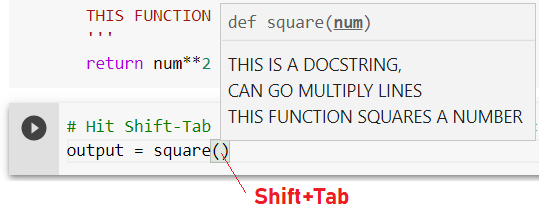
Fig 2. Please, document your code — This is a good practice :)

MAP

seq = [1,2,3,4,5]

Cast your Map object to a list:

# Mapping each item in the list seq to times2 function and cast to a anonymous list:

list(map(times2, seq))
[2, 4, 6, 8, 10]

LAMBDA

(for more info see this post)

HowTo To Get A Lambda Expression just from times2 funtion?

Here is the original function:

def times2(var):
  return var*2

The times2 function can be written in one line:

Rewritting it in one line:

def times2(var):return var*2

Now, get rid of the def keyword:

times2(var):return var*2

Now, to get a lambda expression just get rid of the name of the function (typing lambda in its place — cuz lambda is an anonymous function);

lambda(var):return var*2

And get rid of the parenteses adding space in front (cleaning the code:);

lambda var:return var*2

And finally, get rid of return word (its function is assumed by the colon ), like this :)

lambda var:var*2

It Reads: lambda takes var and returns var*2.

Just in one line. Simple Like That! Awesome!

This is not usual for lambda, but it is a feasible use (saving lambda times2 to var t2):

t2 = lambda var:var*2
t2(5)
10

Now use Map plus Lambda together:

# Using Map function plus Lambda function (what it is build for!):

map(lambda var:var*2, seq)
<map at 0x7f0640b37b38>

# Casting Map to a List:

list(map(lambda var:var*2, seq))
[2, 4, 6, 8, 10]

FILTER

filter(lambda var:var%2==0, seq)
<filter at 0x7f0640b37d30>

# Filters out the even number from seq list casted to a list:

list(filter(lambda var:var%2==0, seq))
[2, 4]

Another example:

seq=['soup','dog','salad','cat','greed']

# Filters out 's' init words using lambda expression:

filter(lambda word:word[0]=='s', seq)
<filter at 0x7f06402bb080>
list(filter(lambda word:word[0]=='s', seq))
['soup', 'salad']

STRING

s = 'hello my name is j3'

Upper function:

s.upper()
'HELLO MY NAME IS J3'

Lower function:

s.lower()
'hello my name is j3'

Split Function:

my_string_list = s.split()
my_string_list
['hello', 'my', 'name', 'is', 'j3']

Tweet use:

tweet = "Go Sports!#Sports"
tweet.split('#')
['Go Sports!', 'Sports']
tweet.split('#')[0]
'Go Sports!'

More Split Function:

tweet.split('#')[1]
'Sports'

Creating a function to count dog occurrences:

# Number of time the word ‘dog’ occurs in the string:

def countDog(phrase):
  count = 0
  for word in phrase.lower().split():
    if word == 'dog':
      count += 1
  return count

Use countDog function:

countDog('This dog runs faster than the other dog dude!')
2

DICTIONARY

d = {'key1':1, 'key2':2}

Keys:

d.keys()
dict_keys(['key1', 'key2'])

Items:

d.items()
dict_items([('key1', 1), ('key2', 2)])

Values:

d.values()
dict_values([1, 2])

LIST

lst = [1,2,3]

Pop & Append Methods:

item = lst.pop()
item
3
lst
[1, 2]
lst.append(3)
lst
[1, 2, 3]

IN word

'x' in ['x','y', 'z']
True
'w' in ['x', 'y', 'z']
False

TUPLE UNPACKING

Python tuples are immutable means that they can not be modified in the whole program.

Packing and Unpacking a Tuple: In Python, there is a very powerful tuple assignment feature that assigns the right-hand side of values into the left-hand side. In another way, it is called the unpacking of a tuple of values into a variable. In packing, we put values into a new tuple while in unpacking we extract those values into a single variable.

x = [(1,2),(3,4),(5,6)]
x[0][0]
1
x[0][1]
2

Using for loop:

for item in x:
  print(item)
(1, 2)
(3, 4)
(5, 6)

Unpacking:

for (a,b) in x:
  print(a)
1
3
5

Or just like this:

for a,b in x:
  print(a+1, b+1)
2 3
4 5
6 7

NUMPY

The reason it is so important for Data Science with Python is that a lot of all the libraries in the Python Ecosystem rely on NUMPY as one of their main building blocks (Jose Portilla — Python For Data Science course).

NUMPY is also incredibly fast as it has bound to C libraries.

Installation:

conda install numpy (Anaconda) or pip install numpy

ARRAYS (Vectors & Matrices) in NUMPY

-> Always cast a list into NUMPY array

# Vectors:

my_list=[1,2,3]
import numpy as np 
vec = np.array(my_list)

# 1 bracket mean 1-dimensional array ([]):

vec
array([1, 2, 3])

# Matrices:

my_mat = [[1,2,3],[4,5,6],[7,8,9]]
import numpy as np
mat=np.array(my_mat)

# 2 brackets mean 2-dimensional array ([[]]):

mat
array([[1, 2, 3],
       [4, 5, 6],
       [7, 8, 9]])

ARANGE in NUMPY

# All the way up to 10, but not including 10 -> return AN NUMPY ARRAY sequence of 10 digits counting from 0 to 9

# np.arange(start, stop):

np.arange(0,10)
array([0, 1, 2, 3, 4, 5, 6, 7, 8, 9])

The third argument is the step:

# Third argument: step size you may want

# np.arange(start, stop, step):

np.arange(0,10,2)
array([0, 2, 4, 6, 8])

ZEROES & ONES & EYE(Identity matrix) in NUMPY

np.zeros(3)
array([0., 0., 0.])
np.zeros((5,5))
array([[0., 0., 0., 0., 0.],
       [0., 0., 0., 0., 0.],
       [0., 0., 0., 0., 0.],
       [0., 0., 0., 0., 0.],
       [0., 0., 0., 0., 0.]])

Ones:

np.zeros(3)
array([1., 1., 1., 1.])
np.ones((5,5))
array([[1., 1., 1., 1., 1.],
       [1., 1., 1., 1., 1.],
       [1., 1., 1., 1., 1.],
       [1., 1., 1., 1., 1.],
       [1., 1., 1., 1., 1.]])

Identity Matrix:

np.eye(4)
array([[1., 0., 0., 0.],
       [0., 1., 0., 0.],
       [0., 0., 1., 0.],
       [0., 0., 0., 1.]])

LINSPACE (SPACED EVENLY) in NUMPY

# From 0, to 5 returning 10 digits spaced evenly:

np.linspace(0,5,10)
array([0.        , 0.55555556, 1.11111111, 1.66666667, 2.22222222,
       2.77777778, 3.33333333, 3.88888889, 4.44444444, 5.        ])

PLEASE DON’T CONFUSE linspace WITH arange:

arange: will take in the third argument as the STEPS SIZE (you want)

linspace: will take in the third argument as the NUMBER OF POINTS (evenly separated)

RANDOM NUMBER in NUMPY

# RAND differs from ARANGE because RAND returns random numbers:

np.random.rand(5)
array([0.08930558, 0.21911281, 0.20612461, 0.51468239, 0.11276573])

N means Normal Distribution:

# n means Normal Distribution (return values around the Mean in gaussian distribution):

np.random.randn(2)
array([0.44034175, 1.1805967 ])

Without the Third Parameter:

# Without the third parameter, it will return one digit from 1(included) to 100 (not included):

np.random.randint(1,100)
84

With the Third Parameter:

# The third parameter specify the number of digits you want to return:

np.random.randint(1,100,10)
array([25, 60, 41, 48, 76, 99, 86, 62, 74, 86])

Difference between ARANGE and RANDINT:

ARANGE: returns sequence of digits

RANDINT: returns randomly selected digits

#Vectors:

arr = np.arange(25)
arr
array([ 0,  1,  2,  3,  4,  5,  6,  7,  8,  9, 10, 11, 12, 13, 14, 15, 16, 17, 18, 19, 20, 21, 22, 23, 24])

#Matrices:

randarr = np.random.randint(0,50,10)
randarr
array([ 2, 11, 26, 19, 13, 37, 35, 36, 18, 24])

RESHAPE in NUMPY

# Get the and Numpy array and reshape it as you want;

Here reshaping arr (1_dimentional) as a matrix of 5x5 (2_dimentional):

reshapped_arr = arr.reshape(5,5)
reshapped_arr
array([[ 0,  1,  2,  3,  4],
       [ 5,  6,  7,  8,  9],
       [10, 11, 12, 13, 14],
       [15, 16, 17, 18, 19],
       [20, 21, 22, 23, 24]])

MAX & MIN in NUMPY

reshapped_arr.min()
0
reshapped_arr.max()
24

ATTRIBUTES SHAPE & DTYPE in NUMPY

(there are no Parentheses cuz this is an attribute, remember?)

reshapped_arr.shape
(5, 5)
reshapped_arr.dtype
dtype('int64')

To import use this syntax:

from numpy.random import randint

That’s it!

print("Thank you for reading this page! Please favorite it, IF YOU LIKE:)")
Thank you for reading this page! Please favorite it, IF YOU LIKE:)

At this point in time, I just want to say THANK YOU for sticking along with this Python Series so far.

It’s been a long way but I’m hoping you have learned a lot!

There is much more to come... Stay tuned!

Bye and till the next #PySeries Episode o/

Fun Little Quiz

A BONUS FOR NUMPY EPISODE;)

01Make this Matriz a:

Fig 3. Go to shared collab (link bellow)

02 How would you index these parts of the matrix b? Create Matrices c,d, and e :-)

Fig 4. Go to shared collab (link bellow)

Solutions here:

👉Colab Google link:)

👉GitHub Repo link:)

👉Files from Google Drive:)

👆More .ipynb

Credits & References:

Jose Portilla — Python for Data Science and Machine Learning Bootcamp — Learn how to use NumPy, Pandas, Seaborn , Matplotlib , Plotly , Scikit-Learn , Machine Learning, Tensorflow , and more!

Python NumPy Tutorial for Beginners — https://youtu.be/QUT1VHiLmmI by freeCodeCamp.org

Posts Related:

00Episode#PySeries — Python — Jupiter Notebook Quick Start with VSCode — How to Set your Win10 Environment to use Jupiter Notebook

01Episode#PySeries — Python — Python 4 Engineers — Exercises! An overview of the Opportunities Offered by Python in Engineering!

02Episode#PySeries — Python — Geogebra Plus Linear Programming- We’ll Create a Geogebra program to help us with our linear programming

03Episode#PySeries — Python — Python 4 Engineers — More Exercises! — Another Round to Make Sure that Python is Really Amazing!

04Episode#PySeries — Python — Linear Regressions — The Basics — How to Understand Linear Regression Once and For All!

05Episode#PySeries — Python — NumPy Init & Python Review — A Crash Python Review & Initialization at Numpy lib. (this one)

06Episode#PySeries — Python — NumPy Arrays & Jupyter Notebook — Arithmetic Operations, Indexing & Slicing, and Conditional Selection w/ np arrays.

07Episode#PySeries — Python — Pandas — Intro & Series — What it is? How to use it?

08Episode#PySeries — Python — Pandas DataFrames — The primary Pandas data structure! It is a dict-like container for Series objects

09Episode#PySeries — Python — Python 4 Engineers — Even More Exercises! — More Practicing Coding Questions in Python!

10Episode#PySeries — Python — Pandas — Hierarchical Index & Cross-section — Open your Colab notebook and here are the follow-up exercises!

11Episode#PySeries — Python — Pandas — Missing Data — Let’s Continue the Python Exercises — Filling & Dropping Missing Data

12Episode#PySeries — Python — Pandas — Group By — Grouping large amounts of data and compute operations on these groups

13Episode#PySeries — Python — Pandas — Merging, Joining & Concatenations — Facilities For Easily Combining Together Series or DataFrame

14Episode#PySeries — Python — Pandas — Pandas Dataframe Examples: Column Operations

15Episode#PySeries — Python — Python 4 Engineers — Keeping It In The Short-Term Memory — Test Yourself! Coding in Python, Again!

16Episode#PySeries — NumPy — NumPy Review, Again;) — Python Review Free Exercises

17Episode#PySeriesGenerators in Python — Python Review Free Hints

18Episode#PySeries — Pandas Review…Again;) — Python Review Free Exercise

19Episode#PySeriesMatlibPlot & Seaborn Python Libs — Reviewing theses Plotting & Statistics Packs

20Episode#PySeriesSeaborn Python Review — Reviewing theses Plotting & Statistics Packs

review: Aug/2021 (text improvements — better lambda explaination)

Numpy
Python Programming
Data Science
Machine Learning
Python Pandas
Recommended from ReadMedium