avatarAayushi Johari

Free AI web copilot to create summaries, insights and extended knowledge, download it at here

9051

Abstract

articular SQL statement is used for updating the records in the table or updating the table.</li><li><b>Delete- </b>As the name itself justifies this command is used for deleting the table.</li></ul><p id="ec4e">Let us look at each aspect in detail from the coding perspective.</p><h2 id="968a">Create Operation:</h2><div id="d67d"><pre><span class="hljs-keyword">import</span> mysql.connector</pre></div><div id="c471"><pre>mydb=mysql.connector.<span class="hljs-keyword">connect</span>(host="localhost",<span class="hljs-keyword">user</span>="root",passwd="password123",<span class="hljs-keyword">database</span>=harshdb)</pre></div><div id="bece"><pre><span class="hljs-attribute">mycursor</span><span class="hljs-operator">=</span>mydb.cursor()</pre></div><div id="756b"><pre>mycursor<span class="hljs-selector-class">.execute</span>("create table employee(name varchar(<span class="hljs-number">250</span>),sal <span class="hljs-built_in">int</span>(<span class="hljs-number">20</span>))")</pre></div><p id="9ea3"><b>Output:</b></p><p id="9dd9">C:UsersHarshit_KantPycharmProjectstest1venvScriptspython.exe C:/Users/Harshit_Kant/PycharmProjects/test1/venv/python-db-conn.py</p><p id="3413">Process finished with exit code 0</p><p id="7e26"><b>Explanation:</b></p><ul><li>In the above-given program, I have created a table ’employee’.</li><li>Table employee has two fields ‘name’ and ‘sal’.</li><li>Here, the User id is “root” and Password is “password123” used for accessing harshdb.</li></ul><p id="efec">Below given Screenshot shows the table ’employee’ and returns the fields ‘name’ and ‘sal’.</p><figure id="be74"><img src="https://cdn-images-1.readmedium.com/v2/resize:fit:800/1*Fpw6qKhqDKzm9fv7mAtUKw.png"><figcaption></figcaption></figure><p id="a8fc">In order to see the table which I have created, refer to the following code in python</p><div id="455a"><pre><span class="hljs-keyword">import</span> mysql.connector</pre></div><div id="d6a0"><pre>mydb=mysql.connector.<span class="hljs-keyword">connect</span>(host="localhost",<span class="hljs-keyword">user</span>="root",passwd="password123",<span class="hljs-keyword">database</span>="harshdb") mycursor=mydb.<span class="hljs-keyword">cursor</span>() mycursor.<span class="hljs-keyword">execute</span>("show tables")</pre></div><div id="0b04"><pre><span class="hljs-attribute">for tb in mycursor</span><span class="hljs-punctuation">:</span></pre></div><div id="28bd"><pre><span class="hljs-function"><span class="hljs-title">print</span><span class="hljs-params">(tb)</span></span></pre></div><h2 id="d7f6">Output:</h2><p id="a9e5">C:UsersHarshit_KantPycharmProjectstest1venvScriptspython.exe C:/Users/Harshit_Kant/PycharmProjects/test1/venv/python-db-conn.py (’employee’,)</p><p id="9528">Process finished with exit code 0</p><p id="ff8e">Below given Screenshot shows the table ’employee’ which I have created.</p><figure id="b0c9"><img src="https://cdn-images-1.readmedium.com/v2/resize:fit:800/1*qmHeFylWnEDRc9y2YJjfLQ.png"><figcaption></figcaption></figure><p id="6b38">Now that you have seen how a table is created, let us look at how a user can fetch values from it.</p><h1 id="f587">Read Operation:</h1><p id="70c7">This particular operation happens in various stages. In order to do that first stage is to populate the table.</p><h2 id="9938">Code:</h2><div id="f263"><pre><span class="hljs-keyword">import</span> mysql.connector</pre></div><div id="ae3d"><pre>mydb=mysql.connector.<span class="hljs-keyword">connect</span>(host="localhost",<span class="hljs-keyword">user</span>="root",passwd="password123",<span class="hljs-keyword">database</span>="harshdb")</pre></div><div id="7eb9"><pre><span class="hljs-attribute">mycursor</span><span class="hljs-operator">=</span>mydb.cursor()</pre></div><div id="6a4e"><pre>sqlformula = <span class="hljs-string">"Insert into employee(name,sal) values(%s,%s)"</span>//<span class="hljs-string">'values has placeholders</span></pre></div><div id="ff7f"><pre>employees = [(<span class="hljs-string">"harshit"</span>,200000),(<span class="hljs-string">"rahul"</span>, 30000),(<span class="hljs-string">"avinash"</span>, 40000),(<span class="hljs-string">"amit"</span>, 50000),]//Created an<span class="hljs-built_in"> array </span>of emplpoyees</pre></div><div id="460c"><pre><span class="hljs-title">mycursor</span>.executemany(sqlformula, employees)//<span class="hljs-type">Passing</span> the <span class="hljs-class"><span class="hljs-keyword">data</span></span></pre></div><div id="dd1e"><pre>mydb.commit<span class="hljs-comment">()</span><span class="hljs-comment">//SQL statement used for saving the changes</span></pre></div><p id="76cc"><b>Output:</b></p><p id="f430">C:UsersHarshit_KantPycharmProjectstest1venvScriptspython.exe C:/Users/Harshit_Kant/PycharmProjects/test1/venv/python-db-conn.py</p><p id="7eb6">Process finished with exit code 0</p><p id="089a">In the above code, I have populated the data by using an array of employees by writing SQL statements in Python. Below a screenshot of the database will show the changes</p><figure id="ca22"><img src="https://cdn-images-1.readmedium.com/v2/resize:fit:800/1*W89CNjHdykZYFERNHYizag.png"><figcaption></figcaption></figure><p id="d3cb">Here,’harshit’ is used two times in the record while created the array.</p><p id="2525"><b>Stage 2: </b>In this stage, we will make use of the “select” SQL statement where the actual read operation will take place.</p><ul><li><b>fetchall()</b>– This particular function fetches all the data from the last executed statement.</li><li><b>fetchone()- </b>This particular statement fetches one data from the last executed statement.</li></ul><p id="f21d"><b>Code:</b></p><div id="fc3d"><pre><span class="hljs-keyword">import</span> mysql.connector</pre></div><div id="434b"><pre>mydb=mysql.connector.<span class="hljs-keyword">connect</span>(host="localhost",<span class="hljs-keyword">user</span>="root",passwd="password123",<span class="hljs-keyword">database</span>="harshdb")</pre></div><div id="9894"><pre><span class="hljs-attribute">mycursor</span><span class="hljs-operator">=</span>mydb.cursor()</pre></div><div id="db0c"><pre>mycursor.<span class="hljs-built_in">execute</span>(<span class="hljs-string">"select * from employee"</span>)</pre></div><div id="dfb8"><pre><span class="hljs-attribute">myresult</span> <span class="hljs-operator">=</span> mycursor.fetchall()</pre></div><div id="e3d1"><pre>for <span class="hljs-built_in">row</span> in myresu<span class="hljs-symbol">lt:</span></pre></div><div id="41c4"><pre><span class="hljs-function"><span class="hljs-title">print</span><span class="hljs-params">(row)</span></span></pre></div><p id="f985"><b>Output:</b></p><p id="bc2e">(‘harshit’, 200000) (‘harshit’, 200000) (‘rahul’, 30000) (‘avinash’, 40000) (‘amit’, 50000)</p><p id="14ed">Process finished with exit code 0</p><p id="7691"><b>Explanation: </b>In the above code we have made use of the function ‘fetchall()’. It fetches all the data from the last executed statement.</p><p id="40ce">Given below is the screenshot of the database.</p><figure id="769c"><img src="https://cdn-images-1.readmedium.com/v2/resize:fit:800/1*L5SP7FpBUt8abHSUoiAATQ.png"><figcaption></figcaption></figure><h2 id="a41a">Code:</h2><div id="4762"><pre><span class="hljs-keyword">import</span> mysql.connector</pre></div><div id="ebb7"><pre>mydb=mysql.connector.<span class="hljs-keyword">connect</span>(host="localhost",<span class="hljs-keyword">user</span>="root",passwd="password123",<span class="hljs-keyword">database</span>="harshdb")</pre></div><div id="2fa1"><pre><span class="hljs-attribute">mycursor</span><span class="hljs-operator">=</span>mydb.cursor()</pre></div><div id="0ccb"><pre>mycursor<span class="hljs-selector-class">.execute</span>("select name <span class="hljs-selector-tag">from</span> employee")//selecting the field <span class="hljs-selector-tag">i</span> want data <span class="hljs-selector-tag">to</span> be fetched <span class="hljs-selector-tag">from</span></pre></div><div id="5eb0"><pre><span class="hljs-attribute">myresult</span> <span class="hljs-operator">=</span> mycursor.fetchone()</pre></div><div id="9d67"><pre>for <span class="hljs-built_in">row</span> in myresu<span class="hljs-symbol">lt:</span></pre></div><div id="81a9"><pre><span class="hljs-function"><span class="hljs-title">print</span><span class="hljs-params">(row)</span></span></pre></div><h2 id="826c">Output:</h2><p id="3669">C:UsersHarshit_KantPycharmProjectstest1venvScriptspython.exe C:/Users/Harshit_Kant/PycharmProjects/test1/venv/python-db-conn.py harshit</p><p id="b45b">Process finished with exit code 0</p><p id="b63f"><b>Explanation: </b>In the above code, I have made use of the function “fetchone()” which basically fetches a single data from the last executed statement.</p><p id="7461">That was all about ‘Read operation’, let’s dive deep into Update operation.</p><h1 id="89bc">Update Operation:</h1><p id="0e67">This SQL statement is used for updating the records in the table. Let’s implement the code an

Options

d see how the changes are taking place.</p><h2 id="8fae">Code:</h2><div id="0617"><pre><span class="hljs-keyword">import</span> mysql.connector</pre></div><div id="5a70"><pre>mydb=mysql.connector.<span class="hljs-keyword">connect</span>(host="localhost",<span class="hljs-keyword">user</span>="root",passwd="password123",<span class="hljs-keyword">database</span>="harshdb")</pre></div><div id="6a00"><pre><span class="hljs-attribute">mycursor</span><span class="hljs-operator">=</span>mydb.cursor()</pre></div><div id="5525"><pre>sql = "<span class="hljs-keyword">Update</span> employee <span class="hljs-keyword">SET</span> sal = <span class="hljs-number">70000</span> <span class="hljs-keyword">WHERE</span> name = <span class="hljs-string">'harshit'</span><span class="hljs-string">"</span></pre></div><div id="0271"><pre>mycursor.<span class="hljs-keyword">execute</span>(<span class="hljs-keyword">sql</span>)</pre></div><div id="affa"><pre>mydb.commit<span class="hljs-comment">()</span></pre></div><h2 id="79bf">Output:</h2><p id="9d00">C:UsersHarshit_KantPycharmProjectstest1venvScriptspython.exe C:/Users/Harshit_Kant/PycharmProjects/test1/venv/python-db-conn.py</p><p id="6eae">Process finished with exit code 0</p><p id="2ca6"><b>Explanation: </b>We have updated the row “sal” of record harshit in the above-given code. Below given Screenshot will give you a clear picture.</p><figure id="f06d"><img src="https://cdn-images-1.readmedium.com/v2/resize:fit:800/1*ar2gqL8rZwW6RdKHW3SvMQ.png"><figcaption></figcaption></figure><p id="ea1d">As you can clearly see row ‘sal’ of record ‘harshit’ is updated to 70000.</p><p id="3ad2">This was all about Update operation, moving on with “Python Database Connection” article we will see the last operation which is ‘delete’.</p><h1 id="96fa">Delete Operation:</h1><p id="b5d4">As the name itself justifies, Delete operation is used for the deletion of records from the table. Let’s understand it from a coding perspective.</p><h2 id="4d7d">Code:</h2><div id="17e8"><pre><span class="hljs-keyword">import</span> mysql.connector

mydb=mysql.connector.<span class="hljs-keyword">connect</span>(host="localhost",<span class="hljs-keyword">user</span>="root",passwd="password123",<span class="hljs-keyword">database</span>="harshdb") mycursor=mydb.<span class="hljs-keyword">cursor</span>()

<span class="hljs-keyword">sql</span> = "DELETE FROM employee WHERE name = 'harshit'"

mycursor.<span class="hljs-keyword">execute</span>(<span class="hljs-keyword">sql</span>)

mydb.<span class="hljs-keyword">commit</span>()</pre></div><h2 id="fa30">Output:</h2><p id="c853">C:UsersHarshit_KantPycharmProjectstest1venvScriptspython.exe C:/Users/Harshit_Kant/PycharmProjects/test1/venv/python-db-conn.py</p><p id="ff9c">Process finished with exit code 0</p><p id="fc32"><b>Explanation: </b>In the above code I have deleted a record ‘harshit’ as it was repeated twice.</p><p id="6adf">Below given screenshot will give you a better picture.</p><figure id="6b82"><img src="https://cdn-images-1.readmedium.com/v2/resize:fit:800/1*7P0Np_vL8RG7NmaHbxj0nQ.png"><figcaption></figcaption></figure><p id="bef5">This brings us to the end of our article on “Python Database Connection”. I hope you are clear with all the concepts related to database, MYSQL db, database operations in python. Make sure you practice as much as possible and revert your experience.</p><p id="bd52">If you wish to check out more articles on the market’s most trending technologies like Artificial Intelligence, DevOps, Ethical Hacking, then you can refer to <a href="https://www.edureka.co/blog/?utm_source=medium&amp;utm_medium=content-link&amp;utm_campaign=python-interview-questions">Edureka’s official site.</a></p><p id="7b26">Do look out for other articles in this series which will explain the various other aspects of Python and Data Science.</p><blockquote id="3fd4"><p>1. <a href="https://readmedium.com/machine-learning-classifier-c02fbd8400c9">Machine Learning Classifier in Python</a></p></blockquote><blockquote id="6b7a"><p>2. <a href="https://readmedium.com/python-scikit-learn-cheat-sheet-9786382be9f5">Python Scikit-Learn Cheat Sheet</a></p></blockquote><blockquote id="ef88"><p>3. <a href="https://readmedium.com/python-libraries-for-data-science-and-machine-learning-1c502744f277">Machine Learning Tools</a></p></blockquote><blockquote id="2ffe"><p>4. <a href="https://readmedium.com/python-libraries-for-data-science-and-machine-learning-1c502744f277">Python Libraries For Data Science And Machine Learning</a></p></blockquote><blockquote id="d725"><p>5. <a href="https://readmedium.com/how-to-make-a-chatbot-in-python-b68fd390b219">Chatbot In Python</a></p></blockquote><blockquote id="5c1a"><p>6. <a href="https://readmedium.com/collections-in-python-d0bc0ed8d938">Python Collections</a></p></blockquote><blockquote id="491c"><p>7. <a href="https://readmedium.com/python-modules-abb0145a5963">Python Modules</a></p></blockquote><blockquote id="ab74"><p>8. <a href="https://readmedium.com/python-developer-skills-371583a69be1">Python developer Skills</a></p></blockquote><blockquote id="905b"><p>9. <a href="https://readmedium.com/oops-interview-questions-621fc922cdf4">OOPs Interview Questions and Answers</a></p></blockquote><blockquote id="5386"><p>10. <a href="https://readmedium.com/python-developer-resume-ded7799b4389">Resume For A Python Developer</a></p></blockquote><blockquote id="21c6"><p>11. <a href="https://readmedium.com/exploratory-data-analysis-in-python-3ee69362a46e">Exploratory Data Analysis In Python</a></p></blockquote><blockquote id="55c0"><p>12. <a href="https://readmedium.com/python-turtle-module-361816449390">Snake Game With Python’s Turtle Module</a></p></blockquote><blockquote id="ea9d"><p>13. <a href="https://readmedium.com/python-developer-salary-ba2eff6a502e">Python Developer Salary</a></p></blockquote><blockquote id="dc03"><p>14.<a href="https://readmedium.com/principal-component-analysis-69d7a4babc96"> Principal Component Analysis</a></p></blockquote><blockquote id="6128"><p>15. <a href="https://readmedium.com/python-vs-cpp-c3ffbea01eec">Python vs C++</a></p></blockquote><blockquote id="062d"><p>16. <a href="https://readmedium.com/scrapy-tutorial-5584517658fb">Scrapy Tutorial</a></p></blockquote><blockquote id="a849"><p>17. <a href="https://readmedium.com/scipy-tutorial-38723361ba4b">Python SciPy</a></p></blockquote><blockquote id="b9ba"><p>18. <a href="https://readmedium.com/least-square-regression-40b59cca8ea7">Least Squares Regression Method</a></p></blockquote><blockquote id="798f"><p>19. <a href="https://readmedium.com/jupyter-notebook-cheat-sheet-88f60d1aca7">Jupyter Notebook Cheat Sheet</a></p></blockquote><blockquote id="b9c7"><p>20. <a href="https://readmedium.com/python-basics-f371d7fc0054">Python Basics</a></p></blockquote><blockquote id="2219"><p>21. <a href="https://readmedium.com/python-pattern-programs-75e1e764a42f">Python Pattern Programs</a></p></blockquote><blockquote id="5e1b"><p>22. <a href="https://readmedium.com/generators-in-python-258f21e3d3ff">Generators in Python</a></p></blockquote><blockquote id="73f5"><p>23. <a href="https://readmedium.com/python-decorator-tutorial-bf7b21278564">Python Decorator</a></p></blockquote><blockquote id="86c5"><p>24.<a href="https://readmedium.com/spyder-ide-2a91caac4e46"> Python Spyder IDE</a></p></blockquote><blockquote id="4434"><p>25. <a href="https://readmedium.com/kivy-tutorial-9a0f02fe53f5">Mobile Applications Using Kivy In Python</a></p></blockquote><blockquote id="3d21"><p>26. <a href="https://readmedium.com/best-books-for-python-11137561beb7">Top 10 Best Books To Learn & Practice Python</a></p></blockquote><blockquote id="d4ec"><p>27. <a href="https://readmedium.com/robot-framework-tutorial-f8a75ab23cfd">Robot Framework With Python</a></p></blockquote><blockquote id="72da"><p>28. <a href="https://readmedium.com/snake-game-with-pygame-497f1683eeaa">Snake Game in Python using PyGame</a></p></blockquote><blockquote id="a85d"><p>29. <a href="https://readmedium.com/django-interview-questions-a4df7bfeb7e8">Django Interview Questions and Answers</a></p></blockquote><blockquote id="1d04"><p>30. <a href="https://readmedium.com/python-applications-18b780d64f3b">Top 10 Python Applications</a></p></blockquote><blockquote id="de58"><p>31. <a href="https://readmedium.com/hash-tables-and-hashmaps-in-python-3bd7fc1b00b4">Hash Tables and Hashmaps in Python</a></p></blockquote><blockquote id="9fb5"><p>32. <a href="https://readmedium.com/whats-new-python-3-8-7d52cda747b">Python 3.8</a></p></blockquote><blockquote id="3c30"><p>33. <a href="https://readmedium.com/python-visual-studio-cef3ad98a9e2">Python Visual Studio</a></p></blockquote><blockquote id="77a3"><p>34. <a href="https://readmedium.com/support-vector-machine-in-python-539dca55c26a">Support Vector Machine In Python</a></p></blockquote><p id="37b4"><i>Originally published at <a href="https://www.edureka.co/blog/python-database-connection/">https://www.edureka.co</a> on July 2, 2019.</i></p></article></body>

Python Database Connection — Know How To Connect With Database
Python Database Connection — Edureka

Databases are critical for storing and processing data even if you consider a powerful programming language like Python. Ever wondered where does this whole large set of data is stored in or fetched from? In this article on “Python database connection”, I’ll talk about the same and take you through the following aspects in detail.

  • What is a database?
  • What is MySQLdb?
  • How does Python connect to a database?
  • Creating a Database
  • Database Operations-CRUD

Let’s get started :)

What is a database?

A database is basically a collection of structured data in such a way that it can easily be retrieved, managed and accessed in various ways. One of the simplest forms of databases is a text database. Relational databases are the most popular database system which includes the following:

  • MySQL
  • Oracle Database
  • SQL server
  • Sybase
  • Informix
  • IBM db2
  • NO SQL

Among all these databases, MySQL is one of the easiest databases to work with. Let me walk you through about this in detail.

What is MySQLdb?

MySQLdb is an open-source freely available relational database management system that uses Structured Query Language. Now one of the most important question here is “What is SQL?”

SQL (Structured Query Language) is a standard language for relational databases that allow users to do various operations on data like, Manipulating, Creating, Dropping, etc. In a nutshell, SQL allows you to do anything with the data.

Let’s move ahead and dive deep into Python database connection wherein you will learn how to connect with the database.

How does Python connect to a database?

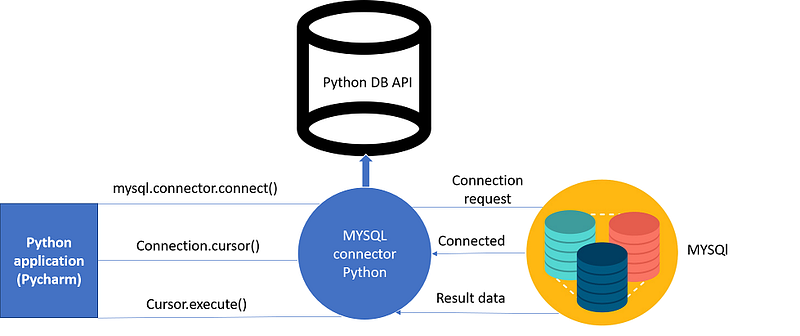
It is very simple to connect Python with the database. Refer the below image which illustrates a Python connection with the database where how a connection request is sent to MySQL connector Python, gets accepted from the database and cursor is executed with result data.
Before connecting to the MySQL database, make sure you have MySQL installer installed on your computer. It provides a comprehensive set of tools which helps in installing MySQL with the following components:

  • MySQL server
  • All available connectors
  • MySQL Workbench
  • MySQL Notifier
  • Tools for Excel and Microsoft Visual Studio
  • MySQL Sample Databases
  • MySQL Documentation

Before proceeding you should make sure you have MySQL db installed on your computer. Refer the below commands for installing MySQL in command prompt and pycharm:

Using Pip:

Command:

import mysql.connector

Output:

C:UsersHarshit_KantPycharmProjectstest1venvScriptspython.exe C:/Users/Harshit_Kant/PycharmProjects/test1/venv/python-db-conn.py

Process finished with exit code 0

Moving on in this article with Python Database Connection let us see the parameters required to connect to the database:

  • Username- It is simply the username you give to work MySQL server with, the Default username is root.
  • Password- Password is given by the user when you have installed the MySQL database. I am giving password here as ‘password123’
  • Host Name- This basically is the server name or IP address on which your MySQL is running, If it is a ‘localhost’, then your IP address is 127.0.0.0

I will show you from a coding perspective to connect python with MySQL database.

Example:

import mysql.connector
mydb=mysql.connector.connect(host="localhost",user="root",passwd="password123") // I have used 'host','username','password'
print(mydb)

Output:

C:UsersHarshit_KantPycharmProjectstest1venvScriptspython.exe C:/Users/Harshit_Kant/PycharmProjects/test1/venv/python-db-conn.py

Process finished with exit code 0

Explanation: Here ‘mydb’ is just an instance. From the output, you can clearly see that it has connected to the database.

Next up in Python Database Connection, you will learn how to create a database.

Creating a Database:

Once the database connection is established, you are ready to create your own database which will be acting as a bridge between your python and MySQL server.

Let’s see the implementation part of it.

Example:

import mysql.connector
mydb=mysql.connector.connect(host="localhost",user="root",passwd="password123")
mycursor=mydb.cursor()
mycursor.execute("create database harshdb")

Output:

C:/Users/Harshit_Kant/PycharmProjects/test1/venv/python-db-conn.py

Process finished with exit code 0

Explanation:

  • In the above program, I have made use of cursor which is basically an object that is used to communicate to your entire MySQL server through which I am able to create my own database.
  • You can see from the output that my database with the name”harshdb” is created which is custom, as you can give any name to your database.

If you want to see the databases in your MySQL server, you can implement the following piece of code in pycharm:

Example :

import mysql.connector
mydb=mysql.connector.connect(host="localhost",user="root",passwd="password123")
mycursor=mydb.cursor()
mycursor.execute("show databases")
for db in mycursor:
print(db)

Output:

C:UsersHarshit_KantPycharmProjectstest1venvScriptspython.exe C:/Users/Harshit_Kant/PycharmProjects/test1/venv/python-db-conn.py (‘harshdb’,) (‘information_schema’,) (‘mysql’,) (‘performance_schema’,) (‘sakila’,) (‘sys’,) (‘world’,)

Process finished with exit code 0

Explanation:

  • By implementing the above-written code I have tried showing all the databases which are existing in MySQL server.

Now that you have created your database, let’s dive deep into one of the most important aspects of Python Database Connection by doing few operations in it. Let us understand this in detail.

Database Operations[CRUD]:

There are numerous operations a programmer can perform using databases and SQL in order to have sound knowledge of database programming and MySQL.

I have demonstrated the CRUD operations below

  • Create– It is an SQL statement used to create a record in the table or can say it is used for creating a table.
  • Read- It is used for fetching useful information from the database.
  • Update- This particular SQL statement is used for updating the records in the table or updating the table.
  • Delete- As the name itself justifies this command is used for deleting the table.

Let us look at each aspect in detail from the coding perspective.

Create Operation:

import mysql.connector
mydb=mysql.connector.connect(host="localhost",user="root",passwd="password123",database=harshdb)
mycursor=mydb.cursor()
mycursor.execute("create table employee(name varchar(250),sal int(20))")

Output:

C:UsersHarshit_KantPycharmProjectstest1venvScriptspython.exe C:/Users/Harshit_Kant/PycharmProjects/test1/venv/python-db-conn.py

Process finished with exit code 0

Explanation:

  • In the above-given program, I have created a table ’employee’.
  • Table employee has two fields ‘name’ and ‘sal’.
  • Here, the User id is “root” and Password is “password123” used for accessing harshdb.

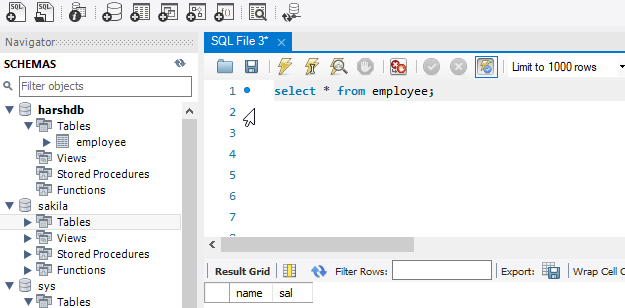
Below given Screenshot shows the table ’employee’ and returns the fields ‘name’ and ‘sal’.
In order to see the table which I have created, refer to the following code in python

import mysql.connector
mydb=mysql.connector.connect(host="localhost",user="root",passwd="password123",database="harshdb")
mycursor=mydb.cursor()
mycursor.execute("show tables")
for tb in mycursor:
print(tb)

Output:

C:UsersHarshit_KantPycharmProjectstest1venvScriptspython.exe C:/Users/Harshit_Kant/PycharmProjects/test1/venv/python-db-conn.py (’employee’,)

Process finished with exit code 0

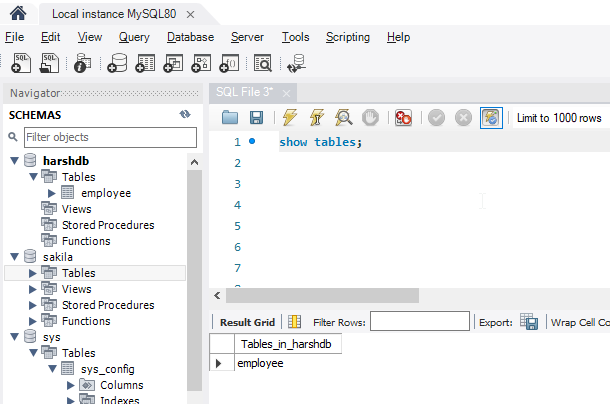
Below given Screenshot shows the table ’employee’ which I have created.
Now that you have seen how a table is created, let us look at how a user can fetch values from it.

Read Operation:

This particular operation happens in various stages. In order to do that first stage is to populate the table.

Code:

import mysql.connector
mydb=mysql.connector.connect(host="localhost",user="root",passwd="password123",database="harshdb")
mycursor=mydb.cursor()
sqlformula = "Insert into employee(name,sal) values(%s,%s)"//'values has placeholders
employees = [("harshit",200000),("rahul", 30000),("avinash", 40000),("amit", 50000),]//Created an array of emplpoyees
mycursor.executemany(sqlformula, employees)//Passing the data
mydb.commit()//SQL statement used for saving the changes

Output:

C:UsersHarshit_KantPycharmProjectstest1venvScriptspython.exe C:/Users/Harshit_Kant/PycharmProjects/test1/venv/python-db-conn.py

Process finished with exit code 0

In the above code, I have populated the data by using an array of employees by writing SQL statements in Python. Below a screenshot of the database will show the changes
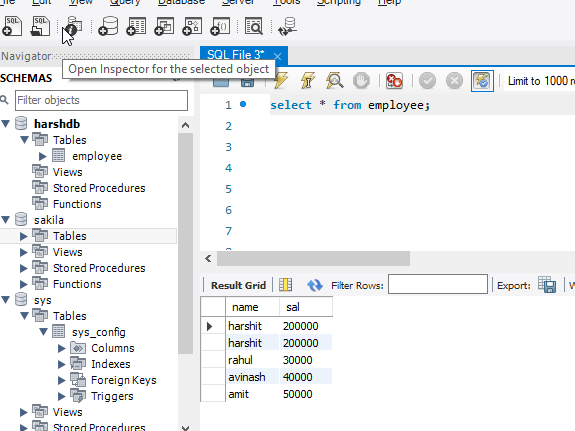
Here,’harshit’ is used two times in the record while created the array.

Stage 2: In this stage, we will make use of the “select” SQL statement where the actual read operation will take place.

  • fetchall()– This particular function fetches all the data from the last executed statement.
  • fetchone()- This particular statement fetches one data from the last executed statement.

Code:

import mysql.connector
mydb=mysql.connector.connect(host="localhost",user="root",passwd="password123",database="harshdb")
mycursor=mydb.cursor()
mycursor.execute("select * from employee")
myresult = mycursor.fetchall()
for row in myresult:
print(row)

Output:

(‘harshit’, 200000) (‘harshit’, 200000) (‘rahul’, 30000) (‘avinash’, 40000) (‘amit’, 50000)

Process finished with exit code 0

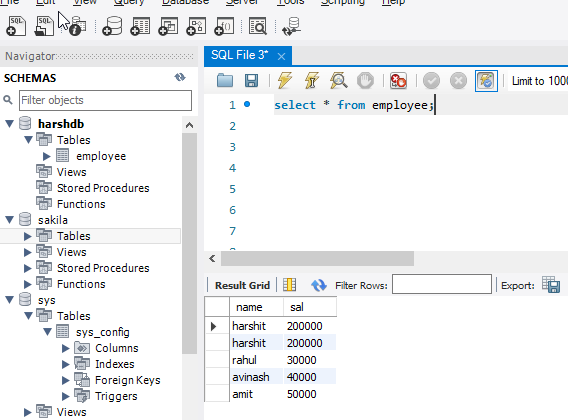
Explanation: In the above code we have made use of the function ‘fetchall()’. It fetches all the data from the last executed statement.

Given below is the screenshot of the database.
Code:

import mysql.connector
mydb=mysql.connector.connect(host="localhost",user="root",passwd="password123",database="harshdb")
mycursor=mydb.cursor()
mycursor.execute("select name from employee")//selecting the field i want data to be fetched from
myresult = mycursor.fetchone()
for row in myresult:
print(row)

Output:

C:UsersHarshit_KantPycharmProjectstest1venvScriptspython.exe C:/Users/Harshit_Kant/PycharmProjects/test1/venv/python-db-conn.py harshit

Process finished with exit code 0

Explanation: In the above code, I have made use of the function “fetchone()” which basically fetches a single data from the last executed statement.

That was all about ‘Read operation’, let’s dive deep into Update operation.

Update Operation:

This SQL statement is used for updating the records in the table. Let’s implement the code and see how the changes are taking place.

Code:

import mysql.connector
mydb=mysql.connector.connect(host="localhost",user="root",passwd="password123",database="harshdb")
mycursor=mydb.cursor()
sql = "Update employee SET sal = 70000 WHERE name = 'harshit'"
mycursor.execute(sql)
mydb.commit()

Output:

C:UsersHarshit_KantPycharmProjectstest1venvScriptspython.exe C:/Users/Harshit_Kant/PycharmProjects/test1/venv/python-db-conn.py

Process finished with exit code 0

Explanation: We have updated the row “sal” of record harshit in the above-given code. Below given Screenshot will give you a clear picture.
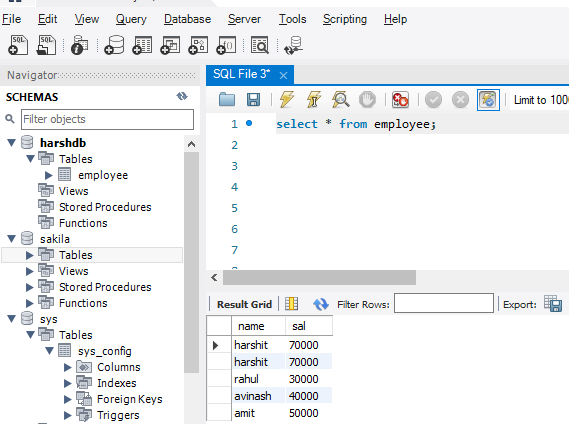
As you can clearly see row ‘sal’ of record ‘harshit’ is updated to 70000.

This was all about Update operation, moving on with “Python Database Connection” article we will see the last operation which is ‘delete’.

Delete Operation:

As the name itself justifies, Delete operation is used for the deletion of records from the table. Let’s understand it from a coding perspective.

Code:

import mysql.connector
 
mydb=mysql.connector.connect(host="localhost",user="root",passwd="password123",database="harshdb")
mycursor=mydb.cursor()
 
sql = "DELETE FROM employee  WHERE name = 'harshit'"
 
mycursor.execute(sql)
 
mydb.commit()

Output:

C:UsersHarshit_KantPycharmProjectstest1venvScriptspython.exe C:/Users/Harshit_Kant/PycharmProjects/test1/venv/python-db-conn.py

Process finished with exit code 0

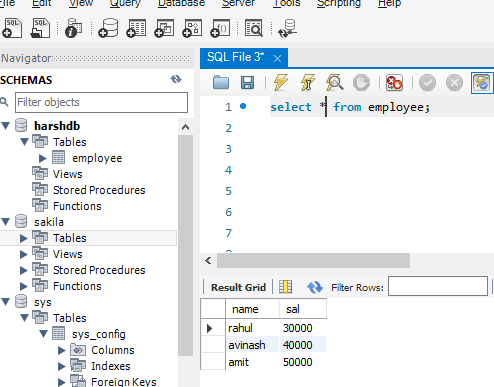
Explanation: In the above code I have deleted a record ‘harshit’ as it was repeated twice.

Below given screenshot will give you a better picture.
This brings us to the end of our article on “Python Database Connection”. I hope you are clear with all the concepts related to database, MYSQL db, database operations in python. Make sure you practice as much as possible and revert your experience.

If you wish to check out more articles on the market’s most trending technologies like Artificial Intelligence, DevOps, Ethical Hacking, then you can refer to Edureka’s official site.

Do look out for other articles in this series which will explain the various other aspects of Python and Data Science.

1. Machine Learning Classifier in Python

2. Python Scikit-Learn Cheat Sheet

3. Machine Learning Tools

4. Python Libraries For Data Science And Machine Learning

5. Chatbot In Python

6. Python Collections

7. Python Modules

8. Python developer Skills

9. OOPs Interview Questions and Answers

10. Resume For A Python Developer

11. Exploratory Data Analysis In Python

12. Snake Game With Python’s Turtle Module

13. Python Developer Salary

14. Principal Component Analysis

15. Python vs C++

16. Scrapy Tutorial

17. Python SciPy

18. Least Squares Regression Method

19. Jupyter Notebook Cheat Sheet

20. Python Basics

21. Python Pattern Programs

22. Generators in Python

23. Python Decorator

24. Python Spyder IDE

25. Mobile Applications Using Kivy In Python

26. Top 10 Best Books To Learn & Practice Python

27. Robot Framework With Python

28. Snake Game in Python using PyGame

29. Django Interview Questions and Answers

30. Top 10 Python Applications

31. Hash Tables and Hashmaps in Python

32. Python 3.8

33. Python Visual Studio

34. Support Vector Machine In Python

Originally published at https://www.edureka.co on July 2, 2019.

Sql
MySQL
Python
Database
Python Database
Recommended from ReadMedium