avatarAayushi Johari

Free AI web copilot to create summaries, insights and extended knowledge, download it at here

6346

Abstract

ssing import OneHotEncoder <span class="hljs-attribute">oneHE</span><span class="hljs-operator">=</span>OneHotEncoder(categorical_features<span class="hljs-operator">=</span>[<range of rows and columns>]) <span class="hljs-attribute">X</span><span class="hljs-operator">=</span>oneHE.fit_transform(X).toarray()</pre></div><p id="8c40"><b>Step 5</b> — Perform scaling</p><p id="2b10">This step is to deal with discrepancies arising out of mismatched scales of the variables. Hence, we scale them all to the same range, so that they receive equal weight while being input to the model. We use an object of the StandardScaler class for this purpose.</p><div id="3e3b"><pre><span class="hljs-keyword">from</span> sklearn.preprocessing import StandardScaler <span class="hljs-attribute">sc_X</span>=StandardScaler() <span class="hljs-attribute">X</span>=sc_X.fit_transform(X)</pre></div><p id="9f0c"><b>Step 6</b> — Split the dataset into training and testing data</p><p id="0418">As the last step of preprocessing, the dataset needs to be divided into a training set and test set. The standard ratio of the train-test split is 75%-25%. We can modify as per requirements. The train_test_split() function can do this for us.</p><div id="96e3"><pre><span class="hljs-keyword">from</span> sklearn.model_selection import train_test_split X_train,X_test,y_train,<span class="hljs-attribute">y_test</span>=train_test_split(X,y,test_size=0.25)</pre></div><p id="12c5"><b>Model Building: </b>This step is actually quite simple. Once we decide which model to apply on the data, we can create an object of its corresponding class, and fit the object on our training set, considering X_train as the input and y_train as the output.</p><div id="f402"><pre><span class="hljs-keyword">from</span> sklearn.<<span class="hljs-keyword">class</span> <span class="hljs-keyword">module</span>> <span class="hljs-keyword">import</span> <model <span class="hljs-keyword">class</span>> classifier = <model <span class="hljs-keyword">class</span>>(<parameters>) classifier.fit(X_train, y_train)</pre></div><p id="0a02">The model is now trained and ready. We can now apply our model to the test set and find the predicted output.</p><div id="8ab1"><pre><span class="hljs-attr">y_pred</span> = classifier.predict(X_test)</pre></div><p id="f924"><b>Viewing Results: </b>The performance of a classifier can be assessed by the parameters of accuracy, precision, recall, and f1-score. These values can be seen using a method known as classification_report(). t can also be viewed as a confusion matrix that helps us to know how many of which category of data have been classified correctly.</p><div id="203a"><pre><span class="hljs-keyword">from</span> sklearn.metrics <span class="hljs-keyword">import</span> confusion_matrix cm = confusion_matrix(y_test, y_pred) print(cm)

<span class="hljs-keyword">from</span> sklearn.metrics <span class="hljs-keyword">import</span> classification_report target_names = [<list of <span class="hljs-keyword">class</span> <span class="hljs-symbol">names</span>>] <span class="hljs-symbol">print</span>(<span class="hljs-symbol">classification_report</span>(<span class="hljs-symbol">y_test, <span class="hljs-symbol">y_pred</span>, <span class="hljs-symbol">target_names</span></span>=<span class="hljs-symbol">target_names</span>))</pre></div><h1 id="0967">Machine Learning Classifier Problem</h1><p id="6f84">We will use the very popular and simple Iris dataset, containing dimensions of flowers in 3 categories — Iris-setosa, Iris-versicolor, and Iris-virginica. There are 150 entries in the dataset.</p><figure id="a182"><img src="https://cdn-images-1.readmedium.com/v2/resize:fit:800/1*sdAROwwLjt6DodSGDK7MgA.jpeg"><figcaption></figcaption></figure><div id="e580"><pre><span class="hljs-meta"># Importing the libraries</span> <span class="hljs-keyword">import</span> numpy <span class="hljs-keyword">as</span> np <span class="hljs-keyword">import</span> matplotlib.pyplot <span class="hljs-keyword">as</span> plt <span class="hljs-keyword">import</span> pandas <span class="hljs-keyword">as</span> pd

<span class="hljs-meta"># Importing the dataset</span> <span class="hljs-title">dataset</span> = pd.read_csv('iris.csv')</pre></div><p id="d995">Let us view the dataset now.</p><div id="e464"><pre>dataset.head<span class="hljs-comment">()</span></pre></div><p id="bef2">We have 4 independent variables (excluding the Id), namely column numbers 1–4, and column 5 is the dependent variable. So we can separate them out.</p><div id="495e"><pre>X = dataset<span class="hljs-selector-class">.iloc</span><span class="hljs-selector-attr">[:, 1:5]</span><span class="hljs-selector-class">.values</span> y = dataset<span class="hljs-selector-class">.iloc</span><span class="hljs-selector-attr">[:, 5]</span>.values</pre></div><p id="b5a9">Now we can Split the Dataset into Training and Testing.</p><div id="eec9"><pre><span class="hljs-comment"># Splitting the dataset into the Training set and Test set</span> <span class="hljs-attribute">from</span> sklearn.model_selection import train_test_split <span class="hljs-attribute">X_train</span>, X_test, y_train, y_test = train_test_split(X, y, test_size = <span class="hljs-number">0</span>.<span class="hljs-number">25</span>)</pre></div><p id="7e28">Now we will apply a Logistic Regression classifier to the dataset.</p><div id="c52a"><pre><span class="hljs-comment"># Building and training the model</span> <span class="hljs-keyword">from</span> sklearn.linear_model <span class="hljs-keyword">import</span> LogisticRegression classifier = LogisticRegression() classifier.fit(X_train, y_train)

<span class="hljs-comment"># Predicting the Test set results</span> y_pred = classifier.predict(X_test)</pre></div><p id="e111">The last step will be to analyze the performance of the trained model.</p><div id="645e"><pre><span class="hljs-comment"># Making the Confusion Matrix</span> <span class="hljs-keyword">from</span> sklearn.metrics <span class="hljs-keyword">import</span> confusion_matrix cm = confusion_matrix(y_test, y_pred) <span class="hljs-built_in">print</span>(cm)</pre></div><figure id="ee2c"><img src="https://cdn-images-1.readmedium.com/v2/resize:fit:800/1*cWI3ZyUrz4PyjaIooJQIJQ.jpeg"><figcaption></figcaption></figure><p id="9fc7">This sh

Options

ows us that 13 entries of the first category, 11 of the second, and 9 of the third category are correctly predicted by the model.</p><div id="7929"><pre><span class="hljs-comment"># Generating accuracy, precision, recall and f1-score</span> <span class="hljs-keyword">from</span> sklearn.metrics import classification_report target_names = [<span class="hljs-string">'Iris-setosa'</span>,<span class="hljs-string">'Iris-versicolor'</span>,<span class="hljs-string">'Iris-virginica'</span>] <span class="hljs-built_in">print</span>(classification_report(y_test, y_pred, <span class="hljs-attribute">target_names</span>=target_names))</pre></div><figure id="40ca"><img src="https://cdn-images-1.readmedium.com/v2/resize:fit:800/1*tMn6NMTwrGqG5e0NDMklug.jpeg"><figcaption></figcaption></figure><p id="6562">The report shows the precision, recall, f1-score and accuracy values of the model on our test set, which consists of 38 entries (25% of the dataset).</p><p id="5e32"><i>Congratulations, you have successfully created and implemented your first machine learning classifier in Python! </i>If you wish to check out more articles on the market’s most trending technologies like Artificial Intelligence, DevOps, Ethical Hacking, then you can refer to <a href="https://www.edureka.co/blog/?utm_source=medium&amp;utm_medium=content-link&amp;utm_campaign=machine-learning-classifier">Edureka’s official site.</a></p><p id="b40c">Do look out for other articles in this series which will explain the various other aspects of Python and Data Science.</p><blockquote id="6c3e"><p>1. <a href="https://readmedium.com/python-tutorial-be1b3d015745">Python Tutorial</a></p></blockquote><blockquote id="ddb8"><p>2.<a href="https://readmedium.com/python-programming-language-fc1015de7a6f"> Python Programming Language</a></p></blockquote><blockquote id="c84e"><p>3.<a href="https://readmedium.com/python-functions-f0cabca8c4a"> Python Functions</a></p></blockquote><blockquote id="3db1"><p>4. <a href="https://readmedium.com/file-handling-in-python-e0a6ff96ede9">File Handling in Python</a></p></blockquote><blockquote id="2091"><p>5.<a href="https://readmedium.com/python-numpy-tutorial-89fb8b642c7d"> Python Numpy Tutorial</a></p></blockquote><blockquote id="9430"><p>6.<a href="https://readmedium.com/scikit-learn-machine-learning-7a2d92e4dd07"> Scikit Learn Machine Learning</a></p></blockquote><blockquote id="e6d8"><p>7. <a href="https://readmedium.com/python-pandas-tutorial-c5055c61d12e">Python Pandas Tutorial</a></p></blockquote><blockquote id="8158"><p>8. <a href="https://readmedium.com/python-matplotlib-tutorial-15d148a7bfee">Matplotlib Tutorial</a></p></blockquote><blockquote id="0b77"><p>9. <a href="https://readmedium.com/tkinter-tutorial-f655d3f4c818">Tkinter Tutorial</a></p></blockquote><blockquote id="4a88"><p>10. <a href="https://readmedium.com/python-requests-tutorial-30edabfa6a1c">Requests Tutorial</a></p></blockquote><blockquote id="46a0"><p>11. <a href="https://readmedium.com/pygame-tutorial-9874f7e5c0b4">PyGame Tutorial</a></p></blockquote><blockquote id="4a05"><p>12. <a href="https://readmedium.com/python-opencv-tutorial-5549bd4940e3">OpenCV Tutorial</a></p></blockquote><blockquote id="896d"><p>13. <a href="https://readmedium.com/web-scraping-with-python-d9e6506007bf">Web Scraping With Python</a></p></blockquote><blockquote id="03f3"><p>14. <a href="https://readmedium.com/pycharm-tutorial-d0ec9ce6fb60">PyCharm Tutorial</a></p></blockquote><blockquote id="e851"><p>15. <a href="https://readmedium.com/machine-learning-tutorial-f2883412fba1">Machine Learning Tutorial</a></p></blockquote><blockquote id="3bef"><p>16.<a href="https://readmedium.com/linear-regression-in-python-e66f869cb6ce"> Linear Regression Algorithm from scratch in Python</a></p></blockquote><blockquote id="6c15"><p>17.<a href="https://readmedium.com/learn-python-for-data-science-1f9f407943d3"> Python for Data Science</a></p></blockquote><blockquote id="61bc"><p>18. <a href="https://readmedium.com/loops-in-python-fc5b42e2f313">Loops in Python</a></p></blockquote><blockquote id="5fe8"><p>19. <a href="https://readmedium.com/python-regex-regular-expression-tutorial-f2d17ffcf17e">Python RegEx</a></p></blockquote><blockquote id="31a2"><p>20. <a href="https://readmedium.com/python-projects-1f401a555ca0">Python Projects</a></p></blockquote><blockquote id="6722"><p>21. <a href="https://readmedium.com/machine-learning-projects-cb0130d0606f">Machine Learning Projects</a></p></blockquote><blockquote id="5e5b"><p>22. <a href="https://readmedium.com/arrays-in-python-14aecabec16e">Arrays in Python</a></p></blockquote><blockquote id="ed9f"><p>23. <a href="https://readmedium.com/sets-in-python-a16b410becf4">Sets in Python</a></p></blockquote><blockquote id="4980"><p>24. <a href="https://readmedium.com/what-is-mutithreading-19b6349dde0f">Multithreading in Python</a></p></blockquote><blockquote id="11a0"><p>25. <a href="https://readmedium.com/python-interview-questions-a22257bc309f">Python Interview Questions</a></p></blockquote><blockquote id="2161"><p>26. <a href="https://readmedium.com/java-vs-python-31d7433ed9d">Java vs Python</a></p></blockquote><blockquote id="662d"><p>27. <a href="https://readmedium.com/how-to-become-a-python-developer-462a0093f246">How To Become A Python Developer?</a></p></blockquote><blockquote id="bc89"><p>28. <a href="https://readmedium.com/python-lambda-b84d68d449a0">Python Lambda Functions</a></p></blockquote><blockquote id="1d5b"><p>29. <a href="https://readmedium.com/how-netflix-uses-python-1e4deb2f8ca5">How Netflix uses Python?</a></p></blockquote><blockquote id="28d3"><p>30. <a href="https://readmedium.com/socket-programming-python-bbac2d423bf9">What is Socket Programming in Python</a></p></blockquote><blockquote id="4a45"><p>31. <a href="https://readmedium.com/python-database-connection-b4f9b301947c">Python Database Connection</a></p></blockquote><blockquote id="5733"><p>32. <a href="https://readmedium.com/golang-vs-python-5ac32e1ef2">Golang vs Python</a></p></blockquote><blockquote id="635c"><p>33. <a href="https://readmedium.com/python-seaborn-tutorial-646fdddff322">Python Seaborn Tutorial</a></p></blockquote><p id="eaf2"><i>Originally published at <a href="https://www.edureka.co/blog/machine-learning-classifier/">https://www.edureka.co</a> on August 2, 2019.</i></p></article></body>

Building your first Machine Learning Classifier in Python
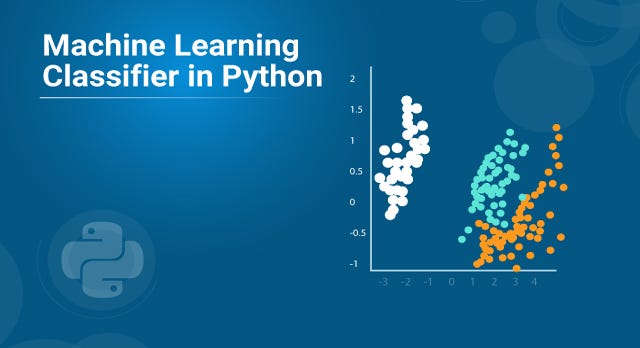
ML Classifier in Python — Edureka

Machine Learning is the buzzword right now. Some incredible stuff is being done with the help of machine learning. From being our personal assistant to deciding our travel routes, helping us shop, aiding us in running our businesses, to taking care of our health and wellness, machine learning is integrated into our daily existence at such fundamental levels, that most of the time we don’t even realize that we are relying on it. In this article, we will follow a beginner’s approach to implement standard a machine learning classifier in Python.

  • Overview of Machine Learning
  • A Template for Machine Learning Classifiers
  • Machine Learning Classification Problem

Overview of Machine Learning

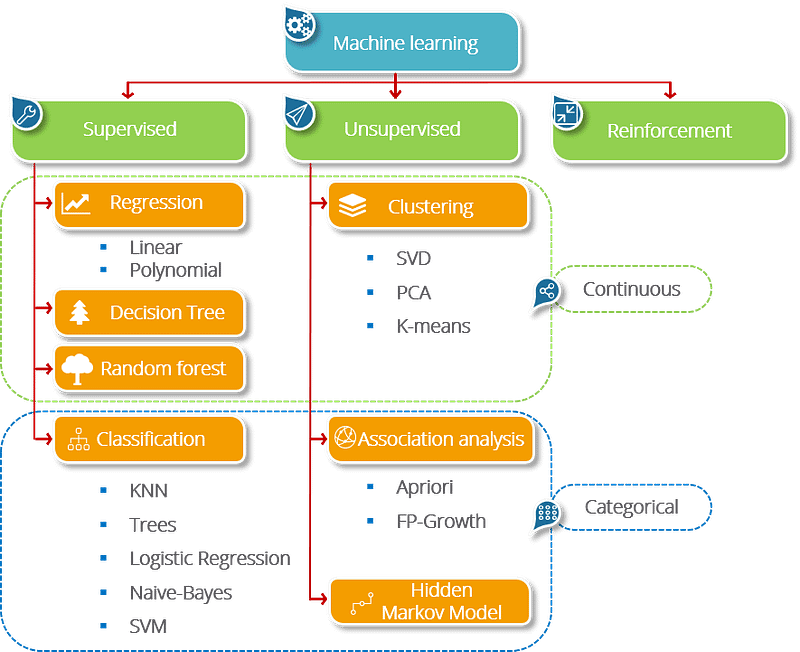
Machine Learning is a concept which allows the machine to learn from examples and experience, and that too without being explicitly programmed. So instead of you writing the code, what you do is you feed data to the generic algorithm, and the algorithm/ machine builds the logic based on the given data.

Machine Learning involves the ability of machines to make decisions, assess the results of their actions, and improve their behavior to get better results successively.

The learning process takes place in three major ways

  • Supervised Learning
  • Unsupervised Learning
  • Reinforcement Learning

A Template for Machine Learning Classifiers

Machine learning tools are provided quite conveniently in a Python library named as scikit-learn, which are very simple to access and apply.

Install scikit-learn through the command prompt using:

pip install -U scikit-learn

If you are an anaconda user, on the anaconda prompt you can use:

conda install scikit-learn

The installation requires prior installation of NumPy and SciPy packages on your system.

Preprocessing: The first and most necessary step in any machine learning-based data analysis is the preprocessing part. Correct representation and cleaning of the data is absolutely essential for the ML model to train well and perform to its potential.

Step 1 — Import necessary libraries

import numpy as np
import pandas as pd
import matplotlib.pyplot as plt

Step 2 — Import the dataset

dataset = pd.read_csv(<pathtofile>)

Then we split the dataset into independent and dependent variables. The independent variables shall be the input data, and the dependent variable is the output data.

X=dataset.iloc[<range of rows and input columns>].values y=dataset.iloc[<range of rows and output column>].values

Step 3 — Handle missing data

The dataset may contain blank or null values, which can cause errors in our results. Hence we need to deal with such entries. A common practice is to replace the null values with a common value, like the mean or the most frequent value in that column.

from sklearn.preprocessing import Imputer
imputer=Imputer(missing_values="NaN", strategy="mean", axis=0)
imputer=imputer.fit(X[<range of rows and columns>])
X[<range of rows and columns>]=imputer.transform(X[<range of rows and columns>])

Step 4 — Convert categorical variables to numeric variables

from sklearn.preprocessing import LabelEncoder
le_X=LabelEncoder()
X[<range of rows and columns>]=le_X.fit_transform(X[<range of rows and columns>])
labelencoder_y = LabelEncoder()
y = labelencoder_y.fit_transform(y)

Now, after encoding, it might happen that the machine assumes the numeric data as a ranking for the encoded columns. Thus, to provide equal weight, we have to convert the numbers to one-hot vectors, using the OneHotEncoder class.

from sklearn.preprocessing import OneHotEncoder
oneHE=OneHotEncoder(categorical_features=[<range of rows and columns>])
X=oneHE.fit_transform(X).toarray()

Step 5 — Perform scaling

This step is to deal with discrepancies arising out of mismatched scales of the variables. Hence, we scale them all to the same range, so that they receive equal weight while being input to the model. We use an object of the StandardScaler class for this purpose.

from sklearn.preprocessing import StandardScaler
sc_X=StandardScaler()
X=sc_X.fit_transform(X)

Step 6 — Split the dataset into training and testing data

As the last step of preprocessing, the dataset needs to be divided into a training set and test set. The standard ratio of the train-test split is 75%-25%. We can modify as per requirements. The train_test_split() function can do this for us.

from sklearn.model_selection import train_test_split
X_train,X_test,y_train,y_test=train_test_split(X,y,test_size=0.25)

Model Building: This step is actually quite simple. Once we decide which model to apply on the data, we can create an object of its corresponding class, and fit the object on our training set, considering X_train as the input and y_train as the output.

from sklearn.<class module> import <model class>
classifier = <model class>(<parameters>)
classifier.fit(X_train, y_train)

The model is now trained and ready. We can now apply our model to the test set and find the predicted output.

y_pred = classifier.predict(X_test)

Viewing Results: The performance of a classifier can be assessed by the parameters of accuracy, precision, recall, and f1-score. These values can be seen using a method known as classification_report(). t can also be viewed as a confusion matrix that helps us to know how many of which category of data have been classified correctly.

from sklearn.metrics import confusion_matrix
cm = confusion_matrix(y_test, y_pred)
print(cm)
 
from sklearn.metrics import classification_report
target_names = [<list of class names>]
print(classification_report(y_test, y_pred, target_names=target_names))

Machine Learning Classifier Problem

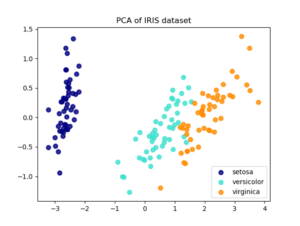
We will use the very popular and simple Iris dataset, containing dimensions of flowers in 3 categories — Iris-setosa, Iris-versicolor, and Iris-virginica. There are 150 entries in the dataset.
# Importing the libraries
import numpy as np
import matplotlib.pyplot as plt
import pandas as pd
 
# Importing the dataset
dataset = pd.read_csv('iris.csv')

Let us view the dataset now.

dataset.head()

We have 4 independent variables (excluding the Id), namely column numbers 1–4, and column 5 is the dependent variable. So we can separate them out.

X = dataset.iloc[:, 1:5].values
y = dataset.iloc[:, 5].values

Now we can Split the Dataset into Training and Testing.

# Splitting the dataset into the Training set and Test set
from sklearn.model_selection import train_test_split
X_train, X_test, y_train, y_test = train_test_split(X, y, test_size = 0.25)

Now we will apply a Logistic Regression classifier to the dataset.

# Building and training the model
from sklearn.linear_model import LogisticRegression
classifier = LogisticRegression()
classifier.fit(X_train, y_train)
 
# Predicting the Test set results
y_pred = classifier.predict(X_test)

The last step will be to analyze the performance of the trained model.

# Making the Confusion Matrix
from sklearn.metrics import confusion_matrix
cm = confusion_matrix(y_test, y_pred)
print(cm)
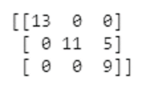
This shows us that 13 entries of the first category, 11 of the second, and 9 of the third category are correctly predicted by the model.

# Generating accuracy, precision, recall and f1-score
from sklearn.metrics import classification_report
target_names = ['Iris-setosa','Iris-versicolor','Iris-virginica']
print(classification_report(y_test, y_pred, target_names=target_names))
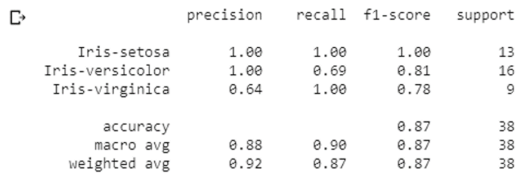
The report shows the precision, recall, f1-score and accuracy values of the model on our test set, which consists of 38 entries (25% of the dataset).

Congratulations, you have successfully created and implemented your first machine learning classifier in Python! If you wish to check out more articles on the market’s most trending technologies like Artificial Intelligence, DevOps, Ethical Hacking, then you can refer to Edureka’s official site.

Do look out for other articles in this series which will explain the various other aspects of Python and Data Science.

1. Python Tutorial

2. Python Programming Language

3. Python Functions

4. File Handling in Python

5. Python Numpy Tutorial

6. Scikit Learn Machine Learning

7. Python Pandas Tutorial

8. Matplotlib Tutorial

9. Tkinter Tutorial

10. Requests Tutorial

11. PyGame Tutorial

12. OpenCV Tutorial

13. Web Scraping With Python

14. PyCharm Tutorial

15. Machine Learning Tutorial

16. Linear Regression Algorithm from scratch in Python

17. Python for Data Science

18. Loops in Python

19. Python RegEx

20. Python Projects

21. Machine Learning Projects

22. Arrays in Python

23. Sets in Python

24. Multithreading in Python

25. Python Interview Questions

26. Java vs Python

27. How To Become A Python Developer?

28. Python Lambda Functions

29. How Netflix uses Python?

30. What is Socket Programming in Python

31. Python Database Connection

32. Golang vs Python

33. Python Seaborn Tutorial

Originally published at https://www.edureka.co on August 2, 2019.

Machine Learning
Ml Classification
Python
Data Science
Programming
Recommended from ReadMedium