
Python for Data Science - Using Python Libraries in Data Science
Python for Data Science is a must-learn for professionals in the Data Analytics domain. With the growth in IT industry, there is a booming demand for skilled Data Scientists and Python has evolved as the most preferred programming language. Through this blog, you will learn the basics, how to analyze data and then create some beautiful visualizations using Python.
This blog on “Python for Data Science” includes the following topics:
- Why learn Python for Data Science?
- Python Introduction
- Jupyter Installation for Python with Data Science
- Python Basics
- Python Libraries for Data Science
- Demo: Practical Implementation
Let’s get started.:-)
Why Learn Python For Data Science?
Python is no-doubt the best-suited language for a data scientist. I have listed down few points which will help you understand why people go with Python for Data Science:
- Python is a free, flexible and powerful open source language
- Python cuts development time in half with its simple and easy to read syntax
- With Python, you can perform data manipulation, analysis, and visualization
- Python provides powerful libraries for Machine learning applications and other scientific computations
And do you know the best part? Data Scientist is one of the highest paid jobs who earn around $130,621 per year as per Indeed.com.
Python Introduction
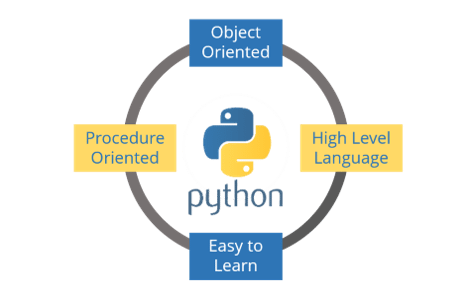
Python was created by Guido Van Rossum in 1989. It is an interpreted language with dynamic semantics. It is free to access and run on all platforms. Python is:
1) Object Oriented 2) High-Level Language 3) Easy to Learn 4) Procedure Oriented
Jupyter Installation for Python With Data Science
Let me guide you through the process of installing Jupyter on your system. Just follow the below steps:
Step 1: Go to the link: http://jupyter.org/
Step 2: You can either click on “Try in your browser” or “Install the Notebook”.
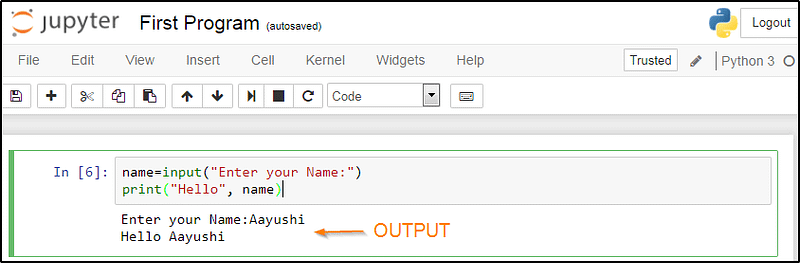
Well, I would recommend you to install Python and Jupyter using Anaconda distribution. Once you have installed Jupyter, it will open on your default browser by typing “Jupyter Notebook” in command prompt. Let us now perform a basic program on Jupyter.
name=input("Enter your Name:")
print("Hello", name)
Now to run this, press “Shift+Enter” and view the output. Refer to the below screenshot:
Basics of Python For Data Science
Now is the time when you get your hands dirty in programming. But for that, you should have a basic understanding of the following topics:
Variables: Variables refers to the reserved memory locations to store the values. In Python, you don’t need to declare variables before using them or even declare their type.
Data Types: Python supports numerous data types, which defines the operations possible on the variables and the storage method. The list of data types includes — Numeric, Lists, Strings, tuples, Sets and Dictionary.
Operators: Operators helps to manipulate the value of operands. The list of operators in Python includes- Arithmetic, Comparison, Assignment, Logical, Bitwise, Membership and Identity.
Conditional Statements: Conditional statements helps to execute a set of statements based on a condition. There are namely three conditional statements — If, Elif and Else.
Loops: Loops are used to iterate through small pieces of code. There are three types of loops namely — While, for and nested loops.
Functions: Functions are used to divide your code into useful blocks, allowing you to order the code, make it more readable, reuse it & save some time.
Python Libraries For Data Science
This is the part where the actual power of Python with data science comes into the picture. Python comes with numerous libraries for scientific computing, analysis, visualization etc. Some of them are listed below:
Numpy
NumPy is a core library of Python for Data Science which stands for ‘Numerical Python’. It is used for scientific computing, which contains a powerful N-dimensional array object and provides tools for integrating C, C++ etc. It can also be used as a multi-dimensional container for generic data where you can perform various Numpy Operations and special functions.
Matplotlib
Matplotlib is a powerful library for visualization in Python. It can be used in Python scripts, shell, web application servers and other GUI toolkits. You can use different types of plots and how multiple plots work using Matplotlib.
Scikit-learn
Scikit learn is one of the main attractions, wherein you can implement machine learning using Python. It is a free library which contains simple and efficient tools for data analysis and mining purposes. You can implement various algorithm, such as logistic regression, time series algorithm using scikit-learn.
Seaborn
Seaborn is a statistical plotting library in Python. So whenever you’re using Python for data science, you will be using matplotlib (for 2D visualizations) and Seaborn, which has its beautiful default styles and a high-level interface to draw statistical graphics.
Pandas
Pandas is an important library in Python for data science. It is used for data manipulation and analysis. It is well suited for different data such as tabular, ordered and unordered time series, matrix data etc.
Demo: Practical Implementation
Problem Statement: You are given a dataset which comprises of comprehensive statistics on a range of aspects like distribution & nature of prison institutions, overcrowding in prisons, type of prison inmates etc. You have to use this dataset to perform descriptive statistics and derive useful insights out of the data. Below are a few tasks:
- Data loading: Load a dataset “prisoners.csv” using pandas and display the first and last five rows in the dataset. Then find out the number of columns using describe the method in Pandas.
- Data Manipulation: Create a new column -“total benefitted”, which is the sum of inmates benefitted through all modes.
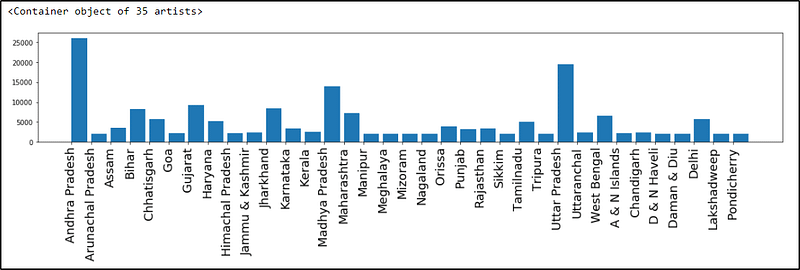
- Data Visualization: Create a bar plot with each state name on the x-axis and their total benefitted inmates as their bar heights.
Solution:
For data loading, write the below code:
import pandas as pd
import matplotlib.pyplot as plot
%matplotlib inline
file_name = "prisoners.csv"
prisoners = pd.read_csv(file_name)
prisoners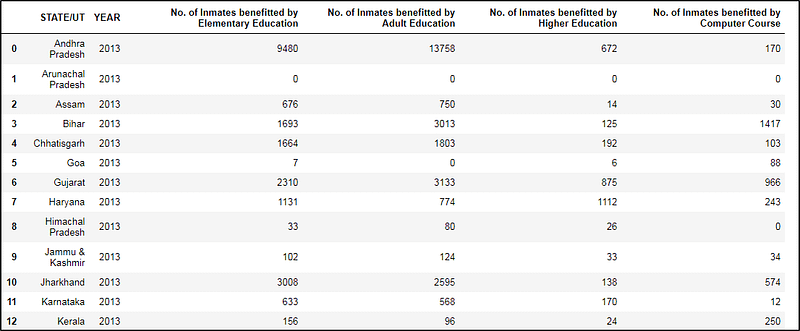
Now to use the describe method in Pandas, just type the below statement:
prisoners.describe()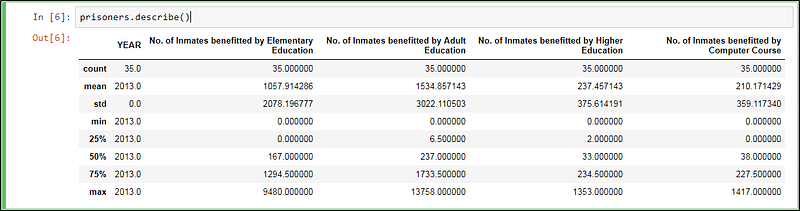
Next, in Python with a data science blog, let us perform data manipulation.
prisoners["total_benefited"]=prisoners.sum(axis=1)
prisoners.head()
And finally, let us perform some visualization in Python for data science blog. Refer the below code:
import numpy as np
xlabels = prisoners['STATE/UT'].values
plot.figure(figsize=(20, 3))
plot.xticks(np.arange(xlabels.shape[0]), xlabels, rotation = 'vertical', fontsize = 18)
plot.xticks
plot.bar(np.arange(prisoners.values.shape[0]),prisoners['total_benefited'],align = 'edge')
Output –
I hope my article on “Python for data science” was relevant for you.
If you wish to check out more articles on the market’s most trending technologies like Artificial Intelligence, DevOps, Ethical Hacking, then you can refer to Edureka’s official site.
Do look out for other articles in this series which will explain the various other aspects of Python and Data Science.
11. PyGame Tutorial
12. OpenCV Tutorial
14. PyCharm Tutorial
17. Python Regex
18. Loops in Python
19. Python Projects
21. Arrays in Python
22. Sets in Python
25. Java vs Python
31. Golang vs Python
Originally published at www.edureka.co on March 8, 2018.


