avatarAayushi Johari

Free AI web copilot to create summaries, insights and extended knowledge, download it at here

15179

Abstract

that is controlled by an iterable expression.</p><p id="a908">Syntax of <i>For</i> statement:</p><div id="9043"><pre><span class="hljs-keyword">for</span> <span class="hljs-keyword">target</span> in iterable: statement (s)</pre></div><figure id="9330"><img src="https://cdn-images-1.readmedium.com/v2/resize:fit:800/1*g6nHcdmN2ettfQBWFFwjwQ.png"><figcaption><i>For - Facebook Friends Example - Python Programming Language</i></figcaption></figure><p id="e357">The ‘<b>for</b>’ statement can be understood from the above example.</p><ul><li>Listing ‘Friends’ from your profile will display the names and photos of all of your friends</li><li>To achieve this, Facebook gets your ‘friendlist’ list containing all the profiles of your friends</li><li>Facebook then starts displaying the HTML of all the profiles till the list index reaches ‘NULL’</li><li>The action of populating all the profiles onto your page is controlled by ‘for’ statement</li></ul><p id="6c89">Let us now look at a sample program in Python to demonstrate the For statement.</p><div id="f756"><pre>travelling = <span class="hljs-selector-tag">input</span>(<span class="hljs-string">"Are you travelling? Yes or No:"</span>) while travelling == <span class="hljs-string">'yes'</span>: num = <span class="hljs-built_in">int</span>(<span class="hljs-selector-tag">input</span>(<span class="hljs-string">"Enter the number of people travelling:"</span>)) <span class="hljs-keyword">for</span> num <span class="hljs-keyword">in</span> <span class="hljs-built_in">range</span>(<span class="hljs-number">1</span>,num+<span class="hljs-number">1</span>): name = <span class="hljs-selector-tag">input</span>(<span class="hljs-string">"Enter Details \n Name:"</span>) age = <span class="hljs-selector-tag">input</span>(<span class="hljs-string">"Age:"</span>) sex = <span class="hljs-selector-tag">input</span>(<span class="hljs-string">"Male or Female:"</span>) <span class="hljs-built_in">print</span>(<span class="hljs-string">"Details Stored \n"</span>,name) <span class="hljs-built_in">print</span>(age) <span class="hljs-built_in">print</span>(sex) <span class="hljs-built_in">print</span>(<span class="hljs-string">"Thank you!"</span>) travelling = <span class="hljs-selector-tag">input</span>(<span class="hljs-string">"Are you travelling? Yes or No:"</span>) <span class="hljs-function"><span class="hljs-title">print</span><span class="hljs-params">(<span class="hljs-string">"Please come back again."</span>)</span></span></pre></div><p id="52d6">The output is as below:</p><div id="0171"><pre>Are you travelling? <span class="hljs-keyword">Yes</span> <span class="hljs-keyword">or</span> <span class="hljs-keyword">No</span>:<span class="hljs-keyword">Yes</span> Enter the number of people travelling:<span class="hljs-number">1</span> Enter Details Name:Harry Age:<span class="hljs-number">20</span> Male <span class="hljs-keyword">or</span> Female:Male Details Stored Harry <span class="hljs-number">20</span> Male Thank you Are you travelling? <span class="hljs-keyword">Yes</span> <span class="hljs-keyword">or</span> <span class="hljs-keyword">No</span>:<span class="hljs-keyword">No</span> Please come back again.</pre></div><h1 id="2816">While Statement</h1><p id="6810">The while statement in Python programming supports repeated execution of a statement or block of statements that is controlled by a conditional expression.</p><p id="480d">Syntax of While statement:</p><div id="01e9"><pre><span class="hljs-keyword">while</span> <span class="hljs-keyword">expression</span>: statement (s)</pre></div><figure id="96de"><img src="https://cdn-images-1.readmedium.com/v2/resize:fit:800/1*ylbOOXqztXkI0Jz6RNtSow.png"><figcaption><i>While - Facebook Newsfeed Example - Python Programming Language</i></figcaption></figure><p id="894b">We will use the above Facebook News feed to understand the use of while loop.</p><ul><li>When we log in to our homepage on Facebook, we have about 10 stories loaded on our news feed</li><li>As soon as we reach the end of the page, Facebook loads another 10 stories onto our news feed</li><li>This demonstrates how ‘while’ loop can be used to achieve this</li></ul><p id="61db">Let us now look at a sample program in Python to demonstrate the While statement.</p><div id="90d3"><pre><span class="hljs-keyword">count</span> = <span class="hljs-number">0</span> <span class="hljs-keyword">print</span>(<span class="hljs-string">'Printing numbers from 0 to 9'</span>) <span class="hljs-keyword">while</span> (<span class="hljs-keyword">count</span><<span class="hljs-number">10</span>): <span class="hljs-keyword">print</span>(<span class="hljs-string">'The count is '</span>,<span class="hljs-keyword">count</span>) <span class="hljs-keyword">count</span> = <span class="hljs-keyword">count</span>+<span class="hljs-number">1</span> <span class="hljs-keyword">print</span>(<span class="hljs-string">'Good Bye'</span>)</pre></div><p id="c7e5">This program prints numbers from 0 to 9 using the while statement to restrict the loop until it reaches 9. The output is as below:</p><div id="4589"><pre>The<span class="hljs-built_in"> count</span> <span class="hljs-literal">is</span> <span class="hljs-number">0</span> The<span class="hljs-built_in"> count</span> <span class="hljs-literal">is</span> <span class="hljs-number">1</span> The<span class="hljs-built_in"> count</span> <span class="hljs-literal">is</span> <span class="hljs-number">2</span> The<span class="hljs-built_in"> count</span> <span class="hljs-literal">is</span> <span class="hljs-number">3</span> The<span class="hljs-built_in"> count</span> <span class="hljs-literal">is</span> <span class="hljs-number">4</span> The<span class="hljs-built_in"> count</span> <span class="hljs-literal">is</span> <span class="hljs-number">5</span> The<span class="hljs-built_in"> count</span> <span class="hljs-literal">is</span> <span class="hljs-number">6</span> The<span class="hljs-built_in"> count</span> <span class="hljs-literal">is</span> <span class="hljs-number">7</span> The<span class="hljs-built_in"> count</span> <span class="hljs-literal">is</span> <span class="hljs-number">8</span> The<span class="hljs-built_in"> count</span> <span class="hljs-literal">is</span> <span class="hljs-number">9</span></pre></div><h1 id="25e4">Break Statement</h1><p id="586a">The break statement is allowed only inside a loop body. When break executes, the loop terminates. If a loop is nested inside other loops, break terminates only the innermost nested loop.</p><p id="0705">Syntax of Break statement:</p><div id="1adb"><pre>while True: x = <span class="hljs-built_in">get_next</span>() y = <span class="hljs-built_in">preprocess</span>(x) if not <span class="hljs-built_in">keep_looking</span>(x, y): break <span class="hljs-built_in">process</span>(x, y)</pre></div><figure id="a85a"><img src="https://cdn-images-1.readmedium.com/v2/resize:fit:800/1*ylbOOXqztXkI0Jz6RNtSow.png"><figcaption><i>Break - Alarm And Incoming Call- Python Programming Language</i></figcaption></figure><p id="264b">The ‘break’ flow control statement can be understood from the above example.</p><ul><li>Let us consider the case of an alarm on a mobile ringing at a particular time.</li><li>Suppose the phone gets an incoming call in the time the alarm is ringing, the alarm is stopped immediately and the phone ringer starts ringing.</li><li>This is how break essentially works.</li></ul><p id="9285">Let us now look at a sample program in Python to demonstrate the Break statement.</p><div id="e82c"><pre><span class="hljs-keyword">for</span> letter <span class="hljs-keyword">in</span> <span class="hljs-string">'The Quick Brown Fox. Jumps, Over The Lazy Dog'</span>: <span class="hljs-keyword">if</span> letter == <span class="hljs-string">'.'</span>: <span class="hljs-keyword">break</span> <span class="hljs-keyword">print</span> (<span class="hljs-string">'Current Letter :'</span>, letter)</pre></div><p id="e209">This program prints all the letters in a given string. It breaks whenever it encounters a ‘.’ or a full stop. We have done this by using the Break statement. The output is as below.</p><div id="d0a3"><pre>Current Letter : <span class="hljs-type">T</span> Current Letter : <span class="hljs-type">h</span> Current Letter : <span class="hljs-type">e</span> Current Letter : <span class="hljs-type">Current</span> Letter : <span class="hljs-type">Q</span> Current Letter : <span class="hljs-type">u</span> Current Letter : <span class="hljs-type">i</span> Current Letter : <span class="hljs-type">c</span> Current Letter : <span class="hljs-type">k</span> Current Letter : <span class="hljs-type">Current</span> Letter : <span class="hljs-type">B</span> Current Letter : <span class="hljs-type">r</span> Current Letter : <span class="hljs-type">o</span> Current Letter : <span class="hljs-type">w</span> Current Letter : <span class="hljs-type">n</span> Current Letter : <span class="hljs-type">Current</span> Letter : <span class="hljs-type">F</span> Current Letter : <span class="hljs-type">o</span> Current Letter : <span class="hljs-type">x</span></pre></div><h1 id="9601">Continue Statement</h1><p id="a350">The continue statement is allowed only inside a loop body. When continue executes, the current iteration of the loop body terminates, and execution continues with the next iteration of the loop.</p><p id="46b1">Syntax of <i>Continue</i> statement:</p><div id="5200"><pre>for <span class="hljs-keyword">x</span> in some_container: if not seems_ok(<span class="hljs-keyword">x</span>): continue lowbound<span class="hljs-punctuation">,</span> highbound <span class="hljs-operator">=</span> bounds_to_test() if <span class="hljs-keyword">x</span><lowbound <span class="hljs-keyword">or</span> <span class="hljs-keyword">x</span>><span class="hljs-operator">=</span>highbound: continue if final_check(<span class="hljs-keyword">x</span>): do_processing(<span class="hljs-keyword">x</span>)</pre></div><figure id="bf45"><img src="https://cdn-images-1.readmedium.com/v2/resize:fit:800/1*hiteLHJwM8Yvh2R8sJ5FLQ.png"><figcaption><i>Continue - Incoming Call And Alarm Example - Python Programming Knowledge</i></figcaption></figure><p id="11d8"><b>Example: </b>The Continue statement can be understood using an incoming call and an alarm.</p><ul><li>Suppose we are on a call and the alarm is scheduled during the call time, then the alarm trigger recognizes the call event</li><li>Once the call event is noted, the phone continues the alarm to ring at the next snooze period</li></ul><p id="693d">Let us now look at a sample program in Python to demonstrate the Continue statement.</p><div id="8249"><pre><span class="hljs-keyword">for</span> <span class="hljs-built_in">num</span> <span class="hljs-keyword">in</span> range(<span class="hljs-number">10</span>, <span class="hljs-number">21</span>): <span class="hljs-keyword">if</span> <span class="hljs-built_in">num</span> % <span class="hljs-number">5</span> == <span class="hljs-number">0</span>: <span class="hljs-built_in">print</span> (<span class="hljs-string">"Found a multiple of 5"</span>) pass <span class="hljs-built_in">num</span> = <span class="hljs-built_in">num</span> + <span class="hljs-number">1</span> <span class="hljs-keyword">continue</span> <span class="hljs-built_in">print</span> (<span class="hljs-string">"Found number: "</span>, <span class="hljs-built_in">num</span>)</pre></div><p id="a97c">This program prints all the numbers except the multiples of 5 from 10 to 20. The output is as follows.</p><div id="9638"><pre><span class="hljs-attribute">Found</span> a multiple of <span class="hljs-number">5</span> <span class="hljs-attribute">Found</span> number: <span class="hljs-number">11</span> <span class="hljs-attribute">Found</span> number: <span class="hljs-number">12</span> <span class="hljs-attribute">Found</span> number: <span class="hljs-number">13</span> <span class="hljs-attribute">Found</span> number: <span class="hljs-number">14</span> <span class="hljs-attribute">Found</span> a multiple of <span class="hljs-number">5</span> <span class="hljs-attribute">Found</span> number: <span class="hljs-number">16</span> <span class="hljs-attribute">Found</span> number: <span class="hljs-number">17</span> <span class="hljs-attribute">Found</span> number: <span class="hljs-number">18</span> <span class="hljs-attribute">Found</span> number: <span class="hljs-number">19</span> <span class="hljs-attribute">Found</span> a multiple of <span class="hljs-number">5</span></pre></div><h2 id="f96a">Pass Statement</h2><p id="0c72">The pass statement, which performs no action, can be used as a placeholder when a statement is syntactically required but you have nothing specific to do.</p><p id="6b5d">Syntax of Pass statement:</p><div id="688b"><pre><span class="hljs-variable"><span class="hljs-keyword">if</span></span> <span class="hljs-function"><span class="hljs-title">condition1</span>(<span class="hljs-variable">x</span>): <span class="hljs-title">process1</span>(<span class="hljs-variable">x</span>)</span> <span class="hljs-variable">elif</span> <span class="hljs-variable">x</span>><span class="hljs-number">23</span> <span class="hljs-variable"><span class="hljs-keyword">or</span></span> <span class="hljs-function"><span class="hljs-title">condition2</span>(<span class="hljs-variable">x</span>) <span class="hljs-variable"><span class="hljs-keyword">and</span></span> <span class="hljs-variable">x</span><<span class="hljs-number">5</span>: <span class="hljs-variable">pass</span> <span class="hljs-variable">elif</span> <span class="hljs-title">condition3</span>(<span class="hljs-variable">x</span>): <span class="hljs-title">process3</span>(<span class="hljs-variable">x</span>)</span> <span class="hljs-variable"><span class="hljs-keyword">else</span></span>: <span class="hljs-function"><span class="hljs-title">process_default</span>(<span class="hljs-variable">x</span>)</span></pre></div><p id="3a1b">Now let us look at a sample program in Python to demonstrate the Pass statement.</p><div id="e7ca"><pre><span class="hljs-keyword">for</span> <span class="hljs-built_in">num</span> <span class="hljs-keyword">in</span> <span class="hljs-built_in">range</span>(<span class="hljs-number">10</span>, <span class="hljs-number">21</span>): <span class="hljs-keyword">if</span> <span class="hljs-built_in">num</span> <span class="hljs-symbol">%</span> <span class="hljs-number">5</span> == <span class="hljs-number">0</span>: <span class="hljs-built_in">print</span> (<span class="hljs-string">"Found a multiple of 5: "</span>) pass <span class="hljs-built_in">num</span>++ <span class="hljs-built_in">print</span> (<span class="hljs-string">"Found number: "</span>, <span class="hljs-built_in">num</span>)</pre></div><p id="b4d3">This program prints the multiples of 5 with a separate sentence. The output is as follows.</p><div id="d47f"><pre><span class="hljs-attribute">Found</span> a multiple of <s

Options

pan class="hljs-number">5</span>: <span class="hljs-number">10</span> <span class="hljs-attribute">Found</span> number: <span class="hljs-number">11</span> <span class="hljs-attribute">Found</span> number: <span class="hljs-number">12</span> <span class="hljs-attribute">Found</span> number: <span class="hljs-number">13</span> <span class="hljs-attribute">Found</span> number: <span class="hljs-number">14</span> <span class="hljs-attribute">Found</span> a multiple of <span class="hljs-number">5</span>: <span class="hljs-number">15</span> <span class="hljs-attribute">Found</span> number: <span class="hljs-number">16</span> <span class="hljs-attribute">Found</span> number: <span class="hljs-number">17</span> <span class="hljs-attribute">Found</span> number: <span class="hljs-number">18</span> <span class="hljs-attribute">Found</span> number: <span class="hljs-number">19</span> <span class="hljs-attribute">Found</span> a multiple of <span class="hljs-number">5</span>: <span class="hljs-number">20</span></pre></div><p id="c9ee">After learning the above six flow control statements, let us now learn what functions are.</p><h1 id="50b4">Functions</h1><p id="496b"><a href="https://www.edureka.co/blog/python-functions?utm_source=medium&amp;utm_medium=content-link&amp;utm_campaign=python-programming-language">Functions in Python programming</a> is a group of related statements that performs a specific task. Functions make our program more organized and help in code re-usability.</p><figure id="5daf"><img src="https://cdn-images-1.readmedium.com/v2/resize:fit:800/1*YzdQWsS0_GnCqE2hndICAw.png"><figcaption><i>Understanding Functions - Python Programming Language</i></figcaption></figure><h2 id="1cb9">Uses Of Functions:</h2><ol><li>Functions help in code reusability</li><li>Functions provide organization to the code</li><li>Functions provide abstraction</li><li>Functions help in extensibility</li></ol><figure id="a149"><img src="https://cdn-images-1.readmedium.com/v2/resize:fit:800/1*yG6tyghv_lhklmBGFbPeTA.png"><figcaption><i>Demonstrating The Uses Of Functions - Python Programming Language</i></figcaption></figure><p id="b0bb">The code used in the above example is as below:</p><div id="6139"><pre># Defining a <span class="hljs-keyword">function</span> <span class="hljs-keyword">to</span> <span class="hljs-keyword">reverse</span> a string def reverse_a_string(): # Reading <span class="hljs-keyword">input</span> <span class="hljs-keyword">from</span> console a_string = <span class="hljs-keyword">input</span>("Enter a string") new_strings = []

# Storing length <span class="hljs-keyword">of</span> <span class="hljs-keyword">input</span> string
<span class="hljs-keyword">index</span> = len(a_string)</pre></div><div id="65df"><pre>    # Reversing the <span class="hljs-built_in">string</span> using <span class="hljs-keyword">while</span> loop
<span class="hljs-keyword">while</span> <span class="hljs-built_in">index</span>:
     <span class="hljs-built_in">index</span> -= <span class="hljs-number">1</span>
     new_strings.<span class="hljs-keyword">append</span>(a_string[<span class="hljs-built_in">index</span>])

#Printing the reversed <span class="hljs-built_in">string</span>
<span class="hljs-keyword">print</span>(<span class="hljs-string">''</span>.<span class="hljs-keyword">join</span>(new_strings))

reverse_a_string()</pre></div><p id="cf47">We have thus shown the power of using functions in Python.</p><h1 id="2f30">File Handling</h1><p id="678d">File Handling refers to those operations that are used to read or write a file.</p><p id="3d56">To perform file handling, we need to perform these steps:</p><ol><li>Open-File</li><li>Read / Write File</li><li>Close File</li></ol><figure id="1ef3"><img src="https://cdn-images-1.readmedium.com/v2/resize:fit:800/1*SCys44tmFz0VIsUB6j4ehg.png"><figcaption><i>File Handling In Python - Python Programming Language</i></figcaption></figure><h1 id="b416">Opening A File</h1><ul><li>Python has a built-in function open() to open a file</li><li>This function returns a file object, also called a handle, as it is used to read or modify the file accordingly</li></ul><p id="9ce0">Example program:</p><div id="84c5"><pre><span class="hljs-keyword">file</span> = <span class="hljs-keyword">open</span>(<span class="hljs-string">"C:/Users/Edureka/Hello.txt"</span>, <span class="hljs-string">"r"</span>) <span class="hljs-keyword">for</span> <span class="hljs-keyword">line</span> <span class="hljs-keyword">in</span> <span class="hljs-keyword">file</span>: <span class="hljs-keyword">print</span> (<span class="hljs-keyword">line</span>)</pre></div><p id="bac7">The output is as below:</p><div id="c33e"><pre><span class="hljs-keyword">One</span> <span class="hljs-keyword">Two</span> Three</pre></div><h1 id="d90d">Writing To A File</h1><ul><li>In order to write into a file, we need to open it in <b><i>write ‘w’</i></b>, <b><i>append ‘a’</i></b> or <b><i>exclusive creation ‘x’</i></b> mode</li><li>We need to be careful with the ‘w’ mode as it will overwrite into the file if it already exists. All previous data are erased</li><li>Writing a string or sequence of bytes (for binary files) is done using write() method</li></ul><p id="3782">Example program:</p><div id="516c"><pre><span class="hljs-keyword">with</span> <span class="hljs-built_in">open</span>(<span class="hljs-string">"C:/Users/Edureka/Writing_Into_File.txt"</span>, <span class="hljs-string">"w"</span>) <span class="hljs-keyword">as</span> f f.<span class="hljs-built_in">write</span>(<span class="hljs-string">"First Line\n"</span>) f.<span class="hljs-built_in">write</span>(<span class="hljs-string">"Second Line\n"</span>)</pre></div><div id="cded"><pre><span class="hljs-keyword">file</span> = <span class="hljs-keyword">open</span>(<span class="hljs-string">"D:/Writing_Into_File.txt"</span>, <span class="hljs-string">"r"</span>) <span class="hljs-keyword">for</span> <span class="hljs-keyword">line</span> <span class="hljs-keyword">in</span> <span class="hljs-keyword">file</span>: <span class="hljs-keyword">print</span> (<span class="hljs-keyword">line</span>)</pre></div><p id="b6a8">The output is as below:</p><div id="1eee"><pre><span class="hljs-built_in">First</span> <span class="hljs-built_in">Line</span> <span class="hljs-variable">Second</span> <span class="hljs-built_in">Line</span></pre></div><h1 id="3749">Reading From A File</h1><ul><li>To read the content of a file, we must open the file in the reading mode</li><li>We can use the read(size) method to read in size number of data</li><li>If the size parameter is not specified, it reads and returns up to the end of the file</li></ul><p id="5c0b">Example program:</p><div id="58ba"><pre><span class="hljs-keyword">file</span> = <span class="hljs-keyword">open</span>(<span class="hljs-string">"C:/Users/Edureka/Writing_Into_File.txt"</span>, <span class="hljs-string">"r"</span>) <span class="hljs-keyword">print</span>(<span class="hljs-keyword">file</span>.<span class="hljs-keyword">read</span>(5)) <span class="hljs-keyword">print</span>(<span class="hljs-keyword">file</span>.<span class="hljs-keyword">read</span>(4)) <span class="hljs-keyword">print</span>(<span class="hljs-keyword">file</span>.<span class="hljs-keyword">read</span>())</pre></div><p id="a430">The output is as below:</p><div id="3683"><pre><span class="hljs-built_in">First</span> <span class="hljs-built_in">Line</span> <span class="hljs-variable">Second</span> <span class="hljs-built_in">Line</span></pre></div><h1 id="80d8">Closing A File</h1><ul><li>When we are done with operations to the file, we need to properly close it.</li><li>Closing a file will free up the resources that were tied with the file and is done using the close() method.</li></ul><p id="5e8f">Example program:</p><div id="def0"><pre><span class="hljs-built_in">file</span> = <span class="hljs-built_in">open</span>(<span class="hljs-string">"C:/Users/Edureka/Hello.txt"</span>, <span class="hljs-string">"r"</span>) <span class="hljs-keyword">text</span> = <span class="hljs-built_in">file</span>.readlines() print(<span class="hljs-keyword">text</span>) <span class="hljs-built_in">file</span>.<span class="hljs-built_in">close</span>()</pre></div><p id="a16c">The output is as below:</p><div id="a7d4"><pre>[<span class="hljs-symbol">'One</span>\n', <span class="hljs-symbol">'Two</span>\n', <span class="hljs-symbol">'Three</span>']</pre></div><h1 id="ef0f">Object & Class</h1><p id="76d2">Python is an object-oriented programming language. Object is simply a collection of data (variables) and methods (functions) that act on those data. A class is a blueprint for the object.</p><figure id="ad83"><img src="https://cdn-images-1.readmedium.com/v2/resize:fit:800/1*NPv3gs6JBdQDCYoyQyxO0w.png"><figcaption>Representation of Class and Objects - Python Programming Language</figcaption></figure><h1 id="18cc">Defining A Class</h1><p id="434a">We define a class using the keyword “<b>Class</b>”. The first string is called <b><i>docstring </i></b>and has a brief description of the class.</p><div id="e1ad"><pre><span class="hljs-keyword">class</span> <span class="hljs-title class_">MyNewClass</span>: <span class="hljs-string">'''This is a docstring. I have created a new class'''</span> <span class="hljs-keyword">pass</span></pre></div><h1 id="1b83">Creating An Object</h1><p id="67be">A Class object can be used to create new object instances (instantiation) of that class. The procedure to create an object is similar to a function call.</p><div id="2b3b"><pre><span class="hljs-attribute">ob</span> <span class="hljs-operator">=</span> MyNewClass</pre></div><p id="b508">We have thus learned how to create an object from a given class.</p><p id="5c7e">So this concludes our Python Programming blog. I hope you enjoyed reading this blog and found it informative. By now, you must have acquired a sound understanding of what Python Programming Language is. Now go ahead and practice all the examples.</p><p id="0909">If you wish to check out more articles on the market’s most trending technologies like Artificial Intelligence, DevOps, Ethical Hacking, then you can refer to Edureka’s official site.</p><p id="7b26">Do look out for other articles in this series which will explain the various other aspects of Python and Data Science.</p><blockquote id="2773"><p>1. <a href="https://readmedium.com/python-tutorial-be1b3d015745">Python Tutorial</a></p></blockquote><blockquote id="ed5e"><p>2.<a href="https://readmedium.com/python-functions-f0cabca8c4a"> Python Functions</a></p></blockquote><blockquote id="2283"><p>3. <a href="https://readmedium.com/file-handling-in-python-e0a6ff96ede9">File Handling in Python</a></p></blockquote><blockquote id="d41a"><p>4.<a href="https://readmedium.com/python-numpy-tutorial-89fb8b642c7d"> Python Numpy Tutorial</a></p></blockquote><blockquote id="c958"><p>5.<a href="https://readmedium.com/scikit-learn-machine-learning-7a2d92e4dd07"> Scikit Learn Machine Learning</a></p></blockquote><blockquote id="40d1"><p>6. <a href="https://readmedium.com/python-pandas-tutorial-c5055c61d12e">Python Pandas Tutorial</a></p></blockquote><blockquote id="76f6"><p>7. <a href="https://readmedium.com/python-matplotlib-tutorial-15d148a7bfee">Matplotlib Tutorial</a></p></blockquote><blockquote id="4823"><p>8. <a href="https://readmedium.com/tkinter-tutorial-f655d3f4c818">Tkinter Tutorial</a></p></blockquote><blockquote id="dedc"><p>9. <a href="https://readmedium.com/python-requests-tutorial-30edabfa6a1c">Requests Tutorial</a></p></blockquote><blockquote id="b00e"><p>10. <a href="https://readmedium.com/pygame-tutorial-9874f7e5c0b4">PyGame Tutorial</a></p></blockquote><blockquote id="31e0"><p>11. <a href="https://readmedium.com/python-opencv-tutorial-5549bd4940e3">OpenCV Tutorial</a></p></blockquote><blockquote id="ccdb"><p>12. <a href="https://readmedium.com/web-scraping-with-python-d9e6506007bf">Web Scraping With Python</a></p></blockquote><blockquote id="1994"><p>13. <a href="https://readmedium.com/pycharm-tutorial-d0ec9ce6fb60">PyCharm Tutorial</a></p></blockquote><blockquote id="44dd"><p>14. <a href="https://readmedium.com/machine-learning-tutorial-f2883412fba1">Machine Learning Tutorial</a></p></blockquote><blockquote id="a6af"><p>15.<a href="https://readmedium.com/linear-regression-in-python-e66f869cb6ce"> Linear Regression Algorithm from scratch in Python</a></p></blockquote><blockquote id="f5b7"><p>16.<a href="https://readmedium.com/learn-python-for-data-science-1f9f407943d3"> Python for Data Science</a></p></blockquote><blockquote id="f3ca"><p>17. <a href="https://readmedium.com/python-regex-regular-expression-tutorial-f2d17ffcf17e">Python Regex</a></p></blockquote><blockquote id="1dbc"><p>18. <a href="https://readmedium.com/loops-in-python-fc5b42e2f313">Loops in Python</a></p></blockquote><blockquote id="bdee"><p>19. <a href="https://readmedium.com/python-projects-1f401a555ca0">Python Projects</a></p></blockquote><blockquote id="cf12"><p>20. <a href="https://readmedium.com/machine-learning-projects-cb0130d0606f">Machine Learning Projects</a></p></blockquote><blockquote id="23b1"><p>21. <a href="https://readmedium.com/arrays-in-python-14aecabec16e">Arrays in Python</a></p></blockquote><blockquote id="e609"><p>22. <a href="https://readmedium.com/sets-in-python-a16b410becf4">Sets in Python</a></p></blockquote><blockquote id="b517"><p>23. <a href="https://readmedium.com/what-is-mutithreading-19b6349dde0f">Multithreading in Python</a></p></blockquote><blockquote id="d809"><p>24. <a href="https://readmedium.com/python-interview-questions-a22257bc309f">Python Interview Questions</a></p></blockquote><blockquote id="589b"><p>25. <a href="https://readmedium.com/java-vs-python-31d7433ed9d">Java vs Python</a></p></blockquote><blockquote id="c6a7"><p>26. <a href="https://readmedium.com/how-to-become-a-python-developer-462a0093f246">How To Become A Python Developer?</a></p></blockquote><blockquote id="f668"><p>27. <a href="https://readmedium.com/python-lambda-b84d68d449a0">Python Lambda Functions</a></p></blockquote><blockquote id="5ecf"><p>28. <a href="https://readmedium.com/how-netflix-uses-python-1e4deb2f8ca5">How Netflix uses Python?</a></p></blockquote><blockquote id="00ec"><p>29. <a href="https://readmedium.com/socket-programming-python-bbac2d423bf9">What is Socket Programming in Python</a></p></blockquote><blockquote id="ddcd"><p>30. <a href="https://readmedium.com/python-database-connection-b4f9b301947c">Python Database Connection</a></p></blockquote><blockquote id="9669"><p>31. <a href="https://readmedium.com/golang-vs-python-5ac32e1ef2">Golang vs Python</a></p></blockquote><blockquote id="6c01"><p>32. <a href="https://readmedium.com/python-seaborn-tutorial-646fdddff322">Python Seaborn Tutorial</a></p></blockquote><blockquote id="a532"><p>33. <a href="https://readmedium.com/python-career-opportunities-a2500ce158de">Python Career Opportunities</a></p></blockquote><p id="9934"><i>Originally published at <a href="https://www.edureka.co/blog/python-programming-language">www.edureka.co</a> on June 16, 2017.</i></p></article></body>

Learning Python With Examples — Installation & Fundamentals
Python Programming Language - Edureka

Python Programming Language is a high-level and interpreted programming language which was created by Guido Van Rossum in 1989. It was first released in 1991, which results in a great general-purpose language capable of creating anything from desktop software to web applications and frameworks.

For those of you familiar with Java or C++, Python will break the mold you have built for a typical programming language. Prepare to fall in love, with Python!

In this blog, we will learn the Python Programming language in the following sequence:

  1. Why Learn Python Programming?
  2. Python Installation
  3. Python Fundamentals 3.1 Datatypes 3.2 Flow Control 3.3 Functions
  4. File Handling
  5. Object & Class

Why Learn Python Programming?

Python is a high-level dynamic programming language. It is quite easy to learn and provides powerful typing. Python code has a very ‘natural’ style to it, in that it is easy to read and understand (thanks to the lack of semicolons and braces). Python programming language runs on any platform, ranging from Windows to Linux to Macintosh, Solaris etc. The simplicity of Python is what it makes so popular. The following gives a highlight of its aesthetics:

  • Highly readable language
  • Clean visual layout
  • Less syntactic exceptions
  • Superior string manipulation
  • Elegant and dynamic typing
  • Interpreted nature
  • Ideal for scripting and rapid application
  • Fit for many platforms

Wait! Python can do more.

It is a very popular language in multiple domains like Automation, Big Data, AI etc. You will also be impressed as it used by the vast multitude of companies around the globe.

Companies Using Python - Python Tutorial

Python Installation

Let us now move on to installing Python on Windows systems.

  1. Go to the link: https://www.python.org/downloads/ and install the latest version on your machines.
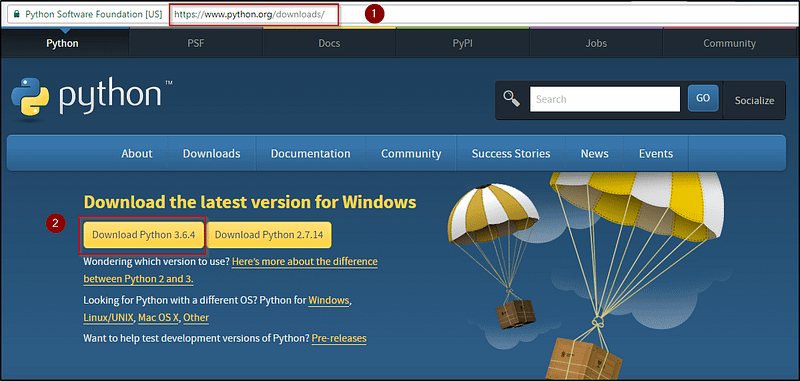
Download Python - Python Programming Language

2. Download and install PyCharm IDE.

Download PyCharm - Python Tutorial

PyCharm is an Integrated Development Environment (IDE) used in computer programming, specifically for the Python programming language. It provides code analysis, a graphical debugger, an integrated unit tester, integration with version control systems (VCSes), and supports web development with Django.

Python Fundamentals

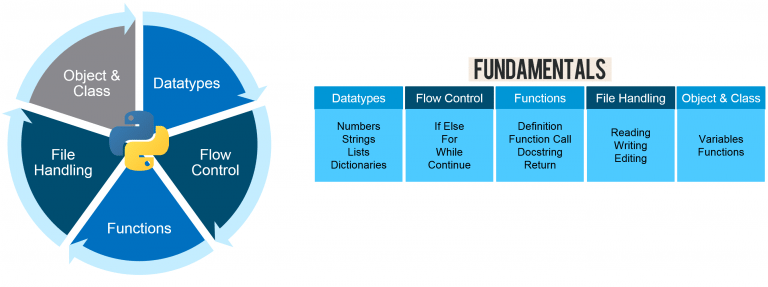
The following are the five fundamentals required to master Python:

  1. Datatypes
  2. Flow Control
  3. Functions
  4. File Handling
  5. Object & Class
Python Programming Fundamentals - Python Programming Language

Datatypes

All data values in Python are represented by objects and each object or value has datatypes.
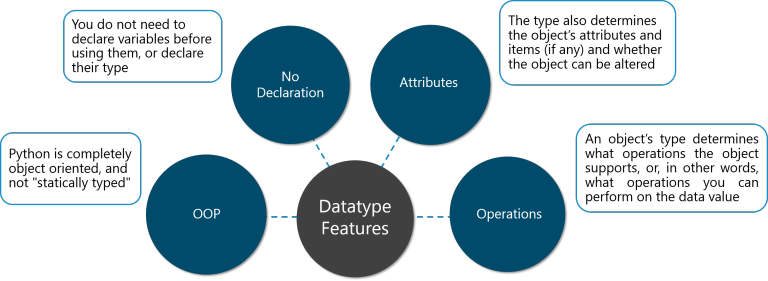
Datatypes Features - Python Programming Knowledge

There are eight native datatypes in Python.

  1. Boolean
  2. Numbers
  3. Strings
  4. Bytes & Byte Arrays
  5. Lists
  6. Tuples
  7. Sets
  8. Dictionaries

The following image will give a description of the same.
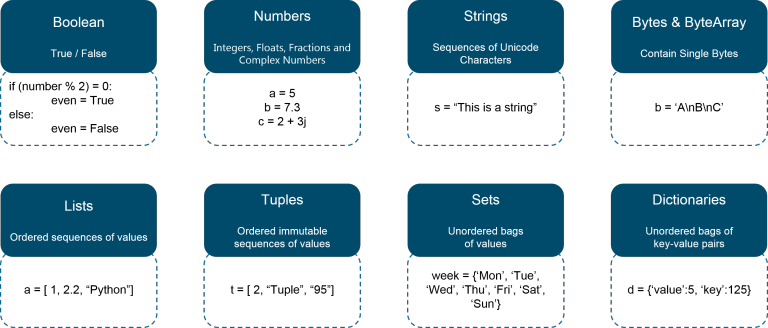
Native Datatypes - Python Programming Knowledge

Let us look at how to implement these data types in Python.

#Boolean
number = [1,2,3,4,5]
boolean = 3 in number
print(boolean)
#Numbers
num1 = 5**3
num2 = 32//3
num3 = 32/3
print('num1 is',num1)
print('num2 is',num2)
print('num3 is',num3)
#Strings
str1 = "Welcome"
str2 = " to Edureka's Python Programming Blog"
str3 = str1 + str2
print('str3 is',str3)
print(str3[0:10])
print(str3[-5:])
print(str3[:-5])
#Lists
countries = ['India', 'Australia', 'United States', 'Canada', 'Singapore']
print(len(countries))
print(countries)
countries.append('Brazil')
print(countries)
countries.insert(2, 'United Kingdom')
print(countries)
#Tuples
sports_tuple = ('Cricket', 'Basketball', 'Football')
sports_list = list(sports_tuple)
sports_list.append('Baseball')
print(sports_list)
print(sports_tuple)
#Dictionary
#Indian Government
Government = {'Legislature':'Parliament', 'Executive':'PM & Cabinet', 'Judiciary':'Supreme Court'}
print('Indian Government has ',Government)
#Modifying for USA
Government['Legislature']='Congress'
Government['Executive']='President & Cabinet'
print('USA Government has ',Government)

The output of the above code is as follows:

True

num1 is 125
num2 is 10
num3 is 10.666666666666666

str3 is Welcome to Edureka's Python Programming Blog
Welcome to
 Blog
Welcome to Edureka's Python Programming

5
['India', 'Australia', 'United States', 'Canada', 'Singapore']
['India', 'Australia', 'United States', 'Canada', 'Singapore', 'Brazil']
['India', 'Australia', 'United Kingdom', 'United States', 'Canada', 'Singapore', 'Brazil']

['Cricket', 'Basketball', 'Football', 'Baseball']
('Cricket', 'Basketball', 'Football')

Indian Government has {'Legislature': 'Parliament', 'Judiciary': 'Supreme Court', 'Executive': 'PM & Cabinet'}
USA Government has {'Legislature': 'Congress', 'Judiciary': 'Supreme Court', 'Executive': 'President & Cabinet'}

Flow Control

Flow Control lets us define a flow in executing our programs. To mimic the real world, you need to transform real-world situations into your program. For this, you need to control the execution of your program statements using Flow Controls.

Flow Control- Python Programming Language

There are six basic flow controls used in Python programming:

  1. if
  2. for
  3. while
  4. break
  5. continue
  6. pass

If Statement

The Python compound statement ’if’ lets you conditionally execute blocks of statements.

Syntax of If statement:

if expression:
     statement (s)
elif expression:
     statement (s)
elif expression:
     statement (s)
...
else:
    statement (s)
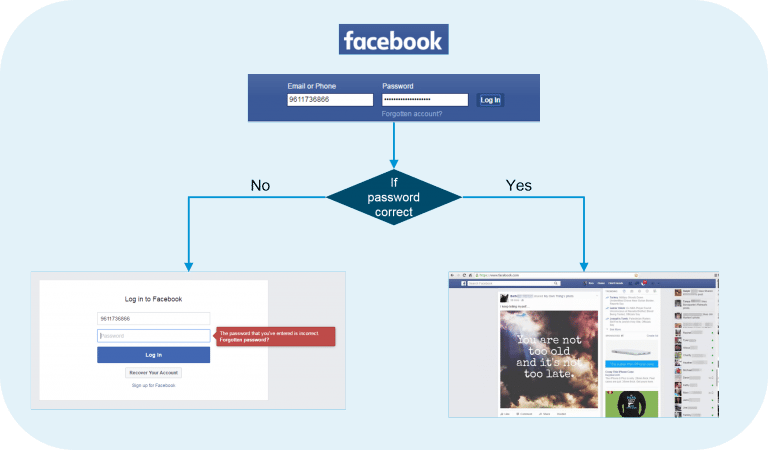
If - Facebook Login Example - Python Programming Language

The above image explains the use of ‘if’ statement using an example of Facebook login.

  1. The Facebook login page will direct you to two pages based on whether your username and password is a match to your account.
  2. If the password entered is wrong, it will direct you to the page on the left.
  3. If the password entered is correct, you will be directed to your homepage.

Let us now look at how Facebook would use the If statement.

password = facebook_hash(input_password)
if password == hash_password
   print('Login successful.')
else
   print('Login failed. Incorrect password.')

The above code just gives a high-level implementation of If statement in the Facebook login example used. Facebook_hash() function takes the input_password as a parameter and compares it with the hash value stored for that particular user.

For Statement

The for statement supports repeated execution of a statement or block of statements that is controlled by an iterable expression.

Syntax of For statement:

for target in iterable:
    statement (s)
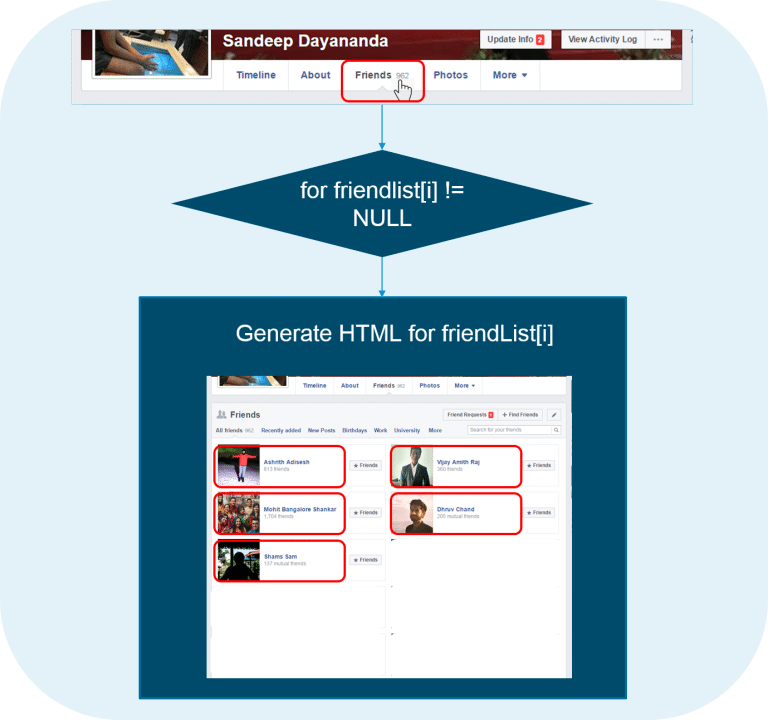
For - Facebook Friends Example - Python Programming Language

The ‘for’ statement can be understood from the above example.

  • Listing ‘Friends’ from your profile will display the names and photos of all of your friends
  • To achieve this, Facebook gets your ‘friendlist’ list containing all the profiles of your friends
  • Facebook then starts displaying the HTML of all the profiles till the list index reaches ‘NULL’
  • The action of populating all the profiles onto your page is controlled by ‘for’ statement

Let us now look at a sample program in Python to demonstrate the For statement.

travelling = input("Are you travelling? Yes or No:")
while travelling == 'yes':
   num = int(input("Enter the number of people travelling:"))
   for num in range(1,num+1):
      name = input("Enter Details \n Name:")
      age = input("Age:")
      sex = input("Male or Female:") 
      print("Details Stored \n",name)
      print(age)
      print(sex)
   print("Thank you!")
   travelling = input("Are you travelling? Yes or No:")
print("Please come back again.")

The output is as below:

Are you travelling? Yes or No:Yes
Enter the number of people travelling:1
Enter Details 
Name:Harry
Age:20
Male or Female:Male
Details Stored
Harry
20
Male
Thank you
Are you travelling? Yes or No:No
Please come back again.

While Statement

The while statement in Python programming supports repeated execution of a statement or block of statements that is controlled by a conditional expression.

Syntax of While statement:

while expression:
     statement (s)
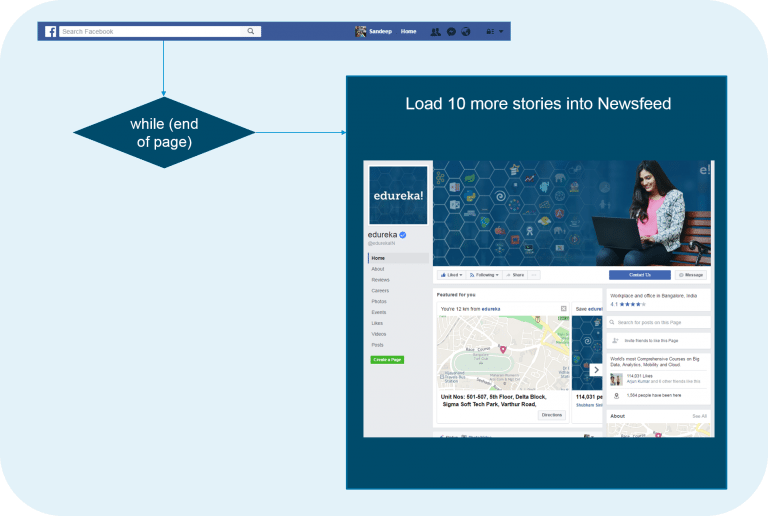
While - Facebook Newsfeed Example - Python Programming Language

We will use the above Facebook News feed to understand the use of while loop.

  • When we log in to our homepage on Facebook, we have about 10 stories loaded on our news feed
  • As soon as we reach the end of the page, Facebook loads another 10 stories onto our news feed
  • This demonstrates how ‘while’ loop can be used to achieve this

Let us now look at a sample program in Python to demonstrate the While statement.

count = 0
print('Printing numbers from 0 to 9')
while (count<10):
   print('The count is ',count)
   count = count+1
print('Good Bye')

This program prints numbers from 0 to 9 using the while statement to restrict the loop until it reaches 9. The output is as below:

The count is 0
The count is 1
The count is 2
The count is 3
The count is 4
The count is 5
The count is 6
The count is 7
The count is 8
The count is 9

Break Statement

The break statement is allowed only inside a loop body. When break executes, the loop terminates. If a loop is nested inside other loops, break terminates only the innermost nested loop.

Syntax of Break statement:

while True:
     x = get_next()
     y = preprocess(x)
     if not keep_looking(x, y): break
     process(x, y)
Break - Alarm And Incoming Call- Python Programming Language

The ‘break’ flow control statement can be understood from the above example.

  • Let us consider the case of an alarm on a mobile ringing at a particular time.
  • Suppose the phone gets an incoming call in the time the alarm is ringing, the alarm is stopped immediately and the phone ringer starts ringing.
  • This is how break essentially works.

Let us now look at a sample program in Python to demonstrate the Break statement.

for letter in 'The Quick Brown Fox. Jumps, Over The Lazy Dog':
   if letter == '.':
      break
   print ('Current Letter :', letter)

This program prints all the letters in a given string. It breaks whenever it encounters a ‘.’ or a full stop. We have done this by using the Break statement. The output is as below.

Current Letter : T
Current Letter : h
Current Letter : e
Current Letter : 
Current Letter : Q
Current Letter : u
Current Letter : i
Current Letter : c
Current Letter : k
Current Letter : 
Current Letter : B
Current Letter : r
Current Letter : o
Current Letter : w
Current Letter : n
Current Letter : 
Current Letter : F
Current Letter : o
Current Letter : x

Continue Statement

The continue statement is allowed only inside a loop body. When continue executes, the current iteration of the loop body terminates, and execution continues with the next iteration of the loop.

Syntax of Continue statement:

for x in some_container:
    if not seems_ok(x): continue
    lowbound, highbound = bounds_to_test()
    if x<lowbound or x>=highbound: continue
    if final_check(x):
         do_processing(x)
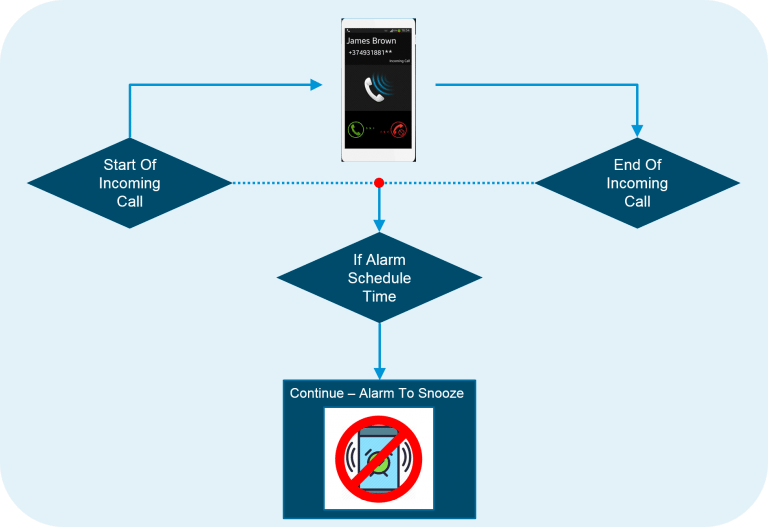
Continue - Incoming Call And Alarm Example - Python Programming Knowledge

Example: The Continue statement can be understood using an incoming call and an alarm.

  • Suppose we are on a call and the alarm is scheduled during the call time, then the alarm trigger recognizes the call event
  • Once the call event is noted, the phone continues the alarm to ring at the next snooze period

Let us now look at a sample program in Python to demonstrate the Continue statement.

for num in range(10, 21):
   if num % 5 == 0:
      print ("Found a multiple of 5")
      pass
      num = num + 1
      continue
   print ("Found number: ", num)

This program prints all the numbers except the multiples of 5 from 10 to 20. The output is as follows.

Found a multiple of 5
Found number: 11
Found number: 12
Found number: 13
Found number: 14
Found a multiple of 5
Found number: 16
Found number: 17
Found number: 18
Found number: 19
Found a multiple of 5

Pass Statement

The pass statement, which performs no action, can be used as a placeholder when a statement is syntactically required but you have nothing specific to do.

Syntax of Pass statement:

if condition1(x):
    process1(x)
elif x>23 or condition2(x) and x<5:
    pass
elif condition3(x):
    process3(x)
else:
    process_default(x)

Now let us look at a sample program in Python to demonstrate the Pass statement.

for num in range(10, 21):
   if num % 5 == 0:
      print ("Found a multiple of 5: ")
      pass
      num++
   print ("Found number: ", num)

This program prints the multiples of 5 with a separate sentence. The output is as follows.

Found a multiple of 5: 10
Found number: 11
Found number: 12
Found number: 13
Found number: 14
Found a multiple of 5: 15
Found number: 16
Found number: 17
Found number: 18
Found number: 19
Found a multiple of 5: 20

After learning the above six flow control statements, let us now learn what functions are.

Functions

Functions in Python programming is a group of related statements that performs a specific task. Functions make our program more organized and help in code re-usability.
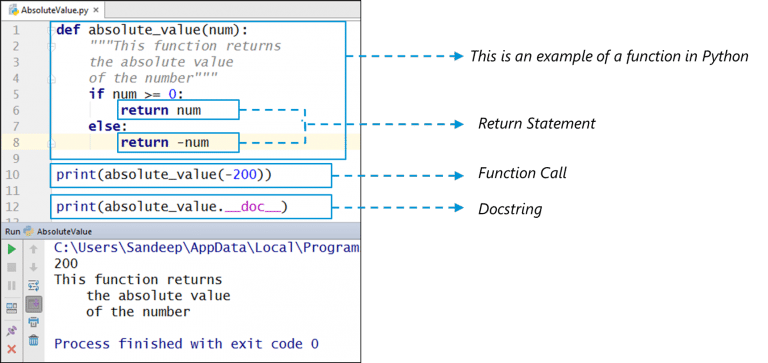
Understanding Functions - Python Programming Language

Uses Of Functions:

  1. Functions help in code reusability
  2. Functions provide organization to the code
  3. Functions provide abstraction
  4. Functions help in extensibility
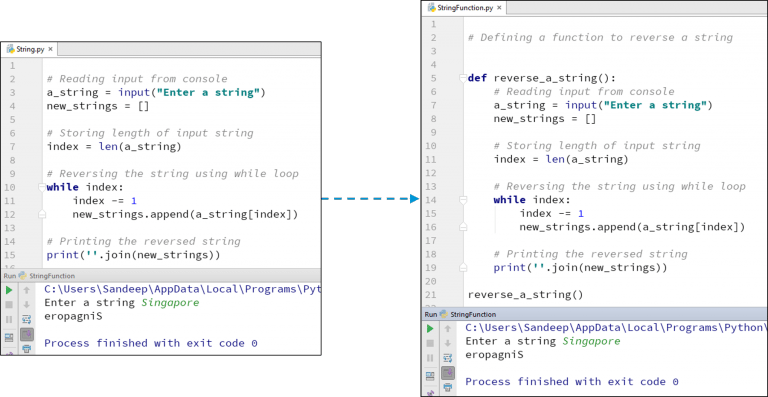
Demonstrating The Uses Of Functions - Python Programming Language

The code used in the above example is as below:

# Defining a function to reverse a string
def reverse_a_string():
    # Reading input from console
    a_string = input("Enter a string")
    new_strings = []
    
    # Storing length of input string
    index = len(a_string)
    # Reversing the string using while loop
    while index:
         index -= 1
         new_strings.append(a_string[index])
    
    #Printing the reversed string
    print(''.join(new_strings))
reverse_a_string()

We have thus shown the power of using functions in Python.

File Handling

File Handling refers to those operations that are used to read or write a file.

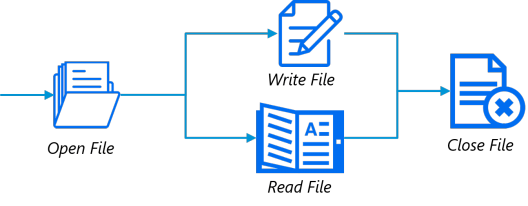
To perform file handling, we need to perform these steps:

  1. Open-File
  2. Read / Write File
  3. Close File
File Handling In Python - Python Programming Language

Opening A File

  • Python has a built-in function open() to open a file
  • This function returns a file object, also called a handle, as it is used to read or modify the file accordingly

Example program:

file = open("C:/Users/Edureka/Hello.txt", "r")
for line in file:
   print (line)

The output is as below:

One
Two
Three

Writing To A File

  • In order to write into a file, we need to open it in write ‘w’, append ‘a’ or exclusive creation ‘x’ mode
  • We need to be careful with the ‘w’ mode as it will overwrite into the file if it already exists. All previous data are erased
  • Writing a string or sequence of bytes (for binary files) is done using write() method

Example program:

with open("C:/Users/Edureka/Writing_Into_File.txt", "w") as f
f.write("First Line\n")
f.write("Second Line\n")
file = open("D:/Writing_Into_File.txt", "r")
for line in file:
   print (line)

The output is as below:

First Line
Second Line

Reading From A File

  • To read the content of a file, we must open the file in the reading mode
  • We can use the read(size) method to read in size number of data
  • If the size parameter is not specified, it reads and returns up to the end of the file

Example program:

file = open("C:/Users/Edureka/Writing_Into_File.txt", "r")
print(file.read(5))
print(file.read(4))
print(file.read())

The output is as below:

First Line
Second Line

Closing A File

  • When we are done with operations to the file, we need to properly close it.
  • Closing a file will free up the resources that were tied with the file and is done using the close() method.

Example program:

file = open("C:/Users/Edureka/Hello.txt", "r")
text = file.readlines()
print(text)
file.close()

The output is as below:

['One\n', 'Two\n', 'Three']

Object & Class

Python is an object-oriented programming language. Object is simply a collection of data (variables) and methods (functions) that act on those data. A class is a blueprint for the object.

Representation of Class and Objects - Python Programming Language

Defining A Class

We define a class using the keyword “Class”. The first string is called docstring and has a brief description of the class.

class MyNewClass:
'''This is a docstring. I have created a new class'''
pass

Creating An Object

A Class object can be used to create new object instances (instantiation) of that class. The procedure to create an object is similar to a function call.

ob = MyNewClass

We have thus learned how to create an object from a given class.

So this concludes our Python Programming blog. I hope you enjoyed reading this blog and found it informative. By now, you must have acquired a sound understanding of what Python Programming Language is. Now go ahead and practice all the examples.

If you wish to check out more articles on the market’s most trending technologies like Artificial Intelligence, DevOps, Ethical Hacking, then you can refer to Edureka’s official site.

Do look out for other articles in this series which will explain the various other aspects of Python and Data Science.

1. Python Tutorial

2. Python Functions

3. File Handling in Python

4. Python Numpy Tutorial

5. Scikit Learn Machine Learning

6. Python Pandas Tutorial

7. Matplotlib Tutorial

8. Tkinter Tutorial

9. Requests Tutorial

10. PyGame Tutorial

11. OpenCV Tutorial

12. Web Scraping With Python

13. PyCharm Tutorial

14. Machine Learning Tutorial

15. Linear Regression Algorithm from scratch in Python

16. Python for Data Science

17. Python Regex

18. Loops in Python

19. Python Projects

20. Machine Learning Projects

21. Arrays in Python

22. Sets in Python

23. Multithreading in Python

24. Python Interview Questions

25. Java vs Python

26. How To Become A Python Developer?

27. Python Lambda Functions

28. How Netflix uses Python?

29. What is Socket Programming in Python

30. Python Database Connection

31. Golang vs Python

32. Python Seaborn Tutorial

33. Python Career Opportunities

Originally published at www.edureka.co on June 16, 2017.

Programming
Python
Python Install
Function
Object Oriented
Recommended from ReadMedium
avatarAbhay Kumar
OOPs in Python

An easy guide

10 min read