avatarAayushi Johari

Free AI web copilot to create summaries, insights and extended knowledge, download it at here

5340

Abstract

py: project pipelines file</p><p id="d111">settings.py: project settings file</p><ul><li>spiders/</li></ul><p id="c22f">init.py: a directory where later you will put your spiders</p><h1 id="f574">Making Your First Spider</h1><p id="4639">Spiders are classes that we define and scrapy uses to gather information from the web. You must subclass scrapy.Spider and define the initial requests to make.</p><p id="379c">You write the code for your spider in a separate python file and save it in the projectname/spiders directory in your project.</p><p id="4689"><b>quotes_spider.py</b></p><div id="3579"><pre>import scrapy

<span class="hljs-keyword">class</span> <span class="hljs-title class_">QuotesSpider</span>(scrapy.<span class="hljs-title class_">Spider</span>): name = <span class="hljs-string">"quotes"</span> <span class="hljs-keyword">def</span> <span class="hljs-title function_">start_request</span>(<span class="hljs-params"><span class="hljs-variable language_">self</span></span>): urls = [ <span class="hljs-string">'<a href="http://quotes.toscrape.com/page/1/">http://quotes.toscrape.com/page/1/</a>'</span>, <span class="hljs-symbol">http:</span>/<span class="hljs-regexp">/quotes.toscrape.com/page</span><span class="hljs-regexp">/2/</span>, ] <span class="hljs-keyword">for</span> url <span class="hljs-keyword">in</span> <span class="hljs-symbol">urls:</span> <span class="hljs-keyword">yield</span> scrapy.<span class="hljs-title class_">Request</span>(url=url , callback= <span class="hljs-variable language_">self</span>.parse)

<span class="hljs-keyword">def</span> <span class="hljs-title function_">parse</span>(<span class="hljs-params"><span class="hljs-variable language_">self</span>, response</span>): page = response.url.split(<span class="hljs-string">"/"</span>)[-<span class="hljs-number">2</span>] filename = <span class="hljs-string">'quotes-%s.html'</span> % page with open(filename, <span class="hljs-string">'wb'</span>) as <span class="hljs-symbol">f:</span> f.write(response.body) <span class="hljs-variable language_">self</span>.log(<span class="hljs-string">'saved file %s'</span> % filename)</pre></div><p id="11a7">As you can see, we have defined various functions in our spiders,</p><ul><li>name: It identifies the spider, it has to be unique throughout the project.</li><li>start_requests(): Must return an iterable of requests which the spider will begin to crawl with.</li><li>parse(): It is a method that will be called to handle the response downloaded with each request.</li></ul><h1 id="3bf3">Extracting Data</h1><p id="1465">Until now the spider does not extract any data, it just saved the whole HTML file. A scrapy spider typically generates many dictionaries containing the data extracted from the page. We use the yield keyword in python in the callback to extract the data.</p><div id="9d7f"><pre><span class="hljs-keyword">import</span> scrapy

<span class="hljs-keyword">class</span> QuotesSpider(scrapy.Spider):

   <span class="hljs-type">name</span> = "quotes"
   start_urls = [ http://quotes.toscrape.com/page/<span class="hljs-number">1</span>/<span class="hljs-string">',
                         http://quotes.toscrape.com/page/2/,
                       ]

   def parse(self, response):
        for quote in response.css('</span>div.quot<span class="hljs-string">e'):
              yield {
                          '</span><span class="hljs-type">text</span><span class="hljs-string">': quote.css(span.text::text'</span>).<span class="hljs-keyword">get</span>(),
                          <span class="hljs-string">'author'</span>: <span class="hljs-keyword">quote</span>.css(small.author::<span class="hljs-type">text</span><span class="hljs-string">')get(),
                          '</span>tags<span class="hljs-string">': quote.css(div.tags a.tag::text'</span>).getall()
                         }</pre></div><p id="788a">When you run this spider, it will output the extracted data with the log.</p><figure id="c2e9"><img src="https://cdn-images-1.readmedium.com/v2/resize:fit:800/1*fylT_L6cDsR3u1UOhSnI-A.png"><figcaption></figcaption></figure><h1 id="e5fe">Storing the Data</h1><p id="d298">The simplest way to store the extracted data is by using feed exports, use the following command to store your data.</p><div id="25a4"><pre>scrapy crawl <span class="hljs-attribute">quotes</span> -o <span class="hljs-attribute">quotes</span><span class="hljs-selector-class">.json</span></pre></div><p id="ebd9">This command will generate a quotes.json file containing all the scraped items, serialized in JSON.</p><p id="ee02">This brings us to the end of this article where we have learned how we can make a web-crawler using scrapy in python to scrape a website and extract the data into a JSON file. I hope you are clear with all that has been shared with you in this tutorial.</p><p id="9d90">If you wish to check out more articles on the market’s most trending technologies like Artificial Intelligence, DevOps, Ethical Hacking, then you can refer to <a href="https://www.edureka.co/blog/?utm_source=medium&amp;utm_medium=content-link&amp;utm_campaign=python-visual-studio">Edureka’s 

Options

official site.</a></p><p id="d95a">Do look out for other articles in this series which will explain the various other aspects of Python and Data Science.</p><blockquote id="ec78"><p><i>1</i>. <a href="https://readmedium.com/machine-learning-classifier-c02fbd8400c9">Machine Learning Classifier in Python</a></p></blockquote><blockquote id="ca54"><p>2. <a href="https://readmedium.com/python-scikit-learn-cheat-sheet-9786382be9f5">Python Scikit-Learn Cheat Sheet</a></p></blockquote><blockquote id="484e"><p>3. <a href="https://readmedium.com/python-libraries-for-data-science-and-machine-learning-1c502744f277">Machine Learning Tools</a></p></blockquote><blockquote id="824a"><p>4. <a href="https://readmedium.com/python-libraries-for-data-science-and-machine-learning-1c502744f277">Python Libraries For Data Science And Machine Learning</a></p></blockquote><blockquote id="2980"><p>5. <a href="https://readmedium.com/how-to-make-a-chatbot-in-python-b68fd390b219">Chatbot In Python</a></p></blockquote><blockquote id="9cd9"><p>6. <a href="https://readmedium.com/collections-in-python-d0bc0ed8d938">Python Collections</a></p></blockquote><blockquote id="ef50"><p>7. <a href="https://readmedium.com/python-modules-abb0145a5963">Python Modules</a></p></blockquote><blockquote id="985c"><p>8. <a href="https://readmedium.com/python-developer-skills-371583a69be1">Python developer Skills</a></p></blockquote><blockquote id="b881"><p>9. <a href="https://readmedium.com/oops-interview-questions-621fc922cdf4">OOPs Interview Questions and Answers</a></p></blockquote><blockquote id="de6c"><p>10. <a href="https://readmedium.com/python-developer-resume-ded7799b4389">Resume For A Python Developer</a></p></blockquote><blockquote id="4794"><p>11. <a href="https://readmedium.com/exploratory-data-analysis-in-python-3ee69362a46e">Exploratory Data Analysis In Python</a></p></blockquote><blockquote id="f298"><p>12. <a href="https://readmedium.com/python-turtle-module-361816449390">Snake Game With Python’s Turtle Module</a></p></blockquote><blockquote id="470c"><p>13. <a href="https://readmedium.com/python-developer-salary-ba2eff6a502e">Python Developer Salary</a></p></blockquote><blockquote id="8c57"><p>14.<a href="https://readmedium.com/principal-component-analysis-69d7a4babc96"> Principal Component Analysis</a></p></blockquote><blockquote id="9642"><p>15. <a href="https://readmedium.com/python-vs-cpp-c3ffbea01eec">Python vs C++</a></p></blockquote><blockquote id="05f8"><p>16. <a href="https://readmedium.com/web-scraping-with-python-d9e6506007bf">Web Scraping With Python</a></p></blockquote><blockquote id="7987"><p>17. <a href="https://readmedium.com/scipy-tutorial-38723361ba4b">Python SciPy</a></p></blockquote><blockquote id="c1fc"><p>18. <a href="https://readmedium.com/least-square-regression-40b59cca8ea7">Least Squares Regression Method</a></p></blockquote><blockquote id="9ce0"><p>19. <a href="https://readmedium.com/jupyter-notebook-cheat-sheet-88f60d1aca7">Jupyter Notebook Cheat Sheet</a></p></blockquote><blockquote id="9ae5"><p>20. <a href="https://readmedium.com/python-basics-f371d7fc0054">Python Basics</a></p></blockquote><blockquote id="6ac2"><p>21. <a href="https://readmedium.com/python-pattern-programs-75e1e764a42f">Python Pattern Programs</a></p></blockquote><blockquote id="0345"><p>22. <a href="https://readmedium.com/generators-in-python-258f21e3d3ff">Generators in Python</a></p></blockquote><blockquote id="abe3"><p>23. <a href="https://readmedium.com/python-decorator-tutorial-bf7b21278564">Python Decorator</a></p></blockquote><blockquote id="e7d3"><p>24.<a href="https://readmedium.com/spyder-ide-2a91caac4e46"> Python Spyder IDE</a></p></blockquote><blockquote id="7295"><p>25. <a href="https://readmedium.com/kivy-tutorial-9a0f02fe53f5">Mobile Applications Using Kivy In Python</a></p></blockquote><blockquote id="bc88"><p>26. <a href="https://readmedium.com/best-books-for-python-11137561beb7">Top 10 Best Books To Learn & Practice Python</a></p></blockquote><blockquote id="0591"><p>27. <a href="https://readmedium.com/robot-framework-tutorial-f8a75ab23cfd">Robot Framework With Python</a></p></blockquote><blockquote id="ca4a"><p>28. <a href="https://readmedium.com/snake-game-with-pygame-497f1683eeaa">Snake Game in Python using PyGame</a></p></blockquote><blockquote id="ca77"><p>29. <a href="https://readmedium.com/django-interview-questions-a4df7bfeb7e8">Django Interview Questions and Answers</a></p></blockquote><blockquote id="9dc1"><p>30. <a href="https://readmedium.com/python-applications-18b780d64f3b">Top 10 Python Applications</a></p></blockquote><blockquote id="c5bb"><p>31. <a href="https://readmedium.com/hash-tables-and-hashmaps-in-python-3bd7fc1b00b4">Hash Tables and Hashmaps in Python</a></p></blockquote><blockquote id="588a"><p>32. <a href="https://readmedium.com/whats-new-python-3-8-7d52cda747b">Python 3.8</a></p></blockquote><blockquote id="7de9"><p>33. <a href="https://readmedium.com/support-vector-machine-in-python-539dca55c26a">Support Vector Machine</a></p></blockquote><blockquote id="c318"><p>34. <a href="https://readmedium.com/python-tutorial-be1b3d015745">Python Tutorial</a></p></blockquote><p id="667b"><i>Originally published at <a href="https://www.edureka.co/blog/scrapy-tutorial/">https://www.edureka.co</a> on September 6, 2019.</i></p></article></body>

Scrapy Tutorial: How To Make A Web-Crawler Using Scrapy?
Scrapy Tutorial — Edureka

Web scraping is an effective way of gathering data from the webpages, it has become an effective tool in data science. With various python libraries present for web scraping like beautifulsoup, a data scientist’s work becomes optimal. Scrapy is a powerful web framework used for extracting, processing and storing data. In this article, we will learn how we can make a web crawler using scrapy, following are the topics discussed in this blog:

  • What is Scrapy?
  • What is A Web Crawler?
  • How to Install Scrapy?
  • Starting Your First Scrapy Project
  • Making Your First Spider
  • Extracting Data
  • Storing the Extracted Data

What is Scrapy?

Scrapy is a free and open-source web crawling framework written in python. It was originally designed to perform web scraping, but can also be used for extracting data using APIs. It is maintained by Scrapinghub ltd.

Scrapy is a complete package when it comes to downloading the webpages, processing and storing the data on the databases.

It is like a powerhouse when it comes to web scraping with multiple ways to scrape a website. Scrapy handles bigger tasks with ease, scraping multiple pages or a group of URLs in less than a minute. It uses a twister that works asynchronously to achieve concurrency.

It provides spider contracts that allow us to create generic as well as deep crawlers. Scrapy also provides item pipelines to create functions in a spider that can perform various operations like replacing values in data etc.
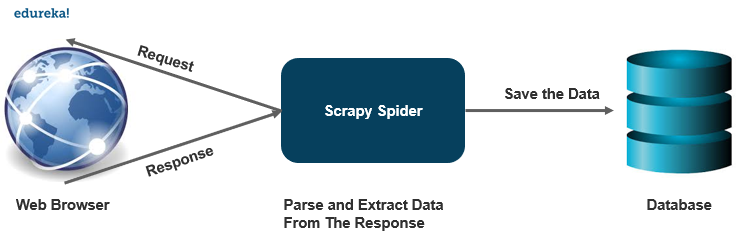
What is A Web-Crawler?

A web-crawler is a program that searches for documents on the web automatically. They are primarily programmed for repetitive action for automated browsing.

How does it work?

A web-crawler is quite similar to a librarian. It looks for the information on the web, categorizes the information and then indexes and catalogs the information for the crawled information to be retrieved and stored accordingly.

The operations that will be performed by the crawler are created beforehand, then the crawler performs all those operations automatically which will create an index. These indexes can be accessed by an output software.

Let’s take a look at various applications a web-crawler can be used for:

  • Price comparison portals search for specific product details to make a comparison of prices on different platforms using a web-crawler.
  • A web-crawler plays a very important role in the field of data mining for the retrieval of information.
  • Data analysis tools use web-crawlers to calculate the data for page views, inbound and outbound links as well.
  • Crawlers also serve to information hubs to collect data such as news portals.

How To Install Scrapy?
To install scrapy on your system, it is recommended to install it on a dedicated virtualenv. Installation works pretty similarly to any other package in python, if you are using conda environment, use the following command to install scrapy:

conda install -c conda-forge scrapy

you can also use the pip environment to install scrapy,

pip install scrapy

There might be a few compilation dependencies depending on your operating system. Scrapy is written in pure python and may depend on a few python packages like:

  • lxml — It is an efficient XML and HTML parser.
  • parcel — An HTML/XML extraction library written on top on lxml
  • W3lib — It is a multi-purpose helper for dealing with URLs and webpage encodings
  • twisted — An asynchronous networking framework
  • cryptography — It helps in various network-level security needs

Starting Your First Scrapy Project

To start your first scrapy project, go to the directory or location where you want to save your files and execute the following command

scrapy startproject projectname

After you execute this command, you will get the following directories created on that location.

  • projectname/

scrapy.cfg: it deploys configuration file

  • projectname/

__init__.py: projects’s python module

items.py: project items definition file

middlewares.py: project middlewares file

pipelines.py: project pipelines file

settings.py: project settings file

  • spiders/

__init__.py: a directory where later you will put your spiders

Making Your First Spider

Spiders are classes that we define and scrapy uses to gather information from the web. You must subclass scrapy.Spider and define the initial requests to make.

You write the code for your spider in a separate python file and save it in the projectname/spiders directory in your project.

quotes_spider.py

import scrapy
 
class QuotesSpider(scrapy.Spider):
    name = "quotes"
    def start_request(self):
          urls = [ '<a href="http://quotes.toscrape.com/page/1/">http://quotes.toscrape.com/page/1/</a>',
                       http://quotes.toscrape.com/page/2/,
                     ]
          for url in urls:
              yield scrapy.Request(url=url , callback= self.parse)
 
def parse(self, response):
     page = response.url.split("/")[-2]
     filename = 'quotes-%s.html' % page
     with open(filename, 'wb') as f:
           f.write(response.body)
     self.log('saved file %s' % filename)

As you can see, we have defined various functions in our spiders,

  • name: It identifies the spider, it has to be unique throughout the project.
  • start_requests(): Must return an iterable of requests which the spider will begin to crawl with.
  • parse(): It is a method that will be called to handle the response downloaded with each request.

Extracting Data

Until now the spider does not extract any data, it just saved the whole HTML file. A scrapy spider typically generates many dictionaries containing the data extracted from the page. We use the yield keyword in python in the callback to extract the data.

import scrapy
 
class QuotesSpider(scrapy.Spider):
 
       name = "quotes"
       start_urls = [ http://quotes.toscrape.com/page/1/',
                             http://quotes.toscrape.com/page/2/,
                           ]
 
       def parse(self, response):
            for quote in response.css('div.quote'):
                  yield {
                              'text': quote.css(span.text::text').get(),
                              'author': quote.css(small.author::text')get(),
                              'tags': quote.css(div.tags a.tag::text').getall()
                             }

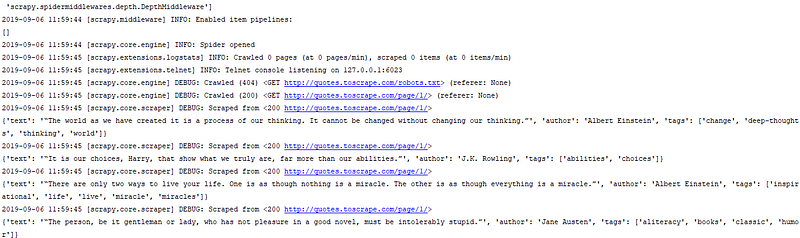
When you run this spider, it will output the extracted data with the log.
Storing the Data

The simplest way to store the extracted data is by using feed exports, use the following command to store your data.

scrapy crawl quotes -o quotes.json

This command will generate a quotes.json file containing all the scraped items, serialized in JSON.

This brings us to the end of this article where we have learned how we can make a web-crawler using scrapy in python to scrape a website and extract the data into a JSON file. I hope you are clear with all that has been shared with you in this tutorial.

If you wish to check out more articles on the market’s most trending technologies like Artificial Intelligence, DevOps, Ethical Hacking, then you can refer to Edureka’s official site.

Do look out for other articles in this series which will explain the various other aspects of Python and Data Science.

1. Machine Learning Classifier in Python

2. Python Scikit-Learn Cheat Sheet

3. Machine Learning Tools

4. Python Libraries For Data Science And Machine Learning

5. Chatbot In Python

6. Python Collections

7. Python Modules

8. Python developer Skills

9. OOPs Interview Questions and Answers

10. Resume For A Python Developer

11. Exploratory Data Analysis In Python

12. Snake Game With Python’s Turtle Module

13. Python Developer Salary

14. Principal Component Analysis

15. Python vs C++

16. Web Scraping With Python

17. Python SciPy

18. Least Squares Regression Method

19. Jupyter Notebook Cheat Sheet

20. Python Basics

21. Python Pattern Programs

22. Generators in Python

23. Python Decorator

24. Python Spyder IDE

25. Mobile Applications Using Kivy In Python

26. Top 10 Best Books To Learn & Practice Python

27. Robot Framework With Python

28. Snake Game in Python using PyGame

29. Django Interview Questions and Answers

30. Top 10 Python Applications

31. Hash Tables and Hashmaps in Python

32. Python 3.8

33. Support Vector Machine

34. Python Tutorial

Originally published at https://www.edureka.co on September 6, 2019.

Python
Scrapy
Web Crawler
Web Development
Programming
Recommended from ReadMedium
avatarAbhay Kumar
OOPs in Python

An easy guide

10 min read