Free AI web copilot to create summaries, insights and extended knowledge, download it at here
6144
Abstract
sense-and-netgate-devices-b58fb6a1b078">
<div>
<div>
<h2>Configuring pfSense and Netgate Devices</h2>
<div><h3>Stories on various settings available in PFSense and Netgate devices running it</h3></div>
<div><p>medium.com</p></div>
</div>
<div>
<div style="background-image: url(https://miro.readmedium.com/v2/resize:fit:320/0*1vTE3US8J-ylVWxR.png)"></div>
</div>
</div>
</a>
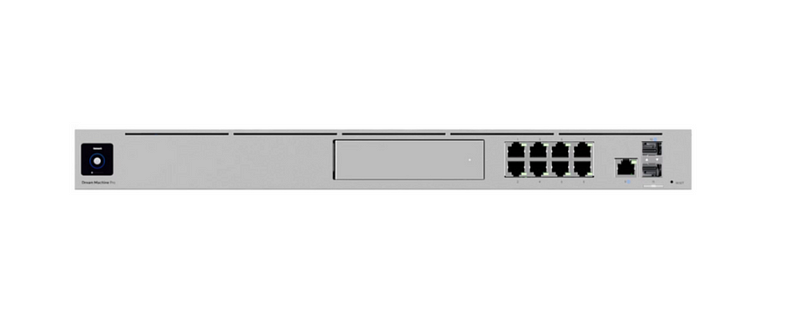
</div><p id="376c">First impressions of UDM Pro. The UI was confusing. When I last logged in it got better but I still couldn’t do something because part of the new UI didn’t work. So I had to resort to the old UI. It seems like it’s getting better though.</p><div id="374c" class="link-block">
<a href="https://readmedium.com/ubiquiti-dream-machine-pro-first-impressions-6c7f400689d7">
<div>
<div>
<h2>Ubiquiti Dream Machine Pro ~ First Impressions</h2>
<div><h3>Initial attempt to set up the device, use the phone app, and set up a VLAN</h3></div>
<div><p>medium.com</p></div>
</div>
<div>
<div style="background-image: url(https://miro.readmedium.com/v2/resize:fit:320/1*wwK73_HEGrpgqvcMylULyA.png)"></div>
</div>
</div>
</a>
</div><p id="c95f">You’ll need to change some routing in pfSense to get a UDM Pro to work behind it.</p><div id="a85c" class="link-block">
<a href="https://readmedium.com/resolving-no-route-to-host-bca0413679ed">
<div>
<div>
<h2>Resolving No Route To Host</h2>
<div><h3>Routing traffic between routers such as pfSense and a UDM Pro</h3></div>
<div><p>medium.com</p></div>
</div>
<div>
<div style="background-image: url(https://miro.readmedium.com/v2/resize:fit:320/1*51nftg7DM0LPRn4a55PlWQ.png)"></div>
</div>
</div>
</a>
</div><p id="fff8">How I resolved the no Internet problem — finally.</p><div id="7d48" class="link-block">
<a href="https://readmedium.com/getting-to-udm-pro-setup-behind-pfsense-no-internet-72fb1313c01a">
<div>
<div>
<h2>Getting to UDM Pro Setup Behind PFSense ~ No Internet</h2>
<div><h3>One of my posts on Network Security, PFSense, and a Ubiquiti Dream Machine Pro</h3></div>
<div><p>medium.com</p></div>
</div>
<div>
<div style="background-image: url(https://miro.readmedium.com/v2/resize:fit:320/1*PYDLi2ankDiaur-YGRS6nA.png)"></div>
</div>
</div>
</a>
</div><p id="eacc">Looking at the domain names an out of the box UDM Pro connects to.</p><div id="c97f" class="link-block">
<a href="https://readmedium.com/domain-names-used-by-devices-76440b1b0d0e">
<div>
<div>
<h2>Domain Names Used by Devices</h2>
<div><h3>Figuring out to what domain names your devices connect</h3></div>
<div><p>medium.com</p></div>
</div>
<div>
<div style="background-image: url(https://miro.readmedium.com/v2/resize:fit:320/1*K91DSi_KMn9Q0m7AQM6tkQ.png)"></div>
</div>
</div>
</a>
</div><p id="8cc6">Using domain names in firewall rules did not allow me to complete the setup process. More reverse-engineering to try to figure out what IP ranges the process required.</p><div id="4875" class="link-block">
<a href="https://readmedium.com/firewall-rules-for-udm-pro-setup-6a8b352252d7">
<div>
<div>
<h2>Firewall Rules for UDM Pro Setup</h2>
<div><h3>Why. So. Many. IP. Ranges? And domains don’t resolve.</h3></div>
<div><p>medium.com</p></div>
</div>
<div>
<div style="background-image: url(https://miro.readmedium.com/v2/resize:fit:320/1*HTgDaHRW54_chf_RBHa6Ug.png)"></div>
</div>
</div>
</a>
</div><p id="8184">No Power over Ethernet (I see they do have a model that has this now — “special edition” — argh — and this post explains why you might need it.)</p><div id="27ed" class="link-block">
<a href="https://readmedium.com/ubiquiti-dream-machine-pro-no-power-over-ethernet-5139225b193c">
<div>
<div>
<h2>Ubiquiti Dream Machine Pro: No Power over Ethernet</h2>
<div><h3>An expensive Wifi solution if you want to power your devices with PoE</h3></div>
<div><p>medium.com</p></div>
</div>
<div>
<div style="background-image: url(https://miro.readmedium.com/v2/resize:fit:320/1*U9oX08tgiucXc-IMT5DTqQ.png)"></div>
</div>
</div>
</a>
</div><p id="a987">Finally got wifi working — and it took a lot longer than these blog posts make it seem. Hopefully, I’ve saved others some time and helped you better secure your network.</p><div id="292e" class="link-block">
<a href="https://readmedium.com/wifi-with-ubiquiti-dream-machine-pro-e947f82f18f">
<div>
<div>
<h2>Wifi with Ubiquiti Dream Machine Pro</h2>
<div><h3>Device adoption and connecting to WiFi</h3></div>
<div><p>medium.com</p></div>
</div>
<div>
<div style="background-image: url(https://miro.readmedium.com/v2/resize:fit:320/1*ixz9RTHO0WKZYC60Cz9pTQ.png)"></div>
</div>
</div>
</a>
</div><p id="20c9">This is a pfSense setting but you might have devices that don’t allow you to define DNS settings or don’t abide by them (Google Chrome) so you can configure your pfSense in front of the UDM to send all DNS reques
Options
ts to your preferred servers. This is also good for NTP and ICMP.</p><div id="103e" class="link-block">
<a href="https://readmedium.com/redirect-iot-devices-to-preferred-dns-b0cbaa49aa69">
<div>
<div>
<h2>Redirect IoT Devices to Preferred DNS</h2>
<div><h3>Leveraging PFSense Nat Rules to redirect DNS requests when the device itself won’t let you</h3></div>
<div><p>medium.com</p></div>
</div>
<div>
<div style="background-image: url(https://miro.readmedium.com/v2/resize:fit:320/1*LJHagEoSNHOLzzxDzyxLAg.png)"></div>
</div>
</div>
</a>
</div><p id="62ee">Need to look into IDS and IPS options on Ubiquity Dream Machine Pro comparable to this:</p><div id="52b2" class="link-block">
<a href="https://readmedium.com/suricata-on-pfsense-ec73761ac969">
<div>
<div>
<h2>Suricata on pfSense</h2>
<div><h3>Detecting the attacks (like bit torrent) that aren’t in your flow logs</h3></div>
<div><p>medium.com</p></div>
</div>
<div>
<div style="background-image: url(https://miro.readmedium.com/v2/resize:fit:320/1*EbNHN3BLiHQmeQlQc0Ollg.png)"></div>
</div>
</div>
</a>
</div><p id="16e4">Testing WPA3 on the UDM Pro</p><div id="c5de" class="link-block">
<a href="https://readmedium.com/testing-wpa3-on-the-udm-pro-f49a3b4b171b">
<div>
<div>
<h2>Testing WPA3 on the UDM Pro</h2>
<div><h3>Roku doesn’t support it…look for Wi-Fi 6 certified</h3></div>
<div><p>medium.com</p></div>
</div>
<div>
<div style="background-image: url(https://miro.readmedium.com/v2/resize:fit:320/0*4rv7MVvdyhS673ak.png)"></div>
</div>
</div>
</a>
</div><p id="1f43">I think this issue was caused by the fact I received a device with way outdated firmware somehow…going to test with a newer model:</p><div id="04f5" class="link-block">
<a href="https://readmedium.com/the-main-reason-i-cannot-recommend-a-ubiquiti-dream-machine-pro-e8d750e82c75">
<div>
<div>
<h2>One Reason I Cannot Recommend a Ubiquiti Dream Machine Pro (Fixed??)</h2>
<div><h3>Let me log into the device without access to the Internet (easily.) Writing this in hopes this gets fixed.</h3></div>
<div><p>medium.com</p></div>
</div>
<div>
<div style="background-image: url(https://miro.readmedium.com/v2/resize:fit:320/1*cWzGfCPIZzV3Ft1htEtUog.png)"></div>
</div>
</div>
</a>
</div><p id="d2a0">I still have more to configure on the UDM — segmenting out different networks for different access points, for example, and checking out the various security options and traffic monitoring. More to follow.</p><p id="f8c5">Also more posts on network security in general:</p><div id="3786" class="link-block">
<a href="https://readmedium.com/network-security-68e1f26db9df">
<div>
<div>
<h2>Network Security</h2>
<div><h3>Blog posts, papers, and articles on Network Security by Teri Radichel</h3></div>
<div><p>medium.com</p></div>
</div>
<div>
<div style="background-image: url(https://miro.readmedium.com/v2/resize:fit:320/1*v_31SwDbGzO2jZk7HfOKEw.png)"></div>
</div>
</div>
</a>
</div><p id="de0c">Seems like a bug — incessant traffic to blocked ports and protocols:</p><div id="73ea" class="link-block">
<a href="https://readmedium.com/ubiquiti-udm-pro-and-pfsense-stop-sending-disallowed-traffic-2fb9cde36408">
<div>
<div>
<h2>Ubiquiti UDM Pro and pfSense— Stop sending disallowed traffic</h2>
<div><h3>If the traffic is blocked a number of times then stop sending it</h3></div>
<div><p>medium.com</p></div>
</div>
<div>
<div style="background-image: url(https://miro.readmedium.com/v2/resize:fit:320/1*4oxP4LXk8l8c3mpRvO7ejg.png)"></div>
</div>
</div>
</a>
</div><p id="b9c8">Follow for updates.</p><p id="4a3a">Teri Radichel | <i>© <a href="https://2ndsightlab.com/?source=post_page---------------------------">2nd Sight Lab</a> 2023</i></p><div id="8b5f"><pre><span class="hljs-section">About Teri Radichel:
⭐️ Author: Cybersecurity Books
⭐️ Presentations: Presentations by Teri Radichel
⭐️ Recognition: SANS Award, AWS Security Hero, IANS Faculty
⭐️ Certifications: SANS ~ GSE 240
⭐️ Education: BA Business, Master of Software Engineering, Master of Infosec
⭐️ Company: Penetration Tests, Assessments, Phone Consulting ~ 2nd Sight Lab</pre></div><div id="caae"><pre><span class="hljs-section">Need Help With Cybersecurity, Cloud, or Application Security?
~~~~~~~~~~~~~~~~~~~~~~~~~~~~~~~~~~~~~~~~~~~~~~~~~~~~~~~~~~~~~</span>
🔒 Request a penetration test or security assessment
🔒 Schedule a consulting call
🔒 Cybersecurity Speaker for Presentation</pre></div><div id="5a42"><pre>Follow <span class="hljs-keyword">for</span> more stories like <span class="hljs-keyword">this</span>:
❤️ Sign Up my Medium Email List
❤️ Twitter: <span class="hljs-meta">@teriradichel</span>
❤️ LinkedIn: https:<span class="hljs-comment">//www.linkedin.com/in/teriradichel</span>
❤️ Mastodon: <span class="hljs-meta">@teriradichel</span><span class="hljs-meta">@infosec</span>.exchange
❤️ Facebook: 2nd Sight Lab
❤️ YouTube: @2ndsightlab</pre></div><figure id="faf5"><img src="https://cdn-images-1.readmedium.com/v2/resize:fit:800/0*H9Ew1KCl-29nZiPR.jpeg"><figcaption></figcaption></figure></article></body>