avatarTeri Radichel

Free AI web copilot to create summaries, insights and extended knowledge, download it at here

2886

Abstract

out more about DoH later.</p><p id="f297">This solution also helps with the Google DNS bypass I wrote about earlier — unless of course it’s DoH. If you block DoH Google seems to fall back to standard DNS so this resolves the following issue and redirects the traffic to your preferred DNS servers instead:</p><div id="ad12" class="link-block"> <a href="https://readmedium.com/google-chrome-dns-security-bypass-9a1e10e02114"> <div> <div> <h2>Google Chrome DNS Security Bypass</h2> <div><h3>Google Chrome overrides system DNS settings in some cases, possibly bypassing third-party security services and tools.</h3></div> <div><p>medium.com</p></div> </div> <div> <div style="background-image: url(https://miro.readmedium.com/v2/resize:fit:320/1*-Rg5EbXuIDifiSsezJr1FA.png)"></div> </div> </div> </a> </div><p id="21c5">This solution cloud also potentially help you spot DNS connections by malware to alternate DNS servers.</p><p id="d6b7">You will want to do your own testing to make sure this works as expected and doesn’t break things on your network.</p><p id="2ec9"><b>NAT Port Forward to Overcome Hardcoded DNS Servers</b></p><p id="07c9">One of the things that really annoys me with some IoT and Wi-Fi devices is that they will not let you redirect DNS to your preferred DNS servers. I wrote about why I like to use CloudFlare’s DNS here:</p><div id="3062" class="link-block"> <a href="https://readmedium.com/easy-dns-change-to-prevent-attacks-5b6708f287b3"> <div> <div> <h2>Easy DNS Change To Prevent Attacks</h2> <div><h3>1.1.1.2 and 1.1.1.3 for Safer Home and Small Business Networks</h3></div> <div><p>medium.com</p></div> </div> <div> <div style="background-image: url(https://miro.readmedium.com/v2/resize:fit:320/1*-h1_PD7dfQQ_hX7fEETPbw.png)"></div> </div> </div> </a> </div><p id="6fea">I can usually force these devices into using the DNS server I want to use by creating NAT rules on PFSense to redirect any DNS traffic to alternate servers to go to CloudFlare.</p><p id="e67d">Note that the PFSense/Netgate documentation refers to the DNS Forwarder and DNS Resolver. I use neither of those and this seems to work fine. I don’t use those because I want to validate the response to the DNS query each time so I am immediately notified via the CloudFlare DNS servers above that a domain is malicious via an NXDomain response or otherwise.</p><h2 id="b713">Configure the DNS NAT rule</h2><p id="b88c">To configure a NAT rule for this purpose navigate to:</p><p id="0b34"><i>> Firewall > NAT</i></p><p id="ca2d">Here’s an exa

Options

mple of how I configure that rule for a particular port I named PORT1:</p><figure id="273d"><img src="https://cdn-images-1.readmedium.com/v2/resize:fit:800/1*LJHagEoSNHOLzzxDzyxLAg.png"><figcaption></figcaption></figure><p id="e83e">I’ve seen problems and attacks on DNS forwarders and resolvers and I’d rather divvy up the DNS portion of networking to go straight to CloudFlare and let my Firewall handle other things. I don’t resolve DNS for devices using my firewall, though that could reduce traffic destined for the Internet.</p><p id="30c3">You can use a similar approach for NTP traffic or anything that uses a Port. Initially I tried this with ICMP but since this is a port redirect and ICMP does not use ports, it doesn’t work.</p><p id="26e1">These rules might not work if a vendor is specifically trying to reach their own servers, but in most cases it’s just a simple device trying to figure out if it’s connected to the Internet or not or resolve domain names. Why these hosts need to be hard-coded to particular DNS servers is not clear to me. They could just use DHCP and whatever DNS name is provided by the local network, but in any case, this resolves the issue 99% of the time so I can create fewer firewall rules and have a less complex network.</p><p id="8c1e">Follow for updates.</p><p id="4a3a">Teri Radichel | <i>© <a href="https://2ndsightlab.com/?source=post_page---------------------------">2nd Sight Lab</a> 2022</i></p><div id="8b5f"><pre><span class="hljs-section">About Teri Radichel:

⭐️ Author: Cybersecurity Books
⭐️ Presentations: Presentations by Teri Radichel
⭐️ Recognition: SANS Award, AWS Security Hero, IANS Faculty
⭐️ Certifications: SANS ~ GSE 240
⭐️ Education: BA Business, Master of Software Engineering, Master of Infosec
⭐️ Company: Penetration Tests, Assessments, Phone Consulting ~ 2nd Sight Lab</pre></div><div id="caae"><pre><span class="hljs-section">Need Help With Cybersecurity, Cloud, or Application Security?
~~~~~~~~~~~~~~~~~~~~~~~~~~~~~~~~~~~~~~~~~~~~~~~~~~~~~~~~~~~~~</span>
🔒 Request a penetration test or security assessment
🔒 Schedule a consulting call
🔒 Cybersecurity Speaker for Presentation</pre></div><div id="5a42"><pre>Follow <span class="hljs-keyword">for</span> more stories like <span class="hljs-keyword">this</span>:

❤️ Sign Up my Medium Email List ❤️ Twitter: <span class="hljs-meta">@teriradichel</span> ❤️ LinkedIn: https:<span class="hljs-comment">//www.linkedin.com/in/teriradichel</span> ❤️ Mastodon: <span class="hljs-meta">@teriradichel</span><span class="hljs-meta">@infosec</span>.exchange ❤️ Facebook: 2nd Sight Lab ❤️ YouTube: @2ndsightlab</pre></div><figure id="faf5"><img src="https://cdn-images-1.readmedium.com/v2/resize:fit:800/0*H9Ew1KCl-29nZiPR.jpeg"><figcaption></figcaption></figure></article></body>

Redirect IoT Devices to Preferred DNS Servers

Leveraging PFSense NAT Rules to redirect DNS requests when the device itself won’t let you

~~~~~~~~~~~~~~~~~~~~~~~~~~~~~~~~~~~~~~~~~~~~~~~~~~~~~~~~~~~

⚙️ Check out my series on Automating Cybersecurity Metrics. The Code.

🔒 Related Stories: Network Security | DNS Security | PFSense | Netgate | OS and IoT Security

💻 Free Content on Jobs in Cybersecurity | ✉️ Sign up for the Email List

~~~~~~~~~~~~~~~~~~~~~~~~~~~~~~~~~~~~~~~~~~~~~~~~~~~~~~~~~~~

In the last post I explained how to disable IPv6 on PFSense and then completely stop traffic logged after disabling IPv6 on PFSense.

In this post I’ll show you how to redirect DNS requests to your preferred DNS provider. Note that this does not include DNS over HTTPS (DoH) requests which I simply block.

Maybe I’ll write about more about DoH later.

This solution also helps with the Google DNS bypass I wrote about earlier — unless of course it’s DoH. If you block DoH Google seems to fall back to standard DNS so this resolves the following issue and redirects the traffic to your preferred DNS servers instead:

This solution cloud also potentially help you spot DNS connections by malware to alternate DNS servers.

You will want to do your own testing to make sure this works as expected and doesn’t break things on your network.

NAT Port Forward to Overcome Hardcoded DNS Servers

One of the things that really annoys me with some IoT and Wi-Fi devices is that they will not let you redirect DNS to your preferred DNS servers. I wrote about why I like to use CloudFlare’s DNS here:

I can usually force these devices into using the DNS server I want to use by creating NAT rules on PFSense to redirect any DNS traffic to alternate servers to go to CloudFlare.

Note that the PFSense/Netgate documentation refers to the DNS Forwarder and DNS Resolver. I use neither of those and this seems to work fine. I don’t use those because I want to validate the response to the DNS query each time so I am immediately notified via the CloudFlare DNS servers above that a domain is malicious via an NXDomain response or otherwise.

Configure the DNS NAT rule

To configure a NAT rule for this purpose navigate to:

> Firewall > NAT

Here’s an example of how I configure that rule for a particular port I named PORT1:
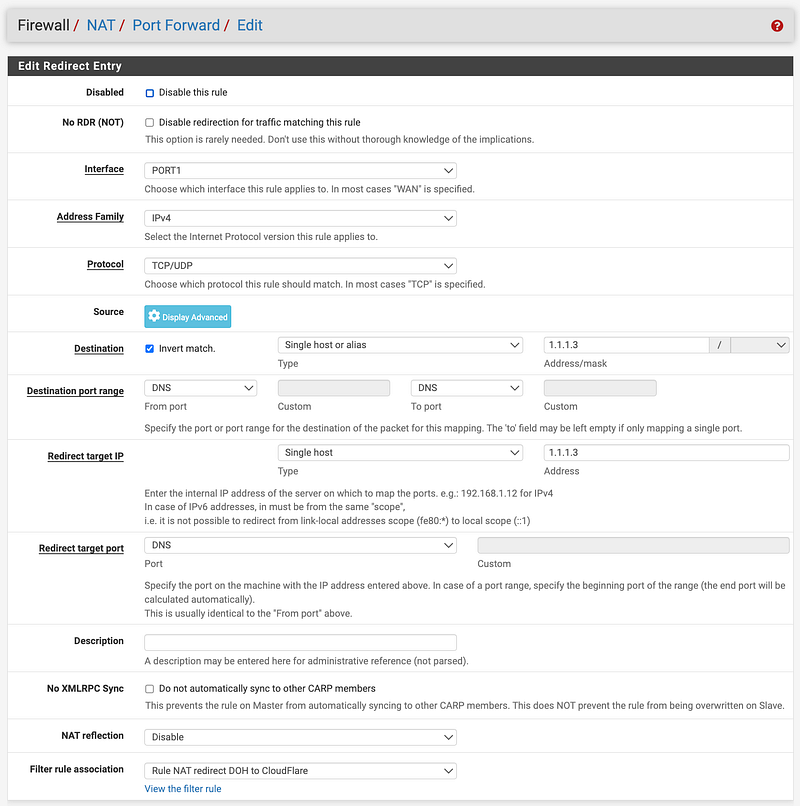
I’ve seen problems and attacks on DNS forwarders and resolvers and I’d rather divvy up the DNS portion of networking to go straight to CloudFlare and let my Firewall handle other things. I don’t resolve DNS for devices using my firewall, though that could reduce traffic destined for the Internet.

You can use a similar approach for NTP traffic or anything that uses a Port. Initially I tried this with ICMP but since this is a port redirect and ICMP does not use ports, it doesn’t work.

These rules might not work if a vendor is specifically trying to reach their own servers, but in most cases it’s just a simple device trying to figure out if it’s connected to the Internet or not or resolve domain names. Why these hosts need to be hard-coded to particular DNS servers is not clear to me. They could just use DHCP and whatever DNS name is provided by the local network, but in any case, this resolves the issue 99% of the time so I can create fewer firewall rules and have a less complex network.

Follow for updates.

Teri Radichel | © 2nd Sight Lab 2022

About Teri Radichel:
~~~~~~~~~~~~~~~~~~~~
⭐️ Author: Cybersecurity Books
⭐️ Presentations: Presentations by Teri Radichel
⭐️ Recognition: SANS Award, AWS Security Hero, IANS Faculty
⭐️ Certifications: SANS ~ GSE 240
⭐️ Education: BA Business, Master of Software Engineering, Master of Infosec
⭐️ Company: Penetration Tests, Assessments, Phone Consulting ~ 2nd Sight Lab
Need Help With Cybersecurity, Cloud, or Application Security?
~~~~~~~~~~~~~~~~~~~~~~~~~~~~~~~~~~~~~~~~~~~~~~~~~~~~~~~~~~~~~
🔒 Request a penetration test or security assessment
🔒 Schedule a consulting call
🔒 Cybersecurity Speaker for Presentation
Follow for more stories like this:
~~~~~~~~~~~~~~~~~~~~~~~~~~~~~~~~~~~~~~~~~~~~~~~~~~~~~~~~~~~~~ 
❤️ Sign Up my Medium Email List
❤️ Twitter: @teriradichel
❤️ LinkedIn: https://www.linkedin.com/in/teriradichel
❤️ Mastodon: @teriradichel@infosec.exchange
❤️ Facebook: 2nd Sight Lab
❤️ YouTube: @2ndsightlab

Nat
Port
Redirect
DNS
IoT
Recommended from ReadMedium