
QUIC and DNS over HTTPS
When not understanding the big picture hurts cybersecurity
~~~~~~~~~~~~~~~~~~~~~~~~~~~~~~~~~~~~~~~~~~~~~~~~~~~~~~~~~~~
🔒 Related Stories: Network Security | DNS Security | Google Security.
💻 Free Content on Jobs in Cybersecurity | ✉️ Sign up for the Email List
~~~~~~~~~~~~~~~~~~~~~~~~~~~~~~~~~~~~~~~~~~~~~~~~~~~~~~~~~~~
Update 6/15/23 Google is trying to rearrange packets are sent such that it breaks networks using standard firewall rules. Read my other posts on network security and try to create the rules I’ve setup to see what I mean.
Right now I’m looking at logs and Google is sending UDP packets on port 443 for YouTube TV. That means I have to open up a new protocol on port 443 which increases risk. Attackers that can get onto your system can try to blend in by sending outbound traffic on port 443 UDP. One more avenue for their traffic to escape your network unnoticed. I lock that down to Google IPs only but the problem is…Google Cloud. I’m seeing a lot of scanning from Google Cloud. How do I know if the traffic is for YouTube TV or an attacker in Google Cloud?
Right now I am constantly getting lots of packets blocked when using streaming protocols that are likely using newer “fast” methods that try to make inbound connections and skip traditional means of establishing connections. Um, those methods of establishing connections are there for a reason. I am still trying to figure out exactly what is causing PFSense to reject random packets and cause the TV to spin. Maybe someone at Google can test that and fix it. If the inbound connections are disallowed, track that and fall back. Stop repeatedly trying to send traffic that is disallowed when other methods exist.
Inbound connections should never be allowed on a server unless you want to allow people to connect to services you are running. If you have to open up inbound connections on random ports, then you risk the chance that malware on your system can establish a C2 connection because now you are allowing inbound connections on a bunch of ports that are not in use but could be if an attacker installs malware to listen on that port later. If you only allow outbound connections that risk is drastically reduced. (Yes, I know there are ways around it. I said reduced. I have a post for that below that will help you find advanced attackers on blocking networks you don’t need.)
Not understanding network security when trying to rearrange network protocols is a problem. Trying to solve a security (or performance) problem without understanding what additional security problems you are adding in the process is a problem.
As for DNS Over HTTP, this is just popped into my feed.
If you allow DNS over HTTP you can’t investigate suspicious traffic the way I described here:
Blocking Networks You Don’t Need
And being able to easily see what you blocked by mistake
medium.com
But I digress. Here’s the post.
— — -
As vendors try to improve performance or solve various problems, they may come up with new ideas about how network protocols should be designed and work to create more efficient or performant systems. In my previous blog post on Security for Startups, I mentioned how Google Cloud is easy to use, sometimes at the expense of security.
It is still possible to have pretty good security on Google Cloud if you implement things very carefully and know what you are doing. I also see that GCP has implemented features recently that move towards more traditional network security when it comes to three-tier networks (though I have to test this out to make sure — it’s on my very long to do list), containers, and packet capture. There are some features I actually like in Google Cloud when it comes to preventing all Internet access to data storage and the fact that everything is encrypted by default. But some network constructs have been difficult to implement.
I had a person from Google Cloud in one of my classes, where I explained some of the networking challenges. I was afraid he would tell me I was all wrong, but he was very nice! I’m glad he was there and also happy about the recent improvements in the platform. However, I still have to explain something about the latest Google Chrome update that I find less than ideal. It is along the same lines — not understanding the impact of changes on network security.
My dislike of the QUIC protocol started when I first discovered it in network logs, causing me problems. Like this BlackHat talk, I found that it hurt the ability for network security products to see, inspect, and block unwanted traffic.
It also broke the ability to simply block ANY inbound requests to a client or non-server host. Does your laptop ever need to accept incoming requests? Unfortunately, recent changes in wireless protocols are causing some issues. I discovered that I can temporarily allow the inbound connection and then turn inbound connections off again. Usually, you can simply block any incoming request. That eliminates 65,355 potential problems (more if you multiply that by ports and protocols). Here’s what that looks like on a Mac. Warning: This is paranoid mode and might break things.
Search for and open Preferences.

Search for firewall and click on Security & Privacy.
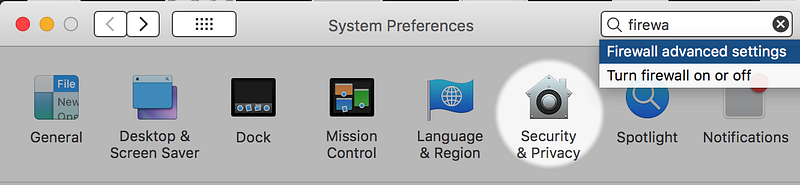
Choose the firewall tab and click the lock to make changes.
Click the lock to make changes. Log in.
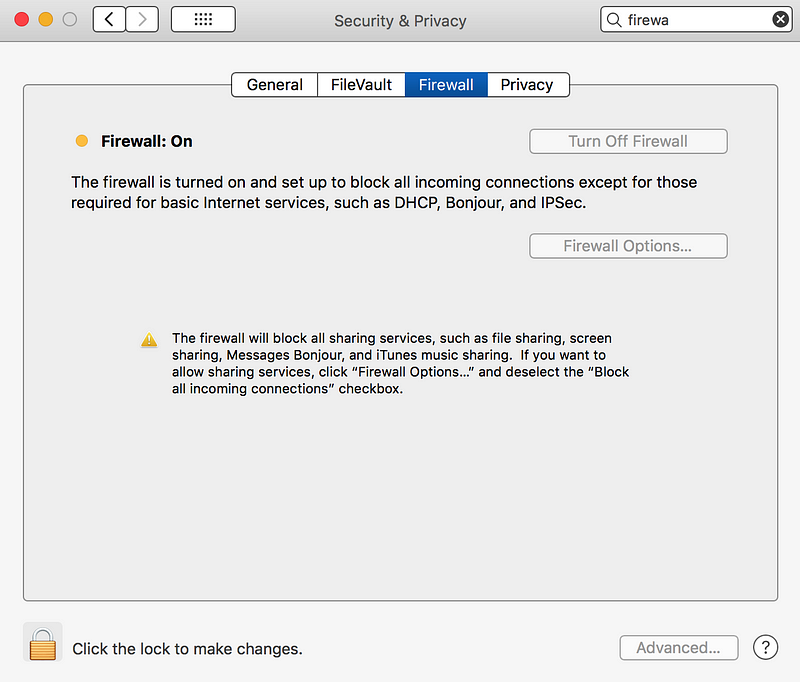
Here is where you can Block all incoming connections.
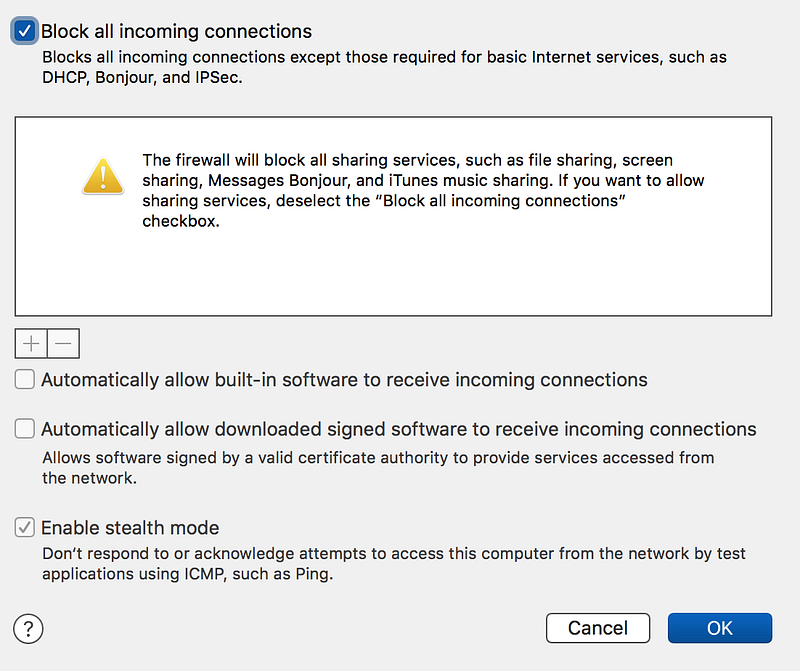
As I noted, it doesn’t actually block all incoming connections because I still see incoming connections accepted by my laptop. I’m not sure what this functionality is doing. I see incoming connections from Google via the QUIC protocol if I allow it. A few other cases exist, which I can mostly block and ignore. I see incoming connections on some wireless networks, and without allowing those, I can’t get on the WI-FI. I wish they would change that too, but back to the point of this blog post.
Sometimes these new features have a particular goal, in some cases even aiming to improve security but lack a big picture view of the problem. They don’t consider the impact on security products being able to inspect and block malicious connections. They also don’t understand the implications of allowing these open ports and how it enables certain types of malware connections.
Tangent: I always wonder about the decision to expose MAC addresses in IPv6 as some people (and even security products!) have been known to use these addresses to enforce security rules. Changing the protocol to send these values over the Internet breaks certain security functionality, though in reality they shouldn’t have been using this as a security control in the first place. Still, it exposes something not previously exposed and at a layer of detail that many people might not realize when they unknowingly have IPv6 connections on their networks. I’m sure there was a reason.
If you don’t understand these network and security concepts, please read my book at the bottom of this post. Organizations that want to help their teams moving to the cloud do so securely can take my class, in which I attempt to convince you of the importance and power of this form of defending your systems in a cloud environment.
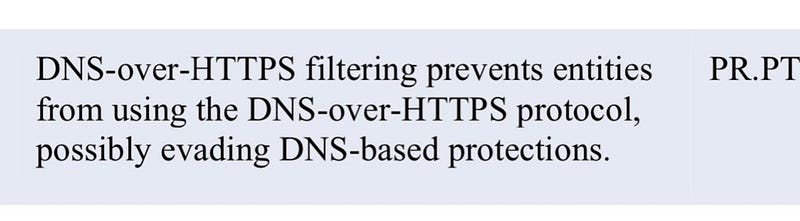
My experience with Google products is that they are good on the application or identity side. Still, sometimes it seems like there is a misunderstanding of network security in the design of some products and services. QUIC and DNS over HTTPS are two examples of this. I am not the only one that feels this way about DNS over HTTPS. Recent cloud security recommendations from CISA include the following guidance:
One of the ways that security products look for problems in network logs is by inspecting those logs for malicious domains. Sometimes these tools will block entire TLDs (the part of the domain after the last dot [.]). For example, maybe you don’t want any traffic from Russian (.ru) or Chinese (.cn) domains. I wrote a blog post on Indicators of Compromise in DNS Logs based on a talk by Seth Misenar in 2017. It was an excellent talk, and I summarized it in that article.
When you use DNS over HTTPS, network tools trying to spot these indicators of compromise fail to function correctly. In addition, when you turn these things off and Google updates your Chrome browser, the update appears to revert your settings to allow them again. It does not seem helpful to override the security settings a user has implemented when updating the software version.
If you use a product like Little Snitch on a Mac, which acts like a host-based firewall (much better than the built-in MAC firewall), it can block domain names and IP addresses. Microsoft’s built-in firewall in Windows platforms will do the same. After the latest Chrome update, everything a Chrome browser tries to connect to in Little Snitch logs turns up as an IP address like this:
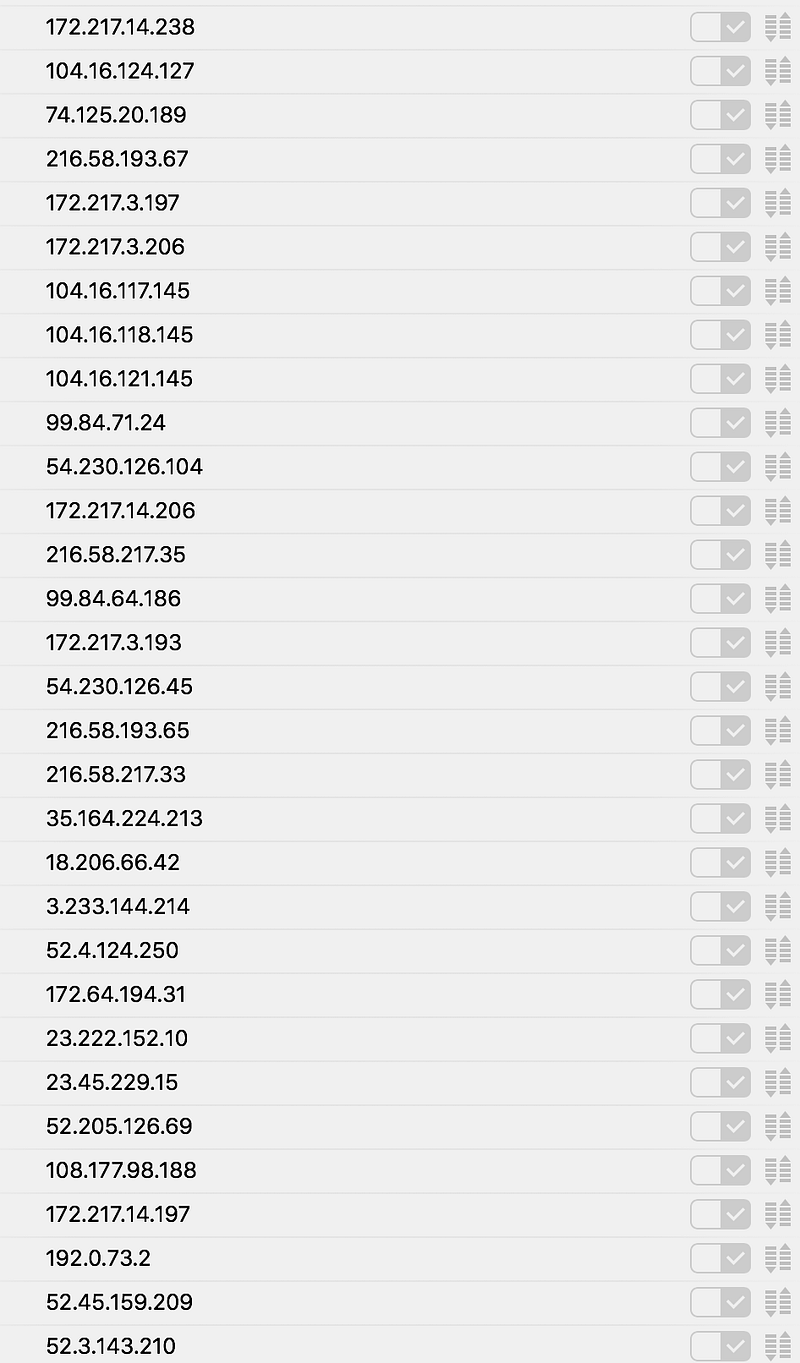
It just so happens that I know what a lot of those IP addresses relate to having been obsessed with network logs for quite some time, but it is much easier to look at and decide whether to block a connection based on domain names than IP addresses. As mentioned in my linked article, domain name indicators of compromise may be used to block an entire category of potentially malicious domains at once. Many threat lists also use domain names to identify malicious traffic.
I had previously turned off QUIC and DNS over HTTPS, but after the latest Google Chrome update, this is happening again. If you are not monitoring your network logs, disabling, or enabling these two things may not make much difference. Perhaps, you may be more secure with DNS over HTTPS if you never look at your logs (which I recommend you do!) I have not investigated the pros and cons of that more fully because I choose to turn them off and monitor my logs and would like everyone else to do the same.
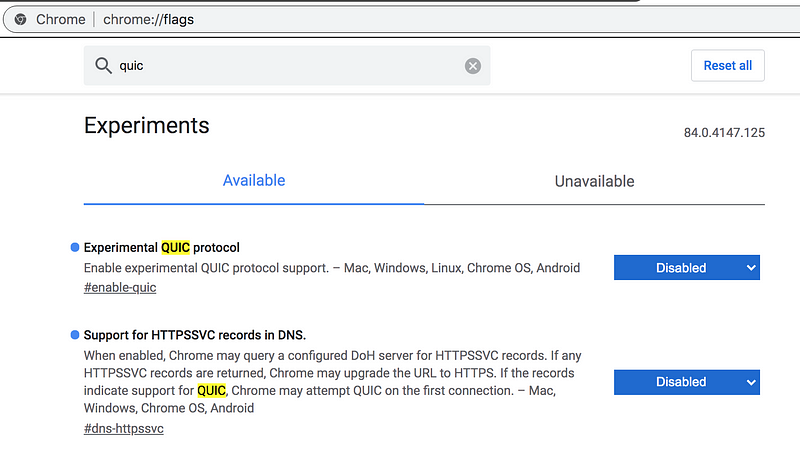
To disable QUIC and DNS over HTTPS in chrome, go to chrome://flags in your browser.
Search for QUIC.
Disable the two options shown below.
If you are interested in monitoring network traffic, get to know what your laptop is connecting to on the Internet, start by turning on a host-based firewall, and looking at the things in your logs. Look at how many connections individual products and web sites generate. Learn to look up and figure out where traffic is coming from, as I wrote about in this article. You might then graduate to looking at your wireless router logs or inspecting traffic in a sniffer like Wireshark. Understanding your network logs and the connections your laptop makes will give you an advantage when attackers are in your network and help you better defend your systems. Turn off protocols that disallow proper inspection of that traffic.
Follow for updates.
Teri Radichel | © 2nd Sight Lab 2020
About Teri Radichel:
~~~~~~~~~~~~~~~~~~~~
⭐️ Author: Cybersecurity Books
⭐️ Presentations: Presentations by Teri Radichel
⭐️ Recognition: SANS Award, AWS Security Hero, IANS Faculty
⭐️ Certifications: SANS ~ GSE 240
⭐️ Education: BA Business, Master of Software Engineering, Master of Infosec
⭐️ Company: Penetration Tests, Assessments, Phone Consulting ~ 2nd Sight Lab
Need Help With Cybersecurity, Cloud, or Application Security?
~~~~~~~~~~~~~~~~~~~~~~~~~~~~~~~~~~~~~~~~~~~~~~~~~~~~~~~~~~~~~
🔒 Request a penetration test or security assessment
🔒 Schedule a consulting call
🔒 Cybersecurity Speaker for PresentationFollow for more stories like this:
~~~~~~~~~~~~~~~~~~~~~~~~~~~~~~~~~~~~~~~~~~~~~~~~~~~~~~~~~~~~~
❤️ Sign Up my Medium Email List
❤️ Twitter: @teriradichel
❤️ LinkedIn: https://www.linkedin.com/in/teriradichel
❤️ Mastodon: @teriradichel@infosec.exchange
❤️ Facebook: 2nd Sight Lab
❤️ YouTube: @2ndsightlab


