
Blocking Networks You Don’t Need
And being able to easily see what you blocked by mistake
~~~~~~~~~~~~~~~~~~~~~~~~~~~~~~~~~~~~~~~~~~~~~~~~~~~~~~~
⚙️ Check out my series on Automating Cybersecurity Metrics | Code.
🔒 Related Stories: pfSense | Network Security | Cybersecurity
💻 Free Content on Jobs in Cybersecurity | ✉️ Sign up for the Email List
~~~~~~~~~~~~~~~~~~~~~~~~~~~~~~~~~~~~~~~~~~~~~~~~~~~~~~~
I just realized that I inadvertently posted three examples of malware and attackers from China on Twitter. These just happened to be three things that came up when I was searching for the latest cybersecurity news and breaches:
Barracuda ESG Zero-Day Vulnerability (CVE-2023–2868) Exploited Globally by Aggressive and Skilled Actor, Suspected Links to China [TR: block the entire ip range for Vultr. I also block before IP ranges I never need to connect to on my network.]
VMware ESXi Zero-Day Used by Chinese Espionage Actor to Perform Privileged Guest Operations on Compromised Hypervisors
Chinese hackers use DNS-over-HTTPS for Linux malware communication
I wrote about DNS over HTTPS here:
Do you do business with China? If not, do you ever have a reason to have your systems making connections to Chinese networks and the related networks they use in other countries? If not, why do you still allow these connections on your network?
In one of the posts above it mentions the Vultr network. If you monitor your logs, as I do, you may recognize that name. You’ll likely notice your systems being scanned by that network and a lot of others like it. I try to block them.
But there are too many, right?
Well, depending on your operations and the size of your network, you might be able to take an aggressive approach. Only allow what you really need. And in my case, I don’t ever want my systems on my home network connecting to China or other rogue countries so I just block all of that.
I’ve already explained to you how you can do that here:
But lately there’s been so much noise on my network that I started to take a different approach. It’s one that I used in the past years ago. I just block large swaths of IP addresses my systems should never connect to.
For example, you might want to block this range:
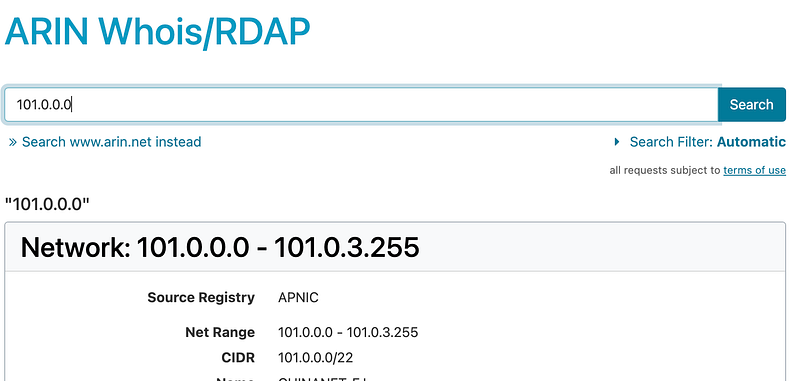
101.0.0.0/8It was one involved inolved in one of the breaches above. Should you block it? Well I can look up this IP in ARIN (I explained what registries are in a prior post.)
I can see it’s coming from APNIC (Asia).
If I check the last IP in the range it all seems to be coming from Asia.
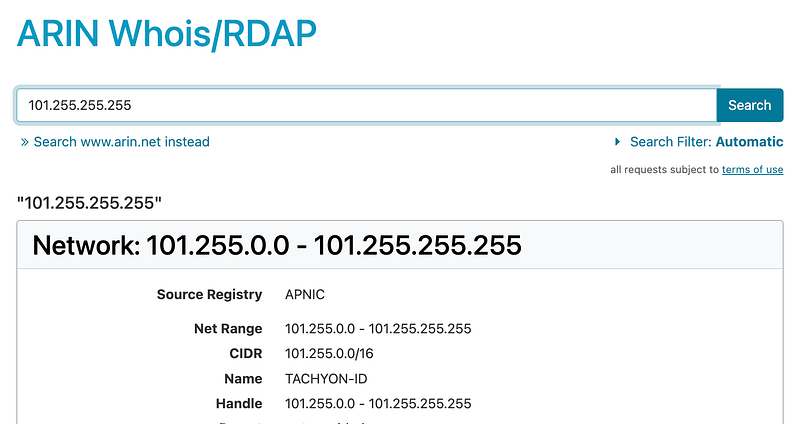
You can spot check some IPs in the middle but it all seems to be part of APNIC and coming from Asia. Yes, there could be exceptions. Hold that thought.
I create an Alias in PFSense. I wrote about that here:
Let’s say you call it unwanted_cidr_blocks. Or whatever.
Then go into PFSense and create a Float rule

To block all traffic from unwanted CIDR blocks.
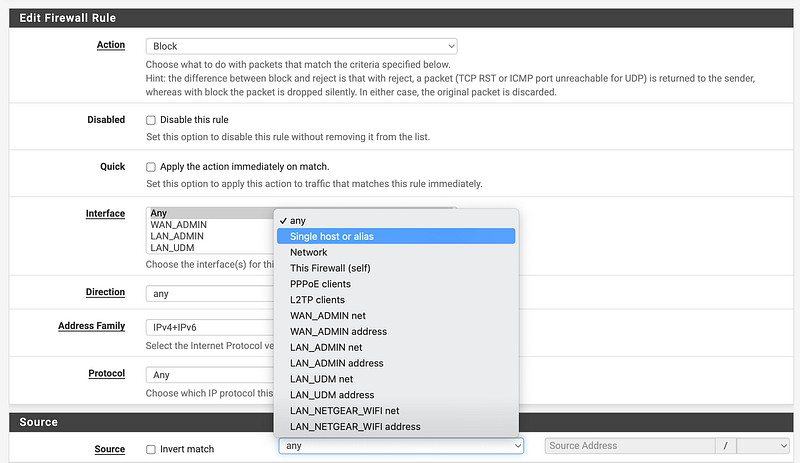
But here’s the thing. I only want to block INBOUND in this rule.

I do not want to log this traffic because inbound noisy pointless scans on the Internet are becoming absolutely excessive and out of control. Those logs: 1.) add noise to my logs, and 2.) as was the case with Log4J could lead to compromise if there are any vulnerabilities in the logging software. So I am not logging INBOUND traffic from IPs in the alias ranges that is BLOCKED.
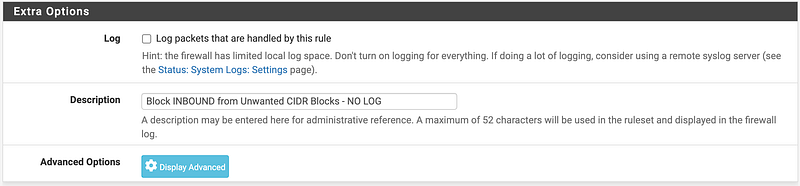
Next I create a rule to help me discover IP ranges inadvertently blocked by my rules (or suspicious traffic going to those IP ranges) very quickly. I either have a compromised system potentially, or I’ve blocked something my network needs to access.
I’ll investigate and if I determine I need to unblock those IPs based on DNS lookups (which you won’t be able to see if you allow DNS over HTTP) or reverse DNS lookup (which doesn’t always work if it’s hosted on a CDN or similar) or by looking up the IP range in ARIN to see what it is. If it looks sketchy I’ll dig deeper. If I need to unblock it, I create exception rules for that.
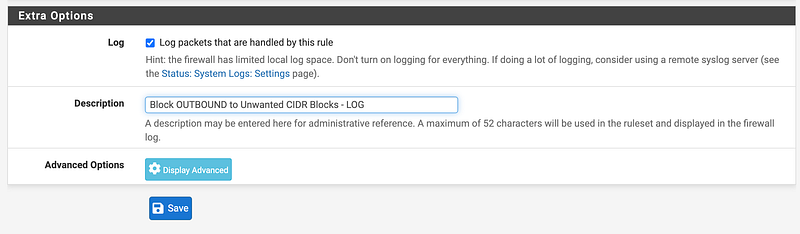
Create a Float rule matching the above to block OUTBOUND traffic to the unwanted CIDRs, but log it. Also, I set this rule to REJECT not BLOCK so my internal devices will know the traffic is not allowed and can respond appropriately.
Now there’s one other trick to getting your exceptions to work correctly.
Create an alias called Unwanted_CIDRS_exceptions.
Add any CIDR ranges you find that are in an unwanted block to that alias. For example, I think Netflix is the a range 45.0.0.0/8 with a bunch of IP addresses from Russia that are constantly scanning my network. So I add an exception for the Netflix range.
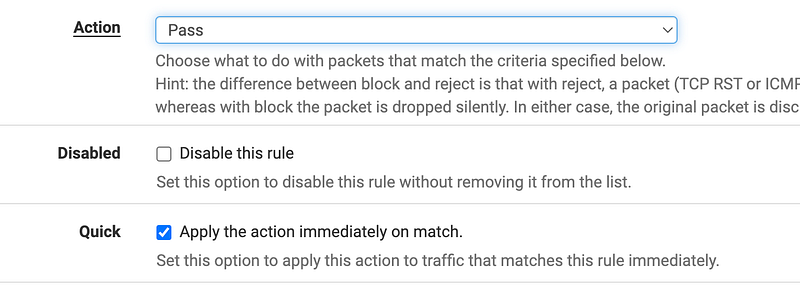
Create a new ALLOW rule for your exceptions. Perhaps you put that allow rule on your LAN and WAN only and not your Admin Interface — however you have that configured on your firewall.
The trick is this. Make sure to check the box that says Apply the action immediately on match.
Also I would recommend only adding the ports you absolutely require, which in my case is
- SOURCE: Ephemeral ports from my network
- DESTINATION 443 TCP with Internet destinations
Make sure the box to Apply the action immediately on match is unchecked for the rules above that block noisy traffic. We want our exceptions to trigger before those rules.
With these rules set up I can block pointless noise and more easily see what is blocked in my logs that I care about when I filter on blocked traffic.
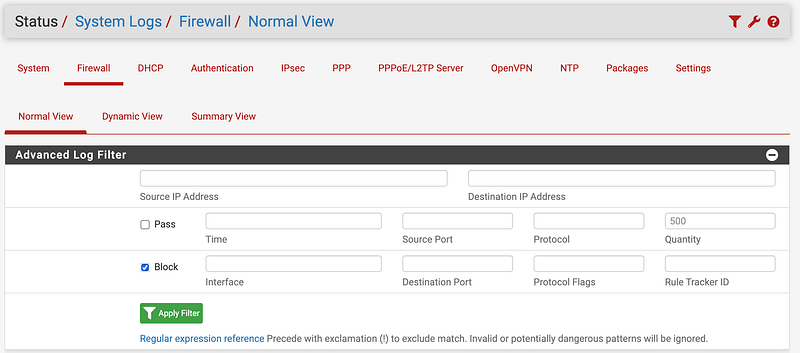
Of course, you can turn back on logging any time you need it. But if all it is showing you is blocked traffic you may only need it to verify your rules are working as expected and that traffic is getting logged when it should be. You may also need to see it in the case of a DDOS attack but then, turning on the logging of all this traffic may further exacerbate the attack.
By blocking large blocks of IPs (/8 CIDRS) you will have less to monitor and you’ll have less firewall rules which should be less taxing on your firewall equipment compared to blocking each individual network.
Well, I’m always testing and tweaking my approach but this is working for the moment — except whatever Google is doing with QUIC or streaming traffic that is not behaving nicely on the network. Besides that it’s working well.
Here’s a related post you may be interested in if you are trying to prevent spying by foreign nations.
Follow for updates.
Teri Radichel | © 2nd Sight Lab 2023
About Teri Radichel:
~~~~~~~~~~~~~~~~~~~~
⭐️ Author: Cybersecurity Books
⭐️ Presentations: Presentations by Teri Radichel
⭐️ Recognition: SANS Award, AWS Security Hero, IANS Faculty
⭐️ Certifications: SANS ~ GSE 240
⭐️ Education: BA Business, Master of Software Engineering, Master of Infosec
⭐️ Company: Penetration Tests, Assessments, Phone Consulting ~ 2nd Sight Lab
Need Help With Cybersecurity, Cloud, or Application Security?
~~~~~~~~~~~~~~~~~~~~~~~~~~~~~~~~~~~~~~~~~~~~~~~~~~~~~~~~~~~~~
🔒 Request a penetration test or security assessment
🔒 Schedule a consulting call
🔒 Cybersecurity Speaker for PresentationFollow for more stories like this:
~~~~~~~~~~~~~~~~~~~~~~~~~~~~~~~~~~~~~~~~~~~~~~~~~~~~~~~~~~~~~
❤️ Sign Up my Medium Email List
❤️ Twitter: @teriradichel
❤️ LinkedIn: https://www.linkedin.com/in/teriradichel
❤️ Mastodon: @teriradichel@infosec.exchange
❤️ Facebook: 2nd Sight Lab
❤️ YouTube: @2ndsightlab


