avatarTeri Radichel

Summary

Free AI web copilot to create summaries, insights and extended knowledge, download it at here

2483

Abstract

on that and one network rule that can weed out a lot of bad traffic here. Unfortunately you can’t do this in AWS Security Groups or NACLs and other basic security controls on in other cloud environments. You should be able to do it on an AWS Firewal but I haven’t tried it yet.</p><div id="158f" class="link-block"> <a href="https://readmedium.com/one-rule-to-identify-network-noise-b08f30a75c9d"> <div> <div> <h2>One Rule To Identify Network Noise</h2> <div><h3>One basic rule filters out a whole lot of noise on your network</h3></div> <div><p>medium.com</p></div> </div> <div> <div style="background-image: url(https://miro.readmedium.com/v2/resize:fit:320/1*FU7ZdQfGiw3f8ALGooY52Q.png)"></div> </div> </div> </a> </div><p id="8eb6">I’ve been tracking some of the scanner traffic and adding it to aliases over time. Now I want to transfer that configuration to another device. It’s a different device so I don’t want to copy all the configuration, but I do wnat my aliases so I can create the appropriate rules to block traffic. Although I have a lot of IP ranges in my aliases my firewall seems to be able to handle the load because I immediately drop bad traffic.</p><p id="3a49"><b>Backing up Aliases on PFSense</b></p><p id="511d">In this post we want to back up an our aliases on one PFSense device to transfer to or share with another device.</p><p id="8b87">First head over to Diagnostics > Backup & Restore.</p><figure id="36af"><img src="https://cdn-images-1.readmedium.com/v2/resize:fit:800/1*pN4MB2f82ligenNN6NXS1w.png"><figcaption></figcaption></figure><p id="86b3">Choose Aliases from the drop down list next to Backup area.</p><figure id="8e0e"><img src="https://cdn-images-1.readmedium.com/v2/resize:fit:800/1*3aRe4yYa4kRNDmPzgVWClw.png"><figcaption></figcaption></figure><p id="33ba">Click download configuration as XML. Store it wherever is appropriate on your local device.</p><figure id="e740"><img src="https://cdn-images-1.readmedium.com/v2/resize:fit:800/1*eQcgFafJr31SyDZqEYqOpw.png"><figcaption></figcaption></figure><p id="76d8"><b>Backup other system configuration data</b></p><p id="a4c5">Next I can back up other parts of the system configuration I want to copy to a new device.</p><figure id="288d"><img src="https://cdn-images-1.readmedium.com/v2/resize:fit:800/1*aYi8Lu-

Options

KrqRDSHW6siYVaA.png"><figcaption></figcaption></figure><p id="11e0">I’m going to pick and choose what I copy over. That seems a bit safer than trying to apply a complete configuration. My devices have a different number of ports so things aren’t going to exactly translate.</p><p id="d216">Now that I’ve backed up my files I can move them to a new device.</p><p id="c9a9"><b>Adding Aliases to a different device or restoring a backup</b></p><p id="85d7">Now you can log into the new device and reverse the process.</p><figure id="d307"><img src="https://cdn-images-1.readmedium.com/v2/resize:fit:800/1*1OzYzyJAmr3Pcq732kNzqg.png"><figcaption></figcaption></figure><p id="1afa">You can repeat that process with any other portions of a configuration you want to backup and restore to another device.</p><p id="374a">Next I’m going to fire up a new PFSense device.</p><p id="0eed">Follow for updates.</p><p id="4a3a">Teri Radichel | <i>© <a href="https://2ndsightlab.com/?source=post_page---------------------------">2nd Sight Lab</a> 2022</i></p><div id="8b5f"><pre><span class="hljs-section">About Teri Radichel:

⭐️ Author: Cybersecurity Books
⭐️ Presentations: Presentations by Teri Radichel
⭐️ Recognition: SANS Award, AWS Security Hero, IANS Faculty
⭐️ Certifications: SANS ~ GSE 240
⭐️ Education: BA Business, Master of Software Engineering, Master of Infosec
⭐️ Company: Penetration Tests, Assessments, Phone Consulting ~ 2nd Sight Lab</pre></div><div id="caae"><pre><span class="hljs-section">Need Help With Cybersecurity, Cloud, or Application Security?
~~~~~~~~~~~~~~~~~~~~~~~~~~~~~~~~~~~~~~~~~~~~~~~~~~~~~~~~~~~~~</span>
🔒 Request a penetration test or security assessment
🔒 Schedule a consulting call
🔒 Cybersecurity Speaker for Presentation</pre></div><div id="5a42"><pre>Follow <span class="hljs-keyword">for</span> more stories like <span class="hljs-keyword">this</span>:

❤️ Sign Up my Medium Email List ❤️ Twitter: <span class="hljs-meta">@teriradichel</span> ❤️ LinkedIn: https:<span class="hljs-comment">//www.linkedin.com/in/teriradichel</span> ❤️ Mastodon: <span class="hljs-meta">@teriradichel</span><span class="hljs-meta">@infosec</span>.exchange ❤️ Facebook: 2nd Sight Lab ❤️ YouTube: @2ndsightlab</pre></div><figure id="faf5"><img src="https://cdn-images-1.readmedium.com/v2/resize:fit:800/0*H9Ew1KCl-29nZiPR.jpeg"><figcaption></figcaption></figure></article></body>

Backup and Restore PFSense Aliases

Leveraging a block list provided by someone else or move an alias list from one PFSense device to another

This is one of my posts on

~~~~~~~~~~~~~~~~~~~~~~~~~~~~~~~~~~~~~~~~~~~~~~~~~~~~~~~~~~~

⚙️ Check out my series on Automating Cybersecurity Metrics. The Code.

🔒 Related Stories: Network Security | PFSense | Netgate

💻 Free Content on Jobs in Cybersecurity | ✉️ Sign up for the Email List

~~~~~~~~~~~~~~~~~~~~~~~~~~~~~~~~~~~~~~~~~~~~~~~~~~~~~~~~~~~

Timeout from my latest blog series as I have a new Azure class coming up so I may be skipping around a bit, but I will be continuing the CloudSecurity Automation Series as time allows. Right now I’m going to jump back over to my home networking series for a second. I have some changes I need to make.

I’ve written before about how you might want to leverage aliases to block IP ranges that are known to host scanners and scammers:

Have you ever looked at the traffic hitting your network on two high ports? More on that and one network rule that can weed out a lot of bad traffic here. Unfortunately you can’t do this in AWS Security Groups or NACLs and other basic security controls on in other cloud environments. You should be able to do it on an AWS Firewal but I haven’t tried it yet.

I’ve been tracking some of the scanner traffic and adding it to aliases over time. Now I want to transfer that configuration to another device. It’s a different device so I don’t want to copy all the configuration, but I do wnat my aliases so I can create the appropriate rules to block traffic. Although I have a lot of IP ranges in my aliases my firewall seems to be able to handle the load because I immediately drop bad traffic.

Backing up Aliases on PFSense

In this post we want to back up an our aliases on one PFSense device to transfer to or share with another device.

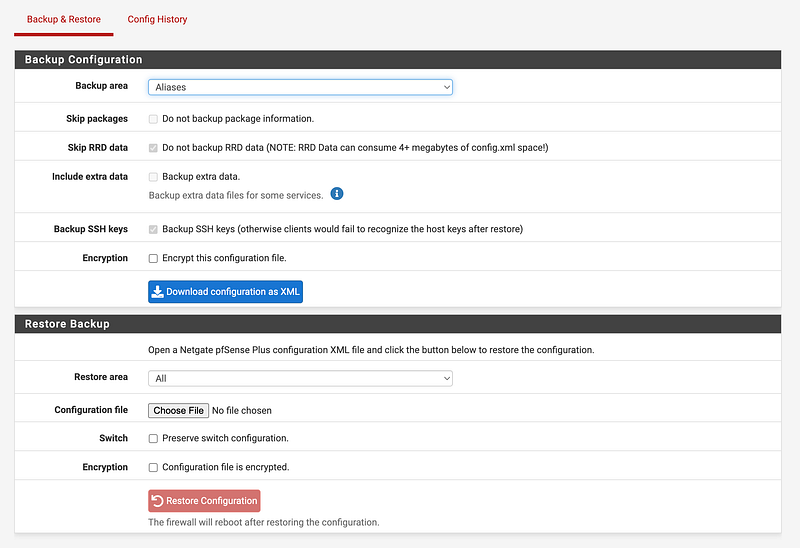
First head over to Diagnostics > Backup & Restore.

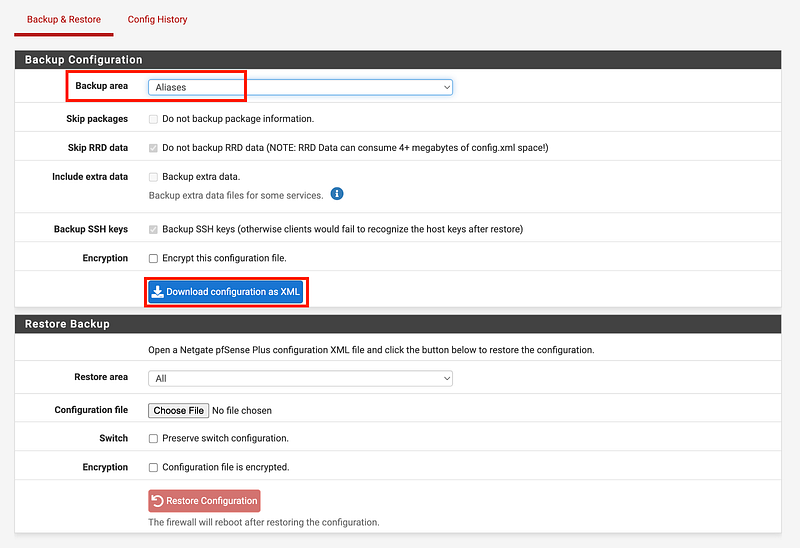
Choose Aliases from the drop down list next to Backup area.
Click download configuration as XML. Store it wherever is appropriate on your local device.
Backup other system configuration data

Next I can back up other parts of the system configuration I want to copy to a new device.
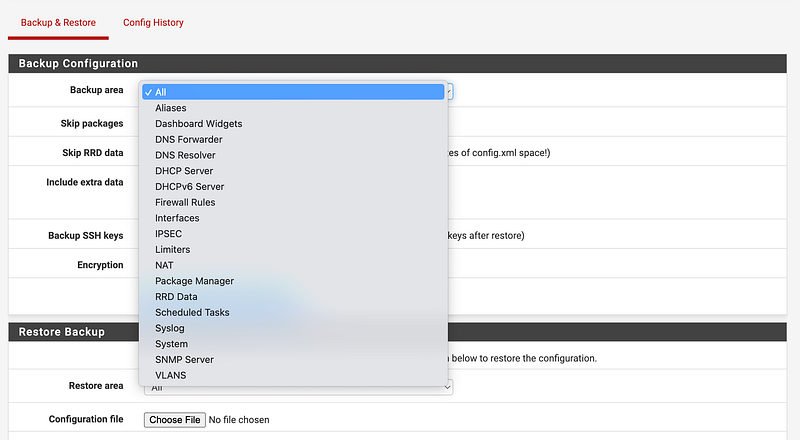
I’m going to pick and choose what I copy over. That seems a bit safer than trying to apply a complete configuration. My devices have a different number of ports so things aren’t going to exactly translate.

Now that I’ve backed up my files I can move them to a new device.

Adding Aliases to a different device or restoring a backup

Now you can log into the new device and reverse the process.
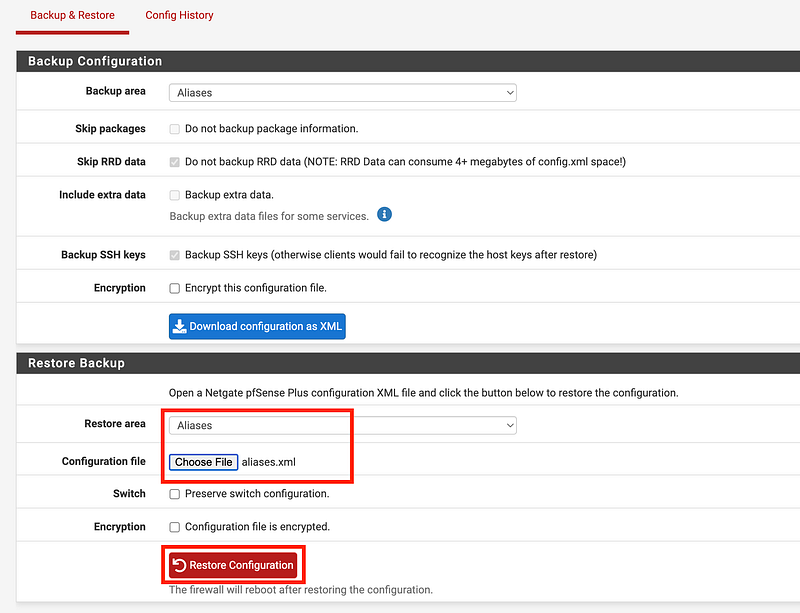
You can repeat that process with any other portions of a configuration you want to backup and restore to another device.

Next I’m going to fire up a new PFSense device.

Follow for updates.

Teri Radichel | © 2nd Sight Lab 2022

About Teri Radichel:
~~~~~~~~~~~~~~~~~~~~
⭐️ Author: Cybersecurity Books
⭐️ Presentations: Presentations by Teri Radichel
⭐️ Recognition: SANS Award, AWS Security Hero, IANS Faculty
⭐️ Certifications: SANS ~ GSE 240
⭐️ Education: BA Business, Master of Software Engineering, Master of Infosec
⭐️ Company: Penetration Tests, Assessments, Phone Consulting ~ 2nd Sight Lab
Need Help With Cybersecurity, Cloud, or Application Security?
~~~~~~~~~~~~~~~~~~~~~~~~~~~~~~~~~~~~~~~~~~~~~~~~~~~~~~~~~~~~~
🔒 Request a penetration test or security assessment
🔒 Schedule a consulting call
🔒 Cybersecurity Speaker for Presentation
Follow for more stories like this:
~~~~~~~~~~~~~~~~~~~~~~~~~~~~~~~~~~~~~~~~~~~~~~~~~~~~~~~~~~~~~ 
❤️ Sign Up my Medium Email List
❤️ Twitter: @teriradichel
❤️ LinkedIn: https://www.linkedin.com/in/teriradichel
❤️ Mastodon: @teriradichel@infosec.exchange
❤️ Facebook: 2nd Sight Lab
❤️ YouTube: @2ndsightlab

Firewall
Alias
Network Security
Pfsense
Cybersecurity
Recommended from ReadMedium