
One Rule To Identify Network Noise
One basic rule filters out a whole lot of noise on your network
~~~~~~~~~~~~~~~~~~~~~~~~~~~~~~~~~~~~~~~~~~~~~~~~~~~~~~~
⚙️ Check out my series on Automating Cybersecurity Metrics | Code.
🔒 Related Stories: Network Security | Data Breaches | Cybersecurity
💻 Free Content on Jobs in Cybersecurity | ✉️ Sign up for the Email List
~~~~~~~~~~~~~~~~~~~~~~~~~~~~~~~~~~~~~~~~~~~~~~~~~~~~~~~
I explained in the last post how to inspect your network traffic logs.
There’s one simple rule you can add to your network firewall to block a whole bunch of rogue traffic all at once. When you create this rule you can set it to automatically drop the packets and provide no response to the offending party sending you the noisy traffic. This may help your firewall performance. It may degrade their network while they sit there waiting for a response that never comes. It depends on how their software handles the packets.
This may not work in a very complex network, but it could work on a lot of home networks, and especially those that are only surfing the web and checking email. If you’re a developer connecting to cloud systems, connecting to a VPN, or using a few other technologies you’ll probably have to do some additional configuration.
First of all, figure out if you need traffic on any ports higher than 1024. You can figure this out by inspecting your network traffic and filtering on your own IP address or other IP addresses in your network to see if they are using any high ports.
Next, create rules for the high ports you absolutely need. Remember to make sure you understand what is inbound versus outbound traffic. You will be contacting systems on low ports most of the time like 80 and 443. The response will come from a high port in the ephemeral range.
For example, you may need a high port like 3389 if you are connecting to Windows systems remotely over the Internet instead of over a private network. Create a rule that gets processed first and allows your system to connect on that high port. Depending on what type of firewall you are using (stateless or stateful) you may need to create a rule to allow the return traffic from 3389 back to your system on a high port. Note that you do NOT need to open 3389 in both directions. That’s a common mistake I see developers make in cloud environments.
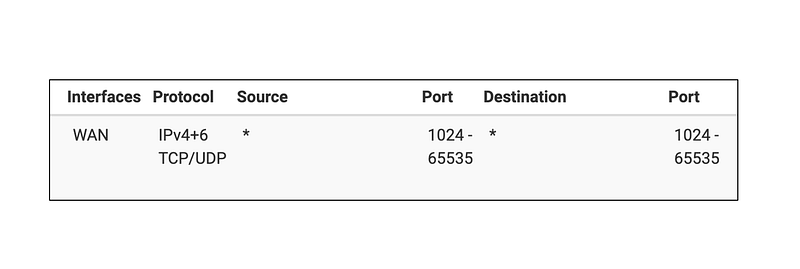
After you create the rules involving high ports that you require simply add this one rule:
Block all traffic on your WAN interface from any port 1024–65535 to any port 1024–65535. The WAN interface is handling traffic to and from the Internet so it won’t affect things running on your local area network (LAN). Set the rule to immediately drop the packet and BLOCK it. Do not REJECT it which provides a response to the offending system. You’ll save bothering with the generation of the REJECT packet. If the other system is waiting for a response it will get tied up at least a little.
Once you do that you can see which IP addresses are getting blocked that are sending this rogue, noisy traffic. Like this:
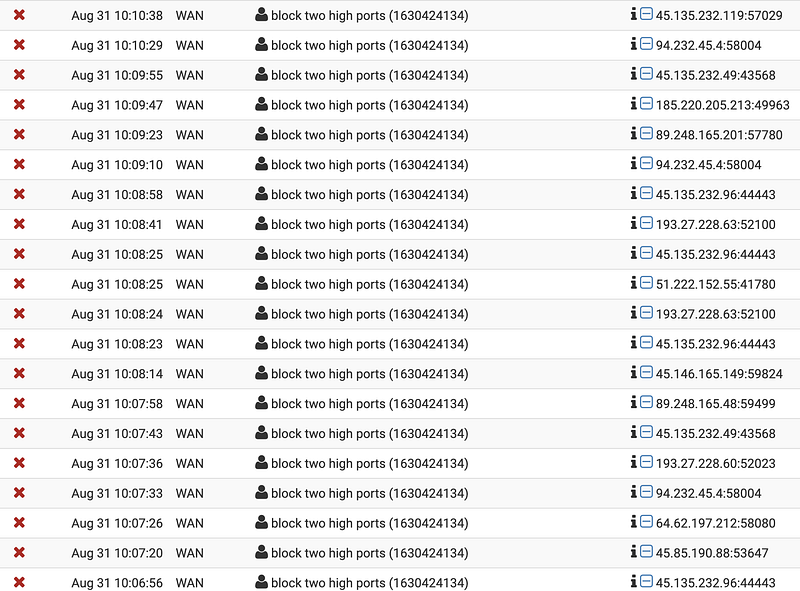
Monitor your network after you make the change to make sure any valid traffic is not getting blocked. Adjust your rules accordingly. I’ve noticed some traffic on high ports related to Apple products going to the Apple network range (17.0.0.0/8). I also noticed some traffic to Google Cloud Platform (GCP) from IOT products doing this as well. You’ll have to look into it to see if it is valid traffic that you want on your network.
Now when you want to inspect your network traffic, as I explained in my last blog post, you can simply filter out that rule because it’s generally just a lot of noise and focus on other potentially anomalous traffic that is more meaningful. This concept is important because sometimes attackers will generate a lot of noise to distract you from a bigger threat on your network.
Also, please make sure your network is not the one generating the noise by means of an amplification attack or redirect by a load balancer or other types of network systems that take a response from a potentially spoofed IP address and direct it to some other system.
Follow for updates.
Teri Radichel | © 2nd Sight Lab 2021
About Teri Radichel:
~~~~~~~~~~~~~~~~~~~~
⭐️ Author: Cybersecurity Books
⭐️ Presentations: Presentations by Teri Radichel
⭐️ Recognition: SANS Award, AWS Security Hero, IANS Faculty
⭐️ Certifications: SANS ~ GSE 240
⭐️ Education: BA Business, Master of Software Engineering, Master of Infosec
⭐️ Company: Penetration Tests, Assessments, Phone Consulting ~ 2nd Sight Lab
Need Help With Cybersecurity, Cloud, or Application Security?
~~~~~~~~~~~~~~~~~~~~~~~~~~~~~~~~~~~~~~~~~~~~~~~~~~~~~~~~~~~~~
🔒 Request a penetration test or security assessment
🔒 Schedule a consulting call
🔒 Cybersecurity Speaker for PresentationFollow for more stories like this:
~~~~~~~~~~~~~~~~~~~~~~~~~~~~~~~~~~~~~~~~~~~~~~~~~~~~~~~~~~~~~
❤️ Sign Up my Medium Email List
❤️ Twitter: @teriradichel
❤️ LinkedIn: https://www.linkedin.com/in/teriradichel
❤️ Mastodon: @teriradichel@infosec.exchange
❤️ Facebook: 2nd Sight Lab
❤️ YouTube: @2ndsightlab


