
Disabling IPv6 on a Mac
Reducing the attack surface by disallowing network access via IPv6
~~~~~~~~~~~~~~~~~~~~~~~~~~~~~~~~~~~~~~~~~~~~~~~~~~~~~~~~~~~
🔒 Related Stories: OS and IoT Security | Network Security | Apple Mac Security
💻 Free Content on Jobs in Cybersecurity | ✉️ Sign up for the Email List
~~~~~~~~~~~~~~~~~~~~~~~~~~~~~~~~~~~~~~~~~~~~~~~~~~~~~~~~~~~
It’s always a good idea to disable things you aren’t using and don’t need. I wrote about reducing the attack surface by limiting the third-party code you download dynamically into your production environment in my last post. Any time you turn off or eliminate something an attacker might use to attack your system, you make their job just a bit harder.
Note: Every time I write about IPV6 I get flamed by a bunch of people who are apparently very passionate about IPV6. I explain further why I use IPV4 in this blog post and when IPV6 is a good design choice.This post is a very high-level explanation of IPv6, how to turn off on a Mac, and why you might want to do that. There’s nothing wrong with IPv6 if you need to use it and know how to secure it. But as with anything you don’t need, you can remove an attack vector if you disable it. You many need IPv6 on certain networks or with certain types of systems, but in my particular case, I don’t need it.
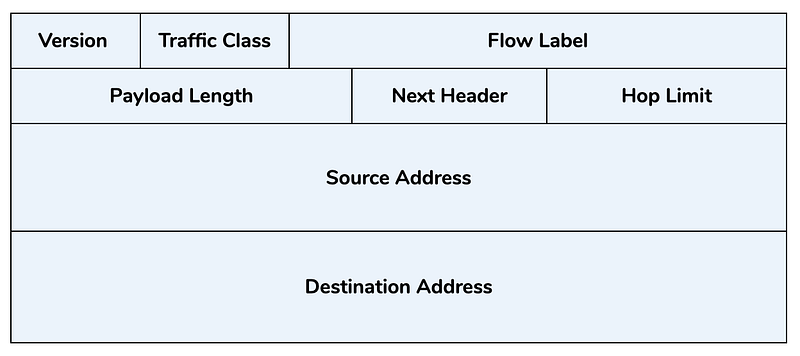
There are two versions of IP or the Internet Protocol used on networks. Each version of the protocol uses a different format for packet headers and different rules for sending data to systems over the Internet. Each version has a different IP address format to identify the systems on the network. These addresses enable systems to send packets over the Internet to reach each other. The older version is IPv4. When using this version, you’ll see IP addresses like this one for your localhost:
127.0.0.1IPv6 has much a much more lengthy and complicated addressing scheme. I’m not going to go into all the details, but basically, it’s a way to allow network owners to have a much bigger pool of IP addresses available to use. In some organizations, there are more devices than IP addresses. I used to manage the IP addresses for Capital One’s cloud network, and let’s just say — if you don’t manage that carefully you could end up with a point where you can’t deploy more applications because you don’t have any more IP addresses. Since that time, the cloud providers have made some changes that help alleviate this problem to some degree, but some companies will still want to use IPv6, which gives them more IP addresses to use on their network. The localhost IP address in IPv6 looks like this:
::1The local host address is shorthand for a much longer address. Here’s an example of IPv4 and IPv6 addresses for the Google DNS servers.
For IPv4: 8.8.8.8 and/or 8.8.4.4.For IPv6: 2001:4860:4860::8888 and/or 2001:4860:4860::8844.IPv6 works differently than IPv4. For example, when using IPv4, your MAC address that identifies your computer hardware doesn’t get sent over the Internet. When using IPv6, it does. Another issue with IPv6 may be that some security tools don’t handle it very well, or at all. To bypass those tools, attackers will use IPv6 instead of IPv4. The other thing for me is that I can quickly read and decipher an IPv4 address. I know when I see many addresses which organizations they belong to just from working with network logs for years. I prefer seeing and using the IPv4 addresses when possible, and especially on my home network, where I don’t need an abundance of IP addresses.
One thing you can do to prevent the use of IPv6 in a network is to turn off the functionality in any networking equipment such as routers and block IPv6 on firewalls. That doesn’t completely solve the problem when people are working remotely, as many people are today. You may want to turn off IPv6 on laptops and other devices, if possible. The ability to do so in the Apple networking screens seems to have changed, and the option to completely turn off IPv6 no longer exists. There’s still a way to do so from the command line, and I tend to forget when I want to do it, so I’m writing this post for myself, basically, as well as anyone else who finds it useful.
Run this command to list all the network services on your system:
networksetup -listallnetworkservicesYou’ll get back a list of names like this:
Wi-FiBluetooth PANThunderbolt BridgeNext disable IPv6 for each service like this, noting that you may need to put spaces around anything that has a space in the name:
networksetup -setv6off "Thunderbolt Bridge"That’s just one example of an unnecessary service or function running on your local system that you can disable or turn off if you are not using. For Windows users, Microsoft warns that some versions of their operating systems require IPv6. You’ll need to be careful not to turn off something that is required, but limiting what you run on your systems can help reduce the chance that attackers can find something to exploit.
Want to make this a script that runs at startup? Check out this post.
Follow for updates.
Teri Radichel | © 2nd Sight Lab 2020
About Teri Radichel:
~~~~~~~~~~~~~~~~~~~~
⭐️ Author: Cybersecurity Books
⭐️ Presentations: Presentations by Teri Radichel
⭐️ Recognition: SANS Award, AWS Security Hero, IANS Faculty
⭐️ Certifications: SANS ~ GSE 240
⭐️ Education: BA Business, Master of Software Engineering, Master of Infosec
⭐️ Company: Penetration Tests, Assessments, Phone Consulting ~ 2nd Sight Lab
Need Help With Cybersecurity, Cloud, or Application Security?
~~~~~~~~~~~~~~~~~~~~~~~~~~~~~~~~~~~~~~~~~~~~~~~~~~~~~~~~~~~~~
🔒 Request a penetration test or security assessment
🔒 Schedule a consulting call
🔒 Cybersecurity Speaker for PresentationFollow for more stories like this:
~~~~~~~~~~~~~~~~~~~~~~~~~~~~~~~~~~~~~~~~~~~~~~~~~~~~~~~~~~~~~
❤️ Sign Up my Medium Email List
❤️ Twitter: @teriradichel
❤️ LinkedIn: https://www.linkedin.com/in/teriradichel
❤️ Mastodon: @teriradichel@infosec.exchange
❤️ Facebook: 2nd Sight Lab
❤️ YouTube: @2ndsightlab


