
Easy DNS Change To Prevent Attacks
1.1.1.2 and 1.1.1.3 for Safer Home and Small Business Networks
~~~~~~~~~~~~~~~~~~~~~~~~~~~~~~~~~~~~~~~~~~~~~~~~~~~~~~~~~~~
🔒 Related Stories: Network Security | DNS Security
💻 Free Content on Jobs in Cybersecurity | ✉️ Sign up for the Email List
~~~~~~~~~~~~~~~~~~~~~~~~~~~~~~~~~~~~~~~~~~~~~~~~~~~~~~~~~~~
My last blog post about SASE explains how new cybersecurity solutions use distributed architectures on global networks to enhance performance and security. You can leverage the power of one of these global networks and threats they identify for free on any system. One pretty simple change will work for most home networks and small businesses and can also help protect children by using a service called CloudFlare for Families.
A quick explanation of DNS for the non-technical folks
When you go to a website, you enter a domain name like 2ndSightLab.com into the browser, or you click a link, which essentially does the same thing automatically.

Your browser sends a request to look up the IP address for that domain name. An IP address is a value that looks like the 1.1.1.1 at the top of this post, except the 1’s will be different numbers. Maybe it’s 123.123.123.123 or any combination where the four numbers between the dots are between 1 and 255. (I’m skipping an explanation of the newer version of IP called IPv6 for simplicity.) That’s an address that your browser can use to get to the website you want to visit like an address on an envelope routes a letter to your mailbox. This process of looking up an IP address for a domain is called domain name resolution.
Sometimes when your system requests an IP for a website, the request fails. For some reason, the browser can’t figure out what the IP address is for the site. The response will technically be a message containing NXDOMAIN, meaning the domain was not resolvable. In that case, your browser cannot load the site because it can’t figure out where to go. It could be that the domain name server doesn’t have an entry for that domain or the DNS server that is supposed to return an IP address for that website is not working correctly. Perhaps the DNS server is blocked by network rules, so your laptop can’t reach to it to get an answer.
Leveraging NXDOMAIN for better security
CloudFlare for Families leverages the domain name resolution process to prevent domain name resolution for web sites and applications hosting malicious or unwanted content. The company has an extensive, global network related to products they offer their customers. Due to the nature of their services, CloudFlare learns about a lot of malicious activity on the Internet. They can track these bad websites and malicious code sources.
If you use their DNS servers to lookup IP addresses for the websites you visit, they will intentionally fail to resolve the address for a known-bad destination. Instead of returning the IP address for that malicious website, it returns NXDomain, and then your system doesn’t know where to go and won’t load the malicious content.
All you need to do to use this service is to change the IP addresses for the DNS Servers your systems use to resolve domain names. For the most basic solution, there is nothing to install or configure beyond that. Depending on how you configure your network and systems, you may be able to simply set the DNS names in your network WiFi or home router. If you have not explicitly defined DNS settings in devices, they will often pick up the DNS configuration from your router.
Let’s say you visit a new site that is serving up advertising links from many different sources. The web page may load, but then when it gets to the ad pointing to a domain that CloudFlare knows is serving malware, it does not resolve the domain name to an IP address. The lookup fails, and the advertisement on the page may turn up blank, or the site may automatically rotate and serve up a different ad.
Block malware or malware and adult content
Most of the time, your system gets DNS server addresses automatically, and you don’t do anything to set them. However, you can control which DNS servers your system uses. CloudFlare explains how to set your DNS servers for several different types of devices on their website:
When you change your DNS settings on a laptop, phone, router, or any other device that allows you to specify which DNS servers you want to use, you’ll typically enter two (or more) DNS addresses. That way, if one DNS server is having issues, your system can still get DNS from the other server.
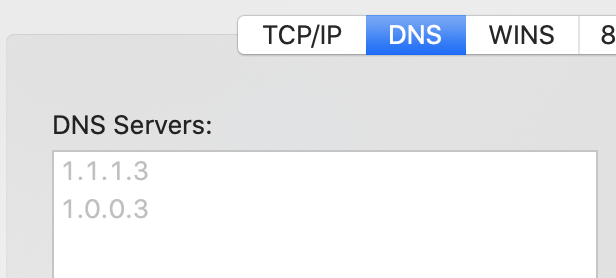
Here’s where you should understand the different options you can choose. If you choose the 1.1.1.1 and related address, you’re potentially getting better performance, but not blocking malicious sites. CloudFlare has two other sets of DNS servers. One set will fail to resolve domain names serving malicious content. The other will also fail to resolve sites blocking adult content. The latter may be especially good on networks used by children and hence the name — CloudFlare for families. This last option is a good one for schools that can use CloudFlare as well.
Here are the DNS servers you use for each option:
Malware Blocking Only Primary DNS: 1.1.1.2 Secondary DNS: 1.0.0.2
Malware and Adult Content Primary DNS: 1.1.1.3 Secondary DNS: 1.0.0.3
CloudFlare also has IPv6 options if you need those:
Note that you do not need to install anything to use this service. Just configure your systems to look up domain names using the CloudFlare service. However, CloudFlare also offers an application you can download and install, which provides some additional functionality. I’m not going to go into that too much here because other considerations exist if you use that application. However, for most home users and small businesses with simple DNS configurations, leveraging the CloudFlare DNS servers won’t cause any issues. It’s an easy security win!
A few Caveats — it’s always DNS
IT and cloud professionals have a common refrain when things break on the network: “It’s always DNS.” When applications fail to function in strange ways or people can’t connect to networks, DNS is often not what you think of first, but that’s what the problem ends up being.
We had this issue at Capital One when we first moved to AWS. Developers were frustrated that they could not use the cloud services from tools that connect and run functions on the cloud platform. As it turned out, the problem was Capital One used DNS servers and security appliances that prevented the developer machines from resolving the domain names for the different services on AWS. When a developer tried to run a command, the system couldn’t figure out where to send it. Although it may have seemed like the application they were using was failing, it was a lower-level DNS problem.
DNS may cause tricky problems, so you’ll want to understand where you have these IP addresses configured in your systems and be aware that they will not work in all cases. For example, I’ve been on planes where I could not connect to WiFi unless I used the automatic DNS servers provided by the router on the airplane. I had to remove my manual DNS entries.
If you are on a corporate enterprise network, the company may use something called split DNS, where some entries are private to your company’s internal network. If you change your DNS servers to CloudFlare and try to access an application running on your company’s private network, your system won’t be able to resolve the address.
Perhaps you are using a network where the firewall blocks DNS to any source except the allowed DNS servers. That also could cause your DNS lookups to fail if you switch to the CloudFlare DNS servers.
Most home networks and users and small businesses won’t have too many issues, and this is, for the most part, an easy change to help enhance the security of your network. It won’t block every threat, but it will be better than the alternative in many cases!
Follow for updates.
Teri Radichel | © 2nd Sight Lab 2020
About Teri Radichel:
~~~~~~~~~~~~~~~~~~~~
⭐️ Author: Cybersecurity Books
⭐️ Presentations: Presentations by Teri Radichel
⭐️ Recognition: SANS Award, AWS Security Hero, IANS Faculty
⭐️ Certifications: SANS ~ GSE 240
⭐️ Education: BA Business, Master of Software Engineering, Master of Infosec
⭐️ Company: Penetration Tests, Assessments, Phone Consulting ~ 2nd Sight Lab
Need Help With Cybersecurity, Cloud, or Application Security?
~~~~~~~~~~~~~~~~~~~~~~~~~~~~~~~~~~~~~~~~~~~~~~~~~~~~~~~~~~~~~
🔒 Request a penetration test or security assessment
🔒 Schedule a consulting call
🔒 Cybersecurity Speaker for PresentationFollow for more stories like this:
~~~~~~~~~~~~~~~~~~~~~~~~~~~~~~~~~~~~~~~~~~~~~~~~~~~~~~~~~~~~~
❤️ Sign Up my Medium Email List
❤️ Twitter: @teriradichel
❤️ LinkedIn: https://www.linkedin.com/in/teriradichel
❤️ Mastodon: @teriradichel@infosec.exchange
❤️ Facebook: 2nd Sight Lab
❤️ YouTube: @2ndsightlab


