avatarTeri Radichel

Free AI web copilot to create summaries, insights and extended knowledge, download it at here

2418

Abstract

6Ug.png)"></div> </div> </div> </a> </div><p id="23a9">So now I’m to the wifi an this is where everything should be dreamy. I should just be able to plug in the wireless access point (AP) and it all magically works. I can allow all the bazillions of ports Unifi needs on it’s own network dedicated to scary Internet magic protocols. But those protocols are what make the devices connect so easily (in theory, as I haven’t gotten there yet.)</p><p id="9a8e">So I plug in my AP to my UDM Pro and….nothing. I look at the console. Nothing. I look at my firewall logs. I’m annoyed with the traffic on port 1900 to the pfSense network out of the box but anyway nothing on the pfSense should affect AP adoption.</p><p id="da23">So I go back and read the instructions. It’s literally three bullet points. One is to power on the AP.</p><p id="329e">Oh. There’s no light. Maybe it doesn’t have power. So I look at it for a switch to turn it on. Maybe it’s inside the little cover where I plugged in the network cord but that would be annoying to have to plug in every AP. It should just be getting power via power over ethernet from the UDM.</p><p id="5dbf">Right? Right. Then it hits me. I was wondering why I purchased an expensive switch last night and considering if I really should have made it, but I’m glad I did. I guess.</p><p id="5f0a">I plug the AP into the switch which I haven’t yet connected to the UDM.</p><p id="74a7">Lights!</p><p id="7a46">Wow. No PoE on the UDM. Mind you, I just bought this a few months back so if it exists now I’m sad. I just paid a lot of money for all this stuff (for my budget anyway). But anyway it looks like I’ll have to plug the AP into the switch.</p><p id="89b0"><i>Update: there is a version how with PoE. Really? Ugh. That did not exist when I purchased because I remember the documentation was confusing as to whether or not the UDM had PoE.</i></p><p id="c10b"><i>Another update. It took me so long to get this working that I forgot there was more stuff in the box. I spent way too long trying to figure out the routing, determine which of all the noisy traffic was required or not so by the time I got back working on this months after I started, I was just looking at the device I had pulled out of the box earlier. It’s very small and cool looking but I didn’t see any plug anywhere on it.</i></p><p id="e2a9"><i>Turns out the bo

Options

x has all this stuff in it which I don’t have time to figure out right now and anyway the switch is working.</i></p><figure id="4f7e"><img src="https://cdn-images-1.readmedium.com/v2/resize:fit:800/1*l2GnkyeUlfnbpXcMc-mhjg.png"><figcaption></figcaption></figure><p id="267e">Back to what I originally did to resolve this problem.</p><p id="0818">Well, let’s see what happens when I plug in the switch.</p><p id="dd39">Pending adoption….</p><figure id="626d"><img src="https://cdn-images-1.readmedium.com/v2/resize:fit:800/1*U9oX08tgiucXc-IMT5DTqQ.png"><figcaption></figcaption></figure><p id="1765">Now provisioning …</p><p id="4a95">I got a popup about the wifi and clicked to add it but I don’t see it here…</p><p id="aaff">More in the next post. Seems to be working but I’m done for the night.</p><p id="0efc">Follow for updates.</p><p id="4a3a">Teri Radichel | <i>© <a href="https://2ndsightlab.com/?source=post_page---------------------------">2nd Sight Lab</a> 2023</i></p><div id="8b5f"><pre><span class="hljs-section">About Teri Radichel:

⭐️ Author: Cybersecurity Books
⭐️ Presentations: Presentations by Teri Radichel
⭐️ Recognition: SANS Award, AWS Security Hero, IANS Faculty
⭐️ Certifications: SANS ~ GSE 240
⭐️ Education: BA Business, Master of Software Engineering, Master of Infosec
⭐️ Company: Penetration Tests, Assessments, Phone Consulting ~ 2nd Sight Lab</pre></div><div id="caae"><pre><span class="hljs-section">Need Help With Cybersecurity, Cloud, or Application Security?
~~~~~~~~~~~~~~~~~~~~~~~~~~~~~~~~~~~~~~~~~~~~~~~~~~~~~~~~~~~~~</span>
🔒 Request a penetration test or security assessment
🔒 Schedule a consulting call
🔒 Cybersecurity Speaker for Presentation</pre></div><div id="5a42"><pre>Follow <span class="hljs-keyword">for</span> more stories like <span class="hljs-keyword">this</span>:

❤️ Sign Up my Medium Email List ❤️ Twitter: <span class="hljs-meta">@teriradichel</span> ❤️ LinkedIn: https:<span class="hljs-comment">//www.linkedin.com/in/teriradichel</span> ❤️ Mastodon: <span class="hljs-meta">@teriradichel</span><span class="hljs-meta">@infosec</span>.exchange ❤️ Facebook: 2nd Sight Lab ❤️ YouTube: @2ndsightlab</pre></div><figure id="faf5"><img src="https://cdn-images-1.readmedium.com/v2/resize:fit:800/0*H9Ew1KCl-29nZiPR.jpeg"><figcaption></figcaption></figure></article></body>

Ubiquiti Dream Machine Pro: No Power over Ethernet

What to do if you want to power your devices with PoE

~~~~~~~~~~~~~~~~~~~~~~~~~~~~~~~~~~~~~~~~~~~~~~~~~~~~~~~~~

⚙️ Check out my series on Automating Cybersecurity Metrics. The Code.

🔒 Related Stories: Unifi | Dream Machine Pro | Ubiquiti | Network Security

💻 Free Content on Jobs in Cybersecurity | ✉️ Sign up for the Email List

~~~~~~~~~~~~~~~~~~~~~~~~~~~~~~~~~~~~~~~~~~~~~~~~~~~~~~~~~

Note: This is in the documentation on the website. I missed it. Get the special edition if you want this or just plug everything into a switch, which I’m told by Ubiquiti is better anyway. More on that in a separate post.

If you’ve been following along, I’ve been setting up a Ubiquiti Dream Machine Pro behind a pfSense firewall. Of course I have to do things the hard way because I would like to have a secure network. When vendors don’t make things easy — that generally leads to giving up and weak security — if security is possible at all. I did get my device working correctly behind a pfSense, I think, with two separate networks.

This was the last post:

So now I’m to the wifi an this is where everything should be dreamy. I should just be able to plug in the wireless access point (AP) and it all magically works. I can allow all the bazillions of ports Unifi needs on it’s own network dedicated to scary Internet magic protocols. But those protocols are what make the devices connect so easily (in theory, as I haven’t gotten there yet.)

So I plug in my AP to my UDM Pro and….nothing. I look at the console. Nothing. I look at my firewall logs. I’m annoyed with the traffic on port 1900 to the pfSense network out of the box but anyway nothing on the pfSense should affect AP adoption.

So I go back and read the instructions. It’s literally three bullet points. One is to power on the AP.

Oh. There’s no light. Maybe it doesn’t have power. So I look at it for a switch to turn it on. Maybe it’s inside the little cover where I plugged in the network cord but that would be annoying to have to plug in every AP. It should just be getting power via power over ethernet from the UDM.

Right? Right. Then it hits me. I was wondering why I purchased an expensive switch last night and considering if I really should have made it, but I’m glad I did. I guess.

I plug the AP into the switch which I haven’t yet connected to the UDM.

Lights!

Wow. No PoE on the UDM. Mind you, I just bought this a few months back so if it exists now I’m sad. I just paid a lot of money for all this stuff (for my budget anyway). But anyway it looks like I’ll have to plug the AP into the switch.

Update: there is a version how with PoE. Really? Ugh. That did not exist when I purchased because I remember the documentation was confusing as to whether or not the UDM had PoE.

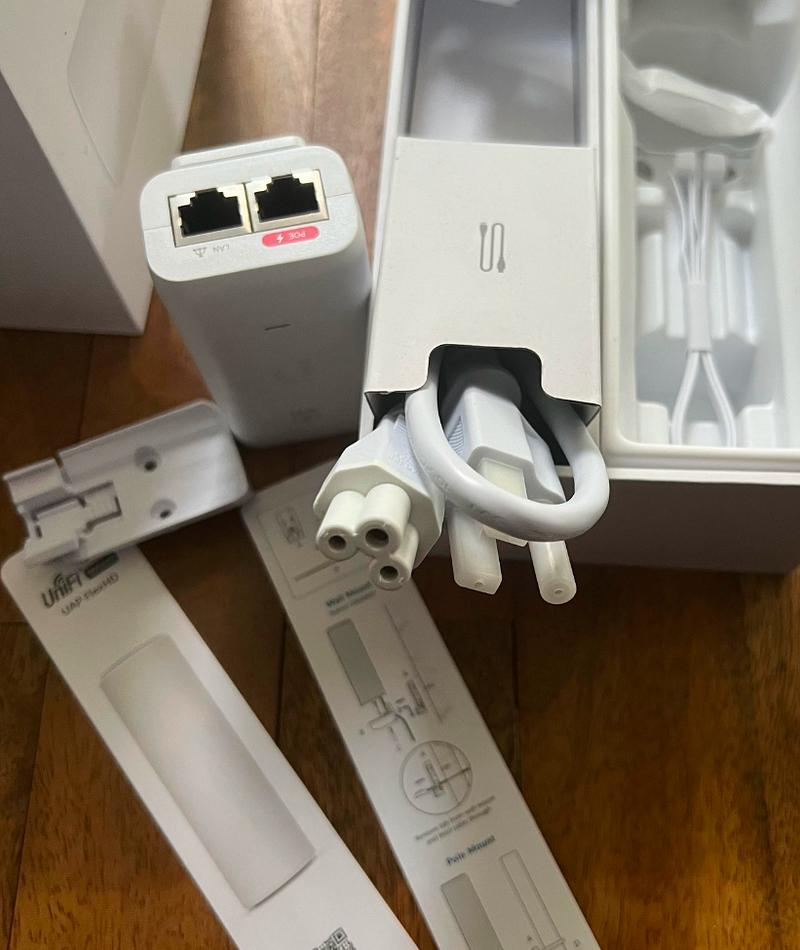
Another update. It took me so long to get this working that I forgot there was more stuff in the box. I spent way too long trying to figure out the routing, determine which of all the noisy traffic was required or not so by the time I got back working on this months after I started, I was just looking at the device I had pulled out of the box earlier. It’s very small and cool looking but I didn’t see any plug anywhere on it.

Turns out the box has all this stuff in it which I don’t have time to figure out right now and anyway the switch is working.
Back to what I originally did to resolve this problem.

Well, let’s see what happens when I plug in the switch.

Pending adoption….
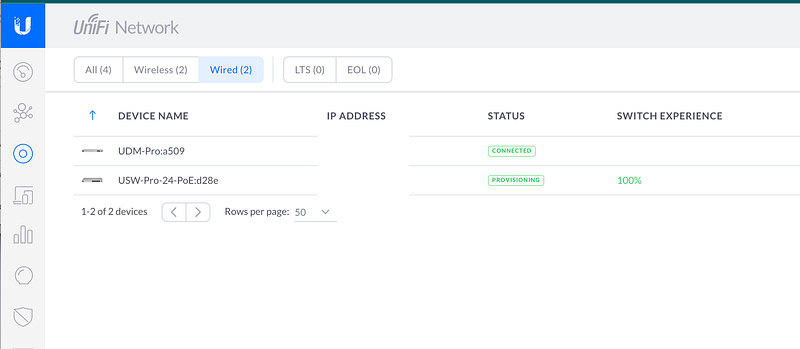
Now provisioning …

I got a popup about the wifi and clicked to add it but I don’t see it here…

More in the next post. Seems to be working but I’m done for the night.

Follow for updates.

Teri Radichel | © 2nd Sight Lab 2023

About Teri Radichel:
~~~~~~~~~~~~~~~~~~~~
⭐️ Author: Cybersecurity Books
⭐️ Presentations: Presentations by Teri Radichel
⭐️ Recognition: SANS Award, AWS Security Hero, IANS Faculty
⭐️ Certifications: SANS ~ GSE 240
⭐️ Education: BA Business, Master of Software Engineering, Master of Infosec
⭐️ Company: Penetration Tests, Assessments, Phone Consulting ~ 2nd Sight Lab
Need Help With Cybersecurity, Cloud, or Application Security?
~~~~~~~~~~~~~~~~~~~~~~~~~~~~~~~~~~~~~~~~~~~~~~~~~~~~~~~~~~~~~
🔒 Request a penetration test or security assessment
🔒 Schedule a consulting call
🔒 Cybersecurity Speaker for Presentation
Follow for more stories like this:
~~~~~~~~~~~~~~~~~~~~~~~~~~~~~~~~~~~~~~~~~~~~~~~~~~~~~~~~~~~~~ 
❤️ Sign Up my Medium Email List
❤️ Twitter: @teriradichel
❤️ LinkedIn: https://www.linkedin.com/in/teriradichel
❤️ Mastodon: @teriradichel@infosec.exchange
❤️ Facebook: 2nd Sight Lab
❤️ YouTube: @2ndsightlab

Unifi
Ubuiqiti
Dream Machine Pro
Power Over Ethernet
Poe
Recommended from ReadMedium