
Resolving No Route To Host
Routing traffic between routers such as pfSense and a UDM Pro
~~~~~~~~~~~~~~~~~~~~~~~~~~~~~~~~~~~~~~~~~~~~~~~~~~~~~
⚙️ Check out my series on Automating Cybersecurity Metrics | Code.
🔒 Related Stories: pfSense | Dream Machine Pro | Ubiquiti | Network Security
💻 Free Content on Jobs in Cybersecurity | ✉️ Sign up for the Email List
~~~~~~~~~~~~~~~~~~~~~~~~~~~~~~~~~~~~~~~~~~~~~~~~~~~~~
In my last post on administering network devices I alluded to a problem with trying to run a UDM Pro behind a PFSense.
This brings me to the topic of routing.
When you send traffic from one network to another, the traffic traverses a router. The router sends the traffic to the next network if the address the request is trying to reach does not exist in the current network.
Route Table Analogy
You’re driving down the highway from Los Angelos and you want to get to San Francisco. You come to a fork in the road where you can take highway 1 or route 66. Which highway should you take?
On a network, the router would make the decision as to which highway you should take. It has a table that says:
- San Francisco, CA | Highway 1 North
- Flagsaff, AZ | Route 66 East
Based on that table, you are trying to get to San Francisco, CA so you should take Highway 1.
What if there is no entry in the route table for your destination? Let’s say you change your mind and want to go to Las Vegas. Well then your traffic would get sent to the default route. The default route might send you to another router with a different table that contains the information you need to get to your destination.
For our analogy, let’s say gas stations have maps that have additional routes. Our default route might point us to gas station 1. If it’s not San Francisco or Flagstaff go to gas station 1 to get the route.
- San Francisco, CA | Highway 1 North
- Flagstaff, AZ | Route 66 East
- Default | Gas Station 1 (to buy a map)
That gas station doesn’t have the route either so they send you to another gas station to buy a map. Their route table might look like this:
- Default | Gas Station 2 (to buy a map)
Gas station 2 has a map.
- Las Vegas| Highway 190
- Default | Gas Station 3
Luckily we don’t need to go to Gas Station 3. We have a route that sends us on the correct highway to Las Vegas in the above “route table.”
In some cases, there is no “next hop” that could have the correct IP address. For internal IP addresses those should never route over the Internet on an IPv4 network. When the router tries to reach a local IP address an it can’t — then there’s “No Route To Host.” I think.
I’m reverse engineering this because documentation on the topic everywhere seems quite abstract. I want specifics.
Gateways — getting to the next network
When you’re traversing from one network to another there’s often a gateway involved. The gateway is a point of entry into another network. I often use the analogy of crossing the border from the US into Canada. You take a road that has a checkpoint, otherwise (legally) you cannot get into Canada.
A gateway is an entry point into another network. The gateway allows the network to pass to the correct destination. Traffic is sent to the appropriate gateway which send the traffic to the appropriate router that can get the packets to the target network.
On AWS, you can set up gateways for virtual private clouds (VPCs) — an Internet gateway to reach the Internet, or a private gateway to reach a corporate network. Then you add a route in your AWS VPC route table to tell network interfaces which gateway to take based on the IP address they are trying to reach. Each route has an IP range and a destination — the Internet gateway to get to the Internet, or a private gateway to get to an IP address in private corporate network ip range.
How does the traffic get routed correctly when the Internet consists of every possible IP address and the private gateway is a subset of those addresses? The smallest IP range applies first. The subset of IP addresses for the private network is smaller than the range of addresses for the entire Internet, so the smaller range will apply first, if the IP address requested falls within that range.
You can set up gateways on a UDM Pro or a PFSense. Not all network devices will allow you to change route tables or set up gateways. That’s why I want to switch from a basic wifi device to a more robust one in addition to being able to monitor network traffic. Supposedly the performance will be better as well — and it will definitely be better once I get hardwired networks in place again like I had in Seattle.
The UDM Pro already has a default gateway which is sending traffic destined for the Internet to pfSense.
I want to add a gateway on pfSense to get traffic to the UDM Pro. I’ll also need routes that tell pfSense to send any packets for the UDM Pro network IP range to the UDM Pro gateway.
Routers
If you need to send traffic from 10.20.30.1 to 192.168.25.35 then you could potentially somehow directly connect the two hosts if they are on a network on pfSense and the UDM Pro. But that’s not what we want if our goal is a secure network. Allowing the devices to directly connect may bypass firewall rules and security checks. We want to send the traffic through the firewall, so it can inspect and log traffic. We also want the firewall to protect the hosts it is supposed to be protecting.
Here’s what we want:
Device in pfSense network > pfSense > UDM Pro > Device in UDM Pro networkIf both hosts are on directly connected private networks (pfsense network to UDM network) packets will route from one router to another and then the destination host.
If the packet is destined for the Internet, the traffic might reach the default gateway where the source IP address gets translated to a public IP address + port by the NAT and then gets sent to another router, then another, then another until it reaches the router at the target network. That router will take the request to a public IP and port and translate it back to a private IP address that receives the traffic.
All those routers are called “hops” on the network. You can see all the hops it takes to get from your IP address to a destination IP address using the following commands:
Windows: tracert x.x.x.x
Linux/Mac: traceroute x.x.x.x
My firewall blocks this kind of traffic so I only see one hop:

If your firewall allows it, you will see a list of routers here instead — all the routers between your IP address and whatever IP address you are trying to reach, as long as the network is allowed to pass through each device.
So the bottom line is, we want a configuration that sends the traffic from pfSense to the UDM Pro which then sends the traffic to the destination device. We don’t want a solution that ends up creating a peer to peer connection that bypasses our security controls.
Other mechanisms for connecting devices
I could use other mechanisms for getting traffic to route to the Internet from the UDM Pro — but many of them are less secure.
You can set up port forwarding to completely bypass the pfSense firewall. If the traffic comes from port 443 on the UDMPro — send it to the Internet. That defeats the purpose of what I’m trying to do with additional layers of security. It’s also a pain to manage every individual port.
You can create some sort of DMZ configuration which I think basically does something similar. Put some things outside the confines of the internal network and some of the firewall rules. Certain network devices have this option and I believe it exposes devices directly to the Internet and puts the device outside the NAT, which is not what I want.
People do this to avoid problems with double NAT, but really if you have two completely separate networks connecting properly with routes and gateways, then it should work just like your internal network works with your ISP. It feels like people are not correctly solving the problem with that approach but I haven’t fully looked into it so can’t fairly judge at this point. But whatever they are trying to do is simply something I do not want on my network.
The other solution I saw involves creating a VLAN across the UDM Pro and the pfSense, so essentially you have a single network spanning both devices. This could work, but again I’m trying to create separate networks for security reasons, not just “make things work.” That solution doesn’t feel right. I’m not sure all the firewall rules are going to work correctly or how the logging works in that case. If the traffic does not traverse the firewall, any firewall rules will not apply, and traffic may not be logged. I’m skipping that approach, in any case, and so not going to dig into what actually happens in regards to firewall rules when you do that.
So I’m back to trying to set up a proper gateway and routes. If traffic is destined for the UDM Pro, send it to the appropriate gateway which routes the traffic to the UDM Pro. The UDM Pro forwards the packet to the proper destination. It’s as if my pfSense is the ISP and my UDM Pro is a customer with a home network.
Physical Port and Network Interface
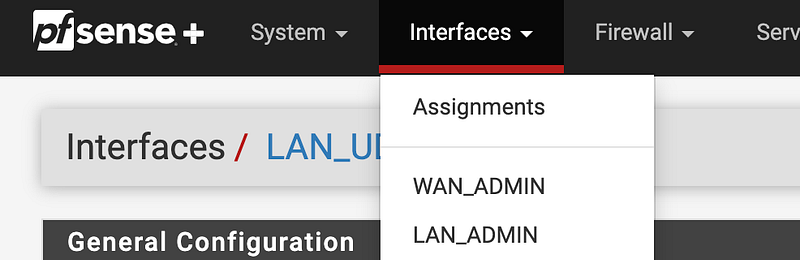
First of all, I need to configure an interface to associate with the gateway I configure on pfSense. I am going to configure an interface for the physical port where I plug in the UDM Pro.
I can head over to Interfaces > Assignments.
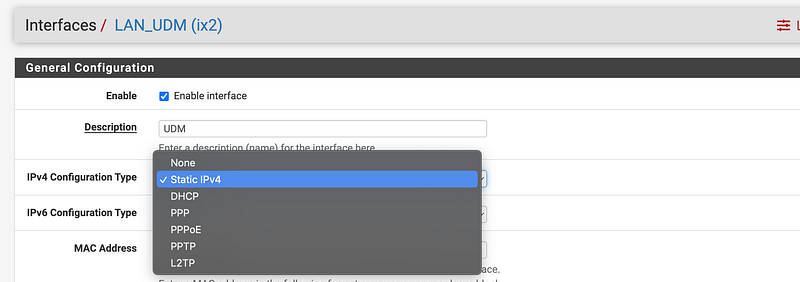
Here’s where the documentation is not really helping me. I need to pick a type. I’m going to pick Static IPv4. I presume I want to assign an IP address that does not change.
Next I scroll down to set an IP address. Can I use a single IP address since I’m basically just routing traffic through this interface and want nothing else connected in this particular address range?
This is also where I can select a gateway.
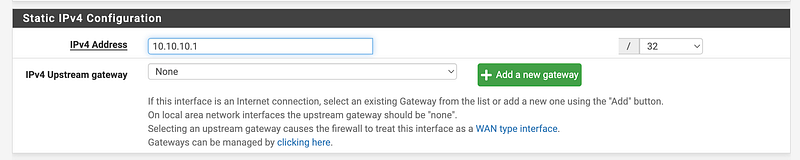
What happens when you select a gateway?
Gateways are the key to routing; They are routers on directly connected networks through which a host can reach other networks.
Gateways are also used for static routing, where certain hosts or networks must be reached via specific routers.
That sounds like what we need —on the PFSense to direct traffic to the UDM Pro.
The question at this point is what should the IP address be for the Interface and associated gateway on PFSense that needs to reach the UDM Pro?
This is not very clear:
On most networks a gateway resides in the same subnet as one of the interfaces on a host. For example, if a firewall has an IP address of
192.168.22.5/24, then a gateway to another network would have to be somewhere inside of192.168.22.xif the other network is reachable through that interface.
Which firewall? The UDM Pro firewall or the PFSense firewall? What is the firewall IP range on PFSense? Is it the CIDR assigned to the Interface? Should the IP range of the subnet assigned to the interface on PFSense be the same or different than the IP range assigned on the UDM Pro?
Well, from my days working on the Capital One cloud networking team, I presume the IPs need to be different. I had to manage all the IP assignments and make sure none of them overlapped, otherwise we would have conflicts. The network would be confused and not know where to send the traffic if two devices have the same IP. I presume the IP for the gateway on pfSense and the IP for the UDM need to be different.
Let’s look at what configuration options we have for a gateway.
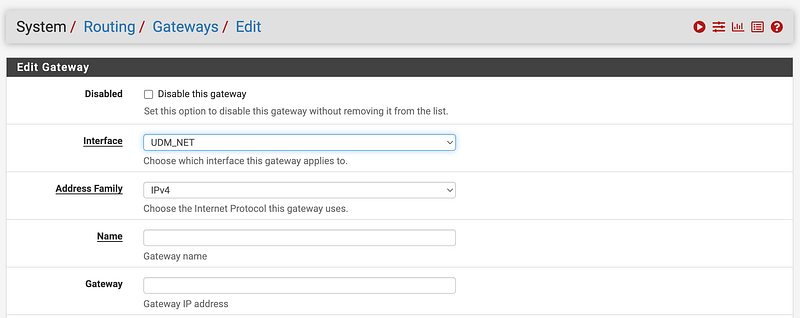
I choose the Interface, give it a name, and add a gateway IP address.
This is the address devices will send traffic to if trying to reach the network accessible via that gateway. I think. I don’t think I care much about the rest of the settings.
So I guess the IP address here has to be in the range added to the interface above? And I presume this IP address has to different from the IP on the UDM Pro. I found a video at the bottom of this post that confirms this.
So it’s like this, presuming I assign 10.10.10.1 to my pfSense gateway and 172.16.16.1 as the IP address for my UDM Pro.
Gateway on pfsense for IP 10.10.10.1 -> UDM Pro IP address 172.16.16.1The IP address I assign the gateway needs to be in the range assigned to the interface.
What is interesting is that I could not set an IP range as the address on the interface. I kept getting an error saying I was trying to enter a network not an IP (I guess, again not clear.)
For example if I add this:
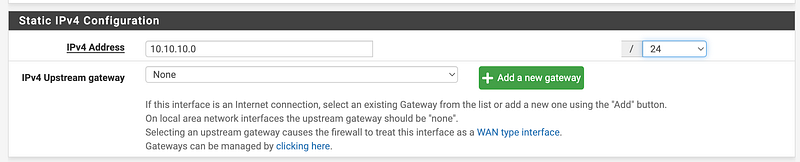
I get this error:
This IPv4 address is the network address and cannot be used

I figured out that I could add a very small IP range like 10.10.10.0/30. But anyway I think I only need one address and not using DHCP. So I’ll just enter the address of my UDM Pro with /32 at the end and see if that works.
Configuring the Interface and Gateway
Here’s what I ended up doing.
Interfaces > Select Interface (or add new assignment to a port).
Give it a name. Choose Static IPv4.
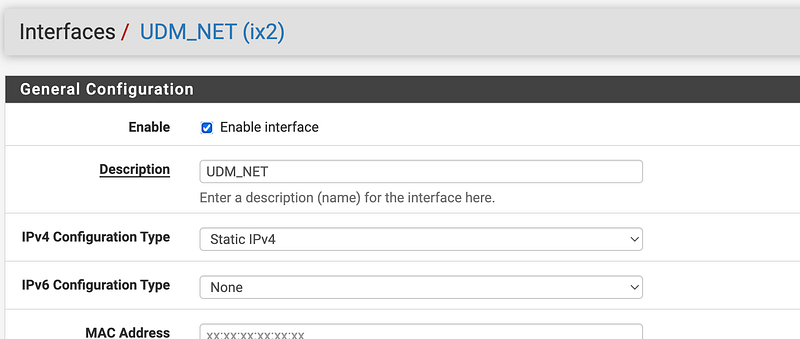
Assign an IP address block with /32 at the end (one IP address)

System > Routing > Add Gateway.
Choose the Interface. Enter a name and the UDM IP address, which is also in the IP range assigned to the Interface above.
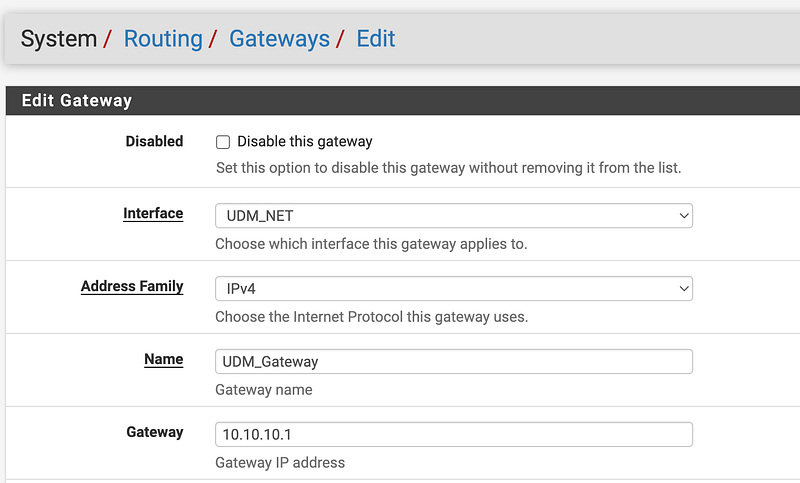
You can repeat the steps for IPv6 if you want to allow IPv6 on your network.
I’m not going to for reasons explained in these posts.
Static routes
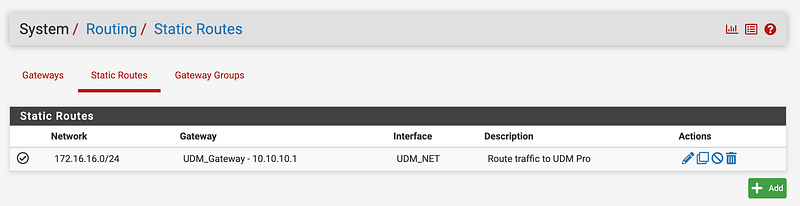
Next we need to tell pfSense that whenever it has to send a packet to one of the IP addresses in the UDM Pro network, it needs to send that packet to the UDM_Gateway we just created. We do that by creating a static route.
Let’s say my UDM Pro network is 172.16.16.0/24.
Create a static route that sends traffic for that network to the gateway we just created above.
System > Routing > Static routes
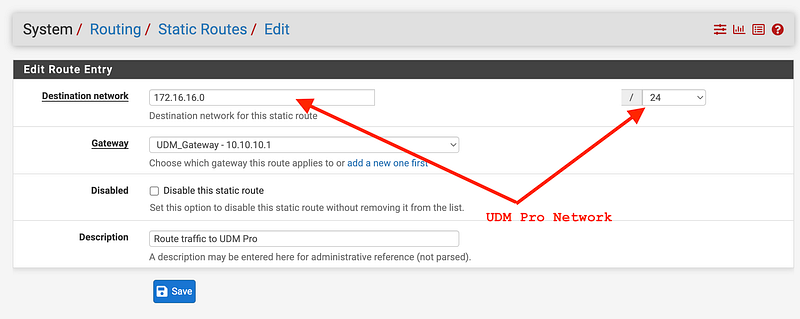
Now any traffic destined for 176.16.16.0 will be directed to the UDM_Gateway.
Firewall rules
Next we need to allow firewall rules to allow traffic to and from the gateway we created.
The rules you need to create will be dependent on your particular device and what traffic you need to allow in your network.
I’ll go over that more in future posts if I haven’t already in relation to the UDM Pro.
I already started reverse engineering domain names and IPs used by the UDM Pro in prior posts so I have some rules set up to allow only those hosts while getting the device initially configured.
Testing Our New Route
Now what I want to know is whether or not traffic for the 172.16.16.0/24 network is correctly sent to the gateway we created.
I went into Diagnostics > Command Prompt on pfSense.
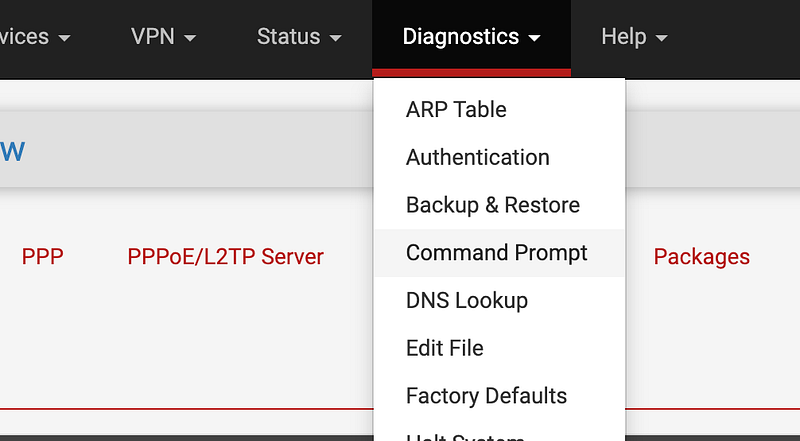
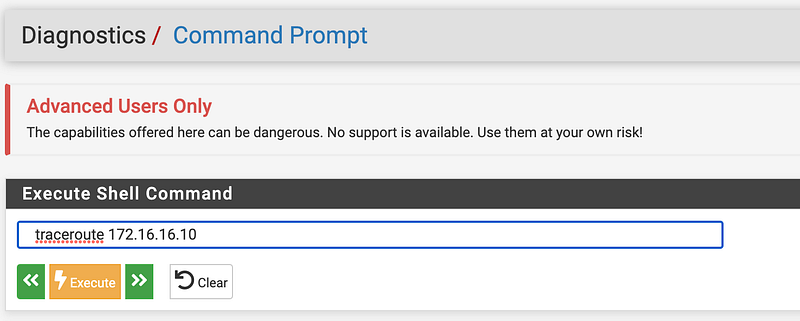
I ran a traceroute command to 172.16.16.10
Then I checked the firewall logs. The traceroute traffic shows that the traffic is being sent through the gateway we set up.
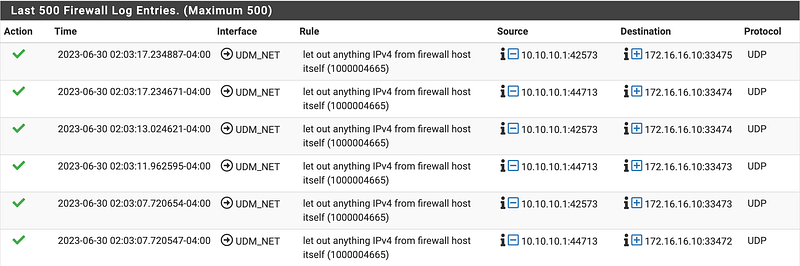
What you will also notice here is that a rule in pfSense you cannot control allows that traffic to go through, irrespective of any firewall rules you have created. This is why it is important to understand what you firewall is doing and if it has been compromised. You can’t block that traffic. But I digress.
I never get the response in the admin interface in pfSense because although the traffic can get out of the firewall it can’t get back the admin interface due to my firewall rules.
If I run the same command to 8.8.8.8 (a Google DNS server) I can see that the traffic is routed out the default gateway instead. Instead of the gateway IP address I see my public IP in the logs from my ISP. In this case the traffic was blocked by a firewall rule. That is interesting.
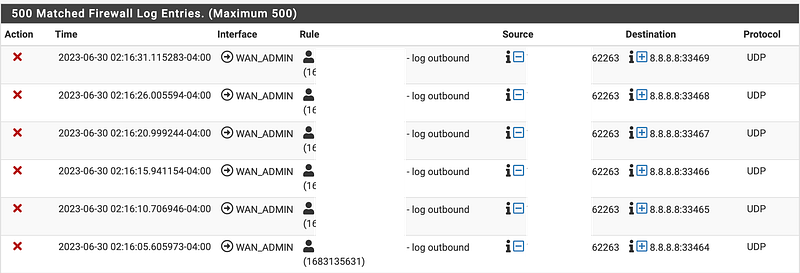
We can see the traffic is getting routed correctly. Now I need to set up the UDM Pro side and that wasn’t the IP range I used. I need to make sure my network on the UDM Pro side matches and that I can send traffic to the Internet and get a response now.
There’s one other thing I realized I didn’t do. I never went back and added the gateway in the Interface settings:
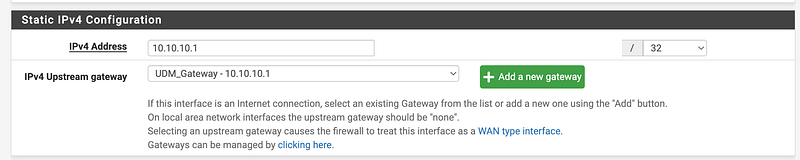
Do we need that?
Stay tuned for more testing.
Resources:
If you want the related video on firewall rules, please do not create wide open firewall rules to anything on the Internet. Take the time to create the correct rules and only allow the ports an protocols you need to allow.
I was reverse engineering what domains a UDM Pro connects to in this prior post before I realized I had a routing issue not a firewall rule issue, so I already have a lot of my firewall rules configured.
Follow for updates.
Teri Radichel | © 2nd Sight Lab 2023
About Teri Radichel:
~~~~~~~~~~~~~~~~~~~~
⭐️ Author: Cybersecurity Books
⭐️ Presentations: Presentations by Teri Radichel
⭐️ Recognition: SANS Award, AWS Security Hero, IANS Faculty
⭐️ Certifications: SANS ~ GSE 240
⭐️ Education: BA Business, Master of Software Engineering, Master of Infosec
⭐️ Company: Penetration Tests, Assessments, Phone Consulting ~ 2nd Sight Lab
Need Help With Cybersecurity, Cloud, or Application Security?
~~~~~~~~~~~~~~~~~~~~~~~~~~~~~~~~~~~~~~~~~~~~~~~~~~~~~~~~~~~~~
🔒 Request a penetration test or security assessment
🔒 Schedule a consulting call
🔒 Cybersecurity Speaker for PresentationFollow for more stories like this:
~~~~~~~~~~~~~~~~~~~~~~~~~~~~~~~~~~~~~~~~~~~~~~~~~~~~~~~~~~~~~
❤️ Sign Up my Medium Email List
❤️ Twitter: @teriradichel
❤️ LinkedIn: https://www.linkedin.com/in/teriradichel
❤️ Mastodon: @teriradichel@infosec.exchange
❤️ Facebook: 2nd Sight Lab
❤️ YouTube: @2ndsightlab


