avatarTeri Radichel

Free AI web copilot to create summaries, insights and extended knowledge, download it at here

3634

Abstract

ab"><p>If you would like to not use STUN (which really has no security consequences, it is merely a way of enabling bidirectional connections through NAT;</p></blockquote><p id="d978"><a href="https://community.ui.com/questions/Disable-STUN-support/7040b528-f626-40aa-918a-2c9ca0e174d0">https://community.ui.com/questions/Disable-STUN-support/7040b528-f626-40aa-918a-2c9ca0e174d0</a></p><p id="3fe2">OK.</p><p id="1e11">I don’t know yet if the following applies to STUN on Ubiqiti yet, but I’m not going to enable that port until I find out.</p><div id="55da" class="link-block"> <a href="https://www.senki.org/dont-let-your-firewalls-be-stun-ddos-reflector/"> <div> <div> <h2>Don't let your Firewalls be STUN DDoS Reflector</h2> <div><h3>STUN with open UDP on your firewalls and other devices abused as STUN DDoS reflectors - wasting bandwidth and…</h3></div> <div><p>www.senki.org</p></div> </div> <div> <div style="background-image: url(https://miro.readmedium.com/v2/resize:fit:320/0*qBs-_u6bRPkm35Ze)"></div> </div> </div> </a> </div><p id="c536">Stun has been used to abuse sytems in the past via various attacks like this one. I don’t know if Turn is used in this case but not going to enable this until I understand what it’s doing exactly and if it is neccessary.</p><div id="961a" class="link-block"> <a href="https://www.rtcsec.com/article/slack-webrtc-turn-compromise-and-bug-bounty/"> <div> <div> <h2>How we abused Slack's TURN servers to gain access to internal services</h2> <div><h3>Slack's TURN server allowed relaying of TCP connections and UDP packets to internal Slack network and meta-data…</h3></div> <div><p>www.rtcsec.com</p></div> </div> <div> <div style="background-image: url(https://miro.readmedium.com/v2/resize:fit:320/0*9s39byZ2KPhFTwfk)"></div> </div> </div> </a> </div><p id="5b4f">Every. Open. Port. Has. Security. Implications.</p><p id="11b1">Also, I noticed that Ubiquiti connects to stun on Digital Ocean — one of my most despised and blocked networks due to the constant traffic that hits my firewall from them. Not opening up anything to DO unless I absolutely have to so…it’s blocked. I can’t find another solution so far to disable it.</p><p id="7209">Maybe I can somehow mimic whatever traffic it needs to get around this problem.</p><p id="11d5">But first let’s just see if we can somehow connect to the wifi without it.</p><p id="0601">Oh cool. I found a video by clicking on the gear icon on the left.</p><figure id="c478"><img src="https://cdn-images-1.readmedium.com/v2/resize:fit:800/1*3Xx8s-dacQrhxsR01KVqHQ.png"><figcaption></figcaption></figure><p id="6488">Which helped zero percent.</p><p id="6e2c">Ok.</p><p id="dc9c">While clicking around I found Internet Threat Management and enabled it. I went ahead and set it up as an IPS since I have nothing on it yet, so I’m not going to break anything. I hope. I had problems with streaming services when I tried to enable Suricata on pfSense. Maybe this will do better.</p><figure id="c617"><img src="https://cdn-images-1.readmedium.com/v2/resize:fit:800/1*S34gVRnHnFpeRNpPq9ZdGA.png"><figcaption></figcaption></figure><p id="4b0f">There’s a teeny link at the top of that page that says “Go to classic settings.” Hmm. I click it.</p><figure id="4bb6"><img src="https://cdn-images-1.readmediu

Options

m.com/v2/resize:fit:800/1*CiEbwevG5s5If4sI2ULR1A.png"><figcaption></figcaption></figure><p id="a28b">What is this? Do I have to set up a wireless network for the AP?</p><figure id="a654"><img src="https://cdn-images-1.readmedium.com/v2/resize:fit:800/1*WGsHLogrxtKCOcJpWoEuuQ.png"><figcaption></figcaption></figure><p id="98f6">Here I can set up an SSID, select the type of security (WPA Personal for the moment) and select a network. The only network I have is “LAN” so I guess I’ll choose that.</p><p id="db9e">Well, I can connect to it. So that’s cool. Now to test it out.</p><p id="a0a7">By the way, I disabled mesh on in the wifi configuration settings on the right side of the console:</p><figure id="2ecd"><img src="https://cdn-images-1.readmedium.com/v2/resize:fit:800/1*afcayXKGzPSnACrIvQapcg.png"><figcaption></figcaption></figure><p id="2908">When I went back in I noticed they hadn’t saved, perhaps because I didn’t click Apply Changes at the bottom. I don’t want to mesh my devices. I want different Wifi hotspots for different purposes.</p><p id="0e30">Now to test out the TV before the person cooking me dinner gets back to it :-) Quick…</p><p id="53e0">Seems to work! It says the connection is only fair as the wifi device is across the house. I plan to change this all and hardware hot spots closer to locations where they will be used. But this works. And the clarity of the video is decent.</p><p id="b826">Now I just need to research how I can create separate networks for my different wifi devices.</p><p id="416c">Later.</p><p id="47a7">Update: 5 minutes later — spoke too soon. The UDM is trying to send DNS traffic over port 53 TCP. That’s interesting since the computer I initially used to set up the UDM was doing the same thing but not on the UDM network. I just reset that machine to factory default and it stopped trying to connect over DNS/TCP. Now the UDM is doing the same thing and the TV is stalling out. Great.</p><p id="aac5">Guess I’m going to have to do more troubleshooting.</p><p id="598b">Follow for updates.</p><p id="4a3a">Teri Radichel | <i>© <a href="https://2ndsightlab.com/?source=post_page---------------------------">2nd Sight Lab</a> 2023</i></p><div id="8b5f"><pre><span class="hljs-section">About Teri Radichel:

⭐️ Author: Cybersecurity Books
⭐️ Presentations: Presentations by Teri Radichel
⭐️ Recognition: SANS Award, AWS Security Hero, IANS Faculty
⭐️ Certifications: SANS ~ GSE 240
⭐️ Education: BA Business, Master of Software Engineering, Master of Infosec
⭐️ Company: Penetration Tests, Assessments, Phone Consulting ~ 2nd Sight Lab</pre></div><div id="caae"><pre><span class="hljs-section">Need Help With Cybersecurity, Cloud, or Application Security?
~~~~~~~~~~~~~~~~~~~~~~~~~~~~~~~~~~~~~~~~~~~~~~~~~~~~~~~~~~~~~</span>
🔒 Request a penetration test or security assessment
🔒 Schedule a consulting call
🔒 Cybersecurity Speaker for Presentation</pre></div><div id="5a42"><pre>Follow <span class="hljs-keyword">for</span> more stories like <span class="hljs-keyword">this</span>:

❤️ Sign Up my Medium Email List ❤️ Twitter: <span class="hljs-meta">@teriradichel</span> ❤️ LinkedIn: https:<span class="hljs-comment">//www.linkedin.com/in/teriradichel</span> ❤️ Mastodon: <span class="hljs-meta">@teriradichel</span><span class="hljs-meta">@infosec</span>.exchange ❤️ Facebook: 2nd Sight Lab ❤️ YouTube: @2ndsightlab</pre></div><figure id="faf5"><img src="https://cdn-images-1.readmedium.com/v2/resize:fit:800/0*H9Ew1KCl-29nZiPR.jpeg"><figcaption></figcaption></figure></article></body>

Wifi with Ubiquiti Dream Machine Pro

Device adoption and connecting to WiFi

~~~~~~~~~~~~~~~~~~~~~~~~~~~~~~~~~~~~~~~~~~~~~~~~~~~~~~~~~

⚙️ Check out my series on Automating Cybersecurity Metrics. The Code.

🔒 Related Stories: Unifi | Dream Machine Pro | Ubiquiti | Network Security

💻 Free Content on Jobs in Cybersecurity | ✉️ Sign up for the Email List

~~~~~~~~~~~~~~~~~~~~~~~~~~~~~~~~~~~~~~~~~~~~~~~~~~~~~~~~~

In the last post I wrote about trying to connect my wifi device to the Ubiquiti dream machine pro and remembering why I bought a $1500 switch. No Power over Ethernet. And it doesn’t appear that the wifi devices have a power cord but I didn’t look that hard because I have a switch and that worked.

I wrote about plugging in the switch, and the wifi. I immediately saw the switch appear and go through the adoption process.

I didn’t see the wifi device but I got a popup about it. It was late. I was tired. I went to bed and hoped for the best.

When I got up on the morning I realized that clicking on the devices icon was only showing me the wired devices, not all devices. I think that should default to all devices but what do I know.
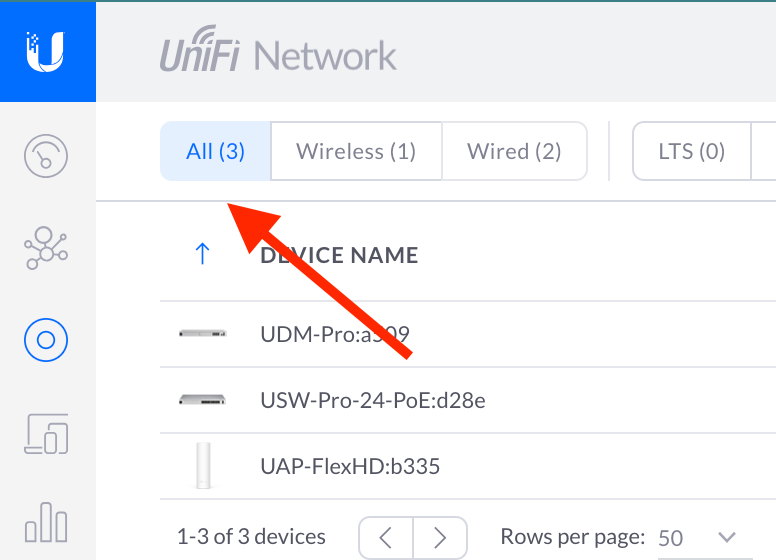
I clicked on wireless devices and yippee! There it is. My wifi device has been adopted. I can click on it and see various things…but…where is the name of the wifi network to connect to? How do I set the password for that wifi network? Shouldn’t that be in there and and be obvious? No?

When I click on the device I get a network connection error — maybe it’s on this screen and I can’t see it.
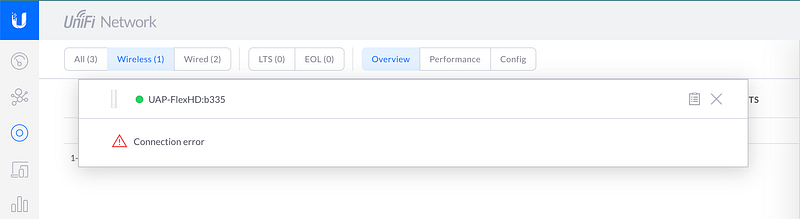
Time to consult the logs and Google.

First of all, I refresh the screen and look at the pfSense logs. I see that a stun port is blocked — which I want. I do not want to allow stun so I hope that is not required.

This post is kind of funny:

If you would like to not use STUN (which really has no security consequences, it is merely a way of enabling bidirectional connections through NAT;

https://community.ui.com/questions/Disable-STUN-support/7040b528-f626-40aa-918a-2c9ca0e174d0

OK.

I don’t know yet if the following applies to STUN on Ubiqiti yet, but I’m not going to enable that port until I find out.

Stun has been used to abuse sytems in the past via various attacks like this one. I don’t know if Turn is used in this case but not going to enable this until I understand what it’s doing exactly and if it is neccessary.

Every. Open. Port. Has. Security. Implications.

Also, I noticed that Ubiquiti connects to stun on Digital Ocean — one of my most despised and blocked networks due to the constant traffic that hits my firewall from them. Not opening up anything to DO unless I absolutely have to so…it’s blocked. I can’t find another solution so far to disable it.

Maybe I can somehow mimic whatever traffic it needs to get around this problem.

But first let’s just see if we can somehow connect to the wifi without it.

Oh cool. I found a video by clicking on the gear icon on the left.
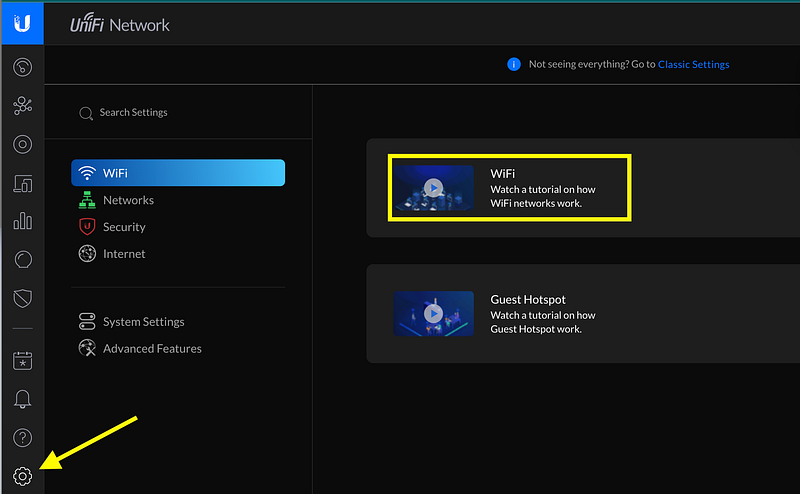
Which helped zero percent.

Ok.

While clicking around I found Internet Threat Management and enabled it. I went ahead and set it up as an IPS since I have nothing on it yet, so I’m not going to break anything. I hope. I had problems with streaming services when I tried to enable Suricata on pfSense. Maybe this will do better.
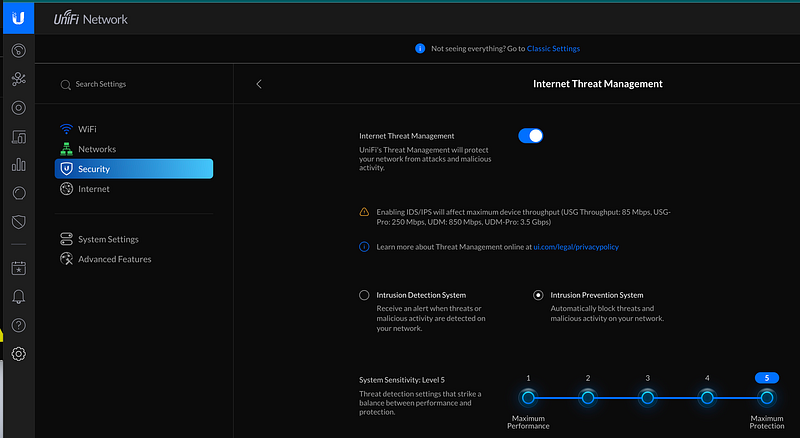
There’s a teeny link at the top of that page that says “Go to classic settings.” Hmm. I click it.
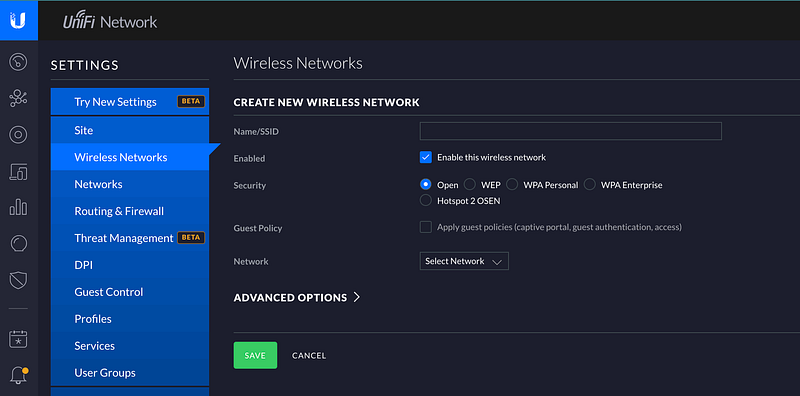
What is this? Do I have to set up a wireless network for the AP?
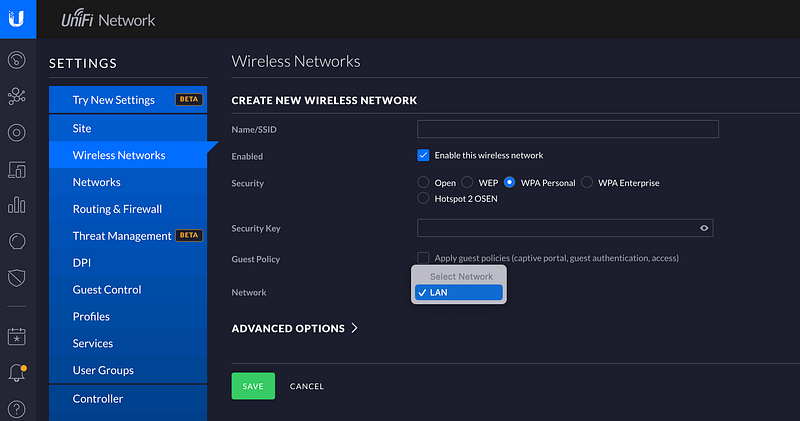
Here I can set up an SSID, select the type of security (WPA Personal for the moment) and select a network. The only network I have is “LAN” so I guess I’ll choose that.

Well, I can connect to it. So that’s cool. Now to test it out.

By the way, I disabled mesh on in the wifi configuration settings on the right side of the console:
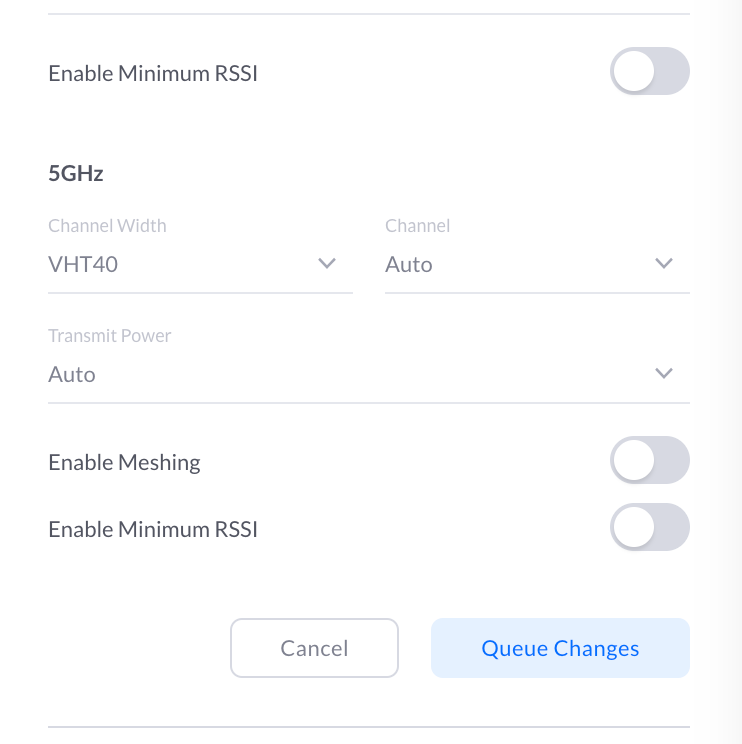
When I went back in I noticed they hadn’t saved, perhaps because I didn’t click Apply Changes at the bottom. I don’t want to mesh my devices. I want different Wifi hotspots for different purposes.

Now to test out the TV before the person cooking me dinner gets back to it :-) Quick…

Seems to work! It says the connection is only fair as the wifi device is across the house. I plan to change this all and hardware hot spots closer to locations where they will be used. But this works. And the clarity of the video is decent.

Now I just need to research how I can create separate networks for my different wifi devices.

Later.

Update: 5 minutes later — spoke too soon. The UDM is trying to send DNS traffic over port 53 TCP. That’s interesting since the computer I initially used to set up the UDM was doing the same thing but not on the UDM network. I just reset that machine to factory default and it stopped trying to connect over DNS/TCP. Now the UDM is doing the same thing and the TV is stalling out. Great.

Guess I’m going to have to do more troubleshooting.

Follow for updates.

Teri Radichel | © 2nd Sight Lab 2023

About Teri Radichel:
~~~~~~~~~~~~~~~~~~~~
⭐️ Author: Cybersecurity Books
⭐️ Presentations: Presentations by Teri Radichel
⭐️ Recognition: SANS Award, AWS Security Hero, IANS Faculty
⭐️ Certifications: SANS ~ GSE 240
⭐️ Education: BA Business, Master of Software Engineering, Master of Infosec
⭐️ Company: Penetration Tests, Assessments, Phone Consulting ~ 2nd Sight Lab
Need Help With Cybersecurity, Cloud, or Application Security?
~~~~~~~~~~~~~~~~~~~~~~~~~~~~~~~~~~~~~~~~~~~~~~~~~~~~~~~~~~~~~
🔒 Request a penetration test or security assessment
🔒 Schedule a consulting call
🔒 Cybersecurity Speaker for Presentation
Follow for more stories like this:
~~~~~~~~~~~~~~~~~~~~~~~~~~~~~~~~~~~~~~~~~~~~~~~~~~~~~~~~~~~~~ 
❤️ Sign Up my Medium Email List
❤️ Twitter: @teriradichel
❤️ LinkedIn: https://www.linkedin.com/in/teriradichel
❤️ Mastodon: @teriradichel@infosec.exchange
❤️ Facebook: 2nd Sight Lab
❤️ YouTube: @2ndsightlab

Ubiqiti
Udm Pro
Wireless
Ap
Recommended from ReadMedium