
Implemented PyTorch Projects
Repo for all the projects ( vertical post)…
Welcome back peeps.
Since we are now focusing on our goals for 2023 — new vertical series than horizontal ( means you will find all the contents of the series in one post and projects in second than developing/extending it to new posts every time). So, keep checking this post every day to see new projects.
Prerequisite to these projects —
Complete 60 days of Data Science and Machine Learning before starting this series ( link below) —
Projects Videos —
All the projects, data structures, SQL, algorithms, system design, Data Science and ML , Data Analytics, Data Engineering, , Implemented Data Science and ML projects, Implemented Data Engineering Projects, Implemented Deep Learning Projects, Implemented Machine Learning Ops Projects, Implemented Time Series Analysis and Forecasting Projects, Implemented Applied Machine Learning Projects, Implemented Tensorflow and Keras Projects, Implemented PyTorch Projects, Implemented Scikit Learn Projects, Implemented Big Data Projects, Implemented Cloud Machine Learning Projects, Implemented Neural Networks Projects, Implemented OpenCV Projects,Complete ML Research Papers Summarized, Implemented Data Analytics projects, Implemented Data Visualization Projects, Implemented Data Mining Projects, Implemented Natural Leaning Processing Projects, MLOps and Deep Learning, Applied Machine Learning with Projects Series, PyTorch with Projects Series, Tensorflow and Keras with Projects Series, Scikit Learn Series with Projects, Time Series Analysis and Forecasting with Projects Series, ML System Design Case Studies Series videos will be published on our youtube channel ( just launched).
Subscribe today!
Tech Newsletter —
If you are interested, you can join my newsletter through which I send tech interview tips, techniques, patterns, hacks — Software Development, ML, Data Science, Startups and Technology projects to more than 35K readers. You can subscribe to Ignito:
Let’s dive in!
PyTorch is an open-source machine learning library for Python, based on the Torch library. It provides a seamless integration between the research and development process, allowing for rapid prototyping and experimentation.
It is primarily used for natural language processing and computer vision tasks, but it can be used for any type of machine learning problem.
- PyTorch provides a dynamic computational graph, which allows for flexible and efficient computation. This means that the user can change the graph on the fly, during runtime, and PyTorch will automatically calculate gradients for backpropagation. This makes it easy to work with complex models and perform tasks such as transfer learning.
- PyTorch also provides a high-level, user-friendly API for building and training neural networks, similar to Keras. It also provides tools for data loading and preprocessing, as well as various types of pre-built neural network layers and functions.
PyTorch has gained popularity in recent years, and it is also used by many researchers and companies in the industry, because of it’s ease of use, flexibility, and performance.
PyTorch Working —
PyTorch works by providing a set of high-level, user-friendly APIs for building and training neural networks. It also provides a dynamic computational graph, which allows for flexible and efficient computation.
- When building a neural network in PyTorch, you begin by defining the architecture of the network, including the number of layers and the types of layers. You can choose from a variety of pre-built layer types, such as fully connected layers, convolutional layers, and recurrent layers, or create your own custom layers.
- Once the architecture is defined, you can then load data and train the network using the backward() function along with an optimizer. PyTorch calculates the gradients for you, which is used for backpropagation. This allows for easy experimentation with various neural network architectures and optimizers.
- Pytorch also provides a variety of data loading and preprocessing tools, which allows for easy handling of large datasets. It also provides tools for data augmentation, which can be useful for increasing the amount of data available for training, and for preventing overfitting.
Once the network is trained, you can use the forward() function to generate output for new input data. PyTorch also provides a variety of tools for evaluating the performance of your network, such as metrics for classification and regression tasks, as well as visualization tools for analyzing the network’s structure and behavior.
This post will house all the PyTorch projects related to the topics below-
PyTorch
Convent
Tensors
Linear Regression
Perceptron
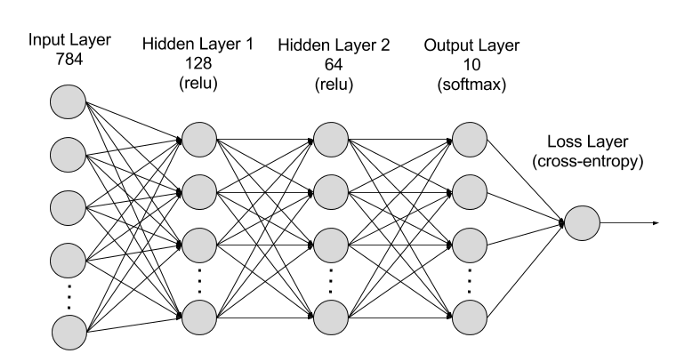
Deep Neural Network
CNN
PyTorch Projects (40)
PyTorch is an open source machine learning library for Python that provides an efficient way to build and train machine learning models. It was developed by Facebook AI Research and is widely used by researchers and practitioners in the field of machine learning.
Here are some key features and concepts of PyTorch:
- Tensors: The fundamental building block of PyTorch is a multi-dimensional array called a tensor. Tensors are similar to NumPy arrays, but they can be used on a GPU for faster computation. PyTorch provides many functions for creating, manipulating, and operating on tensors.
- Autograd: PyTorch has a powerful automatic differentiation engine called autograd. Autograd allows you to compute gradients of tensors with respect to a given loss function. This makes it easy to train complex models with many parameters.
- Dynamic computational graph: Unlike some other deep learning frameworks that use a static computational graph, PyTorch uses a dynamic computational graph. This means that the graph is built on-the-fly during the forward pass of a model, allowing for more flexibility and dynamic control flow.
- Neural networks: PyTorch provides many tools for building neural networks, including pre-built layers, activation functions, loss functions, and optimization algorithms. PyTorch also provides a simple and intuitive way to define custom neural network architectures.
- Data loading: PyTorch provides tools for loading and preprocessing data, including built-in support for popular data formats such as CSV, JSON, and image files. PyTorch also provides tools for creating custom data loaders and iterators.
- GPU acceleration: PyTorch can automatically move data and computations to a GPU if one is available, allowing for faster computation. PyTorch also provides tools for parallelizing computations across multiple GPUs.
- Deployment: PyTorch provides tools for exporting trained models to other formats for deployment, such as ONNX, TorchScript, and Caffe2.
How PyTorch Works —
Here is a high-level overview of how PyTorch works:
- Creating and manipulating tensors: The fundamental building block of PyTorch is a multi-dimensional array called a tensor. PyTorch provides functions for creating, manipulating, and operating on tensors, such as reshaping, slicing, and concatenating.
- Building a computational graph: When you define a model in PyTorch, you are actually defining a computational graph. The graph consists of nodes that represent operations, and edges that represent data flow. During the forward pass of the model, PyTorch executes the operations in the graph and computes a prediction.
- Automatic differentiation: PyTorch’s automatic differentiation engine, called autograd, allows you to compute gradients of tensors with respect to a given loss function. During the backward pass, PyTorch traces the operations in the graph in reverse order and computes gradients using the chain rule.
- Optimization: PyTorch provides a variety of optimization algorithms for updating the parameters of your model, such as stochastic gradient descent (SGD), Adam, and Adagrad. These algorithms use the computed gradients to adjust the weights of the model, with the goal of minimizing the loss function.
- GPU acceleration: PyTorch can automatically move data and computations to a GPU if one is available, allowing for faster computation. PyTorch also provides tools for parallelizing computations across multiple GPUs.
First we will cover above mentioned topics with code implementation —
PyTorch is a popular open-source machine learning library for Python that allows for efficient computation on tensors and is widely used in developing deep learning models. PyTorch is designed to provide flexibility and speed in deep neural network implementation, making it an ideal choice for many researchers and practitioners.
Implementation of each stage of PyTorch basics :
1. Tensors
In PyTorch, tensors are the basic data structure for storing and manipulating data. They are similar to NumPy arrays, but can also be used on GPUs for faster computation. PyTorch tensors have a similar API to NumPy arrays and are used to store and manipulate multi-dimensional data.
import torch# create a 2x3 tensor
a = torch.tensor([[1, 2, 3], [4, 5, 6]])
print(a)# get the shape of the tensor
print(a.shape)# create a tensor of all ones with shape (3, 2)
b = torch.ones((3, 2))
print(b)# create a tensor of random numbers with shape (2, 4)
c = torch.rand((2, 4))
print(c)Output:
tensor([[1, 2, 3],
        [4, 5, 6]])
torch.Size([2, 3])
tensor([[1., 1.],
        [1., 1.],
        [1., 1.]])
tensor([[0.6446, 0.0513, 0.8373, 0.0413],
        [0.3641, 0.6597, 0.8010, 0.9238]])
2. Autograd
PyTorch’s autograd package provides automatic differentiation for all operations on Tensors. This means that we can compute gradients of tensors with respect to other tensors using backward propagation. PyTorch’s autograd package tracks all the operations performed on tensors and builds a computational graph.
import torch# create a tensor and set requires_grad=True to track computation with it
x = torch.tensor([3.0], requires_grad=True)
y = torch.tensor([5.0], requires_grad=True)# perform a computation
z = x + y# get the gradients of the computation with respect to x and y
z.backward()# print the gradients
print(x.grad)
print(y.grad)Output:
tensor([1.])
tensor([1.])
In this implmentation, we created two tensors x and y and set requires_grad=True to track computation with them. We then performed a computation z = x + y, which resulted in the creation of a new tensor z. We then called z.backward() to compute the gradients of z with respect to x and y. Finally, we printed the gradients of x and y using x.grad and y.grad, respectively.
3. Optimizers
PyTorch provides several optimization algorithms that can be used to update the parameters of a model during training. These optimization algorithms are implemented as optim classes in the torch.optim module.
import torch
import torch.optim as optim

# create a tensor and set requires_grad=True to track computation with it
x = torch.tensor([3.0], requires_grad=True)

# create an optimizer object
optimizer = optim.SGD([x], lr=0.01)

# perform a computation and compute gradients
y = x**2
y.backward()

# update parameters
optimizer.step()

# print the updated value of x
print(x)
Output:
tensor([2.9400], requires_grad=True)In this implmentation, we first create a tensor x with requires_grad=True to track computation with it. We then create an optimizer object optimizer using the optim.SGD class with a learning rate of 0.01. We then perform a computation y = x**2 and compute the gradients of y with respect to x using y.backward(). Finally, we update the value of x using the optimizer.step() method and print the updated value of x. The optimizer updates the value of x by subtracting the product of the learning rate and the gradient of y with respect to x from the current value of x. In this case, the updated value of x is 2.94 which is slightly smaller than the original value of 3.0.
Pytorch is a computer program that helps us do really cool things with numbers. We can use it to teach computers to learn, like how you learn new things!
Here are the basic steps we need to follow to use Pytorch:
- Import Pytorch — This means we need to tell the computer that we want to use Pytorch so that it can understand our code.
import torch- Create data — This means we need to give the computer some examples of what we want it to learn. We can use numbers, pictures, or anything else we want the computer to recognize.
data = torch.tensor([1, 2, 3, 4])- Create a model — This is like a recipe that tells the computer how to learn. We need to create a model that takes our data and turns it into something we want to learn, like a prediction or a classification.
model = torch.nn.Linear(4, 1)- Train the model — This is where the computer actually learns! We need to give our model some examples and tell it what the right answer is. Then, it will adjust itself to get better and better at predicting the right answer.
optimizer = torch.optim.SGD(model.parameters(), lr=0.01)
for i in range(100):
    optimizer.zero_grad()
    output = model(data)
    loss = ((output - 5)**2).mean()
    loss.backward()
optimizer.step()- Use the model — Now that our model has learned, we can use it to make predictions on new data that it hasn’t seen before.
new_data = torch.tensor([5, 6, 7, 8])
output = model(new_data)
print(output)
With these steps, we can use Pytorch to teach computers to do all sorts of things, like recognize pictures, understand language.
Tensors basics
In PyTorch, a tensor is a multi-dimensional array used for numerical computations. It is similar to a numpy array, but it can be easily used with GPUs for faster computations.
Here are some basic tensor operations in PyTorch, along with implementation code:
- Creating a tensor
You can create a PyTorch tensor from a Python list or numpy array using the torch.tensor function.
Implementation:
import torcha = torch.tensor([1, 2, 3])
b = torch.tensor([[1, 2], [3, 4]])This creates a one-dimensional tensor a with the values [1, 2, 3], and a two-dimensional tensor b with the values [[1, 2], [3, 4]].
- Tensor arithmetic
You can perform arithmetic operations on tensors using standard operators like +, -, *, and /.
Implementation:
c = a + 1
d = b * 2
This creates a tensor c that is the same as a but with each value incremented by 1, and a tensor d that is the same as b but with each value multiplied by 2.
- Tensor indexing and slicing
You can access individual elements or sub-tensors of a tensor using indexing and slicing.
Implementation:
print(a[0]) # prints 1
print(b[1, 0]) # prints 3
print(b[:, 1]) # prints [2, 4]
This prints the first element of a (which is 1), the element at row 1, column 0 of b (which is 3), and the second column of b (which is [2, 4]).
- Tensor shape
You can get the shape of a tensor using the .shape attribute.
Implementation:
scssCopy codeprint(a.shape) # prints torch.Size([3])
print(b.shape) # prints torch.Size([2, 2])This prints the shape of a (which is a one-dimensional tensor with length 3) and the shape of b (which is a two-dimensional tensor with shape [2, 2]).
Linear Regression
Linear regression is a supervised learning algorithm used to predict a continuous target variable given one or more predictor variables. In PyTorch, we can implement linear regression using the torch.nn module.
Implement linear regression in PyTorch:
import torch
import torch.nn as nn
import numpy as np
import matplotlib.pyplot as plt
# Generating random data
np.random.seed(42)
x = np.random.rand(100, 1)
y = 2 + 3 * x + 0.1 * np.random.randn(100, 1)# Converting data to PyTorch tensors
inputs = torch.from_numpy(x.astype('float32'))
targets = torch.from_numpy(y.astype('float32'))# Defining the model
class LinearRegression(nn.Module):
def __init__(self, input_dim, output_dim):
super(LinearRegression, self).__init__()
self.linear = nn.Linear(input_dim, output_dim)
def forward(self, x):
out = self.linear(x)
return outinput_dim = 1
output_dim = 1model = LinearRegression(input_dim, output_dim)# Defining the loss function
criterion = nn.MSELoss()# Defining the optimizer
learning_rate = 0.01
optimizer = torch.optim.SGD(model.parameters(), lr=learning_rate)# Training the model
num_epochs = 1000for epoch in range(num_epochs):
# Forward pass
outputs = model(inputs)
loss = criterion(outputs, targets)
# Backward and optimize
optimizer.zero_grad()
loss.backward()
optimizer.step()
if (epoch+1) % 100 == 0:
print('Epoch [{}/{}], Loss: {:.4f}'.format(epoch+1, num_epochs, loss.item()))# Plotting the results
predicted = model(inputs).detach().numpy()
plt.plot(x, y, 'ro', label='Original data')
plt.plot(x, predicted, label='Fitted line')
plt.legend()
plt.show()In this implementation, we first generate some random data, which consists of 100 data points with one predictor variable (x) and one target variable (y). We then convert the data to PyTorch tensors.
Next, we define the linear regression model using the nn.Linear module. This module takes the input dimension and output dimension as arguments and automatically initializes the weights and biases of the linear layer.
We then define the loss function, which in this case is the mean squared error loss (MSE). We also define the optimizer, which in this case is stochastic gradient descent (SGD) with a learning rate of 0.01.
We then train the model for a certain number of epochs using a loop. In each epoch, we perform a forward pass, compute the loss, perform backpropagation, and update the weights and biases of the linear layer using the optimizer.
Finally, we plot the original data points and the fitted line predicted by the linear regression model.
Linear Regression is like trying to draw a straight line through a bunch of points on a piece of paper. You want the line to be as close to all of the points as possible.
Implementation of Linear Regression in Pytorch:
- Import Pytorch — This means we need to tell the computer that we want to use Pytorch so that it can understand our code.
import torch- Create data — This means we need to make some points on our piece of paper. We can use numbers to represent the points, and we want to draw a line that is as close to all of the points as possible.
x = torch.tensor([1, 2, 3, 4, 5])
y = torch.tensor([2, 4, 6, 8, 10])- Create a model — This is like the straight line we want to draw through the points. We need to create a model that takes our input data (the x values) and predicts our output data (the y values).
model = torch.nn.Linear(1, 1)- Train the model — This is where we try to draw the line through the points. We need to give our model some examples and tell it what the right answer is. Then, it will adjust itself to get better and better at drawing the line.
optimizer = torch.optim.SGD(model.parameters(), lr=0.01)
for i in range(100):
    optimizer.zero_grad()
    output = model(x.unsqueeze(1))
    loss = ((output - y.unsqueeze(1))**2).mean()
    loss.backward()
optimizer.step()- Use the model — Now that our model has learned how to draw the line, we can use it to predict the y value for any x value we want.
new_x = torch.tensor([6])
new_y = model(new_x.unsqueeze(1))
print(new_y)
With these steps, we can use Pytorch to draw a line through any set of points we want.
Convolutional Neural Network
A convolutional neural network (CNN or ConvNet) is a popular deep learning architecture used for image classification and other computer vision tasks. PyTorch is a popular framework for building deep learning models and provides a comprehensive set of tools for training CNNs.
To train a CNN in PyTorch, you need to define the model architecture, prepare the dataset, define the loss function and optimizer, and train the model using mini-batch gradient descent.
Implementation code for training a simple CNN on the CIFAR-10 dataset:
import torch
import torch.nn as nn
import torch.optim as optim
import torchvision
import torchvision.transforms as transforms
# Define the model architecture
class Net(nn.Module):
def __init__(self):
super(Net, self).__init__()
self.conv1 = nn.Conv2d(3, 6, 5)
self.pool = nn.MaxPool2d(2, 2)
self.conv2 = nn.Conv2d(6, 16, 5)
self.fc1 = nn.Linear(16 * 5 * 5, 120)
self.fc2 = nn.Linear(120, 84)
self.fc3 = nn.Linear(84, 10) def forward(self, x):
x = self.pool(nn.functional.relu(self.conv1(x)))
x = self.pool(nn.functional.relu(self.conv2(x)))
x = x.view(-1, 16 * 5 * 5)
x = nn.functional.relu(self.fc1(x))
x = nn.functional.relu(self.fc2(x))
x = self.fc3(x)
return x# Prepare the dataset
transform = transforms.Compose(
[transforms.ToTensor(),
transforms.Normalize((0.5, 0.5, 0.5), (0.5, 0.5, 0.5))])trainset = torchvision.datasets.CIFAR10(root='./data', train=True,
download=True, transform=transform)
trainloader = torch.utils.data.DataLoader(trainset, batch_size=4,
shuffle=True, num_workers=2)testset = torchvision.datasets.CIFAR10(root='./data', train=False,
download=True, transform=transform)
testloader = torch.utils.data.DataLoader(testset, batch_size=4,
shuffle=False, num_workers=2)classes = ('plane', 'car', 'bird', 'cat',
'deer', 'dog', 'frog', 'horse', 'ship', 'truck')# Define the loss function and optimizer
criterion = nn.CrossEntropyLoss()
optimizer = optim.SGD(net.parameters(), lr=0.001, momentum=0.9)# Train the model
net = Net()
for epoch in range(2):
running_loss = 0.0
for i, data in enumerate(trainloader, 0):
inputs, labels = data optimizer.zero_grad() outputs = net(inputs)
loss = criterion(outputs, labels)
loss.backward()
optimizer.step() running_loss += loss.item()
if i % 2000 == 1999: # print every 2000 mini-batches
print('[%d, %5d] loss: %.3f' %
(epoch + 1, i + 1, running_loss / 2000))
running_loss = 0.0print('Finished Training')In this implementation, we define a simple CNN architecture with two convolutional layers and three fully connected layers.
To implement a ConvNet in PyTorch, we typically define a class that extends the
nn.Moduleclass. This class will define the architecture of our ConvNet, including the convolutional layers, pooling layers, and fully connected layers.
Implementation of a simple ConvNet that can be used for image classification:
import torch
import torch.nn as nnclass ConvNet(nn.Module):
def __init__(self):
super(ConvNet, self).__init__()
# Convolutional layers
self.conv1 = nn.Conv2d(3, 16, kernel_size=3, stride=1, padding=1)
self.conv2 = nn.Conv2d(16, 32, kernel_size=3, stride=1, padding=1)
self.conv3 = nn.Conv2d(32, 64, kernel_size=3, stride=1, padding=1)
# Pooling layer
self.pool = nn.MaxPool2d(kernel_size=2, stride=2)
# Fully connected layers
self.fc1 = nn.Linear(64 * 4 * 4, 512)
self.fc2 = nn.Linear(512, 10)
def forward(self, x):
x = self.pool(nn.functional.relu(self.conv1(x)))
x = self.pool(nn.functional.relu(self.conv2(x)))
x = self.pool(nn.functional.relu(self.conv3(x)))
x = x.view(-1, 64 * 4 * 4)
x = nn.functional.relu(self.fc1(x))
x = self.fc2(x)
return xIn this implementation, we define a ConvNet class that extends the nn.Module class. In the constructor (__init__), we define the convolutional layers using the nn.Conv2d class, which takes the number of input channels, number of output channels, kernel size, stride, and padding as arguments. We also define a max pooling layer using the nn.MaxPool2d class, which takes the kernel size and stride as arguments. Finally, we define the fully connected layers using the nn.Linear class.
In the forward method, we define the forward pass of the ConvNet. We apply the convolutional layers, activation function (ReLU), and pooling layers in sequence. We then flatten the output using the view method and apply the fully connected layers.
Once we have defined our ConvNet, we can train it using PyTorch’s built-in training loop or a custom training loop.
- Define your ConvNet architecture using PyTorch’s
nn.Moduleclass. This would typically involve defining the convolutional layers, pooling layers, and fully connected layers that make up your network. - Define your loss function. This is the function that your ConvNet will try to minimize during training. For example, if you are training a classification model, your loss function might be cross-entropy loss.
- Define your optimizer. This is the algorithm that will update the parameters of your ConvNet during training to minimize the loss function. Popular optimizers include stochastic gradient descent (SGD) and Adam.
- Load your training data and define your data loaders using PyTorch’s
DataLoaderclass. This allows you to load your data into batches and shuffle it during training. - Write your training loop using PyTorch’s built-in training loop. This typically involves iterating over your data loader, computing the forward and backward passes through your ConvNet, and updating the parameters using your optimizer.
Implementation —
import torch
import torch.nn as nn
import torch.optim as optim# Step 1: Define your ConvNet architecture
class ConvNet(nn.Module):
def __init__(self):
super(ConvNet, self).__init__()
self.conv1 = nn.Conv2d(3, 6, 5)
self.pool = nn.MaxPool2d(2, 2)
self.conv2 = nn.Conv2d(6, 16, 5)
self.fc1 = nn.Linear(16 * 5 * 5, 120)
self.fc2 = nn.Linear(120, 84)
self.fc3 = nn.Linear(84, 10) def forward(self, x):
x = self.pool(torch.relu(self.conv1(x)))
x = self.pool(torch.relu(self.conv2(x)))
x = x.view(-1, 16 * 5 * 5)
x = torch.relu(self.fc1(x))
x = torch.relu(self.fc2(x))
x = self.fc3(x)
return x# Step 2: Define your loss function
criterion = nn.CrossEntropyLoss()# Step 3: Define your optimizer
optimizer = optim.SGD(net.parameters(), lr=0.001, momentum=0.9)# Step 4: Load your training data and define your data loaders
trainset = torchvision.datasets.CIFAR10(root='./data', train=True,
                                        download=True, transform=transform)
trainloader = torch.utils.data.DataLoader(trainset, batch_size=4,
shuffle=True, num_workers=2)# Step 5: Write your training loop
for epoch in range(2): # loop over the dataset multiple times running_loss = 0.0
for i, data in enumerate(trainloader, 0):
# get the inputs; data is a list of [inputs, labels]
inputs, labels = data # zero the parameter gradients
optimizer.zero_grad() # forward + backward + optimize
outputs = net(inputs)
loss = criterion(outputs, labels)
loss.backward()
optimizer.step()CNN is like a special kind of robot that can see pictures and tell us what’s in them.
Here are the steps we need to follow to use CNN in Pytorch:
- Import Pytorch — This means we need to tell the computer that we want to use Pytorch so that it can understand our code.
import torch
import torch.nn as nn
import torch.nn.functional as F- Create data — This means we need to give the computer some pictures to look at. We can use pictures of anything we want the CNN to recognize.
image = torch.randn(1, 3, 32, 32)- Create a model — This is like the robot that will look at the pictures and tell us what’s in them. We need to create a model that takes our input data (the pictures) and predicts what’s in them.
class Net(nn.Module):
def __init__(self):
super(Net, self).__init__()
self.conv1 = nn.Conv2d(3, 6, 5)
self.pool = nn.MaxPool2d(2, 2)
self.conv2 = nn.Conv2d(6, 16, 5)
self.fc1 = nn.Linear(16 * 5 * 5, 120)
self.fc2 = nn.Linear(120, 84)
self.fc3 = nn.Linear(84, 10) def forward(self, x):
x = self.pool(F.relu(self.conv1(x)))
x = self.pool(F.relu(self.conv2(x)))
x = x.view(-1, 16 * 5 * 5)
x = F.relu(self.fc1(x))
x = F.relu(self.fc2(x))
x = self.fc3(x)
return xmodel = Net()- Train the model — This is where we teach the robot how to recognize things in pictures. We need to give our model some examples and tell it what the right answer is. Then, it will adjust itself to get better and better at recognizing things.
criterion = nn.CrossEntropyLoss()
optimizer = torch.optim.SGD(model.parameters(), lr=0.001, momentum=0.9)
for epoch in range(2):
running_loss = 0.0
for i, data in enumerate(trainloader, 0):
inputs, labels = data
optimizer.zero_grad()
outputs = net(inputs)
loss = criterion(outputs, labels)
loss.backward()
optimizer.step()- Use the model — Now that our robot has learned how to recognize things in pictures, we can use it to tell us what’s in any picture we want!
classes = ('plane', 'car', 'bird', 'cat',
           'deer', 'dog', 'frog', 'horse', 'ship', 'truck')
outputs = model(image)
_, predicted = torch.max(outputs, 1)
print(classes[predicted])With these steps, we can use Pytorch to teach a robot to recognize anything we want in pictures.
CNN Visualization
Visualization is a critical step in the process of training deep learning models, especially for convolutional neural networks (CNNs) used in computer vision tasks. PyTorch provides several tools for visualizing the training process, including TensorBoard and matplotlib.
Implementation code for visualizing the training process of a simple CNN using matplotlib:
import torch
import torch.nn as nn
import torch.optim as optim
import torchvision
import torchvision.transforms as transforms
import matplotlib.pyplot as plt
import numpy as np# Define the model architecture
class Net(nn.Module):
def __init__(self):
super(Net, self).__init__()
self.conv1 = nn.Conv2d(3, 6, 5)
self.pool = nn.MaxPool2d(2, 2)
self.conv2 = nn.Conv2d(6, 16, 5)
self.fc1 = nn.Linear(16 * 5 * 5, 120)
self.fc2 = nn.Linear(120, 84)
self.fc3 = nn.Linear(84, 10) def forward(self, x):
x = self.pool(nn.functional.relu(self.conv1(x)))
x = self.pool(nn.functional.relu(self.conv2(x)))
x = x.view(-1, 16 * 5 * 5)
x = nn.functional.relu(self.fc1(x))
x = nn.functional.relu(self.fc2(x))
x = self.fc3(x)
return x# Prepare the dataset
transform = transforms.Compose(
[transforms.ToTensor(),
transforms.Normalize((0.5, 0.5, 0.5), (0.5, 0.5, 0.5))])trainset = torchvision.datasets.CIFAR10(root='./data', train=True,
download=True, transform=transform)
trainloader = torch.utils.data.DataLoader(trainset, batch_size=4,
shuffle=True, num_workers=2)testset = torchvision.datasets.CIFAR10(root='./data', train=False,
download=True, transform=transform)
testloader = torch.utils.data.DataLoader(testset, batch_size=4,
shuffle=False, num_workers=2)classes = ('plane', 'car', 'bird', 'cat',
'deer', 'dog', 'frog', 'horse', 'ship', 'truck')# Define the loss function and optimizer
criterion = nn.CrossEntropyLoss()
optimizer = optim.SGD(net.parameters(), lr=0.001, momentum=0.9)# Train the model and visualize the training process
net = Net()
losses = []
for epoch in range(2):
running_loss = 0.0
for i, data in enumerate(trainloader, 0):
inputs, labels = data optimizer.zero_grad() outputs = net(inputs)
loss = criterion(outputs, labels)
loss.backward()
optimizer.step() running_loss += loss.item()
if i % 2000 == 1999: # print every 2000 mini-batches
losses.append(running_loss / 2000)
print('[%d, %5d] loss: %.3f' %
(epoch + 1, i + 1, running_loss / 2000))
running_loss = 0.0print('Finished Training')# Visualize the training loss
plt.plot(losses)
plt.title('Training Loss')
plt.xlabel('Mini-batches')
plt.ylabel('Loss')
plt.show()In this implementation, we train the same simple CNN as before and record the training loss at the end of each mini-batch.
Data Loading in Pytorch
In PyTorch, data loading is a critical step in the machine learning workflow. The data loading process typically involves three stages: preparing the dataset, creating a data loader, and iterating through the data loader to extract individual samples from the dataset.
Here’s an overview of each stage and an implementation in PyTorch:
Stage 1: Preparing the dataset
Before we can create a data loader, we need to prepare our dataset. This typically involves downloading, preprocessing, and splitting the data into training, validation, and test sets. The dataset can be either structured or unstructured, and can be stored in a variety of formats, such as CSV, JSON, or images.
Let’s assume we have an image dataset stored in a folder called “data”. Each image in the dataset is associated with a label, and the images are stored in subfolders that correspond to their respective labels. We can use the ImageFolder class from the torchvision.datasets module to load this dataset.
import torchvision.transforms as transforms
import torchvision.datasets as datasets# Define the data transformation pipeline
transform = transforms.Compose([
transforms.Resize((224, 224)),
transforms.ToTensor(),
transforms.Normalize(mean=[0.485, 0.456, 0.406],
std=[0.229, 0.224, 0.225])
])# Load the dataset
train_dataset = datasets.ImageFolder(root='data/train', transform=transform)
valid_dataset = datasets.ImageFolder(root='data/valid', transform=transform)
test_dataset = datasets.ImageFolder(root='data/test', transform=transform)In this implementation, we defined a data transformation pipeline that resizes the images to 224x224, converts them to tensors, and normalizes their pixel values. We then loaded the training, validation, and test sets using the ImageFolder class, specifying the root directory of each set and the data transformation pipeline to be applied to each image.
Stage 2: Creating a data loader
Once we have prepared our dataset, we can create a data loader to load the data into our model. A data loader is an iterator that batches and shuffles the data and loads it into the GPU for faster processing. We can create a data loader using the DataLoader class from the torch.utils.data module.
from torch.utils.data import DataLoader# Create a data loader
train_loader = DataLoader(train_dataset, batch_size=32, shuffle=True)
valid_loader = DataLoader(valid_dataset, batch_size=32, shuffle=True)
test_loader = DataLoader(test_dataset, batch_size=32, shuffle=True)In this implementation, we created a data loader for each set using the DataLoader class, specifying the dataset to be loaded, the batch size (i.e., the number of samples to load at once), and whether or not to shuffle the data. Shuffling the data is important to ensure that the model is not biased towards any particular subset of the data.
Stage 3: Iterating through the data loader
Once we have created our data loader, we can iterate through it to extract individual samples from the dataset. We typically use a for loop to iterate through the data loader.
# Iterate through the data loader
for inputs, labels in train_loader:
# Process the inputs and labels
passIn this implementation, we used a for loop to iterate through the training data loader. At each iteration, the loop returns a batch of inputs (i.e., images) and their corresponding labels. We can then process these inputs and labels using our model and update the model's parameters based on the loss and the optimizer.
Data loading is when we get our pictures and labels into Pytorch so that we can use them to teach our robots. Here are the steps we need to follow:
- Import Pytorch — This means we need to tell the computer that we want to use Pytorch so that it can understand our code.
import torch
from torch.utils.data import Dataset, DataLoader- Create a custom dataset — This is like a special box where we can put all of our pictures and labels. We can create our own dataset by inheriting from the Pytorch
Datasetclass and implementing the__getitem__and__len__methods. In these methods, we can load the pictures and labels and return them as a tuple.
class CustomDataset(Dataset):
def __init__(self, image_paths, labels):
self.image_paths = image_paths
self.labels = labels def __getitem__(self, index):
image_path = self.image_paths[index]
label = self.labels[index]
image = load_image(image_path)
return image, label def __len__(self):
return len(self.image_paths)- Load the dataset — This is like opening our special box with all of our pictures and labels inside. We can use the Pytorch
DataLoaderclass to load our dataset. We need to specify the batch size, which is like how many pictures we want to teach our robot at once.
dataset = CustomDataset(image_paths, labels)
dataloader = DataLoader(dataset, batch_size=4, shuffle=True)- Use the data — Now that we have our pictures and labels loaded into Pytorch, we can use them to teach our robot. We can loop through the
dataloaderand get each batch of pictures and labels.
for i, (images, labels) in enumerate(dataloader):
# Teach the robot with the images and labels in this batchWith these steps, we can load our pictures and labels into Pytorch and use them to teach our robots.
Recurrent Neural Networks (RNNs)
Recurrent Neural Networks (RNNs) are a type of neural network that is commonly used for processing sequential data such as time series, speech, and text. RNNs have a loop in their architecture that allows information to be passed from one step of the sequence to the next. In this way, RNNs can capture the temporal dependencies in sequential data.
In PyTorch, we can easily implement RNNs using the torch.nn module.
Implement a simple RNN in PyTorch to process a sequence of text data:
import torch
import torch.nn as nnclass RNN(nn.Module):
def __init__(self, input_size, hidden_size, output_size):
super(RNN, self).__init__() self.hidden_size = hidden_size # Define the RNN layer
self.rnn = nn.RNN(input_size, hidden_size) # Define the output layer
self.fc = nn.Linear(hidden_size, output_size) def forward(self, input, hidden):
# Pass the input and the hidden state through the RNN layer
output, hidden = self.rnn(input, hidden) # Pass the output of the RNN layer through the output layer
output = self.fc(output) # Return the output and the hidden state
return output, hidden def init_hidden(self, batch_size):
# Initialize the hidden state with zeros
return torch.zeros(1, batch_size, self.hidden_size)# Define the hyperparameters
input_size = 10
hidden_size = 20
output_size = 5
batch_size = 32
sequence_length = 10# Create the RNN model
model = RNN(input_size, hidden_size, output_size)# Generate some random input data
input = torch.randn(sequence_length, batch_size, input_size)# Initialize the hidden state
hidden = model.init_hidden(batch_size)# Pass the input data through the RNN model
output, hidden = model(input, hidden)# Print the output shape
print(output.shape)In this implementation, we define an RNN class that inherits from the nn.Module class. The RNN class has an __init__ method that initializes the RNN layer and the output layer, a forward method that passes the input data and the hidden state through the RNN layer and the output layer, and an init_hidden method that initializes the hidden state with zeros.
We then define some hyperparameters such as the input size, hidden size, output size, batch size, and sequence length, and use them to create an instance of the RNN model. We generate some random input data and initialize the hidden state with zeros. We then pass the input data through the RNN model using the model object, and print the shape of the output.
An RNN has three stages that work together to help it learn:
- Input stage: This is where the program receives some words, like “The cat sat on the mat.” These words are converted into numbers that the program can understand.
- Hidden stage: This is where the program tries to make sense of the words it received. It uses the numbers from the input stage and tries to figure out what the words mean and how they relate to each other.
- Output stage: This is where the program produces its own words, like “The dog chased the ball.” It uses what it learned in the hidden stage to come up with new words.
To implement these stages in PyTorch, we first need to define our RNN model using PyTorch’s built-in functions.
Implementation:
import torch
import torch.nn as nnclass RNN(nn.Module):
def __init__(self, input_size, hidden_size, output_size):
super(RNN, self).__init__()
self.hidden_size = hidden_size
self.i2h = nn.Linear(input_size + hidden_size, hidden_size)
self.i2o = nn.Linear(input_size + hidden_size, output_size)
self.softmax = nn.LogSoftmax(dim=1) def forward(self, input, hidden):
combined = torch.cat((input, hidden), 1)
hidden = self.i2h(combined)
output = self.i2o(combined)
output = self.softmax(output)
return output, hidden def initHidden(self):
return torch.zeros(1, self.hidden_size)In this implementation, the RNN model takes in an input, which is a sequence of words represented as a tensor, and a hidden state, which is also a tensor. The input_size parameter represents the size of the input tensor, the hidden_size parameter represents the size of the hidden tensor, and the output_size parameter represents the size of the output tensor.
The __init__ function initializes the RNN model by defining the different layers of the model. The i2h layer is a linear layer that takes in the concatenated input and hidden tensors and produces a new hidden tensor. The i2o layer is a linear layer that takes in the concatenated input and hidden tensors and produces an output tensor. The softmax layer applies a logarithmic softmax function to the output tensor to normalize the values.
The forward function defines how the input and hidden tensors are processed to produce an output and a new hidden tensor. The initHidden function initializes the hidden tensor to a tensor of zeros.
Overall, the RNN model takes in a sequence of words as input, processes them in the hidden state, and produces an output that represents the predicted next word in the sequence.
Datasets processing in Pytorch
In PyTorch, datasets can be easily processed using the torch.utils.data.Dataset class. This class provides an interface for accessing the data in a dataset and provides methods for getting the length of the dataset, getting a specific item from the dataset, and transforming the data.
To use the Dataset class, we need to create a custom subclass that overrides two methods: __len__ and __getitem__. The __len__ method should return the length of the dataset, and the __getitem__ method should return a specific item from the dataset given an index.
Implementation of how to create a custom dataset in PyTorch:
import torch
from torch.utils.data import Datasetclass CustomDataset(Dataset):
def __init__(self, data):
self.data = data
def __len__(self):
return len(self.data)
def __getitem__(self, idx):
x = self.data[idx][0]
y = self.data[idx][1]
return x, yIn this implementation, we define a CustomDataset class that takes a data argument in its constructor. The __len__ method returns the length of the dataset, which is simply the length of the data list. The __getitem__ method returns a specific item from the dataset given an index. In this case, the data list contains pairs of input and output tensors, and the __getitem__ method returns the input and output tensors corresponding to the given index.
Once we have defined our custom dataset, we can use it in a PyTorch data loader to load the data in batches.
Create a data loader for our custom dataset:
from torch.utils.data import DataLoader# Create a list of input and output tensors
data = [(torch.randn(10), torch.randn(5)) for i in range(100)]# Create a custom dataset
dataset = CustomDataset(data)# Create a data loader for the dataset
batch_size = 32
dataloader = DataLoader(dataset, batch_size=batch_size, shuffle=True)# Iterate over the batches in the data loader
for batch in dataloader:
# Get the input and output tensors for the batch
inputs, targets = batch # Process the batch...In this implementation, we first create a list of input and output tensors. We then create an instance of our custom dataset using the data list. We create a data loader for the dataset using the DataLoader class, specifying a batch size and setting shuffle=True to shuffle the data. We can then iterate over the batches in the data loader, and for each batch, we get the input and output tensors using the batch variable. We can then process the batch as needed.
Feature Extraction in ConvNet in Pytorch
Feature extraction is the process of using a pre-trained convolutional neural network (ConvNet) to extract features from an input image, which can be used for various computer vision tasks such as image classification, object detection, and segmentation. In PyTorch, we can use pre-trained ConvNets from the torchvision.models module to extract features.
Let’s take a closer look at feature extraction using a pre-trained ConvNet. We’ll use the VGG16 model, which is a popular ConvNet architecture for image classification.
import torch
import torch.nn as nn
import torchvision.models as models# Load the pre-trained VGG16 model
vgg16 = models.vgg16(pretrained=True)# Remove the fully connected layers from the model
vgg16 = nn.Sequential(*list(vgg16.features.children()))# Freeze the weights of the convolutional layers
for param in vgg16.parameters():
param.requires_grad = False# Create a random input image
x = torch.randn(1, 3, 224, 224)# Pass the input image through the model to extract features
features = vgg16(x)# Print the shape of the output features
print(features.shape)In this implementation, we load the pre-trained VGG16 model using models.vgg16(pretrained=True). We then remove the fully connected layers from the model by creating a new nn.Sequential object that contains only the convolutional layers (i.e., the features part of the VGG16 model). This is because we only want to use the convolutional layers to extract features, not the fully connected layers, which are used for classification.
We then freeze the weights of the convolutional layers by setting requires_grad to False for all the parameters in the model. This prevents the weights from being updated during training, which is important because we only want to use the pre-trained weights to extract features, not to train the model from scratch.
We create a random input image x with dimensions 1 x 3 x 224 x 224, where 1 is the batch size, 3 is the number of input channels (e.g., RGB), and 224 x 224 is the width and height of the input image.
We pass the input image through the model to extract features by calling vgg16(x). The output features have dimensions 1 x 512 x 14 x 14, where 512 is the number of channels in the output feature maps, and 14 x 14 is the width and height of the feature maps.
Imagine you have a picture of a cat and a picture of a dog, and you want to teach a computer how to tell them apart. To do this, you might use a Convolutional Neural Network (ConvNet) which is like a computer brain that can learn from examples.
- The ConvNet works by looking at different parts of the image, called “features”, and trying to find patterns in those features that can help it decide whether the image is a cat or a dog. For example, it might notice that cats often have pointy ears, while dogs have floppy ears. Now, let’s talk about how to implement feature extraction in a ConvNet using PyTorch.
- To do this, you can use a pre-trained ConvNet, which has already learned how to recognize many different features in images. PyTorch provides a number of pre-trained ConvNets, such as VGG, ResNet, and MobileNet, that you can use for feature extraction.
Implementation of how you might use a pre-trained ConvNet like VGG for feature extraction in PyTorch:
import torch
import torch.nn as nn
import torchvision.models as models# Load a pre-trained VGG model
vgg = models.vgg16(pretrained=True)# Remove the last layer of the model, which is the classifier
new_classifier = nn.Sequential(*list(vgg.classifier.children())[:-1])
vgg.classifier = new_classifier# Extract features from an image
image = torch.randn(1, 3, 224, 224) # a random image
features = vgg(image)# Print the shape of the extracted features
print(features.shape) # this will print (1, 4096), because VGG16 extracts 4096 featuresIn this implementation, we first load the pre-trained VGG16 model using models.vgg16(pretrained=True). We then remove the last layer of the model, which is the classifier, using list(vgg.classifier.children())[:-1] and replace it with a new classifier using vgg.classifier = new_classifier.
Finally, we extract features from an example image image by passing it through the modified VGG16 model using vgg(image). The resulting features tensor will have shape (1, 4096), because VGG16 extracts 4096 features.
Recursive Neural networks
Recursive Neural Networks (RNNs) are a type of neural network that can handle sequences of arbitrary length, by processing each element of the sequence one at a time and maintaining a hidden state that summarizes the previous elements. In PyTorch, we can implement RNNs using the torch.nn.RNN module.
Implementation of a simple RNN using PyTorch:
import torch
import torch.nn as nn# Define the RNN model
class SimpleRNN(nn.Module):
def __init__(self, input_size, hidden_size, num_layers):
super(SimpleRNN, self).__init__()
self.hidden_size = hidden_size
self.num_layers = num_layers
self.rnn = nn.RNN(input_size, hidden_size, num_layers, batch_first=True)
self.fc = nn.Linear(hidden_size, 1) def forward(self, x):
# Initialize the hidden state
h0 = torch.zeros(self.num_layers, x.size(0), self.hidden_size)
# Pass the input through the RNN
out, _ = self.rnn(x, h0)
# Pass the last hidden state through a fully connected layer
out = self.fc(out[:, -1, :])
return out# Define the input sequence
x = torch.randn(32, 10, 5) # (batch_size, sequence_length, input_size)# Initialize the model
model = SimpleRNN(input_size=5, hidden_size=10, num_layers=1)# Pass the input through the model to get the output
output = model(x)# Print the output shape
print(output.shape)In this implementation, we define a simple RNN model using the nn.RNN module. The __init__ function takes three arguments: input_size, hidden_size, and num_layers. input_size is the number of features in the input, hidden_size is the number of features in the hidden state, and num_layers is the number of recurrent layers. We also define a fully connected layer (nn.Linear) that takes the last hidden state and outputs a single value.
In the forward function, we initialize the hidden state to all zeros using torch.zeros, with dimensions num_layers x batch_size x hidden_size. We then pass the input sequence x through the RNN using the nn.RNN module, which returns the output and the last hidden state. We only need the output of the last time step, so we extract that using slicing (out[:, -1, :]), and pass it through the fully connected layer to get the final output.
We define a random input sequence x with dimensions 32 x 10 x 5, where 32 is the batch size, 10 is the sequence length, and 5 is the input size.
We initialize the model using SimpleRNN(input_size=5, hidden_size=10, num_layers=1) and pass the input sequence through the model to get the output. The output has dimensions 32 x 1, where 32 is the batch size and 1 is the output size (since we're using a single fully connected layer to output a single value).
Recursive Neural Networks (RNNs) are another type of neural network that can be used to process sequential data, like sentences or time-series data.
Imagine you want to teach a computer to understand a story. One way to do this is to break the story down into sentences and analyze each sentence to figure out what’s happening. Recursive Neural Networks do this by analyzing each sentence word by word, and building up a representation of the sentence as it goes.
To implement RNNs in PyTorch, you first need to define the structure of the network. RNNs have one or more hidden layers that allow the network to remember information about previous words in the sentence.
Implementation of a simple RNN in PyTorch:
import torch
import torch.nn as nn# Define the RNN architecture
class SimpleRNN(nn.Module):
def __init__(self, input_size, hidden_size):
super(SimpleRNN, self).__init__()
self.hidden_size = hidden_size
self.rnn = nn.RNN(input_size, hidden_size) def forward(self, x):
# Initialize the hidden state
hidden = torch.zeros(1, x.size(0), self.hidden_size)
# Pass the input through the RNN
out, hidden = self.rnn(x, hidden)
# Return the output and the final hidden state
return out, hidden# Use the RNN to process a sequence of words
input_size = 10 # size of each word embedding
hidden_size = 20 # number of hidden units in the RNN
seq_length = 5 # length of the sequence# Create a random sequence of word embeddings
input_sequence = torch.randn(seq_length, 1, input_size)# Create an instance of the SimpleRNN class
rnn = SimpleRNN(input_size, hidden_size)# Process the sequence using the RNN
output, hidden = rnn(input_sequence)# Print the shape of the output and hidden state
print(output.shape) # this will print (5, 1, 20), because there are 5 words and 20 hidden units
print(hidden.shape) # this will print (1, 1, 20), because there is one final hidden stateIn this implementation, we define a simple RNN architecture using the nn.RNN module in PyTorch. The SimpleRNN class takes as input the size of each word embedding, input_size, and the number of hidden units in the RNN, hidden_size.
We then define the forward method, which takes a sequence of word embeddings x as input, initializes the hidden state using torch.zeros, and passes the input through the RNN using self.rnn(x, hidden).
Finally, we create an instance of the SimpleRNN class using rnn = SimpleRNN(input_size, hidden_size), and use it to process a random sequence of word embeddings using output, hidden = rnn(input_sequence). The resulting output tensor will have shape (5, 1, 20), because there are 5 words and 20 hidden units, and the hidden tensor will have shape (1, 1, 20), because there is one final hidden state.
1D tensor vector operations in Pytorch
In PyTorch, 1D tensors are often used to represent vectors, which are mathematical objects that have both a magnitude (or length) and a direction. We can perform various operations on 1D tensors to manipulate their values and perform calculations.
Here are some basic vector operations that can be performed on 1D tensors in PyTorch, along with implementation:
- Element-wise addition and subtraction:
import torcha = torch.tensor([1, 2, 3])
b = torch.tensor([4, 5, 6])c = a + b # element-wise addition
d = a - b # element-wise subtractionprint(c) # tensor([5, 7, 9])
print(d) # tensor([-3, -3, -3])- Dot product:
import torcha = torch.tensor([1, 2, 3])
b = torch.tensor([4, 5, 6])c = torch.dot(a, b) # dot productprint(c) # tensor(32)- Scalar multiplication and division:
import torcha = torch.tensor([1, 2, 3])
b = 2c = a * b # scalar multiplication
d = a / b # scalar divisionprint(c) # tensor([2, 4, 6])
print(d) # tensor([0.5000, 1.0000, 1.5000])- Vector magnitude (or length):
import torcha = torch.tensor([1, 2, 3])c = torch.norm(a) # magnitudeprint(c) # tensor(3.7417)Gradient
In PyTorch, gradients can be easily computed using the autograd package. This package automatically computes gradients of tensors with respect to some variable, which is necessary for training deep neural networks using backpropagation.
Implementation of how to compute gradients using PyTorch:
import torch# Create a tensor and set requires_grad=True to track computation with it
x = torch.tensor([3.0], requires_grad=True)# Define a function
y = x ** 2# Compute gradients
y.backward()# Print gradients
print(x.grad) # Output: tensor([6.])In this implementation, we created a tensor x with a value of 3.0 and set requires_grad=True to indicate that we want to compute gradients with respect to this variable. We defined a function y as the square of x, and then called y.backward() to compute the gradients of y with respect to x.
The resulting gradient is stored in x.grad, which is a tensor with the same shape as x. In this case, the gradient is 6.0 because the derivative of y = x**2 with respect to x is 2*x, and when x is 3.0, 2*x equals 6.0.
Note that the backward() method can only be called on a scalar tensor, which means that y must be a scalar function of x for this code to work. If y is a vector or a tensor of higher rank, we need to specify a gradient argument when calling backward() to compute the gradients with respect to each element of y.
In summary, the autograd package in PyTorch makes it easy to compute gradients of tensors with respect to some variable, which is necessary for training deep neural networks using backpropagation.
In the context of neural networks, we use gradient to update the weights of the network during training, so that the network can learn to make better predictions.
- Imagine you want to teach a computer to recognize different types of animals, and you have a dataset of images of different animals. You can use a neural network to analyze the images and make predictions about which animal is in each image.
- To do this, you first need to define the structure of the neural network, including the number of layers, the number of neurons in each layer, and the activation functions used at each neuron. Once you have defined the network architecture, you can use gradient to adjust the weights of the network during training, so that the network can learn to make better predictions.
Implement gradient computation and weight updates in PyTorch:
import torch
import torch.nn as nn
import torch.optim as optim# Define the neural network architecture
class AnimalClassifier(nn.Module):
def __init__(self):
super(AnimalClassifier, self).__init__()
self.conv1 = nn.Conv2d(3, 6, 5)
self.pool = nn.MaxPool2d(2, 2)
self.conv2 = nn.Conv2d(6, 16, 5)
self.fc1 = nn.Linear(16 * 5 * 5, 120)
self.fc2 = nn.Linear(120, 84)
self.fc3 = nn.Linear(84, 10) def forward(self, x):
x = self.pool(torch.relu(self.conv1(x)))
x = self.pool(torch.relu(self.conv2(x)))
x = x.view(-1, 16 * 5 * 5)
x = torch.relu(self.fc1(x))
x = torch.relu(self.fc2(x))
x = self.fc3(x)
return x# Define the loss function and optimizer
net = AnimalClassifier()
criterion = nn.CrossEntropyLoss()
optimizer = optim.SGD(net.parameters(), lr=0.001, momentum=0.9)# Train the neural network
for epoch in range(10):
running_loss = 0.0
for i, data in enumerate(trainloader, 0):
inputs, labels = data
optimizer.zero_grad()
        outputs = net(inputs)
        loss = criterion(outputs, labels)
        loss.backward()
        optimizer.step()
running_loss += loss.item()
if i % 2000 == 1999: # print every 2000 mini-batches
print('[%d, %5d] loss: %.3f' %
(epoch + 1, i + 1, running_loss / 2000))
running_loss = 0.0print('Finished Training')In this implementation, we first define the architecture of a convolutional neural network called AnimalClassifier, which takes as input images of animals and outputs a prediction of which animal is in each image.
We then define the loss function, which measures how far the network’s predictions are from the true labels, and the optimizer, which uses gradient to adjust the weights of the network during training. In this case, we use the stochastic gradient descent (SGD) optimizer with a learning rate of 0.001 and a momentum of 0.9.
We then train the network using a loop that iterates over the training dataset, computes the loss and gradient for each batch of images and labels, and updates the weights of the network using the optimizer.
Mean squared Error
Mean squared error (MSE) is a popular loss function used in regression tasks in deep learning. In PyTorch, we can easily compute the MSE between two tensors using the torch.nn.MSELoss module.
Implementation of how to use this module to compute the MSE:
import torch.nn as nn
import torch# Create two tensors with random values
y_true = torch.randn(5)
y_pred = torch.randn(5)# Create the MSE loss function
mse_loss = nn.MSELoss()# Compute the loss
loss = mse_loss(y_pred, y_true)# Print the loss
print(loss)In this implmentation, we created two tensors y_true and y_pred with random values. We then created an instance of the nn.MSELoss module to compute the MSE loss between these two tensors. We passed in y_pred as the predicted values and y_true as the true values.
The nn.MSELoss module computes the mean squared error between the predicted and true values. This is defined as the average of the squared differences between the predicted and true values. The resulting loss is a scalar tensor that represents the MSE between the two tensors.
Note that the order of the inputs to the nn.MSELoss module is important. The first argument should be the predicted values, and the second argument should be the true values. This is because the loss function computes the squared difference between the two inputs, so the order matters.
- Imagine you want to teach a computer to predict the price of a house based on its size and the number of bedrooms. You have a dataset of houses with their corresponding sizes, number of bedrooms, and prices. You can use a neural network to analyze the features of each house and make a prediction about its price.
- To train the neural network, you need to define a loss function that measures how far the predicted prices are from the true prices. MSE is one possible choice of loss function, which calculates the average of the squared differences between the predicted prices and the true prices.
Implement MSE in PyTorch:
import torch.nn as nn# Define the neural network architecture
class HousePricePredictor(nn.Module):
def __init__(self):
super(HousePricePredictor, self).__init__()
self.fc1 = nn.Linear(2, 1) def forward(self, x):
x = self.fc1(x)
return x# Define the loss function
net = HousePricePredictor()
criterion = nn.MSELoss()# Train the neural network
for epoch in range(10):
running_loss = 0.0
for i, data in enumerate(trainloader, 0):
inputs, labels = data
optimizer.zero_grad()
outputs = net(inputs)
loss = criterion(outputs, labels)
loss.backward()
optimizer.step() running_loss += loss.item()
if i % 2000 == 1999: # print every 2000 mini-batches
print('[%d, %5d] loss: %.3f' %
(epoch + 1, i + 1, running_loss / 2000))
running_loss = 0.0print('Finished Training')In this implementation, we define the architecture of a neural network called HousePricePredictor, which takes as input the size and number of bedrooms of a house and outputs a predicted price for that house.
We then define the MSE loss function using nn.MSELoss(). During training, we use the optimizer to update the weights of the network based on the calculated gradients, in order to minimize the MSE loss.
We train the network using a loop that iterates over the training dataset, computes the loss and gradient for each batch of inputs and labels, and updates the weights of the network using the optimizer.
Custom module in Pytorch
In PyTorch, we can create custom modules by defining classes that inherit from the nn.Module class.
Create a custom module in PyTorch:
import torch.nn as nnclass MyModule(nn.Module):
def __init__(self, in_features, out_features):
super(MyModule, self).__init__()
self.linear = nn.Linear(in_features, out_features) def forward(self, x):
out = self.linear(x)
return outIn this implementation, we defined a custom module called MyModule that inherits from the nn.Module class. We defined the constructor (__init__) to take two arguments: in_features and out_features, which represent the input and output dimensions of the linear layer.
We created a linear layer using the nn.Linear module, which takes the in_features and out_features as arguments. We saved this linear layer as an instance variable of the MyModule class.
We then defined the forward method, which takes an input tensor x and applies the linear layer to it. We saved the output of the linear layer in a variable called out, and then returned this variable.
By inheriting from the nn.Module class, our custom module now has all the functionality of the nn.Module class, such as the ability to track parameters, compute gradients, and use other modules as building blocks.
To use our custom module in a PyTorch model, we can create an instance of the module and pass it to the constructor of another module, such as a nn.Sequential module.
Implementation of how to use our custom module in a simple neural network:
import torch.nn as nn# Create an instance of our custom module
my_module = MyModule(in_features=10, out_features=5)# Create a simple neural network using our custom module
model = nn.Sequential(
my_module,
nn.ReLU(),
nn.Linear(5, 1)
)In this implementation, we created an instance of our custom module MyModule with 10 input features and 5 output features. We then created a simple neural network using this custom module, along with a ReLU activation function and a linear layer with a single output.
To create a custom module in PyTorch, you can define a new class that inherits from the nn.Module base class. This class should define the layers that make up the neural network architecture, as well as a forward method that specifies how the input data is processed by these layers.
Implement a custom module in PyTorch:
import torch
import torch.nn as nn
class MyNet(nn.Module):
def __init__(self):
super(MyNet, self).__init__()
self.fc1 = nn.Linear(10, 20)
self.relu1 = nn.ReLU()
self.fc2 = nn.Linear(20, 1) def forward(self, x):
x = self.fc1(x)
x = self.relu1(x)
x = self.fc2(x)
return xIn this implementation, we define a custom module called MyNet that consists of two fully connected layers with ReLU activation in between. The __init__ method defines the layers that make up the network, and the forward method specifies how the input data is processed by these layers.
To use this custom module in a PyTorch script, you can create an instance of the module and pass input data through it:
net = MyNet()
inputs = torch.randn(1, 10)
outputs = net(inputs)In this implementation, we create an instance of the MyNet module and pass a random input tensor of size 1x10 through it. The outputs variable contains the output of the network for this input tensor.
You can also train this custom module using a standard PyTorch training loop, similar to the way you would train a built-in PyTorch module:
optimizer = torch.optim.SGD(net.parameters(), lr=0.01)
criterion = nn.MSELoss()for i in range(num_epochs):
optimizer.zero_grad()
outputs = net(inputs)
loss = criterion(outputs, targets)
loss.backward()
optimizer.step()In this training loop, we first zero out the gradients in the optimizer using optimizer.zero_grad(), then pass the input data through the network and calculate the loss using the mean squared error loss function (nn.MSELoss()). We then calculate the gradients using loss.backward() and update the weights of the network using the optimizer (optimizer.step()).
Loss function
In PyTorch, a loss function is used to compute the difference between the model’s predicted output and the actual output. The optimizer then uses this difference to update the model’s weights and improve its performance. PyTorch provides several built-in loss functions, and we can also define custom loss functions by inheriting from the nn.Module class.
Implementation of how to use the built-in Mean Squared Error (MSE) loss function in PyTorch:
import torch
import torch.nn as nn# Define some example input and target tensors
input_tensor = torch.randn(10, 5)
target_tensor = torch.randn(10, 1)# Create an instance of the MSE loss function
loss_fn = nn.MSELoss()# Compute the loss between the input and target tensors
loss = loss_fn(input_tensor, target_tensor)# Print the computed loss
print(loss.item())In this implementation, we first created some example input and target tensors. The input tensor has a shape of (10, 5) and the target tensor has a shape of (10, 1).
We then created an instance of the built-in MSE loss function by calling nn.MSELoss(). This creates an object that we can call like a function to compute the loss between two tensors.
We then called the loss function with the input and target tensors as arguments, and saved the result in a variable called loss. We then printed the value of the loss using the item() method, which returns a Python scalar value.
PyTorch provides many other built-in loss functions, such as Cross-Entropy Loss, Binary Cross-Entropy Loss, and Kullback-Leibler Divergence Loss. These loss functions can be used in a similar way as the MSE loss function shown above.
To define a custom loss function in PyTorch, we can define a class that inherits from the nn.Module class and implements the forward method.
Define a custom L1 loss function:
import torch
import torch.nn as nnclass L1Loss(nn.Module):
def __init__(self):
super(L1Loss, self).__init__() def forward(self, input, target):
return torch.mean(torch.abs(input - target))# Define some example input and target tensors
input_tensor = torch.randn(10, 5)
target_tensor = torch.randn(10, 5)# Create an instance of the custom L1 loss function
loss_fn = L1Loss()# Compute the loss between the input and target tensors
loss = loss_fn(input_tensor, target_tensor)# Print the computed loss
print(loss.item())In this implementation, we defined a custom L1Loss class that inherits from the nn.Module class. The __init__ method of this class calls the constructor of the parent class, and the forward method implements the L1 loss function.
We then created an instance of the custom L1Loss class, and called it with the input and target tensors to compute the loss. We then printed the value of the loss using the item() method.
A loss function is used to measure how well a neural network is performing on a given task. The goal of training a neural network is to minimize the value of this loss function, which means the network is getting better at the task it’s trying to perform.
PyTorch provides several built-in loss functions that you can use depending on the type of task you’re working on.
Implement the mean squared error (MSE) loss function in PyTorch:
import torch.nn as nncriterion = nn.MSELoss()outputs = model(inputs)
loss = criterion(outputs, targets)In this implementation, we first create an instance of the MSELoss class from the nn module. We then pass the output of our neural network (outputs) and the target values for the task (targets) to the loss function to calculate the value of the loss.
You can also create your own custom loss function in PyTorch by defining a new class that inherits from the nn.Module base class. This class should define a forward method that takes the predicted outputs and target values as inputs and returns the value of the loss.
Implement a custom loss function in PyTorch:
import torch.nn as nnclass MyLoss(nn.Module):
def __init__(self):
super(MyLoss, self).__init__() def forward(self, outputs, targets):
loss = torch.mean(torch.abs(outputs - targets))
return lossIn this implementation, we define a custom loss function called MyLoss that calculates the mean absolute error between the predicted outputs and the target values. The __init__ method is empty since we don't need to define any layers for this loss function, and the forward method takes the predicted outputs and target values as inputs and returns the value of the loss.
To use this custom loss function in a PyTorch script, you can create an instance of the loss function and pass the predicted outputs and target values through it:
criterion = MyLoss()outputs = model(inputs)
loss = criterion(outputs, targets)In this implementation, we create an instance of the MyLoss class and pass the output of our neural network (outputs) and the target values for the task (targets) to the loss function to calculate the value of the loss.
Perceptron
The Perceptron is a type of artificial neural network that was developed in the 1950s. It is a simple model that can be used for binary classification tasks, and it forms the basis for more complex neural network models.
The Perceptron algorithm has four main stages:
- Input: The input stage involves feeding the input data into the model. The input data is usually represented as a vector of real-valued numbers.
- Weights and bias initialization: In the second stage, the model initializes its weights and bias. The weights and bias are randomly initialized and then adjusted through training.
- Activation function: The activation function is used to compute the output of the model. The activation function takes in the weighted sum of the input data and the bias, and produces a binary output.
- Training: In the final stage, the model is trained to adjust its weights and bias to correctly classify the input data. This is done by iteratively adjusting the weights and bias to minimize the error between the predicted output and the actual output.
PyTorch implementation of the Perceptron algorithm:
import torch
import torch.nn as nn# Define the Perceptron model
class Perceptron(nn.Module):
def __init__(self, input_size):
super(Perceptron, self).__init__()
self.linear = nn.Linear(input_size, 1)
self.sigmoid = nn.Sigmoid() def forward(self, x):
x = self.linear(x)
x = self.sigmoid(x)
return x# Initialize the Perceptron model
input_size = 2
perceptron = Perceptron(input_size)# Define the loss function and optimizer
criterion = nn.BCELoss()
optimizer = torch.optim.SGD(perceptron.parameters(), lr=0.1)# Generate some example data
x = torch.randn(100, input_size)
y = torch.randint(0, 2, (100, 1)).float()# Train the Perceptron model
for epoch in range(100):
# Forward pass
output = perceptron(x)
loss = criterion(output, y) # Backward pass and optimization
optimizer.zero_grad()
loss.backward()
optimizer.step() # Print the loss every 10 epochs
if epoch % 10 == 0:
print('Epoch [{}/{}], Loss: {:.4f}'.format(epoch+1, 100, loss.item()))In this implementation, we first defined the Perceptron class, which inherits from the nn.Module class. The __init__ method of this class initializes the linear layer and sigmoid activation function. The forward method of the class defines the forward pass of the model.
We then created an instance of the Perceptron class and initialized the loss function and optimizer.
We generated some example data by randomly generating two-dimensional input vectors and binary output labels.
We then trained the Perceptron model by iterating through 100 epochs. In each epoch, we performed a forward pass of the model, computed the loss using the binary cross-entropy loss function, performed a backward pass of the model, and updated the weights and bias using stochastic gradient descent.
Finally, we printed the value of the loss every 10 epochs.
In summary, the Perceptron algorithm involves four main stages: input, weights and bias initialization, activation function, and training.
In PyTorch, you can implement a perceptron using the nn.Linear module and a simple activation function like the nn.ReLU module.
Implementation code:
import torch.nn as nnclass Perceptron(nn.Module):
def __init__(self, input_dim, hidden_dim, output_dim):
super(Perceptron, self).__init__()
self.layer1 = nn.Linear(input_dim, hidden_dim)
self.layer2 = nn.Linear(hidden_dim, output_dim)
self.activation = nn.ReLU() def forward(self, x):
x = self.layer1(x)
x = self.activation(x)
x = self.layer2(x)
return xIn this implementation, we define a Perceptron class that inherits from the nn.Module base class. The constructor takes three arguments: input_dim, hidden_dim, and output_dim, which specify the number of input features, hidden units, and output units, respectively. In the constructor, we define two linear layers (layer1 and layer2) with the specified input and output dimensions, and an activation function (activation) using the ReLU function.
The forward method takes a tensor x as input and passes it through the layers and activation function to produce the output. First, x is passed through layer1 to compute a weighted sum of the input features. Then, the activation function activation is applied to the output of layer1 to introduce non-linearity. Finally, the output of the activation function is passed through layer2 to produce the final output of the perceptron.
To use this perceptron in a PyTorch script, you can create an instance of the Perceptron class and pass input data through it like this:
perceptron = Perceptron(input_dim=10, hidden_dim=5, output_dim=2)
input_data = torch.randn(32, 10) # 32 samples with 10 features each
output_data = perceptron(input_data)In this implementation, we create an instance of the Perceptron class with 10 input features, 5 hidden units, and 2 output units. We then generate a random input tensor input_data with 32 samples and 10 features each, and pass it through the perceptron to obtain the output tensor output_data.
Create dataset in perceptron
In the Perceptron algorithm, a dataset consists of input data and corresponding binary output labels. The input data is usually represented as a vector of real-valued numbers, and the binary output labels are either 0 or 1.
To create a dataset for the Perceptron algorithm in PyTorch, we can use the TensorDataset class. The TensorDataset class is a PyTorch dataset that takes in tensors as input and provides an iterable over the first dimension of each tensor.
Create a dataset for the Perceptron algorithm using the TensorDataset class:
import torch
from torch.utils.data import TensorDataset# Generate some example data
x = torch.randn(100, 2)
y = torch.randint(0, 2, (100, 1)).float()# Create a PyTorch dataset
dataset = TensorDataset(x, y)In this implementation, we first generated some example data by randomly generating two-dimensional input vectors and binary output labels.
We then created a PyTorch dataset using the TensorDataset class, which takes in x and y as input. The resulting dataset object is an iterable over the first dimension of x and y.
Once we have created the dataset, we can use it to train the Perceptron model.
Train the Perceptron model using the dataset:
import torch
import torch.nn as nn
from torch.utils.data import DataLoader, TensorDataset# Define the Perceptron model
class Perceptron(nn.Module):
def __init__(self, input_size):
super(Perceptron, self).__init__()
self.linear = nn.Linear(input_size, 1)
self.sigmoid = nn.Sigmoid() def forward(self, x):
x = self.linear(x)
x = self.sigmoid(x)
return x# Initialize the Perceptron model
input_size = 2
perceptron = Perceptron(input_size)# Define the loss function and optimizer
criterion = nn.BCELoss()
optimizer = torch.optim.SGD(perceptron.parameters(), lr=0.1)# Create a PyTorch dataset
x = torch.randn(100, input_size)
y = torch.randint(0, 2, (100, 1)).float()
dataset = TensorDataset(x, y)# Create a PyTorch dataloader
dataloader = DataLoader(dataset, batch_size=10, shuffle=True)# Train the Perceptron model
for epoch in range(100):
for batch_x, batch_y in dataloader:
# Forward pass
output = perceptron(batch_x)
loss = criterion(output, batch_y) # Backward pass and optimization
optimizer.zero_grad()
loss.backward()
optimizer.step() # Print the loss every 10 epochs
if epoch % 10 == 0:
print('Epoch [{}/{}], Loss: {:.4f}'.format(epoch+1, 100, loss.item()))In this implementation, we defined the Perceptron class, initialized the loss function and optimizer, and created a dataset using the TensorDataset class, as described above.
We then created a PyTorch dataloader using the DataLoader class, which takes in the dataset object, the batch_size, and whether or not to shuffle the data.
We trained the Perceptron model by iterating through 100 epochs and looping through the batches of data using the dataloader.
Sequence processing in Pytorch
Sequence processing is a fundamental task in deep learning, and it involves working with sequential data such as text, audio, and time-series data. Pytorch provides powerful tools for sequence processing, including built-in classes and modules, as well as a flexible framework for implementing custom sequence models.
Implement sequence processing in Pytorch:
import torch
import torch.nn as nn# define the input sequence
input_seq = torch.randn(10, 5, 3)# define a simple LSTM model
class SequenceModel(nn.Module):
def __init__(self, input_size, hidden_size, num_layers, output_size):
super(SequenceModel, self).__init__()
self.lstm = nn.LSTM(input_size, hidden_size, num_layers)
self.linear = nn.Linear(hidden_size, output_size) def forward(self, input_seq):
lstm_output, _ = self.lstm(input_seq)
output = self.linear(lstm_output[-1])
return output# create an instance of the model
model = SequenceModel(input_size=3, hidden_size=10, num_layers=2, output_size=1)# pass the input sequence through the model
output = model(input_seq)# print the output
print(output)In this implementation, we define a simple LSTM-based sequence model with Pytorch. The model takes as input a sequence of length 10, with 5 features per time step. The model consists of an LSTM layer followed by a linear layer, and it outputs a single scalar value.
We create an instance of the model and pass the input sequence through it. The output is a tensor of shape (1,), which represents the predicted value based on the input sequence.
- Imagine you have a bunch of pictures of a cat doing different things, like sleeping, playing, and eating. If you want a computer to be able to understand what the cat is doing in each picture, you can use sequence processing with an RNN.
- You would first convert each picture into a tensor (a type of data structure used in PyTorch), and then feed each tensor into the RNN one at a time, in the order of the pictures. The RNN will process each tensor and output a prediction about what the cat is doing in that picture.
Implement sequence processing in PyTorch using an RNN:
import torch
import torch.nn as nn# Define a simple RNN model
class RNN(nn.Module):
def __init__(self, input_size, hidden_size, output_size):
super(RNN, self).__init__()
self.hidden_size = hidden_size
self.i2h = nn.Linear(input_size + hidden_size, hidden_size)
self.i2o = nn.Linear(input_size + hidden_size, output_size)
self.softmax = nn.LogSoftmax(dim=1)
def forward(self, input, hidden):
combined = torch.cat((input, hidden), 1)
hidden = self.i2h(combined)
output = self.i2o(combined)
output = self.softmax(output)
return output, hidden def initHidden(self):
return torch.zeros(1, self.hidden_size)# Create a sample input sequence
input_sequence = [torch.randn(1, 10) for _ in range(5)]# Initialize the model
input_size = 10
hidden_size = 20
output_size = 3
model = RNN(input_size, hidden_size, output_size)# Initialize the hidden state
hidden = model.initHidden()# Process the input sequence one element at a time
for i in range(len(input_sequence)):
output, hidden = model(input_sequence[i], hidden)# Print the final output and hidden state
print(output)
print(hidden)In this implementation, we define a simple RNN model using PyTorch’s nn.Module class. The model takes as input a sequence of tensors, each of shape (1, 10), and outputs a sequence of tensors, each of shape (1, 3).
We then create a sample input sequence of length 5, initialize the model with the appropriate input, hidden, and output sizes, and initialize the hidden state to a tensor of zeros.
We then process the input sequence one element at a time using a for loop, passing each element through the model and updating the hidden state.
Finally, we print the final output and hidden state. The output is a tensor of shape (1, 3) representing the final prediction of the model, and the hidden state is a tensor of shape (1, 20) representing the final hidden state of the model after processing the entire input sequence.
Word Embeddings in Pytorch
Word embeddings are a way to represent words as numerical vectors, where words that are semantically similar are represented by vectors that are close together in a high-dimensional space.
Pytorch provides several ways to implement word embeddings, including the built-in nn.Embedding module and pre-trained word embeddings.
Implement word embeddings in Pytorch:
import torch
import torch.nn as nn# define a list of input sentences
sentences = ["this is a sentence", "this is another sentence"]# tokenize the sentences into words
words = []
for sentence in sentences:
words.extend(sentence.split())# create a vocabulary from the words
vocab = set(words)# create a mapping from words to indices in the vocabulary
word_to_idx = {word: i for i, word in enumerate(vocab)}# define the input sequence as a list of word indices
input_seq = [word_to_idx[word] for word in words]# define the embedding layer
embedding_dim = 5
embedding = nn.Embedding(len(vocab), embedding_dim)# pass the input sequence through the embedding layer
embedded_seq = embedding(torch.tensor(input_seq))# print the embedded sequence
print(embedded_seq)In this implementation, we start by defining a list of input sentences. We then tokenize the sentences into words and create a vocabulary from the unique words. We create a mapping from words to indices in the vocabulary, and define the input sequence as a list of word indices.
We then define an embedding layer with a specified embedding dimension of 5. We pass the input sequence through the embedding layer by calling the layer with the input sequence tensor. The output is an embedded sequence tensor of shape (N, embedding_dim), where N is the length of the input sequence.
Note that the nn.Embedding layer is initialized with random weights, so the embeddings will not necessarily be meaningful. In practice, it is common to use pre-trained word embeddings such as GloVe or Word2Vec, which can be loaded into Pytorch and used as the weights of the embedding layer.
- Imagine you have a sentence, “The cat is sleeping.” You could represent each word as a one-hot vector, where each vector has a 1 in the position corresponding to the index of the word in a pre-defined vocabulary, and all other positions are 0. For example, the one-hot vector for “cat” might look like [0, 0, 1, 0, 0, …], where the “1” is in the third position corresponding to the index of “cat” in the vocabulary.
- However, one-hot vectors can be very large and sparse, making them difficult to use in computations. Instead, word embeddings represent each word as a vector of smaller dimensionality, such as 50 or 100. These vectors are learned by the computer based on how the words are used in the context of a given task, such as language translation or sentiment analysis.
Implement word embeddings in PyTorch:
import torch
import torch.nn as nn# Define a simple model with word embeddings
class Model(nn.Module):
def __init__(self, vocab_size, embedding_dim):
super(Model, self).__init__()
self.embedding = nn.Embedding(vocab_size, embedding_dim)
self.fc = nn.Linear(embedding_dim, 1)
def forward(self, input):
embedded = self.embedding(input)
averaged = torch.mean(embedded, dim=0)
output = self.fc(averaged)
return output# Define a sample vocabulary and input sequence
vocab = ['the', 'cat', 'is', 'sleeping']
input_sequence = [vocab.index(word) for word in ['the', 'cat', 'is', 'sleeping']]# Initialize the model
vocab_size = len(vocab)
embedding_dim = 3
model = Model(vocab_size, embedding_dim)# Convert the input sequence to a tensor
input_tensor = torch.tensor(input_sequence)# Get the model output
output = model(input_tensor)# Print the output
print(output)In this implementation, we define a simple model that takes as input a sequence of word indices (corresponding to a pre-defined vocabulary) and outputs a single scalar value. The model uses PyTorch’s nn.Embedding class to learn word embeddings for each word in the vocabulary.
We then define a sample vocabulary and input sequence, initialize the model with the appropriate vocabulary size and embedding dimension, and convert the input sequence to a tensor.
We then get the model output by passing the input tensor through the model, and print the output. The output is a scalar value representing the model’s prediction for the input sequence, based on the learned word embeddings.
2D tensors
In Pytorch, 2D tensors are used to represent matrices or two-dimensional arrays. They can be used for a wide variety of applications, including image processing, natural language processing, and linear algebra.
Create and use 2D tensors in Pytorch:
import torch# create a 2D tensor with random values
x = torch.randn(3, 4)# print the tensor and its shape
print(x)
print(x.shape)# access individual elements of the tensor
print(x[0, 0])
print(x[2, 3])# access rows and columns of the tensor
print(x[0, :])
print(x[:, 2])# perform operations on the tensor
y = torch.ones(3, 4)
z = x + y
print(z)# compute the matrix product of two tensors
u = torch.tensor([[1, 2], [3, 4], [5, 6]])
v = torch.tensor([[6, 5], [4, 3]])
matrix_product = torch.mm(u, v)
print(matrix_product)In this implementation, we first create a 2D tensor x with random values using the torch.randn function. We print the tensor and its shape using the print function and the .shape attribute of the tensor.
We then access individual elements of the tensor using indexing with square brackets and two indices. We can access the element in the first row and first column using x[0, 0], and the element in the third row and fourth column using x[2, 3].
We can also access rows and columns of the tensor using indexing with a colon :. We can access the first row of the tensor using x[0, :], and the third column of the tensor using x[:, 2].
We perform operations on the tensor by creating another tensor y with all ones and adding it to x using the + operator. We print the result.
Finally, we compute the matrix product of two tensors u and v using the torch.mm function, and print the result.
Gradient Descent
Gradient descent is an optimization algorithm commonly used in machine learning to minimize the loss or cost function of a model. In Pytorch, gradient descent is implemented using automatic differentiation, which allows us to compute the gradients of the cost function with respect to the model parameters.
Implement gradient descent in Pytorch:
import torch# define the model and cost function
w = torch.tensor([1.0], requires_grad=True)
b = torch.tensor([0.0], requires_grad=True)def model(x):
return w * x + bdef cost_function(y_pred, y_true):
return ((y_pred - y_true) ** 2).mean()# define the training data
x_train = torch.tensor([1.0, 2.0, 3.0, 4.0])
y_train = torch.tensor([2.0, 4.0, 6.0, 8.0])# set the learning rate and number of iterations
learning_rate = 0.01
num_iterations = 1000# run the training loop
for i in range(num_iterations):
# compute the predicted y values
y_pred = model(x_train) # compute the cost function
cost = cost_function(y_pred, y_train) # compute the gradients of the cost function with respect to w and b
cost.backward() # update the parameters w and b using gradient descent
with torch.no_grad():
w -= learning_rate * w.grad
b -= learning_rate * b.grad # zero the gradients for the next iteration
w.grad.zero_()
b.grad.zero_() # print the current cost every 100 iterations
if i % 100 == 0:
print(f"Iteration {i}, cost: {cost}")# print the final parameters of the model
print(f"w: {w.item()}, b: {b.item()}")In this implementation, we define a simple linear model with one weight parameter w and one bias parameter b, and a mean squared error cost function. We then define the training data, which consists of four input-output pairs, and set the learning rate and number of iterations for gradient descent.
We run the training loop, which consists of computing the predicted y values using the model, computing the cost function, and computing the gradients of the cost function with respect to the parameters using automatic differentiation. We then update the parameters using gradient descent, and zero the gradients for the next iteration.
We print the current cost every 100 iterations, and print the final parameters of the model after training. The final parameters should be close to w=2.0 and b=0.0, which are the true parameters of the linear model for this dataset.
Gradient descent can be used to optimize a wide variety of models in Pytorch, including neural networks with many layers and complex architectures.
Gradient descent is a method that helps a computer program learn to improve its predictions over time. It’s like a teacher who helps a student learn math by giving them hints and feedback until they can solve problems on their own.
In PyTorch, gradient descent is used to adjust the parameters of a model (such as the weights of a neural network) in order to improve its accuracy. The goal is to find the values of these parameters that minimize the difference between the predicted output of the model and the actual output.
Implement gradient descent in PyTorch:
import torch# Define a sample function to minimize
def function(x):
return x ** 2 - 4 * x + 3# Initialize a starting point and a learning rate
x = torch.tensor(0.0, requires_grad=True)
learning_rate = 0.1# Run the gradient descent loop
for i in range(100):
# Compute the function value and its gradient at the current point
y = function(x)
y.backward()
# Update the point based on the gradient and learning rate
with torch.no_grad():
x -= learning_rate * x.grad
# Clear the gradient for the next iteration
x.grad.zero_()# Print the final result
print(x)In this implementation, we define a simple function to minimize (in this case, a parabola), and initialize a starting point for gradient descent (in this case, x = 0). We also specify a learning rate (in this case, 0.1), which controls the size of the step we take in the direction of the gradient.
We then run a loop for a fixed number of iterations (in this case, 100), where we compute the function value and its gradient at the current point, update the point based on the gradient and learning rate, and clear the gradient for the next iteration.
After the loop is finished, we print the final result (in this case, the value of x that minimizes the function). The result should be close to 2, which is the minimum of the parabola.
Model setup in perceptron
The Perceptron is a linear classifier that makes predictions by applying a linear function to the inputs and then applying a step function to the result. In PyTorch, we can define and train a Perceptron model by creating a subclass of the nn.Module class, which provides a base class for all neural network modules in PyTorch.
Implementation of a Perceptron in PyTorch:
import torch.nn as nnclass Perceptron(nn.Module):
def __init__(self, input_size):
super(Perceptron, self).__init__()
self.fc1 = nn.Linear(input_size, 1) def forward(self, x):
x = self.fc1(x)
return x.sign()In this implementation, we define a subclass of nn.Module called Perceptron. The __init__ method of the Perceptron class takes an input_size argument that specifies the number of input features.
In the __init__ method, we create a Linear layer with input_size input features and 1 output feature. The Linear layer applies a linear function to the input features and produces a single output.
In the forward method, we pass the input tensor x through the Linear layer fc1. We then apply the step function to the output of the Linear layer using the sign function. The sign function returns 1 if the input is positive or zero, and -1 if the input is negative.
To use the Perceptron model, we can create an instance of the Perceptron class and pass input tensors to the model's forward method:
input_size = 3
model = Perceptron(input_size)# Generate a random input tensor
x = torch.randn(1, input_size)# Pass the input tensor through the model
output = model(x)print(output)In this implementation, we create an instance of the Perceptron class with input_size equal to 3. We then generate a random input tensor x with shape (1, 3) and pass it through the Perceptron model using the forward method. The output is a tensor with shape (1, 1) that contains the model's prediction for the input tensor.
Training and Testing perceptron
To train and test a Perceptron model in PyTorch, we need to define a loss function and an optimizer, and then run the training loop.
Implementation of training and testing a Perceptron model in PyTorch:
import torch
import torch.nn as nn
import torch.optim as optimclass Perceptron(nn.Module):
def __init__(self, input_size):
super(Perceptron, self).__init__()
self.fc1 = nn.Linear(input_size, 1) def forward(self, x):
x = self.fc1(x)
return x.sign()# Create a Perceptron model with input size 2
model = Perceptron(2)# Define the loss function and optimizer
criterion = nn.BCEWithLogitsLoss()
optimizer = optim.SGD(model.parameters(), lr=0.01)# Generate some random training data
x_train = torch.tensor([[0.5, 0.5], [0.5, -0.5], [-0.5, 0.5], [-0.5, -0.5]])
y_train = torch.tensor([[1], [-1], [-1], [-1]])# Train the model for 100 epochs
for epoch in range(100):
# Reset the gradients to zero
optimizer.zero_grad() # Forward pass
y_pred = model(x_train) # Compute the loss
loss = criterion(y_pred, y_train) # Backward pass
loss.backward() # Update the parameters
optimizer.step()# Generate some random test data
x_test = torch.tensor([[1.0, 1.0], [1.0, -1.0], [-1.0, 1.0], [-1.0, -1.0]])# Test the model on the test data
with torch.no_grad():
y_pred = model(x_test)# Print the model's predictions
print(y_pred)In this implementation, we define a Perceptron model using the same code as in the previous implementation. We also define a binary cross-entropy loss function (nn.BCEWithLogitsLoss()) and a stochastic gradient descent optimizer (optim.SGD) with a learning rate of 0.01.
We generate some random training data with input size 2 and labels 1 or -1. We then run the training loop for 100 epochs, where each epoch consists of a forward pass, a computation of the loss, a backward pass, and an update of the model parameters using the optimizer.
After training, we generate some random test data and test the model on the test data using the with torch.no_grad() context manager to disable gradient computation during the testing. The model's predictions are printed to the console.
Note that in this implementation we use a binary cross-entropy loss instead of the step function in the forward method of the Perceptron class. This is because the step function is not differentiable and cannot be used for backpropagation. The binary cross-entropy loss, on the other hand, provides a differentiable approximation of the step function and can be used to train the model using gradient descent.
Deep Neural Networks (DNNs)
A Deep Neural Network (DNN) is a type of neural network with multiple hidden layers. Each layer performs a specific type of computation on the input data, gradually transforming it into a more abstract representation that can be used for prediction or classification.
Here’s a brief overview of each stage of a DNN, along with an implementation:
- Input layer: This is the layer that receives the input data and passes it to the next layer. In PyTorch, you can define the input layer using the
nn.Linearmodule.
import torch.nn as nninput_layer = nn.Linear(in_features=784, out_features=64)- Hidden layers: These are the layers between the input and output layers that perform intermediate computations on the input data. In PyTorch, you can define a hidden layer using the
nn.Linearmodule and pass the output of the previous layer as input.
hidden_layer = nn.Linear(in_features=64, out_features=32)- Activation functions: These are functions that introduce nonlinearity into the network and allow it to learn complex relationships between the input and output. In PyTorch, you can define an activation function using the
nn.ReLUmodule.
activation_fn = nn.ReLU()- Dropout: Dropout is a regularization technique that randomly sets a fraction of the activations in a layer to zero during training, which helps prevent overfitting. In PyTorch, you can apply dropout using the
nn.Dropoutmodule.
dropout = nn.Dropout(p=0.5)- Output layer: This is the layer that produces the final output of the network. In PyTorch, you can define the output layer using the
nn.Linearmodule, with the number of output features equal to the number of classes in the classification task.
output_layer = nn.Linear(in_features=32, out_features=10)Define a DNN in PyTorch:
import torch.nn as nnclass DNN(nn.Module):
def __init__(self):
super(DNN, self).__init__()
self.input_layer = nn.Linear(in_features=784, out_features=64)
self.hidden_layer = nn.Linear(in_features=64, out_features=32)
self.activation_fn = nn.ReLU()
self.dropout = nn.Dropout(p=0.5)
self.output_layer = nn.Linear(in_features=32, out_features=10)
def forward(self, x):
x = self.input_layer(x)
x = self.activation_fn(x)
x = self.hidden_layer(x)
x = self.activation_fn(x)
x = self.dropout(x)
x = self.output_layer(x)
return xIn this implementation, we define a DNN class that inherits from the nn.Module class in PyTorch. We define the layers of the network in the constructor using the nn.Linear, nn.ReLU, and nn.Dropout modules, and define the forward pass of the network using the forward method.
The forward method takes an input x, passes it through each layer of the network using the appropriate activation functions and dropout, and returns the final output of the network. Once the DNN is defined, it can be trained on a dataset using PyTorch’s built-in training loop or other optimization methods.
Testing a DNN in PyTorch involves evaluating the performance of the trained model on a test dataset.
Implementation of testing a DNN in PyTorch:
import torch
import torch.nn as nn
import torch.optim as optim
from torch.utils.data import DataLoader# define the DNN
class DNN(nn.Module):
def __init__(self, input_size, hidden_size, output_size):
super(DNN, self).__init__()
self.input_layer = nn.Linear(input_size, hidden_size)
self.hidden_layer = nn.Sequential(
nn.Linear(hidden_size, hidden_size),
nn.ReLU()
)
self.output_layer = nn.Sequential(
nn.Linear(hidden_size, output_size),
nn.Sigmoid()
) def forward(self, x):
x = self.input_layer(x)
x = self.hidden_layer(x)
x = self.output_layer(x)
return x# define the test dataset
test_data = torch.randn(100, 10)
test_labels = torch.randint(0, 2, (100,))# load the trained model
model = DNN(input_size=10, hidden_size=20, output_size=1)
model.load_state_dict(torch.load("model.pt"))# evaluate the model on the test dataset
model.eval()
with torch.no_grad():
test_predictions = model(test_data)
test_loss = nn.BCELoss()(test_predictions.squeeze(), test_labels.float())
test_acc = ((test_predictions > 0.5) == test_labels.unsqueeze(1)).float().mean()print("Test Loss: {:.4f}, Test Accuracy: {:.2f}%".format(test_loss.item(), test_acc.item() * 100))In this implementation, we define a DNN (DNN) and load the trained model using torch.load. We then evaluate the model on the test dataset (test_data) and compute the test loss and accuracy using binary cross-entropy loss (nn.BCELoss()) and the number of correct predictions divided by the total number of predictions, respectively. Finally, we print the test loss and accuracy. Note that we set the model to evaluation mode using model.eval() and disable gradient computation using torch.no_grad() to improve performance.
Feed Forward process in DNN
The feedforward process in a DNN refers to the computation that is performed when data is passed through the network, resulting in a prediction or output.
Implementation of the feedforward process in PyTorch.
- First, we define a DNN model in PyTorch using the
nn.Moduleclass. This involves defining the architecture of the network, which includes the number of layers, the number of neurons in each layer, and the activation functions used. - During the feedforward process, we pass an input tensor to the model. This tensor represents the data we want to predict on. The tensor is passed through the first layer of the model, where it is multiplied by a set of weights and passed through an activation function. The output of this layer is then passed as input to the next layer of the model, and so on until the final layer, which produces the output prediction.
- The output of the final layer is a tensor that represents the predicted output of the model. This tensor can be compared to the true labels of the data to compute a loss function that measures the difference between the predicted output and the true labels.
- The loss function is used to compute gradients, which are used to update the weights in the model during training using an optimization algorithm like Stochastic Gradient Descent.
Implementation:
import torch
import torch.nn as nn# Define a DNN with three layers
class MyDNN(nn.Module):
def __init__(self):
super(MyDNN, self).__init__()
self.fc1 = nn.Linear(10, 20) # input layer
self.fc2 = nn.Linear(20, 30) # hidden layer
self.fc3 = nn.Linear(30, 1) # output layer def forward(self, x):
# Pass input tensor through the first layer
x = self.fc1(x)
x = nn.ReLU()(x) # Pass output of first layer through the second layer
x = self.fc2(x)
x = nn.ReLU()(x) # Pass output of second layer through the final layer
x = self.fc3(x)
x = nn.Sigmoid()(x) return x# Create an instance of the DNN
model = MyDNN()# Generate some random data to pass through the DNN
input_tensor = torch.randn(1, 10)# Pass the input tensor through the model to get a prediction
output_tensor = model(input_tensor)# Print the output tensor
print(output_tensor)In this implementation, we define a simple DNN with three layers using the nn.Module class. We define the __init__ method to create the layers of the network and the forward method to define the feedforward process.
We then create an instance of the DNN and generate a random input tensor to pass through the network. We pass the input tensor through the network using the forward method, which returns the output tensor representing the prediction of the DNN on the input data.
Backpropagation process in DNN
Backpropagation is an algorithm used to train deep neural networks by calculating the gradients of the loss function with respect to the model’s parameters. These gradients are then used to update the parameters of the model during training.
Implementation of the backpropagation process in PyTorch:
- During the forward pass, the input data is passed through the DNN and produces a predicted output.
- The predicted output is compared to the true labels of the data to calculate a loss function. The loss function measures the difference between the predicted output and the true labels.
- During the backward pass, the gradients of the loss function with respect to the model’s parameters are calculated using the chain rule of calculus. This involves calculating the gradients of the output of each layer with respect to the input of the layer, and then multiplying the gradients of each layer together to obtain the final gradient.
- The gradients are used to update the parameters of the model during training using an optimization algorithm like Stochastic Gradient Descent.
Implementation:
import torch
import torch.nn as nn
# Define a DNN with three layers
class MyDNN(nn.Module):
def __init__(self):
super(MyDNN, self).__init__()
self.fc1 = nn.Linear(10, 20) # input layer
self.fc2 = nn.Linear(20, 30) # hidden layer
self.fc3 = nn.Linear(30, 1) # output layer def forward(self, x):
# Pass input tensor through the first layer
x = self.fc1(x)
x = nn.ReLU()(x) # Pass output of first layer through the second layer
x = self.fc2(x)
x = nn.ReLU()(x) # Pass output of second layer through the final layer
x = self.fc3(x)
x = nn.Sigmoid()(x) return x# Create an instance of the DNN
model = MyDNN()# Generate some random data to pass through the DNN
input_tensor = torch.randn(1, 10)# Pass the input tensor through the model to get a prediction
output_tensor = model(input_tensor)# Generate some random true labels for the data
true_labels = torch.randn(1, 1)# Calculate the loss function
loss_function = nn.MSELoss()
loss = loss_function(output_tensor, true_labels)# Calculate the gradients using backpropagation
loss.backward()# Print the gradients of the first layer's weights
print(model.fc1.weight.grad)In this implementation, we define a simple DNN with three layers using the nn.Module class. We define the __init__ method to create the layers of the network and the forward method to define the feedforward process.
We then create an instance of the DNN and generate a random input tensor to pass through the network. We pass the input tensor through the network using the forward method, which returns the output tensor representing the prediction of the DNN on the input data. We also generate some random true labels for the data, and calculate the mean squared error (MSE) loss between the predicted output and the true labels using the nn.MSELoss() function.
We then use the backward() method to calculate the gradients of the loss function with respect to the model's parameters using backpropagation. Finally, we print the gradients of the weights in the first layer of the DNN using the weight.grad attribute of the layer's nn.Linear module.
Validation and Testing of CNN
A Convolutional Neural Network (CNN) is a type of deep neural network that is commonly used for image recognition and processing tasks. The architecture of a CNN is designed to take advantage of the spatial structure of an image by using convolutions over the input image to extract features and reduce the dimensionality of the input.
CNNs consist of several layers that perform different operations on the input data. The most common layers in a CNN are:
- Convolutional layers: These layers use filters to convolve over the input image and extract features such as edges, corners, and textures.
- Pooling layers: These layers reduce the dimensionality of the input by downsampling the feature maps obtained from the convolutional layers.
- Fully-connected layers: These layers perform the classification task by taking the output of the previous layers and transforming it into a probability distribution over the different classes.
Training a CNN in PyTorch
Implementation of a simple CNN in PyTorch with the code for training, validation, and testing :
import torch
import torch.nn as nn
import torch.optim as optim
from torchvision import datasets, transforms# Define the CNN architecture
class Net(nn.Module):
def __init__(self):
super(Net, self).__init__()
self.conv1 = nn.Conv2d(1, 32, kernel_size=3, padding=1)
self.conv2 = nn.Conv2d(32, 64, kernel_size=3, padding=1)
self.pool = nn.MaxPool2d(2, 2)
self.fc1 = nn.Linear(64 * 7 * 7, 128)
self.fc2 = nn.Linear(128, 10)
def forward(self, x):
x = self.pool(nn.functional.relu(self.conv1(x)))
x = self.pool(nn.functional.relu(self.conv2(x)))
x = torch.flatten(x, 1)
x = nn.functional.relu(self.fc1(x))
x = self.fc2(x)
return x# Define the data transformation and loading
transform = transforms.Compose([
transforms.ToTensor(),
transforms.Normalize((0.1307,), (0.3081,))
])train_set = datasets.MNIST('data', train=True, download=True, transform=transform)
test_set = datasets.MNIST('data', train=False, transform=transform)train_loader = torch.utils.data.DataLoader(train_set, batch_size=64, shuffle=True)
test_loader = torch.utils.data.DataLoader(test_set, batch_size=64, shuffle=True)# Initialize the network and optimizer
net = Net()
optimizer = optim.SGD(net.parameters(), lr=0.01, momentum=0.9)# Define the loss function
criterion = nn.CrossEntropyLoss()# Train the network
def train(epoch):
net.train()
for batch_idx, (data, target) in enumerate(train_loader):
optimizer.zero_grad()
output = net(data)
loss = criterion(output, target)
loss.backward()
optimizer.step()
if batch_idx % 100 == 0:
print('Train Epoch: {} [{}/{} ({:.0f}%)]\tLoss: {:.6f}'.format(
epoch, batch_idx * len(data), len(train_loader.dataset),
100. * batch_idx / len(train_loader), loss.item()))# Validate the network
def validate():
net.eval()
test_loss = 0
correct = 0
with torch.no_grad():
for data, target in test_loader:
output = net(data)
test_loss += criterion(output, target).item() * data.size(0)
pred = output.argmax(dim=1, keepdim=True)
correct += pred.eq(target.view_as(pred)).sum().item()
test_loss /= len(test_loader.dataset)
accuracy = 100. * correct / len(test_loader.dataset)
print('Validation set: Average loss: {:.4f}, Accuracy: {}/{} ({:.0f}%)'.format(
test_loss, correct, len(test_loader.dataset), accuracy))
In this function, we set the network to evaluation mode by calling net.eval(). We then loop through the test set using a with torch.no_grad() context, which disables gradient calculation to reduce memory usage.
For each batch in the test set, we pass the input data through the network to obtain the output predictions, and compute the loss using the same loss function as during training. We also compute the number of correct predictions using the pred.eq(target.view_as(pred)).sum().item() code, which compares the predicted classes with the true classes and sums up the number of correct predictions.
Finally, we compute the average loss and accuracy over the entire test set, and print out the results.
That’s it for now. Projects coming soon!
Keep checking this post every day to see new projects.
Let me know if you have questions in the comment section below. Subscribe/ Follow, Like/Clap as it would encourage me to write more in my free time
Stay Tuned and Keep coding!!
Read More —
11 most important System Design Base Concepts
6. Networking, How Browsers work, Content Network Delivery ( CDN)
13. System Design Template — How to solve any System Design Question
System Design Case Studies — In Depth
Design Instagram
Design Netflix
Design Reddit
Design Amazon
Design Messenger App
Design Twitter
Design URL Shortener
Design Dropbox
Design Youtube
Design API Rate Limiter
Design Web Crawler
Design Amazon Prime Video
Design Facebook’s Newsfeed
Design Yelp
Design Uber
Design Tinder
Design Tiktok
Design Whatsapp
Most Popular System Design Questions
Mega Compilation : Solved System Design Case studies
Complete Data Structures and Algorithm Series
Some of the other best Series —
30 days of Data Structures and Algorithms and System Design Simplified
Data Science and Machine Learning Research ( papers) Simplified **
100 days : Your Data Science and Machine Learning Degree Series with projects
Complete Data Visualization and Pre-processing Series with projects
Exceptional Github Repos — Part 1
Exceptional Github Repos — Part 2
Tech Newsletter —
If you are interested, you can join my newsletter through which I send tech interview tips, techniques, patterns, hacks — Software Development, ML, Data Science, Startups and Technology projects to more than 30K readers. You can subscribe to Tech Brew :
For Python Projects —
For complete 60 days of Data Science and ML : Day 1 — Day 60 : Quick Recap of 60 days of Data Science and ML
Follow for more updates.
For other projects, tune to —
Build Machine Learning Pipelines( With Code)
Recurrent Neural Network with Keras
Clustering Geolocation Data in Python using DBSCAN and K-Means
Facial Expression Recognition using Keras
Hyperparameter Tuning with Keras Tuner
Custom Layers in Keras


