
How to work with DMN
Hello,
Today we gonna learn about the DMN,
DMN (Decision Model and Notation): DMN stands for Decision Model and Notation. It is a standard for modeling and representing decisions and business rules in a structured way. DMN provides a graphical notation that allows business analysts and domain experts to define and communicate decision logic in a clear and understandable manner, without requiring deep technical knowledge. It was developed by the Object Management Group (OMG) and is widely adopted as a standard for decision modeling.
In DMN, decisions are represented as decision tables or decision trees, making it easy to visualize the logic behind various business rules and decision-making processes. DMN can be used to model complex decision-making scenarios and is commonly used in business process management (BPM) and workflow automation applications.
-Why use DMN in Camunda: The use of DMN in Camunda offers several benefits:
- Separation of concerns: DMN allows the separation of business rules and decision logic from the process flow. This separation makes it easier to modify decision logic without changing the process, and vice versa.
- Decision transparency: DMN decision tables and diagrams provide clear visibility into the decision-making process, making it easier for business stakeholders to understand, validate, and audit the rules.
- Agility and adaptability: With DMN, you can update decision logic without the need for reprogramming the entire workflow, enabling quicker adjustments to changing business requirements.
- Ease of collaboration: DMN provides a standard notation that business analysts and domain experts can use to collaborate and communicate with technical teams effectively.
- Reusability: DMN allows you to model and reuse decision logic across multiple processes, ensuring consistency and reducing duplication of efforts.
Example of DMN file:
Let s create and example with DMN diagram, here we have a temprature variable “integer” as input,country variable “string” as input also and weather variable “string” as output

our dmn file is successfuly deployed :

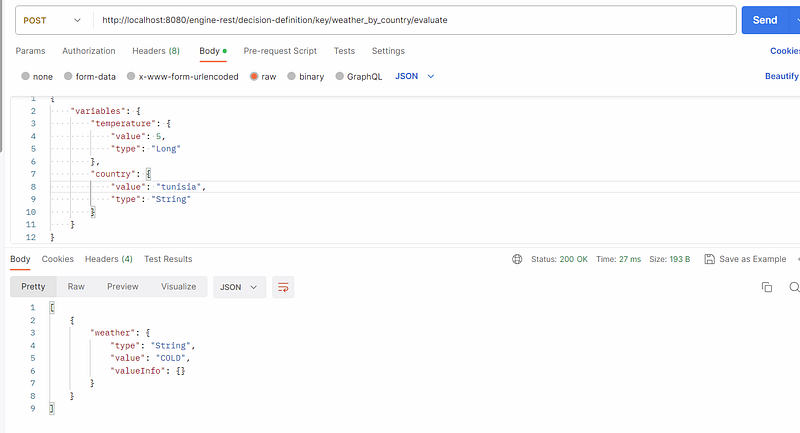
lets execute the dmn process using api rest:

The result is correct “CLOUDY” based on the inserted data.
HIT POLICY:
a “hit policy” refers specifically to the way decision tables are evaluated in the Decision Model and Notation (DMN) standard. Camunda supports DMN hit policies for making decisions based on predefined rules.
Camunda supports the following hit policies for decision tables:
- Unique (U): Ensures that only one rule matches the input data; otherwise, an error is raised.
- First (F): Executes the action of the first rule that matches the input conditions and stops evaluating other rules.
- Priority: Considers the priority of the rules and executes the action of the highest priority rule that matches the input conditions.
- Any (A): Executes the action of any single rule that matches the input conditions. The specific rule executed is not deterministic.
- Collect (C ): Combines the results of all matching rules into a collection, such as a list or set.
- Rule Order (R): Executes the actions of all matching rules in the order they appear in the decision table.
The choice of hit policy in Camunda’s DMN engine depends on the desired behavior when evaluating the decision table. Different hit policies may be appropriate for different use cases and decision-making requirements.
Unique hit policy:
The hit policy exist here:
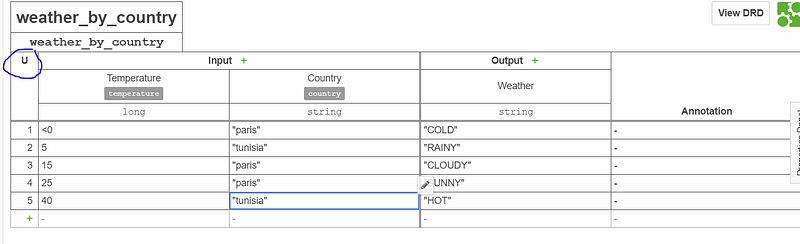
the example below show that we use unique hit policy, the rule are not duplicate, only one rule matches the input data.
First Hit Policy:
Executes the action of the first rule that matches the input conditions and stops evaluating other rules.
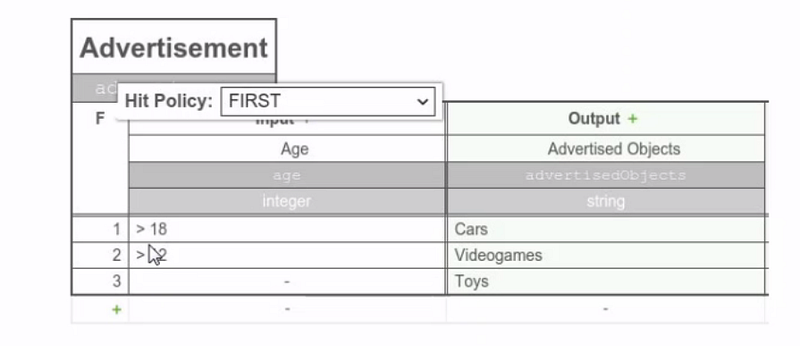
in this examoe we gonna get the Cars value because it was the first when we put a value = 20 for example
Any hit policy:
=> too many rules can have the same output.(thats why the output value can be duplicated)
now as we can see the output variable have a duplicated value (COLD)
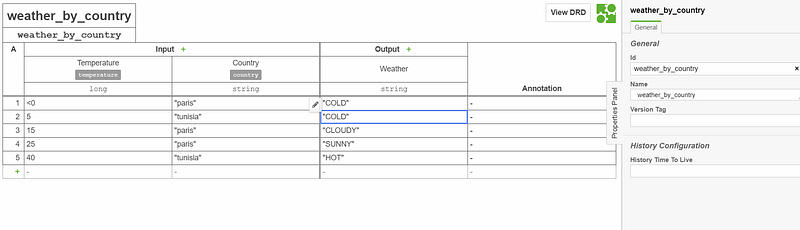
The result are correct based on the input even when the output is duplicated:
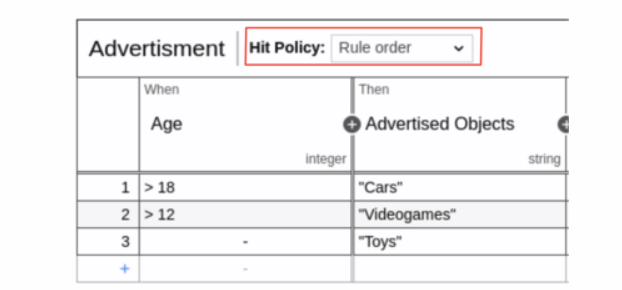
Rule Order hit policy:
Multiple rule can be satisfied, the results will be displayed by order of the rules in the decision table.
Collect hit policy:
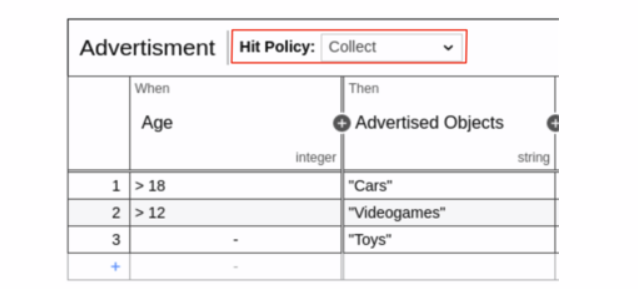
Multiple rule can be satisfied, the result list will be displayed as a list but not ordred, the order is arbitrary . (list of outputs)
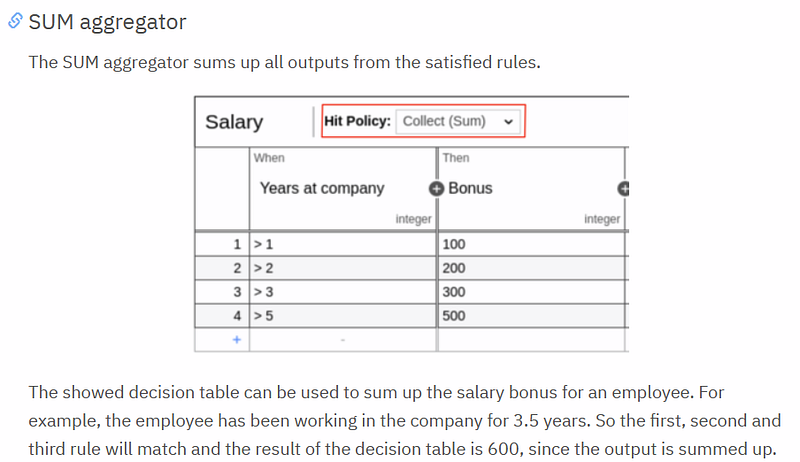
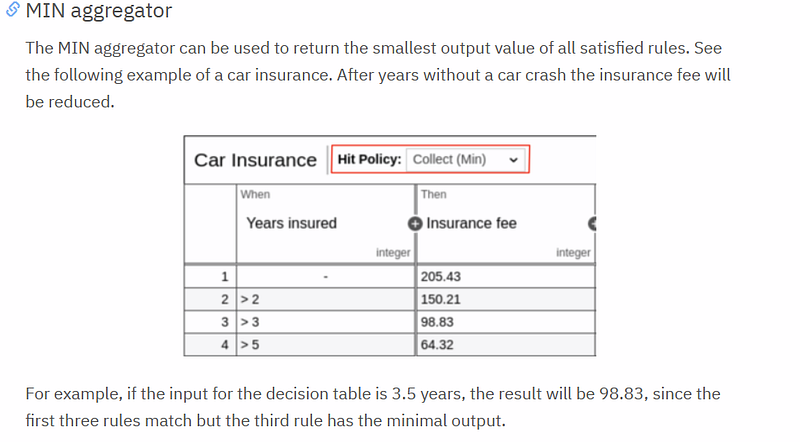
using Collect we can have an aggregation option:
SUM to show the sum of the output result:
MIN to get the min value as result:
Max to get the max value as result:
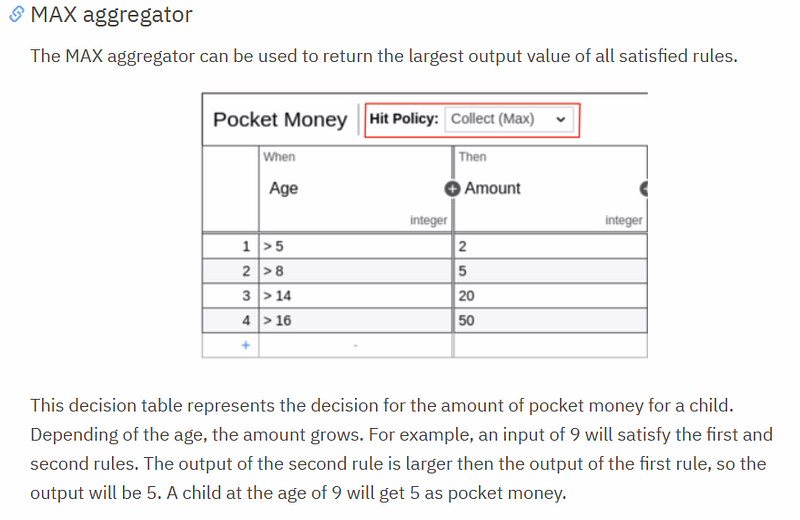
Count to get the number of output values:
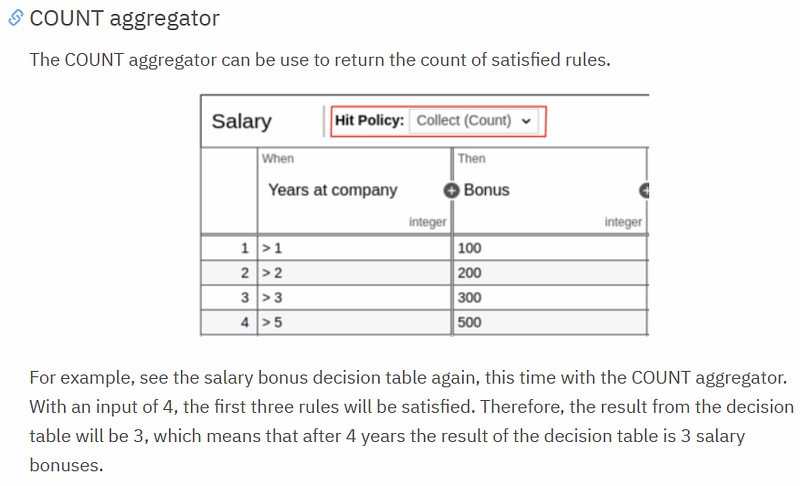
For more details, of aggregator operation and hit policy : https://docs.camunda.org/manual/7.19/reference/dmn/decision-table/hit-policy/
Thank you for reading my article, please contact me for any further information or question.
Other Camunda topics:
camunda task events notifier camunda genericuser task listener in camunda task marker multi-instance taskmarker loop in camunda feel language camunda how to work with dmn how to work with dmn how-to-use-embedded-task-form-in-camunda all-about-camunda-database error-handling-in-camunda sub-process-in-camunda gateways-in-camunda camunda-with-spring-boot-example task-in-camunda events-in-camunda


