
Feel language Camunda
The Camunda DMN engine enables the use of FEEL (Friendly Enough Expression Language) for input values. The FEEL language provides simple unary tests for expression in input values. These unary tests evaluate an input value against an expression and yield either true if the test is met or false otherwise. The expression can consist of various elements, which are explained in the following sections.
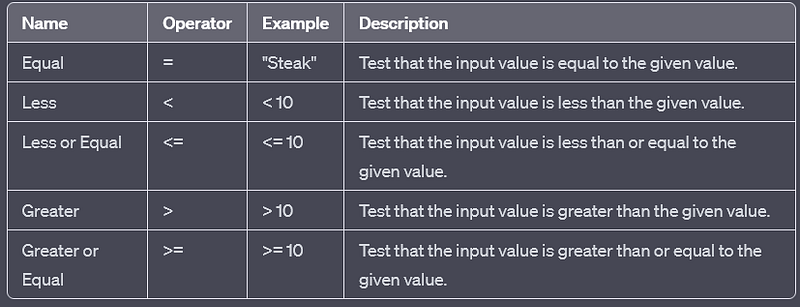
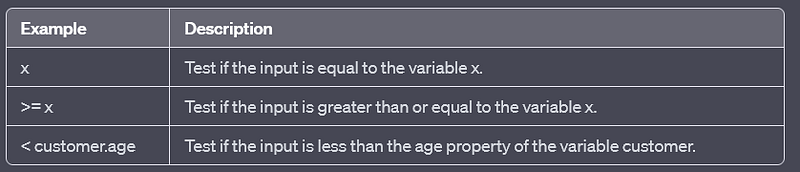
Comparison
FEEL basic unary tests include the comparison operators listed below. Please keep in mind that the equals operator is denoted as empty and not =. Moreover, there is no non-equal operator like != available. To convey this, negation must be utilized.
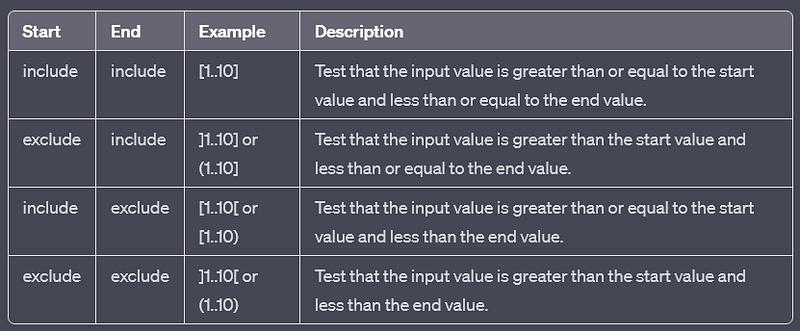
Range
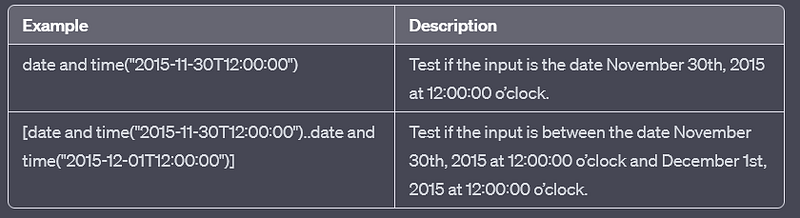
Certain FEEL data types, such as numeric types and date types, can undergo testing against a range of values. These ranges encompass both a start value and an end value. Additionally, the range specification determines whether the start and end values are included in the range.
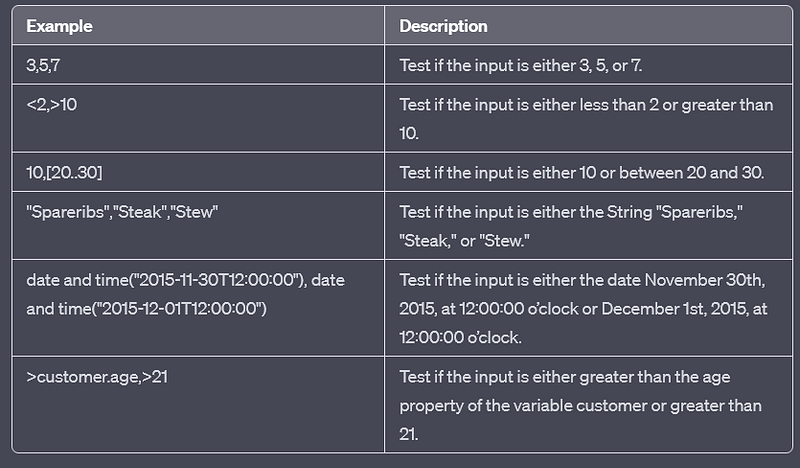
Disjunction
A FEEL basic unary test can be expressed as a conjunction of expressions. These expressions must either consist of comparisons or ranges. The test will be true if at least one of the conjunct expressions evaluates to true.
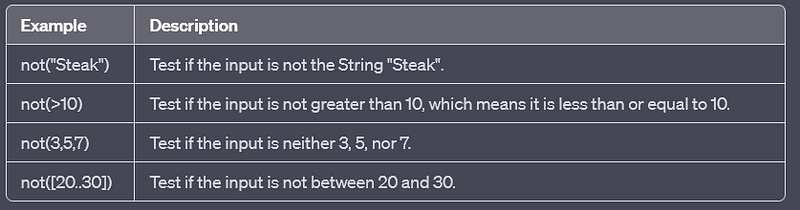
Negation
A FEEL basic unary test can undergo negation using the not function. In this case, if the enclosing expression evaluates to true, the test will yield false. Please be aware that only a single negation as the first operator is permitted, but it can include a disjunction.
Qualified Names
FEEL basic unary tests have the capability to retrieve variables and object properties using qualified names.
Date Functions
FEEL basic unary tests offer functionalities for generating date types. The Camunda DMN engine facilitates the use of the subsequent date functions:
- date and time(“…”): Generates a date and time value from a String formatted as yyyy-MM-dd’T’HH:mm:ss.
Thank you for reading my article, Please contact me for any further information.
Other Camunda topics:
camunda task events notifier camunda genericuser task listener in camunda task marker multi-instance taskmarker loop in camunda feel language camunda how to work with dmn how to work with dmn how-to-use-embedded-task-form-in-camunda all-about-camunda-database error-handling-in-camunda sub-process-in-camunda gateways-in-camunda camunda-with-spring-boot-example task-in-camunda events-in-camunda


