
CS50’s Web Programming with Python and JavaScript 2020 — Review JavaScript, SPA, and CSS animation
Introduction
CS50’s Web Programming with Python and JavaScript is a solid course for IT or software engineers to review the basic knowledge for web programming which provided by HarvardX. Of course, we still have to take time to clarify the concepts after completing the class.
The content of this correspond to the week 6 and the week 7. There are few items that I noted for detailed and examples.
- Some basic concepts of JavaScript
- Ajax (Asynchounus JavaScript and XML)
- Socket.IO
- Single-Page Apps
- Use Ajax with HTML5 History API
- Load resources only when the user scrolls to the bottom of the page
- Use HandleBars template
- CSS Animation
- Project2:AnonymousChat
About this Series
This series aims to wrap up contents of CS50’s Web Programming with Python and JavaScript.
- Article 1: Review CSS, Sass, and RWD
- Article 2: Review APIs, ORM and SQL
- Article 3: this article
- Article 4: Learn Django and Selenium
- Article 5: CI/CD, Containerization, Scalability, Caching, and Security
Basic concepts of JavaScript
The content of JavaScript in CS50w doesn’t dive deep. However, it helps me to review my knowledge and let me know it’s completed or not.
It includes the following items in this section.
- The DOMContentLoaded listener
- Event delegation: capture and bubbling
- The differences between const, let, and var
- Arrow notation syntax (ES6)
- The differences between cookie, local storage, and session storage
- The differences between session-based login and token-base login
The DOMContentLoaded listener
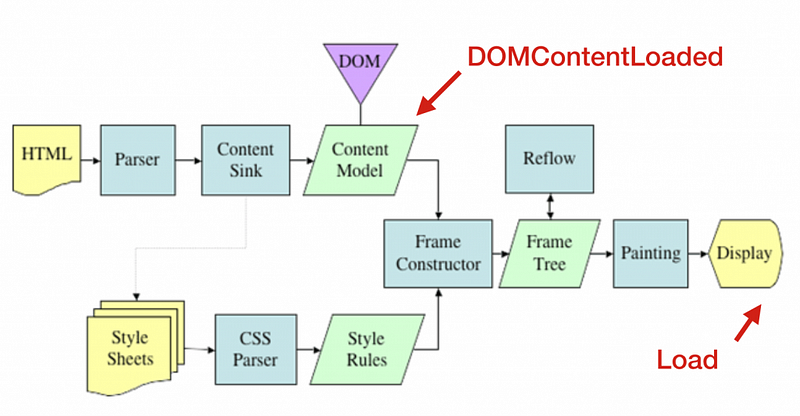
- We use the DOMContentLoaded listener to manipulate the DOM when the DOM is loaded completely
- We can also use the DOMContentLoaded listener to help us to improve our performance when appending new nodes
- I have ever studied what does the browser do for rendering. You can also refer to it for the detail.
Event delegation: capture and bubbling
There are three phases when the DOM event happens.
- Capture phase: the message begins from the root element and will be passed to the target element.
- Target phase: the message arrives at the target element
- Bubbling event: The message begins from the target element and will be passed to the root element.
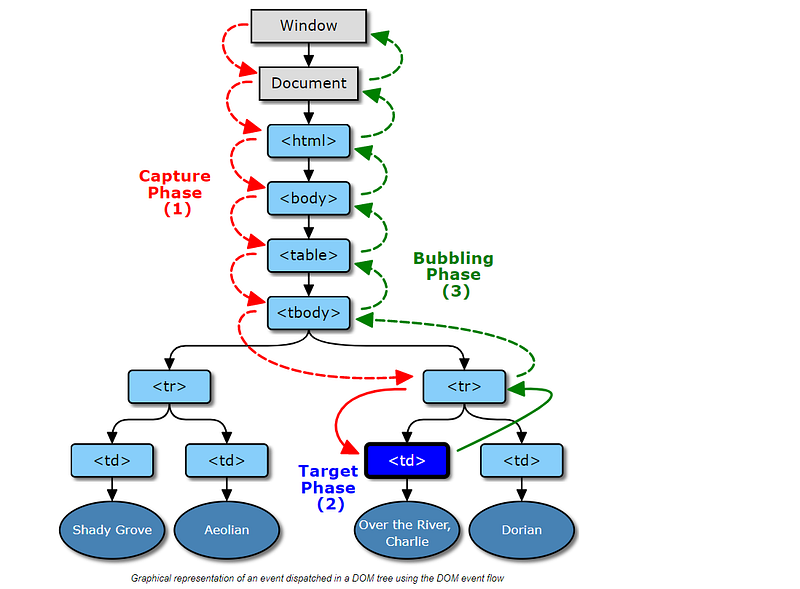
Event delegation
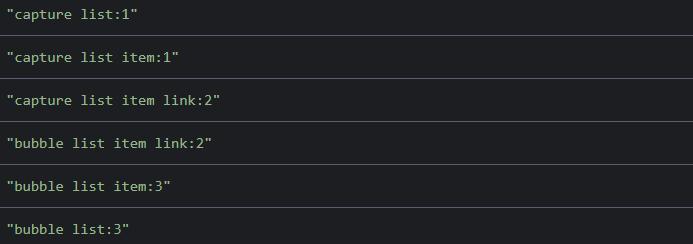
- The event on the DOM will be passed down to the target element. There is an example.
- Ir proves that the order of the event propagation
Stop the event delegation
- e.stopPropagation(): stop the event propagation(capturing, bubbling) to next layers
- e.stopImmediatePropagation(): stop the event propagation(capturing, bubbling) to the current layer and next layers
Prevent the default action
The differences between const, let, and var
- Scope, hoisting, update, re-defined
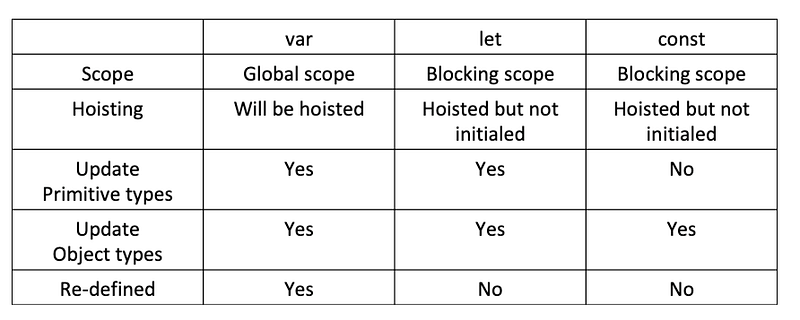
- We can also refer to the following article to review the JavaScript variables.
Arrow notation syntax (ES6)
- properties
- Arrow function doesn’t have its this, arguments, super, new.target
- Can’t use arrow function as a constructor
() => alert('Hello, world!')- We can also refer to the following article to review the JavaScript arrow function.
The differences between cookie, local storage, and session storage
Cookie (referencence: MDN)
- Description: A key/value pair storage in the browser with the Expires date and the Domain.
- Capacity: 4 KB
- Properties
- It’s sent with res/req. It’s across the server-side and the browser side
- It follows CORS
- Session cookies
It is deleted when the browser is closed because it didn’t specify Expires or Max-Age.
(1) The server sets the browser’s cookie from the response
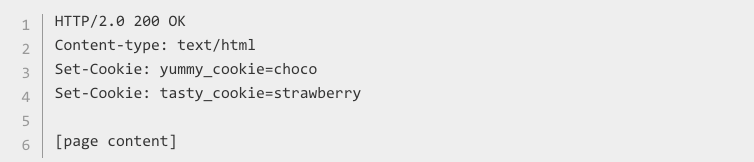
(2) The client send the request with the cookie

- Permanent cookies
The cookie specified Expires or Max-Age

- HttpOnly cookies
It’s inaccessible to JavaScript’s Document.cookie API

- Scope: set Domain(includes sub-domain) and Path
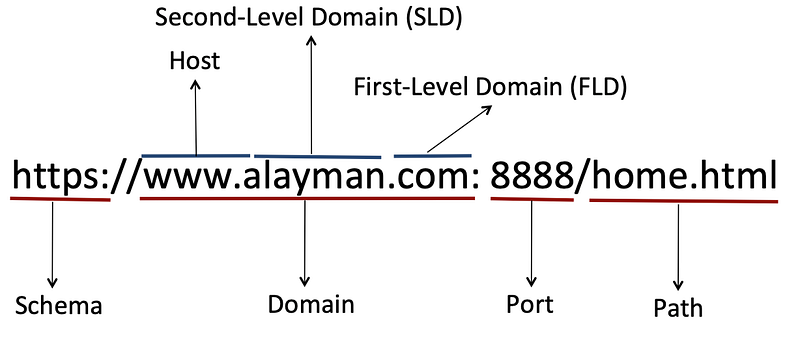
- Application
- Session management: login, shopping cart
- Customize: trace the user’s preferences, account management
- Don’t store user’s information by using cookie
- The capacity is not large enough
—
Local storage (reference: MDN)
- Description: a key/value pair storage in the browser
- Capacity: 5 MB
- Properties
- It’s the client-side(browser) only. It’s across different tabs.(follow CORS)
- No expired time
- Get/Set the local storage
if (!localStorage.getItem('counter')) {
    localStorage.setItem('counter', 0)
}- Remove the local storage
localStorage.removeItem('counter');
localStorage.clear(); // Clear all items
—
Session storage (reference: MDN)
- Description: a key/value pair storage in the browser
- Capacity: 5 MB
- Properties
- It’s the client-side(browser) only. It’s across different tabs.(follow CORS)
- It is deleted when the tab is closed
- Get/Set the session storage
if (!sessionStorage.getItem('counter')) {
    sessionStorage.setItem('counter', 0)
}- Remove the session storage
sessionStorage.removeItem('counter');
sessionStorage.clear(); // Clear all items
—
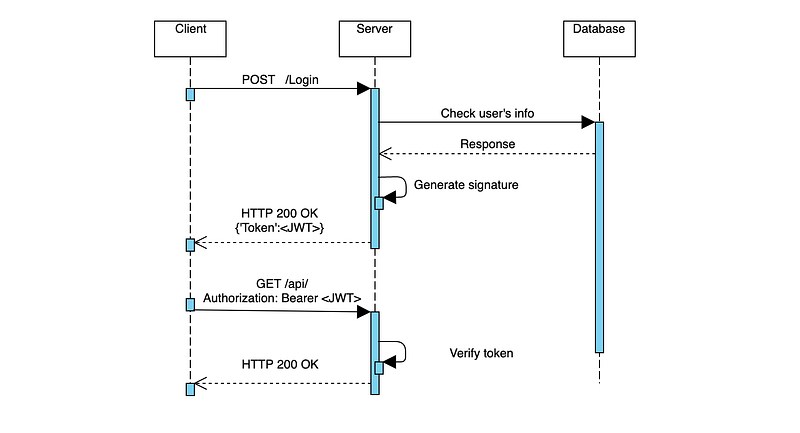
The differences between session-based login and token-base login
session-based login
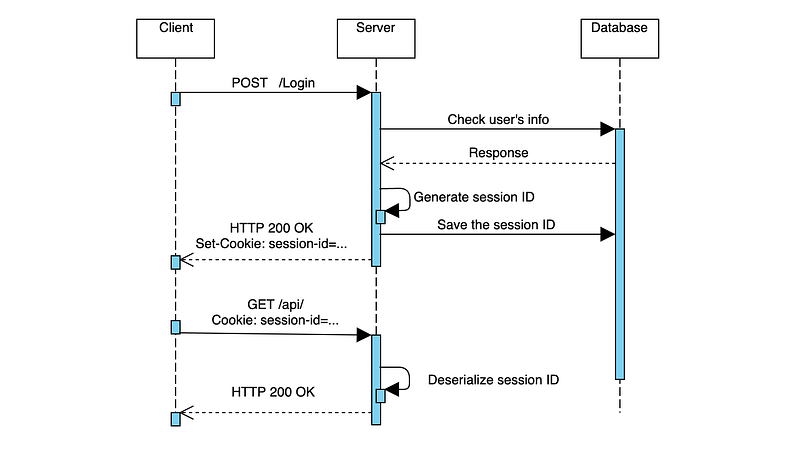
token-based login
Ajax (Asynchronous JavaScript and XML)
Ajax is a technology we use in order to get more information from a server even without needing to reload an entire new page. We use Ajax in the Request-response model.
Steps to use Ajax to update DOM
- Make an Ajax request to get information from the server
- Use JavaScript to update the DOM in order to render this new content
A simple example of using Ajax
Back end (Flask)
- Provide an endpoint to fetch results from external endpoi
- Use requests library in Python
Front end
- HTML: provide inputs and buttons to users
- JavaScript: send a XMLHttpRequest to the back-end
- We can also refer to the following article to use Ajax call.
Socket.IO
We usually use theweb socket for chatroom style applications like real-time communication (full-duplex communication). The client and the server can both be talking to each other simultaneously.
A simple example of using Ajax in Flask
Back end
- Use emit to broadcast the message to clients when receiving the message from flask_socketio
- Decorate the function with @socketio.on
Front end
HTML
- Provide users options
- Show the vote results from the server-side by using flask variables
JavaScript
- Send the message to the server and receive the message from the server
- Microsoft also provides their solution for the real-time communication. We can also refer to the following article.
Single-Page Apps
Single-page apps are talking content that would ordinarily be on multiple pages or multiple different Flask routes and combining them into just a single page.
A simple example of SPA in Flask
Back end
- Provide a default route and few endpoints
Front end
HTML
- put the empty body and navigation without href
JavaScript
- Get the content from the server and fill in the body
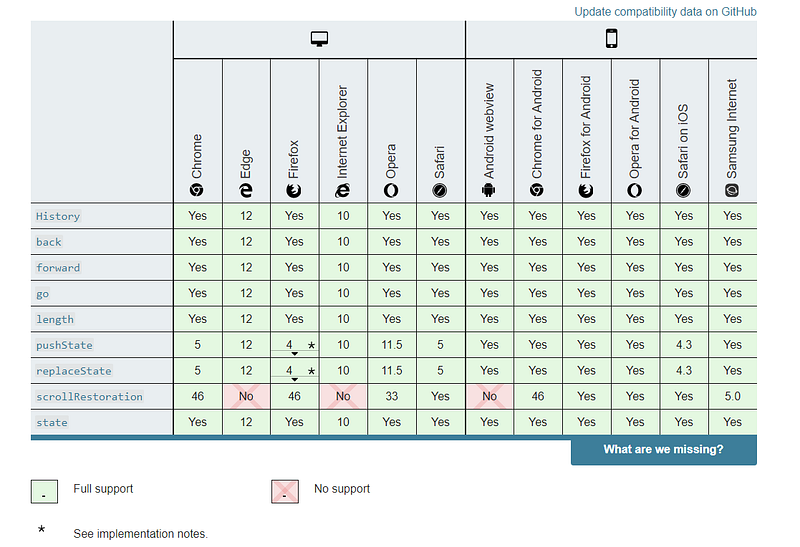
Use Ajax with HTML5 History API
We can update the URL on the browser when using Ajax without refreshing pages.
APIs (an example from MDN)
- history.pushState
- window.onpopState: modify the path of URL when the user clicks the next page or the previous page
Add History APIs in JavaScript to SPA
- Get the content from the server and fill in the body
Browser compatibility
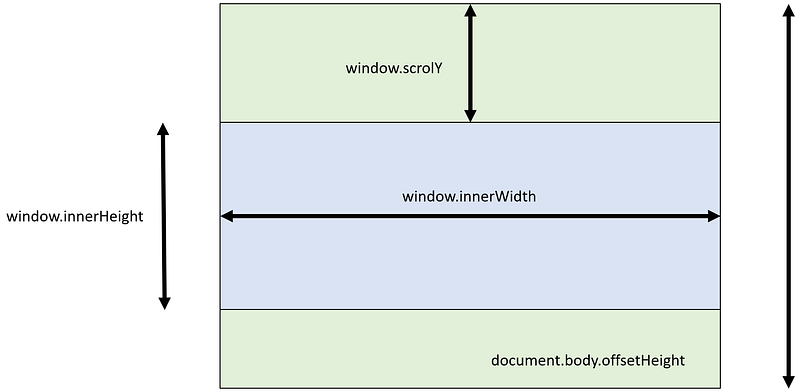
Load resources only when the user scrolls to the bottom of the page
window
- window.innerWidth
- window.innerHeight
- window.scrollY
- document.body.offsetHeight
Listen the scrolling event and load new resources
Back end
Front end
- HTML
- JavaScript
Use HandleBars template
Handlebars is a simple templating language.
It uses a template and an input object to generate HTML or other text formats. Handlebars templates look like regular text with embedded Handlebars expressions.
- from Handlebars
Example 1. use Handlebars.compile
- HTML
- JavaScript
Example 2.use Handlebars.compile with a separated section
- HTML
- JavaScript
CSS Animation
The ability to change one CSS property to another CSS property over some duration of time, while the page is running.
Examples
- Remove elements with animation
CSS
JavaScript
SVG (Scalable Vector Graphic)
- Create a simple circle
- Create a simple circle by using d3 library with animation
- Draw lines with the mouse moving by using d3 library
Project2: AnonymousChat
Function requirements
- Channel creation
- Message creation
- Messages recording
- A personal touch
Implementations: AnonymousChat
It’s a real-time communication project based on the socket.io
The personal touch is that users can send images in this service to each other. I surveyed the methods and recorded the process in the following article.
References
- 10 popular interview questions of JavaScript for Front-end Developers
- HTTP cookies
- 重新認識 JavaScript 番外篇 (6) — 網頁的生命週期
- HTML5 简介(三):利用 History API 无刷新更改地址栏
- Flask-SocketIO
- DOM 的事件傳遞機制:捕獲與冒泡
- JWT vs Cookies for Authentication
- 淺談JWT的安全性與適用情境
- Window.sessionStorage
- [Day-35] 使用JWT來存取API內容(總結)
- 淺談 Authentication 上集:Cookie 與 Session 介紹
- How does cookie based authentication work?
Summary
Thanks for your patient. I am Sean. I work as a software engineer.
This article is my note. Please feel free to give me advice if any mistakes. I am looking forward to your feedback.
Please feel free to clap if this article can help you. Thank you.
You can also subscribe my page on Facebook.
Related topics
How to use the two-way binding in Knout.js and ReactJS?
Learn how to use SignalR to build a chatroom application
My reflection of
IT & Network:
Database:
Software testing:
Debugging:
DevOps: