
How does JavaScript work? Part 2. The terms and syntax (includes ES5 and ES6)

Introduction
In the previous article, I mentioned the JavaScript Runtime and how does it work.
The next stage for us is how do we write a JavaScript program? This topic is my note for learning some basic terms and syntax like Function, Object, String, Array, Map, Set, ES6 module.
I expect it will be helpful to you!
ECMAScript, JavaScript, ES5, and ES6?
That’s declare these common terms before we dive into the JavaScript syntax.
- ECMAScript: it’s a standard and a specification published by Ecma International.
- JavaScript: it’s an implementation of ECMAScript.
- ES5 (ECMAScript5): The version 5 of ECMAScript. Here are some major features in ES5. - 1. strict mode - 2. object methods - 3. array methods
- ES6 (ECMAScript6/ ECMAScript2015): The version 6 of ECMAScript. Here are some major features in ES6. - 1. Arrow function - 2. Rest operator - 3. Spread operator - 4. Object literal shorthand - 5. String template/Template literals - 6. Array destructuring - 7. Default parameters - 8. Object literal - 9. Promises - 10. Class - 11. const & let
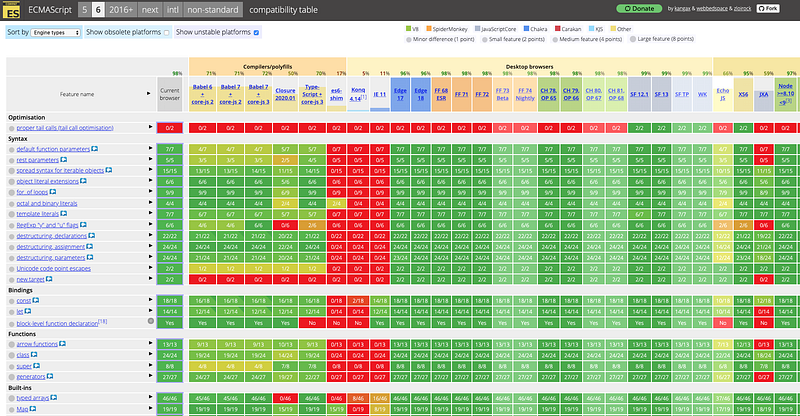
The following table shows browsers’ compatibility for ES6.
The article includes the following topics
- Function statement (函數陳述式)
- Function expression (函數表達式)
- First class function
- Default parameters (ES6)
- Pure function
- Arrow function (ES6)
- Arguments and Rest operator (ES6)
- spread operator (ES6)
- How to create an object? - 1. Using new Object
- Destructuring (ES6)
- Add functions in the object (ES6)
- Check the key in the object
- Turn string to JSON
- Turn JSON to string
- Calculate the length of the object
- String template/Template literals (ES6)
- Combine two arrays (push, concat)
- Array cutting and replacing
- Array copy
- Change values of an array
- Calculate the sum of the list (Array reduce)
- Array filter
- Array destructuring (ES6)
- Array.find
- Turn array to unique
- Sort array
5.Queue
6.Stack
- Create Map and use for…of loop (ES6)
- WeakMap (ES6)
- Destructuring and use for…of loop (ES6)
- WeakSet (ES6)
- Named export
- Import module as an object
- Default export
- Default export with class
- Named export with class
10. For loop
- For…in loop
- For…of loop
11.Promise
1.Function
Function statement (函數陳述式)
- The greet function will be put into the memory in the creation phase.
//Invoke
greet('Sean'); //Hello Sean
//Save in the memory
function greet(name) {
console.log('Hello ' + name)
}Function expression (函數表達式)
- Stored in a variable
- The greet function will be put into the memory in the execution phase.
greetFunc('Sean');//Uncaught TypeError: greetFunc is not a function
at <anonymous>:1:1//Isn't put into memory initially
//It creates this function object on the fly
var greetFunc = function(name) {
console.log('Hello ' + name)
}First class function
- Functions are treated as variables. Functions can be returned by another function and can be assigned as a value to a variable.
- We can treat a function as other data types. The following example is to treat a function as a variable
const add = (a, b) => a + bDefault parameters
//ES5
function box(height) {
    var height = (height !== undefined) ? height : 50;
}
//ES6
function box(height = 50) {
}function setHeight(value) {
return value * 10;
}function box(height = setHeight(10)) {
}- Defaults and destructuring objects
const buildHouse = ({floors = 1, color = 'red', walls = 'brick'} = {}) => `Your house has ${floors} floor(s) with ${color} ${walls} walls.`Pure function
- A function where the return value is only determined by its arguments without any side effects
Arrow function (ES6)
- Advantages
- The syntax is short
- Easier to write and read short, single-line functions
- Automatically return when using concise body syntax
- Properties
- Arrow functions are only expressions
- Arrow functions inherit their
this value from their surrounding context - Can’t use the arrow function as a constructor
- Convert a function to an arrow function
Arrow functions are very similar to regular functions in behavior, but quite different syntactically.
- Concise body syntax
- Has no curly braces surrounding the function body
- Automatically return the expression
const upperizedNames = ['Farrin', 'Kagure', 'Asser'].map(
  name => name.toUpperCase()
);- Block body syntax
- Use curly braces to wrap the function body
- Use return statement to return something from the function
const upperizedNames = ['Farrin', 'Kagure', 'Asser'].map( name => {
  name = name.toUpperCase();
  return `${name} has ${name.length} characters in their name`;
});- Curry function
const multiArgFunc = (a, b, c) => a + b + c;
const curryUnaryFunc = a => b => c => a + b + c;
curryUnaryFunc(1);
curryUnaryFunc(1)(2);
curryUnaryFunc(1)(2)(3);
Arguments and Rest operator (ES6)
- Turn all input parameters to a list
//ES5
function sum() {
    var numbers = Array.prototype.slice.call(arguments)
}
//ES6 rest operator
function sum(...numbers) {
}//ES6 spread operator
let numbers = [1, 2, 3];
function sum(num1, num2, num3) {
return num1 + num2 + num3;
}console.log(sum(...numbers))spread operator (ES6)
- Turn an array to parameters
let a = [2, 3, 4]
let b = [1, …a, 5]console.log(a) // [1, 2, 3, 4, 5]2.Object
- It’s a name and value pair.
- An object have functions and properties.
How to create an object?
Solution 1.Using new Object
var person = new Object();Solution 2.object literals
function createUser(firstName, lastName) {
    let fullName = firstName + ' ' + lastName;
    return {
        firstName: firstName,
        lastName: lastName,
        fullName: fullName
    }
}
let user = createUser('Sean', 'Hsieh')- Object literal: It works only if the keys and variable names are the same
function createUser(firstName, lastName) {
    let fullName = firstName + ' ' + lastName;
    return {
        firstName,
        lastName,
        fullName
    }
}
let user = createUser('Sean', 'Hsieh')Solution 3.Object.create (Pure Prototype inheritance)
var jane = {
    address: '123 St',
    getFullName: function() {
        return 'jane';
    }
}
var john = Object.create(jane);
john.address = '456 St'Solution 4.Use constructor
- ES5 constructor
function Person(person) {
    this.name = person.name
    this.model = person.model
    this.description = person.description
}
let person = new Person({name: 'Sean', model: 'robot', description: 'test'})console.log(person) //Person {name: "Sean", model: "robot", description: "test"}- ES6 Class constructor
class Person {
    constructor(person) {
        this.name = person.name
        this.model = person.model
        this.description = person.description
    }
}
let person = new Person({name: 'Sean', model: 'robot', description: 'test'})console.log(person) //Person {name: "Sean", model: "robot", description: "test"}- ES6 inheritance
class Robot extends Person {
    constructor(person) {
        super(person);
        this.engine = person.engine;
    }
}
Solution 5. Object.assign (ES6)
var item= {
    id: 1,
    content: 'Sean',
    completed: false
}
let newItem = Object.assign({}, item, {completed: true});
console.log(newItem)Solution 6. Use spread operator (ES6)
var item= {
    id: 1,
    content: 'Sean',
    completed: false
}
let newItem = {...item, completed: true};
console.log(newItem)// {id: 1, content: "Sean", completed: true}Object literal shorthand (ES6)
- It works only if the keys and variable names are the same.
let obj = {
    x: 1,
    y: 2,
    z: 3
}
let {x, y, z} = obj;
console.log(x, y, z); // 1, 2, 3- Example
- Receive props in React stateless component
const LogItem = ({log}) => {
    return (
        <li className="collection-item">
            <div>
                <a href="">{log.message}</a>
            </div>
        </li>
    )
}
Add functions in the object (ES6)
- The short cut in ES6.
var person = {
        firstname: 'Sean',
        lastname: 'Hsieh',
        getFullName () {
            return console.log(this.firstname + ' ' + this.lastname);
        }
}person.getFullName() //Sean HsiehCheck the key in the object
let s = {"key": 1};
let flag = s.hasOwnProperty("key");
Remove property
let s = {"key": 1};
delete s.key //s: {}
Turn string to JSON
JSON.parse('{"1": 1, "2": 2, "3": {"4": 4, "5": {"6": 6}}}', function(k, v) {
  console.log(k); // log the current property name, the last is "".
  return v;       // return the unchanged property value.
});
// 1
// 2
// 4
// 6
// 5
// 3
// ""Turn JSON to string
console.log(JSON.stringify({ x: 5, y: 6 }));
// expected output: "{"x":5,"y":6}"
Calculate the length of the object
var s = {}, size = 0;
for(var i = 0; i < A.length; i++) {
    if (!s.hasOwnProperty(A[i])) {
        s[A[i]] = 1;
        size++;
    }
}console.log(size);You can also read: - Length of a JavaScript object
3. String
String template/Template literals (ES6)
- It uses dollar sign and curly braces.
let serviceId = 123;
let url = `/service/${serviceId}`;
console.log(url) // /service/123- Multi-line example
4. Array
Array push / pop
- push: push new element to the end of the list
var l = [1,2,3]
l.push(4)
console.log(l) //[1, 2, 3, 4]
Combine two arrays
1.Array.prototype.push
var vegetables = ['parsnip', 'potato'];
var moreVegs = ['celery', 'beetroot'];
Array.prototype.push.apply(vegetables, moreVegs);
[].push.apply(vegetables, moreVegs);
2.concat
var a = [1,2,3]
var b = [4,5,6]
var add = a => b => b.concat(a);
add(a)(b) // [4, 5, 6, 1, 2, 3]
Array cutting and replacing
- slice - Return a shallow copy from begin to end
var l = [1,2,3,4,5]
var newL1 = l.slice(2,4) // [3,4]
var newL2 = l.slice(0,2) // [1,2]- splice - Modifies the original array(mutable) - Returns the deleted elements as array - Used to insert or delete elements to/from array
var l = [1,2,3,4,5]
var newL1 = l.splice(2,4,"a","b","c") // [3,4]
console.log(newL1) //[3,4,5]
console.log(l) //[1,2,"a","b","c"]
Array copy
var l = [1,2,3,4,5]
var newL1 = l.slice()
Change values of an array
- forEach: override original array
l.forEach((name, index) => l[index] = max);- map: keep original array
l.map((name, index) => max);Calculate the sum of the list (Array reduce)
var total = A.reduce((a, b) => a + b);Array filter
for (var i = 0; i < e.length; i++) {
    cnt = cnt + w.filter(x => x > e[i]).length;
}
Array destructuring (ES6)
let obj = [1, 2, 3]
let [x, y, z] = obj;
console.log(x, y, z); // 1, 2, 3
let [x, , z] = obj;
console.log(x, z); // 1, 3Array.find
- It returns the first object which is true.
let services= [
    {name: 'nails', flag: true},
    {name: 'test', flag: true},
    {name: 'haircut', flag: false}
]
services.find(service => service.flag) //{name: 'nails', flag: true}- Check member exists or not
for(var i = 0; i < len; i++) {
    if (A.find(x => x == (i + 1)) === undefined) {
        return i + 1;
    }
}
Turn array to unique
var s = [...set(L)]Sort array
- The default sorting function is lexicographical
var a = [7, 40, 300]
a.sort() // [300, 40, 7]
var a = [1, 2, 3]
a.sort() // [1, 2, 3]
var a = [-5, -6, -4, -7, -10]
a.sort() // [ -10, -4, -5, -6, -7 ]- Sorting an array in numerical order
var a = [7, 40, 300]
a.sort(function(a,b){
    return a - b
})
// [7, 40, 300]
var a = [-5, -6, -4, -7, -10]
a.sort(function(a,b){
return a - b
})
// [-10, -7, -6, -5, -4]You can also read: - Array.sort() doesn’t sort numbers correctly [duplicate] - Sorting a JavaScript array using array.sort() - Array.prototype.sort()
5.Queue
We can imitate a queue in JavaScript by using array’s methods.

- unshift (push): push new element to the beginning of the list
var l = [1,2,3]
l.unshift(4)
console.log(l) //[4, 1, 2, 3]- pop (pop): remove the element from the last of the list
var l = [1,2,3]
var b = l.pop()
console.log(b) //3
console.log(l) //[1, 2]- use l[index — 1] (front)
var l = [1,2,3]
var front = l[l.length - 1] // 3
6.Stack
We can imitate a queue in JavaScript by using array’s methods.
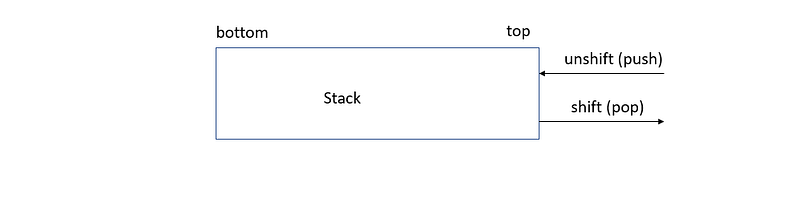
- unshift (push): push new element to the beginning of the list
var l = [1,2,3]
l.unshift(4)
console.log(l) //[4, 1, 2, 3]- shift (pop): remove the element from the beginning of the list
var l = [1,2,3]
var t = l.shift()
console.log(t) //1
console.log(l) //[2, 3]- use l[0] (top)
var l = [1,2,3]
var front = l[0] // 1
7. Map
- ES6 map can input any values as key.
Create Map and use for…of loop (ES6)
let carOne = {make: 'audit'};
let carTwo = {make: 'toyota'};
let carAge = new Map();
carAge.set(carOne, 3);
carAge.set(carTwo, 5);console.log(carAge) // Map(2) {{…} => 3, {…} => 5}//for...of loop
for(let [key, value] of carAge) {
console.log(`${key} = ${value}`)
}WeakMap (ES6)
- Keys of WeakMap are of the type Object only.
let carOne = {make: 'audit'};
let carTwo = {make: 'toyota'};
let carAge = new WeakMap();
carAge.set(carOne, 3);
carAge.set(carTwo, 5);console.log(carAge.get(carOne));8. Set
- ES6 map can input any values as key.
Destructuring and use for…of loop (ES6)
let cars = new Set();
cars.add('carOne');
cars.add('carTwo');
//for...of loop
for (let car of cars) {
console.log(car);
}//destructuring
let [a, b] = cars;
console.log(a, b);WeakSet (ES6)
- Keys of WeakSet are of the type Object only.
let carAge = new WeakSet();
let carOne = {make: 'audit'};
let carTwo = {make: 'toyota'};
carAge.add(carOne);
carAge.add(carTwo);9. ES6 modules
- strict mode by default
Named export
- The imported name should be identical to the exported name.
- Imported functions with curly braces.
//calculator.js
export function add(a, b){
    return a + b;
}
export function substract(a, b) {
return a - b;
}//App.js
import {add, substract} from './calculator.js'Import module as an object
//calculator.js
function add(a, b){
    return a + b;
}
function substract(a, b) {
return a - b;
}export {add, substract};//App.js
import * as calculator from './calculator.js'calculator.add(2, 3);Default export
- The imported name doesn’t have to be identical with the export name.
//single-module.js
export default function greet(name){
    return `hello ${name}`;
}
//App.js
import myfunc from './single-module.js'myfunc('Sean');Default export with class
//calculator.js
export default class Calculator {
    add(a, b){
        return a + b;
    }
    substract(a, b) {
        return a - b;
    }
}
//App.js
import Calculator from './calculator.js';
let calculator = new Calculator();Named export with class
- The imported and the exported functions with curly braces.
//calculator.js
class Calculator {
    add(a, b){
        return a + b;
    }
    substract(a, b) {
        return a - b;
    }
}
export {Calculator};//App.js
import {Calculator} from './calculator.js';
let calculator = new Calculator();10. For loop
For…in loop
Improve the downsides of the traditional loop and loop the index
- variable: i
- length: digits.length
const digits = [0, 1, 2, 3, 4, 5, 6, 7, 8, 9];

for (let i = 0; i < digits.length; i++) {
  console.log(digits[i]);
}
for (const index in digits) {
console.log(digits[index]);
}For…for loop
Drop the index
for (const digit of digits) {
  console.log(digit);
}- Example
11. Promise
- Introduction
- async/await
Summary
Thanks for your patient. I am Sean. I work as a software engineer.
This article is my note. Please feel free to give me advice if any mistakes. I am looking forward to your feedback.
Please feel free to clap if this article can help you. Thank you.
You can also subscribe my page on Facebook.
Related topics
How to use the two-way binding in Knout.js and ReactJS?
Learn how to use SignalR to build a chatroom application
My reflection of
IT & Network:
Database:
Software testing:
Debugging:
DevOps:


