
How to return the response of AJAX (asynchronous) call? Compare Promise, async/await, fetch

Introduction
The task I took recently was to refactor AMD modules in the project. A simple challenge is how to launch a request and return the result from an AMD module. What we expect is our modules can return the result from the HTTP request.
I tried several ways to solve this problem. I can only get a Promise object from most of these methods. I felt frustrated about it.
Finally, I got a solution to return the result from my module. This article shares my experiments and hopes it can help you. The following items were the methods I have tried.
- Promise + AJAX (failed)
- async/await + AJAX (failed)
- fetch (failed)
- AJAX without aync (success)
Use Promise (ES6) — You will only get a Promise object
- The first method I tried was to use AJAX with Promise as the following code.
var res = new Promise(function (resolve, reject) {
    $.ajax({url: resourceUrl,
        dataType: "script",
        success: function (data) {
            resolve(resources);
        },
        error: function (err) {
            reject(err);
        }
    });
});console.log(res)
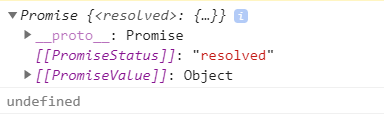
console.log(res.PromiseValue)return res.PromiseValue // undefined- The above statements will return a Promise object. PromiseValue is an internal property and we can‘t access it directly. The value is undefined if you access Promise.PromiseValue.
Use aync/await (ES7) : You will only get a Promise object as well
- The next method I try was to use AJAX with async/await as the following code. We still get a Promise object.
const getResource = async() => {
    try {
        var res;
        await $.ajax({
            url: resourceUrl,
            dataType: "script",
            success: function (data) {
                res = resources;
            },
            error: function (err) {
                console.log(err);
            }
        });
        return res;
    } catch (err) {
        console.log(err);
    }
}
var results = await getResource()
return results.PromiseValue // undefined- We can print the unwrapped value in then statements. However, we will still get a Promise object when we pass the value out of the function.

Use fetch : You will only get a Promise object as well
- The next method I try was to use fetch as the following code.
var res = fetch(stringsResourceUrl, {
    headers: {
        'Content-Type': 'text/javascript'
    }
}).then(resp => resp.text())console.log(res)- we will get the same result as the first example.

Use Pure AJAX : We will get the response from this method
- The last method I tried was to use AJAX without aync as the following code.
- I could get the response and it solved my problem.
var res = $.ajax({
    url: stringsResourceUrl,
    dataType: "script",
    success: function (data) {},
    async: false,
    error: function (err) {
        console.log(err);
    }
}).responseText;
return res;References
- How to Store The $.ajax Response in Some Variable Please Help me ……
- 前端非同步操作大雜燴(ajax、fetch、promise、async/await)
- 簡介 Fetch API
- js promise中如何取到[[PromiseValue]] ?
- AMD , CMD, CommonJS,ES Module,UMD
- What do double brackets mean in javascript and how to access them
- 我要學會 JS(三):callback、Promise 和 async/await 那些事兒
Summary
Thanks for your patient. I am Sean. I work as a software engineer.
This article is my note. Please feel free to give me advice if any mistakes. I am looking forward to your feedback.
Please feel free to clap if this article can help you. Thank you.
You can also subscribe my page on Facebook.
Related topics
How to use the two-way binding in Knout.js and ReactJS?
Learn how to use SignalR to build a chatroom application
My reflection of
IT & Network:
Database:
Software testing:
Debugging:
DevOps:


