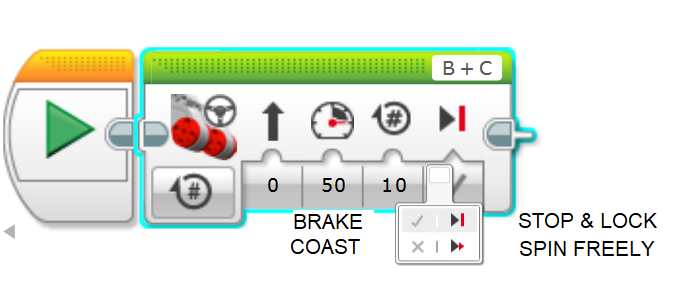
n class="hljs-number">100</span> <span class="hljs-keyword">the</span> motor runs <span class="hljs-keyword">it</span> <span class="hljs-keyword">as</span> fast <span class="hljs-keyword">as</span> <span class="hljs-keyword">it</span> can :)</pre></div><h2 id="5bc5">Duration</h2><div id="fa02"><pre>In <span class="hljs-keyword">order</span> to know how much a spin <span class="hljs-keyword">is</span> worth, solve <span class="hljs-keyword">for</span> circumference or see <span class="hljs-keyword">this</span> video =D</pre></div><figure id="e190"><img src="https://cdn-images-1.readmedium.com/v2/resize:fit:800/1*uvp66HV4CmhMzvgHRxk2Kw.png"><figcaption><a href="https://www.google.com.br/search?q=circle%20calc%3A%20find%20C&oq=circle+formula&aqs=chrome..69i57&sourceid=chrome&ie=UTF-8&skip=s">Link</a></figcaption></figure><h2 id="4b5b">Brake At End</h2><figure id="0464"><img src="https://cdn-images-1.readmedium.com/v2/resize:fit:800/1*UdyRw1RM4fSmkT3jgiuhfA.png"><figcaption></figcaption></figure><h2 id="b42a">Port B = Left Motor</h2><h2 id="1832">Port C = Right Motor</h2><h2 id="bac2">Port View</h2><div id="12e9"><pre>- Port <span class="hljs-keyword">View</span> <span class="hljs-keyword">is</span> a Big help :D it says how far <span class="hljs-keyword">each</span> motor has moved;
You can <span class="hljs-keyword">move</span> motor <span class="hljs-keyword">by</span> hand <span class="hljs-keyword">to</span> determine the distance you want it <span class="hljs-keyword">to</span> go;
<span class="hljs-keyword">Values</span> are <span class="hljs-keyword">reset</span> <span class="hljs-keyword">to</span> zero at the <span class="hljs-keyword">start</span>;
You can <span class="hljs-keyword">add</span> Wait Block <span class="hljs-keyword">to</span> make the program pause <span class="hljs-keyword">if</span> you want <span class="hljs-keyword">to</span> <span class="hljs-keyword">check</span> the <span class="hljs-keyword">value</span> at various steps.</pre></div><p id="0b8d">Please see this <b>video </b>for my laboratory about the <b>Move Steering Block</b>:</p>
<figure id="6fc5">
<div>
<div>
<img class="ratio" src="http://placehold.it/16x9">
<iframe class="" src="https://cdn.embedly.com/widgets/media.html?src=https%3A%2F%2Fwww.youtube.com%2Fembed%2Fs6XAx8qsR1c%3Ffeature%3Doembed&url=http%3A%2F%2Fwww.youtube.com%2Fwatch%3Fv%3Ds6XAx8qsR1c&image=https%3A%2F%2Fi.ytimg.com%2Fvi%2Fs6XAx8qsR1c%2Fhqdefault.jpg&key=a19fcc184b9711e1b4764040d3dc5c07&type=text%2Fhtml&schema=youtube" allowfullscreen="" frameborder="0" height="480" width="854">
</div>
</div>
</figure></iframe></div></div></figure><p id="51c4">That’s all for now, folks.</p><p id="513d">See you soon!</p><p id="8f9a">Bye o/</p><h1 id="4d6b">Related Posts:</h1><p id="eed4">01º Lego Episode — <a href="https://readmedium.com/lego-our-startups-journey-2db83f9e92a4"><b>Our Startup’s Journey</b> </a>— Invaders and Invasions?</p><p id="da00">02º Lego Episode — <a href="https://readmedium.com/timmyton-lego-adventures-02-faae7d8c6fea"><b>Timmyton </b>— <b>Lego-Learning-By-Playing — L2BP Series</b></a></p><p id="b1d2">04º Lego Episode — <a href="https://readmedium.com/lego-motions-episode-04-41dff47e8834"><b>Lego Motions</b> — <b>Tribot v 1.0</b> — <b>Seeing Your Creation Move</b> </a>— Move Steering Block</p><p id="0d41">05º Lego Episode — <a href="https://readmedium.com/lego-motions-move-tribot-around-deb227946425"><b>Lego Motions </b>— <b>Move Tribot Around</b> </a>— And Backward…Five Programs Files</p><p id="98f9">06º Lego Episode — <a href="https://readmedium.com/lego-sensors-touch-n-color-edbe0f6642f"><b>Lego Sensors</b> — <b>Touch N Color</b></a> — Two out of five human senses — Touch N Sight</p><p id="3976">07º Lego Episode — <a href="https://readmedium.com/lego-sensor-color-5db4d42e0203"><b>Lego Sensor </b>— <b>LineFollower</b> </a>— Line Follower Tribot v1.0</p><p id="2c2a">08º Lego Episode — <a href="https://readmedium.com/maze-solving-tribot-v1-0-a29963f8742a"><b>Maze Solving Robot v1</b></a><b> </b>— Lego Solution Right-Wall-Follower-Robot</p><p id="d92c">09° Lego Episode — <a href="https://readmedium.com/lego-gettle-sound-bots-5fb40f6d84df"><b>Gettle_&a
Options
mp;_Sound_Bots</b></a> — How gentle can a robot be? What is the audible range of the human ear? How deep can we dive?</p><p id="51de">10° Lego Episode — <a href="https://readmedium.com/lego-data-logging-a2fd59dd7933"><b>Data Logging</b></a> — Data Collection and the EV3</p><p id="ed1f">11º Lego Episode — <a href="https://readmedium.com/lego-binning-the-linefollower-code-5562e059237e"><b>Binning the LineFollower Code </b></a>— Binning: Arithmetic To Map Sensor Reading</p><p id="ec68">12º Lego Episode — <a href="https://readmedium.com/lego-a-proportional-linefollower-robot-d9a951debbef"><b>A Proportional LineFollower Robot </b></a>— Advanced Math To Improve Your Robot’s Steering</p><p id="c7b7">13º LEGO Theory — <a href="https://readmedium.com/lego-theory-multitasking-2f060d2e3678"><b>Theory of Multitasking</b></a> — A very Useful Programming Technique</p><p id="2050">14º LEGO formula — <a href="https://readmedium.com/lego-formula-normalizing-data-66fefd9eb90e?postPublishedType=repub"><b>Normalizing Data</b></a> — Converting Data to Use The Same Range</p><p id="cd47">15º Lego Episode — <a href="https://readmedium.com/lego-pid-the-ultimate-line-follower-45d4e517572b"><b>PID — The Ultimate Line Follower </b></a>— Algorithm for your EV3 PID Line Follower Robot</p><p id="eb58">16° <a href="https://readmedium.com/lego-meets-pixy-8f8ea7677114?postPublishedType=repub"><b>Lego Meets Pixy Episode</b></a> — How to Connect Your Inexpensive Camera Module to Lego</p><p id="479c">18° Lego Episode — <a href="https://readmedium.com/lego-gears-worms-bf8ef3280d0e"><b>GEARS & WORMS</b></a> — Geartrains & Worm & Clutch Gears</p><p id="a0a2">23° Lego Episode — <a href="https://readmedium.com/lego-differential-explained-12fa1865f3db"><b>Differential Explained</b></a><b> </b>— How Differential Works?</p><p id="7631">24° Lego Episode — <a href="https://readmedium.com/pitbot-a-star-is-born-e04a0f305fb6?source=post_page---------------------------"><b>PitBot — A Star Is Born </b></a>— Working at The First Structure in Our Sparring Robot</p><p id="adf0">25° Lego Episode — <a href="https://readmedium.com/pitbot-is-agressive-well-no-worries-c801adba4b4c?source=post_page---------------------------"><b>PitBot Is Agressive? Well, No Worries! </b></a>— Making PitBot bite!</p><p id="8974">26° Lego Episode —<a href="https://readmedium.com/dancing-good-w-pitbot-16b5ef035077"> <b>Dancing Good w/ PitBot</b></a> — All The Secret for Replicate This Awesome Robot</p><p id="574d">27 ° LEGO Episode — <a href="https://readmedium.com/lego-sumo-arena-is-ready-64a59e8bf987"><b>Sumo Arena is Ready! </b></a>— Here is the playing arena for Arduino x Lego</p><p id="c4ad">28 ° LEGO Episode — <a href="https://readmedium.com/pick-pitbot-up-7dbfa4edc12e"><b>Pick Pitbot Up!</b></a> — Our Robot Are Leaving Body & Paint Shop</p><p id="3e66">28 ° LEGO — B — Episode — <a href="https://readmedium.com/pitbot-battery-sensor-setup-4f572fedfe20"><b>Pitbot Battery & Sensor Setup</b></a> — Preparing The infrastructure for running Arduino code</p><p id="1a2e">29 ° LEGO Episode — <a href="https://readmedium.com/bridging-all-sensors-together-pitbot-ca8803bf9cb"><b>Bridging All Sensors Together</b></a> — Pitbot — Collecting All Codes for the Final Act of Giving Behaviors to Robot</p><h1 id="546a">Credits & References</h1><p id="116f"><a href="https://g.co/kgs/6kLgmu">Book: The Art of Lego Mindstorms EV3 Programming by Terry Griffin</a></p><p id="cc47"><a href="https://youtu.be/tscYgpD3m7g">EV3 Large and NXT Motors — The Differences Explained</a></p><p id="1240"><a href="https://education.lego.com/en-au/support/mindstorms-ev3/building-instructions">Building Instructions & Program Descriptions</a></p><p id="7e3d"><a href="http://www.philohome.com/motors/motorcomp.htm">LEGO® 9V Technic Motors compared characteristics</a></p><p id="061a"><a href="https://robotics4children.blogspot.com/">Robotics for Children (& Parents (& Grandparents))</a></p><p id="87c2"><a href="https://le-www-live-s.legocdn.com/sc/media/lessons/mindstorms-ev3/building-instructions/ev3-rem-driving-base-79bebfc16bd491186ea9c9069842155e.pdf">Tribot v 1.0 .pdf File</a></p><p id="12c5"><a href="https://www.virtualroboticstoolkit.com/documentation/sections/9/articles/39">Introducing LEGO Digital Designer</a></p></article></body>
In this Episode, we’re gonna explore the setup of Large Motor from EV3 31313 :)
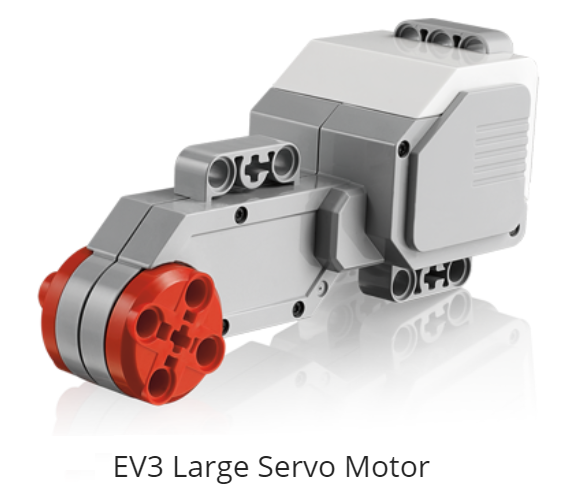
The EV3 Large Servo Motor is a powerful motor that uses tacho feedback for precise control to within one degree of accuracy. By using the built-in rotation sensor, the intelligent motor can be made to align with other motors on the robot so that it can drive in a straight line at the same speed.
It can also be used to give an accurate reading for experiments. The motor case design also makes it easy to assemble gear trains.
Characteristics:
Description Ev3 Large Motor:
– Tacho feedback to one degree of accuracy;
- Precise movement;
– 160–170 PEAK RPM;
– Running torque of20 N/cm (approximately 30 oz/in);
– Stall torque of40 N/cm (approximately 60 oz/in);
– Auto-ID is built intothe EV3 software;
- It has an unusual shape;
- Inside itis a setof gears, electric controller circuit (build-in rotation sensor);
- Weight = 82g
Steering Blocks
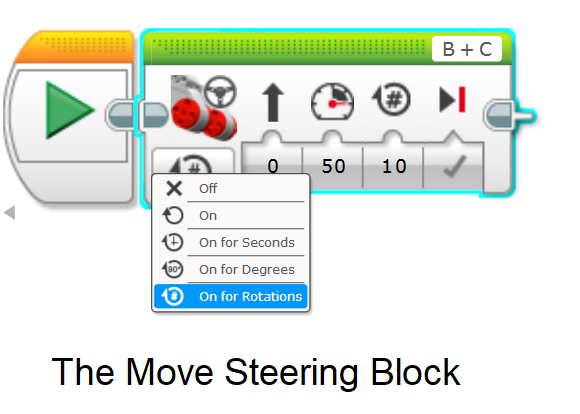
The settings you choose will depend on how you construct the Robot and what you want it to do.
Mode
Off -> Turn off the motor;
On -> Stay on until prog ends or tunned off by another block;
On For Rotation -> Move the motor determined number of turns;
On For Degrees -> Moves the motor determined number of degrees;
On For Seconds -> Move the motor determined number of seconds.
Steering
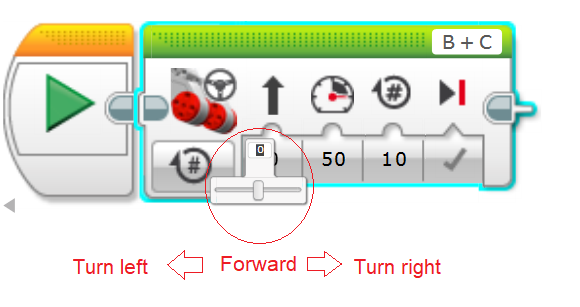
Slider tothemiddlethe robot move straight
Power
Positive value move the motor forward; negative, backward;
Applying 100the motor runs itas fast asit can :)
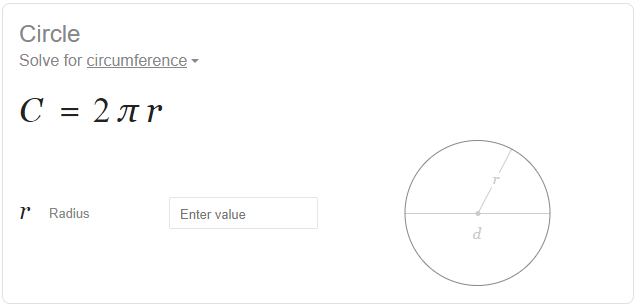
Duration
In order to know how much a spin is worth, solve for circumference or see this video =D
- Port Viewis a Big help :D it says how far each motor has moved;
- You can move motor by hand to determine the distance you want it to go;
- Values are resetto zero at the start;
- You can add Wait Block to make the program pause if you want tocheck the value at various steps.
Please see this video for my laboratory about the Move Steering Block: