7&type=text%2Fhtml&schema=youtube" allowfullscreen="" frameborder="0" height="480" width="854">
</div>
</div>
</figure></iframe></div></div></figure><p id="4645">The data is stored in a file named <b><i>File1</i></b>. The loop block is configured to <i>run</i> until the Motor B Rotation Sensor reads greater than one rotation, which will move the Tribot far enough to accumulate all the data we want (Fig.3).</p><p id="c7a3">Here is the resulting graphic:</p><figure id="e6bc"><img src="https://cdn-images-1.readmedium.com/v2/resize:fit:800/1*f-pSWfYQujDgHh54ioU0VQ.png"><figcaption><b>Fig 5.</b> Graph from <b>13_ReadingBlackLine_v1; </b>The symmetry is why we don’t try to make the Tribot follow the center of the line</figcaption></figure><p id="e280">The <i>two nice straight lines</i> formed by the readings as they change those 70 to 8 tells us that the reading is proportional to the distance from the edge, which is why we can use those readings as a reliable basis for the proportional line follower.</p><h2 id="e636">Reading At Runtime — Proportional Algorithm</h2><p id="7550">Now the last exercise: let’s collect data as Tribot gives an entire revolution on the track.</p><figure id="02d6"><img src="https://cdn-images-1.readmedium.com/v2/resize:fit:800/1*ObekiTeMkqtDq7Q3fxWlYw.gif"><figcaption><b>Fig 6.</b> Tribot around the circuit :D while we’re collecting data saving data<b> </b>to<b> File2</b></figcaption></figure><figure id="d34d"><img src="https://cdn-images-1.readmedium.com/v2/resize:fit:800/1*pHgZ4Ep8c4wOSLr7iY_AUg.png"><figcaption><b>Fig 7.</b> Code: <b>13_Proportional_Lap_Reading_v1</b></figcaption></figure><figure id="a247"><img src="https://cdn-images-1.readmedium.com/v2/resize:fit:800/1*EFXOIFBOLPXSc-giKA_31Q.png"><figcaption><b>Fig 8</b>. The graphical result from the code <b>13_Proportional_Lap_Reading_v1</b></figcaption></figure>
<figure id="89bc">
<div>
<div>
<img class="ratio" src="http://placehold.it/16x9">
<iframe class="" src="https://cdn.embedly.com/widgets/media.html?src=https%3A%2F%2Fwww.youtube.com%2Fembed%2Fgxx7ngrFerg%3Ffeature%3Doembed&url=http%3A%2F%2Fwww.youtube.com%2Fwatch%3Fv%3Dgxx7ngrFerg&image=https%3A%2F%2Fi.ytimg.com%2Fvi%2Fgxx7ngrFerg%2Fhqdefault.jpg&key=a19fcc184b9711e1b4764040d3dc5c07&type=text%2Fhtml&schema=youtube" allowfullscreen="" frameborder="0" height="480" width="854">
</div>
</div>
</figure></iframe></div></div></figure><p id="20de">Look at that! Wow! Yeap Tribot works hard; I could not even imagine this because the Tribot runs smoothly all the way, could you?</p><p id="8007">The error line (red) is the mirror of the sensor reading (orange); Motor B (gray) basically takes care of the outer (of the curve) wheel; Motor B is the one that works hard and it reacts proportionally to the recorded error (60%), while Motor C (black) only works hard at the most critical point of the curve (Fig.6); When the speed of the two motors is the same (well at the end of the lap), then its curves (Motors A & B) overlap (Fig. 8).</p><h2 id="4bea">When We Must (Not) Use Multitasking</h2><div id="b492"><pre>. <span class="hljs-keyword">Use</span> a second <span class="hljs-keyword">sequence</span> (treads) <span class="hljs-keyword">only</span> when it’s really necessary;</pre></div><div id="5744"><pre>. <span class="hljs-built_in">Edit</span> the program slowly;</pre></div><div id="d778"><pre>. Avoid trying <span class="hljs-keyword">to</span> control <span class="hljs-keyword">the</span> same motor <span class="hljs-keyword">or</span> sensor <span class="hljs-keyword">from</span> more than one treads;</pre></div><div id="f028"><pre>. Use Variables <span class="hljs-keyword">instead of</span> data wires <span class="hljs-keyword">to</span> pass information <span class="hljs-keyword">between</span> treads;</pre></div><div id="e010"><pre>. <span class="hljs-keyword">Be </span>specially careful with data wires that pass into <span class="hljs-keyword">or </span>out Loop <span class="hljs-keyword">blocks </span><span class="hljs-keyword">and </span><span class="hljs-keyword">Switch </span><span class="hljs-keyword">blocks;</span></pre></div><div id="7871"><pre>. Multiple <span class="hljs-keyword">sequences</span> are most appropriate <span class="hljs-keyword">when</span> the tasks they <span class="hljs-keyword">perform</span> are independent;</pre></div><p id="d61c">And that’s all folks!</p><p id="ad6d">Thanks for being here!</p><p id="b371">Until <b>PID </b>….but to get there in the next episode we’re gonna deal with normalization o/</p><p id="1372"><a href="https://drive.google.com/open?id=1B4uR19DPoO1Mw76D1lRhf1lMucKDaoqF">Download All Files For This Project</a></p><h1 id="a55f">Related Posts:</h1><p id="eed4">01º Lego Episode — <a href="https://readmedium.com/lego-our-startups-journey-2db83f9e92a4"><b>Our Startup’s Journey</b> </a>— Invaders and Invasions?</p><p id="da00">02º Lego Episode — <a href="https://readmedium.com/timmyton-lego-adventures-02-faae7d8c6fea"><b>Timmyton </b>— <b>Lego-Learning-By-Playing — L2BP Series</b></a></p><p id="b1d2">04º Lego Episode — <a href="https://readmedium.com/lego-motions-episode-04-41dff47e88
Options
34"><b>Lego Motions</b> — <b>Tribot v 1.0</b> — <b>Seeing Your Creation Move</b> </a>— Move Steering Block</p><p id="0d41">05º Lego Episode — <a href="https://readmedium.com/lego-motions-move-tribot-around-deb227946425"><b>Lego Motions </b>— <b>Move Tribot Around</b> </a>— And Backward…Five Programs Files</p><p id="98f9">06º Lego Episode — <a href="https://readmedium.com/lego-sensors-touch-n-color-edbe0f6642f"><b>Lego Sensors</b> — <b>Touch N Color</b></a> — Two out of five human senses — Touch N Sight</p><p id="3976">07º Lego Episode — <a href="https://readmedium.com/lego-sensor-color-5db4d42e0203"><b>Lego Sensor </b>— <b>LineFollower</b> </a>— Line Follower Tribot v1.0</p><p id="5939">08º Lego Episode — <a href="https://readmedium.com/maze-solving-tribot-v1-0-a29963f8742a"><b>Maze Solving Robot v1</b></a><b> </b>— Lego Solution Right-Wall-Follower-Robot</p><p id="b7c2">09° Lego Episode — <a href="https://readmedium.com/lego-gettle-sound-bots-5fb40f6d84df"><b>Gettle_&_Sound_Bots</b></a> — How gentle can a robot be? What is the audible range of the human ear? How deep can we dive?</p><p id="9a96">10° Lego Episode — <a href="https://readmedium.com/lego-data-logging-a2fd59dd7933"><b>Data Logging</b></a> — Data Collection and the EV3</p><p id="14df">11º Lego Episode — <a href="https://readmedium.com/lego-binning-the-linefollower-code-5562e059237e"><b>Binning the LineFollower Code </b></a>— Binning: Arithmetic To Map Sensor Reading</p><p id="2380">12º Lego Episode — <a href="https://readmedium.com/lego-a-proportional-linefollower-robot-d9a951debbef"><b>A Proportional LineFollower Robot </b></a>— Advanced Math To Improve Your Robot’s Steering</p><p id="c725">8th KidSeries — <a href="https://readmedium.com/j3-folower-line-robot-v1-0-7ad68256de83"><b>J3 Follower Line Robot v1.0</b></a> — The Simplest Follower Line Robot</p><p id="8ab6">13º LEGO Theory —<a href="https://readmedium.com/lego-theory-multitasking-2f060d2e3678"><b> Theory of Multitasking</b></a> — A very Useful Programming Technique</p><p id="3283">14º LEGO formula — <a href="https://readmedium.com/lego-formula-normalizing-data-66fefd9eb90e?postPublishedType=repub"><b>Normalizing Data</b></a> — Converting Data to Use The Same Range</p><p id="78f1">15º Lego Episode — <a href="https://readmedium.com/lego-pid-the-ultimate-line-follower-45d4e517572b"><b>PID — The Ultimate Line Follower </b></a>— Algorithm for your EV3 PID Line Follower Robot</p><p id="f341">16° <a href="https://readmedium.com/lego-meets-pixy-8f8ea7677114?postPublishedType=repub"><b>Lego Meets Pixy Episode</b></a> — How to Connect Your Inexpensive Camera Module to Lego</p><p id="870b">18° Lego Episode — <a href="https://readmedium.com/lego-gears-worms-bf8ef3280d0e"><b>GEARS & WORMS</b></a> — Geartrains & Worm & Clutch Gears</p><p id="456d">24° Lego Episode — <a href="https://readmedium.com/pitbot-a-star-is-born-e04a0f305fb6?source=post_page---------------------------"><b>PitBot — A Star Is Born </b></a>— Working at The First Structure in Our Sparring Robot</p><p id="b8b5">25° Lego Episode — <a href="https://readmedium.com/pitbot-is-agressive-well-no-worries-c801adba4b4c?source=post_page---------------------------"><b>PitBot Is Agressive? Well, No Worries! </b></a>— Making PitBot bite!</p><p id="b20d">26° Lego Episode — <a href="https://readmedium.com/dancing-good-w-pitbot-16b5ef035077"><b>Dancing Good w/ PitBot</b></a> — All The Secret for Replicate This Awesome Robot</p><p id="0fab">27 ° LEGO Episode — <a href="https://readmedium.com/lego-sumo-arena-is-ready-64a59e8bf987"><b>Sumo Arena is Ready! </b></a>— Here is the playing arena for Arduino x Lego</p><p id="7af7">28 ° LEGO Episode — <a href="https://readmedium.com/pick-pitbot-up-7dbfa4edc12e"><b>Pick Pitbot Up!</b></a> — Our Robot Are Leaving Body & Paint Shop</p><p id="328d">28 ° LEGO — B — Episode — <a href="https://readmedium.com/pitbot-battery-sensor-setup-4f572fedfe20"><b>Pitbot Battery & Sensor Setup</b></a> — Preparing The infrastructure for running Arduino code</p><p id="2be4">29 ° LEGO Episode — <a href="https://readmedium.com/bridging-all-sensors-together-pitbot-ca8803bf9cb"><b>Bridging All Sensors Together</b></a> — Pitbot — Collecting All Codes for the Final Act of Giving Behaviors to Robot</p><h1 id="546a">Credits & References</h1><p id="6376"><a href="https://g.co/kgs/6kLgmu">Book: The Art of Lego Mindstorms EV3 Programming by Terry Griffin</a></p><p id="cc47"><a href="https://youtu.be/tscYgpD3m7g">EV3 Large and NXT Motors — The Differences Explained</a></p><p id="1240"><a href="https://education.lego.com/en-au/support/mindstorms-ev3/building-instructions">Building Instructions & Program Descriptions</a></p><p id="7e3d"><a href="http://www.philohome.com/motors/motorcomp.htm">LEGO® 9V Technic Motors compared characteristics</a></p><p id="061a"><a href="https://robotics4children.blogspot.com/">Robotics for Children (& Parents (& Grandparents))</a></p><p id="87c2"><a href="https://le-www-live-s.legocdn.com/sc/media/lessons/mindstorms-ev3/building-instructions/ev3-rem-driving-base-79bebfc16bd491186ea9c9069842155e.pdf">Tribot v 1.0 .pdf File</a></p><p id="12c5"><a href="https://www.virtualroboticstoolkit.com/documentation/sections/9/articles/39">Introducing LEGO Digital Designer</a></p></article></body>
LEGO Theory — Multitasking
A very Useful Programming Technique — Episode #13
Using multiple sequences — treads — allows your program to perform more than one task simultaneously :) videos? click herenow!
In this post, we’re gonna explore some concepts related to the ways of how to use multiple sequences in our program: Multitasking!
Why should we be worriedabout multitasking?
In a competition, like FLL, instead of using fixed configuration for our robot, we could collect information from the track during the race and set the parameters at runtime.
Think about a line follower robot: Will track illumination influence the performance of our robot? Will the material that they made the track influence robot’s performance in the same way that does impact playing tennis on a hard, Grass or Clay Court?
Collecting data at runtime can be our competitive differential, and may represent a place on the podium! Who knows? Just get ready!
Are we counting 1, 2 and 3? Nope…instead, it is 1,3 and 2. Why is that?
The key issue resides in the fact that is the variable two, which is passed via data wire, that triggers the second treads. At that very moment, that is, after the three variable is presented on the screen, is that the two pops up.
The next alert is about loop: it must be finished first before variables can be passed by. In the program below, inside the loop, we are counting one through five and trying to display the digits on the screen. But in the end, just digit 4 appears on screen…Why is that occurs?
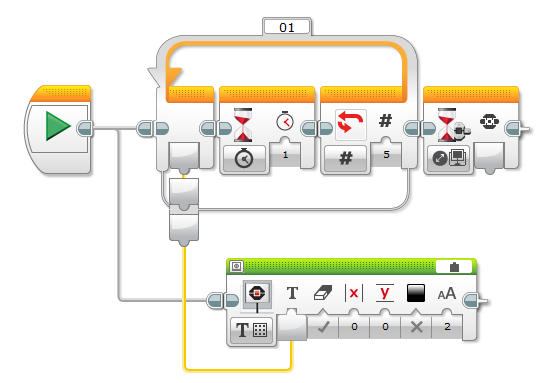
Fig 2. code: 13_Simple_Sequence_Synch_v1
The threads above are only initialized after the loop exits. And it comes out on index 4. Stay alert, okay?
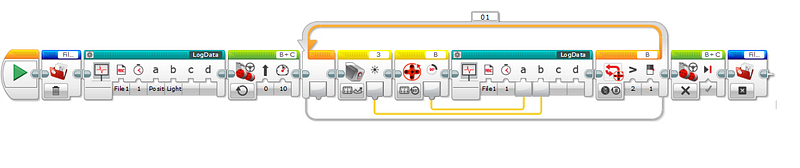
The next exercise is a simple way to data logging the sensor readings at various distances from the black line: 13_ReadingBlackLine_v1:
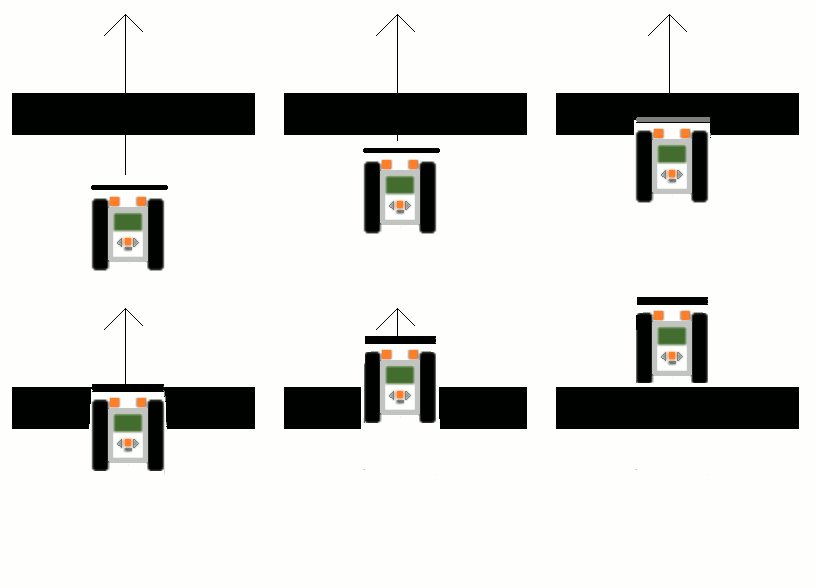
Fig 3. Tribot moves over the line and we collect the data to File1
Fig 4. Code: 13_ReadingBlackLine_v1; Reading black line program
The data is stored in a file named File1. The loop block is configured to run until the Motor B Rotation Sensor reads greater than one rotation, which will move the Tribot far enough to accumulate all the data we want (Fig.3).
Here is the resulting graphic:
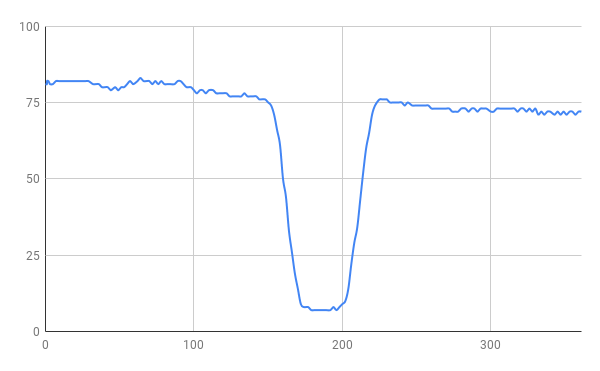
Fig 5. Graph from 13_ReadingBlackLine_v1; The symmetry is why we don’t try to make the Tribot follow the center of the line
The two nice straight lines formed by the readings as they change those 70 to 8 tells us that the reading is proportional to the distance from the edge, which is why we can use those readings as a reliable basis for the proportional line follower.
Reading At Runtime — Proportional Algorithm
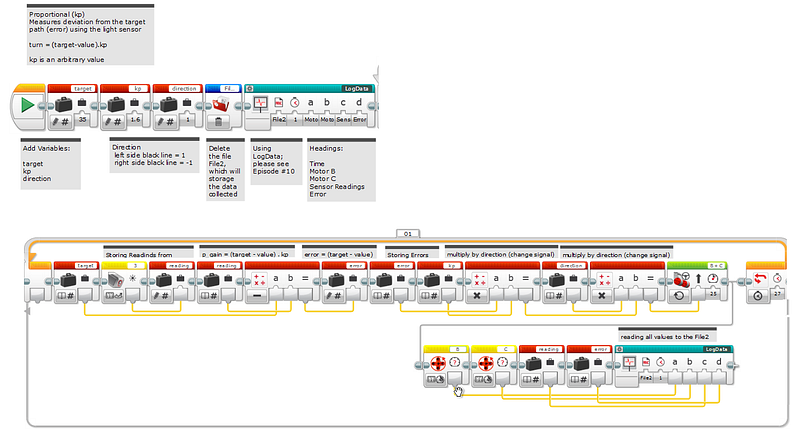
Now the last exercise: let’s collect data as Tribot gives an entire revolution on the track.

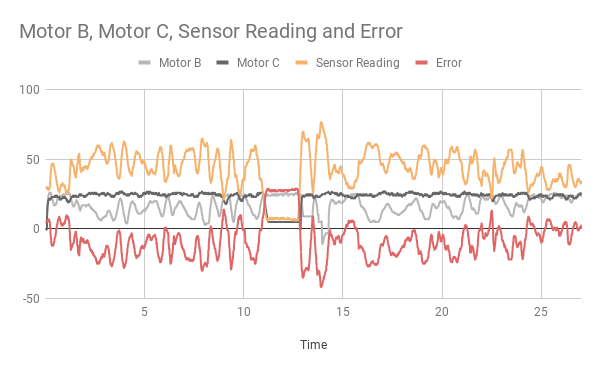
Fig 6. Tribot around the circuit :D while we’re collecting data saving datato File2Fig 7. Code: 13_Proportional_Lap_Reading_v1Fig 8. The graphical result from the code 13_Proportional_Lap_Reading_v1
Look at that! Wow! Yeap Tribot works hard; I could not even imagine this because the Tribot runs smoothly all the way, could you?
The error line (red) is the mirror of the sensor reading (orange); Motor B (gray) basically takes care of the outer (of the curve) wheel; Motor B is the one that works hard and it reacts proportionally to the recorded error (60%), while Motor C (black) only works hard at the most critical point of the curve (Fig.6); When the speed of the two motors is the same (well at the end of the lap), then its curves (Motors A & B) overlap (Fig. 8).
When We Must (Not) Use Multitasking
. Use a second sequence (treads) only when it’s really necessary;
. Edit the program slowly;
. Avoid trying to control the same motor or sensor from more than one treads;
. Use Variables instead of data wires to pass information between treads;
. Be specially careful with data wires that pass into or out Loop blocks and Switch blocks;
. Multiple sequences are most appropriate when the tasks they perform are independent;
And that’s all folks!
Thanks for being here!
Until PID ….but to get there in the next episode we’re gonna deal with normalization o/