<figure id="ef18">
<div>
<div>
<img class="ratio" src="http://placehold.it/16x9">
<iframe class="" src="https://cdn.embedly.com/widgets/media.html?src=https%3A%2F%2Fwww.youtube.com%2Fembed%2FD8Kf-MgM97I%3Ffeature%3Doembed&url=http%3A%2F%2Fwww.youtube.com%2Fwatch%3Fv%3DD8Kf-MgM97I&image=https%3A%2F%2Fi.ytimg.com%2Fvi%2FD8Kf-MgM97I%2Fhqdefault.jpg&key=a19fcc184b9711e1b4764040d3dc5c07&type=text%2Fhtml&schema=youtube" allowfullscreen="" frameborder="0" height="480" width="854">
</div>
</div>
</figure></iframe></div></div></figure><h2 id="5a19">Testing My Block</h2><p id="4a50">Now let’s use the SteeringTestData2 file to test my block DataLog:</p><figure id="2b8f"><img src="https://cdn-images-1.readmedium.com/v2/resize:fit:800/1*JSspS2gT-6f-HmY7S4sQSg.png"><figcaption></figcaption></figure><p id="83d1">This program will make the Tribot traces a spiral line similar to a snail shell. It is very interesting.</p>
<figure id="578d">
<div>
<div>
<img class="ratio" src="http://placehold.it/16x9">
<iframe class="" src="https://cdn.embedly.com/widgets/media.html?src=https%3A%2F%2Fwww.youtube.com%2Fembed%2FrIXWMkU3P6A%3Ffeature%3Doembed&url=http%3A%2F%2Fwww.youtube.com%2Fwatch%3Fv%3DrIXWMkU3P6A&image=https%3A%2F%2Fi.ytimg.com%2Fvi%2FrIXWMkU3P6A%2Fhqdefault.jpg&key=a19fcc184b9711e1b4764040d3dc5c07&type=text%2Fhtml&schema=youtube" allowfullscreen="" frameborder="0" height="480" width="854">
</div>
</div>
</figure></iframe></div></div></figure><p id="c003">While Motor B maintains the speed of 50, the Motor C will slow down the rotation until zeroing, then begins to turn backward. All this movement is recorded in the file SteeringTestData2 and the graphic below describes the movement.</p><p id="9160">Here is the resulting graph:(<a href="https://docs.google.com/spreadsheets/d/1HAJsQT0U_IEzeSizSLKVT9YokYcONA3lbj3umdzD_JY/edit?usp=sharing">https://docs.google.com/spreadsheets/d/1HAJsQT0U_IEzeSizSLKVT9YokYcONA3lbj3umdzD_JY/edit?usp=sharing</a>):</p><figure id="c9b1"><img src="https://cdn-images-1.readmedium.com/v2/resize:fit:800/1*7MhO3oR7Rc7_tS3-ykaonQ.png"><figcaption></figcaption></figure><p id="80ce">When the Steering parameter is 0, both motors have a Current Power reading of 50;</p><p id="823f">When the Steering parameter is 50, Current Power of the Motor C is 0, which means it’s not moving at all.</p><p id="9f06">When the Steering parameter at 100, Motor C has a Current Power of -50, so it moves just as fast as Motor B but in the opposite direction.</p><p id="9a95">A Steering parameter between 50 and 100 causes the robot to spins around.</p><h2 id="0ee8">brainstorming</h2><figure id="bc53"><img src="https://cdn-images-1.readmedium.com/v2/resize:fit:800/1*7bYBiVNMeXlb3r7Hj_mT3g.png"><figcaption></figcaption></figure><p id="8ab0">Imagine that you are the <b>Automation Solution Providers</b> (ASP) for the Fast Delivery Company above.</p><p id="7d95">The first information for your <b>data logger </b>will be the Time Receps of Gods and the Number of each Pallet; this is the timestamp in which each good is received in the warehouse (see below). Read an RFID tag that cames sticker on top of each pallet.</p><figure id="5c1f"><img src="https://cdn-images-1.readmedium.com/v2/resize:fit:800/1*EAA-n7rwzrxaPPFNpZoLRQ.png"><figcaption></figcaption></figure><p id="9566">Here is how your reading workflow:</p><figure id="5d7b"><img src="https://cdn-images-1.readmedium.com/v2/resize:fit:800/1*3SeA4HSiS8s7GUUbCaA-Tw.png"><figcaption></figcaption></figure><p id="9121">Realize that the forklift is smart too; it does the reading of the pallets that it carries. These data are retrieved to your data logging too.</p><p id="2c62">The Clerk who collects the goods for the boxes uses a portable device to read the RFID tags. This data will compose your <b>datalogger </b>as well:)</p><figure id="f2ef"><img src="https://cdn-images-1.readmedium.com/v2/resize:fit:800/1*SVYm0OuwlABOVI4J2oI4FA.png"><figcaption></figcaption></figure><p id="60a4">Ok you’ve got the idea, right? Now it’s up to you! Make your own <b>data</b> <b>recorder</b>!</p><p id="a365">That’s all for now, folks.</p><p id="513d">See you soon!</p><p id="8f9a">Bye o/</p><p id="335e"><a href="https://drive.google.com/open?id=1h9c4uY4YbSu1cNDssJEYkuOHCHFB4E4j">Download All The Files For This Project</a></p><h1 id="4f17">Related Posts:</h1><p id="eed4">01º Lego Episode — <a href="https://readmedium.com/lego-our-startups-journey-2db83f9e92a4"><b>Our Startup’s Journey</b> </a>— Invaders and Invasions?</p><p id="da00">02º Lego Episode — <a href="https://readmedium.com/timmyton-lego-adventures-02-faae7d8c6fea"><b>Timmyton </b>— <b>Lego-Learning-By-Playing — L2BP Series</b></a></p><p id="b1d2">04º Lego Episode — <a href="https://readmedium.com/lego-motions-episode-04-41dff47e8834"><b>Lego Motions</b> — <b>Tribot v 1.0</b> — <b>Seeing Your Creation Move</b> </a>— Move Steering Block</p><p id="0d41">05º Lego Episode — <a href="https://readmedium.com/lego-motions-move-tribot-around-deb227946425"><b>Lego Motions </b>— <b>Move Tribot Around</b> </a>— And Backward…Five Programs Files</p><p id="98f9">06º Lego Episode — <a href="https://readmedium.com/lego-
Options
sensors-touch-n-color-edbe0f6642f"><b>Lego Sensors</b> — <b>Touch N Color</b></a> — Two out of five human senses — Touch N Sight</p><p id="3976">07º Lego Episode — <a href="https://readmedium.com/lego-sensor-color-5db4d42e0203"><b>Lego Sensor </b>— <b>LineFollower</b> </a>— Line Follower Tribot v1.0</p><p id="5939">08º Lego Episode — <a href="https://readmedium.com/maze-solving-tribot-v1-0-a29963f8742a"><b>Maze Solving Robot v1</b></a><b> </b>— Lego Solution Right-Wall-Follower-Robot</p><p id="b7c2">09° Lego Episode — <a href="https://readmedium.com/lego-gettle-sound-bots-5fb40f6d84df"><b>Gettle_&_Sound_Bots</b></a> — How gentle can a robot be? What is the audible range of the human ear? How deep can we dive?</p><p id="9a96">10° Lego Episode —<a href="https://readmedium.com/lego-data-logging-a2fd59dd7933"> <b>Data Logging</b></a> — Data Collection and the EV3</p><p id="499e">11º Lego Episode — <a href="https://readmedium.com/lego-binning-the-linefollower-code-5562e059237e"><b>Binning the LineFollower Code </b></a>— Binning: Arithmetic To Map Sensor Reading</p><p id="aea1">12º Lego Episode — <a href="https://readmedium.com/lego-a-proportional-linefollower-robot-d9a951debbef"><b>A Proportional LineFollower Robot </b></a>— Advanced Math To Improve Your Robot’s Steering</p><p id="2ba7">13º LEGO Theory — <a href="https://readmedium.com/lego-theory-multitasking-2f060d2e3678"><b>Theory of Multitasking</b></a> — A very Useful Programming Technique</p><p id="5f37">14º LEGO formula — <a href="https://readmedium.com/lego-formula-normalizing-data-66fefd9eb90e?postPublishedType=repub"><b>Normalizing Data</b></a> — Converting Data to Use The Same Range</p><p id="e3f2">15º Lego Episode — <a href="https://readmedium.com/lego-pid-the-ultimate-line-follower-45d4e517572b"><b>PID — The Ultimate Line Follower </b></a>— Algorithm for your EV3 PID Line Follower Robot</p><p id="bfc7">16° <a href="https://readmedium.com/lego-meets-pixy-8f8ea7677114?postPublishedType=repub"><b>Lego Meets Pixy Episode</b></a> — How to Connect Your Inexpensive Camera Module to Lego</p><p id="b130">18° Lego Episode — <a href="https://readmedium.com/lego-gears-worms-bf8ef3280d0e"><b>GEARS & WORMS</b></a> — Geartrains & Worm & Clutch Gears</p><p id="d909">23° Lego Episode — <a href="https://readmedium.com/lego-differential-explained-12fa1865f3db"><b>Differential Explained</b></a><b> </b>— How Differential Works?</p><p id="84a7">24° Lego Episode — <a href="https://readmedium.com/pitbot-a-star-is-born-e04a0f305fb6?source=post_page---------------------------"><b>PitBot — A Star Is Born </b></a>— Working at The First Structure in Our Sparring Robot</p><p id="f924">25° Lego Episode — <a href="https://readmedium.com/pitbot-is-agressive-well-no-worries-c801adba4b4c?source=post_page---------------------------"><b>PitBot Is Agressive? Well, No Worries! </b></a>— Making PitBot bite!</p><p id="6396">26° Lego Episode — <a href="https://readmedium.com/dancing-good-w-pitbot-16b5ef035077"><b>Dancing Good w/ PitBot</b></a> — All The Secret for Replicate This Awesome Robot</p><p id="2733">27 ° LEGO Episode — <a href="https://readmedium.com/lego-sumo-arena-is-ready-64a59e8bf987"><b>Sumo Arena is Ready! </b></a>— Here is the playing arena for Arduino x Lego</p><p id="a4f8">28 ° LEGO Episode — <a href="https://readmedium.com/pick-pitbot-up-7dbfa4edc12e"><b>Pick Pitbot Up!</b></a> — Our Robot Are Leaving Body & Paint Shop</p><p id="8480">28 ° LEGO — B — Episode — <a href="https://readmedium.com/pitbot-battery-sensor-setup-4f572fedfe20"><b>Pitbot Battery & Sensor Setup</b></a> — Preparing The infrastructure for running Arduino code</p><p id="e9be">29 ° LEGO Episode — <a href="https://readmedium.com/bridging-all-sensors-together-pitbot-ca8803bf9cb"><b>Bridging All Sensors Together</b></a> — Pitbot — Collecting All Codes for the Final Act of Giving Behaviors to Robot</p><h1 id="546a">Credits & References</h1><p id="6376"><a href="https://g.co/kgs/6kLgmu">Book: The Art of Lego Mindstorms EV3 Programming by Terry Griffin</a></p><p id="cc47"><a href="https://youtu.be/tscYgpD3m7g">EV3 Large and NXT Motors — The Differences Explained</a></p><p id="1240"><a href="https://education.lego.com/en-au/support/mindstorms-ev3/building-instructions">Building Instructions & Program Descriptions</a></p><p id="7e3d"><a href="http://www.philohome.com/motors/motorcomp.htm">LEGO® 9V Technic Motors compared characteristics</a></p><p id="061a"><a href="https://robotics4children.blogspot.com/">Robotics for Children (& Parents (& Grandparents))</a></p><p id="87c2"><a href="https://le-www-live-s.legocdn.com/sc/media/lessons/mindstorms-ev3/building-instructions/ev3-rem-driving-base-79bebfc16bd491186ea9c9069842155e.pdf">Tribot v 1.0 .pdf File</a></p><p id="12c5"><a href="https://www.virtualroboticstoolkit.com/documentation/sections/9/articles/39">Introducing LEGO Digital Designer</a></p><blockquote id="f854"><p>A <b>data logger</b> (also <b>datalogger </b>or <b>data</b> <b>recorder</b>) is an electronic device that records <b>data</b> over time or in relation to location either with a built in instrument or sensor or via external instruments and sensors. Increasingly, but not entirely, they are based on a digital processor (or computer). <a href="https://en.wikipedia.org/wiki/Data_logger">Data logger — Wikipedia</a></p></blockquote></article></body>
Lego — Data Logging
Data Collection and the EV3 — Episode # 10
Data logging is the process of acquiring and recording data.
Collecting data by hand can be tedious and error-prone.
Let’s use the Lego computer to do this monotonous task for us; Be Welcome :)
Jump to videos? to see my Lego’s youtube playlist— click here;
Data Logging can help you learn the world around you by streaming and collecting sensory information about your surroundings :)
WithData Logging you can:
- create the data file;
- collecting sensor data;
- writing the data to the file with a timestamp;
- and even controlling the rate of the data collection...
And Here is the video:
Here is our LogBot v1 program!
Code
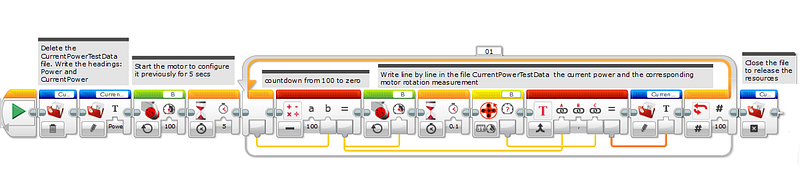
The Tribot rotates on its own axis and slows down its speed until it stops. The code takes 100 readings and stores the information in a file called CurrentPowerTestData; When opening the file use Tools> Memory Browserand rename the .rbt to .csv. So done open it in google spreadsheet.
Watch the video for more information, please;)
I tested the code with the Tribot on the table and suspended in the hand and see the difference in the graphs below:
Graph I
I lifted the robot so that the wheels would run without load:
Graph II
Now the robot rotates with load:
Results
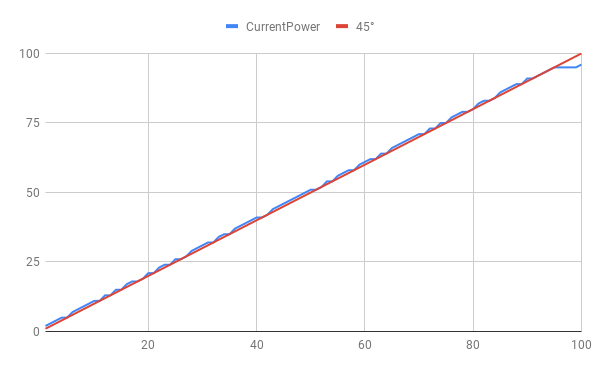
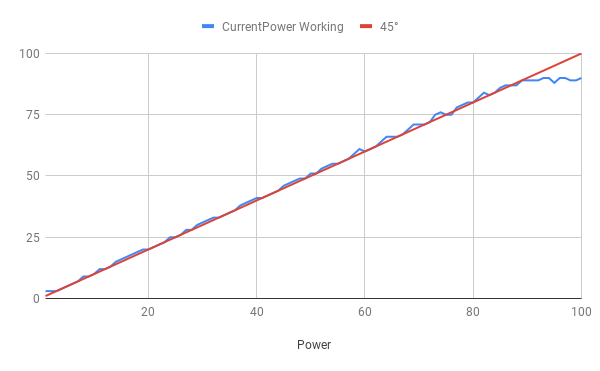
The blue line is the motor power. My battery is brand new.
As the battery goes unloading certainty the maximum values of rotation will be decreasing.
See that the motor (blue line) reacts almost linearly with the power demanding (red line).
For Graph I the max power is 96 (without load).
For Graph II the max power is 90 (with load).
Now you have a way of knowing if your plant is being efficient or not; what is the charge level of your battery? My mechanical designs are efficient? Is the gearbox releasing all the power of the motor?
Now you have a data log! Congratulations!
Keep reading for more information about data logging…
The LogBot v1 program uses a Text block to join the Power parameter and Current Power reading values in a file.
This method can quickly become cumbersome as the number of variables increases:/
To solve this problem we present version 2:
Meet LogBot_v2 in the format of My Block named LogData:

Correction in the video below: Do not forget the last data wire from Text Block to File Block. Oops sorry:/☝️☝️
LogData makes the process of displaying on the screen numbers in text format a breeze (up to 1 timestamp and 4 readings);
To learn how do My Block, watch this video:) ☝️ Correction in the video below: Do not forget the last data wire from Text Block to File Block☝️
Testing My Block
Now let’s use the SteeringTestData2 file to test my block DataLog:
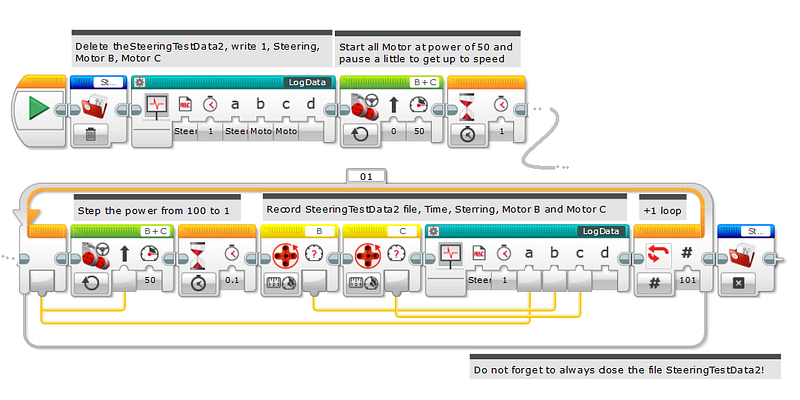
This program will make the Tribot traces a spiral line similar to a snail shell. It is very interesting.
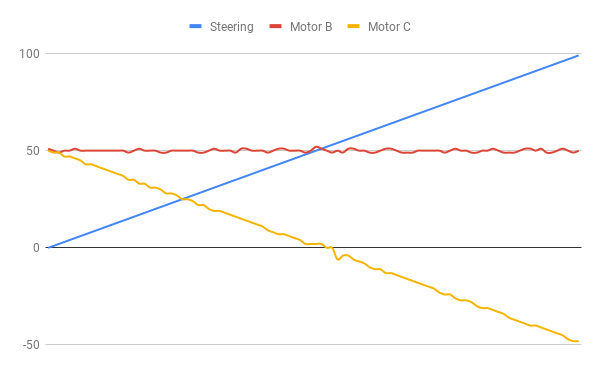
While Motor B maintains the speed of 50, the Motor C will slow down the rotation until zeroing, then begins to turn backward. All this movement is recorded in the file SteeringTestData2 and the graphic below describes the movement.
When the Steering parameter is 0, both motors have a Current Power reading of 50;
When the Steering parameter is 50, Current Power of the Motor C is 0, which means it’s not moving at all.
When the Steering parameter at 100, Motor C has a Current Power of -50, so it moves just as fast as Motor B but in the opposite direction.
A Steering parameter between 50 and 100 causes the robot to spins around.
brainstorming
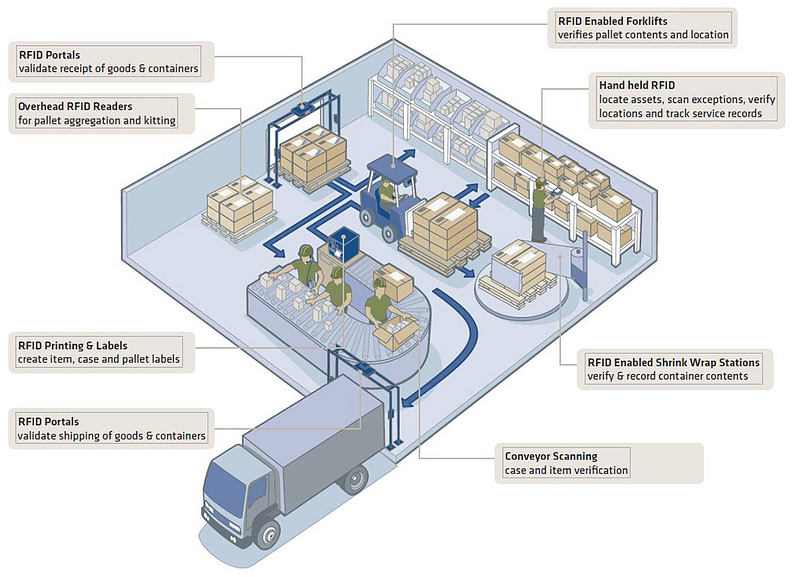
Imagine that you are the Automation Solution Providers (ASP) for the Fast Delivery Company above.
The first information for your data logger will be the Time Receps of Gods and the Number of each Pallet; this is the timestamp in which each good is received in the warehouse (see below). Read an RFID tag that cames sticker on top of each pallet.
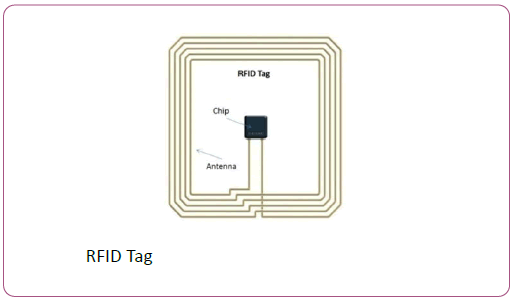
Here is how your reading workflow:
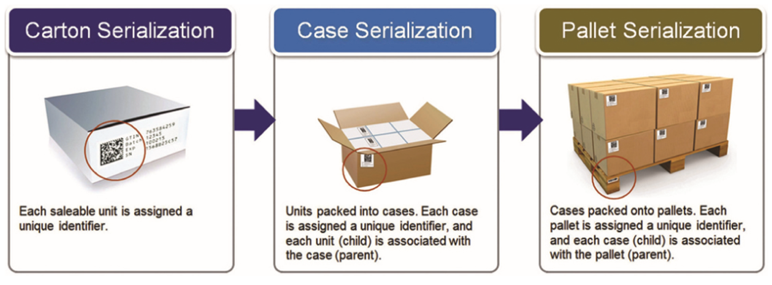
Realize that the forklift is smart too; it does the reading of the pallets that it carries. These data are retrieved to your data logging too.
The Clerk who collects the goods for the boxes uses a portable device to read the RFID tags. This data will compose your datalogger as well:)
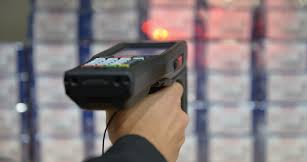
Ok you’ve got the idea, right? Now it’s up to you! Make your own datarecorder!
A data logger (also datalogger or datarecorder) is an electronic device that records data over time or in relation to location either with a built in instrument or sensor or via external instruments and sensors. Increasingly, but not entirely, they are based on a digital processor (or computer). Data logger — Wikipedia