ttps://drive.google.com/open?id=16Q2qBJEjLyuCygJS1D45mcCMDDXfsx_o">CODE </a>AND OPEN IT AT <a href="https://www.lego.com/en-sg/service/help-topics/bricks-and-sets/themes/mindstorms/download-ev3-software">LEGO® MINDSTORMS® EV3 Software</a></figcaption></figure>
<figure id="b178">
<div>
<div>
<img class="ratio" src="http://placehold.it/16x9">
<iframe class="" src="https://cdn.embedly.com/widgets/media.html?src=https%3A%2F%2Fwww.youtube.com%2Fembed%2FbaZXnMzwMBc%3Ffeature%3Doembed&url=http%3A%2F%2Fwww.youtube.com%2Fwatch%3Fv%3DbaZXnMzwMBc&image=https%3A%2F%2Fi.ytimg.com%2Fvi%2FbaZXnMzwMBc%2Fhqdefault.jpg&key=a19fcc184b9711e1b4764040d3dc5c07&type=text%2Fhtml&schema=youtube" allowfullscreen="" frameborder="0" height="480" width="854">
</div>
</div>
</figure></iframe></div></div></figure><p id="e864"><b>3°</b> Step</p><p id="1d55">Now, join the follower line, calibration, and data normalizer in one program with a custom <b>GUI</b>, saving the <b>min</b> and <b>max</b> values to a File named <b>File4</b> and retrieving them internally to calibrate the Tribot v1:</p><figure id="9886"><img src="https://cdn-images-1.readmedium.com/v2/resize:fit:800/1*1BAxbaYb0pmfFD-VY6pYBg.png"><figcaption><b>Fig 6. </b>Code <b>14_GUI_Cal_FollowerLine_v2; </b>PLEASE, DOWNLOAD THE <a href="https://drive.google.com/open?id=16Q2qBJEjLyuCygJS1D45mcCMDDXfsx_o">CODE </a>AND OPEN IT AT <a href="https://www.lego.com/en-sg/service/help-topics/bricks-and-sets/themes/mindstorms/download-ev3-software">LEGO® MINDSTORMS® EV3 Software</a></figcaption></figure><p id="8964">This <b>GUI</b>, follower line’s <b>Graphical User Interface</b>, allows the user to select one of the two operating modes (or more) within the same program. After selecting an operating mode, the user can exit and return to this menu screen to select a new operating mode.</p><figure id="ba1a"><img src="https://cdn-images-1.readmedium.com/v2/resize:fit:800/1*YltBKLmkzl53tqqJxrQTxA.gif"><figcaption><b>Fig 7.</b> Making <b>GUI </b>with <b>Tool > Image Editor</b></figcaption></figure><p id="3c00">A GUI has additional applications within the realm of LEGO robotics — many <b>First Lego League (FLL)</b> teams have decided to use custom GUI’s and/or program sequencers to make changing programs quicker and easier, saving precious time on the competition field.</p>
<figure id="0a19">
<div>
<div>
<img class="ratio" src="http://placehold.it/16x9">
<iframe class="" src="https://cdn.embedly.com/widgets/media.html?src=https%3A%2F%2Fwww.youtube.com%2Fembed%2FIFgEWESMK8g%3Ffeature%3Doembed&url=http%3A%2F%2Fwww.youtube.com%2Fwatch%3Fv%3DIFgEWESMK8g&image=https%3A%2F%2Fi.ytimg.com%2Fvi%2FIFgEWESMK8g%2Fhqdefault.jpg&key=a19fcc184b9711e1b4764040d3dc5c07&type=text%2Fhtml&schema=youtube" allowfullscreen="" frameborder="0" height="480" width="854">
</div>
</div>
</figure></iframe></div></div></figure><p id="1baf">And that’s all folks!</p><p id="e41a">For the next episode, we will use finally <b>PID </b>controller.</p><p id="3138">The ideas behind the Proportional-integral-derivative controller are about 100 years old and are used to control all kinds of mechanisms in everything from ship navigation and printers to musical instruments.</p><p id="a4fd">Bye!</p><p id="e62b"><a href="https://drive.google.com/open?id=16Q2qBJEjLyuCygJS1D45mcCMDDXfsx_o">Download All Files For This Project</a></p><h1 id="4b99">Related Posts:</h1><p id="ca95">01º Lego Episode — <a href="https://readmedium.com/lego-our-startups-journey-2db83f9e92a4"><b>Our Startup’s Journey</b> </a>— Invaders and Invasions?</p><p id="da00">02º Lego Episode — <a href="https://readmedium.com/timmyton-lego-adventures-02-faae7d8c6fea"><b>Timmyton </b>— <b>Lego-Learning-By-Playing — L2BP Series</b></a></p><p id="b1d2">04º Lego Episode — <a href="https://readmedium.com/lego-motions-episode-04-41dff47e8834"><b>Lego Motions</b> — <b>Tribot v 1.0</b> — <b>Seeing Your Creation Move</b> </a>— Move Steering Block</p><p id="0d41">05º Lego Episode — <a href="https://readmedium.com/lego-motions-move-tribot-around-deb227946425"><b>Lego Motions </b>— <b>Move Tribot Around</b> </a>— And Backward…Five Programs Files</p><p id="98f9">06º Lego Episode — <a href="https://readmedium.com/lego-sensors-touch-n-color-edbe0f6642f"><b>Lego Sensors</b> — <b>Touch N Color</b></a> — Two out of five human senses — Touch N Sight</p><p id="3976">07º Lego Episode — <a href="https://readmedium.com/lego-sensor-color-5db4d42e0203"><b>Lego Sensor </b>— <b>LineFollower</b> </a>— Line Follower Tribot v1.0</p><p id="5939">08º Lego Ep
Options
isode — <a href="https://readmedium.com/maze-solving-tribot-v1-0-a29963f8742a"><b>Maze Solving Robot v1</b></a><b> </b>— Lego Solution Right-Wall-Follower-Robot</p><p id="b7c2">09° Lego Episode — <a href="https://readmedium.com/lego-gettle-sound-bots-5fb40f6d84df"><b>Gettle_&_Sound_Bots</b></a> — How gentle can a robot be? What is the audible range of the human ear? How deep can we dive?</p><p id="9a96">10° Lego Episode — <a href="https://readmedium.com/lego-data-logging-a2fd59dd7933"><b>Data Logging</b></a> — Data Collection and the EV3</p><p id="14df">11º Lego Episode — <a href="https://readmedium.com/lego-binning-the-linefollower-code-5562e059237e"><b>Binning the LineFollower Code </b></a>— Binning: Arithmetic To Map Sensor Reading</p><p id="2380">12º Lego Episode — <a href="https://readmedium.com/lego-a-proportional-linefollower-robot-d9a951debbef"><b>A Proportional LineFollower Robot </b></a>— Advanced Math To Improve Your Robot’s Steering</p><p id="8b82">8th KidSeries — <a href="https://readmedium.com/j3-folower-line-robot-v1-0-7ad68256de83"><b>J3 Follower Line Robot v1.0</b></a> — The Simplest Follower Line Robot</p><p id="8ab6">13º LEGO Theory —<a href="https://readmedium.com/lego-theory-multitasking-2f060d2e3678"> <b>Multitasking </b></a>— A very Useful Programming Technique</p><p id="c586">14º LEGO formula —<a href="https://readmedium.com/lego-formula-normalizing-data-66fefd9eb90e?postPublishedType=repub"><b> Normalizing Data</b></a> — Converting Data to Use The Same Range</p><p id="9844">15º Lego Episode — <a href="https://readmedium.com/lego-pid-the-ultimate-line-follower-45d4e517572b"><b>PID — The Ultimate Line Follower </b></a>— Algorithm for your EV3 PID Line Follower Robot</p><p id="8e7e">16° <a href="https://readmedium.com/lego-meets-pixy-8f8ea7677114?postPublishedType=repub"><b>Lego Meets Pixy Episode</b></a> — How to Connect Your Inexpensive Camera Module to Lego</p><p id="ebd7">18° Lego Episode — <a href="https://readmedium.com/lego-gears-worms-bf8ef3280d0e"><b>GEARS & WORMS</b></a> — Geartrains & Worm & Clutch Gears</p><p id="d5bd">23° Lego Episode — <a href="https://readmedium.com/lego-differential-explained-12fa1865f3db"><b>Differential Explained</b></a><b> </b>— How Differential Works?</p><p id="328d">24° Lego Episode — <a href="https://readmedium.com/pitbot-a-star-is-born-e04a0f305fb6?source=post_page---------------------------"><b>PitBot — A Star Is Born </b></a>— Working at The First Structure in Our Sparring Robot</p><p id="bcda">25° Lego Episode — <a href="https://readmedium.com/pitbot-is-agressive-well-no-worries-c801adba4b4c?source=post_page---------------------------"><b>PitBot Is Agressive? Well, No Worries! </b></a>— Making PitBot bite!</p><p id="37e8">26° Lego Episode — <a href="https://readmedium.com/dancing-good-w-pitbot-16b5ef035077"><b>Dancing Good w/ PitBot</b></a> — All The Secret for Replicate This Awesome Robot</p><p id="c90b">27 ° LEGO Episode — <a href="https://readmedium.com/lego-sumo-arena-is-ready-64a59e8bf987"><b>Sumo Arena is Ready! </b></a>— Here is the playing arena for Arduino x Lego</p><p id="8b45">28 ° LEGO Episode — <a href="https://readmedium.com/pick-pitbot-up-7dbfa4edc12e"><b>Pick Pitbot Up!</b></a> — Our Robot Are Leaving Body & Paint Shop</p><p id="1ab4">28 ° LEGO — B — Episode — <a href="https://readmedium.com/pitbot-battery-sensor-setup-4f572fedfe20"><b>Pitbot Battery & Sensor Setup</b></a> — Preparing The infrastructure for running Arduino code</p><p id="f560">29 ° LEGO Episode — <a href="https://readmedium.com/bridging-all-sensors-together-pitbot-ca8803bf9cb"><b>Bridging All Sensors Together</b></a> — Pitbot — Collecting All Codes for the Final Act of Giving Behaviors to Robot</p><h1 id="546a">Credits & References</h1><p id="6376"><a href="https://g.co/kgs/6kLgmu">Book: The Art of Lego Mindstorms EV3 Programming by Terry Griffin</a></p><p id="cc47"><a href="https://youtu.be/tscYgpD3m7g">EV3 Large and NXT Motors — The Differences Explained</a></p><p id="1240"><a href="https://education.lego.com/en-au/support/mindstorms-ev3/building-instructions">Building Instructions & Program Descriptions</a></p><p id="7e3d"><a href="http://www.philohome.com/motors/motorcomp.htm">LEGO® 9V Technic Motors compared characteristics</a></p><p id="061a"><a href="https://robotics4children.blogspot.com/">Robotics for Children (& Parents (& Grandparents))</a></p><p id="87c2"><a href="https://le-www-live-s.legocdn.com/sc/media/lessons/mindstorms-ev3/building-instructions/ev3-rem-driving-base-79bebfc16bd491186ea9c9069842155e.pdf">Tribot v 1.0 .pdf File</a></p><p id="12c5"><a href="https://www.virtualroboticstoolkit.com/documentation/sections/9/articles/39">Introducing LEGO Digital Designer</a></p></article></body>
LEGO Formula — Normalizing Data
Converting Data to Use The Same Range — Episode #14
Did you hear about Normalization? No, Here’s the scoop: when you normalize a set of data, you map the original data range into another scale. videos? Click herenow!
I’m going to be showing you how to convert information read from the IR Sensor into normalized data set to turn your data into a percentage scale and make your line follower program adaptable to any track!
In the end, we implement a code that joins both the calibration and the navigation functionality using the EV3 programming environment’s built-in Image Editor to make the menu graphics — a follower line custom GUI.
Motivation
Let’s say I run the 13_BlackLineReading_v1code, from Episode #13, on my test line and get Min and Max values of 5 and 65, and let’s suppose that you run the same program on your line and get values of 15 and 55 with your own paraphernalia.
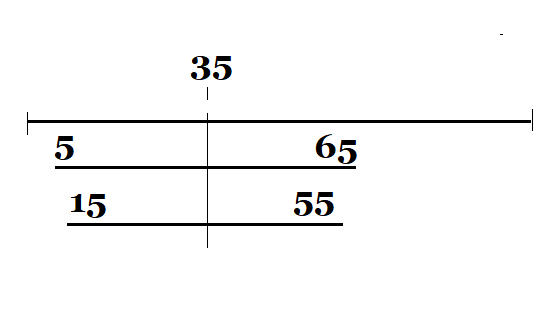
Fig 1. My measure and your measure
The midpoint of both sets of values is 35, but the program 12_Proportional_Controller_v1 really should react differently for each line because the range of values is different.
How to implement a code that works for both (or any) test tracks? or how to configure according to the maximum and minimum restraints?
The solution would be to turn all scales into a percentage and this is called normalizing for a percentage scale (in fact you can normalize to any scale).
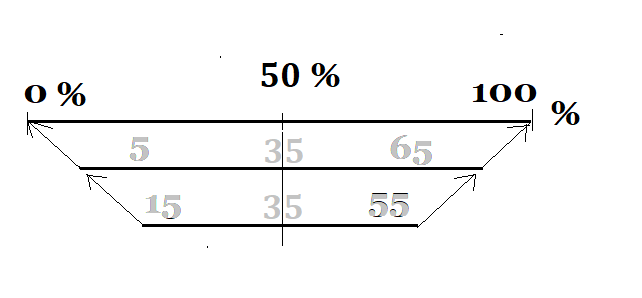
Fig 2. Transforming all scale in percentage; But how?
Let`s just create some intuition about normalization:
Suppose you are reading a sensor in the Arduino’s analog pin A1.
The analog-to-digital converter of ATMega328p (the chip that comes in the Arduino board) has a 10-bits resolution; this means that it can spit out values from 0 to 1023 (2¹⁰).
All you want is to put all values in percentage :).
So far so good!
To get the percentage scale you can do like this:
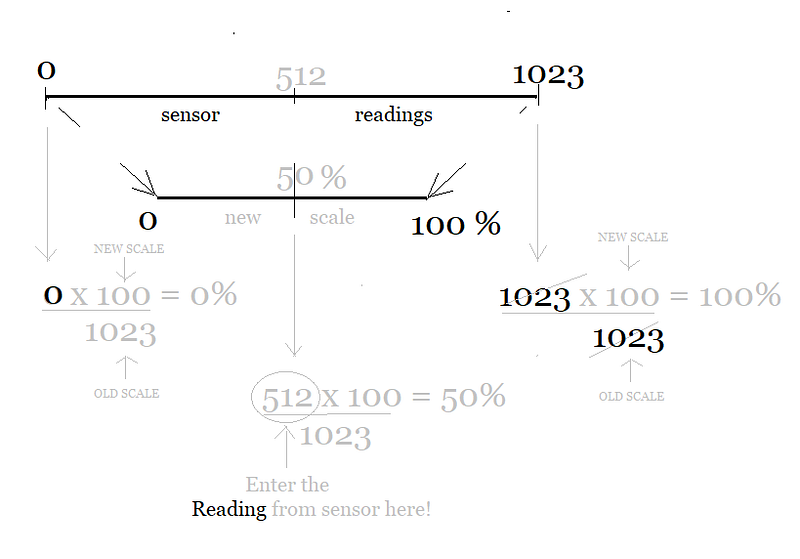
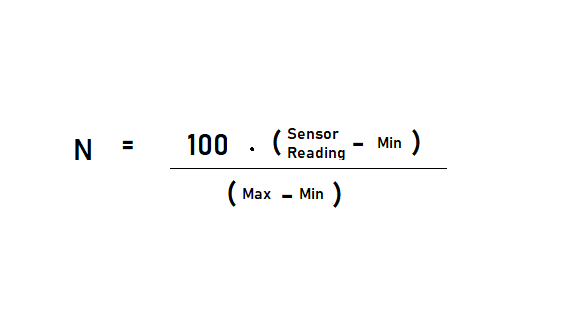
Fig 3. Transforming all the extremes to percentual value scale
From the calculation above, you can see that it is enough to divide the reading taken from the sensor by the original scale (removing so this scale from the result) and multiply the equation by the new max scale value (adopting this new scale).
Back to LEGO:)
The steps for normalizing a data set are described here.
1° Step
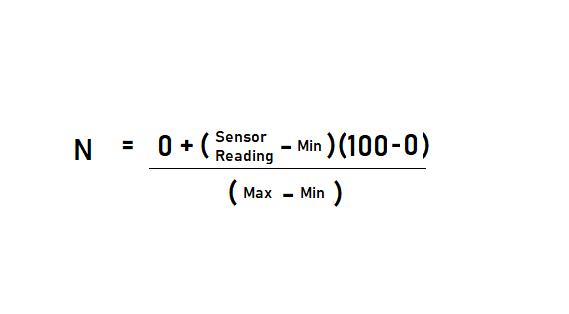
Calculate the normalized value of every number x in the original data set using this equation (scientific formula):
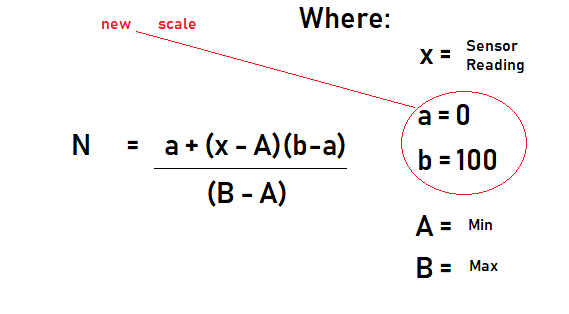
Fig 4. Simplified equation incorporated into the program below.
2° Step
Identify the Maximum andMinimum values numbers in the original data set and save them in the variables max and min, respectively, saving the data set to a file called File3.
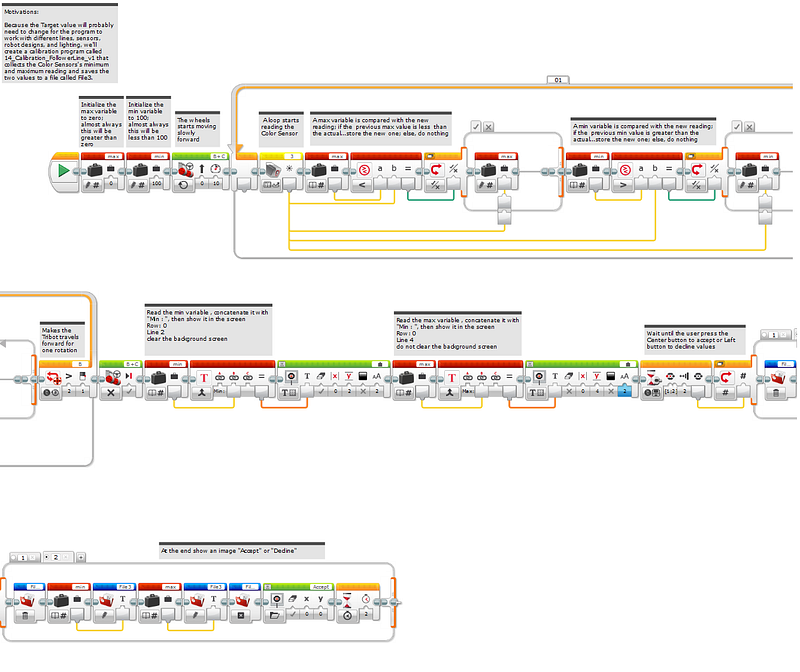
Fig 5. The code 14_Calibration_FollowerLine_v1 that collects the Color Sensors' minimum and maximum reading and saves the two values to a file called File3. PLEASE, DOWNLOAD THE CODE AND OPEN IT AT LEGO® MINDSTORMS® EV3 Software
3° Step
Now, join the follower line, calibration, and data normalizer in one program with a custom GUI, saving the min and max values to a File named File4 and retrieving them internally to calibrate the Tribot v1:
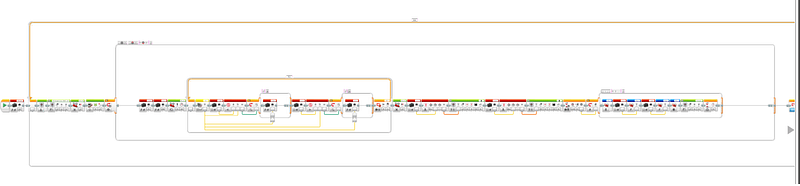
This GUI, follower line’s Graphical User Interface, allows the user to select one of the two operating modes (or more) within the same program. After selecting an operating mode, the user can exit and return to this menu screen to select a new operating mode.
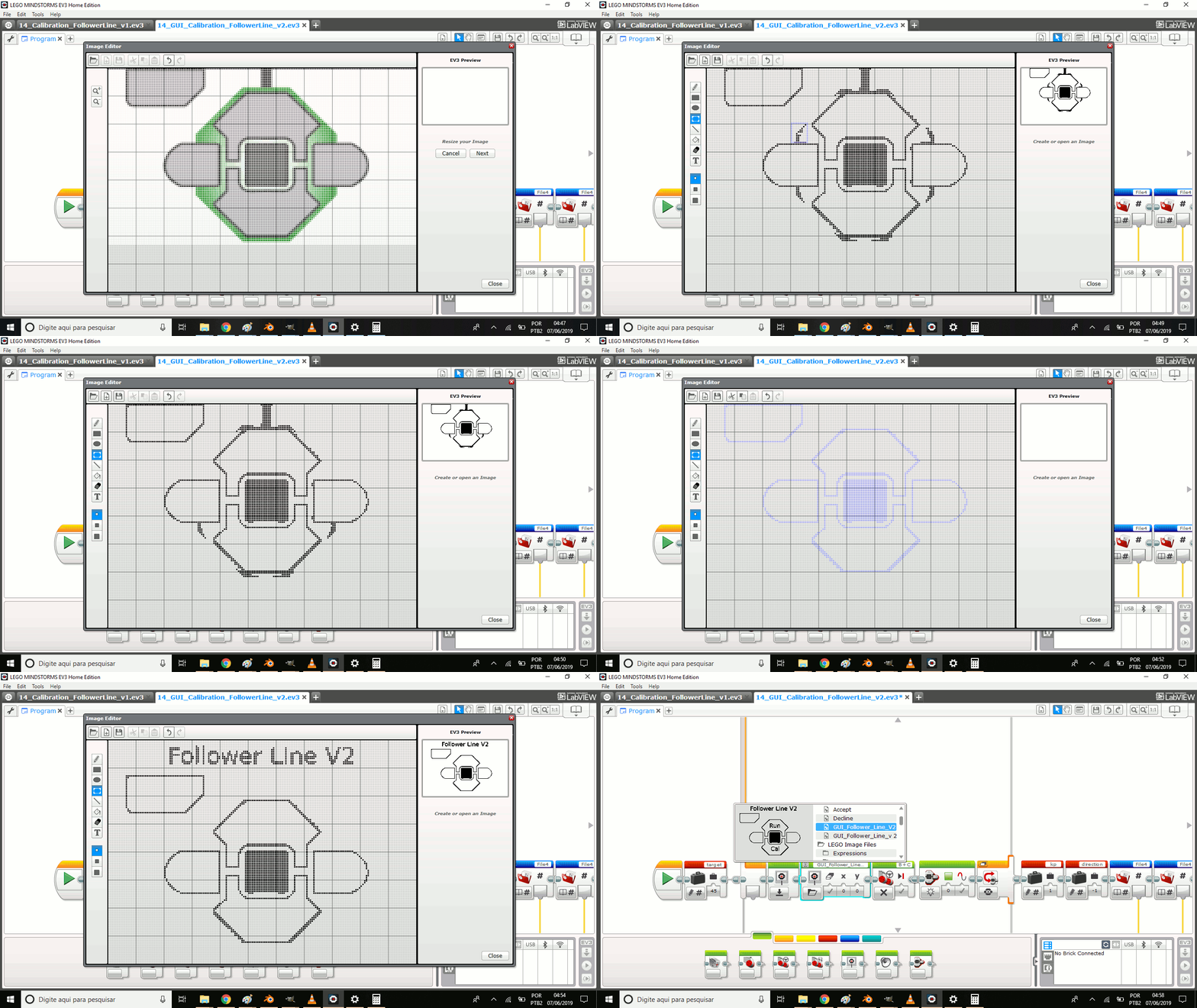
Fig 7. Making GUI with Tool > Image Editor
A GUI has additional applications within the realm of LEGO robotics — many First Lego League (FLL) teams have decided to use custom GUI’s and/or program sequencers to make changing programs quicker and easier, saving precious time on the competition field.
And that’s all folks!
For the next episode, we will use finally PID controller.
The ideas behind the Proportional-integral-derivative controller are about 100 years old and are used to control all kinds of mechanisms in everything from ship navigation and printers to musical instruments.