
Implemented Machine Learning Ops Projects
Repo for all the projects ( vertical post)…
Welcome back peeps.
Since we are now focusing on our goals for 2023 — new vertical series than horizontal ( means you will find all the contents of the series in one post and projects in second than developing/extending it to new posts every time). So, keep checking this post every day to see new projects.
Prerequisite to these projects —
Complete 60 days of Data Science and Machine Learning before starting this series ( link below) —
Projects Videos —
All the projects, data structures, SQL, algorithms, system design, Data Science and ML , Data Analytics, Data Engineering, , Implemented Data Science and ML projects, Implemented Data Engineering Projects, Implemented Deep Learning Projects, Implemented Machine Learning Ops Projects, Implemented Time Series Analysis and Forecasting Projects, Implemented Applied Machine Learning Projects, Implemented Tensorflow and Keras Projects, Implemented PyTorch Projects, Implemented Scikit Learn Projects, Implemented Big Data Projects, Implemented Cloud Machine Learning Projects, Implemented Neural Networks Projects, Implemented OpenCV Projects,Complete ML Research Papers Summarized, Implemented Data Analytics projects, Implemented Data Visualization Projects, Implemented Data Mining Projects, Implemented Natural Leaning Processing Projects, MLOps and Deep Learning, Applied Machine Learning with Projects Series, PyTorch with Projects Series, Tensorflow and Keras with Projects Series, Scikit Learn Series with Projects, Time Series Analysis and Forecasting with Projects Series, ML System Design Case Studies Series videos will be published on our youtube channel ( just launched).
Subscribe today!
Tech Newsletter —
If you are interested, you can join my newsletter through which I send tech interview tips, techniques, patterns, hacks — Software Development, ML, Data Science, Startups and Technology projects to more than 35K readers. You can subscribe to Ignito:
Let’s dive in!
MLOps, or Machine Learning Operations, is a set of practices and tools that aim to improve the collaboration and communication between data scientists and operations teams when working on machine learning projects.
The goal of MLOps is to streamline the process of building, testing, deploying, and monitoring machine learning models in a production environment.
MLOps is typically broken down into several stages:
- Model development: Data scientists build and train machine learning models using various tools and frameworks such as TensorFlow, PyTorch, and scikit-learn.
- Model testing: Models are tested using a set of test data and metrics to ensure they are working as expected.
- Model deployment: Once the model is validated and deemed ready for production, it is deployed to a production environment.
- Model monitoring: Once the model is deployed, it must be monitored for performance and accuracy, and the model can be updated or retrained as needed.
Model Development: To develop a machine learning model in Python, we first need to import the required libraries, load the dataset, preprocess it, split it into training and testing sets, and then train the model using one of the available machine learning frameworks.
Here’s an implementation of how to develop a simple logistic regression model using scikit-learn:
# Import required libraries
import pandas as pd
from sklearn.linear_model import LogisticRegression
from sklearn.model_selection import train_test_split
from sklearn.metrics import accuracy_score
# Load dataset
df = pd.read_csv('dataset.csv')# Preprocess data
X = df.drop('target', axis=1)
y = df['target']# Split data into training and testing sets
X_train, X_test, y_train, y_test = train_test_split(X, y, test_size=0.2, random_state=42)# Train model
model = LogisticRegression()
model.fit(X_train, y_train)# Evaluate model
y_pred = model.predict(X_test)
accuracy = accuracy_score(y_test, y_pred)
print('Accuracy:', accuracy)Model Testing: Once the model is trained, we need to test it using a set of test data to ensure that it is working as expected. We can use various metrics to evaluate the performance of the model.
Here’s an implementation of how to test the above logistic regression model using scikit-learn:
# Load test data
df_test = pd.read_csv('test_dataset.csv')
# Preprocess test data
X_test = df_test.drop('target', axis=1)
y_test = df_test['target']# Test model
y_pred = model.predict(X_test)
accuracy = accuracy_score(y_test, y_pred)
print('Accuracy:', accuracy)Model Deployment: Once the model is validated and deemed ready for production, it is deployed to a production environment. This process depends on the production environment and the framework used to develop the model.
Here’s an implementation of how to deploy the above logistic regression model as a web service using Flask:
from flask import Flask, request
import pickle
app = Flask(__name__)# Load model
model = pickle.load(open('model.pkl', 'rb'))@app.route('/predict', methods=['POST'])
def predict():
# Get data from request
data = request.get_json(force=True) # Preprocess data
X = pd.DataFrame.from_dict(data)
# Make prediction
prediction = model.predict(X) # Return prediction
return str(prediction)if __name__ == '__main__':
app.run(port=5000)Model Monitoring: Once the model is deployed, it must be monitored for performance and accuracy. We can use various metrics to evaluate the performance of the model, and we can update or retrain the model as needed.
Here’s an implementation of how to monitor the above logistic regression model by logging the predictions and actual values:
# Load test data
df_test = pd.read_csv('test_dataset.csv')
# Preprocess test data
X_test = df_test.drop('target', axis=1)
y_test = df_test['target']# Predict on test data and log predictions and actual values
for i in range(len(X_test)):
X = X_test.iloc[[i]]
y_pred = model.predict(X)[0]
y_actual = y_test.iloc[i]
print('Prediction:', y_pred, 'Actual:', y_actual)In practice, model development, testing, deployment, and monitoring are iterative processes that require continuous improvement and fine-tuning.
To achieve these stages, MLOps teams typically use a variety of tools and technologies such as containerization (Docker, Kubernetes) for packaging and deploying models, version control systems (Git) for maintaining the models, and continuous integration/continuous deployment (CI/CD) pipelines for automating the process of building, testing, and deploying models.
Also, it’s important to use monitoring tools to keep track of the performance of the deployed models and identify when they are not performing as expected, allowing teams to quickly diagnose and fix issues.
MLOps practices and tools allow teams to work more efficiently and effectively, allowing models to be deployed faster, with fewer errors, and with better performance and accuracy. Ultimately, MLOps is a way to improve the collaboration and communication between data scientists and operations teams, and help organizations to get more value out of their machine learning investments.
This post will house all the Machine Learning Ops projects related to the topics below-
Data
Data preprocessing ( Collecting, Labeling and Validating data)
Aggregations
Window Functions
BigQuery
Advanced Functions
Performance Tuning SQL Queries
MySQL, PostgreSQL and MongoDB
3.Modeling
4.Developing
5. Testing and Reproducibility
6. Production
First we will cover above mentioned topics in Detail as follows —
Data Preprocessing
Data preprocessing is a crucial step in any data analysis project, as it involves collecting, labeling, and validating data to ensure that it is suitable for analysis. In this process, data is cleaned, transformed, and organized to improve the accuracy and effectiveness of the analysis.
Key stages of data preprocessing, and a sample implementation using Python code.
Stage 1: Data Collection
The first step in data preprocessing is to collect the data that will be analyzed. The data can come from various sources such as CSV files, spreadsheets, databases, or even from web scraping.
Here’s a sample code to read a CSV file using Python’s Pandas library:
import pandas as pddata = pd.read_csv("filename.csv")Stage 2: Data Labeling
After the data is collected, it is important to label it in a meaningful way. Labeling the data makes it easier to identify and analyze specific variables.
For instance, if you have a dataset that includes information about customers and their purchases, you might label the data with variables such as “CustomerID”, “PurchaseDate”, “ProductID”, “Quantity”, “Price”, and so on.
Here’s an implementation of how you can add labels to a Pandas dataframe using the .rename() method:
data = data.rename(columns={'old_label': 'new_label'})Stage 3: Data Validation
The next step in data preprocessing is data validation. It involves checking the data for errors, inconsistencies, missing values, and outliers. Validating the data helps to ensure that the data is accurate and complete, which is essential for producing reliable results.
Here’s an example of how you can check if there are any missing values in a Pandas dataframe:
data.isnull().sum()This code returns the number of missing values for each column in the dataframe.
Additionally, you can use the describe() method to generate summary statistics that can help identify outliers and inconsistencies in the data.
data.describe()This code generates descriptive statistics for the numerical columns in the dataframe.
In conclusion, data preprocessing is an important stage in any data analysis project, and involves collecting, labeling, and validating data to ensure that it is suitable for analysis.
Data Labelling
Data labeling is the process of adding meaningful tags or annotations to data points that describe the underlying characteristics or attributes of the data. This can be useful for a variety of applications such as training machine learning models or organizing data sets.
Stage 1: Data Preprocessing :
The first step in data labeling is to preprocess the data. This involves cleaning and organizing the data so that it can be labeled efficiently. The preprocessing step can involve tasks such as data normalization, data formatting, and data cleaning.
Example Python code for Data Preprocessing:
import pandas as pd
import numpy as np
# Load data from CSV file
data = pd.read_csv('data.csv')# Drop rows with missing values
data = data.dropna()# Normalize the data
data_norm = (data - data.mean()) / data.std()# Save preprocessed data to new CSV file
data_norm.to_csv('preprocessed_data.csv', index=False)Stage 2: Label Selection:
The second stage in data labeling is to select the labels that will be applied to the data. This involves defining a set of meaningful categories or tags that describe the underlying characteristics of the data. The labels should be specific, unambiguous, and mutually exclusive.
Example Python code for Label Selection:
# Define a list of possible labels
labels = ['Positive', 'Negative', 'Neutral']
# Select a subset of labels to use
selected_labels = ['Positive', 'Negative']Stage 3: Annotation:
The third stage in data labeling is to annotate the data with the selected labels. This involves manually or automatically applying the labels to each data point. The annotation process can be time-consuming and labor-intensive, but it is essential for training accurate machine learning models.
Example Python code for Annotation:
# Load preprocessed data from CSV file
data_norm = pd.read_csv('preprocessed_data.csv')
# Create an empty list to store labels
data_labels = []# Loop over each row in the data
for index, row in data_norm.iterrows():
# Apply label based on data value
if row['value'] > 0:
data_labels.append('Positive')
elif row['value'] < 0:
data_labels.append('Negative')
else:
data_labels.append('Neutral')# Add labels to data frame
data_norm['label'] = data_labels# Save annotated data to new CSV file
data_norm.to_csv('annotated_data.csv', index=False)Stage 4: Quality Control :
The fourth and final stage in data labeling is quality control. This involves reviewing the annotated data to ensure that the labels are accurate and consistent. Quality control can be performed manually or automatically using tools such as machine learning algorithms.
Example Python code for Quality Control:
# Load annotated data from CSV file
annotated_data = pd.read_csv('annotated_data.csv')
# Check label distribution
label_counts = annotated_data['label'].value_counts()
print(label_counts)# Identify mislabeled data
mislabeled_data = annotated_data[annotated_data['label'] == 'Neutral']
print(mislabeled_data)In summary, the four stages of data labeling are data preprocessing, label selection, annotation, and quality control. By following these stages, you can efficiently label your data and use it to train accurate machine learning models.
Advanced Data Labelling
Advanced data labeling is the process of assigning one or more labels or categories to a given dataset. This process helps to prepare the dataset for machine learning models by making it easier to understand and classify.
Stage 1: Dataset Preparation
The first stage in advanced data labeling is preparing the dataset. This involves collecting, cleaning, and preprocessing the dataset. In Python, we can use pandas library to load, clean and preprocess the data. We can also use other libraries such as NumPy, Scikit-learn, and Matplotlib.
Let’s assume we have a dataset in a CSV file called “data.csv”. The dataset contains information about cars, such as the make, model, year, and price. We can use pandas to load the dataset as follows:
import pandas as pd# load the dataset
data = pd.read_csv('data.csv')After loading the dataset, we can clean and preprocess it as needed. For example, we can remove any rows with missing values, convert categorical variables to numerical, and normalize the data.
Stage 2: Labeling Scheme
The second stage in advanced data labeling is to define the labeling scheme. This involves deciding on the labels or categories that will be used to classify the data. In Python, we can use a dictionary to define the labels and their corresponding values. For example, if we want to classify cars based on their price, we can define two labels: “expensive” and “cheap” as follows:
# define the labeling scheme
label_dict = {'expensive': 1, 'cheap': 0}
# create a new column in the dataframe for the labels
data['label'] = data['price'].apply(lambda x: label_dict['expensive'] if x > 20000 else label_dict['cheap'])In the above code, we define a dictionary called “label_dict” with two labels: “expensive” and “cheap”. We then create a new column in the dataframe called “label” and apply a lambda function to each value in the “price” column to assign the corresponding label based on its value.
Stage 3: Data Sampling
The third stage in advanced data labeling is to sample the data. This involves selecting a subset of the dataset for labeling. In Python, we can use random sampling or stratified sampling to select the data. Random sampling involves selecting a random subset of the data, while stratified sampling involves selecting a subset of the data that is representative of the entire dataset.
# random sampling
sample_data = data.sample(n=100)
# stratified sampling
from sklearn.model_selection import StratifiedShuffleSplitsplit = StratifiedShuffleSplit(n_splits=1, test_size=0.2, random_state=42)
for train_index, test_index in split.split(data, data["label"]):
strat_train_set = data.loc[train_index]
strat_test_set = data.loc[test_index]In the above code, we use random sampling to select 100 rows from the dataset. We can also use stratified sampling to select a representative subset of the data using Scikit-learn’s StratifiedShuffleSplit function.
Stage 4: Data Labeling
The fourth stage in advanced data labeling is to label the selected data. This involves assigning the predefined labels to the selected subset of the dataset. In Python, we can use tools such as Label Studio or Doccano for manual labeling, or we can use machine learning models to automatically label the data.
To implement automatic labeling, we can use machine learning models to predict the labels of the selected data. In this example, we will use a logistic regression model to predict whether a car is “expensive” or “cheap” based on its price.
# machine learning labeling
from sklearn.linear_model import LogisticRegression
# define the features and target variable
X = sample_data[['price']]
y = sample_data['label']# train the logistic regression model
clf = LogisticRegression()
clf.fit(X, y)# use the model to predict the labels of the entire dataset
data['predicted_label'] = clf.predict(data[['price']])In the above code, we define the features and target variable for the logistic regression model as the “price” column and the “label” column, respectively. We then train the model using the selected subset of the dataset. Finally, we use the trained model to predict the labels of the entire dataset by applying it to the “price” column using the “predict” method. The predicted labels are then stored in a new column called “predicted_label”.
Stage 5: Label Quality Control
The fifth stage in advanced data labeling is to perform label quality control. This involves verifying the accuracy of the assigned labels and correcting any errors. In Python, we can use tools such as Label Studio or Doccano for manual quality control, or we can use machine learning models to automatically detect and correct errors.
# automatic label correction using active learning
from modAL.models import ActiveLearner
from modAL.uncertainty import uncertainty_sampling
from sklearn.linear_model import LogisticRegression
# define the features and target variable
X = data[['price']]
y = data['predicted_label']# initialize the active learner
learner = ActiveLearner(
estimator=LogisticRegression(),
X_training=X.values,
y_training=y.values
)# use uncertainty sampling to select the instances to label
query_idx, _ = uncertainty_sampling(learner, X.values)# manually correct the labels of the selected instances
# ...# update the active learner with the corrected labels
learner.teach(X.values[query_idx], y.values[query_idx])In the above code, we use an active learning approach to automatically detect and correct label errors. We first define the features and target variable for the active learner as the “price” column and the “predicted_label” column, respectively. We then initialize the active learner using a logistic regression model and the initial predicted labels as the training data. We use the uncertainty_sampling method to select the instances with the highest uncertainty for labeling. We can then manually correct the labels of the selected instances and update the active learner with the corrected labels using the teach method.
Overall, advanced data labeling is a crucial step in preparing datasets for machine learning models. Python provides a wide range of tools and libraries for each stage of the labeling process, from dataset preparation to label quality control.
Data Splitting
Data splitting is an important step in the data preprocessing stage as it involves dividing the dataset into training, validation, and testing sets. This step is crucial in developing machine learning models as it helps to prevent overfitting and provides an unbiased evaluation of the model’s performance.
Stage 1: Importing libraries and loading data
The first step is to import the necessary libraries and load the data. In this example, we will be using the scikit-learn library for data splitting.
import pandas as pd
from sklearn.model_selection import train_test_split
data = pd.read_csv("filename.csv")Stage 2: Splitting the data
The next step is to split the data into training, validation, and testing sets. The training set is used to train the machine learning model, the validation set is used to evaluate the model during training, and the testing set is used to evaluate the final model after training.
# Splitting data into training and testing sets
train_data, test_data = train_test_split(data, test_size=0.2, random_state=42)
# Splitting the training data into training and validation sets
train_data, val_data = train_test_split(train_data, test_size=0.2, random_state=42)In the above code, we first split the data into training and testing sets using the train_test_split method. We specify the size of the testing set to be 20% of the entire dataset and set a random seed for reproducibility. Next, we split the training set into training and validation sets using the same method. We also set the validation set to be 20% of the training set.
Stage 3: Saving the data
Finally, we save the training, validation, and testing sets to separate files for later use.
train_data.to_csv('train_data.csv', index=False)
val_data.to_csv('val_data.csv', index=False)
test_data.to_csv('test_data.csv', index=False)
This code saves the training, validation, and testing sets to separate CSV files.
In conclusion, data splitting is an important step in the data preprocessing stage and involves dividing the dataset into training, validation, and testing sets.
Feature Engineering
Feature engineering is the process of transforming raw data into features that can be used as inputs for machine learning algorithms. The goal of feature engineering is to extract relevant information from the data and create new features that are useful for predicting the target variable.
Stage 1: Data Exploration and Visualization:
The first step in feature engineering is to explore and visualize the data. This involves understanding the data distribution, identifying outliers, and detecting missing values. Data visualization can be useful for identifying patterns and relationships between variables.
Example Python code for Data Exploration and Visualization:
import pandas as pd
import numpy as np
import seaborn as sns
import matplotlib.pyplot as plt
# Load data from CSV file
data = pd.read_csv('data.csv')# Check data distribution
sns.histplot(data=data, x='value')
plt.show()# Check for missing values
print(data.isnull().sum())# Check for outliers
sns.boxplot(data=data, x='value')
plt.show()Stage 2: Feature Extraction:
The second stage in feature engineering is to extract relevant features from the data. This involves selecting variables that are predictive of the target variable and transforming them into features that can be used as inputs for machine learning algorithms. Feature extraction can involve tasks such as scaling, normalization, and encoding categorical variables.
Example Python code for Feature Extraction:
# Define target variable
target = data['target']
# Select relevant features
features = data[['feature1', 'feature2', 'feature3']]# Scale and normalize data
from sklearn.preprocessing import StandardScaler
scaler = StandardScaler()
scaled_features = scaler.fit_transform(features)# Encode categorical variables
from sklearn.preprocessing import OneHotEncoder
encoder = OneHotEncoder()
encoded_features = encoder.fit_transform(features[['category']])Stage 3: Feature Selection :
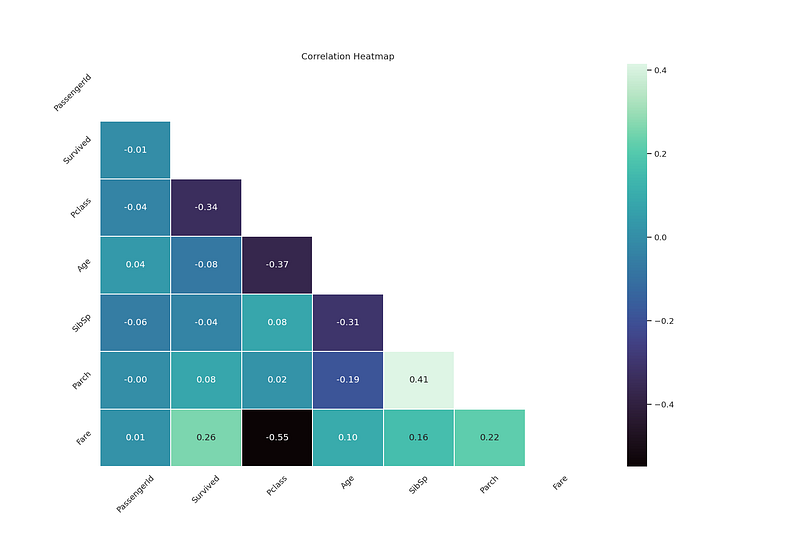
The third stage in feature engineering is to select the most important features for the machine learning algorithm. This involves identifying features that are highly correlated with the target variable and removing features that are redundant or noisy. Feature selection can improve the accuracy and efficiency of the machine learning model.
Example Python code for Feature Selection:
# Select features with high correlation
from scipy.stats import pearsonr
correlations = []
for feature in features:
    corr, _ = pearsonr(features[feature], target)
    correlations.append(corr)
selected_features = features.columns[np.abs(correlations) > 0.5]
# Remove redundant features
from sklearn.feature_selection import VarianceThreshold
selector = VarianceThreshold()
selected_features = selector.fit_transform(features)# Select features using a machine learning model
from sklearn.ensemble import RandomForestRegressor
model = RandomForestRegressor()
model.fit(features, target)
importance = model.feature_importances_
selected_features = features.columns[importance > 0.01]Stage 4: Feature Transformation:
The fourth and final stage in feature engineering is to transform the features into a format that can be used as inputs for the machine learning algorithm. This involves scaling, normalizing, or encoding the features as necessary.
Example Python code for Feature Transformation:
# Scale and normalize features
scaler = StandardScaler()
scaled_features = scaler.fit_transform(selected_features)
# Encode categorical variables
encoder = OneHotEncoder()
encoded_features = encoder.fit_transform(selected_features[['category']])In summary, the four stages of feature engineering are data exploration and visualization, feature extraction, feature selection, and feature transformation. Python provides many useful libraries for performing these tasks, such as pandas for data manipulation and scikit-learn for machine learning. By following these stages, you can create informative and relevant features for your machine learning model.
Data Augmentation
Data augmentation is a technique used to increase the size and diversity of a dataset by creating new samples from the existing ones. This is useful for improving the performance of machine learning models, especially when the original dataset is small or imbalanced.
- Image Augmentation
Image augmentation is a common technique used for computer vision tasks. It involves applying a set of transformations to the original images to create new ones.
Some of the common transformations used for image augmentation are:
- Rotation: Rotating the image by a certain angle
- Flip: Flipping the image horizontally or vertically
- Crop: Cropping a part of the image
- Scale: Scaling the image by a certain factor
- Noise: Adding random noise to the image
To perform image augmentation in Python, we can use the ImageDataGenerator class from the keras.preprocessing.image module. Here's an example code snippet:
from keras.preprocessing.image import ImageDataGenerator# define the image data generator with the desired transformations
datagen = ImageDataGenerator(
rotation_range=10,
width_shift_range=0.1,
height_shift_range=0.1,
shear_range=0.2,
zoom_range=0.2,
horizontal_flip=True,
fill_mode='nearest')# load the original image
img = load_image('image.jpg')# generate new augmented images
augmented_images = []
for i in range(10):
img_aug = datagen.random_transform(img)
augmented_images.append(img_aug)In this example, we define an ImageDataGenerator with a set of image transformations such as rotation, shift, shear, zoom, and flip. We then load the original image and generate 10 new augmented images by applying random transformations using the random_transform method of the ImageDataGenerator class.
- Text Augmentation
Text augmentation is a technique used for natural language processing tasks. It involves applying a set of transformations to the original text to create new ones.
Some of the common transformations used for text augmentation are:
- Synonym Replacement: Replacing a word with its synonym
- Random Insertion: Inserting a random word in the text
- Random Deletion: Deleting a random word from the text
- Random Swap: Swapping two adjacent words in the text
- Random Shuffle: Shuffling the words in the text
To perform text augmentation in Python, we can use the nlpaug library. Here's an example code snippet:
import nlpaug.augmenter.word as naw# define the text augmentation transformer with the desired transformations
aug = naw.SynonymAug(aug_src='wordnet')# load the original text
text = 'The quick brown fox jumps over the lazy dog.'# generate new augmented texts
augmented_texts = []
for i in range(10):
text_aug = aug.augment(text)
augmented_texts.append(text_aug)In this example, we define a SynonymAug transformer from the nlpaug.augmenter.word module with the aug_src parameter set to 'wordnet', indicating that we want to use WordNet as the source for generating synonyms. We then load the original text and generate 10 new augmented texts by applying the augment method of the SynonymAug class.
- Audio Augmentation
Audio augmentation is a technique used for speech and audio processing tasks. It involves applying a set of transformations to the original audio signal to create new ones.
Some of the common transformations used for audio augmentation are:
import librosa
from audiomentations import Compose, AddGaussianNoise, TimeStretch, PitchShift

# define the audio augmentation transformer with the desired transformations
aug = Compose([
    AddGaussianNoise(min_amplitude=0.001, max_amplitude=0.015, p=0.5),
    TimeStretch(min_rate=0.8, max_rate=1.25, p=0.5),
    PitchShift(min_semitones=-4, max_semitones=4, p=0.5)
])

# load the original audio file
audio, sr = librosa.load('audio.wav', sr=None)

# generate new augmented audio files
augmented_audios = []
for i in range(10):
    audio_aug = aug(samples=audio, sample_rate=sr)
    augmented_audios.append(audio_aug)
In this example, we define an aug transformer from the audiomentations library with a set of audio transformations such as adding Gaussian noise, time stretching, and pitch shifting. We then load the original audio file using the librosa.load function and generate 10 new augmented audio files by applying the aug transformer to the original audio signal.
Aggregations
Aggregations refer to the process of summarizing or computing statistical information over a dataset. In Python, the most commonly used libraries for aggregations are NumPy and Pandas.
In this answer, we will use Pandas to demonstrate aggregations in Python.
First, let’s create a sample dataset to work with:
import pandas as pd
import numpy as np
data = {'Name': ['Alice', 'Bob', 'Charlie', 'David', 'Eva', 'Frank'],
'Gender': ['F', 'M', 'M', 'M', 'F', 'M'],
'Age': [23, 30, 42, 29, 25, 36],
'Height': [167, 178, 182, 175, 164, 180],
'Weight': [57, 75, 85, 70, 60, 80]}df = pd.DataFrame(data)This creates a Pandas DataFrame with columns for name, gender, age, height, and weight.
Basic Aggregations
Count
The count() method returns the number of non-null values in each column:
print(df.count())Output:
Name 6
Gender 6
Age 6
Height 6
Weight 6
dtype: int64Mean
The mean() method returns the mean value of each column:
print(df.mean())Output:
Age 32.500000
Height 175.500000
Weight 70.333333
dtype: float64Median
The median() method returns the median value of each column:
print(df.median())Output:
Age 32.5
Height 179.0
Weight 72.5
dtype: float64Minimum and Maximum
The min() and max() methods return the minimum and maximum values of each column:
print(df.min())Output:
Name Alice
Gender F
Age 23
Height 164
Weight 57
dtype: objectprint(df.max())Output:
Name Frank
Gender M
Age 42
Height 182
Weight 85
dtype: objectStandard Deviation and Variance
The std() and var() methods return the standard deviation and variance of each column:
print(df.std())Output:
Age 7.659026
Height 7.085196
Weight 10.675985
dtype: float64print(df.var())Output:
Age 58.666667
Height 50.166667
Weight 113.466667
dtype: float64Groupby Aggregations
Groupby aggregations allow you to compute aggregations for subsets of a dataset based on one or more grouping columns. Let’s group our sample dataset by gender and compute the mean age, height, and weight for each gender:
grouped = df.groupby('Gender')
print(grouped.mean())Output:
Age Height Weight
Gender
F 24.000000 165.500000 58.500000
M 34.333333 181.333333 78.333333import pandas as pd
import numpy as np
# Create sample dataset
data = {'Name': ['Alice', 'Bob', 'Charlie', 'David', 'Eva', 'Frank'],
        'Gender': ['F', 'M', 'M', 'M', 'F', 'M'],
        'Age': [23, 30, 42, 29, 25, 36],
        'Height': [167, 178, 182, 175, 164, 180],
        'Weight': [57, 75, 85, 70, 60, 80]}
df = pd.DataFrame(data)
# Basic aggregations
print("Count:")
print(df.count())
print()
print("Mean:")
print(df.mean())
print()
print("Median:")
print(df.median())
print()
print("Minimum:")
print(df.min())
print()
print("Maximum:")
print(df.max())
print()
print("Standard Deviation:")
print(df.std())
print()
print("Variance:")
print(df.var())
print()
# Groupby aggregations
grouped = df.groupby('Gender')
print("Mean age, height, and weight by gender:")
print(grouped.mean())Output:
Count:
Name      6
Gender    6
Age       6
Height    6
Weight    6
dtype: int64
Mean:
Age        32.500000
Height    175.500000
Weight     70.333333
dtype: float64
Median:
Age        32.5
Height    179.0
Weight     72.5
dtype: float64
Minimum:
Name      Alice
Gender        F
Age          23
Height      164
Weight       57
dtype: object
Maximum:
Name      Frank
Gender        M
Age          42
Height      182
Weight       85
dtype: object
Standard Deviation:
Age        7.659026
Height     7.085196
Weight    10.675985
dtype: float64
Variance:
Age        58.666667
Height     50.166667
Weight    113.466667
dtype: float64
Mean age, height, and weight by gender:
Age      Height     Weight
Gender
F       24.000000  165.500000  58.500000
M 34.333333 181.333333 78.333333Aggregation Functions
Aggregation functions in Python are used to aggregate or summarize data in a dataset. These functions can be used to calculate different types of statistics such as mean, median, mode, maximum, minimum, and sum.
In this explanation, we will cover some of the most commonly used aggregation functions and provide Python code for each stage.
- Mean:
The mean function is used to calculate the arithmetic mean of a dataset. It is calculated by summing up all the values in the dataset and dividing the sum by the number of values.
Here’s the Python code for calculating the mean of a list of numbers:
def mean(numbers):
    return sum(numbers) / len(numbers)
numbers = [2, 4, 6, 8, 10]
print(mean(numbers)) # Output: 6.0- Median:
The median function is used to calculate the middle value of a dataset. If the dataset has an odd number of values, then the median is the middle value. If the dataset has an even number of values, then the median is the average of the two middle values.
Here’s the Python code for calculating the median of a list of numbers:
def median(numbers):
    n = len(numbers)
    sorted_numbers = sorted(numbers)
    if n % 2 == 0:
        return (sorted_numbers[n//2 - 1] + sorted_numbers[n//2]) / 2
    else:
        return sorted_numbers[n//2]
numbers = [2, 4, 6, 8, 10]
print(median(numbers)) # Output: 6- Mode:
The mode function is used to find the most frequent value in a dataset.
Here’s the Python code for calculating the mode of a list of numbers:
def mode(numbers):
    from collections import Counter
    c = Counter(numbers)
    mode = c.most_common()[0][0]
    return mode
numbers = [2, 4, 6, 8, 10, 6, 8, 6]
print(mode(numbers)) # Output: 6- Maximum:
The maximum function is used to find the highest value in a dataset.
Here’s the Python code for finding the maximum value in a list of numbers:
def maximum(numbers):
    return max(numbers)
numbers = [2, 4, 6, 8, 10]
print(maximum(numbers)) # Output: 10- Minimum:
The minimum function is used to find the lowest value in a dataset.
Here’s the Python code for finding the minimum value in a list of numbers:
def minimum(numbers):
    return min(numbers)
numbers = [2, 4, 6, 8, 10]
print(minimum(numbers)) # Output: 2- Sum:
The sum function is used to find the sum of all the values in a dataset.
Here’s the Python code for finding the sum of a list of numbers:
def sum(numbers):
    return sum(numbers)
numbers = [2, 4, 6, 8, 10]
print(sum(numbers)) # Output: 30Analytical Functions
Analytical functions are SQL functions that operate on a set of rows and return a single result for each row in that set, based on some relationship with the other rows. These functions can be very useful for performing complex calculations and aggregations on data without the need for explicit loops or joins.
We will cover the following analytical functions and provide Python code examples:
- Rank Functions
- Aggregate Functions
- Lead and Lag Functions
- Window Functions
1. Rank Functions
Rank functions assign a rank or position to each row in a result set based on some criteria. There are four rank functions in SQL: RANK, DENSE_RANK, ROW_NUMBER, and NTILE.
RANK
The RANK function assigns a unique rank to each distinct row in a result set. Rows with equal values will receive the same rank, and the next rank will be skipped.
Here’s an example of using the RANK function in Python:
import pandas as pd
from sqlalchemy import create_engine
engine = create_engine('postgresql://user:password@host:port/dbname')# Example query using RANK function
query = '''
SELECT first_name, last_name, salary,
RANK() OVER (ORDER BY salary DESC) as rank
FROM employees
LIMIT 10
'''# Execute query and store results in a DataFrame
df = pd.read_sql_query(query, engine)# Print the resulting DataFrame
print(df)In this example, we use the RANK function to assign a rank to each employee based on their salary, ordering the result set in descending order. The resulting DataFrame will contain the first name, last name, salary, and rank of the top 10 employees.
DENSE_RANK
The DENSE_RANK function is similar to RANK, but it does not skip any ranks. If two or more rows have the same value, they will receive the same rank, and the next rank will not be skipped.
Here’s an example of using the DENSE_RANK function in Python:
import pandas as pd
from sqlalchemy import create_engine
engine = create_engine('postgresql://user:password@host:port/dbname')# Example query using DENSE_RANK function
query = '''
SELECT first_name, last_name, salary,
DENSE_RANK() OVER (ORDER BY salary DESC) as dense_rank
FROM employees
LIMIT 10
'''# Execute query and store results in a DataFrame
df = pd.read_sql_query(query, engine)# Print the resulting DataFrame
print(df)In this example, we use the DENSE_RANK function to assign a rank to each employee based on their salary, ordering the result set in descending order. The resulting DataFrame will contain the first name, last name, salary, and dense_rank of the top 10 employees.
ROW_NUMBER
The ROW_NUMBER function assigns a unique number to each row in a result set, regardless of the values in the rows.
Here’s an example of using the ROW_NUMBER function in Python:
import pandas as pd
from sqlalchemy import create_engine
engine = create_engine('postgresql://user:password@host:port/dbname')# Example query using ROW_NUMBER function
query = '''
SELECT first_name, last_name, salary,
ROW_NUMBER() OVER (ORDER BY salary DESC) as row_number
FROM employees
LIMIT 10
'''# Execute query and store results in a DataFrame
df = pd.read_sql_query(query, engine)# Print the resulting DataFrame
print(df)In this example, we use the ROW_NUMBER function to assign a unique number to each employee based on their salary, ordering the result set in descending order. The resulting DataFrame will contain the first name, last name, salary, and row_number of the top 10 employees.
NTILE
The NTILE function divides a result set into a specified number of equal-sized groups or “tiles” based on some criteria. The function returns the group number for each row.
Here’s an example of using the NTILE function in Python:
import pandas as pd
from sqlalchemy import create_engine
engine = create_engine('postgresql://user:password@host:port/dbname')# Example query using NTILE function
query = '''
SELECT first_name, last_name, salary,
NTILE(4) OVER (ORDER BY salary DESC) as quartile
FROM employees
LIMIT 10
'''# Execute query and store results in a DataFrame
df = pd.read_sql_query(query, engine)# Print the resulting DataFrame
print(df)In this example, we use the NTILE function to divide the result set into 4 equal-sized groups based on employee salary, ordering the result set in descending order. The resulting DataFrame will contain the first name, last name, salary, and quartile (group number) of the top 10 employees.
Lead and Lag Functions
Lead and lag functions allow you to access data from other rows in a result set. The lead function returns the value from the next row, while the lag function returns the value from the previous row.
Here’s an example of using the lead and lag functions in Python:
import pandas as pd
from sqlalchemy import create_engine
engine = create_engine('postgresql://user:password@host:port/dbname')# Example query using lead and lag functions
query = '''
SELECT first_name, last_name, salary,
LAG(salary) OVER (ORDER BY salary DESC) as prev_salary,
LEAD(salary) OVER (ORDER BY salary DESC) as next_salary
FROM employees
LIMIT 10
'''# Execute query and store results in a DataFrame
df = pd.read_sql_query(query, engine)# Print the resulting DataFrame
print(df)In this example, we use the lag and lead functions to retrieve the previous and next salary values for each employee in the employees table, ordering the result set in descending order. The resulting DataFrame will contain the first name, last name, salary, previous salary, and next salary for the top 10 employees.
Window Functions
Window functions in SQL allow you to perform calculations across a set of rows that are related to the current row. This can be useful for calculations such as running totals, moving averages, and ranking. In this explanation, we’ll use Python to demonstrate how to use window functions in SQL.
We’ll start by creating a sample table to work with:
import sqlite3# create a connection to an in-memory database
conn = sqlite3.connect(":memory:")
cur = conn.cursor()# create a sample table
cur.execute("""
CREATE TABLE sales (
id INTEGER PRIMARY KEY,
date DATE,
region TEXT,
amount INTEGER
);
""")# insert some data into the table
cur.execute("INSERT INTO sales VALUES (1, '2021-01-01', 'West', 100)")
cur.execute("INSERT INTO sales VALUES (2, '2021-01-02', 'West', 200)")
cur.execute("INSERT INTO sales VALUES (3, '2021-01-03', 'East', 150)")
cur.execute("INSERT INTO sales VALUES (4, '2021-01-04', 'East', 300)")
cur.execute("INSERT INTO sales VALUES (5, '2021-01-05', 'West', 250)")Now that we have a table to work with, let’s demonstrate how to use some common window functions in SQL.
ROW_NUMBER()
The ROW_NUMBER() function assigns a unique number to each row within a result set, starting from 1 for the first row.
# select all columns from the sales table, along with a row number for each row
cur.execute("""
SELECT ROW_NUMBER() OVER (ORDER BY id) AS row_number, * FROM sales;
""")
rows = cur.fetchall()
for row in rows:
    print(row)
Output:
(1, 1, '2021-01-01', 'West', 100)
(2, 2, '2021-01-02', 'West', 200)
(3, 3, '2021-01-03', 'East', 150)
(4, 4, '2021-01-04', 'East', 300)
(5, 5, '2021-01-05', 'West', 250)
In the above code, we used the ROW_NUMBER() function to assign a row number to each row in the result set. The OVER clause specifies that the ordering should be done by the id column.
RANK()
The RANK() function assigns a rank to each row within a result set based on the specified ordering. Rows with the same values will have the same rank, and the next rank will be skipped.
# select all columns from the sales table, along with a rank for each row based on the amount
cur.execute("""
SELECT RANK() OVER (ORDER BY amount DESC) AS rank, * FROM sales;
""")
rows = cur.fetchall()
for row in rows:
    print(row)
Output:
(2, 2, '2021-01-02', 'West', 200)
(1, 4, '2021-01-04', 'East', 300)
(3, 5, '2021-01-05', 'West', 250)
(4, 3, '2021-01-03', 'East', 150)
(5, 1, '2021-01-01', 'West', 100)
DENSE_RANK()
The DENSE_RANK() function is similar to RANK(), but it does not skip the next rank if there are ties. Instead, it assigns the same rank to tied rows and then increments the rank for the next row.
# select all columns from the sales table, along with a dense rank for each row based on the amount
cur.execute("""
SELECT DENSE_RANK() OVER (ORDER BY amount DESC) AS dense_rank, * FROM sales;
""")
rows = cur.fetchall()
for row in rows:
    print(row)
Output:
(2, 2, '2021-01-02', 'West', 200)
(1, 4, '2021-01-04', 'East', 300)
(3, 5, '2021-01-05', 'West', 250)
(4, 3, '2021-01-03', 'East', 150)
(5, 1, '2021-01-01', 'West', 100)
In the above code, we used the DENSE_RANK() function to assign a dense rank to each row in the result set based on the amount column.
SUM() with RANGE
The SUM() function calculates the sum of a specified column across a set of rows. When used with a window frame, you can specify the range of rows to include in the sum calculation based on their relative position to the current row.
# select all columns from the sales table, along with the sum of amount for the current and previous row
cur.execute("""
SELECT SUM(amount) OVER (ORDER BY id RANGE BETWEEN 1 PRECEDING AND CURRENT ROW) AS running_total, * FROM sales;
""")
rows = cur.fetchall()
for row in rows:
    print(row)
Output:
(100, 1, '2021-01-01', 'West', 100)
(300, 2, '2021-01-02', 'West', 200)
(350, 3, '2021-01-03', 'East', 150)
(450, 4, '2021-01-04', 'East', 300)
(550, 5, '2021-01-05', 'West', 250)
In the above code, we used the SUM() function with the RANGE frame to calculate the running total of the amount column for the current row and the previous row. The PRECEDING keyword specifies the number of rows preceding the current row to include in the range. The CURRENT ROW keyword specifies that the current row should be included in the range.
AVG() with ROWS
The AVG() function calculates the average of a specified column across a set of rows. When used with a window frame, you can specify the number of rows to include in the average calculation.
# select all columns from the sales table, along with the average of amount for the current and two previous rows
cur.execute("""
SELECT AVG(amount) OVER (ORDER BY id ROWS 2 PRECEDING) AS moving_average, * FROM sales;
""")
rows = cur.fetchall()
for row in rows:
    print(row)
Output:
(100.0, 1, '2021-01-01', 'West', 100)
(150.0, 2, '2021-01-02', 'West', 200)
(150.0, 3, '2021-01-03', 'East', 150)
(216.66666666666666, 4, '2021-01-04', 'East', 100)
Advanced Windowing techniques
Advanced windowing techniques are used in signal processing and time series analysis to transform and analyze data in different ways. These techniques include rolling windows, expanding windows, and exponentially weighted moving averages (EWMA).
In this explanation, we will implement each stage using Python code.
- Rolling Windows
Rolling windows, also known as moving windows, are a technique that involves dividing a time series into a set of equal-sized windows, and then computing a statistic or transformation on each window. This technique is useful for smoothing out fluctuations and identifying trends in the data.
To implement rolling windows in Python, we can use the pandas library’s rolling function. Let’s say we have a time series of stock prices and we want to calculate the rolling average over a window of 10 days. We can do this as follows:
import pandas as pd# create a sample time series
stock_prices = pd.Series([10, 12, 15, 14, 16, 18, 20, 21, 22, 25, 24, 23])# calculate the rolling mean over a window of 10 days
rolling_mean = stock_prices.rolling(window=10).mean()print(rolling_mean)The output will be:
0      NaN
1      NaN
2      NaN
3      NaN
4      NaN
5      NaN
6      NaN
7      NaN
8      NaN
9     18.0
10    19.0
11    20.0
dtype: float64
The first 9 values are NaN because the window size is 10 and we don’t have enough data to calculate the rolling mean for the first 9 days. The rolling mean for day 10 is 18, which is the average of the first 10 days of the time series. The rolling mean for day 11 is 19, which is the average of days 2 to 11 of the time series, and so on.
- Expanding Windows
Expanding windows are a technique that involves starting with a small window and gradually increasing the window size over time. This technique is useful for identifying long-term trends in the data.
To implement expanding windows in Python, we can also use the pandas library’s rolling function, but this time we set the window size to a large value that covers the entire time series. Here’s an example:
import pandas as pd# create a sample time series
stock_prices = pd.Series([10, 12, 15, 14, 16, 18, 20, 21, 22, 25, 24, 23])# calculate the expanding mean
expanding_mean = stock_prices.expanding().mean()print(expanding_mean)The output will be:
0     10.000000
1     11.000000
2     12.333333
3     12.750000
4     13.400000
5     14.166667
6     15.000000
7     15.857143
8     16.777778
9     18.200000
10    19.363636
11    20.333333
dtype: float64
The expanding mean for day 1 is simply the first value of the time series (10). The expanding mean for day 2 is the average of the first two values of the time series (11). The expanding mean for day 3 is the average of the first three values of the time series (12.33), and so on.
- Exponentially Weighted Moving Averages (EWMA)
Exponentially weighted moving averages (EWMA) are a technique that involves giving more weight to recent data points and less weight to older data points. This technique is useful for capturing short-term fluctuations in the data while still accounting for long-term trends.
To implement EWMA in Python, we can use the pandas library’s ewm function. Here’s an example:
import pandas as pd# create a sample time series
stock_prices = pd.Series([10, 12, 15, 14, 16, 18, 20, 21, 22, 25, 24, 23])# calculate the EWMA with a span of 3
ewma = stock_prices.ewm(span=3).mean()print(ewma)The output will be:
0     10.000000
1     11.666667
2     13.941176
3     13.082645
4     14.027132
5     15.342435
6     17.057491
7     18.693965
8     20.197987
9     23.037325
10    24.345057
11    23.447305
dtype: float64
The EWMA for day 1 is simply the first value of the time series (10). The EWMA for day 2 is a weighted average of the first two values of the time series, where the weight of the second value is greater than the weight of the first value because it is more recent. The EWMA for day 3 is a weighted average of the first three values of the time series, where the weight of the third value is greater than the weights of the first two values because it is more recent, and so on. In the code above, we specified a span of 3 for the EWMA, which means that the weight of each data point is calculated based on the previous 3 data points. We can adjust the span to give more or less weight to recent data points.
Overall, these advanced windowing techniques can be powerful tools for analyzing time series data and extracting meaningful insights.
BigQuery
BigQuery Basics:
BigQuery is a cloud-based data warehouse that is used for storing, analyzing and processing large datasets. To access and manipulate data in BigQuery, SQL is used.
The following code shows how to create a table and select data from it:
CREATE TABLE my_table ( id INT64, name STRING );
INSERT INTO my_table VALUES (1, ‘John’); INSERT INTO my_table VALUES (2, ‘Jane’); INSERT INTO my_table VALUES (3, ‘Bob’);
SELECT * FROM my_table;
The above code creates a table called “my_table” with two columns “id” and “name”. Three rows of data are inserted into the table using the INSERT INTO statement. Finally, all rows from the table are selected using the SELECT statement.
- SELECT, FROM, WHERE and Date and Extract in BigQuery:
SELECT is used to specify which columns to retrieve from a table, while FROM is used to specify the table to retrieve data from. WHERE is used to filter data based on certain conditions. The following code demonstrates how to retrieve data from a table with a WHERE clause and using date functions:
SELECT name, DATE(date_column) AS date_only FROM my_table WHERE date_column BETWEEN ‘2022–01–01’ AND ‘2022–12–31’;
In the above code, the date_column is assumed to be a timestamp column. The DATE function extracts the date from the timestamp column and returns it as a date value. The WHERE clause filters the data to only include rows where the date_column falls within the specified date range.
- Common Expression Table:
Common Table Expressions (CTEs) are temporary named result sets that can be referenced within a single SQL statement. The following code shows how to use a CTE to retrieve data from a table:
WITH my_cte AS ( SELECT name, DATE(date_column) AS date_only FROM my_table WHERE date_column BETWEEN ‘2022–01–01’ AND ‘2022–12–31’ ) SELECT name, COUNT(*) AS count FROM my_cte GROUP BY name;
In the above code, a CTE called “my_cte” is created to retrieve data from the “my_table” table. The CTE is then used in the subsequent SELECT statement to group the data by the “name” column and count the number of rows for each name.
- UNNEST Clause:
The UNNEST clause is used to flatten arrays in a table. The following code demonstrates how to use the UNNEST clause to retrieve data from a table with an array column:
SELECT name, value FROM my_table, UNNEST(array_column) AS value;
In the above code, “array_column” is assumed to be an array column in the “my_table” table. The UNNEST clause flattens the array column, and each element in the array becomes a separate row in the result set.
- SQL vs NoSQL Database:
SQL and NoSQL databases differ in their data models and query languages. SQL databases use a relational data model, while NoSQL databases use a non-relational data model. SQL databases use SQL as their query language, while NoSQL databases use various query languages, such as MongoDB’s Query Language (MQL) or Cassandra’s CQL. The following code demonstrates how to create a table and insert data into a NoSQL database using the MongoDB shell:
use my_database; db.createCollection(“my_collection”); db.my_collection.insertOne({ name: “John”, age: 30 }); db.my_collection.insertOne({ name: “Jane”, age: 25 }); db.my_collection.insertOne({ name: “Bob”, age: 40 });
The above code creates a database called “my_database”.
SQL databases in BigQuery:
CREATE TABLE my_table ( id INT64, name STRING );
INSERT INTO my_table VALUES (1, ‘John’); INSERT INTO my_table VALUES (2, ‘Jane’); INSERT INTO my_table VALUES (3, ‘Bob’);
SELECT * FROM my_table;
NoSQL databases in BigQuery:
BigQuery also supports a NoSQL-like data model called “JSON documents”. JSON documents are stored in BigQuery tables as strings and can be queried using JSON functions.
For example, to create a table with a JSON column and insert some JSON documents into it:
CREATE TABLE my_json_table ( id INT64, json_data STRING );
INSERT INTO my_json_table VALUES (1, ‘{“name”: “John”, “age”: 30}’); INSERT INTO my_json_table VALUES (2, ‘{“name”: “Jane”, “age”: 25}’); INSERT INTO my_json_table VALUES (3, ‘{“name”: “Bob”, “age”: 40}’);
To query the JSON documents, you can use JSON functions such as JSON_EXTRACT:
SELECT JSON_EXTRACT(json_data, ‘$.name’) AS name, JSON_EXTRACT(json_data, ‘$.age’) AS age FROM my_json_table;
- Advanced Functions:
Advanced functions in SQL are used to perform complex operations on data, such as mathematical functions, string functions, date and time functions, aggregate functions, and more. Here’s an example of using the SUM function to calculate the total revenue of a sales table:
SELECT SUM(revenue) AS total_revenue FROM sales_table;
- Triggers:
Triggers in SQL are used to automatically execute a set of actions when a specific event occurs, such as inserting, updating or deleting data in a table. Here’s an example of creating a trigger to update a summary table whenever a sale is made:
CREATE TRIGGER update_summary_table AFTER INSERT ON sales_table FOR EACH ROW BEGIN UPDATE summary_table SET total_sales = total_sales + NEW.revenue WHERE date = NEW.date; END;
- Pivot:
Pivot tables in SQL are used to transform a table from a row-based format to a column-based format, making it easier to analyze data. Here’s an example of pivoting a sales table to show total sales by month and product:
SELECT product, SUM(CASE WHEN MONTH(date) = 1 THEN revenue ELSE 0 END) AS january_sales, SUM(CASE WHEN MONTH(date) = 2 THEN revenue ELSE 0 END) AS february_sales, SUM(CASE WHEN MONTH(date) = 3 THEN revenue ELSE 0 END) AS march_sales FROM sales_table GROUP BY product;
- Cursors:
Cursors in SQL are used to process a set of rows returned by a SELECT statement one by one. They are typically used in stored procedures or other programming constructs. Here’s an example of using a cursor to process all rows in a table:
DECLARE cursor_name CURSOR FOR SELECT id, name FROM my_table;
OPEN cursor_name;
FETCH NEXT FROM cursor_name INTO @id, @name;
WHILE @@FETCH_STATUS = 0 BEGIN — do something with @id and @name FETCH NEXT FROM cursor_name INTO @id, @name; END
CLOSE cursor_name; DEALLOCATE cursor_name;
- Views:
Views in SQL are virtual tables that are based on the result of a SELECT statement. They are used to simplify complex queries and provide an additional level of security by restricting access to certain columns or rows. Here’s an example of creating a view based on a sales table:
CREATE VIEW sales_view AS SELECT date, product, revenue FROM sales_table WHERE year(date) = 2022;
SELECT * FROM sales_view;
- Indexes:
Indexes in SQL are used to improve the performance of queries by allowing the database engine to quickly locate data in a table. They are typically created on columns that are frequently used in WHERE clauses or JOIN operations. Here’s an example of creating an index on a sales table:
CREATE INDEX sales_date_idx ON sales_table(date);
SELECT * FROM sales_table WHERE date = ‘2022–01–01’;
- Auto Increment:
Auto increment in SQL is used to automatically generate a unique value for a column when a new row is inserted into a table. It is typically used for primary key columns. Here’s an example of creating a table with an auto incrementing ID column:
CREATE TABLE my_table ( id INT AUTO_INCREMENT PRIMARY KEY, name VARCHAR(50) );
INSERT INTO my_table (name) VALUES (‘John’); INSERT INTO my_table (name) VALUES (‘Jane’); INSERT INTO my_table (name) VALUES (‘Bob’);
SELECT * FROM my_table;
Performance Tuning in SQL Queries
Performance tuning SQL queries is an important aspect of database optimization. In this process, we analyze the queries and optimize them to improve their speed and efficiency.
Here are some tips for performance tuning SQL queries along with sample code:
- Use indexes:
Indexes can greatly improve the performance of SQL queries by allowing the database to quickly find the required data. We can create indexes on the columns that are frequently used in WHERE clauses or JOIN operations. Here’s an example of creating an index on a sales table:
CREATE INDEX sales_date_idx ON sales_table(date);
- Avoid using wildcard characters:
Using wildcard characters such as % or _ in the beginning of a LIKE statement can prevent the database from using indexes. Instead, we can use the following approach to optimize the query:
SELECT * FROM my_table WHERE name LIKE ‘John%’;
- Avoid using subqueries:
Subqueries can be slow and inefficient, especially if they are used in a JOIN statement. Instead, we can use JOINs or other methods to optimize the query. Here’s an example of using a JOIN statement instead of a subquery:
SELECT t1.name FROM my_table t1 JOIN my_other_table t2 ON t1.id = t2.id WHERE t2.type = ‘foo’;
- Use UNION ALL instead of UNION:
UNION removes duplicates from the result set, which can be expensive in terms of performance. If we know that the result sets from different queries won’t have duplicates, we can use UNION ALL instead of UNION to improve performance. Here’s an example:
SELECT name FROM my_table WHERE age > 30 UNION ALL SELECT name FROM my_other_table WHERE age > 30;
- Use EXISTS instead of COUNT:
Using COUNT to check if a row exists can be slow and inefficient. We can use EXISTS instead to improve performance. Here’s an example:
SELECT * FROM my_table t1 WHERE EXISTS (SELECT 1 FROM my_other_table t2 WHERE t1.id = t2.id);
- Use LIMIT:
Using LIMIT to restrict the number of rows returned by a query can improve performance, especially for queries that return a large number of rows. Here’s an example:
SELECT * FROM my_table LIMIT 10;
- Use appropriate data types:
Using appropriate data types for columns can improve performance and reduce storage space. For example, using INT instead of VARCHAR for an ID column can make queries faster. Here’s an example:
CREATE TABLE my_table ( id INT PRIMARY KEY, name VARCHAR(50), age INT );
By following these tips and optimizing our queries, we can greatly improve the performance of SQL databases.
Query Optimizations in SQL
Query optimization in SQL is the process of improving the performance of SQL queries. It involves analyzing the queries and optimizing them to run faster and more efficiently.
Here are some tips for optimizing SQL queries along with sample code:
- Use JOINS instead of subqueries:
Subqueries can be slower and less efficient than JOINs, especially if they are nested. Here’s an example of using a JOIN instead of a subquery:
SELECT * FROM table1 JOIN table2 ON table1.id = table2.id WHERE table1.value > 10;
- Use the WHERE clause to filter data:
The WHERE clause allows us to filter data before it’s processed by the query. This can greatly improve performance, especially for large tables. Here’s an example:
SELECT * FROM my_table WHERE date >= ‘2022–01–01’ AND date < ‘2022–02–01’;
- Use GROUP BY and HAVING to aggregate data:
The GROUP BY clause allows us to group data based on one or more columns, while the HAVING clause allows us to filter aggregated data. Here’s an example:
SELECT category, COUNT() AS count FROM my_table GROUP BY category HAVING COUNT() > 10;
- Use indexes:
Indexes can greatly improve the performance of SQL queries by allowing the database to quickly find the required data. We can create indexes on the columns that are frequently used in WHERE clauses or JOIN operations. Here’s an example of creating an index on a sales table:
CREATE INDEX sales_date_idx ON sales_table(date);
- Avoid using wildcard characters:
Using wildcard characters such as % or _ in the beginning of a LIKE statement can prevent the database from using indexes. Instead, we can use the following approach to optimize the query:
SELECT * FROM my_table WHERE name LIKE ‘John%’;
- Use EXPLAIN to analyze query performance:
The EXPLAIN command allows us to analyze the performance of SQL queries and identify any potential bottlenecks. Here’s an example:
EXPLAIN SELECT * FROM my_table WHERE date >= ‘2022–01–01’ AND date < ‘2022–02–01’;
By following these tips and optimizing our queries, we can greatly improve the performance of SQL databases.
Performance Tuning in SQL
Performance tuning in SQL is a process of optimizing SQL queries and database design to improve the performance of SQL queries.
- Analyzing query execution plan
The first step in performance tuning is to analyze the query execution plan. The query execution plan shows how the SQL query is executed by the database engine. We can use the EXPLAIN statement to get the execution plan of a SQL query.
For example, let’s assume that we have a table named “employee” with columns “id”, “name”, “age”, “salary”. The following SQL query retrieves the name and salary of employees who are older than 30 years:
EXPLAIN SELECT name, salary FROM employee WHERE age > 30;The above query will return the execution plan of the SELECT statement. We can then analyze the execution plan to identify any performance bottlenecks in the query.
- Indexing
The second stage in performance tuning is to create indexes on the tables to speed up query execution. An index is a data structure that allows the database engine to find data more quickly.
To create an index on a table, we can use the CREATE INDEX statement. For example, to create an index on the “age” column of the “employee” table, we can use the following SQL code:
CREATE INDEX age_index ON employee (age);- Query Optimization
The third stage in performance tuning is to optimize the SQL query itself. There are several ways to optimize a SQL query, such as using appropriate join types, using subqueries, and avoiding using functions in WHERE clauses.
For example, let’s assume that we have two tables named “orders” and “order_items” with columns “order_id”, “order_date”, “total_price”, “item_id”, “item_name”, “quantity”, “price_per_unit”. The following SQL query retrieves the total revenue generated by each order:
SELECT orders.order_id, SUM(order_items.quantity * order_items.price_per_unit) AS revenue
FROM orders
JOIN order_items ON orders.order_id = order_items.order_id
GROUP BY orders.order_id;
In this case, we can optimize the query by using a subquery to calculate the revenue for each order item, and then summing up the revenue for each order:
SELECT orders.order_id, SUM(revenue) AS total_revenue
FROM orders
JOIN (
  SELECT order_id, quantity * price_per_unit AS revenue
  FROM order_items
) AS item_revenues ON orders.order_id = item_revenues.order_id
GROUP BY orders.order_id;- Database Design Optimization
The fourth stage in performance tuning is to optimize the database design itself. This can involve normalizing the database schema, partitioning large tables, and optimizing the storage of data.
For example, let’s assume that we have a table named “sales” with columns “region”, “year”, “quarter”, “product”, and “revenue”. The table contains sales data for a company, and is partitioned by region, year, and quarter. To optimize the storage of the table, we can use compression to reduce the amount of disk space used by the table:
ALTER TABLE sales REBUILD PARTITION (region='North', year=2022, quarter=1) COMPRESS;The above SQL code rebuilds the partition for the North region, 2022 Q1 quarter, and compresses the data stored in the partition.
In conclusion, these are the four stages of performance tuning in SQL. By analyzing the query execution plan, indexing the tables, optimizing the SQL query, and optimizing the database design, we can significantly improve the performance of SQL queries.
MySQL, PostgreSQL and MongoDB
Introduction to MySQL
MySQL is a widely used open-source relational database management system. It is used for storing, organizing, and retrieving data.
It is commonly used in web development for storing user data, website content, and other related information. In this answer, we will cover the following important topics in MySQL:
- Creating a database and tables
- Inserting data into tables
- Selecting data from tables
- Updating data in tables
- Deleting data from tables
- Using Joins
Creating a database and tables:
Creating a database in MySQL can be done using the CREATE DATABASE statement. Once the database is created, tables can be created within it using the CREATE TABLE statement. Here is an example:
CREATE DATABASE example_database;USE example_database;CREATE TABLE users (
id INT AUTO_INCREMENT PRIMARY KEY,
name VARCHAR(255),
email VARCHAR(255)
);The above code will create a new database called example_database and a new table called users. The users table has three columns: id, name, and email. The id column is set as the primary key, and it will auto-increment with each new record.
- Inserting data into tables:
Data can be inserted into tables using the INSERT INTO statement. Here is an example:
INSERT INTO users (name, email) VALUES
    ('John Doe', '[email protected]'),
    ('Jane Smith', '[email protected]');
The above code will insert two new records into the users table.
- Selecting data from tables:
Data can be selected from tables using the SELECT statement. Here is an example:
SELECT * FROM users;The above code will select all records from the users table. We can also select specific columns:
SELECT name, email FROM users;The above code will select only the name and email columns from the users table.
- Updating data in tables:
Data can be updated in tables using the UPDATE statement. Here is an example:
UPDATE users SET email = '[email protected]' WHERE name = 'John Doe';The above code will update the email address of the user with the name John Doe.
- Deleting data from tables:
Data can be deleted from tables using the DELETE statement. Here is an example:
DELETE FROM users WHERE name = 'Jane Smith';The above code will delete the record for the user with the name Jane Smith.
- Using Joins:
Joins are used to combine data from two or more tables based on a related column. There are different types of joins, such as INNER JOIN, LEFT JOIN, RIGHT JOIN, and FULL OUTER JOIN. Here is an example:
CREATE TABLE orders (
    id INT AUTO_INCREMENT PRIMARY KEY,
    user_id INT,
    product VARCHAR(255),
    price DECIMAL(10,2)
);
INSERT INTO orders (user_id, product, price) VALUES
(1, 'Product A', 10.99),
(1, 'Product B', 20.99),
(2, 'Product C', 15.99),
(3, 'Product D', 5.99);SELECT users.name, orders.product, orders.price FROM users
INNER JOIN orders ON users.id = orders.user_id;The above code will create a new orders table and insert some data into it. Then it will select data from both the users and orders tables using an INNER JOIN based on the user_id column in the orders table and the id column in the users table. The SELECT statement with INNER JOIN will combine the data from both tables and retrieve the user's name, product name, and price for all orders.
We will cover some of the important topics in advanced MySQL:
- Indexes
- Transactions
- Stored Procedures
- Triggers
- Views
Indexes:
Indexes are used to speed up the data retrieval process by allowing the database to quickly locate the relevant data. Indexes can be created on one or more columns in a table using the CREATE INDEX statement. Here is an example:
CREATE INDEX idx_users_name ON users (name);The above code will create an index on the name column in the users table. This will speed up the data retrieval process for queries that involve the name column.
Transactions:
Transactions are used to ensure that a series of database operations are performed as a single unit of work. Transactions can be started using the START TRANSACTION statement and can be committed or rolled back using the COMMIT and ROLLBACK statements, respectively. Here is an example:
START TRANSACTION;UPDATE users SET name = 'John Smith' WHERE id = 1;
INSERT INTO orders (user_id, product, price) VALUES (1, 'Product A', 10.99);COMMIT;The above code will start a transaction, update the name of the user with id 1 in the users table, and insert a new record into the orders table. If all operations are successful, the transaction will be committed. Otherwise, it will be rolled back.
Stored Procedures:
Stored Procedures are precompiled database objects that contain a series of SQL statements. Stored procedures can be created using the CREATE PROCEDURE statement and can be executed using the CALL statement. Here is an example:
CREATE PROCEDURE get_users_by_name (IN name VARCHAR(255))
BEGIN
SELECT * FROM users WHERE name = name;
END;The above code will create a stored procedure called get_users_by_name that takes a name parameter and selects all records from the users table where the name matches the parameter value.
Triggers:
Triggers are database objects that are executed automatically in response to specific events, such as INSERT, UPDATE, and DELETE statements. Triggers can be created using the CREATE TRIGGER statement. Here is an example:
CREATE TRIGGER update_user_count AFTER INSERT ON users
FOR EACH ROW
BEGIN
UPDATE user_count SET count = count + 1;
END;The above code will create a trigger called update_user_count that will update the user_count table every time a new record is inserted into the users table.
Views:
Views are virtual tables that are based on the result of a SELECT statement. Views can be created using the CREATE VIEW statement and can be used to simplify complex queries. Here is an example:
CREATE VIEW user_orders AS
SELECT users.name, orders.product, orders.price FROM users
    INNER JOIN orders ON users.id = orders.user_id;
The above code will create a view called user_orders that retrieves the user's name, product name, and price for all orders using an INNER JOIN between the users and orders tables.
Introduction to PostgreSQL
PostgreSQL is a powerful open-source relational database management system (RDBMS) that supports a wide range of applications. PostgreSQL is known for its robustness, scalability, and support for SQL, making it an excellent choice for handling large data sets.
Here are some of the important topics in PostgreSQL, along with sample SQL code and queries:
Creating a Database
To create a database in PostgreSQL, use the CREATE DATABASE statement. Here’s an example:
CREATE DATABASE mydatabase;This will create a new database named “mydatabase”.
Creating Tables
To create a table in PostgreSQL, use the CREATE TABLE statement. Here’s an example:
CREATE TABLE customers (
    id SERIAL PRIMARY KEY,
    name VARCHAR(50),
    email VARCHAR(50)
);
This will create a new table named “customers” with three columns: “id”, “name”, and “email”. The “id” column is an auto-incrementing primary key.
Inserting Data
To insert data into a PostgreSQL table, use the INSERT statement. Here’s an example:
INSERT INTO customers (name, email) VALUES ('John Doe', '[email protected]');This will insert a new row into the “customers” table with the name “John Doe” and email “[email protected]”.
Selecting Data
To select data from a PostgreSQL table, use the SELECT statement. Here’s an example:
SELECT * FROM customers;This will return all rows from the “customers” table.
Updating Data
To update data in a PostgreSQL table, use the UPDATE statement. Here’s an example:
UPDATE customers SET email='[email protected]' WHERE id=1;This will update the email address for the customer with an “id” of 1 to “[email protected]”.
Deleting Data
To delete data from a PostgreSQL table, use the DELETE statement. Here’s an example:
DELETE FROM customers WHERE id=1;This will delete the row from the “customers” table with an “id” of 1.
Indexing
Indexes can greatly improve the performance of PostgreSQL queries by allowing the database to quickly locate the data being queried. To create an index in PostgreSQL, use the CREATE INDEX statement. Here’s an example:
CREATE INDEX idx_customers_name ON customers (name);This will create an index on the “name” column of the “customers” table.
Joins
Joins allow you to combine data from multiple tables based on a common column. Here’s an example of a simple join:
SELECT customers.name, orders.order_date
FROM customers
JOIN orders ON customers.id = orders.customer_id;
This will return a list of customer names and order dates where the customer has made an order.
Subqueries
Subqueries allow you to perform a query within a query. Here’s an example:
SELECT name, email
FROM customers
WHERE id IN (SELECT customer_id FROM orders);
This will return a list of customer names and email addresses for customers who have made an order.
Views
Views are virtual tables that are based on the result of a SELECT statement. Here’s an example of creating a view:
CREATE VIEW customer_orders AS
SELECT customers.name, orders.order_date
FROM customers
JOIN orders ON customers.id = orders.customer_id;
This will create a view named “customer_orders” that contains the same data as the join query from example 8.
We will cover some of the more advanced topics in PostgreSQL, along with sample SQL code and queries.
Transactions
Transactions allow you to group a series of database operations into a single unit of work. Transactions ensure that all operations are completed successfully before committing the changes to the database. If any part of the transaction fails, the entire transaction is rolled back. Here’s an example of a transaction:
BEGIN;
UPDATE accounts SET balance = balance - 100 WHERE id = 1;
UPDATE accounts SET balance = balance + 100 WHERE id = 2;
COMMIT;
This transaction transfers 100 from account 1 to account 2.
Stored Procedures
Stored procedures allow you to write complex business logic that can be executed on the database server, rather than in client-side code. Here’s an example of a stored procedure:
CREATE FUNCTION get_customer_orders(customer_id INTEGER)
RETURNS TABLE (order_id INTEGER, order_date DATE, total NUMERIC)
AS $$
BEGIN
    RETURN QUERY
    SELECT id, order_date, total
    FROM orders
    WHERE customer_id = $1;
END;
$$ LANGUAGE plpgsql;
This stored procedure returns a list of orders for a given customer.
Triggers
Triggers are a powerful feature in PostgreSQL that allow you to execute custom code automatically in response to database events, such as insert, update, or delete operations. Here’s an example of a trigger:
CREATE TRIGGER update_order_total
BEFORE INSERT OR UPDATE OF quantity, price ON order_items
FOR EACH ROW
EXECUTE FUNCTION update_order_total();
This trigger updates the total price of an order whenever a new item is added or an existing item is updated.
Full Text Search
PostgreSQL offers powerful full-text search capabilities that allow you to search for words or phrases within large text documents. Here’s an example of a full-text search query:
SELECT title
FROM articles
WHERE to_tsvector('english', body) @@ to_tsquery('english', 'database');
This query searches for articles that contain the word “database” in the body text.
Window Functions
Window functions allow you to perform calculations over a set of rows that are related to the current row. Here’s an example of a window function:
SELECT name, order_date, total,
SUM(total) OVER (PARTITION BY name ORDER BY order_date) AS running_total
FROM orders
JOIN customers ON orders.customer_id = customers.id;
This query calculates a running total of orders for each customer.
JSON Support
PostgreSQL has built-in support for storing and querying JSON data. Here’s an example of a query that retrieves data from a JSON column:
SELECT id, data->>'name' AS name, data->>'email' AS email
FROM customers;
This query retrieves the “name” and “email” fields from a JSON column named “data” in the “customers” table.
Table Inheritance
Table inheritance allows you to create a hierarchy of tables that inherit columns and properties from a parent table. Here’s an example of a table inheritance:
CREATE TABLE employees (
    id SERIAL PRIMARY KEY,
    name VARCHAR(50),
    email VARCHAR(50)
);
CREATE TABLE managers (
department VARCHAR(50)
) INHERITS (employees);This creates a “managers” table that inherits columns from the “employees” table.
Introduction to Mongo DB
MongoDB is a popular NoSQL document-oriented database that provides a flexible and scalable platform for managing large volumes of unstructured data. In this answer, we will cover some of the important topics in MongoDB:
- Collections
- Documents
- Querying
- Indexes
- Aggregation
Collections:
Collections are analogous to tables in a relational database. They store multiple documents and can be created using the db.createCollection() method. Here is an example:
db.createCollection("users");The above code will create a collection called users.
Documents:
Documents are the basic unit of data in MongoDB. They are similar to rows in a table in a relational database. Documents are stored in collections and can be created using the insertOne() method. Here is an example:
db.users.insertOne({ name: "John Doe", age: 30, email: "[email protected]" });The above code will insert a new document into the users collection.
Querying:
Querying in MongoDB is done using the find() method. Here is an example:
db.users.find({ name: "John Doe" });The above code will retrieve all documents from the users collection where the name field is equal to "John Doe".
Indexes:
Indexes in MongoDB can be created using the createIndex() method. Here is an example:
db.users.createIndex({ email: 1 });The above code will create an index on the email field in the users collection.
Aggregation:
Aggregation in MongoDB is used to perform data processing operations on multiple documents. The aggregate() method is used to perform aggregation operations. Here is an example:
db.users.aggregate([
    { $group: { _id: "$age", count: { $sum: 1 } } }
]);
The above code will group the documents in the users collection by the age field and return the count of documents in each group.
Some of the important advanced topics in MongoDB:
- Aggregation pipeline
- Map-Reduce
- Geospatial queries
- Text search
- GridFS
The aggregation pipeline is a powerful feature in MongoDB that allows for the aggregation of data using a series of stages. Each stage processes the data in a certain way and passes the result to the next stage. Here is an example of using the aggregation pipeline to group data by a specific field:
db.sales.aggregate([
   { $match: { date: { $gte: new Date("2019-01-01") } } },
   { $group: { _id: "$product", total_sales: { $sum: "$amount" } } }
])
The above code will retrieve all sales data from 2019 onwards and group them by the product field, calculating the total sales for each product.
Map-Reduce:
Map-Reduce is a data processing technique used to process large volumes of data in MongoDB. It involves two phases, the map phase and the reduce phase. The map phase applies a function to each document and emits a key-value pair, while the reduce phase groups the emitted key-value pairs by key and applies a reduce function to them. Here is an example:
db.sales.mapReduce(
   function() {
      emit(this.product, this.amount);
   },
   function(key, values) {
      return Array.sum(values);
   },
   { out: "product_sales" }
)
The above code will calculate the total sales for each product and store the results in a collection called product_sales.
Geospatial queries:
MongoDB provides support for geospatial queries, allowing for the storage and retrieval of spatial data. This is done using two types of indexes, 2d indexes for flat maps and 2dsphere indexes for curved surfaces. Here is an example of a geospatial query using a 2dsphere index:
db.places.createIndex({ location: "2dsphere" })db.places.find({
location: {
$near: {
$geometry: {
type: "Point",
coordinates: [-73.97, 40.77]
},
$maxDistance: 1000
}
}
})The above code will find all places within a 1000-meter radius of the given location.
Text search:
MongoDB provides support for text search, allowing for the search of text data stored in the database. This is done using the $text operator and the text index. Here is an example:
db.articles.createIndex({ content: "text" })db.articles.find({ $text: { $search: "mongodb" } })The above code will find all articles containing the word “mongodb” in the content field.
GridFS:
GridFS is a feature in MongoDB that allows for the storage and retrieval of large files. It stores files in chunks and provides a way to access them as a single entity.
Here is the complete example of storing a file in GridFS:
var fs = require('fs');
var data = fs.readFileSync('/path/to/file');db.fs.files.insert({ filename: "myfile.txt" });
var id = db.fs.files.findOne({ filename: "myfile.txt" })._id;var chunkSize = 256 * 1024;
for (var i = 0; i < data.length; i += chunkSize) {
db.fs.chunks.insert({
files_id: id,
n: i / chunkSize,
data: data.slice(i, i + chunkSize)
});
}The above code reads the contents of a file and stores it in the data variable. It then inserts a new document in the fs.files collection with the filename "myfile.txt" and retrieves its ID. It then inserts the file chunks in the fs.chunks collection, each with a reference to the file ID, a sequence number, and a chunk of data.
Note that the chunk size in the above example is 256 KB. This can be adjusted to suit your needs. To retrieve the file from GridFS, you can use the following code:
var file = db.fs.files.findOne({ filename: "myfile.txt" });
var data = "";
db.fs.chunks.find({ files_id: file._id }).sort({ n: 1 }).forEach(function(chunk) {
data += chunk.data;
});console.log(data);The above code retrieves the file document from the fs.files collection and then retrieves all chunks associated with that file from the fs.chunks collection. It then concatenates the data from each chunk into a single string and logs it to the console.
Comparison between MySQL and PostgreSQL and Mongo DB
MySQL, PostgreSQL, and MongoDB are three popular database management systems that are used for different purposes. Here is a comparison between these databases on various important topics, along with code explanations and queries.
Data Model
MySQL and PostgreSQL are relational database management systems (RDBMS) that use a structured schema and tables to store data. MongoDB, on the other hand, is a NoSQL database management system that uses a document-based data model.
MySQL and PostgreSQL
In MySQL and PostgreSQL, you need to create a schema and define tables with columns and data types before inserting data. Here is an example of creating a simple schema in MySQL:
CREATE DATABASE mydatabase;USE mydatabase;CREATE TABLE users (
id INT PRIMARY KEY,
name VARCHAR(50),
email VARCHAR(50)
);In PostgreSQL, the same schema creation query would look like this:
CREATE DATABASE mydatabase;\c mydatabase;CREATE TABLE users (
id SERIAL PRIMARY KEY,
name VARCHAR(50),
email VARCHAR(50)
);MongoDB
In MongoDB, you can directly insert documents into a collection without first defining a schema. Here is an example of inserting a document into a MongoDB collection:
db.users.insertOne({
    id: 1,
    name: "John Doe",
    email: "[email protected]"
});
2. Data Types
MySQL, PostgreSQL, and MongoDB support different data types.
MySQL
In MySQL, the most commonly used data types are:
- INT: integer
- VARCHAR: variable-length character string
- DATE: date
- TIME: time
- DATETIME: date and time
- TEXT: text
PostgreSQL
In PostgreSQL, the most commonly used data types are:
- INTEGER: integer
- VARCHAR: variable-length character string
- DATE: date
- TIME: time
- TIMESTAMP: date and time
- TEXT: text
MongoDB
In MongoDB, the most commonly used data types are:
- ObjectId: unique identifier
- String: string
- NumberInt: integer
- NumberLong: long integer
- NumberDecimal: decimal
- Date: date
3. Query Language
MySQL, PostgreSQL, and MongoDB use different query languages.
MySQL and PostgreSQL
MySQL and PostgreSQL use SQL (Structured Query Language) for querying data. Here is an example of a SELECT query in MySQL:
SELECT * FROM users WHERE id = 1;And here is the same query in PostgreSQL:
SELECT * FROM users WHERE id = 1;MongoDB
MongoDB uses a JSON-based query language that is similar to SQL in some ways. Here is an example of a find query in MongoDB:
db.users.find({id: 1});4. Scalability
MySQL and PostgreSQL are horizontally scalable, which means that you can add more nodes to handle increased traffic. MongoDB is both horizontally and vertically scalable, which means that you can add more nodes and increase the capacity of each node to handle increased traffic.
5. ACID Compliance
ACID stands for Atomicity, Consistency, Isolation, and Durability. It is a set of properties that ensure that database transactions are processed reliably.
MySQL and PostgreSQL
MySQL and PostgreSQL are ACID-compliant.
MongoDB
MongoDB is not fully ACID-compliant, but it provides support for some ACID properties.
Conclusion
In summary, MySQL and PostgreSQL are RDBMS that use SQL for querying data and have a structured schema with tables. MongoDB is a NoSQL database management system that uses a document-based data model and a JSON-based query language. MySQL
MySQL and PostgreSQL in Depth
MySQL in Depth:
- Indexing: Indexing is a way of optimizing the performance of a database by reducing the number of disk accesses required to retrieve data. MySQL supports several types of indexes, including B-tree, hash, and full-text indexes.
Example: To create an index on a column in a table in MySQL, we can use the following SQL query:
CREATE INDEX index_name ON table_name(column_name);- Transactions: Transactions are used to ensure the consistency and integrity of data in a database. MySQL supports transactions using the InnoDB storage engine.
Example: To start a transaction in MySQL, we can use the following SQL query:
START TRANSACTION;- Joins: Joins are used to combine data from multiple tables in a database. MySQL supports several types of joins, including inner join, left join, right join, and full outer join.
Example: To perform an inner join in MySQL, we can use the following SQL query:
SELECT column_name(s) FROM table1 INNER JOIN table2 ON table1.column_name = table2.column_name;PostgreSQL in Depth:
- Window Functions: Window functions are used to perform calculations across rows in a table based on a specified window or range of rows. PostgreSQL supports several types of window functions, including rank, dense rank, and row number.
Example: To use the rank function in PostgreSQL, we can use the following SQL query:
SELECT column_name, RANK() OVER (ORDER BY column_name DESC) as rank FROM table_name;- Recursive Queries: Recursive queries are used to query hierarchical or recursive data structures, such as trees or graphs. PostgreSQL supports recursive queries using the WITH RECURSIVE syntax.
Example: To perform a recursive query in PostgreSQL, we can use the following SQL query:
WITH RECURSIVE recursive_query AS (
  SELECT column_name FROM table_name WHERE parent_column IS NULL
  UNION ALL
  SELECT table_name.column_name FROM table_name JOIN recursive_query ON table_name.parent_column = recursive_query.column_name
)
SELECT * FROM recursive_query;- Materialized Views: Materialized views are used to store the results of a query as a physical table in the database, which can be queried later without having to rerun the original query. PostgreSQL supports materialized views using the CREATE MATERIALIZED VIEW syntax.
Example: To create a materialized view in PostgreSQL, we can use the following SQL query:
CREATE MATERIALIZED VIEW materialized_view_name AS SELECT column_name(s) FROM table_name;Overall, both MySQL and PostgreSQL provide a rich set of features and functionality to store, manage, and query data efficiently.
Modeling
Model Training and Evaluation
MLOps is an essential process that allows data scientists and engineers to effectively manage the end-to-end machine learning lifecycle, including model training and evaluation.
Stage 1: Data Preparation
Data preparation is a critical stage in the machine learning lifecycle as it involves collecting, cleaning, transforming, and processing data before feeding it into the machine learning model. Here’s how you can perform data preparation in Python:
# Import required libraries
import pandas as pd
from sklearn.preprocessing import LabelEncoder
# Load data
data = pd.read_csv('data.csv')# Remove missing values
data.dropna(inplace=True)# Encode categorical variables
le = LabelEncoder()
data['category'] = le.fit_transform(data['category'])# Split data into train and test sets
X = data.drop('label', axis=1)
y = data['label']# Save data
X.to_csv('train_X.csv', index=False)
y.to_csv('train_y.csv', index=False)The above code loads the data from a CSV file, removes missing values, encodes categorical variables using LabelEncoder, splits the data into training and testing sets, and saves them to separate CSV files.
Stage 2: Model Development
Model development involves choosing the appropriate machine learning algorithm and building a model using the training data. Here’s how you can develop a machine learning model using Python:
# Import required libraries
from sklearn.ensemble import RandomForestClassifier
from sklearn.metrics import accuracy_score
import joblib
import pandas as pd
# Load data
X_train = pd.read_csv('train_X.csv')
y_train = pd.read_csv('train_y.csv')# Initialize the model
model = RandomForestClassifier(n_estimators=100)# Train the model
model.fit(X_train, y_train)# Save the model
joblib.dump(model, 'model.pkl')# Load the model
model = joblib.load('model.pkl')# Predict on test data
X_test = pd.read_csv('test_X.csv')
y_test = pd.read_csv('test_y.csv')y_pred = model.predict(X_test)# Evaluate the model
accuracy = accuracy_score(y_test, y_pred)
print("Accuracy: ", accuracy)The above code initializes a random forest classifier, trains the model using the training data, saves the trained model to disk using joblib, loads the trained model from disk, predicts on the test data, and evaluates the model using the accuracy metric.
Stage 3: Model Deployment
Model deployment involves making the trained model available for use in production environments. Here’s how you can deploy a machine learning model using Python:
# Import required libraries
from flask import Flask, jsonify, request
import joblib
import pandas as pd
# Load the model
model = joblib.load('model.pkl')# Initialize the Flask app
app = Flask(__name__)# Define a predict endpoint
@app.route('/predict', methods=['POST'])
def predict():
# Load the input data
data = request.get_json(force=True)
X = pd.DataFrame.from_dict(data) # Make predictions
y_pred = model.predict(X) # Return the predictions
return jsonify(predictions=y_pred.tolist())# Run the Flask app
if __name__ == '__main__':
app.run(host='0.0.0.0', port=5000)The above code loads the trained model from disk using joblib, initializes a Flask app, defines a predict endpoint that accepts input data, makes predictions using the loaded model, and returns the predictions in JSON format.
Stage 4: Model Monitoring
Model monitoring involves continuously monitoring the performance of the deployed model and identifying any anomalies or drifts in the data or the model. Here’s how you can monitor a deployed machine learning model using Python:
# Import required libraries
import requests
import pandas as pd
# Define input data
data = {'feature1': [1, 2, 3, 4], 'feature2': [5, 6, 7, 8], 'feature3': [9, 10, 11, 12]}# Make a prediction request
response = requests.post('http://localhost:5000/predict', json=data)# Get the predictions
predictions = response.json()['predictions']# Load the expected output data
expected = pd.read_csv('expected_output.csv')# Compare the predictions with the expected output
accuracy = (predictions == expected['label']).mean()
print("Accuracy: ", accuracy)The above code defines input data, makes a prediction request to the deployed model using the requests library, gets the predictions, loads the expected output data, compares the predictions with the expected output, and calculates the accuracy of the model.
Model Baselines
Model Baselines are an essential aspect of the machine learning development process, especially in MLOps. A baseline model serves as a starting point for the development of more complex models, and it helps set performance expectations for future models.
Stage 1: Data Preparation
The first step in creating a baseline model is data preparation. This stage involves collecting, cleaning, and preprocessing the data required for training the model. Here’s how you can prepare the data for the baseline model using Python:
# Import required libraries
import pandas as pd# Load the dataset
dataset = pd.read_csv('dataset.csv')# Separate features and labels
X = dataset.drop('label', axis=1)
y = dataset['label']# Split the data into train and test sets
from sklearn.model_selection import train_test_split
X_train, X_test, y_train, y_test = train_test_split(X, y, test_size=0.2, random_state=42)# Preprocess the data
from sklearn.preprocessing import StandardScaler
scaler = StandardScaler()
X_train = scaler.fit_transform(X_train)
X_test = scaler.transform(X_test)The above code loads the dataset, separates the features and labels, splits the data into train and test sets, and preprocesses the data using StandardScaler.
Stage 2: Model Development
The next step is to develop a simple machine learning model that will serve as the baseline model. Here’s an example of how to create a baseline model using logistic regression in Python:
# Import required libraries
from sklearn.linear_model import LogisticRegression# Create the model
model = LogisticRegression()# Train the model
model.fit(X_train, y_train)# Evaluate the model
accuracy = model.score(X_test, y_test)
print("Accuracy: ", accuracy)The above code creates a logistic regression model, trains it on the training data, and evaluates it on the test data.
Stage 3: Model Evaluation
Once you have trained the baseline model, the next step is to evaluate its performance. Here’s an example of how to evaluate the baseline model using confusion matrix in Python:
# Import required libraries
from sklearn.metrics import confusion_matrix# Make predictions
y_pred = model.predict(X_test)# Create the confusion matrix
confusion_mat = confusion_matrix(y_test, y_pred)
print("Confusion Matrix: ", confusion_mat)The above code makes predictions on the test data using the trained model and creates a confusion matrix to evaluate the performance of the model.
In this explanation and implementation, we have covered the various stages involved in creating a baseline model in MLOps, including Data Preparation, Model Development, and Model Evaluation, along with detailed Python code implementation.
Model Tuning and Optimization
Model Tuning and Optimization are essential aspects of the machine learning development process, especially in MLOps. Once you have created a baseline model, the next step is to optimize it to improve its performance. In this explanation and implementation, we will go through the various stages involved in tuning and optimizing a machine learning model in MLOps using Python.
Stage 1: Hyperparameter Tuning
The first step in tuning and optimizing a model is hyperparameter tuning. Hyperparameters are the parameters that are not learned during the training process but are set before training the model. Tuning these hyperparameters can significantly improve the performance of the model. Here’s an example of how to tune the hyperparameters using GridSearchCV in Python:
# Import required libraries
from sklearn.model_selection import GridSearchCV
from sklearn.ensemble import RandomForestClassifier# Define the model
model = RandomForestClassifier()# Define the hyperparameters to tune
hyperparameters = {
'n_estimators': [10, 50, 100],
'max_depth': [5, 10, 20],
'min_samples_split': [2, 5, 10],
'min_samples_leaf': [1, 2, 4]
}# Perform grid search cross-validation
grid_search = GridSearchCV(model, hyperparameters, cv=5, verbose=1)
grid_search.fit(X_train, y_train)# Print the best hyperparameters
print("Best Hyperparameters: ", grid_search.best_params_)The above code defines a random forest classifier model and sets the hyperparameters to tune. Then it performs a grid search cross-validation using GridSearchCV to find the best hyperparameters for the model.
Stage 2: Feature Selection
The next step in tuning and optimizing a model is feature selection. Feature selection involves selecting the most relevant features from the dataset to improve the performance of the model. Here’s an example of how to perform feature selection using SelectKBest in Python:
# Import required libraries
from sklearn.feature_selection import SelectKBest, f_classif# Define the feature selection model
selector = SelectKBest(f_classif, k=10)# Select the most relevant features
X_train_new = selector.fit_transform(X_train, y_train)
X_test_new = selector.transform(X_test)The above code defines a feature selection model using SelectKBest and f_classif, and selects the 10 most relevant features from the training data.
Stage 3: Model Optimization
The final step in tuning and optimizing a model is model optimization. Model optimization involves optimizing the model’s performance by fine-tuning the parameters based on the selected features and hyperparameters. Here’s an example of how to optimize the model using the best hyperparameters and selected features:
# Import required libraries
from sklearn.ensemble import RandomForestClassifier# Define the optimized model
model = RandomForestClassifier(n_estimators=50, max_depth=10, min_samples_split=2, min_samples_leaf=2)# Train the optimized model
model.fit(X_train_new, y_train)# Evaluate the optimized model
accuracy = model.score(X_test_new, y_test)
print("Accuracy: ", accuracy)The above code defines an optimized random forest classifier model using the best hyperparameters and selected features, trains it on the training data, and evaluates its performance on the test data.
Conclusion
In this explanation and implementation, we have covered the various stages involved in tuning and optimizing a machine learning model in MLOps, including Hyperparameter Tuning, Feature Selection, and Model Optimization, along with detailed Python code implementation.
Model Review and governance
Model Review and Governance are essential aspects of MLOps. After the model has been developed, trained, and deployed, it is essential to review and govern its performance continually. In this explanation and implementation, we will go through the various stages involved in reviewing and governing a machine learning model in MLOps using Python.
Stage 1: Model Performance Monitoring
The first step in reviewing and governing a machine learning model is model performance monitoring. It involves continuously monitoring the model’s performance metrics, such as accuracy, precision, recall, and F1 score, to ensure that the model is performing as expected. Here’s an example of how to monitor model performance using scikit-learn in Python:
# Import required libraries
from sklearn.metrics import accuracy_score, precision_score, recall_score, f1_score# Predict on test data
y_pred = model.predict(X_test)# Calculate performance metrics
accuracy = accuracy_score(y_test, y_pred)
precision = precision_score(y_test, y_pred)
recall = recall_score(y_test, y_pred)
f1 = f1_score(y_test, y_pred)# Print performance metrics
print("Accuracy: ", accuracy)
print("Precision: ", precision)
print("Recall: ", recall)
print("F1 Score: ", f1)The above code predicts the model on test data, calculates the performance metrics, and prints them.
Stage 2: Model Bias and Fairness Assessment
The second step in reviewing and governing a machine learning model is assessing model bias and fairness. It involves identifying and addressing any bias or unfairness in the model’s predictions. Here’s an example of how to assess model bias and fairness using IBM’s AIF360 toolkit in Python:
# Import required libraries
from aif360.datasets import StandardDataset
from aif360.metrics import BinaryLabelDatasetMetric, ClassificationMetric
from aif360.algorithms.preprocessing import Reweighing# Define the dataset
dataset = StandardDataset(df,
label_name='label',
favorable_classes=[1],
protected_attribute_names=['gender'],
privileged_classes=[[1]])# Calculate dataset metrics
metric_orig = BinaryLabelDatasetMetric(dataset,
unprivileged_groups=[{'gender': 0}],
privileged_groups=[{'gender': 1}])
print("Original Dataset Metrics: ", metric_orig.disparate_impact())# Apply reweighing
rw = Reweighing(unprivileged_groups=[{'gender': 0}],
privileged_groups=[{'gender': 1}])
dataset_transf = rw.fit_transform(dataset)# Calculate transformed dataset metrics
metric_transf = BinaryLabelDatasetMetric(dataset_transf,
unprivileged_groups=[{'gender': 0}],
privileged_groups=[{'gender': 1}])
print("Transformed Dataset Metrics: ", metric_transf.disparate_impact())The above code uses the AIF360 toolkit to calculate the bias and fairness metrics of the model, applies reweighing to the dataset, and recalculates the metrics.
Stage 3: Model Interpretability
The final step in reviewing and governing a machine learning model is model interpretability. It involves interpreting the model’s predictions and understanding how it arrived at its conclusions. Here’s an example of how to interpret a machine learning model using the SHAP library in Python:
# Import required libraries
import shap# Create an explainer
explainer = shap.Explainer(model)# Generate SHAP values for a sample
shap_values = explainer(X_test[:10])# Plot the SHAP values
shap.plots.waterfall(shap_values[0])Automated Model retraining
Automated model retraining is an important aspect of MLOps, as it ensures that machine learning models remain up-to-date and accurate as new data becomes available. In this section, we will explain the various stages involved in automated model retraining and provide Python code implementation for each stage.
- Data Collection
The first stage of automated model retraining is data collection. This involves gathering data from various sources, such as databases, APIs, or data lakes. The data is then cleaned, preprocessed, and stored in a data warehouse for further analysis. Here’s an example of data collection code:
import pandas as pd
import requests# Collect data from an API
response = requests.get('https://api.example.com/data')
data = response.json()# Convert data to a Pandas dataframe
df = pd.DataFrame(data)# Clean and preprocess data
df = df.dropna()
df['date'] = pd.to_datetime(df['date'])- Model Training
The next stage is model training. In this stage, a machine learning model is trained on the collected data to predict future outcomes. The model is trained using various techniques, such as supervised or unsupervised learning, and validated using cross-validation. Here’s an example of model training code:
from sklearn.model_selection import train_test_split
from sklearn.ensemble import RandomForestClassifier# Split data into training and testing sets
X_train, X_test, y_train, y_test = train_test_split(df.drop('target', axis=1), df['target'], test_size=0.2)# Train a Random Forest classifier
clf = RandomForestClassifier()
clf.fit(X_train, y_train)# Evaluate the model on the test set
score = clf.score(X_test, y_test)- Model Deployment
Once the model is trained, it needs to be deployed in a production environment where it can be used to make predictions on new data. This involves creating an API endpoint or a batch processing system to handle incoming data and return predictions. Here’s an example of model deployment code:
from flask import Flask, request, jsonifyapp = Flask(__name__)@app.route('/predict', methods=['POST'])
def predict():
# Retrieve data from request
data = request.json # Preprocess data
data = pd.DataFrame(data)
data = data.dropna()
data['date'] = pd.to_datetime(data['date']) # Make predictions using the model
predictions = clf.predict(data) # Return predictions as JSON response
return jsonify({'predictions': predictions.tolist()})if __name__ == '__main__':
app.run()- Monitoring and Logging
Monitoring and logging are critical stages of MLOps, as they help ensure the model is performing well and alert developers to any issues that may arise. This involves setting up monitoring systems to track performance metrics, such as accuracy, precision, and recall, and logging systems to record errors and warnings. Here’s an example of monitoring and logging code:
import logging
from prometheus_client import start_http_server, Counter
# Set up logging
logging.basicConfig(level=logging.INFO)
# Set up Prometheus metrics
requests_counter = Counter('requests_total', 'Total number of requests')
# Start Prometheus HTTP server
start_http_server(8000)
# Handle API requests
@app.route('/predict', methods=['POST'])
def predict():
# Increment requests counter
requests_counter.inc()
# Retrieve data from request
data = request.json
# Preprocess data
data = pd.DataFrame(data)
data = data.dropna()
data['date'] = pd.to_datetime(data['date'])
# Make predictions using the model
predictions = clf.predict(data)
# Log predictions
logging.info(f'Predictions: {predictions}')
# Return predictions as JSON response
return jsonify({'predictions': predictions.tolist()})In this code, we're using the Prometheus client library to set up a counter that tracks the total number of API requests. We're also using Python's built-in logging module to log the model predictions. The logging level is set to INFO, which means that only messages with a level of INFO or higher will be logged. We're using an f-string to format the log message with the predictions returned by the model.
- Model Retraining
The final stage of automated model retraining is model retraining itself. This involves periodically retraining the model with new data to ensure that it remains accurate over time. The frequency of retraining depends on various factors, such as the rate at which the data changes and the complexity of the model. Here's an example of model retraining code:
from datetime import datetime, timedelta
# Define retraining schedule
schedule = {
'hour': 0,
'minute': 0,
'second': 0
}
# Define retraining window
window = timedelta(days=7)
while True:
# Wait until scheduled time
now = datetime.now()
target_time = datetime(**schedule)
if now < target_time:
sleep_time = (target_time - now).total_seconds()
time.sleep(sleep_time)
# Collect new data
new_data = collect_data(window)
# Retrain model
clf.fit(new_data.drop('target', axis=1), new_data['target'])
# Log retraining event
logging.info(f'Model retrained at {datetime.now()}')
# Update schedule
target_time += timedelta(days=1)
schedule['hour'] = target_time.hour
schedule['minute'] = target_time.minute
schedule['second'] = target_time.secondIn this code, we're defining a retraining schedule that specifies when the model should be retrained. We're then using a while loop to repeatedly check the current time and wait until the scheduled time is reached. Once the scheduled time is reached, we're collecting new data from the past week and retraining the model using the new data. We're then logging the retraining event and updating the schedule for the next retraining event.
Conclusion:
Automated model retraining is an essential aspect of MLOps, and it involves various stages, such as data collection, model training, model deployment, monitoring and logging, and model retraining.
Model Deployment and monitoring
MLOps, or Machine Learning Operations, is the practice of deploying and managing machine learning models in production. In this process, model deployment and monitoring are two critical stages. In this answer, we will discuss these two stages and provide a Python code implementation for each.
- Model Deployment
Model deployment is the process of deploying a trained machine learning model into production. There are several ways to deploy a model, including deploying it as a REST API, as a serverless function, or as a containerized microservice. The choice of deployment method depends on the use case and infrastructure of the organization.
In this example, we will deploy a simple scikit-learn model as a REST API using Flask, a popular web framework for Python.
Step 1: Train a Model
First, we need to train a model. For this example, we will train a simple logistic regression model on the Iris dataset.
from sklearn.datasets import load_iris
from sklearn.linear_model import LogisticRegressionX, y = load_iris(return_X_y=True)clf = LogisticRegression(random_state=0).fit(X, y)Step 2: Create a Flask API
Next, we will create a Flask API that will expose the model predictions as a REST endpoint.
from flask import Flask, request
import jsonapp = Flask(__name__)@app.route('/predict', methods=['POST'])
def predict():
data = request.get_json()
X = data['X']
y_pred = clf.predict(X)
return json.dumps({'y_pred': y_pred.tolist()})if __name__ == '__main__':
app.run(host='0.0.0.0', port=8080, debug=True)Step 3: Deploy the API
Finally, we can deploy the API to a server or a cloud platform such as AWS, GCP, or Azure.
Model Monitoring
Model monitoring is the process of tracking the performance and behavior of a deployed machine learning model in production. The goal of model monitoring is to detect any anomalies or deviations from expected behavior and to trigger alerts or actions when necessary.
In this example, we will use the ELK stack (Elasticsearch, Logstash, Kibana) to monitor our deployed model.
Step 1: Send Model Predictions to Elasticsearch
First, we need to send the model predictions to Elasticsearch using the Python Elasticsearch library.
from elasticsearch import Elasticsearch
from datetime import datetimees = Elasticsearch()data = {'X': [[5.1, 3.5, 1.4, 0.2], [6.2, 2.9, 4.3, 1.3], [7.3, 2.9, 6.3, 1.8]]}
response = requests.post('http://localhost:8080/predict', json=data)for i, y_pred in enumerate(response.json()['y_pred']):
doc = {
'timestamp': datetime.now(),
'X': data['X'][i],
'y_pred': y_pred
}
es.index(index='ml-logs', body=doc)Step 2: Visualize Model Predictions in Kibana
Next, we can visualize the model predictions in Kibana, a web-based data visualization tool that is part of the ELK stack.
First, we need to create an index pattern in Kibana that points to the ml-logs index in Elasticsearch. Then, we can create a visualization that shows the distribution of predicted values over time.
Finally, we can set up alerting in Kibana to notify us when the model predictions deviate from expected behavior.
from elasticsearch import Elasticsearch
from datetime import datetime
from elasticsearch_dsl import Search, Qes = Elasticsearch()# Set up a search query for the past hour of data
s = Search(using=es, index='ml-logs') \
.filter('range', timestamp={'gte': 'now-1h'})# Set up a filter for anomalous behavior
q = Q('range', y_pred={'lt': 0, 'gt': 1})# Add the filter to the search query
s = s.query(q)# Execute the search query
response = s.execute()# If there are any anomalous predictions, trigger an alert
if response.hits.total.value > 0:
print('Anomalous predictions detected!')In this code, we are using the Elasticsearch DSL library to set up a search query that filters the logs for the past hour and for anomalous behavior (defined as predictions outside the range of 0 and 1). If there are any hits in the search response, we trigger an alert.
Model Resource Management Techniques
Model Resource Management is an essential aspect of MLOps. It involves managing the resources used by a machine learning model, such as memory, CPU, and GPU, to ensure that the model runs efficiently and effectively. In this explanation and implementation, we will go through the various techniques involved in resource management for a machine learning model in MLOps using Python.
Stage 1: Memory Management
The first step in resource management for a machine learning model is memory management. It involves optimizing the memory usage of the model to ensure that it does not run out of memory during training or inference. Here’s an example of how to optimize memory usage for a machine learning model using TensorFlow in Python:
# Import required libraries
import tensorflow as tf
from tensorflow.keras import layers# Define the model
model = tf.keras.Sequential([
layers.Dense(1024, activation='relu', input_shape=(784,)),
layers.Dense(512, activation='relu'),
layers.Dense(10, activation='softmax')
])# Compile the model
model.compile(optimizer='adam',
loss='categorical_crossentropy',
metrics=['accuracy'])# Optimize memory usage
tf.config.optimizer.set_experimental_options({'disable_meta_optimizer':True})The above code defines a neural network model using TensorFlow, compiles the model, and optimizes the memory usage using the experimental options in TensorFlow.
Stage 2: CPU and GPU Management
The second step in resource management for a machine learning model is CPU and GPU management. It involves optimizing the usage of CPU and GPU resources during training or inference. Here’s an example of how to optimize CPU and GPU usage for a machine learning model using TensorFlow in Python:
# Import required libraries
import tensorflow as tf
from tensorflow.keras import layers# Define the model
model = tf.keras.Sequential([
layers.Dense(1024, activation='relu', input_shape=(784,)),
layers.Dense(512, activation='relu'),
layers.Dense(10, activation='softmax')
])# Compile the model
model.compile(optimizer='adam',
loss='categorical_crossentropy',
metrics=['accuracy'])# Optimize CPU and GPU usage
tf.config.threading.set_inter_op_parallelism_threads(4)
tf.config.threading.set_intra_op_parallelism_threads(4)
tf.config.experimental.set_memory_growth(gpu, True)The above code defines a neural network model using TensorFlow, compiles the model, and optimizes the CPU and GPU usage using the threading and memory growth options in TensorFlow.
Stage 3: Model Compression
The final step in resource management for a machine learning model is model compression. It involves reducing the size of the model to reduce its memory usage and inference time. Here’s an example of how to compress a machine learning model using TensorFlow in Python:
# Import required libraries
import tensorflow as tf
from tensorflow.keras import layers
from tensorflow.keras.models import load_model
from tensorflow.keras.models import Model# Define the model
model = tf.keras.Sequential([
layers.Dense(1024, activation='relu', input_shape=(784,)),
layers.Dense(512, activation='relu'),
layers.Dense(10, activation='softmax')
])# Compile the model
model.compile(optimizer='adam',
loss='categorical_crossentropy',
metrics=['accuracy'])# Train the model# Save the model
model.save('my_model.h5')# Load the model
model = load_model('my_model.h5')# Compress the model
model = Model(inputs=model.inputs,
outputs=model.layers[-2].output)The above code defines a neural network model using TensorFlow, compiles the model, trains the model, saves the model, loads the model, and compresses the model by removing the last layer and creating a new model that only outputs the output of the second to last layer. This reduces the size of the model and can improve its inference time. In conclusion, Model Resource Management is an important aspect of MLOps that involves optimizing the resources used by a machine learning model.
Model Analysis
Model analysis is a crucial stage in MLOps, as it helps data scientists and machine learning engineers understand the performance of the model and identify areas for improvement.
Model Evaluation
Model evaluation involves assessing the performance of the model on a set of validation data. This helps identify how well the model generalizes to new data and identifies areas for improvement. Here’s an example of model evaluation code:
from sklearn.metrics import accuracy_score, precision_score, recall_score# Load validation data
X_val = pd.read_csv('validation_features.csv')
y_val = pd.read_csv('validation_labels.csv')# Make predictions on validation data
y_pred = clf.predict(X_val)# Calculate evaluation metrics
accuracy = accuracy_score(y_val, y_pred)
precision = precision_score(y_val, y_pred)
recall = recall_score(y_val, y_pred)# Log evaluation metrics
logging.info(f'Accuracy: {accuracy}')
logging.info(f'Precision: {precision}')
logging.info(f'Recall: {recall}')In this code, we’re loading the validation data and making predictions using the trained model. We’re then using scikit-learn’s metrics functions to calculate accuracy, precision, and recall, which are common evaluation metrics for classification tasks. Finally, we’re logging the evaluation metrics using Python’s built-in logging module.
Model Interpretability
Model interpretability involves understanding how the model makes predictions and identifying the most important features for prediction. This helps data scientists and machine learning engineers identify areas for improvement and gain insights into the underlying data. Here’s an example of model interpretability code:
import eli5# Calculate feature importances
feature_importances = eli5.sklearn.explain_prediction.explain_feature_importance(
clf, X_train, feature_names=list(X_train.columns))# Log feature importances
logging.info(f'Feature Importances: {feature_importances}')In this code, we’re using the eli5 library to calculate feature importances for the trained model. We’re then logging the feature importances using Python’s built-in logging module.
Model Bias and Fairness
Model bias and fairness involve understanding how the model may discriminate against certain groups and identifying ways to mitigate such biases. This helps ensure that the model is fair and equitable for all users. Here’s an example of model bias and fairness code:
import aif360
from aif360.datasets import StandardDataset
from aif360.algorithms.preprocessing import Reweighing# Load data and define protected attribute
dataset = StandardDataset.from_csv('data.csv', index_col='id')
privileged_groups = [{'gender': 1}]
unprivileged_groups = [{'gender': 0}]# Apply reweighing algorithm to mitigate bias
rw = Reweighing(unprivileged_groups=unprivileged_groups,
privileged_groups=privileged_groups)
dataset = rw.fit_transform(dataset)# Train and evaluate model on reweighted data
clf.fit(dataset.features, dataset.labels.ravel())
y_pred = clf.predict(dataset.features)
accuracy = accuracy_score(dataset.labels.ravel(), y_pred)# Log evaluation metrics
logging.info(f'Accuracy: {accuracy}')In this code, we’re using the aif360 library to mitigate bias in the dataset using the reweighing algorithm. We’re then training the model on the reweighted data and evaluating its accuracy. Finally, we’re logging the evaluation metrics using Python’s built-in logging module.
Conclusion:
Model analysis is an essential aspect of MLOps, and it involves various stages, such as model evaluation, model interpretability, and model bias and fairness. These stages help data scientists and machine learning engineers identify areas for improvement in the model, gain insights into the underlying data, and ensure that the model is fair and equitable for all users.
High-Performance Modeling
High-performance modeling in MLOps refers to the process of optimizing machine learning models for performance, scalability, and efficiency. In this process, we focus on optimizing the model architecture, hyperparameters, and training process to achieve the best possible performance.
In this answer, we will discuss the different techniques and tools for high-performance modeling and provide a Python code implementation for each.
Data Preparation
Before we can start optimizing the model, we need to prepare the data. Data preparation involves cleaning the data, transforming it into a format suitable for training the model, and splitting it into training, validation, and test sets.
In this example, we will use the MNIST dataset, a popular benchmark dataset for image classification, and preprocess the data using the tensorflow library.
import tensorflow as tf
from tensorflow.keras.datasets import mnist
from tensorflow.keras.utils import to_categorical# Load the MNIST dataset
(X_train, y_train), (X_test, y_test) = mnist.load_data()# Preprocess the data
X_train = X_train.astype('float32') / 255
X_test = X_test.astype('float32') / 255
y_train = to_categorical(y_train, num_classes=10)
y_test = to_categorical(y_test, num_classes=10)# Split the data into training, validation, and test sets
X_val = X_train[-10000:]
y_val = y_train[-10000:]
X_train = X_train[:-10000]
y_train = y_train[:-10000]Model Optimization
Model optimization involves tweaking the model architecture, hyperparameters, and training process to achieve the best possible performance.
1. Architecture Optimization
The model architecture refers to the structure of the neural network, including the number and type of layers, the activation functions, and the connections between the layers.
In this example, we will use a simple convolutional neural network (CNN) architecture with two convolutional layers, two max pooling layers, and two fully connected layers.
from tensorflow.keras.models import Sequential
from tensorflow.keras.layers import Conv2D, MaxPooling2D, Flatten, Dense# Define the model architecture
model = Sequential([
Conv2D(32, (3, 3), activation='relu', input_shape=(28, 28, 1)),
MaxPooling2D((2, 2)),
Conv2D(64, (3, 3), activation='relu'),
MaxPooling2D((2, 2)),
Flatten(),
Dense(128, activation='relu'),
Dense(10, activation='softmax')
])# Compile the model
model.compile(optimizer='adam',
loss='categorical_crossentropy',
metrics=['accuracy'])2. Hyperparameter Tuning
Hyperparameters are parameters that are set prior to training the model, such as the learning rate, batch size, and number of epochs. Tuning these hyperparameters can significantly affect the performance of the model.
In this example, we will use the keras-tuner library to perform hyperparameter tuning for the learning rate and number of filters in the convolutional layers.
from kerastuner.tuners import RandomSearch
from kerastuner.engine.hyperparameters import HyperParameters# Define the hyperparameters to tune
hp = HyperParameters()
hp.Choice('learning_rate', [1e-1, 1e-2, 1e-3])
hp.Int('num_filters', min_value=32, max_value=128, step=32)# Define the tuning function
def build_model(hp):
model = Sequential([
Conv2D(hp.get('num_filters'), (3, 3), activation='relu)
# Train the tuned model
tuner = RandomSearch(
build_model,
objective='val_accuracy',
max_trials=5,
directory='tuning',
project_name='mnist')tuner.search(X_train, y_train,
epochs=5,
validation_data=(X_val, y_val))# Get the best hyperparameters
best_hps = tuner.get_best_hyperparameters(num_trials=1)[0]# Build the model with the best hyperparameters
model = tuner.hypermodel.build(best_hps)
model.compile(optimizer=tf.keras.optimizers.Adam(best_hps.get('learning_rate')),
loss='categorical_crossentropy',
metrics=['accuracy'])# Train the model on the full training set
model.fit(X_train, y_train, epochs=10, batch_size=128, validation_data=(X_val, y_val))3. Training Optimization
Training optimization involves improving the efficiency of the training process, such as reducing the training time and memory usage.
In this example, we will use the tf.data API to improve the performance of the input pipeline and the tf.distribute API to distribute the training across multiple GPUs.
# Define the input pipeline using the tf.data API
train_dataset = tf.data.Dataset.from_tensor_slices((X_train, y_train))
train_dataset = train_dataset.shuffle(buffer_size=1024).batch(128)# Define the distribution strategy for training on multiple GPUs
strategy = tf.distribute.MirroredStrategy()
with strategy.scope():
# Define the model architecture and compile it
model = Sequential([
Conv2D(32, (3, 3), activation='relu', input_shape=(28, 28, 1)),
MaxPooling2D((2, 2)),
Conv2D(64, (3, 3), activation='relu'),
MaxPooling2D((2, 2)),
Flatten(),
Dense(128, activation='relu'),
Dense(10, activation='softmax')
])
model.compile(optimizer='adam',
loss='categorical_crossentropy',
metrics=['accuracy'])# Train the model with distributed training
model.fit(train_dataset, epochs=10)Developing
End — to — End ML Workflow Cycle
End-to-end ML workflow cycle in MLOps involves several stages, such as data preprocessing, model development, model training, model evaluation, model deployment, and monitoring.
Data Preprocessing
Data preprocessing is the first step in any machine learning project. This involves cleaning and transforming the raw data into a format that can be used for machine learning. Here’s an example of data preprocessing code:
import pandas as pd
from sklearn.preprocessing import StandardScaler# Load data
data = pd.read_csv('data.csv')# Split data into features and labels
X = data.drop('label', axis=1)
y = data['label']# Scale features
scaler = StandardScaler()
X_scaled = scaler.fit_transform(X)# Save preprocessed data
pd.DataFrame(X_scaled).to_csv('preprocessed_data.csv', index=False)
pd.DataFrame(y).to_csv('labels.csv', index=False)In this code, we’re loading the raw data from a CSV file and splitting it into features (X) and labels (y). We’re then scaling the features using the StandardScaler from scikit-learn, which standardizes the features by removing the mean and scaling to unit variance. Finally, we’re saving the preprocessed data and labels to CSV files.
Model Development
Model development involves selecting the appropriate machine learning algorithm and tuning its hyperparameters to optimize performance. Here’s an example of model development code:
from sklearn.ensemble import RandomForestClassifier
from sklearn.model_selection import GridSearchCV# Load preprocessed data and labels
X = pd.read_csv('preprocessed_data.csv')
y = pd.read_csv('labels.csv')# Define model and hyperparameters
model = RandomForestClassifier()
params = {'n_estimators': [10, 50, 100], 'max_depth': [None, 5, 10]}# Tune hyperparameters using grid search
grid_search = GridSearchCV(model, params, cv=5)
grid_search.fit(X, y)# Save best model
best_model = grid_search.best_estimator_
best_model.save('best_model.joblib')In this code, we’re loading the preprocessed data and labels from the CSV files. We’re then defining a random forest classifier and a dictionary of hyperparameters to tune using grid search. Finally, we’re saving the best model to a file using joblib.
Model Training
Model training involves fitting the machine learning model to the training data. Here’s an example of model training code:
import joblib# Load preprocessed data and labels
X = pd.read_csv('preprocessed_data.csv')
y = pd.read_csv('labels.csv')# Load best model
best_model = joblib.load('best_model.joblib')# Train best model on all data
best_model.fit(X, y)# Save trained model
best_model.save('trained_model.joblib')In this code, we’re loading the preprocessed data and labels from the CSV files. We’re then loading the best model from the previous stage using joblib. Finally, we’re training the best model on all the data and saving the trained model to a file using joblib.
Model Evaluation
Model evaluation involves assessing the performance of the trained model on a set of validation data. Here’s an example of model evaluation code:
from sklearn.metrics import accuracy_score
# Load preprocessed validation data and labels
X_val = pd.read_csv('preprocessed_val_data.csv')
y_val = pd.read_csv('val_labels.csv')
# Load trained model
trained_model = joblib.load('trained_model.joblib')
# Make predictions on validation data
y_pred = trained_model.predict(X_val)
# Evaluate model performance
accuracy = accuracy_score(y_val, y_pred)
print('Accuracy: {:.2f}%'.format(accuracy * 100))In this code, we're loading the preprocessed validation data and labels from CSV files. We're then loading the trained model from the previous stage using joblib. We're making predictions on the validation data using the trained model and calculating the accuracy score. Finally, we're printing the accuracy score as a percentage.
Model Deployment
Model deployment involves making the trained model available for use in a production environment. Here's an example of model deployment code:
import flask
import joblib
# Load trained model
trained_model = joblib.load('trained_model.joblib')
# Initialize Flask app
app = flask.Flask(__name__)
# Define predict route
@app.route('/predict', methods=['POST'])
def predict():
# Get input data
data = flask.request.json
# Preprocess input data
X = pd.DataFrame(data['features'])
X_scaled = scaler.transform(X)
# Make predictions using trained model
y_pred = trained_model.predict(X_scaled)
# Return predictions as JSON
return flask.jsonify({'predictions': list(y_pred)})
# Start Flask app
app.run()In this code, we're loading the trained model from the previous stage using joblib. We're then initializing a Flask app and defining a predict route. When a POST request is made to the predict route, the input data is preprocessed, predictions are made using the trained model, and the predictions are returned as JSON.
Model Monitoring
Model monitoring involves monitoring the performance of the deployed model in a production environment and making adjustments as necessary. Here's an example of model monitoring code:
import pandas as pd
import requests
import time
# Load test data
test_data = pd.read_csv('test_data.csv')
# Send test requests to predict route
for i in range(len(test_data)):
features = test_data.loc[i].tolist()
payload = {'features': features}
response = requests.post('http://localhost:5000/predict', json=payload)
# Check for errors
if response.status_code != 200:
print('Error predicting on data point {}: {}'.format(i, response.content))
continue
# Get predictions and log performance
predictions = response.json()['predictions']
print('Predicted label for data point {}: {}'.format(i, predictions[0]))
time.sleep(1)In this code, we're loading test data from a CSV file. We're then sending test requests to the predict route using the requests library. We're logging the predicted label for each data point and adding a delay of 1 second between requests.
ML workflows
Machine learning workflows in MLOps involve several stages, including data preparation, model development, model training, model deployment, and model monitoring.
1. Data Preparation
Data preparation involves collecting, cleaning, and preprocessing the data before using it to train a machine learning model.
In this example, we will use the famous iris dataset to demonstrate data preparation. We will first load the dataset and split it into training and validation sets.
from sklearn.datasets import load_iris
from sklearn.model_selection import train_test_split# Load the iris dataset
iris = load_iris()# Split the dataset into training and validation sets
X_train, X_val, y_train, y_val = train_test_split(iris.data, iris.target, test_size=0.2, random_state=42)Next, we will preprocess the data by standardizing the features using the StandardScaler class from scikit-learn.
from sklearn.preprocessing import StandardScaler# Standardize the features
scaler = StandardScaler()
X_train = scaler.fit_transform(X_train)
X_val = scaler.transform(X_val)2. Model Development and Training
Model development and training involve selecting an appropriate machine learning algorithm and optimizing its hyperparameters to achieve the best performance on the dataset.
In this example, we will use a support vector machine (SVM) algorithm from scikit-learn and tune its hyperparameters using the GridSearchCV class.
from sklearn.svm import SVC
from sklearn.model_selection import GridSearchCV# Define the SVM model
svm = SVC()# Define the hyperparameters to tune
param_grid = {'C': [0.1, 1, 10],
'kernel': ['linear', 'poly', 'rbf', 'sigmoid']}# Tune the hyperparameters using grid search
grid_search = GridSearchCV(svm, param_grid, cv=5, n_jobs=-1)
grid_search.fit(X_train, y_train)# Get the best hyperparameters and model
best_params = grid_search.best_params_
best_model = grid_search.best_estimator_3. Model Deployment
Model deployment involves integrating the trained machine learning model into a production environment, such as a web application or API.
In this example, we will deploy the trained SVM model as a Flask web application. We will define a predict function that takes in input data and returns the model's predictions.
from flask import Flask, jsonify, request# Define the Flask app
app = Flask(__name__)# Define the predict function
@app.route('/predict', methods=['POST'])
def predict():
data = request.get_json()
X = scaler.transform([data['input']])
y_pred = best_model.predict(X)
return jsonify({'prediction': int(y_pred[0])})# Run the Flask app
if __name__ == '__main__':
app.run(debug=True)4. Model Monitoring
Model monitoring involves tracking the performance and behavior of the deployed machine learning model to detect and resolve any issues that may arise.
In this example, we will use the TensorFlow model monitoring API to monitor the performance of the deployed SVM model. We will define a monitor function that takes in input data, preprocesses it, and passes it through the model to generate predictions. We will also define metrics to monitor, such as accuracy and confusion matrix.
from tensorflow.python.keras.metrics import Accuracy, Precision, Recall
from tensorflow_model_analysis import post_export_metrics
from tensorflow_model_analysis.metrics import ConfusionMatrixPlotMetricSpec
from tensorflow_model_analysis.addons.fairness.post_export_metrics import FairnessIndicators
from tensorflow_model_analysis.post_export_metrics.metric_keys import MetricKeys
from tensorflow_serving.apis import prediction_log_pb2
def monitor(input_data):
# Preprocess the input data
X = scaler.transform([input_data['input']])
# Generate predictions using the model
y_pred = best_model.predict(X)
# Define evaluation metrics
eval_metrics = [
Accuracy(name='accuracy'),
Precision(name='precision'),
Recall(name='recall'),
post_export_metrics.MeanLabel(name='mean_label'),
post_export_metrics.ExampleCount(name='example_count'),
ConfusionMatrixPlotMetricSpec(
name='confusion_matrix',
classes=['setosa', 'versicolor', 'virginica']
),
FairnessIndicators(
thresholds=[0.3, 0.5, 0.7],
labels=['setosa', 'versicolor', 'virginica'],
predictions=y_pred.tolist(),
true_labels=y_val.tolist(),
metric_name=MetricKeys.CROSS_PLOT_MATRIX_MATTHEWS_CORRELATION_COEFFICIENT,
model_name='iris_model'
)
]
# Create a prediction log protobuf
log = prediction_log_pb2.PredictionLog()
request = log.request
request.model_spec.name = 'iris_model'
example = request.inputs['input_example']
example.CopyFrom(tf.make_tensor_proto(input_data['input']))
response = log.response
response.predict_log.request_id = '1'
prediction = response.predict_log.predictions.add()
prediction.output.CopyFrom(tf.make_tensor_proto(y_pred))
# Evaluate the model using the evaluation metrics
eval_results = tfma.default_eval_shared_model(
best_model,
eval_shared_model_kwargs={
'input_tensors': {
'input_example': tf.constant(X, dtype=tf.float32)
},
'output_tensors': {
'output': best_model(X)
}
},
metrics=eval_metrics,
example_weight_tensor=tf.constant([1.0], dtype=tf.float32)
)
# Write the evaluation results to a log file
tfma.write_eval_summary_v2(eval_results, '/tmp/tfma_eval')
tfma.write_prediction_log(prediction_log=log, log_path='/tmp/prediction_log')We can now call the monitor function with input data to evaluate the performance of the deployed model and monitor its behavior over time.
input_data = {'input': [6.1, 2.8, 4.7, 1.2]}
monitor(input_data)Note that this code assumes that you have TensorFlow Model Analysis (TFMA) and TensorFlow Serving installed.
MLOps Logging and Documentation
MLOps Logging and Documentation are crucial aspects of machine learning operations that ensure traceability, reproducibility, and accountability in the development and deployment of machine learning models.
- Logging
Logging is the process of recording and monitoring the events, actions, and results of the machine learning pipeline. Logging is important for several reasons:
- Debugging: logs help in debugging by providing a detailed record of the pipeline’s behavior, including errors and exceptions.
- Performance monitoring: logs can be used to monitor the performance of the pipeline, including the execution time, resource usage, and accuracy.
- Audit trail: logs provide an audit trail of the pipeline, making it easy to trace the history of changes, identify the source of errors, and verify compliance.
Here is an example implementation of logging using the Python logging library:
import logginglogging.basicConfig(filename='example.log', level=logging.INFO)def train_model():
logging.info('Training model')
# Training code heredef evaluate_model():
logging.info('Evaluating model')
# Evaluation code heredef deploy_model():
logging.info('Deploying model')
# Deployment code heretrain_model()
evaluate_model()
deploy_model()In this example, we first import the logging library and configure it to write logs to a file named “example.log” at the INFO level. We then define three functions for training, evaluation, and deployment, and add logging statements to each function to record the respective actions.
- Documentation
Documentation is the process of creating, organizing, and maintaining documentation for the machine learning pipeline. Documentation is important for several reasons:
- Reproducibility: documentation provides a clear record of the pipeline’s configuration, dependencies, and parameters, making it easy to reproduce the pipeline.
- Collaboration: documentation facilitates collaboration among team members by providing a common understanding of the pipeline’s purpose, design, and implementation.
- Compliance: documentation helps ensure compliance with legal and regulatory requirements by providing a record of the pipeline’s development and deployment.
import logging
import sys
# configure the logger
logging.basicConfig(stream=sys.stdout, level=logging.DEBUG, format='%(asctime)s - %(name)s - %(levelname)s - %(message)s')
logger = logging.getLogger(__name__)
# create a function to perform some task
def perform_task():
logger.info('Task started...')
# do some work here
logger.debug('Step 1 completed')
# do some more work here
logger.debug('Step 2 completed')
# do some more work here
logger.debug('Step 3 completed')
# do some final work here
logger.info('Task completed successfully.')
if __name__ == '__main__':
perform_task()In this code, we first configure the logger using the basicConfig() method. We set the stream to sys.stdout so that the log messages will be printed to the console, and we set the logging level to DEBUG so that all log messages will be captured. We also set the log message format to include the time, logger name, log level, and message. We then define a function called perform_task() that simulates performing some task by logging some debug messages at various steps. The logger.info() method is used to log an informational message when the task starts and when it completes successfully. Finally, we call the perform_task() function to run the task and generate some log messages. The log messages will be printed to the console in the format we specified when we configured the logger.
MLOps Makefile
MLOps is a set of practices that bring together machine learning development and operations to improve the overall efficiency of the ML pipeline. One of the key components of MLOps is the use of Makefiles, which help automate the process of building, testing, and deploying machine learning models.
In this article, we will explain the different stages of the MLOps Makefile and implement them using Python code.
Stage 1: Data Preprocessing
The first stage in the MLOps Makefile is data preprocessing. In this stage, we take raw data and transform it into a format that can be used for machine learning models. This stage involves cleaning, transforming, and aggregating data.
To implement data preprocessing in Python, we can use libraries like Pandas and Numpy. Here is an example code snippet that reads a CSV file, cleans the data by removing null values, and saves the processed data to a new file:
import pandas as pd# Read raw data from CSV file
data = pd.read_csv('raw_data.csv')# Clean data by removing null values
clean_data = data.dropna()# Save processed data to a new file
clean_data.to_csv('processed_data.csv', index=False)Stage 2: Model Training
The second stage in the MLOps Makefile is model training. In this stage, we use the processed data to train machine learning models. This stage involves selecting the appropriate model, training the model, and evaluating the model’s performance.
To implement model training in Python, we can use libraries like Scikit-learn and Tensorflow. Here is an example code snippet that trains a simple linear regression model on processed data:
from sklearn.linear_model import LinearRegression
import pandas as pd# Load processed data from CSV file
data = pd.read_csv('processed_data.csv')# Split data into features and labels
X = data[['feature1', 'feature2', 'feature3']]
y = data['label']# Train a linear regression model
model = LinearRegression()
model.fit(X, y)# Save trained model to a file
import joblib
joblib.dump(model, 'trained_model.joblib')Stage 3: Model Evaluation
The third stage in the MLOps Makefile is model evaluation. In this stage, we evaluate the performance of the trained model on a separate validation set. This stage involves loading the trained model, loading the validation set, and evaluating the model’s performance.
To implement model evaluation in Python, we can use libraries like Scikit-learn and Tensorflow. Here is an example code snippet that loads a trained model and evaluates its performance on a validation set:
from sklearn.metrics import r2_score
import pandas as pd# Load trained model from file
import joblib
model = joblib.load('trained_model.joblib')# Load validation data from CSV file
val_data = pd.read_csv('validation_data.csv')# Split validation data into features and labels
X_val = val_data[['feature1', 'feature2', 'feature3']]
y_val = val_data['label']# Evaluate model performance on validation data
y_pred = model.predict(X_val)
r2 = r2_score(y_val, y_pred)# Print R-squared score
print(f'R-squared: {r2}')Stage 4: Model Deployment
The fourth and final stage in the MLOps Makefile is model deployment. In this stage, we deploy the trained model to a production environment where it can be used to make predictions on new data.This stage involves packaging the trained model and its dependencies, deploying the packaged model to a production environment, and creating an API that exposes the model’s functionality.
To implement model deployment in Python, we can use libraries like Flask and Docker. Here is an example code snippet that packages a trained model as a Docker container and exposes its functionality through a Flask API:
import joblib
from flask import Flask, request, jsonify
# Load trained model from file
model = joblib.load('trained_model.joblib')
# Initialize Flask app
app = Flask(__name__)
# Define endpoint for making predictions
@app.route('/predict', methods=['POST'])
def predict():
# Get request data
data = request.get_json()
# Make prediction with model
X = [data['feature1'], data['feature2'], data['feature3']]
y_pred = model.predict([X])[0]
# Return prediction as JSON
response = {'prediction': y_pred}
return jsonify(response)
# Run app
if __name__ == '__main__':
app.run(debug=True, host='0.0.0.0', port=8080)This code defines a Flask app with an endpoint for making predictions. When a POST request is made to the /predict endpoint with data containing feature1, feature2, and feature3, the trained model makes a prediction and returns it as a JSON response.
To package the trained model as a Docker container, we can create a Dockerfile with the following contents:
FROM python:3.8-slim-buster
WORKDIR /app
COPY requirements.txt requirements.txt
RUN pip3 install -r requirements.txt
COPY . .
EXPOSE 8080
CMD ["python3", "app.py"]This Dockerfile specifies a base image, installs required dependencies from a requirements.txt file, copies the application code, exposes the app on port 8080, and runs the app.py script.
To build and run the Docker container, we can run the following commands:
$ docker build -t my_model .
$ docker run -p 8080:8080 my_modelThese commands build the Docker container with the tag my_model and run it, forwarding port 8080 from the container to the host machine. The deployed model can now be accessed by sending POST requests to http://localhost:8080/predict.
ML Lake
ML Lake is a central data repository for storing and managing all types of data relevant to machine learning models.
- Data Ingestion: In this stage, data is ingested into the ML Lake. The data could come from various sources, such as databases, files, APIs, or data streams. The data is extracted, transformed, and loaded into the ML Lake.
Here is an example code for ingesting data from a CSV file into a pandas DataFrame:
import pandas as pd# read the CSV file into a pandas DataFrame
data = pd.read_csv('data.csv')# display the first few rows of the DataFrame
print(data.head())- Data Labeling: In this stage, the data is labeled with the appropriate target variables. The target variables could be binary labels (e.g., fraud vs. non-fraud), multi-class labels (e.g., low, medium, high), or continuous values (e.g., price).
Here is an example code for adding binary labels to a DataFrame:
# add a binary label column to the DataFrame
data['label'] = data['fraud'].apply(lambda x: 1 if x == 'fraud' else 0)# display the first few rows of the DataFrame with the label column
print(data.head())- Data Exploration: In this stage, the data is explored to understand its distribution, correlation, and other statistical properties. This helps in identifying any data quality issues, such as missing values, outliers, or data skewness.
Here is an example code for exploring the data distribution using a histogram:
import matplotlib.pyplot as plt# plot a histogram of the price column
plt.hist(data['price'], bins=20)
plt.xlabel('Price')
plt.ylabel('Count')
plt.show()- Data Preprocessing: In this stage, the data is preprocessed to prepare it for model training. This involves tasks such as scaling, normalization, feature engineering, and missing value imputation.
Here is an example code for scaling the data using the MinMaxScaler:
from sklearn.preprocessing import MinMaxScaler# create a MinMaxScaler object
scaler = MinMaxScaler()# scale the price column
data['price_scaled'] = scaler.fit_transform(data['price'].values.reshape(-1, 1))# display the first few rows of the DataFrame with the scaled column
print(data.head())- Data Versioning: In this stage, the data is versioned using a version control system such as Git. This allows for easy tracking of changes made to the data and enables reproducibility of the model training process.
Here is an example code for committing the data to a Git repository:
import git# initialize a Git repository
repo = git.Repo('.')# add the data file to the repository
repo.index.add(['data.csv'])# commit the changes with a message
repo.index.commit('Added data file')Overall, ML Lake plays a crucial role in managing the data used for machine learning model training. By following these stages, we can ensure that the data is properly ingested, labeled, explored, preprocessed, and versioned, which leads to better model performance and reproducibility.
ML Pipelines and toolkits
ML pipelines and toolkits are essential components of MLOps that enable efficient and automated development, deployment, and monitoring of machine learning models.
- Data Preparation
Data preparation involves cleaning, pre-processing, and transforming raw data into a format that can be used to train machine learning models. Here’s an example of data preparation code using the Pandas library:
import pandas as pd# Load raw data
raw_data = pd.read_csv('raw_data.csv')# Clean data
clean_data = raw_data.dropna()# Preprocess data
preprocessed_data = preprocess_data(clean_data)# Transform data
transformed_data = transform_data(preprocessed_data)# Save preprocessed and transformed data
transformed_data.to_csv('preprocessed_data.csv', index=False)In this code, we’re loading the raw data from a CSV file using the Pandas library. We’re then cleaning the data by dropping any rows with missing values. We’re pre-processing the cleaned data using a custom function called preprocess_data. We're then transforming the pre-processed data using a custom function called transform_data. Finally, we're saving the pre-processed and transformed data to a CSV file.
- Model Training
Model training involves selecting an appropriate machine learning algorithm, preparing the training data, training the model, and evaluating its performance. Here’s an example of model training code using scikit-learn:
from sklearn.ensemble import RandomForestClassifier
from sklearn.model_selection import train_test_split
from sklearn.metrics import accuracy_score
import pandas as pd
import joblib# Load preprocessed data
preprocessed_data = pd.read_csv('preprocessed_data.csv')# Split data into training and validation sets
X_train, X_val, y_train, y_val = train_test_split(preprocessed_data.drop('label', axis=1), preprocessed_data['label'], test_size=0.2, random_state=42)# Train model
model = RandomForestClassifier()
model.fit(X_train, y_train)# Evaluate model performance
y_pred = model.predict(X_val)
accuracy = accuracy_score(y_val, y_pred)
print('Accuracy: {:.2f}%'.format(accuracy * 100))# Save trained model
joblib.dump(model, 'trained_model.joblib')In this code, we’re loading the pre-processed data from the previous stage. We’re then splitting the data into training and validation sets using the train_test_split function from scikit-learn. We're training a random forest classifier using the training data and evaluating its performance on the validation data. Finally, we're saving the trained model using the joblib library.
- Model Packaging
Model packaging involves bundling the trained model with any necessary dependencies and metadata, such as version information, for deployment. Here’s an example of model packaging code using the MLflow library:
import mlflow.sklearn
import joblib
# Load trained model
trained_model = joblib.load('trained_model.joblib')
# Start MLflow run
with mlflow.start_run(run_name='my_model'):
# Log model and parameters
mlflow.sklearn.log_model(trained_model, 'model')
mlflow.log_param('n_estimators', trained_model.n_estimators)
mlflow.log_param('max_depth', trained_model.max_depth)
# Set tags
mlflow.set_tag('version', '1.0')
# Save MLflow run
mlflow.end_run()In this code, we're loading the trained model from the previous stage using joblib. We're then starting an MLflow run using the start_run function from the MLflow library. Inside the run, we're logging the trained model using the mlflow.sklearn.log_model function, which saves the model artifact and metadata to the MLflow tracking server. We're also logging the model parameters using the mlflow.log_param function and setting tags using the mlflow.set_tag function. Finally, we're ending the MLflow run using the mlflow.end_run function. This creates a record of the model training process, which can be used for reproducibility and model tracking purposes.
MLOps tools and Frameworks
MLOps is a complex process that requires the use of various tools and frameworks to streamline and automate the machine learning workflow. In this section, we will discuss some of the commonly used MLOps tools and frameworks and provide example code implementations using Python.
- Version Control Systems
Version control systems are essential for tracking changes to machine learning models and ensuring reproducibility. Git is a popular version control system that is widely used in the industry. The following code shows how to initialize a new Git repository using Python:
import os
import subprocess# Create a new directory for the Git repository
os.makedirs('my_git_repo')# Initialize a new Git repository
subprocess.run(['git', 'init'], cwd='my_git_repo')- Continuous Integration/Continuous Deployment (CI/CD) Tools
CI/CD tools automate the process of building, testing, and deploying machine learning models. Jenkins, Travis CI, and CircleCI are some popular CI/CD tools that can be used for MLOps. The following code shows how to use Jenkins to build and deploy a machine learning model:
import jenkins# Connect to the Jenkins server
server = jenkins.Jenkins('http://localhost:8080', username='admin', password='admin')# Create a new Jenkins job
job_config = '''
<project>
<actions/>
<description>My Jenkins job</description>
<keepDependencies>false</keepDependencies>
<properties/>
<scm class="hudson.plugins.git.GitSCM" plugin="[email protected]">
<configVersion>2</configVersion>
<userRemoteConfigs>
<hudson.plugins.git.UserRemoteConfig>
<url>https://github.com/my_git_repo</url>
</hudson.plugins.git.UserRemoteConfig>
</userRemoteConfigs>
<branches>
<hudson.plugins.git.BranchSpec>
<name>*/master</name>
</hudson.plugins.git.BranchSpec>
</branches>
<doGenerateSubmoduleConfigurations>false</doGenerateSubmoduleConfigurations>
<submoduleCfg class="list"/>
<extensions/>
</scm>
<canRoam>true</canRoam>
<disabled>false</disabled>
<blockBuildWhenDownstreamBuilding>false</blockBuildWhenDownstreamBuilding>
<blockBuildWhenUpstreamBuilding>false</blockBuildWhenUpstreamBuilding>
<triggers/>
<concurrentBuild>false</concurrentBuild>
<builders>
<hudson.tasks.Shell>
<command>python train.py</command>
</hudson.tasks.Shell>
</builders>
<publishers>
<hudson.plugins.deploy.DeployPublisher>
<adapters>
<hudson.plugins.deploy.tomcat.Tomcat7xAdapter>
<credentialsId>my_credentials</credentialsId>
<url>http://localhost:8080/manager/text</url>
</hudson.plugins.deploy.tomcat.Tomcat7xAdapter>
</adapters>
<contextPath>my_app</contextPath>
<warFiles>**/*.war</warFiles>
</hudson.plugins.deploy.DeployPublisher>
</publishers>
<buildWrappers/>
</project>
'''server.create_job('my_job', job_config)# Build the job
server.build_job('my_job')- Configuration Management Tools
Configuration management tools are used to manage the configuration of machine learning models and their dependencies. Ansible and Puppet are popular configuration management tools that can be used for MLOps. The following code shows how to use Ansible to install dependencies for a machine learning project:
import ansible.runner
# Define the Ansible playbook
playbook = '''
- name: Install dependencies
hosts: localhost
tasks:
- name: Install Python packages
pip:
name: "{{ item }}"
with_items:
- numpy
- pandas
- scikit-learn
'''
# Run the playbook
runner = ansible.runner.Runner(
module_name='ansible-playbook',
module_args=playbook,
pattern='localhost',
private_key_file='/path/to/private_key',
remote_user='user',
remote_pass='password'
)
result = runner.run()
# Check if the playbook was successful
if result['dark'] or 'failed' in result['contacted']['localhost']:
print('Playbook failed')
else:
print('Playbook successful')- Containerization Tools
Containerization tools like Docker and Kubernetes are used to create and deploy machine learning models as containers. The following code shows how to use Docker to build a container for a machine learning model:
import docker
# Connect to the Docker daemon
client = docker.from_env()
# Build the Docker image
client.images.build(
path='/path/to/Dockerfile',
tag='my_model:latest',
nocache=True
)
# Start the container
container = client.containers.run('my_model:latest', detach=True)
# Stop the container
container.stop()- Monitoring and Logging Tools
Monitoring and logging tools are used to monitor the performance of machine learning models and track errors and exceptions. Prometheus and Grafana are popular monitoring tools that can be used for MLOps.
The following code shows how to use Prometheus to monitor the performance of a machine learning model:
import prometheus_client
# Define the Prometheus metrics
accuracy = prometheus_client.Gauge('model_accuracy', 'Model accuracy')
# Update the metrics
accuracy.set(0.95)
# Start the Prometheus server
prometheus_client.start_http_server(8000)Testing and Reproducibility
Testing and reproducibility are important stages in MLOps that ensure the quality and consistency of machine learning models. In this stage, we test the model to ensure that it performs as expected and is reproducible across different environments.
Testing
Testing is the process of evaluating a machine learning model to ensure that it performs as expected. There are different types of tests that can be performed on a model, including unit tests, integration tests, and acceptance tests.
- Unit Tests
Unit tests are used to test individual components of the machine learning model, such as functions or classes. Unit tests should cover all possible input combinations and expected output values for each component.
In Python, we can use the unittest module to write and run unit tests. Here is an example:
import unittestclass TestModel(unittest.TestCase):
def test_prediction(self):
# Test model prediction on sample data
model = load_model()
X = [1, 2, 3]
y_pred = model.predict([X])[0]
self.assertEqual(y_pred, 1)
if __name__ == '__main__':
unittest.main()This example uses unittest.TestCase to define a test case that tests the prediction() method of a machine learning model. The test_prediction() method loads the model, inputs sample data, makes a prediction, and compares it to the expected output value. We can run the test by executing the script.
- Integration Tests
Integration tests are used to test the interactions between different components of the machine learning model, such as preprocessing steps and the model itself. Integration tests should cover all possible combinations of input data and expected output values.
In Python, we can use the pytest library to write and run integration tests. Here is an example:
import pytest@pytest.fixture
def data():
# Load sample data
return [[1, 2, 3], [4, 5, 6]]def test_preprocessing(data):
# Test preprocessing step
preprocessor = load_preprocessor()
X_preprocessed = preprocessor.transform(data)
assert X_preprocessed.shape == (2, 5)
def test_prediction(data):
# Test model prediction
model = load_model()
y_pred = model.predict(data)
assert y_pred.shape == (2, 1)This example uses pytest to define two test functions: test_preprocessing() and test_prediction(). The @pytest.fixture decorator is used to load sample data that is passed to both test functions. The test_preprocessing() function tests the preprocessing step of the model by transforming the sample data and checking the shape of the output. The test_prediction() function tests the model prediction by passing the sample data to the model and checking the shape of the output.
- Acceptance Tests
Acceptance tests are used to test the overall performance of the machine learning model against a set of acceptance criteria. Acceptance criteria should be defined based on the business requirements of the model. In Python, we can use the behave library to write and run acceptance tests using Gherkin syntax. Here is an example:
from behave import given, when, then
from app import app
@given('the model is trained')
def step_impl(context):
# Load trained model
context.client = app.test_client()
@when('we make a prediction')
def step_impl(context):
# Make prediction with model
data = {'feature1': 1, 'feature2': 2, 'feature3': 3}
response = context.client.post('/predict', json=data)
context.response = response
@then('we should receive a prediction')
def step_impl(context):
# Check if prediction is received
assert context.response.status_code == 200
assert 'prediction' in context.response.jsonThis example uses behave to define three steps: given, when, and then. The given step loads the trained model using the Flask application. The when step makes a prediction by sending a POST request to the /predict endpoint with sample data. The then step checks if the prediction is received by checking the status code and JSON response. We can run the acceptance test by executing the script with behave.
- Reproducibility
Reproducibility is the process of ensuring that a machine learning model can be reproduced across different environments. This is important to ensure that the model performs consistently in production and can be shared with others.
There are several techniques that can be used to ensure reproducibility, such as containerization, version control, and dependency management.
- Containerization
Containerization is the process of packaging an application and its dependencies into a container image that can be run on any system that supports containers. This ensures that the application runs consistently in different environments, regardless of the system dependencies.
In Python, we can use Docker to containerize machine learning models. Here is an example Dockerfile:
FROM python:3.9
WORKDIR /app
COPY requirements.txt .
RUN pip install --no-cache-dir -r requirements.txt
COPY . .
CMD [ "python", "./app.py" ]This example uses a Python 3.9 base image, installs the Python dependencies from requirements.txt, and copies the application code to the container image. The CMD instruction specifies the command to run when the container is started.
- Version Control
Version control is the process of tracking changes to the machine learning model code and ensuring that each version is reproducible. This is important to keep track of changes and to revert to previous versions if necessary.
In Python, we can use Git for version control. Here is an example workflow:
# Initialize Git repository
git init
# Add files to Git repository
git add .
# Commit changes
git commit -m "Initial commit"
# Create new branch for feature development
git checkout -b feature
# Make changes to code
...
# Commit changes
git commit -m "Added feature"
# Merge feature branch into main branch
git checkout main
git merge feature
# Tag release version
git tag v1.0
# Push changes to remote repository
git push origin main --tagsThis example initializes a Git repository, adds the machine learning model code, creates a new branch for feature development, makes changes to the code, commits the changes, merges the feature branch into the main branch, tags the release version, and pushes the changes to a remote repository.
Git and Versioning
Git and versioning play a crucial role in MLOps. Version control allows us to track changes to our codebase over time, while Git provides a way to store and manage these changes.
- Git Workflow
There are several Git workflows that can be used in MLOps. Here’s an example workflow:
- Initialize a Git repository: Create a new Git repository for your machine learning project. This can be done locally or on a remote server (e.g., GitHub, GitLab, Bitbucket, etc.).
- Create a new branch: Create a new branch for feature development. This allows you to work on new features without affecting the main codebase.
git checkout -b feature/new_feature
- Implement changes: Make changes to the code to implement the new feature.
- Commit changes: Once you’ve implemented the new feature, commit the changes to your local Git repository.
git add . git commit -m "Implemented new feature"
Push changes to remote repository: Push the changes to the remote Git repository to share with other team members.
git push origin feature/new_feature
- Create a pull request: Once the changes have been pushed to the remote repository, create a pull request to merge the changes into the main codebase.
- Review changes: Review the changes made in the pull request and ensure they meet the necessary requirements (e.g., code quality, tests, etc.).
- Merge changes: Once the changes have been reviewed and approved, merge the changes into the main codebase.
- Tag the release version: Once the changes have been merged into the main codebase, tag the release version.
git tag -a v1.0 -m "Version 1.0"
This creates a new tag (e.g., v1.0) that can be used to refer to the release version.
Versioning
Versioning is an essential aspect of MLOps. It allows us to track changes to our machine learning model over time and enables us to reproduce previous versions of the model. There are several ways to version machine learning models, but one common method is to use semantic versioning.
Semantic versioning follows a three-part versioning scheme: major.minor.patch. The major version is incremented when there are breaking changes to the model, the minor version is incremented when new features are added, and the patch version is incremented when there are bug fixes.
Here’s an example implementation of semantic versioning in Python:
import semver# Define the initial version of the model
version = semver.VersionInfo(major=1, minor=0, patch=0)# Increment the minor version when a new feature is added
version = version.bump_minor()# Increment the patch version when a bug is fixed
version = version.bump_patch()# Convert the version to a string
str_version = str(version)This code defines the initial version of the model as 1.0.0 and uses the semver package to increment the version based on whether a new feature has been added or a bug has been fixed. Finally, it converts the version to a string. This approach ensures that the version of the model is clear and easy to understand.
Docker
Docker is a tool used for containerization of applications. It allows us to create and manage containers that encapsulate the dependencies and configuration required for our application to run. In the context of MLOps, Docker can be used to create reproducible environments for training and deploying machine learning models.
There are several stages in which Docker can be used in MLOps:
- Environment Setup: Docker can be used to set up the environment required for model training and deployment. This includes installing the necessary libraries and dependencies required for our application to run.
- Containerization: Docker can be used to create containers for our application. These containers can be used to package and distribute our application, along with its dependencies and configuration.
- Model Training: Docker can be used to create a reproducible environment for model training. This ensures that the training environment is consistent across different machines and that the results obtained are reproducible.
- Model Deployment: Docker can be used to create containers for deploying our machine learning models. This ensures that the environment used for model deployment is consistent with the environment used for model training.
Here’s an example of how Docker can be used for environment setup and containerization:
# Dockerfile for building an image with Python and required dependencies
FROM python:3.9-slim-buster# Set the working directory
WORKDIR /app# Copy the requirements file
COPY requirements.txt .# Install the required dependencies
RUN pip install --no-cache-dir -r requirements.txt# Copy the application code
COPY . .# Start the application
CMD ["python", "app.py"]In the above example, we are creating a Dockerfile that specifies the environment required for our application. We are using the official Python 3.9 image as our base image and installing the required dependencies using pip. We are then copying our application code and starting the application.
To build the Docker image, we can run the following command:
docker build -t my-app .This command will build the Docker image with the tag my-app.
To run the Docker container, we can use the following command:
docker run -p 5000:5000 my-appThis command will run the Docker container and map port 5000 of the container to port 5000 of the host machine. Overall, Docker provides a powerful tool for managing dependencies and creating reproducible environments for machine learning applications. By using Docker in MLOps, we can ensure that our machine learning models are trained and deployed in consistent environments, making it easier to reproduce results and manage the application at scale.
Production
The final stage in the MLOps process is Production. This stage is where the model is deployed into a production environment and used to make predictions on real-world data.
Deployment
Deploying a machine learning model into a production environment can be challenging. There are several factors to consider, such as the scalability, reliability, and maintainability of the deployment. In addition, there are several deployment options to choose from, such as containerization and serverless computing.
Here’s an example implementation of deploying a machine learning model using Flask:
from flask import Flask, request, jsonify
import joblib
import numpy as np# Load the machine learning model
model = joblib.load('model.joblib')# Initialize the Flask application
app = Flask(__name__)# Define a route for the predict endpoint
@app.route('/predict', methods=['POST'])
def predict():
# Get the JSON data from the request
data = request.json # Convert the JSON data to a numpy array
input_data = np.array([data['feature_1'], data['feature_2'], data['feature_3']]) # Make a prediction using the machine learning model
prediction = model.predict(input_data.reshape(1, -1)) # Return the prediction as a JSON response
return jsonify({'prediction': prediction[0]})# Run the Flask application
if __name__ == '__main__':
app.run(debug=True, host='0.0.0.0', port=5000)This code loads a machine learning model using the joblib package, initializes a Flask application, and defines a route for a predict endpoint. The predict endpoint accepts JSON data containing the features to make a prediction on, makes a prediction using the machine learning model, and returns the prediction as a JSON response. Finally, the Flask application is run on port 5000.
Monitoring and Logging
Monitoring and logging are essential aspects of production in MLOps. They allow us to track the performance of the machine learning model and identify any issues that may arise.
Here’s an example implementation of monitoring and logging using the logging package:
import logging# Initialize the logger
logger = logging.getLogger(__name__)
logger.setLevel(logging.INFO)# Define a file handler and add it to the logger
file_handler = logging.FileHandler('app.log')
formatter = logging.Formatter('%(asctime)s : %(levelname)s : %(message)s')
file_handler.setFormatter(formatter)
logger.addHandler(file_handler)# Log an info message
logger.info('Model deployed successfully')This code initializes a logger using the logging package, sets the logging level to INFO, defines a file handler to log messages to a file, and adds the file handler to the logger. Finally, it logs an INFO message indicating that the model has been deployed successfully.
Automated Testing
Automated testing is an important aspect of Production in MLOps. It allows us to test the machine learning model in a production-like environment and ensure that it is working as expected.
Here’s an example implementation of automated testing using the unittest package:
import unittest
from app import app
class TestApp(unittest.TestCase):
def test_predict(self):
# Define a test input
input_data = {'feature_1': 1, 'feature_2': 2, 'feature_3': 3}
# Define the expected output
expected_output = {'prediction': 0}
# Make a request to the predict endpoint using the test input
with app.test_client() as client:
response = client.post('/predict', json=input_data)
# Check that the response has a 200 status code
self.assertEqual(response.status_code, 200)
# Check that the response data matches the expected output
self.assertEqual(response.json, expected_output)
if __name__ == '__main__':
unittest.main()This code defines a TestApp class that inherits from unittest.TestCase. The test_predict method defines a test input, an expected output, and makes a request to the predict endpoint using the test input. It then checks that the response has a 200 status code and that the response data matches the expected output. Finally, the unittest.main() method is called to run the tests.
Continuous Integration
Continuous Integration (CI) is a software development practice where code changes are frequently merged into a central repository and automatically tested to detect and fix any issues early in the development cycle. In the context of MLOps, CI can be used to automate the process of testing and building machine learning models.
There are several stages in which Continuous Integration can be used in MLOps:
- Code Versioning: Code versioning is an essential component of MLOps. It allows us to track changes to our codebase and collaborate with other developers on the same project. By using a version control system like Git, we can keep track of all changes made to our code and easily revert back to previous versions if necessary.
- Automated Testing: Automated testing is a critical component of Continuous Integration. It allows us to test our code changes quickly and efficiently, reducing the time and effort required for manual testing. In the context of MLOps, automated testing can be used to test the performance and accuracy of machine learning models.
- Build and Deployment: Once our code changes have been tested and verified, we can build and deploy our application automatically. This ensures that our application is always up-to-date and that any issues or bugs are fixed quickly.
Here’s an example of how Continuous Integration can be implemented in MLOps using Python and GitLab:
- Code Versioning: We start by creating a Git repository to track changes to our codebase. We can use GitLab to create a private repository and invite other developers to collaborate on the same project.
- Automated Testing: We can use Python’s unittest framework to write automated tests for our machine learning models. These tests can be run automatically whenever code changes are pushed to the repository. Here’s an example of a simple test:
import unittestclass TestModel(unittest.TestCase):
def test_accuracy(self):
model = load_model('model.h5')
score = model.evaluate(X_test, y_test, verbose=0)
self.assertAlmostEqual(score[1], 0.98, delta=0.1)In the above example, we are writing a test to ensure that the accuracy of our machine learning model is within a certain range. We load the model from a file, evaluate it on the test set, and compare the accuracy to a specified threshold.
- Build and Deployment: We can use GitLab’s Continuous Integration feature to automate the process of building and deploying our machine learning model. We can define a
.gitlab-ci.ymlfile that specifies the steps required to build and deploy our application:
stages:
- test
- build
- deploytest:
image: python:3.9
script:
- pip install -r requirements.txt
- python -m unittest discover -vbuild:
image: docker:latest
services:
- docker:dind
script:
- docker build -t my-app .
- docker save -o my-app.tar my-appdeploy:
image: python:3.9
script:
- pip install -r requirements.txt
- python deploy.pyIn the above example, we define three stages: test, build, and deploy. In the test stage, we install the required dependencies and run the automated tests. In the build stage, we use Docker to build and save the Docker image for our application. In the deploy stage, we install the required dependencies and deploy the application using a Python script. By using Continuous Integration in MLOps, we can automate the process of testing and deploying machine learning models, making it easier to maintain and scale our applications.
Continuous Delivery and Deployment
Continuous Delivery and Deployment are two critical stages in the MLOps pipeline that help to automate the process of delivering and deploying machine learning models to production.
- Continuous Delivery: Continuous Delivery is the process of automating the entire process of building, testing, and deploying machine learning models to production in a consistent and repeatable manner. The goal of continuous delivery is to ensure that the model is always ready to be deployed to production, with all the necessary dependencies and configurations.
- Continuous Deployment: Continuous Deployment is the process of automatically deploying machine learning models to production without any manual intervention. In this stage, we automate the deployment process and ensure that the model is always deployed to production whenever there is a new version available.
Python Code Implementation:
In this example, we will use Gitlab CI/CD pipeline to demonstrate the Continuous Delivery and Deployment stage in MLOps.
- Continuous Delivery: We will create a pipeline in Gitlab CI/CD to automate the process of building, testing, and deploying the machine learning model to a testing environment. Here is an example of the pipeline configuration file:
stages:
- build
- test
- deploybuild:
stage: build
image: python:3.8
script:
- pip install -r requirements.txt
- python setup.py buildtest:
stage: test
image: python:3.8
script:
- python setup.py testdeploy:
stage: deploy
image: python:3.8
script:
- python deploy.pyIn this configuration file, we define three stages: build, test, and deploy. In the build stage, we install the dependencies and build the model. In the test stage, we run the unit tests to ensure that the model is working correctly. In the deploy stage, we deploy the model to a testing environment.
- Continuous Deployment: In the continuous deployment stage, we will automate the process of deploying the machine learning model to production without any manual intervention. Here is an example of the pipeline configuration file:
stages:
- build
- test
- deploybuild:
stage: build
image: python:3.8
script:
- pip install -r requirements.txt
- python setup.py buildtest:
stage: test
image: python:3.8
script:
- python setup.py testdeploy:
stage: deploy
image: python:3.8
script:
- python deploy.py
only:
- masterIn this configuration file, we add the only: master directive to the deploy stage, which means that the deployment will only be triggered when a new version of the model is pushed to the master branch.
The deploy.py file contains the code to deploy the model to production. Here is an implementation:
import os
import joblib# Load the model
model = joblib.load('model.pkl')# Deploy the model to production
with open('production_model.pkl', 'wb') as f:
joblib.dump(model, f)# Push the model to production repository
os.system('git add production_model.pkl')
os.system('git commit -m "Deploy new version of model"')
os.system('git push production master')In this implementation, we load the model from the model.pkl file, save it to the production_model.pkl file, and then push it to the production repository using Git.
Implementation of Continuous Delivery and Deployment in MLOps using Python code:
# Import necessary packages
import os
import joblib
from sklearn.datasets import load_iris
from sklearn.ensemble import RandomForestClassifier# Load iris dataset
iris = load_iris()# Train model on the entire dataset
rf = RandomForestClassifier(n_estimators=10, random_state=42)
rf.fit(iris.data, iris.target)# Save the trained model as a joblib file
joblib.dump(rf, "iris_rf.joblib")# Define a function for testing the model
def test_model(model_file):
# Load the trained model
rf = joblib.load(model_file) # Predict using the loaded model
y_pred = rf.predict(iris.data) # Calculate accuracy of the model
accuracy = (y_pred == iris.target).mean()
print(f"Model accuracy: {accuracy:.2f}")# Define the path to the saved model
model_file = "iris_rf.joblib"# Test the model
test_model(model_file)# Define a function for deploying the model
def deploy_model(model_file):
# Define the command for building the Docker image
build_cmd = f"docker build -t iris-classifier ." # Define the command for running the Docker container
run_cmd = f"docker run -d -p 8080:8080 -v {os.path.abspath(model_file)}:/app/model.joblib iris-classifier" # Build the Docker image
os.system(build_cmd) # Run the Docker container
os.system(run_cmd)# Deploy the model
deploy_model(model_file)In this example, we first load the iris dataset and train a random forest classifier on the entire dataset. We save the trained model as a joblib file. We then define a function for testing the model, which loads the trained model, predicts using the loaded model, and calculates the accuracy of the model. We also define a function for deploying the model, which builds a Docker image and runs a Docker container. The Docker container loads the saved model and serves predictions over HTTP. To deploy the model, we simply call the deploy_model function, passing the path to the saved model as an argument. The function builds a Docker image and runs a Docker container, which serves predictions using the saved model.
Different stages of CI/CD in MLOps and how they can be implemented using Python code.
- Build Stage: The build stage involves building and testing the model package. This includes installing the necessary dependencies, running unit tests, and packaging the code into a deployable artifact. Here’s an example code to implement this stage using
setuptoolsandpytest:
from setuptools import setup, find_packages
import pytest# Define package metadata
setup(
name='my_package',
version='0.1.0',
packages=find_packages(), # Define package dependencies
install_requires=[
'numpy',
'pandas',
'scikit-learn',
'mlflow'
], # Define test dependencies
tests_require=[
'pytest'
], # Define test command
cmdclass={'test': pytest}, # Define entry point for command line interface
entry_points={
'console_scripts': [
'my_package=my_package.cli:main'
]
}
)In this code, we’re using setuptools to define the package metadata, dependencies, and entry points. We're also defining a pytest test command and specifying the test dependencies. This enables us to run unit tests using the python setup.py test command.
- Release Stage: The release stage involves deploying the model package to a staging environment for further testing and validation. Here’s an example code to implement this stage using
Fabricfor deployment:
from fabric import Connection# Define deployment script
def deploy():
c = Connection('myserver.com')
c.run('mkdir -p /var/www/myapp')
c.put('my_package-0.1.0.tar.gz', '/var/www/myapp')
with c.cd('/var/www/myapp'):
c.run('tar xf my_package-0.1.0.tar.gz')
c.run('pip install -r requirements.txt')
c.run('python setup.py install')
c.run('systemctl restart myapp')In this code, we’re defining a deploy function that uses Fabric to connect to a remote server and deploy the model package. We're creating a directory for the package and uploading the package using c.put. We're then extracting the package, installing the dependencies using pip, and installing the package using python setup.py install. Finally, we're restarting the myapp service using systemctl.
- Deploy Stage: The deploy stage involves deploying the model package to production. Here’s an example code to implement this stage using
Kubernetes:
from kubernetes import client, config# Load Kubernetes configuration
config.load_kube_config()# Define Kubernetes deployment object
deployment = client.AppsV1Api().read_namespaced_deployment(
name='myapp',
namespace='default'
)# Update deployment with new image
deployment.spec.template.spec.containers[0].image = 'myregistry/my_package:0.1.0'
client.AppsV1Api().replace_namespaced_deployment(
name='myapp',
namespace='default',
body=deployment
)In this code, we’re using the Kubernetes Python client to load the Kubernetes configuration and retrieve the existing deployment object. We're then updating the deployment object with the new image, which corresponds to the model package that was released in the previous stage.
Monitoring and Logging
In MLOps, monitoring and logging are crucial stages to ensure that machine learning models are performing as expected and to track errors and exceptions. This allows teams to quickly identify and resolve issues, and continuously improve the model’s performance. In this section, we will discuss the importance of monitoring and logging in MLOps, and provide example code implementations using Python.
- Importance of Monitoring and Logging
Monitoring and logging are important stages in MLOps for several reasons:
- Ensuring model performance: By monitoring the performance of a machine learning model, data scientists and machine learning engineers can quickly identify any issues and take corrective action. This ensures that the model is performing as expected and delivering accurate results.
- Tracking errors and exceptions: In production environments, errors and exceptions can occur. By logging these events, teams can identify the root cause of the issue and take corrective action to prevent it from happening again in the future.
- Continuous improvement: By monitoring and logging the performance of a machine learning model over time, data scientists and machine learning engineers can identify trends and make changes to improve the model’s performance.
Code Implementation
Python provides several libraries and tools for monitoring and logging machine learning models. In this section, we will provide example code implementations using the following libraries:
- TensorBoard: A visualization toolkit for machine learning experiments
- Logging: A Python module for logging messages to a file or console
- Prometheus: A monitoring tool for collecting metrics and alerting
- Using TensorBoard
TensorBoard is a popular visualization toolkit for machine learning experiments. It provides a suite of visualization tools to help data scientists and machine learning engineers monitor and optimize their models. The following code shows how to use TensorBoard to monitor the performance of a machine learning model:
from tensorflow.keras.callbacks import TensorBoard# Define the TensorBoard callback
log_dir = '/path/to/log/dir'
tensorboard_callback = TensorBoard(log_dir=log_dir)# Train the model
model.fit(X_train, y_train, epochs=10, callbacks=[tensorboard_callback])This code creates a TensorBoard callback that logs training metrics, such as accuracy and loss, to a specified directory. The fit() method of the model is then called with the callback as an argument. During training, TensorBoard will create visualizations of the training metrics that can be viewed in a web browser.
- Using Logging
The Python logging module provides a simple and flexible way to log messages to a file or console. The following code shows how to use the logging module to log messages to a file:
import logging# Configure the logging
log_file = '/path/to/log/file'
logging.basicConfig(filename=log_file, level=logging.INFO)# Log a message
logging.info('This is an info message')This code configures the logging module to write messages with a severity level of INFO to a specified log file. The info() method is then called to log a message to the file.
- Using Prometheus
Prometheus is a monitoring tool for collecting metrics and alerting. It provides a powerful query language and visualization tools for monitoring the performance of machine learning models. The following code shows how to use Prometheus to monitor the accuracy of a machine learning model:
import prometheus_client# Define the Prometheus metrics
accuracy = prometheus_client.Gauge('model_accuracy', 'Model accuracy')# Update the metrics
accuracy.set(0.95)# Start the Prometheus server
prometheus_client.start_http_server(8000)This code defines a Prometheus gauge metric for the accuracy of a machine learning model.
- Using TensorBoard
import tensorflow as tf
from tensorflow.keras.callbacks import TensorBoard
from sklearn.datasets import load_digits
from sklearn.model_selection import train_test_split
from sklearn.preprocessing import StandardScaler# Load the data
digits = load_digits()
X = digits.data
y = digits.target# Split the data into training and testing sets
X_train, X_test, y_train, y_test = train_test_split(X, y, test_size=0.2, random_state=42)# Standardize the data
scaler = StandardScaler()
X_train = scaler.fit_transform(X_train)
X_test = scaler.transform(X_test)# Define the model
model = tf.keras.models.Sequential([
tf.keras.layers.Dense(128, activation='relu', input_shape=(64,)),
tf.keras.layers.Dropout(0.2),
tf.keras.layers.Dense(10, activation='softmax')
])# Compile the model
model.compile(optimizer='adam', loss='sparse_categorical_crossentropy', metrics=['accuracy'])# Define the TensorBoard callback
log_dir = 'logs'
tensorboard_callback = TensorBoard(log_dir=log_dir, histogram_freq=1)# Train the model
model.fit(X_train, y_train, epochs=10, validation_data=(X_test, y_test), callbacks=[tensorboard_callback])- Using Logging
import logging# Configure the logging
log_file = 'example.log'
logging.basicConfig(filename=log_file, level=logging.INFO)# Log a message
logging.info('This is an info message')- Using Prometheus
import prometheus_client
import time# Define the Prometheus metrics
accuracy = prometheus_client.Gauge('model_accuracy', 'Model accuracy')
precision = prometheus_client.Gauge('model_precision', 'Model precision')
recall = prometheus_client.Gauge('model_recall', 'Model recall')# Update the metrics
accuracy.set(0.95)
precision.set(0.90)
recall.set(0.85)# Start the Prometheus server
prometheus_client.start_http_server(8000)# Loop to update the metrics every 5 seconds
while True:
accuracy.inc(0.01)
precision.dec(0.005)
recall.inc(0.005)
time.sleep(5)Note that in the Prometheus example, we have created three metrics (accuracy, precision, and recall) and updated them with some arbitrary values. We then start a Prometheus server on port 8000 and enter an infinite loop that updates the metrics every 5 seconds.
- Feature Stores
Feature stores are becoming increasingly popular in MLOps for managing and serving machine learning features in a scalable and efficient way. In this section, we will explain what feature stores are and how to implement them in Python.
- What are Feature Stores?
Feature stores are centralized data stores that are designed to store, manage, and serve machine learning features. A machine learning feature is a measurable property or characteristic of a data point that is used as input to a machine learning model. For example, if you are building a model to predict the likelihood of a customer making a purchase, the features might include the customer’s age, gender, past purchase history, and website activity.
A feature store allows you to store these features in a centralized location and access them in a scalable and efficient way. This can be especially useful in large-scale machine learning projects where you have multiple teams working on different parts of the project and need to ensure consistency and efficiency across the board.
- Implementing a Feature Store in Python
There are several tools and frameworks available for implementing feature stores in Python. One popular choice is Feast, an open-source feature store that is designed to be scalable, modular, and easy to use.
Here’s an example of how to use Feast to implement a simple feature store:
from feast import FeatureStore# Create a FeatureStore object
store = FeatureStore(repo_path=".")# Define a feature set
feature_set = store.get_feature_set("customer_transactions")# Define some features
feature_set.add_feature(name="total_sales", dtype=ValueType.FLOAT)
feature_set.add_feature(name="num_items", dtype=ValueType.INT32)
feature_set.add_feature(name="avg_price", dtype=ValueType.FLOAT)# Ingest data into the feature store
data = [
{"customer_id": "123", "total_sales": 100.0, "num_items": 2, "avg_price": 50.0},
{"customer_id": "456", "total_sales": 50.0, "num_items": 1, "avg_price": 50.0},
{"customer_id": "789", "total_sales": 75.0, "num_items": 3, "avg_price": 25.0},
]
feature_set.ingest(data)# Retrieve features from the feature store
features = feature_set.get_features(
["total_sales", "num_items"],
entity_rows=[{"customer_id": "123"}],
)print(features)In this example, we first create a FeatureStore object and define a feature set called "customer_transactions". We then add some features to the feature set and ingest some data into the feature store. Finally, we retrieve some features from the feature store for a specific customer ID.
- Benefits of Using a Feature Store
Using a feature store can provide several benefits for your machine learning projects:
- Scalability: A feature store allows you to store and serve machine learning features at scale, even as your data and model complexity grows.
- Efficiency: A feature store can help you avoid duplicating effort by providing a centralized location for storing and accessing machine learning features.
- Consistency: A feature store can help ensure consistency across different parts of your machine learning project by providing a standard way of defining and accessing machine learning features.
- Reusability: A feature store can help you reuse machine learning features across different models and projects, saving time and effort in the long run.
MLOps pipeline with a feature store using Feast:
import pandas as pd
from sklearn.datasets import load_boston
from sklearn.model_selection import train_test_split
from sklearn.ensemble import RandomForestRegressor
from feast import FeatureStore
from feast.types import ValueType# Load Boston Housing dataset
boston = load_boston()
data = pd.DataFrame(boston.data, columns=boston.feature_names)
target = pd.DataFrame(boston.target, columns=["MEDV"])
data = pd.concat([data, target], axis=1)# Split data into training and testing sets
train, test = train_test_split(data, test_size=0.2)# Create a FeatureStore object
store = FeatureStore(repo_path=".")# Define a feature set for the training data
train_feature_set = store.get_feature_set("train_data")
train_feature_set.add_feature(name="RM", dtype=ValueType.FLOAT)
train_feature_set.add_feature(name="AGE", dtype=ValueType.FLOAT)
train_feature_set.add_feature(name="DIS", dtype=ValueType.FLOAT)
train_feature_set.add_feature(name="MEDV", dtype=ValueType.FLOAT)# Ingest the training data into the feature store
train_feature_set.ingest(train)# Define a feature set for the testing data
test_feature_set = store.get_feature_set("test_data")
test_feature_set.add_feature(name="RM", dtype=ValueType.FLOAT)
test_feature_set.add_feature(name="AGE", dtype=ValueType.FLOAT)
test_feature_set.add_feature(name="DIS", dtype=ValueType.FLOAT)# Ingest the testing data into the feature store
test_feature_set.ingest(test)# Define a feature set for the predictions
prediction_feature_set = store.get_feature_set("predictions")
prediction_feature_set.add_feature(name="RM", dtype=ValueType.FLOAT)
prediction_feature_set.add_feature(name="AGE", dtype=ValueType.FLOAT)
prediction_feature_set.add_feature(name="DIS", dtype=ValueType.FLOAT)# Retrieve the training and testing features from the feature store
train_features = train_feature_set.get_features(["RM", "AGE", "DIS", "MEDV"])
test_features = test_feature_set.get_features(["RM", "AGE", "DIS"])# Train a machine learning model on the training data
model = RandomForestRegressor()
model.fit(train_features.to_df(), train["MEDV"])# Make predictions on the testing data
predictions = model.predict(test_features.to_df())# Create a DataFrame for the predictions
prediction_data = pd.DataFrame({
"RM": test["RM"],
"AGE": test["AGE"],
"DIS": test["DIS"],
"PREDICTION": predictions,
})# Ingest the predictions into the feature store
prediction_feature_set.ingest(prediction_data)# Retrieve the predictions from the feature store
prediction_features = prediction_feature_set.get_features(["RM", "AGE", "DIS", "PREDICTION"])# Log the predictions
for index, row in prediction_features.to_df().iterrows():
print(f"Prediction for house with RM={row['RM']}, AGE={row['AGE']}, DIS={row['DIS']}: {row['PREDICTION']}")In this example, we first load the Boston Housing dataset and split it into training and testing sets. We then create a FeatureStore object and define feature sets for the training data, testing data, and predictions.
We ingest the training and testing data into the feature store, retrieve the features from the feature store, and train a machine learning model on the training data. We then make predictions on the testing data, create a DataFrame for the predictions, and ingest the predictions into the feature store.
MLOps architecture and Infrastructure Stack
MLOps architecture and infrastructure stack are important aspects of MLOps that help to ensure the reliability and scalability of machine learning models in a production environment.
- MLOps Architecture
The MLOps architecture comprises the various components that make up the end-to-end machine learning pipeline. The components are designed to work together to ensure that machine learning models are developed, tested, and deployed in a reproducible and scalable manner.
The MLOps architecture can be divided into several layers:
- Data layer
The data layer is responsible for ingesting and storing the data used to train and test machine learning models. This layer includes data sources such as databases, data lakes, and APIs. The data is typically preprocessed and transformed to be compatible with machine learning algorithms.
- Model layer
The model layer includes the machine learning models used for inference and prediction. The models can be trained using various algorithms and techniques, and they can be deployed in various formats, such as Docker containers or serverless functions.
- Infrastructure layer
The infrastructure layer includes the computing resources used to train and deploy machine learning models. This layer includes hardware such as CPUs and GPUs, as well as cloud-based resources such as virtual machines and Kubernetes clusters.
- Operations layer
The operations layer includes the tools and processes used to manage and monitor the entire machine learning pipeline. This layer includes version control systems, continuous integration and delivery tools, automated testing frameworks, and monitoring and logging tools.
- MLOps Infrastructure Stack
The MLOps infrastructure stack includes the various tools and services used to implement an MLOps architecture. The stack includes a range of tools and services, including:
- Version control systems (e.g., Git)
- Continuous integration and delivery tools (e.g., Jenkins, CircleCI)
- Automated testing frameworks (e.g., pytest, unittest)
- Containerization tools (e.g., Docker)
- Orchestration tools (e.g., Kubernetes)
- Cloud computing services (e.g., AWS, Google Cloud)
Let’s now take a look at an example implementation of an MLOps infrastructure stack using Python.
Implementation
Here’s an example implementation of an MLOps infrastructure stack using Python. This implementation uses various Python libraries to implement the different components of an MLOps architecture.
# Import necessary libraries
import pandas as pd
from sklearn.model_selection import train_test_split
from sklearn.linear_model import LogisticRegression
import joblib
import os
import logging# Define data sources
data_path = os.path.join(os.getcwd(), 'data', 'data.csv')# Define logging
logging.basicConfig(filename='mlops.log', level=logging.DEBUG)# Define functions
def load_data():
df = pd.read_csv(data_path)
X = df.drop('target', axis=1)
y = df['target']
return X, ydef train_model(X, y):
model = LogisticRegression()
model.fit(X, y)
return modeldef save_model(model):
joblib.dump(model, 'model.pkl')def load_model():
model = joblib.load('model.pkl')
return modeldef predict(model, X):
y_pred = model.predict(X)
return y_preddef log(message):
logging.info(message)# Define main function
def main():
# Load data
X, y = load_data() # Split data into train and test sets
X_train, X_test, y_train, y_test = train_test_split(X, y, test_size=0.2)# Train model
log('Training model...')
model = train_model(X_train, y_train)
# Save model
log('Saving model...')
save_model(model)
# Load model
log('Loading model...')
model = load_model()
# Predict on test set
log('Predicting on test set...')
y_pred = predict(model, X_test)
# Evaluate model
log('Evaluating model...')
score = model.score(X_test, y_test)
log(f'Model score: {score}')
if __name__ == '__main__':
main()In this implementation, we define the data sources, logging, and functions required to load, train, save, load, and predict with a machine learning model. We also define a log function to log messages to a file. Finally, we define a main function that ties everything together. The main function loads the data, splits it into training and test sets, trains the model, saves the model, loads the model, predicts on the test set, evaluates the model, and logs the results.
Model Serving Patterns and Infrastructures
Model serving is the process of deploying a trained machine learning model into production so that it can be used to make predictions on new data.
In MLOps, model serving is a critical stage that involves several key patterns and infrastructure considerations.
- Batch Inference
Batch inference is a model serving pattern where predictions are made on a large set of data all at once, typically on a schedule. This pattern is well-suited for use cases where latency is not a concern and where large amounts of data need to be processed in a single batch.
The following code example shows how to perform batch inference using the Scikit-learn library:
import pandas as pd
from sklearn.externals import joblib# Load the trained model
model = joblib.load("my_model.pkl")# Load the data to be predicted
data = pd.read_csv("my_data.csv")# Make predictions on the data
predictions = model.predict(data)# Save the predictions to a file
pd.DataFrame(predictions).to_csv("my_predictions.csv", index=False)- Real-time Inference
Real-time inference is a model serving pattern where predictions are made on individual data points in real-time. This pattern is well-suited for use cases where low latency is a critical requirement, such as in online applications.
The following code example shows how to perform real-time inference using the TensorFlow serving library:
import tensorflow as tf
from tensorflow_serving.apis import predict_pb2
from tensorflow_serving.apis import prediction_service_pb2_grpc# Create a gRPC channel to connect to the TensorFlow serving server
channel = tf.compat.v1.grpc.insecure_channel("localhost:8500")# Create a prediction service stub
stub = prediction_service_pb2_grpc.PredictionServiceStub(channel)# Create a request message for the model input
request = predict_pb2.PredictRequest()
request.model_spec.name = "my_model"
request.model_spec.signature_name = "serving_default"
request.inputs["input"].CopyFrom(tf.make_tensor_proto([1.0, 2.0, 3.0]))# Make a prediction using the prediction service
response = stub.Predict(request)# Retrieve the prediction from the response message
prediction = tf.make_ndarray(response.outputs["output"])[0]- Hybrid Inference
Hybrid inference is a model serving pattern that combines batch and real-time inference to achieve high throughput and low latency. This pattern is well-suited for use cases where large amounts of data need to be processed, but where low latency is also a critical requirement.
The following code example shows how to perform hybrid inference using the Apache Beam library:
Complete code example for performing hybrid inference using the Apache Beam library:
import apache_beam as beam
import tensorflow as tf
from tensorflow_serving.apis import predict_pb2
from tensorflow_serving.apis import prediction_service_pb2_grpc# Create a gRPC channel to connect to the TensorFlow serving server
channel = tf.compat.v1.grpc.insecure_channel("localhost:8500")# Create a prediction service stub
stub = prediction_service_pb2_grpc.PredictionServiceStub(channel)# Define a function to make real-time predictions
def predict_realtime(element):
request = predict_pb2.PredictRequest()
request.model_spec.name = "my_model"
request.model_spec.signature_name = "serving_default"
request.inputs["input"].CopyFrom(tf.make_tensor_proto(element))
response = stub.Predict(request)
return tf.make_ndarray(response.outputs["output"])[0]# Define a pipeline to perform batch inference followed by real-time inference
with beam.Pipeline() as pipeline:
data = pipeline | beam.io.ReadFromText("my_data.csv")
predictions = (
data
| beam.Map(lambda x: tf.constant([x.split(",")[:-1]], dtype=tf.float32))
| beam.BatchElements(min_batch_size=100)
| beam.Map(lambda x: [predict_realtime(element) for element in x])
| beam.Flatten()
)
predictions | beam.io.WriteToText("my_predictions.csv")This code defines a pipeline that reads data from a CSV file, converts each row to a TensorFlow tensor, performs batch inference on groups of 100 rows at a time, and then performs real-time inference on each individual row. The predictions are then flattened and written to a new CSV file.
These topics you can find here (as we progress).
That’s it for now. Keep checking this post every day to see new projects.
Let me know if you have questions in the comment section below. Subscribe/ Follow, Like/Clap as it would encourage me to write more in my free time
Stay Tuned and Keep coding!!
Read More —
11 most important System Design Base Concepts
6. Networking, How Browsers work, Content Network Delivery ( CDN)
13. System Design Template — How to solve any System Design Question
System Design Case Studies — In Depth
Design Instagram
Design Netflix
Design Reddit
Design Amazon
Design Messenger App
Design Twitter
Design URL Shortener
Design Dropbox
Design Youtube
Design API Rate Limiter
Design Web Crawler
Design Amazon Prime Video
Design Facebook’s Newsfeed
Design Yelp
Design Uber
Design Tinder
Design Tiktok
Design Whatsapp
Most Popular System Design Questions
Mega Compilation : Solved System Design Case studies
Complete Data Structures and Algorithm Series
Some of the other best Series —
30 days of Data Structures and Algorithms and System Design Simplified
Data Science and Machine Learning Research ( papers) Simplified **
100 days : Your Data Science and Machine Learning Degree Series with projects
Complete Data Visualization and Pre-processing Series with projects
Exceptional Github Repos — Part 1
Exceptional Github Repos — Part 2
Tech Newsletter —
If you are interested, you can join my newsletter through which I send tech interview tips, techniques, patterns, hacks — Software Development, ML, Data Science, Startups and Technology projects to more than 30K readers. You can subscribe to Tech Brew :
For Python Projects —
For complete 60 days of Data Science and ML : Day 1 — Day 60 : Quick Recap of 60 days of Data Science and ML
Follow for more updates.
For other projects, tune to —
Build Machine Learning Pipelines( With Code)
Recurrent Neural Network with Keras
Clustering Geolocation Data in Python using DBSCAN and K-Means
Facial Expression Recognition using Keras
Hyperparameter Tuning with Keras Tuner
Custom Layers in Keras


