avatarNaina Chaturvedi

Free AI web copilot to create summaries, insights and extended knowledge, download it at here

8834

Abstract

odel learns through observation and finds structures in the data. Once the model is given a dataset, it automatically finds patterns and relationships in the dataset by creating clusters in it. What it cannot do is add labels to the cluster.</li></ul><figure id="770f"><img src="https://cdn-images-1.readmedium.com/v2/resize:fit:800/0*xvehxiXoUVx-z8AA.gif"><figcaption><b>Unsupervised Machine Learning ( <i>source: gifs.com</i>)</b></figcaption></figure><ul><li><b>Reinforcement Machine Learning</b> — Reinforcement learning is the training of machine learning models to make a sequence of decisions. The agent learns to achieve a goal in an uncertain, potentially complex environment. In reinforcement learning and artificial intelligence faces a game-like situation. The computer employs trial and error to come up with a solution to the problem.</li></ul><figure id="9407"><img src="https://cdn-images-1.readmedium.com/v2/resize:fit:800/0*KTnq94T-9gHJAjLZ.gif"><figcaption><b>Reinforcement Machine Learning ( <i>source: gifs.com</i>)</b></figcaption></figure><h1 id="19cb">Different Stages of ML</h1><figure id="82a9"><img src="https://cdn-images-1.readmedium.com/v2/resize:fit:800/0*CL_HTTL1ByIB5CFf"><figcaption>Pic credits — Maurice Chang</figcaption></figure><h1 id="757c">Deep Learning</h1><p id="f049">Deep learning is a branch of machine learning, in essence, its the implementation of neural networks with more than a single hidden layer of neurons.</p><figure id="596c"><img src="https://cdn-images-1.readmedium.com/v2/resize:fit:800/0*k899dE1Hnbnr0w1X.png"><figcaption>AI, ML, DL (Pic credits: Pinterest)</figcaption></figure><figure id="3794"><img src="https://cdn-images-1.readmedium.com/v2/resize:fit:800/0*vKBbJWvbUm0kpmbW"><figcaption>A basic Neural Network</figcaption></figure><p id="b328">The stages of training and testing deep-learning require sophisticated knowledge of the ML architectures and data infrastructure. As a solution, Uber introduced a framework for training and testing deep learning models without the need to write code and named it Ludwig —</p><p id="30da" type="7">Ludwig is a toolbox built on top of TensorFlow that allows us to train and test deep learning models without the need to write code.</p><div id="e17e" class="link-block"> <a href="https://www.datadriveninvestor.com/2020/06/24/disclosure-and-resolution-program-wont-prevent-physicians-from-practicing-defensive-medicine/"> <div> <div> <h2>Artificial Intelligence, Deep Learning, and Medical Practice | Data Driven Investor</h2> <div><h3>The utility of artificial intelligence and Deep Neural Learning may seem potentially legit and promising, particularly…</h3></div> <div><p>www.datadriveninvestor.com</p></div> </div> <div> <div style="background-image: url(https://miro.readmedium.com/v2/resize:fit:320/0*3WQUEhBpcRSyao6g)"></div> </div> </div> </a> </div><p id="7901">The core design principles of Ludwig are (source: Ludwig Github):</p><ul><li><b>No coding required:</b> no coding skills are required to train a model and use it for obtaining predictions.</li><li><b>Generality:</b> a new data type-based approach to deep learning model design that makes the tool usable across many different use cases.</li><li><b>Flexibility:</b> experienced users have extensive control over model building and training, while newcomers will find it easy to use.</li><li><b>Extensibility:</b> easy to add new model architecture and new feature data types.</li><li><b>Interpretability and Understandability</b>: Ludwig includes visualizations that help data scientists understand the performance of machine learning models.</li></ul><figure id="85df"><img src="https://cdn-images-1.readmedium.com/v2/resize:fit:800/0*odkKHOAq-nweMhI-.png"><figcaption>Pic Credits — Ludwig’s Website</figcaption></figure><ul><li><i>Ludwig uses a modular design, where each component of the model, such as the encoder, decoder, and head, is implemented as a separate module. This design allows you to easily mix and match components to build a custom model that fits your specific use case.</i></li><li><i>To use Ludwig, you first prepare your data in a tabular format, such as a CSV file. Then, you define your model architecture using a YAML configuration file that specifies the input and output features, the encoder and decoder to use, and any additional hyperparameters.</i></li><li><i>Next, you train the model using the Ludwig command-line interface. Ludwig takes care of the training process, including splitting the data into training and validation sets, setting up the optimizer and loss function, and training the model for a specified number of epochs.</i></li><li><i>Finally, you can test the model on a new dataset using the same command-line interface, and Ludwig will generate evaluation metrics such as accuracy, precision, recall, and F1 score.</i></li></ul><p id="d168"><b><i>Ludwig’s goal is to make it easy for people with limited machine learning experience to quickly train and test machine learning models, and to allow experts to experiment with new models and ideas quickly without having to write code from scratch.</i></b></p><h1 id="c15e">How to work with Ludwig?</h1><p id="107b">Input as a CSV file containing your data, a list of columns, and a list of columns to use as outputs, Ludwig will do the rest. Simple commands can be used to train models both locally and in a distributed way, and to use them to predict on new data.</p><h2 id="af63">Ludwig API —</h2><p id="ead7">A programmatic API can be plugged to use Ludwig from your python code. A suite of visualization tools allows you to analyze models’ training and test performance and to compare them.</p><p id="d3d6">There are 4 steps —</p><h1 id="58b4">1. Install</h1><p id="9f26">Just run <code>pip install ludwig</code> and it will be ready to use.</p><p id="4b69">Ludwig’s basic requirements are the following:</p><ul><li>tensorflow</li><li>numpy</li><li>pandas</li><li>python 3</li><li>scipy</li><li>scikit-learn</li><li>Cython</li><li>h5py</li><li>tabulate</li><li>tqdm</li><li>PyYAML</li><li>absl-py</li></ul><h1 id="eb82">2. Train</h1><p id="d2d4">Prepare your data in a CSV file, define input and output feature in a model definition YAML file and run:</p><div id="8274"><pre>ludwig train <span class="hljs-attr">--data_csv</span> file<span class="hljs-selector-class">.csv</span> <span class="hljs-attr">--model_definition</span> definition.yaml</pre></div><h1 id="9c00">3. Predict</h1><p id="390e">Prepare your data in a CSV file and use a pre-trained model to predict the output targets:</p><div id="5c85"><pre>ludwig predict <span class="hljs-attr">--data_csv</span> data<span class="hljs-selector-class">.csv</span> <span class="hljs-attr">--model</span> path_to_model</pre></div><h1 id="1ff7">4. Visualize</h1><p id="6dae">Ludwig comes with many visualization options. If you want to look at the learning curves of your model for instance, run:</p><div id="35d9"><pre>ludwig visualize <span class="hljs-comment">--visualization learning_curves</span> <span class="hljs-comment">--training_statistics train_statistics.json</span></pre></div><h1 id="2d33">For API —</h1><p id="28dc">Train models and use them to predict directly from Python</p><div id="6af8"><pre><span class="hljs-keyword">from</span> ludwig.api <span class="hljs-keyword">import</span> LudwigModel</pre></div><div id="1b1d"><pre><span class="hljs-comment"># train a model</span> model_definition = <span class="hljs-meta">{...}</span> model = <span class="hljs-type">LudwigModel</span>(model_definition) train_stats = model.train(training_dataframe) <span class="hljs-comment"># or load a model</span> model = <span class="hljs-type">LudwigModel</span>.load(model_path)</pre></div><div id="6af3"><pre><span class="hljs-comment"># obtain predictions</span> <span class="hljs-attr">predictions</span> = model.predict(test_dataframe)</pre></div><h1 id="e11f">When to use Ludwig?</h1><p id="d7f6">Ludwig can be used by practitioners to quickly train and test deep learning models as well as by researchers to obtain strong baselines that can be used to compare and have an experimentation setting that ensures comparability by performing standard data preprocessing and visualization.</p><p id="444e">Ludwig provides two main functionalities: training models and then use these to predict.</p><p id="d672">Ludwig is based on datatype abstraction which means that the data preprocessing and postprocessing will be performed on different datasets that share data types and the same encoding and decoding models developed for one task can be reused for different tasks.</p><figure id="dea9"><img src="https://cdn-images-

Options

1.readmedium.com/v2/resize:fit:800/0*0_q2dusOoCCv6XMy.jpg"><figcaption>Source: <a href="https://eng.uber.com/introducing-ludwig/">https://eng.uber.com/introducing-ludwig/</a></figcaption></figure><h1 id="ee4b">Example —</h1><p id="7ba6">Input your image_classification.csv which has a column containing path/url to the image to be classified.</p><div id="7a86"><pre>ludwig experiment \ <span class="hljs-attr">--data_csv</span> image_classification<span class="hljs-selector-class">.csv</span> \ <span class="hljs-attr">--model_definition_file</span> model_definition.yaml</pre></div><p id="f99d">With <code>model_definition.yaml</code></p><div id="5549"><pre><span class="hljs-attribute">input_features</span><span class="hljs-punctuation">: </span> <span class="hljs-bullet">-</span>

<span class="hljs-attribute">name</span><span class="hljs-punctuation">:</span> <span class="hljs-string">image_path </span> <span class="hljs-attribute">type</span><span class="hljs-punctuation">:</span> <span class="hljs-string">image </span> <span class="hljs-attribute">encoder</span><span class="hljs-punctuation">:</span> <span class="hljs-string">stacked_cnn</span></pre></div><div id="a0fa"><pre>output_features:

name: <span class="hljs-keyword">class</span>
<span class="hljs-symbol">type: <span class="hljs-symbol">category</span></span></pre></div><p id="d082">References and credits —</p><div id="4edf" class="link-block"> <a href="https://ludwig-ai.github.io/ludwig-docs/"> <div> <div> <h2>Ludwig — code-free deep learning toolbox</h2> <div><h3>Just run pip install ludwig and it will be ready to use. Some features may require further steps, read Getting Started…</h3></div> <div><p>ludwig-ai.github.io</p></div> </div> <div> <div style="background-image: url(https://miro.readmedium.com/v2/resize:fit:320/0*-pSBXiJcAIFSh4Mo)"></div> </div> </div> </a> </div><h1 id="ceb6">Want to read programmers humor?</h1><div id="fd28" class="link-block"> <a href="https://readmedium.com/programming-humor-part-2-f92cf5a26f2b"> <div> <div> <h2>Programming Humor Part 2</h2> <div><h3>Keep laughing because it’s hilarious ….</h3></div> <div><p>medium.com</p></div> </div> <div> <div style="background-image: url(https://miro.readmedium.com/v2/resize:fit:320/0*xkCXqHz7vIXjmjD_.png)"></div> </div> </div> </a> </div><div id="1e2f" class="link-block"> <a href="https://readmedium.com/the-most-hilarious-code-comments-ever-bae3cb1030b5"> <div> <div> <h2>The Most Hilarious Code Comments Ever</h2> <div><h3>Programmer Humor: Yes, coders actually wrote them!</h3></div> <div><p>medium.com</p></div> </div> <div> <div style="background-image: url(https://miro.readmedium.com/v2/resize:fit:320/0*C-cPP9D2MIyeexAT.gif)"></div> </div> </div> </a> </div><div id="93a8" class="link-block"> <a href="https://readmedium.com/coding-sins-hilarious-developer-confessions-f55eb342454e"> <div> <div> <h2>Coding Sins: Hilarious Developer Confessions</h2> <div><h3>How ‘whiteboarding’ got mocked</h3></div> <div><p>medium.com</p></div> </div> <div> <div style="background-image: url(https://miro.readmedium.com/v2/resize:fit:320/0*JceCvoRHEHRXyHnb.jpeg)"></div> </div> </div> </a> </div><div id="052b" class="link-block"> <a href="https://readmedium.com/10-witty-programming-jokes-that-will-make-you-go-rofl-a53fbfb91943"> <div> <div> <h2>10 Witty Programming Jokes That Will Make You Go ROFL</h2> <div><h3>These are hilarious ….</h3></div> <div><p>medium.com</p></div> </div> <div> <div style="background-image: url(https://miro.readmedium.com/v2/resize:fit:320/0*c6MUlOF-1Z2Su0-E)"></div> </div> </div> </a> </div><h1 id="d281">Recommended Articles -</h1><div id="f7a3" class="link-block"> <a href="https://readmedium.com/python-iterators-generators-and-decorators-made-easy-659cae26054f"> <div> <div> <h2>Python Iterators, Generators And Decorators Made Easy</h2> <div><h3>A Quick Implementation Guide</h3></div> <div><p>medium.com</p></div> </div> <div> <div style="background-image: url(https://miro.readmedium.com/v2/resize:fit:320/0*XtVnWXUTVVE13f3-.jpeg)"></div> </div> </div> </a> </div><div id="70ed" class="link-block"> <a href="https://readmedium.com/23-data-science-techniques-you-should-know-61bc2c9d1b3a"> <div> <div> <h2>23 Data Science Techniques You Should Know!</h2> <div><h3>Save your precious time by using these hacks</h3></div> <div><p>medium.com</p></div> </div> <div> <div style="background-image: url(https://miro.readmedium.com/v2/resize:fit:320/1*222j6BFuGGqZxksgOHa4kg.png)"></div> </div> </div> </a> </div><div id="b8f3" class="link-block"> <a href="https://readmedium.com/coding-sins-hilarious-developer-confessions-f55eb342454e"> <div> <div> <h2>Coding Sins: Hilarious Developer Confessions</h2> <div><h3>How ‘whiteboarding’ got mocked</h3></div> <div><p>medium.com</p></div> </div> <div> <div style="background-image: url(https://miro.readmedium.com/v2/resize:fit:320/0*JceCvoRHEHRXyHnb.jpeg)"></div> </div> </div> </a> </div><div id="c55e" class="link-block"> <a href="https://readmedium.com/5-cool-advanced-pandas-techniques-for-data-scientists-c5a59ae0625d"> <div> <div> <h2>5 Cool Advanced Pandas Techniques for Data Scientists</h2> <div><h3>Use these techniques …</h3></div> <div><p>medium.com</p></div> </div> <div> <div style="background-image: url(https://miro.readmedium.com/v2/resize:fit:320/0*nd1WG4uRgLzMQr8P.jpeg)"></div> </div> </div> </a> </div><div id="bbb9" class="link-block"> <a href="https://readmedium.com/stack-overflow-analyzed-data-from-60-000-software-developers-hours-they-work-languages-they-476ac6ca0197"> <div> <div> <h2>Stack Overflow Analyzed Data from 60,000+ Software Developers — Hours They Work, Languages They…</h2> <div><h3>Here is what they found…</h3></div> <div><p>medium.com</p></div> </div> <div> <div style="background-image: url(https://miro.readmedium.com/v2/resize:fit:320/0*LWGz2247yyjKfW6g.png)"></div> </div> </div> </a> </div><div id="4965" class="link-block"> <a href="https://readmedium.com/advanced-python-made-easy-part-4-a4996ba9fe19"> <div> <div> <h2>Advanced Python Made Easy — Part 4</h2> <div><h3>Use these hacks and techniques…</h3></div> <div><p>medium.com</p></div> </div> <div> <div style="background-image: url(https://miro.readmedium.com/v2/resize:fit:320/0*nd1WG4uRgLzMQr8P.jpeg)"></div> </div> </div> </a> </div><div id="1938" class="link-block"> <a href="https://readmedium.com/advanced-python-made-easy-part-1-ce1e2f17431e"> <div> <div> <h2>Advanced Python Made Easy — Part 1</h2> <div><h3>Use these hacks and techniques…</h3></div> <div><p>medium.com</p></div> </div> <div> <div style="background-image: url(https://miro.readmedium.com/v2/resize:fit:320/0*nd1WG4uRgLzMQr8P.jpeg)"></div> </div> </div> </a> </div></article></body>

What is Uber’s Ludwig?

An open-source framework for low code ML …
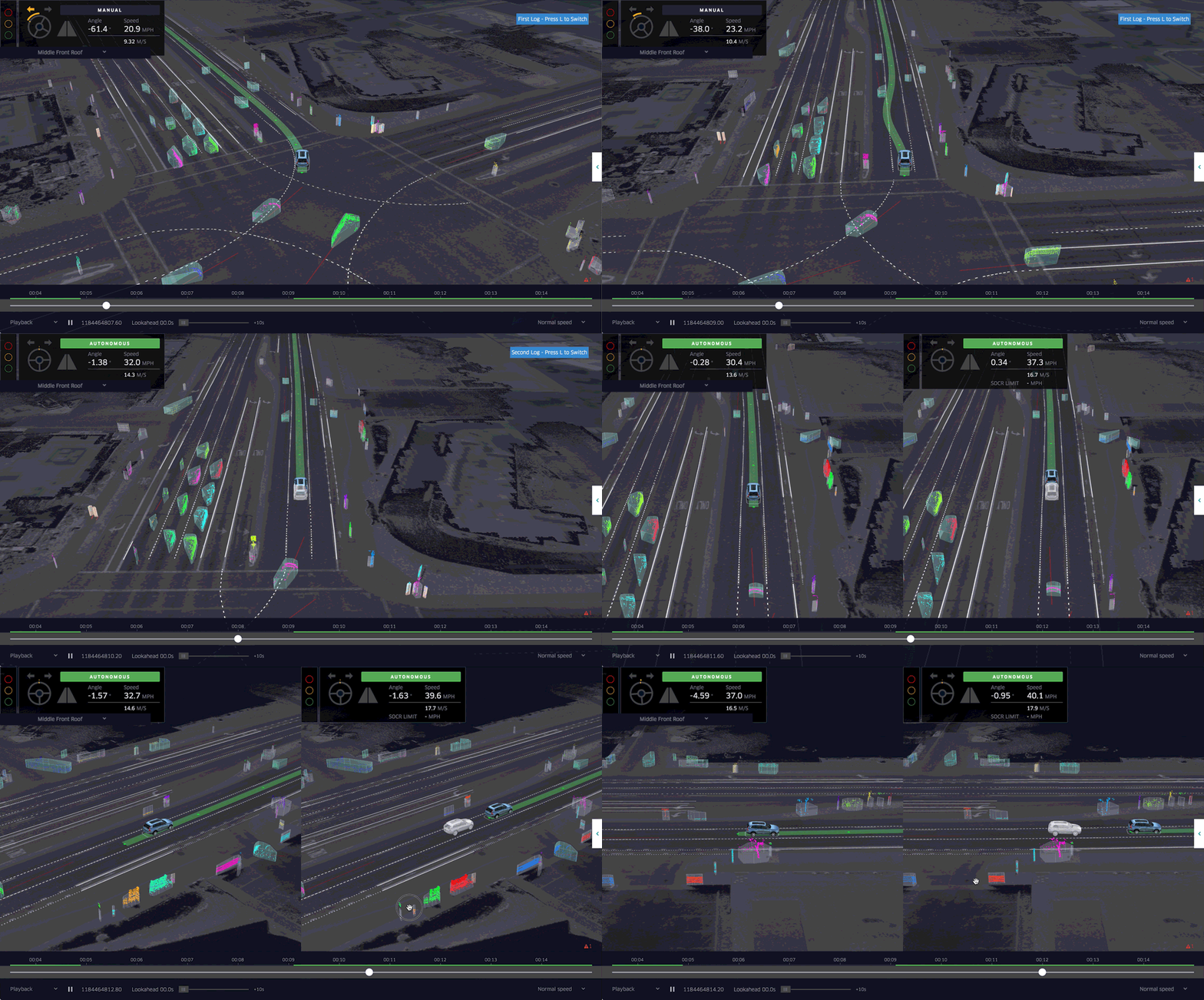
Pic credits — Uber Blog

Machine Learning is the field of study that gives computers the ability to learn without being explicitly programmed. Its a subset of artificial intelligence that focuses mainly on the machine, learning from their experience and making predictions based on its experience.
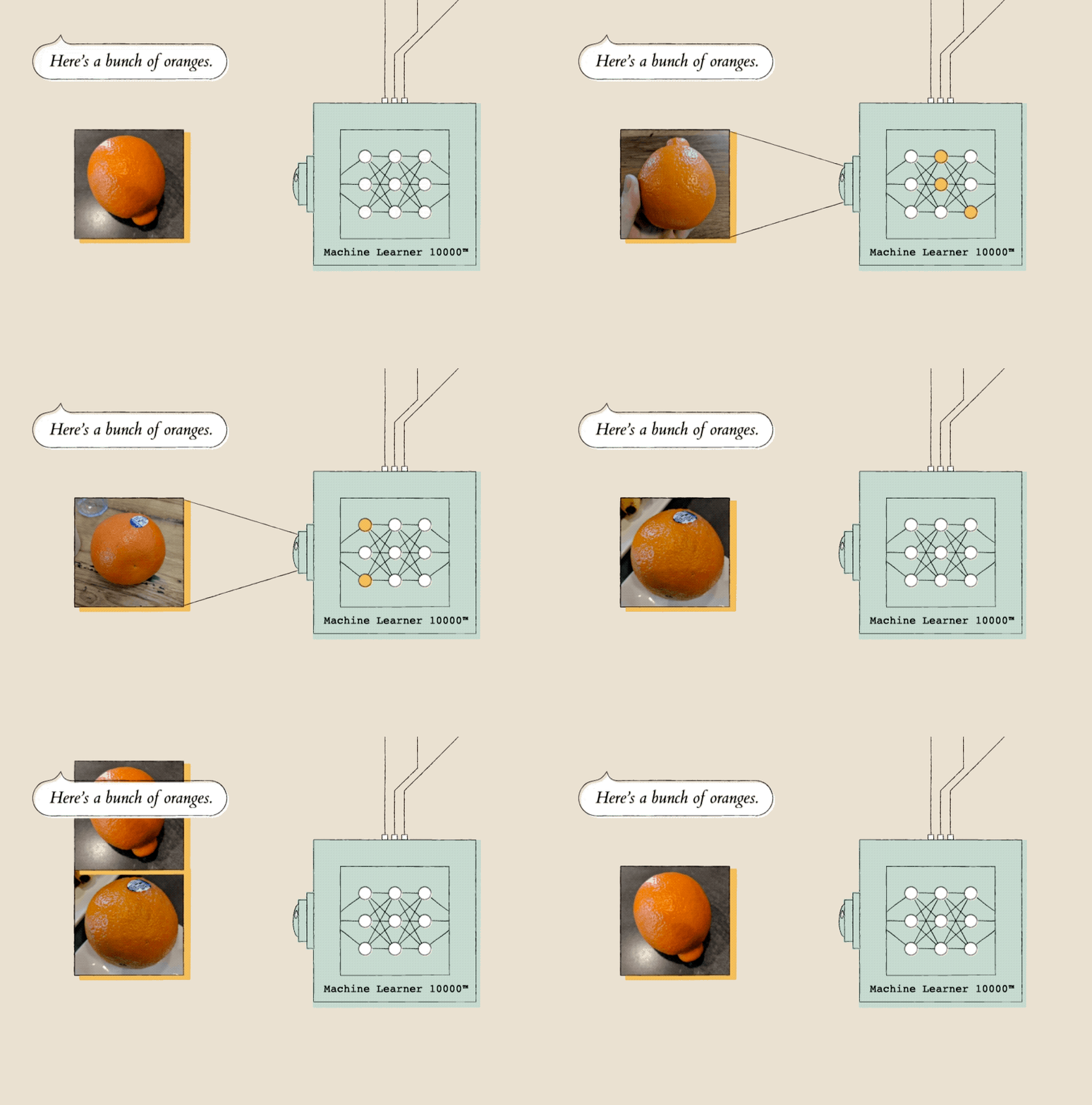
How it works

Projects Videos —

All the projects, data structures, SQL, algorithms, system design, Data Science and ML , Data Analytics, Data Engineering, , Implemented Data Science and ML projects, Implemented Data Engineering Projects, Implemented Deep Learning Projects, Implemented Machine Learning Ops Projects, Implemented Time Series Analysis and Forecasting Projects, Implemented Applied Machine Learning Projects, Implemented Tensorflow and Keras Projects, Implemented PyTorch Projects, Implemented Scikit Learn Projects, Implemented Big Data Projects, Implemented Cloud Machine Learning Projects, Implemented Neural Networks Projects, Implemented OpenCV Projects,Complete ML Research Papers Summarized, Implemented Data Analytics projects, Implemented Data Visualization Projects, Implemented Data Mining Projects, Implemented Natural Leaning Processing Projects, MLOps and Deep Learning, Applied Machine Learning with Projects Series, PyTorch with Projects Series, Tensorflow and Keras with Projects Series, Scikit Learn Series with Projects, Time Series Analysis and Forecasting with Projects Series, ML System Design Case Studies Series videos will be published on our youtube channel ( just launched).

Subscribe today!

What are the different types of Machine Learning?
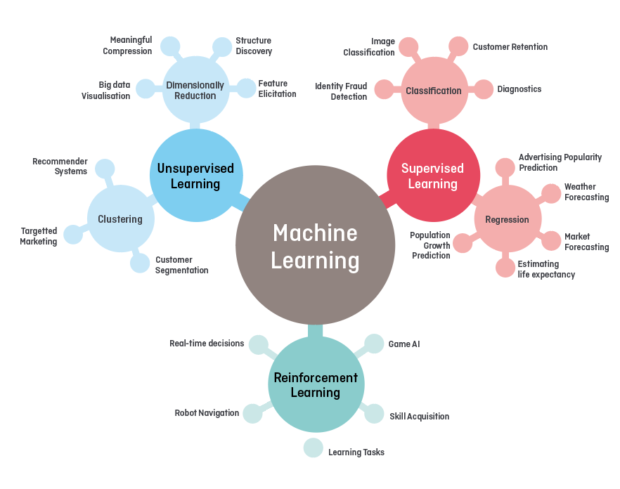
Different types of Machine Learning
  • Supervised Machine Learning — Supervised learning is when the model is getting trained on a labeled dataset. The labeled dataset is one that has both input and output parameters. In this type of learning both training and validation, datasets are labeled
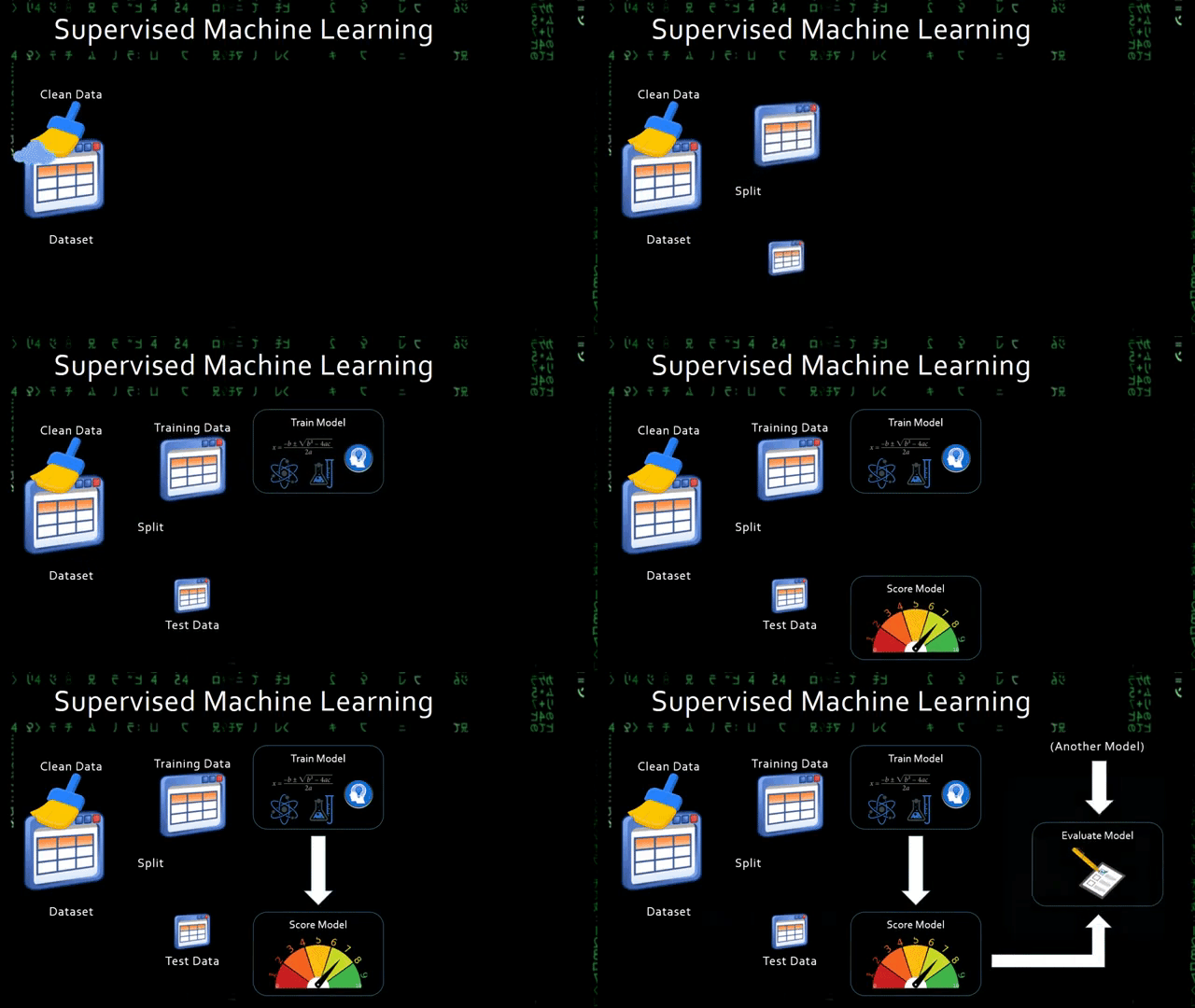
Supervised Machine Learning ( source: gifs.com)
  • Unsupervised Machine Learning — The model learns through observation and finds structures in the data. Once the model is given a dataset, it automatically finds patterns and relationships in the dataset by creating clusters in it. What it cannot do is add labels to the cluster.
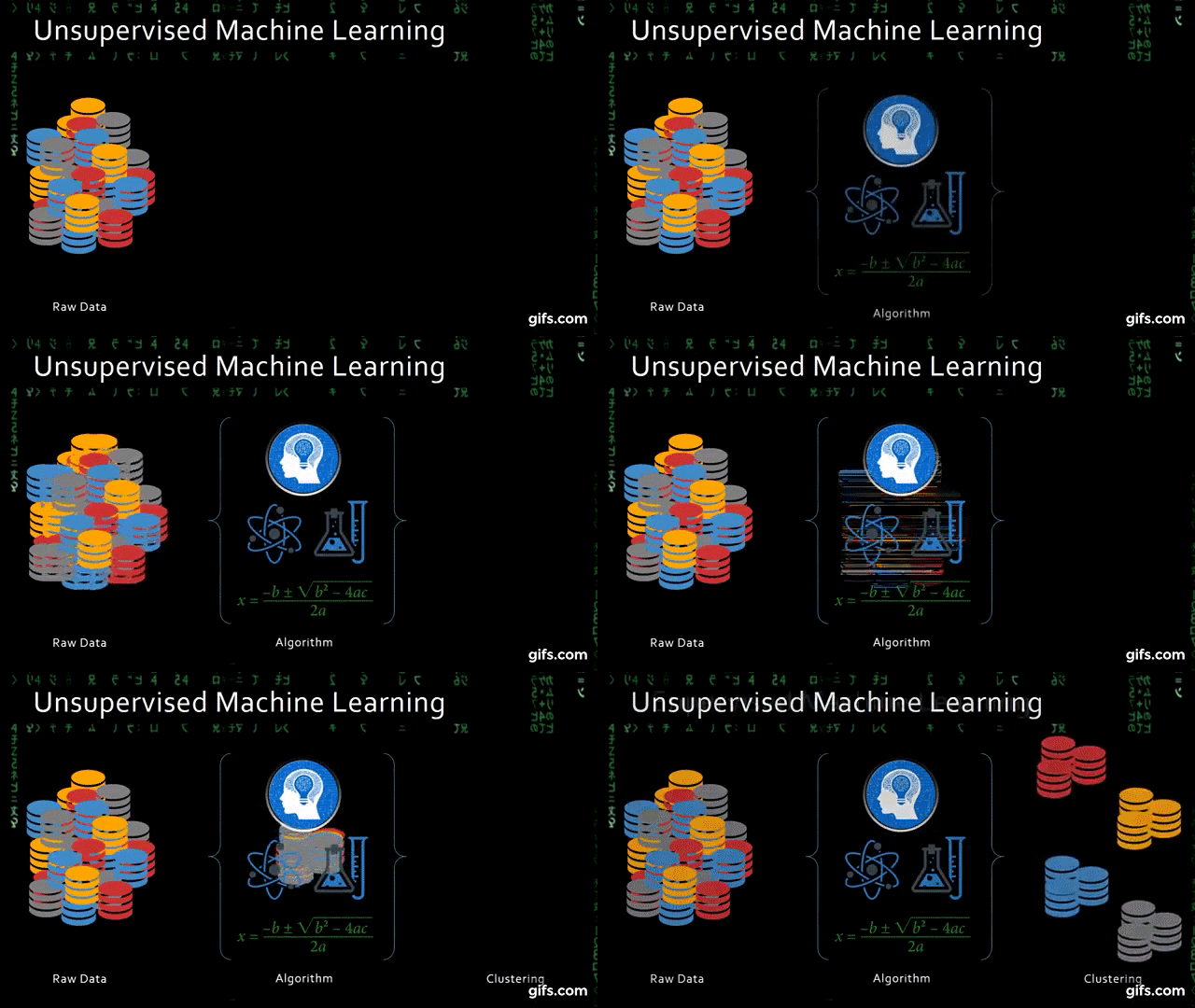
Unsupervised Machine Learning ( source: gifs.com)
  • Reinforcement Machine Learning — Reinforcement learning is the training of machine learning models to make a sequence of decisions. The agent learns to achieve a goal in an uncertain, potentially complex environment. In reinforcement learning and artificial intelligence faces a game-like situation. The computer employs trial and error to come up with a solution to the problem.
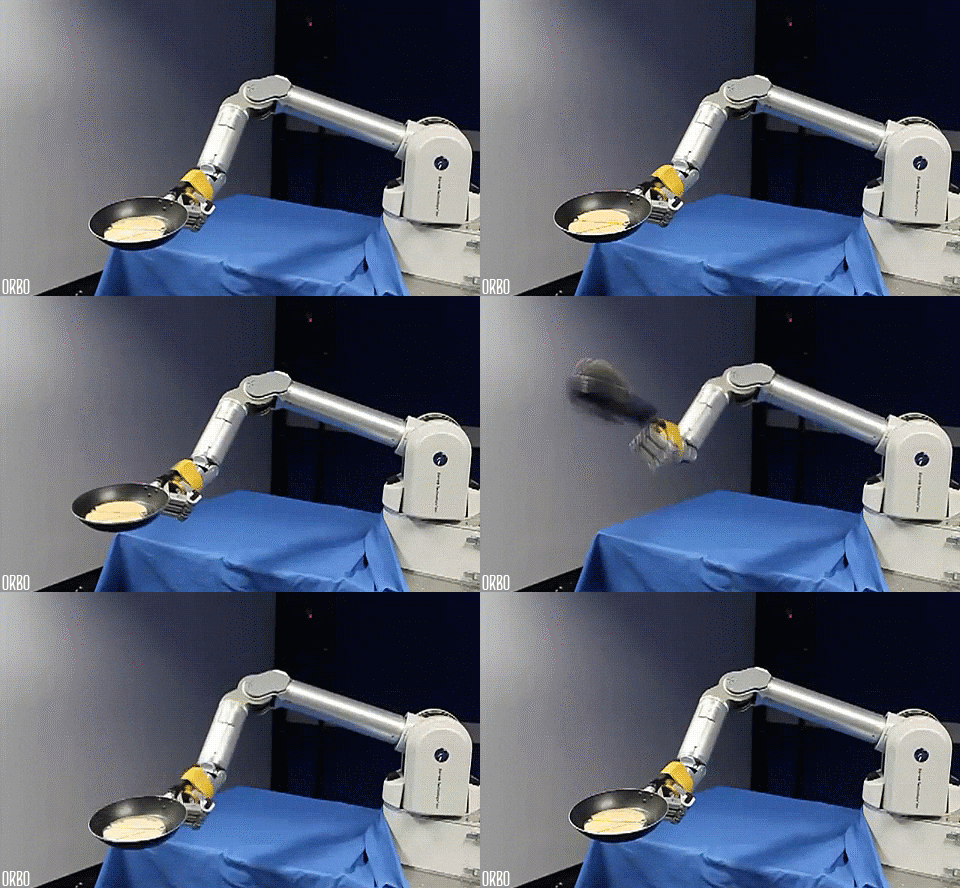
Reinforcement Machine Learning ( source: gifs.com)

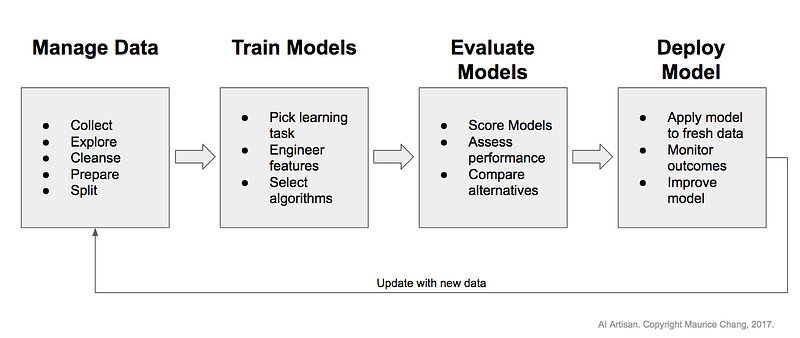
Different Stages of ML

Pic credits — Maurice Chang

Deep Learning

Deep learning is a branch of machine learning, in essence, its the implementation of neural networks with more than a single hidden layer of neurons.
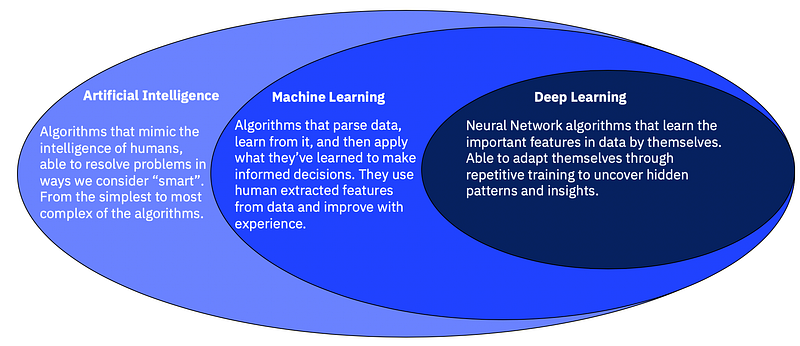
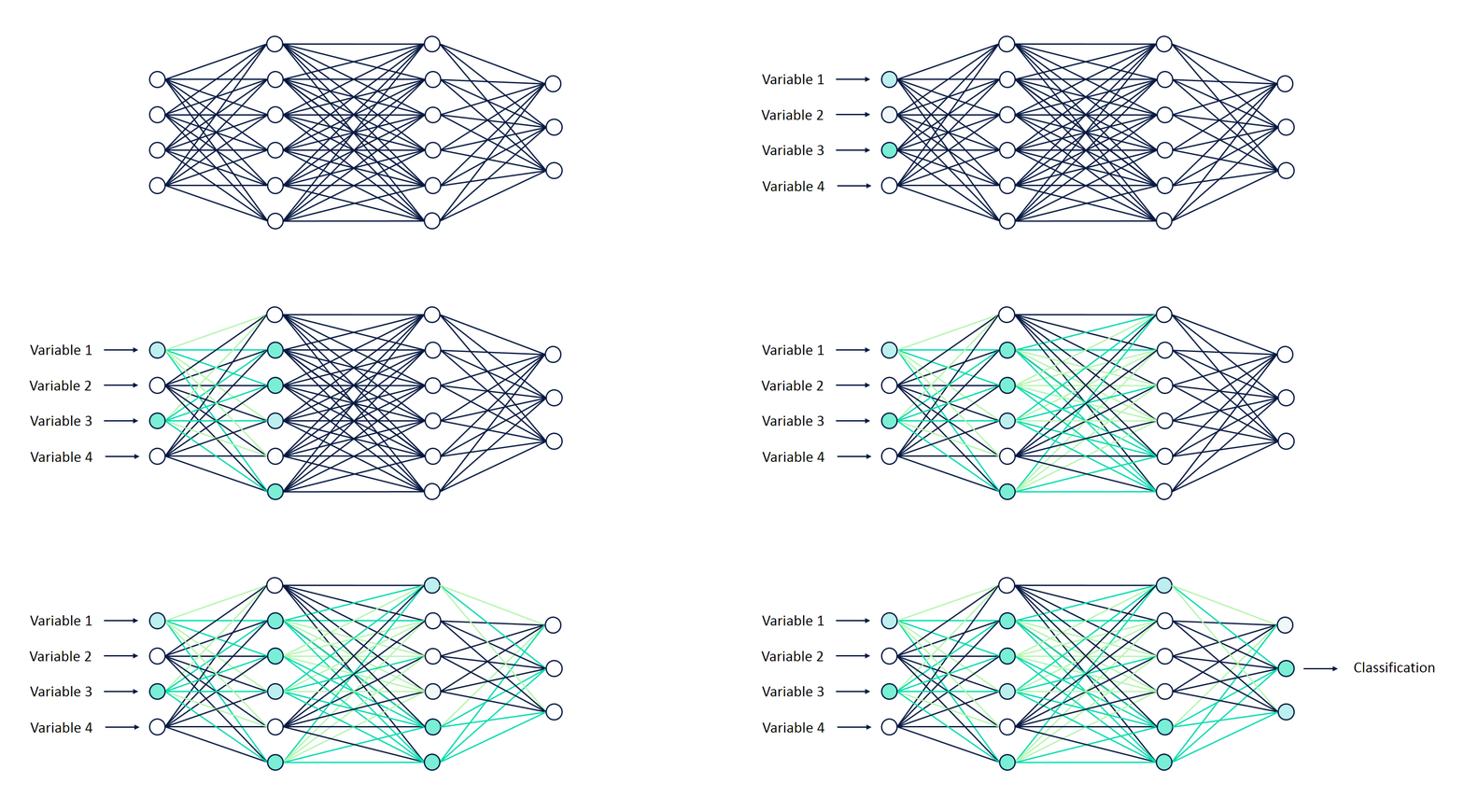
AI, ML, DL (Pic credits: Pinterest)
A basic Neural Network

The stages of training and testing deep-learning require sophisticated knowledge of the ML architectures and data infrastructure. As a solution, Uber introduced a framework for training and testing deep learning models without the need to write code and named it Ludwig —

Ludwig is a toolbox built on top of TensorFlow that allows us to train and test deep learning models without the need to write code.

The core design principles of Ludwig are (source: Ludwig Github):

  • No coding required: no coding skills are required to train a model and use it for obtaining predictions.
  • Generality: a new data type-based approach to deep learning model design that makes the tool usable across many different use cases.
  • Flexibility: experienced users have extensive control over model building and training, while newcomers will find it easy to use.
  • Extensibility: easy to add new model architecture and new feature data types.
  • Interpretability and Understandability: Ludwig includes visualizations that help data scientists understand the performance of machine learning models.
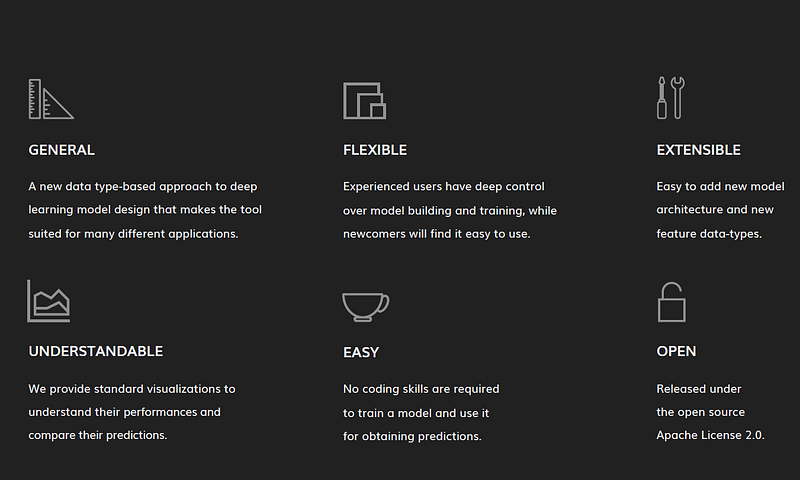
Pic Credits — Ludwig’s Website
  • Ludwig uses a modular design, where each component of the model, such as the encoder, decoder, and head, is implemented as a separate module. This design allows you to easily mix and match components to build a custom model that fits your specific use case.
  • To use Ludwig, you first prepare your data in a tabular format, such as a CSV file. Then, you define your model architecture using a YAML configuration file that specifies the input and output features, the encoder and decoder to use, and any additional hyperparameters.
  • Next, you train the model using the Ludwig command-line interface. Ludwig takes care of the training process, including splitting the data into training and validation sets, setting up the optimizer and loss function, and training the model for a specified number of epochs.
  • Finally, you can test the model on a new dataset using the same command-line interface, and Ludwig will generate evaluation metrics such as accuracy, precision, recall, and F1 score.

Ludwig’s goal is to make it easy for people with limited machine learning experience to quickly train and test machine learning models, and to allow experts to experiment with new models and ideas quickly without having to write code from scratch.

How to work with Ludwig?

Input as a CSV file containing your data, a list of columns, and a list of columns to use as outputs, Ludwig will do the rest. Simple commands can be used to train models both locally and in a distributed way, and to use them to predict on new data.

Ludwig API —

A programmatic API can be plugged to use Ludwig from your python code. A suite of visualization tools allows you to analyze models’ training and test performance and to compare them.

There are 4 steps —

1. Install

Just run pip install ludwig and it will be ready to use.

Ludwig’s basic requirements are the following:

  • tensorflow
  • numpy
  • pandas
  • python 3
  • scipy
  • scikit-learn
  • Cython
  • h5py
  • tabulate
  • tqdm
  • PyYAML
  • absl-py

2. Train

Prepare your data in a CSV file, define input and output feature in a model definition YAML file and run:

ludwig train
--data_csv file.csv
--model_definition definition.yaml

3. Predict

Prepare your data in a CSV file and use a pre-trained model to predict the output targets:

ludwig predict
--data_csv data.csv
--model path_to_model

4. Visualize

Ludwig comes with many visualization options. If you want to look at the learning curves of your model for instance, run:

ludwig visualize
--visualization learning_curves
--training_statistics train_statistics.json

For API —

Train models and use them to predict directly from Python

from ludwig.api import LudwigModel
# train a model
model_definition = {...}
model = LudwigModel(model_definition)
train_stats = model.train(training_dataframe)
# or load a model
model = LudwigModel.load(model_path)
# obtain predictions
predictions = model.predict(test_dataframe)

When to use Ludwig?

Ludwig can be used by practitioners to quickly train and test deep learning models as well as by researchers to obtain strong baselines that can be used to compare and have an experimentation setting that ensures comparability by performing standard data preprocessing and visualization.

Ludwig provides two main functionalities: training models and then use these to predict.

Ludwig is based on datatype abstraction which means that the data preprocessing and postprocessing will be performed on different datasets that share data types and the same encoding and decoding models developed for one task can be reused for different tasks.
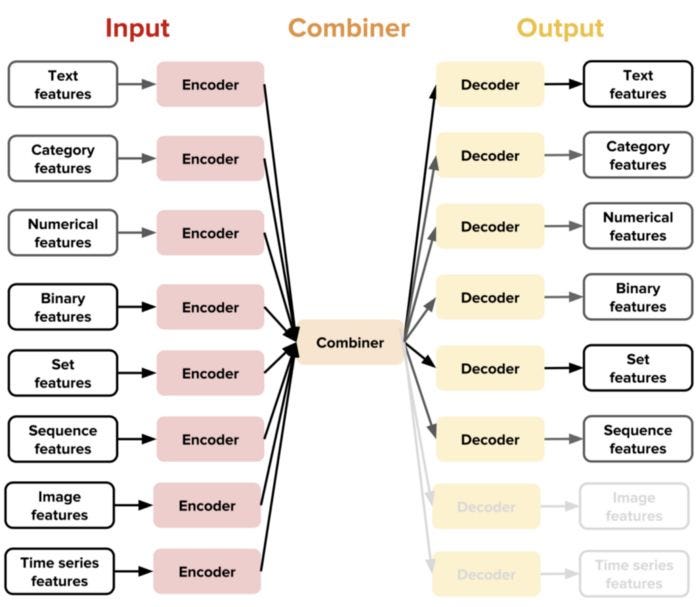
Source: https://eng.uber.com/introducing-ludwig/

Example —

Input your image_classification.csv which has a column containing path/url to the image to be classified.

ludwig experiment \   --data_csv image_classification.csv \   --model_definition_file model_definition.yaml

With model_definition.yaml

input_features:     
- 
       
   name: image_path         
   type: image         
   encoder: stacked_cnn
output_features:     
-         
   name: class         
   type: category

References and credits —

Want to read programmers humor?

Recommended Articles -

Deep Learning
Artificial Intelligence
Machine Learning
Programming
Data Science
Recommended from ReadMedium