
Spring Boot Retry Pattern Example with Resilience4j: Step-by-Step Guide
The Retry Pattern in Resilience4j is a fault tolerance mechanism that allows you to automatically retry failed operations a specified number of times before giving up. This pattern is particularly useful when transient faults, such as temporary network issues or momentary service unavailability, cause the failure. The Retry Pattern helps improve the resiliency of your application by handling these intermittent failures.
The Retry Pattern is used to handle temporary failures in distributed systems or unreliable network connections. The idea is to automatically retry a failed operation a specified number of times before giving up. In Spring Boot, the Retry Pattern is often implemented using the Resilience4j or Spring Retry libraries.
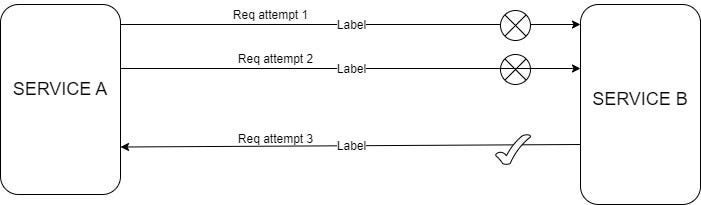
Retry Pattern in Resilience4j:
- Configurable Retry Attempts: You can configure how many times an operation should be retried before failing completely.
- Wait Interval Between Retries: It allows you to specify the time delay between consecutive retry attempts.
- Backoff Strategy: You can implement different backoff strategies (e.g., fixed or exponential backoff) to avoid overwhelming the system during retries.
- Retry on Specific Exceptions: You can configure which types of exceptions should trigger retries.
- Result-Based Retry: It allows retries based on the result of an operation (e.g., retry only if the response is not as expected).
- Event Publishing: You can monitor retry attempts through events like
onRetry,onSuccess,onError, andonCompletion.
To implement the Retry Pattern using Resilience4j in two Spring Boot microservices, let’s create a scenario where Service A (Student Service) communicates with Service B (Course Service). Service A will invoke an API from Service B, and if the API call fails (e.g., due to network issues or Service B being down), the Retry Pattern will attempt to re-execute the failed request a configurable number of times before finally failing.
1. Create Two Microservices
We’ll create two Spring Boot microservices:
- Student Service: Calls the Course Service to get course details.
- Course Service: Provides course details, which could sometimes fail or delay to simulate a network issue.
Dependencies
Both services should include the following dependencies in pom.xml:
<dependency>
    <groupId>org.springframework.boot</groupId>
    <artifactId>spring-boot-starter-web</artifactId>
</dependency>
<dependency>
    <groupId>io.github.resilience4j</groupId>
    <artifactId>resilience4j-spring-boot2</artifactId>
</dependency>
2. Course Service (Service B)
This microservice will provide course details but occasionally throw an exception to simulate a failure.
CourseController.java
@RestController
@RequestMapping("/api/courses")
public class CourseController {

    @GetMapping("/{courseId}")
    public ResponseEntity<String> getCourseDetails(@PathVariable String courseId) {
        // Simulating failure on purpose for testing Retry Pattern
        if ("fail".equalsIgnoreCase(courseId)) {
            throw new RuntimeException("Course Service is currently unavailable");
        }
        return ResponseEntity.ok("Course details for " + courseId);
    }
}
Application.properties
server.port=80823. Student Service (Service A)
This microservice will call Course Service and use Resilience4j Retry to handle failures by retrying the API call.
StudentController.java
@RestController
@RequestMapping("/api/students")
public class StudentController {

    private final CourseService courseService;

    public StudentController(CourseService courseService) {
        this.courseService = courseService;
    }

    @GetMapping("/{studentId}/courses/{courseId}")
    public ResponseEntity<String> getStudentCourse(@PathVariable String studentId, @PathVariable String courseId) {
        String courseDetails = courseService.getCourseDetails(courseId);
        return ResponseEntity.ok("Student " + studentId + " enrolled in " + courseDetails);
    }
}
CourseService.java
@Service
public class CourseService {

    private final RestTemplate restTemplate;

    public CourseService(RestTemplate restTemplate) {
        this.restTemplate = restTemplate;
    }

    @Retry(name = "courseService", fallbackMethod = "fallbackCourseDetails")
    public String getCourseDetails(String courseId) {
        String url = "http://localhost:8082/api/courses/" + courseId;
        return restTemplate.getForObject(url, String.class);
    }

    public String fallbackCourseDetails(String courseId, Throwable throwable) {
        return "Default course details";
    }
}- @Retry: The
@Retryannotation in theCourseServiceclass specifies that if an exception occurs during thegetCourseDetails()method, Resilience4j will retry the method up to 3 times with a 2-second interval between attempts. - Fallback Method: If all retry attempts fail, the fallback method
fallbackCourseDetails()is invoked, providing a default response
Application.properties
server.port=8081
resilience4j.retry.instances.courseService.maxAttempts=3
resilience4j.retry.instances.courseService.waitDuration=2s- resilience4j.retry.instances.courseService.maxAttempts=3 :
This property defines the maximum number of retry attempts that should be made for the
courseServiceinstance if the method fails (throws an exception).
- In this case, when a failure occurs while trying to fetch course details, Resilience4j will retry up to 3 times before giving up and invoking the fallback method.
- Suppose the
getCourseDetails()method inStudent Servicecalls theCourse Service, and theCourse Serviceis down or throws an error (e.g., thecourseId = fail). - The Retry mechanism will try to call the service 3 times (1 original attempt + 2 retries) before considering the operation as failed and invoking the fallback method.
2. resilience4j.retry.instances.courseService.waitDuration=2s :
- This property specifies the wait duration between each retry attempt.
- In this case, after the first failure, Resilience4j will wait for 2 seconds before attempting to retry the
courseServicemethod again. - If the
getCourseDetails()method fails on the first attempt, the system will wait for 2 seconds before attempting the retry. - This 2-second interval ensures that there is enough time between retries, possibly allowing transient issues (e.g., a temporary network outage) to resolve themselves.
Configure RestTemplate Bean in Student Service
@Configuration
public class AppConfig {

    @Bean
    public RestTemplate restTemplate() {
        return new RestTemplate();
    }
}
Postman Testing for Success and Failure Scenarios
Now that both services (Student Service and Course Service) are set up with the Retry Pattern, you can test the success and failure scenarios using Postman.
1. Success Scenario
- URL:
GET http://localhost:8081/api/students/1/courses/101 - Method: GET
Expected Response:
"Student 1 enrolled in Course details for 101"This request will be successfully processed by the Course Service without any errors.
2. Failure Scenario with Retry and Fallback
- URL:
GET http://localhost:8081/api/students/1/courses/fail - Method: GET
What Happens:
- The Course Service throws a runtime exception (
Course Service is currently unavailable) because the course ID is"fail". - The Student Service, with the Resilience4j Retry configuration, will attempt to call the Course Service 3 times (as specified in
application.properties). - After the retries are exhausted, the fallback method
fallbackCourseDetails()will be executed, providing a default response.
Expected Response:
"Student 1 enrolled in Default course details"This fallback response will be returned after the 3 retry attempts fail.
Logs for Failure Scenario (Optional)
If you monitor the console logs of the Student Service during the failure scenario, you should see output indicating the retries:
Retry attempt 1 for courseId: fail
Retry attempt 2 for courseId: fail
Retry attempt 3 for courseId: fail
Fallback method called for courseId: fail
This ensures that Resilience4j’s Retry mechanism is functioning as expected. The retry happens automatically, and after the maximum attempts, the fallback is triggered.
👏 If you found my articles useful, please consider giving it claps and sharing it with your friends and colleagues.
To read other topics
- Spring Boot Circuit Breaker Example with Resilience4j: Step-by-Step Guide
- Mastering Transaction Propagation and Isolation in Spring Boot
- @Formula Annotation in Spring Boot
- One To One mapping in Spring Boot JPA
- One To Many mapping in Spring Boot JPA
- SOLID Principles in Java
- Java 8 Interview Questions and Answer
- Java String Interview Questions and answer
- Kafka Interview Questions and Answers
- Optional in Java 8
- Global exception handling in spring boot
- Pessimistic Locking in JPA with Spring Boot
- Optimistic Locking in JPA with Spring Boot
- Design Pattern in java
- Generic ApiResponse and Global Exception Handling in Spring Boot
- Garbage Collection in Java
- JVM Architecture
- How the JIT Compiler Enhances Java Performance: An In-Depth Explanation
- Git and GitHub Integration in IntelliJ IDEA


