
Design Pattern in java
Design patterns in Java are standard solutions to common problems in software design. They provide a way to structure and solve recurring design challenges in a reusable manner. Design patterns are not specific to any programming language but can be implemented in any language, including Java.
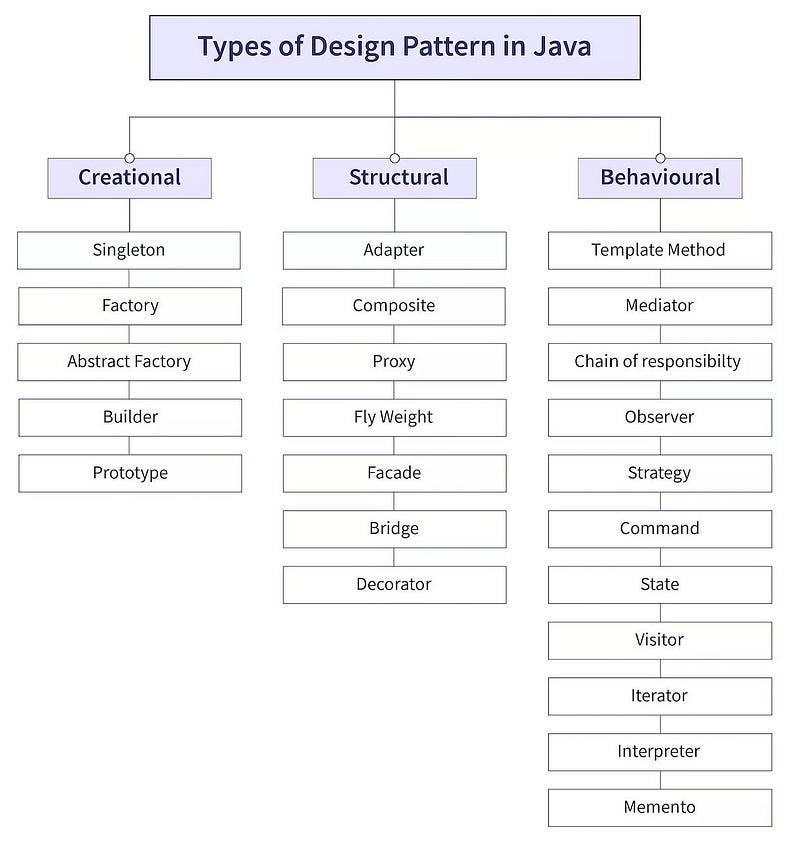
Creational Patterns: Focus on the creation of objects in a way that is suitable to the situation.
- Singleton: Ensures that a class has only one instance and provides a global point of access to it.
- Factory Method: Defines an interface for creating an object but lets subclasses alter the type of objects that will be created.
- Abstract Factory: Provides an interface for creating families of related or dependent objects without specifying their concrete classes.
- Builder: Allows for the step-by-step creation of complex objects.
- Prototype: Creates a new object by copying an existing object.
Structural Patterns: Deal with the composition of classes or objects to form larger structures.
- Adapter: Allows incompatible interfaces to work together.
- Decorator: Adds responsibilities to objects dynamically without altering their code.
- Facade: Provides a simplified interface to a complex system of classes.
- Composite: Composes objects into tree structures to represent part-whole hierarchies.
- Proxy: Provides a surrogate or placeholder for another object to control access to it.
Behavioral Patterns: Focus on communication between objects, defining the ways they interact.
- Observer: Defines a one-to-many dependency between objects so that when one object changes state, all its dependents are notified.
- Strategy: Defines a family of algorithms, encapsulates each one, and makes them interchangeable.
- Command: Encapsulates a request as an object, thereby allowing for parameterization and queuing of requests.
- Iterator: Provides a way to access elements of a collection sequentially without exposing its underlying representation.
- State: Allows an object to alter its behavior when its internal state changes.
- Template Method: Defines the skeleton of an algorithm in a method, deferring some steps to subclasses.
In this article, we’ll delve into some of the most important design patterns that every developer should be familiar with.
1. Singleton pattern
The Singleton pattern ensures that a class has only one instance and provides a global point of access to it. This is particularly useful when exactly one object is needed to coordinate actions across the system.
Key Concepts of Singleton Pattern
- Private Constructor: The constructor of the Singleton class is private, which prevents other classes from instantiating the Singleton class.
- Static Instance: A static variable of the same class type is used to store the single instance of the class.
- Public Static Method: A public static method (usually named
getInstance()) returns the single instance of the class. This method checks whether the instance is already created; if not, it creates one and returns it.
Types of Singleton Pattern
- Eager Initialization: The instance is created at the time of class loading.
- Lazy Initialization: The instance is created only when it is requested for the first time.
- Thread-Safe Singleton: Ensures that the Singleton instance is thread-safe using synchronization.
- Bill Pugh Singleton Design: Uses a static inner helper class to create the Singleton instance.
Example : Lazy Initialization Singleton Pattern
public class Singleton {
    // Static variable to hold the single instance of the class
    private static Singleton instance;

    // Private constructor to prevent instantiation from other classes
    private Singleton() {
        // Optional: Any initialization code
        System.out.println("Singleton Instance Created");
    }

    // Public static method to provide the single instance of the class
    public static Singleton getInstance() {
        if (instance == null) { // Create the instance if it doesn't exist
            instance = new Singleton();
        }
        return instance;
    }

    // Example method to demonstrate functionality
    public void showMessage() {
        System.out.println("Hello from Singleton!");
    }
}
Main Class to Test Singleton Pattern
public class Main {
    public static void main(String[] args) {
        // Attempt to create the first instance
        Singleton singleton1 = Singleton.getInstance();
        singleton1.showMessage();

        // Attempt to create another instance
        Singleton singleton2 = Singleton.getInstance();
        singleton2.showMessage();

        // Check if both instances are the same
        System.out.println("Are both instances the same? " + (singleton1 == singleton2));
    }
}
Output :
Singleton Instance Created
Hello from Singleton!
Hello from Singleton!
Are both instances the same? true
Factory Design Pattern
The Factory Design Pattern is a creational design pattern that provides an interface for creating objects in a super class, but allows subclasses to alter the type of objects that will be created. It promotes loose coupling by eliminating the need to bind application-specific classes into the code.
Key Concepts of Factory Design Pattern
- Factory Method: Defines an interface or abstract class for creating an object but lets the subclasses decide which class to instantiate. This method handles the object creation.
- Decoupling: The client code depends on an abstract factory (or interface) rather than on concrete classes, which reduces the coupling between the client and the created objects.
- Flexible Object Creation: It allows the code to be more flexible by allowing the type of object to be determined at runtime based on the factory method.
Example: Factory Design Pattern
Let’s create a scenario where different types of animals are created by a factory method.
Step 1: Create an Interface or Abstract Class
// Step 1: Create an interface
public interface Animal {
    void speak();
}
Step 2: Implement the Interface with Concrete Classes
// Step 2: Implement the interface with concrete classes
public class Dog implements Animal {
    @Override
    public void speak() {
        System.out.println("Woof!");
    }
}

public class Cat implements Animal {
    @Override
    public void speak() {
        System.out.println("Meow!");
    }
}

public class Cow implements Animal {
    @Override
    public void speak() {
        System.out.println("Moo!");
    }
}
Step 3: Create a Factory Class
// Step 3: Create a factory class to generate objects of concrete classes based on given information
public class AnimalFactory {
    // Factory method to create objects of concrete classes based on input
    public Animal getAnimal(String animalType) {
        if (animalType == null) {
            return null;
        }
        if (animalType.equalsIgnoreCase("DOG")) {
            return new Dog();
        } else if (animalType.equalsIgnoreCase("CAT")) {
            return new Cat();
        } else if (animalType.equalsIgnoreCase("COW")) {
            return new Cow();
        }
        return null;
    }
}
Step 4: Use the Factory Class to Get Objects
// Step 4: Use the factory class to get objects of concrete classes by passing an information such as type
public class Main {
    public static void main(String[] args) {
        AnimalFactory animalFactory = new AnimalFactory();

        // Get an object of Dog and call its speak method
        Animal dog = animalFactory.getAnimal("DOG");
        dog.speak();  // Output: Woof!

        // Get an object of Cat and call its speak method
        Animal cat = animalFactory.getAnimal("CAT");
        cat.speak();  // Output: Meow!

        // Get an object of Cow and call its speak method
        Animal cow = animalFactory.getAnimal("COW");
        cow.speak();  // Output: Moo!
    }
}
Output
Woof!
Meow!
Moo!
Explanation
- Animal Interface: The
Animalinterface defines a commonspeakmethod that must be implemented by all concrete classes (i.e.,Dog,Cat,Cow). - Concrete Classes: The concrete classes
Dog,Cat, andCowimplement theAnimalinterface and provide specific implementations of thespeakmethod. - AnimalFactory Class: The
AnimalFactoryclass contains thegetAnimalmethod, which takes ananimalTypestring as input and returns an instance of the corresponding concrete class. If an unknown type is passed, it returnsnull. - Main Class: In the
Mainclass, we use theAnimalFactoryto create instances ofDog,Cat, andCowbased on the input string, and then call thespeakmethod on each instance.
Builder pattern
The Builder Pattern provides a way to construct an object by allowing you to set its various properties (or attributes) in a step-by-step manner.
Some of the parameters might be optional for an object, but we are forced to send all the parameters and optional parameters need to send as NULL. We can solve this issue with large number of parameters by providing a constructor with required parameters and then different setter methods to set the optional parameters.
Instead of creating many constructors with different parameters, the Builder pattern offers a more readable and flexible way to create objects.
Key Concepts of Builder Pattern
- Builder Class: A static nested class within the class to be built. It holds the same fields as the class and provides methods to set these fields.
- Fluent Interface: The builder methods return the builder object itself (
this), allowing for method chaining, which makes the object creation more readable. - Build Method: A
build()method in the builder class that returns the final constructed object. - Immutability: The object created by the builder is often immutable, meaning its state cannot be changed after it’s created.
Example: Builder Pattern
Let’s say we want to create a House class with several optional and mandatory fields.
Step 1: Define the Class to Be Built
public class House {
    // Required parameters
    private String foundation;
    private String structure;

    // Optional parameters
    private boolean hasGarage;
    private boolean hasSwimmingPool;
    private boolean hasGarden;

    // Private constructor accessible only by the Builder
    private House(HouseBuilder builder) {
        this.foundation = builder.foundation;
        this.structure = builder.structure;
        this.hasGarage = builder.hasGarage;
        this.hasSwimmingPool = builder.hasSwimmingPool;
        this.hasGarden = builder.hasGarden;
    }

    @Override
    public String toString() {
        return "House [foundation=" + foundation +
               ", structure=" + structure +
               ", hasGarage=" + hasGarage +
               ", hasSwimmingPool=" + hasSwimmingPool +
               ", hasGarden=" + hasGarden + "]";
    }

    // Static Builder Class
    public static class HouseBuilder {
        // Required parameters
        private String foundation;
        private String structure;

        // Optional parameters - initialized to default values
        private boolean hasGarage = false;
        private boolean hasSwimmingPool = false;
        private boolean hasGarden = false;

        // Constructor for required parameters
        public HouseBuilder(String foundation, String structure) {
            this.foundation = foundation;
            this.structure = structure;
        }

        // Methods for optional parameters
        public HouseBuilder setGarage(boolean hasGarage) {
            this.hasGarage = hasGarage;
            return this;
        }

        public HouseBuilder setSwimmingPool(boolean hasSwimmingPool) {
            this.hasSwimmingPool = hasSwimmingPool;
            return this;
        }

        public HouseBuilder setGarden(boolean hasGarden) {
            this.hasGarden = hasGarden;
            return this;
        }

        // Build method to construct the House object
        public House build() {
            return new House(this);
        }
    }
}
Step 2: Use the Builder to Construct the Object
public class Main {
    public static void main(String[] args) {
        // Building a house with all optional features
        House house1 = new House.HouseBuilder("Concrete", "Wood")
                                .setGarage(true)
                                .setSwimmingPool(true)
                                .setGarden(true)
                                .build();

        System.out.println(house1);

        // Building a house with only a garage
        House house2 = new House.HouseBuilder("Concrete", "Brick")
                                .setGarage(true)
                                .build();

        System.out.println(house2);
    }
}
Output
House [foundation=Concrete, structure=Wood, hasGarage=true, hasSwimmingPool=true, hasGarden=true]
House [foundation=Concrete, structure=Brick, hasGarage=true, hasSwimmingPool=false, hasGarden=false]
Explanation
- House Class: The
Houseclass has both required and optional parameters. The constructor is private, ensuring that the only way to create aHouseobject is through theHouseBuilder. - HouseBuilder Class: The
HouseBuilderstatic class has methods for setting each optional parameter, returning the builder instance (this) to allow for method chaining. - Main Class: In the
Mainclass, we use the builder pattern to createHouseobjects. The first house has all the optional features, while the second house only has a garage.
Adapter Pattern
The Adapter Pattern is a structural design pattern that allows incompatible interfaces to work together. It acts as a bridge between two incompatible interfaces by converting the interface of a class into another interface that a client expects. This pattern is especially useful when integrating new components into existing systems, where the new components have interfaces that differ from the rest of the system.
Key Concepts of Adapter Pattern
- Target Interface: The interface that the client expects. The adapter will implement this interface.
- Adaptee: The existing class or component that needs to be adapted to the new interface.
- Adapter: The class that implements the target interface and internally uses an instance of the adaptee class to fulfill the requests.
- Client: The class that interacts with the target interface.
Types of Adapter Pattern
- Class Adapter (Using Inheritance): The adapter inherits from both the target interface and the adaptee class. However, Java does not support multiple inheritance, so this approach is less common.
- Object Adapter (Using Composition): The adapter holds a reference to the adaptee and implements the target interface by delegating the calls to the adaptee.
Example: Object Adapter Pattern
Let’s say we have an existing MediaPlayer interface that plays audio files, but we need to adapt it to play video files as well using an existing VideoPlayer class.
Step 1: Define the Target Interface
// Target Interface
public interface MediaPlayer {
    void play(String audioType, String fileName);
}
Step 2: Define the Adaptee Class
// Adaptee class which we want to adapt
public class VideoPlayer {
    public void playVideo(String fileName) {
        System.out.println("Playing video: " + fileName);
    }
}
Step 3: Create the Adapter Class
// Adapter class which implements the target interface and uses the adaptee
public class MediaAdapter implements MediaPlayer {
    private VideoPlayer videoPlayer;

    public MediaAdapter() {
        videoPlayer = new VideoPlayer();
    }

    @Override
    public void play(String audioType, String fileName) {
        if (audioType.equalsIgnoreCase("video")) {
            videoPlayer.playVideo(fileName);
        } else {
            System.out.println("Invalid media type: " + audioType);
        }
    }
}
Step 4: Create the Client Class
// Client class that uses the adapter
public class AudioPlayer implements MediaPlayer {
    private MediaAdapter mediaAdapter;

    @Override
    public void play(String audioType, String fileName) {
        // In-built support for audio file types
        if (audioType.equalsIgnoreCase("audio")) {
            System.out.println("Playing audio: " + fileName);
        }
        // MediaAdapter is used to play video files
        else if (audioType.equalsIgnoreCase("video")) {
            mediaAdapter = new MediaAdapter();
            mediaAdapter.play(audioType, fileName);
        } else {
            System.out.println("Invalid media type: " + audioType + ". Supported types: audio, video.");
        }
    }
}
Step 5: Test the Adapter Pattern
public class Main {
    public static void main(String[] args) {
        AudioPlayer audioPlayer = new AudioPlayer();

        audioPlayer.play("audio", "song.mp3");   // Playing audio: song.mp3
        audioPlayer.play("video", "movie.mp4");  // Playing video: movie.mp4
        audioPlayer.play("mp3", "music.mp3");    // Invalid media type: mp3. Supported types: audio, video.
    }
}
Output
Playing audio: song.mp3
Playing video: movie.mp4
Invalid media type: mp3. Supported types: audio, video.
Explanation
- MediaPlayer Interface: The
MediaPlayerinterface defines aplaymethod that the client (in this case,AudioPlayer) expects. - VideoPlayer Class (Adaptee): The
VideoPlayerclass has its own methodplayVideo, which is not compatible with theMediaPlayerinterface. - MediaAdapter Class: The
MediaAdapterclass implements theMediaPlayerinterface and adapts theVideoPlayerclass to this interface. It checks if the media type is "video" and then delegates the request toVideoPlayer. - AudioPlayer Class (Client): The
AudioPlayerclass uses theMediaAdapterto play video files. It directly handles audio files, while delegating video playback to the adapter.
Decorator Pattern
The Decorator Pattern is a structural design pattern that allows behavior to be added to individual objects, either statically or dynamically, without affecting the behavior of other objects from the same class. This pattern is particularly useful when you want to add functionalities to objects without altering their structure.
Key Concepts of Decorator Pattern
- Component Interface: The interface or abstract class that defines the methods that will be implemented by both the core class and decorators.
- Concrete Component: The original class whose functionalities will be extended by decorators.
- Decorator Class: An abstract class that implements the
Componentinterface and contains a reference to aComponentobject. This class delegates the operations to theComponentobject, allowing additional behavior to be added by subclasses. - Concrete Decorators: Subclasses of the decorator class that add specific behaviors to the component.
Example: Decorator Pattern
Let’s consider an example where we have a Coffee interface, and we want to add different types of add-ons (like milk, sugar, etc.) to our coffee.
Step 1: Define the Component Interface
// Component Interface
public interface Coffee {
    String getDescription();
    double getCost();
}
Step 2: Create a Concrete Component
// Concrete Component
public class SimpleCoffee implements Coffee {
    @Override
    public String getDescription() {
        return "Simple Coffee";
    }

    @Override
    public double getCost() {
        return 5.0;
    }
}
Step 3: Create the Decorator Abstract Class
// Decorator Class
public abstract class CoffeeDecorator implements Coffee {
    protected Coffee decoratedCoffee;

    public CoffeeDecorator(Coffee decoratedCoffee) {
        this.decoratedCoffee = decoratedCoffee;
    }

    @Override
    public String getDescription() {
        return decoratedCoffee.getDescription();
    }

    @Override
    public double getCost() {
        return decoratedCoffee.getCost();
    }
}
Step 5: Use the Decorator Pattern
public class Main {
    public static void main(String[] args) {
        // Creating a simple coffee
        Coffee coffee = new SimpleCoffee();
        System.out.println(coffee.getDescription() + " $" + coffee.getCost());

        // Adding milk to the coffee
        coffee = new MilkDecorator(coffee);
        System.out.println(coffee.getDescription() + " $" + coffee.getCost());

        // Adding sugar to the coffee with milk
        coffee = new SugarDecorator(coffee);
        System.out.println(coffee.getDescription() + " $" + coffee.getCost());
    }
}
Output
Simple Coffee $5.0
Simple Coffee, Milk $6.5
Simple Coffee, Milk, Sugar $7.0
Explanation
- Coffee Interface: The
Coffeeinterface defines the methodsgetDescription()andgetCost()which are implemented by both theSimpleCoffeeand decorator classes. - SimpleCoffee (Concrete Component): This is the base class representing a simple coffee. It provides a basic description and cost.
- CoffeeDecorator Class: The
CoffeeDecoratorabstract class implements theCoffeeinterface and holds a reference to aCoffeeobject. It delegates thegetDescription()andgetCost()methods to the decorated coffee. - MilkDecorator and SugarDecorator (Concrete Decorators): These classes extend the
CoffeeDecoratorand add their own behavior to the coffee object, like adding a description of the add-on and increasing the cost. - Main Class: The
Mainclass demonstrates how to create aSimpleCoffee, and then decorate it withMilkDecoratorandSugarDecorator, adding new behaviors and costs to the base coffee.
Observer Pattern
The Observer Pattern is a behavioral design pattern that defines a one-to-many dependency between objects. When one object (the Subject) changes its state, all its dependent objects (the Observers) are notified and updated automatically. This pattern is widely used in scenarios where multiple objects need to be informed about the state changes of another object without tightly coupling them.
Key Concepts of Observer Pattern
- Subject: The object that holds the state and maintains a list of observers. It provides methods to attach, detach, and notify observers.
- Observer: The objects that need to be notified when the subject’s state changes. Each observer implements the update method to handle updates from the subject.
- Concrete Subject: A class that implements the Subject interface. It maintains the state and notifies observers of any state changes.
- Concrete Observer: A class that implements the Observer interface and reacts to state changes by updating itself.
Example: Observer Pattern
Let’s implement a simple weather monitoring system where different devices (observers) need to be updated when the weather changes.
Step 1: Define the Subject Interface
import java.util.ArrayList;
import java.util.List;

// Subject Interface
public interface Subject {
    void registerObserver(Observer observer);
    void removeObserver(Observer observer);
    void notifyObservers();
}
Step 2: Define the Observer Interface
// Observer Interface
public interface Observer {
    void update(float temperature, float humidity, float pressure);
}
Step 3: Implement the Concrete Subject
// Concrete Subject
public class WeatherData implements Subject {
    private List<Observer> observers;
    private float temperature;
    private float humidity;
    private float pressure;

    public WeatherData() {
        observers = new ArrayList<>();
    }

    @Override
    public void registerObserver(Observer observer) {
        observers.add(observer);
    }

    @Override
    public void removeObserver(Observer observer) {
        observers.remove(observer);
    }

    @Override
    public void notifyObservers() {
        for (Observer observer : observers) {
            observer.update(temperature, humidity, pressure);
        }
    }

    public void setMeasurements(float temperature, float humidity, float pressure) {
        this.temperature = temperature;
        this.humidity = humidity;
        this.pressure = pressure;
        measurementsChanged();
    }

    private void measurementsChanged() {
        notifyObservers();
    }
}
Step 4: Implement the Concrete Observers
// Concrete Observer - Current Conditions Display
public class CurrentConditionsDisplay implements Observer {
    private float temperature;
    private float humidity;
    private Subject weatherData;

    public CurrentConditionsDisplay(Subject weatherData) {
        this.weatherData = weatherData;
        weatherData.registerObserver(this);
    }

    @Override
    public void update(float temperature, float humidity, float pressure) {
        this.temperature = temperature;
        this.humidity = humidity;
        display();
    }

    public void display() {
        System.out.println("Current conditions: " + temperature + "F degrees and " + humidity + "% humidity");
    }
}

// Concrete Observer - Forecast Display
public class ForecastDisplay implements Observer {
    private float currentPressure = 29.92f;
    private float lastPressure;
    private Subject weatherData;

    public ForecastDisplay(Subject weatherData) {
        this.weatherData = weatherData;
        weatherData.registerObserver(this);
    }

    @Override
    public void update(float temperature, float humidity, float pressure) {
        lastPressure = currentPressure;
        currentPressure = pressure;
        display();
    }

    public void display() {
        System.out.print("Forecast: ");
        if (currentPressure > lastPressure) {
            System.out.println("Improving weather on the way!");
        } else if (currentPressure == lastPressure) {
            System.out.println("More of the same.");
        } else if (currentPressure < lastPressure) {
            System.out.println("Watch out for cooler, rainy weather.");
        }
    }
}
Step 5: Test the Observer Pattern
public class WeatherStation {
    public static void main(String[] args) {
        WeatherData weatherData = new WeatherData();

        CurrentConditionsDisplay currentDisplay = new CurrentConditionsDisplay(weatherData);
        ForecastDisplay forecastDisplay = new ForecastDisplay(weatherData);

        weatherData.setMeasurements(80, 65, 30.4f);
        weatherData.setMeasurements(82, 70, 29.2f);
        weatherData.setMeasurements(78, 90, 29.2f);
    }
}
Output
Current conditions: 80.0F degrees and 65.0% humidity
Forecast: Improving weather on the way!
Current conditions: 82.0F degrees and 70.0% humidity
Forecast: Watch out for cooler, rainy weather.
Current conditions: 78.0F degrees and 90.0% humidity
Forecast: More of the same.
Explanation
- Subject Interface: The
Subjectinterface defines methods to register, remove, and notify observers. - Observer Interface: The
Observerinterface defines theupdatemethod that will be called when the subject's state changes. - WeatherData Class (Concrete Subject): The
WeatherDataclass implements theSubjectinterface. It stores weather information and notifies all registered observers whenever the weather data changes. - CurrentConditionsDisplay and ForecastDisplay (Concrete Observers): These classes implement the
Observerinterface and display the weather information. They update themselves when theWeatherDataobject changes. - WeatherStation Class: The
WeatherStationclass simulates a real-world scenario by creating aWeatherDataobject and attaching observers to it. When the weather data changes, the observers automatically update themselves and display the new data.
- SOLID Principles in Java
- Java 8 Interview Questions and Answer
- Java String Interview Questions and answer
- Kafka Interview Questions and Answers
- Optional in Java 8
- Global exception handling in spring boot
- Pessimistic Locking in JPA with Spring Boot
- Optimistic Locking in JPA with Spring Boot
- Generic ApiResponse and Global Exception Handling in Spring Boot
- One To One mapping in Spring Boot JPA
- One To Many mapping in Spring Boot JPA
👏 If you found my articles useful, please consider giving it claps and sharing it with your friends and colleagues.
Keep learning, exploring, and creating amazing things with JAVA!
Happy coding!
-Vinothkumar-


