
One To Many mapping in Spring Boot JPA
One-to-Many relationship is used when one entity can have multiple instances of another entity.
A one-to-many relationship occurs when one entity (e.g., Book) can be associated with multiple instances of another entity (e.g., Chapter). This type of relationship is useful when you have a parent entity that logically owns or relates to several child entities. In this case, a Book can have multiple Chapter entities.
When to Use One-to-Many Relationships
- Use a one-to-many relationship when an entity needs to associate with multiple child entities. For example, a
Bookcan have multipleChapterentities. - Scenarios: A blog with multiple comments, a department with multiple employees, or a product with multiple reviews.
Here’s a complete example using Spring Boot and MySQL for a Book entity having a one-to-many relationship with Chapter entities:
1. Project Setup
Ensure that you have the following dependencies in your pom.xml:
<dependencies>
    <dependency>
        <groupId>org.springframework.boot</groupId>
        <artifactId>spring-boot-starter-data-jpa</artifactId>
    </dependency>
    <dependency>
        <groupId>mysql</groupId>
        <artifactId>mysql-connector-java</artifactId>
    </dependency>
    <dependency>
        <groupId>org.springframework.boot</groupId>
        <artifactId>spring-boot-starter-web</artifactId>
    </dependency>
</dependencies>
2. Application Properties Configuration
Configure MySQL connection settings in src/main/resources/application.properties:
spring.datasource.url=jdbc:mysql://localhost:3306/bookdb
spring.datasource.username=root
spring.datasource.password=your_password
spring.jpa.hibernate.ddl-auto=update
spring.jpa.show-sql=true
3. Entity Classes
Book Entity
package com.example.demo.entity;

import javax.persistence.*;
import java.util.List;

@Entity
public class Book {

    @Id
    @GeneratedValue(strategy = GenerationType.IDENTITY)
    private Long id;
    private String title;

    @OneToMany(mappedBy = "book", cascade = CascadeType.ALL, fetch = FetchType.LAZY)
    private List<Chapter> chapters;

    // Getters and setters
    public Long getId() {
        return id;
    }

    public void setId(Long id) {
        this.id = id;
    }

    public String getTitle() {
        return title;
    }

    public void setTitle(String title) {
        this.title = title;
    }

    public List<Chapter> getChapters() {
        return chapters;
    }

    public void setChapters(List<Chapter> chapters) {
        this.chapters = chapters;
    }
}@Id: Marks theidfield as the primary key of theBookentity.@GeneratedValue(strategy = GenerationType.IDENTITY): Specifies that theidfield value will be automatically generated by the database. In this case,GenerationType.IDENTITYtells JPA to use the database’s identity column to generate unique values for theidfield. This is commonly used with databases that support auto-incremented columns.
mappedBy in One-to-Many Relationships
In a one-to-many relationship, the mappedBy attribute is used in the parent entity to indicate that it is not the owner of the relationship. Instead, the child entity owns the relationship. The mappedBy attribute points to the field in the child entity that is responsible for the relationship.
Explanation of mappedBy
- In the
BookEntity: ThemappedBy = "book"attribute in the@OneToManyannotation specifies that theBookentity is not the owner of the relationship. Instead, theChapterentity is the owner, and the field that owns the relationship is namedbookin theChapterentity. - In the
ChapterEntity: The@ManyToOneannotation with the@JoinColumn(name = "book_id")specifies that theChapterentity contains a foreign key column (book_id) that references theBookentity. This makesChapterthe owner of the relationship.
Purpose of mappedBy
- Maintain Consistency: It ensures that the relationship is consistent by specifying which side is responsible for managing the relationship.
- Avoid Redundant Mapping: It prevents redundant foreign key columns and ensures that updates to the relationship are correctly propagated.
cascade and fetch are attributes of the relationship annotations (@OneToMany, @ManyToOne, etc.) that control how related entities are handled. Here’s what each of these attributes means:
cascade = CascadeType.ALL: If you persist aBook, all associatedChapterentities will also be persisted. Similarly, if you remove aBook, all associatedChapterentities will be removed.fetch = FetchType.LAZY: Thechapterslist will not be loaded from the database until you access it. This means that if you load aBookobject, itschaptersare not immediately loaded; they will only be loaded when you explicitly call methods on thechapterslist.
When to Use
- CascadeType.ALL: Use this when you want all operations to propagate from the parent to child entities. This is often used when the lifecycle of child entities is tightly coupled with the parent entity.
- FetchType.LAZY: Use this when you want to optimize performance and avoid unnecessary database queries. Lazy fetching is useful when you have large collections or associations that you don’t need immediately.
Chapter Entity
package com.example.demo.entity;

import javax.persistence.*;

@Entity
public class Chapter {

    @Id
    @GeneratedValue(strategy = GenerationType.IDENTITY)
    private Long id;
    private String name;

    @ManyToOne
    @JoinColumn(name = "book_id")
    private Book book;

    // Getters and setters
    public Long getId() {
        return id;
    }

    public void setId(Long id) {
        this.id = id;
    }

    public String getName() {
        return name;
    }

    public void setName(String name) {
        this.name = name;
    }

    public Book getBook() {
        return book;
    }

    public void setBook(Book book) {
        this.book = book;
    }
}
@JoinColumn(name = "book_id"): This annotation specifies that the book_id column in the Chapter table is used as the foreign key that refers to the primary key of the Book entity. It establishes the relationship between the Chapter and Book entities.
Explanation
- Foreign Key Column:
@JoinColumn(name = "book_id")indicates that theChapterentity will have abook_idcolumn that holds the reference to theBookentity's primary key. This column is used to maintain the relationship betweenChapterandBook. - Column Name: The
nameattribute specifies the name of the foreign key column in the database. In this case, the columnbook_idin theChaptertable will hold theidvalue from theBooktable. - Relationship Management: The
@ManyToOneannotation on thebookfield indicates that eachChapteris associated with oneBook. The@JoinColumnannotation specifies how this association is mapped in the database.
4. Repository Interfaces BookRepository
package com.example.demo.repository;

import com.example.demo.entity.Book;
import org.springframework.data.jpa.repository.JpaRepository;

public interface BookRepository extends JpaRepository<Book, Long> {
}
ChapterRepository
package com.example.demo.repository;

import com.example.demo.entity.Chapter;
import org.springframework.data.jpa.repository.JpaRepository;

public interface ChapterRepository extends JpaRepository<Chapter, Long> {
}
5. Service Layer
You can create services to manage books and chapters.
package com.example.demo.service;

import com.example.demo.entity.Book;
import com.example.demo.entity.Chapter;
import com.example.demo.repository.BookRepository;
import com.example.demo.repository.ChapterRepository;
import org.springframework.beans.factory.annotation.Autowired;
import org.springframework.stereotype.Service;

import java.util.List;

@Service
public class BookService {

    @Autowired
    private BookRepository bookRepository;

    @Autowired
    private ChapterRepository chapterRepository;

    public Book saveBookWithChapters(Book book) {
        return bookRepository.save(book);
    }

    public List<Book> getAllBooks() {
        return bookRepository.findAll();
    }

    public Book getBookById(Long id) {
        return bookRepository.findById(id).orElse(null);
    }
}
6. Controller Layer
Create a controller to manage requests.
package com.example.demo.controller;

import com.example.demo.entity.Book;
import com.example.demo.service.BookService;
import org.springframework.beans.factory.annotation.Autowired;
import org.springframework.web.bind.annotation.*;

import java.util.List;

@RestController
@RequestMapping("/books")
public class BookController {

    @Autowired
    private BookService bookService;

    @PostMapping
    public Book createBook(@RequestBody Book book) {
        return bookService.saveBookWithChapters(book);
    }

    @GetMapping
    public List<Book> getAllBooks() {
        return bookService.getAllBooks();
    }

    @GetMapping("/{id}")
    public Book getBookById(@PathVariable Long id) {
        return bookService.getBookById(id);
    }
}
7. Sample JSON for Creating a Book with Chapters
Use the following JSON to create a Book with chapters via the /books POST endpoint:
{
  "title": "Spring Boot Guide",
  "chapters": [
    { "name": "Introduction to Spring Boot" },
    { "name": "Building REST APIs" },
    { "name": "Database Integration" }
  ]
}
8. Running the Application
- Start the application.
- Use a tool like Postman or curl to POST the above JSON to
localhost:8080/books. - To retrieve all books, GET from
localhost:8080/books.
9. Output Example
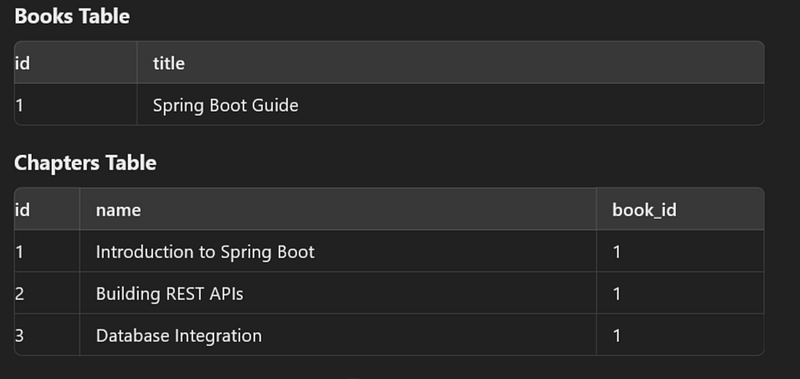
This approach is useful when data is logically grouped but can be managed independently. For instance, chapters belong to a book but are distinct in content and can be managed (added/removed) independently while maintaining their association with the book.
Summary Notes :
Here are the possible CascadeType options:
PERSIST: When the parent entity is persisted, the associated child entities will also be persisted.MERGE: When the parent entity is merged (updated), the associated child entities will also be merged.REMOVE: When the parent entity is removed, the associated child entities will also be removed.REFRESH: When the parent entity is refreshed, the associated child entities will also be refreshed.DETACH: When the parent entity is detached from the persistence context, the associated child entities will also be detached.ALL: Applies all the above operations.
FetchType options :
FetchType.LAZY: This means that the related entities are loaded on demand (lazily). They are not loaded from the database until they are explicitly accessed. This helps in improving performance by avoiding unnecessary data loading, especially when you don’t always need the related entities.FetchType.EAGER: This means that the related entities are fetched immediately when the parent entity is fetched. This can lead to performance issues if there is a large amount of data because it loads all related entities upfront.
Primary Key Generation Strategies
There are several primary key generation strategies you can use:
GenerationType.AUTO: The persistence provider (JPA implementation) will choose an appropriate strategy for the database.GenerationType.IDENTITY: The database generates a unique value automatically, usually by auto-incrementing a column.GenerationType.SEQUENCE: A database sequence is used to generate primary key values.GenerationType.TABLE: A separate table is used to generate unique primary key values.
👏 If you found my articles useful, please consider giving it claps and sharing it with your friends and colleagues.
To read other topics
- One To One mapping in Spring Boot JPA
- One To Many mapping in Spring Boot JPA
- @Formula Annotation in Spring Boot
- Mastering Transaction Propagation and Isolation in Spring Boot
- SOLID Principles in Java
- Java 8 Interview Questions and Answer
- Java String Interview Questions and answer
- Kafka Interview Questions and Answers
- Optional in Java 8
- Global exception handling in spring boot
- Pessimistic Locking in JPA with Spring Boot
- Optimistic Locking in JPA with Spring Boot
- Design Pattern in java
- Generic ApiResponse and Global Exception Handling in Spring Boot
- Garbage Collection in Java
- JVM Architecture
- How the JIT Compiler Enhances Java Performance: An In-Depth Explanation


