
One To One mapping in Spring Boot JPA
One-to-One mapping is a type of relationship between two entities where each record in one table is associated with exactly one record in another table. This is typically used when you have two entities that have a direct correspondence with each other.
When to Use a One-to-One Relationship
A one-to-one relationship is used when one entity is associated with exactly one instance of another entity. For example, a User can have one and only one Profile. You use a one-to-one relationship when:
- Each row in one table is associated with exactly one row in another table.
- You want to split a larger table into smaller tables for design efficiency, especially if one part of the data is accessed frequently and the other part infrequently.
- You want to handle optional or conditional data that only applies to some rows in another table.
Example: User-Profile One-to-One Relationship in Spring Boot with MySQL
Step 1: MySQL Database Setup
Assume you have a MySQL database named userdb. You can create it using the following command:
CREATE DATABASE userdb;Step 2: Spring Boot Project Setup
Dependencies
Add the following dependencies in your pom.xml:
<dependencies>
    <dependency>
        <groupId>org.springframework.boot</groupId>
        <artifactId>spring-boot-starter-data-jpa</artifactId>
    </dependency>
    <dependency>
        <groupId>mysql</groupId>
        <artifactId>mysql-connector-java</artifactId>
        <scope>runtime</scope>
    </dependency>
    <dependency>
        <groupId>org.springframework.boot</groupId>
        <artifactId>spring-boot-starter-web</artifactId>
    </dependency>
</dependencies>
Application Properties
In your src/main/resources/application.properties, configure the MySQL database connection:
spring.datasource.url=jdbc:mysql://localhost:3306/userdb
spring.datasource.username=root
spring.datasource.password=rootpassword
spring.jpa.hibernate.ddl-auto=update
spring.jpa.show-sql=true
Step 3: Create Entities
User Entity
package com.example.demo.model;

import javax.persistence.*;

@Entity
public class User {
    @Id
    @GeneratedValue(strategy = GenerationType.IDENTITY)
    private Long id;

    private String name;

    @OneToOne(cascade = CascadeType.ALL)
    @JoinColumn(name = "profile_id", referencedColumnName = "id")
    private Profile profile;

    // Getters and Setters
}
@JoinColumn
The @JoinColumn annotation specifies the foreign key column in the database that will be used to establish the relationship between the two entities.
name = "profile_id": This defines the name of the foreign key column in theusertable. It creates a column namedprofile_idin theusertable, which will store the primary key (id) of theprofiletable.- Without
@JoinColumn, JPA would automatically generate the default column name (which might beprofile_id, but explicitly defining it makes the code more readable and ensures correctness).
referencedColumnName
The referencedColumnName attribute is used to define which column in the target entity (in this case, Profile) will be used as the foreign key reference.
referencedColumnName = "id": This specifies that the profile_id in the user table references the id column in the profile table. In other words, the profile_id in the user table holds the value of the id from the profile table.
Profile Entity
package com.example.demo.model;

import javax.persistence.*;

@Entity
public class Profile {
    @Id
    @GeneratedValue(strategy = GenerationType.IDENTITY)
    private Long id;

    private String phoneNumber;
    private String address;

    @OneToOne(mappedBy = "profile")
    private User user;

    // Getters and Setters
}
The mappedBy attribute in JPA is used to specify the owner side of the relationship in bidirectional associations, and it indicates which entity is responsible for managing the relationship.
Here, the Profile entity uses mappedBy to indicate that the User entity is the owner of the relationship, and Profile is the inverse side.
Explanation of mappedBy
mappedBy = "profile":
- This tells JPA that the
Profileentity does not own the relationship. - The
mappedByattribute points to the fieldprofilein theUserentity, which means that theUserentity owns the relationship and contains the foreign key (profile_id).
2. Owner vs. Inverse Side:
- The side of the relationship that does not have
mappedByis the owner of the relationship. In this case, theUserentity is the owner because it has the foreign key (profile_id) and uses@JoinColumn. - The side with
mappedByis the inverse side, which refers back to the owner and does not have control over the relationship (i.e.,Profilejust referencesUser, but it doesn’t manage the foreign key).
Why Use mappedBy?
When defining bidirectional relationships in JPA, it’s important to specify which entity is responsible for managing the association. The mappedBy attribute is used on the inverse side to point to the owner side, which contains the foreign key and is responsible for updating and maintaining the relationship in the database.
Step 4: Create Repositories
UserRepository
package com.example.demo.repository;

import org.springframework.data.jpa.repository.JpaRepository;
import com.example.demo.model.User;

public interface UserRepository extends JpaRepository<User, Long> {
}
ProfileRepository
package com.example.demo.repository;

import org.springframework.data.jpa.repository.JpaRepository;
import com.example.demo.model.Profile;

public interface ProfileRepository extends JpaRepository<Profile, Long> {
}
Step 5: Create Service
UserService
package com.example.demo.service;

import org.springframework.beans.factory.annotation.Autowired;
import org.springframework.stereotype.Service;
import com.example.demo.model.User;
import com.example.demo.repository.UserRepository;

@Service
public class UserService {

    @Autowired
    private UserRepository userRepository;

    public User saveUser(User user) {
        return userRepository.save(user);
    }

    public User getUserById(Long id) {
        return userRepository.findById(id).orElse(null);
    }
}
Step 6: Create Controller
UserController
package com.example.demo.controller;

import org.springframework.beans.factory.annotation.Autowired;
import org.springframework.web.bind.annotation.*;
import com.example.demo.model.User;
import com.example.demo.service.UserService;

@RestController
@RequestMapping("/users")
public class UserController {

    @Autowired
    private UserService userService;

    @PostMapping
    public User createUser(@RequestBody User user) {
        return userService.saveUser(user);
    }

    @GetMapping("/{id}")
    public User getUser(@PathVariable Long id) {
        return userService.getUserById(id);
    }
}
Step 7: Testing with Sample Input
You can use Postman or any REST client to test the API.
1. Create User with Profile:
- Endpoint:
POST /users - Request Body:
{
  "name": "John Doe",
  "profile": {
    "phoneNumber": "123456789",
    "address": "123 Main St"
  }
}Response:
{
  "id": 1,
  "name": "John Doe",
  "profile": {
    "id": 1,
    "phoneNumber": "123456789",
    "address": "123 Main St"
  }
}
2. Get User by ID:
- Endpoint:
GET /users/1 - Response:
{
  "id": 1,
  "name": "John Doe",
  "profile": {
    "id": 1,
    "phoneNumber": "123456789",
    "address": "123 Main St"
  }
}
Step 8: Output in MySQL
After creating a user, the data is stored in the MySQL database in two tables: user and profile.
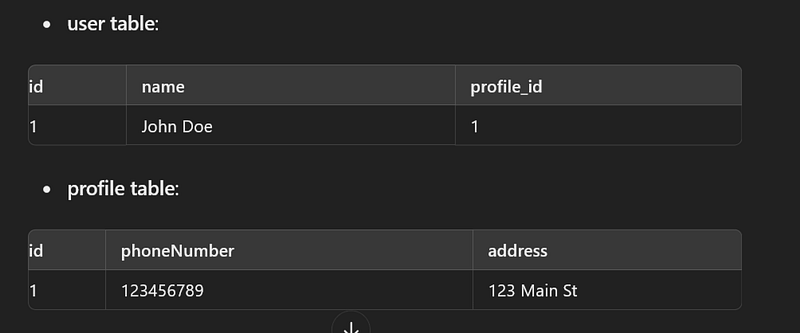
In this example, the one-to-one relationship ensures that each User has exactly one Profile, and each Profile is associated with one User. This design is useful when a User's profile data is logically separated but still tightly coupled.
In This Example:
- In the
Userentity, the@JoinColumnannotation on theprofilefield defines the foreign key (profile_id), makingUserthe owner of the one-to-one relationship. - In the
Profileentity, themappedBy = "profile"points back to theUserentity and indicates thatProfiledoes not own the relationship; it is the inverse side.
👏 If you found my articles useful, please consider giving it claps and sharing it with your friends and colleagues.
To read other topics
- Mastering Transaction Propagation and Isolation in Spring Boot
- One To One mapping in Spring Boot JPA
- One To Many mapping in Spring Boot JPA
- @Primary and @Qualifier Annotations with Practical Examples
- @Formula Annotation in Spring Boot
- SOLID Principles in Java
- Java 8 Interview Questions and Answer
- Java String Interview Questions and answer
- Kafka Interview Questions and Answers
- Optional in Java 8
- Global exception handling in spring boot
- Pessimistic Locking in JPA with Spring Boot
- Optimistic Locking in JPA with Spring Boot
- Design Pattern in java
- Generic ApiResponse and Global Exception Handling in Spring Boot


