
Using Hibernate @Formula in Spring Boot to Compute Derived Fields Dynamically
Boost Spring Boot Performance with Hibernate @Formula: Efficient Data Computation Directly from Your Database
The @Formula annotation in Hibernate allows you to map a computed value or SQL expression to a field in your entity class. This field is not persisted in the database but is computed at runtime based on the SQL expression provided in the @Formula annotation. It's often used to compute derived or aggregated values.
The @Formula annotation in Spring Boot is used with JPA (Java Persistence API) to define a custom SQL formula for a field in an entity. This can be particularly useful when you need to calculate a field based on other fields or perform some custom SQL logic
Use Case Scenario:
Imagine you have a Product entity, and each product has a price and a discount. You want to compute the discounted price (price after applying the discount) for each product using the formula:
discountedPrice = price - (price * discount / 100)Instead of computing this in Java code or fetching the price and discount separately from the database, you can use the @Formula annotation to compute this value at the database level.
 @Formula("price - (price * discount / 100)")
 private double discountedPrice;
Example 1:
Product Entity with @Formula
@Entity
public class Product {

    @Id
    @GeneratedValue(strategy = GenerationType.IDENTITY)
    private Long id;

    private String name;

    private double price;

    private double discount; // Discount in percentage

    @Formula("price - (price * discount / 100)")
    private double discountedPrice;

    // Getters and setters
    public Long getId() {
        return id;
    }

    public void setId(Long id) {
        this.id = id;
    }

    public String getName() {
        return name;
    }

    public void setName(String name) {
        this.name = name;
    }

    public double getPrice() {
        return price;
    }

    public void setPrice(double price) {
        this.price = price;
    }

    public double getDiscount() {
        return discount;
    }

    public void setDiscount(double discount) {
        this.discount = discount;
    }

    public double getDiscountedPrice() {
        return discountedPrice;
    }
}
Explanation:
priceanddiscountare fields in the database.discountedPriceis a computed field using the formulaprice - (price * discount / 100).- The value for
discountedPriceis computed at runtime whenever the entity is fetched from the database, based on the current values ofpriceanddiscount.
Repository:
@Repository
public interface ProductRepository extends JpaRepository<Product, Long> {
}
Service:
@Service
public class ProductService {

    @Autowired
    private ProductRepository productRepository;

    public List<Product> getAllProducts() {
        return productRepository.findAll();
    }
}
Controller:
@RestController
@RequestMapping("/products")
public class ProductController {

    @Autowired
    private ProductService productService;

    @GetMapping
    public List<Product> getAllProducts() {
        return productService.getAllProducts();
    }
}
Sample Data in Database:
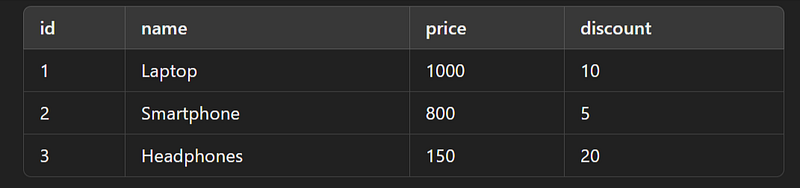
Output:
When you make a GET request to /products, you will see:
[
  {
    "id": 1,
    "name": "Laptop",
    "price": 1000,
    "discount": 10,
    "discountedPrice": 900.0
  },
  {
    "id": 2,
    "name": "Smartphone",
    "price": 800,
    "discount": 5,
    "discountedPrice": 760.0
  },
  {
    "id": 3,
    "name": "Headphones",
    "price": 150,
    "discount": 20,
    "discountedPrice": 120.0
  }
]
Here, the discountedPrice field is computed using the formula defined in the @Formula annotation. The output shows the computed values for each product based on the price and discount values stored in the database.
Key Benefits of @Formula:
- Performance: Complex calculations are pushed to the database, leveraging its computing power.
- Consistency: Computed fields are always up-to-date without needing manual calculations.
- Readability: It simplifies the Java entity code by avoiding additional methods for calculations.
Example 2 :
Use Case Scenario :
Let’s consider a scenario where you have an Employee entity, and you want to calculate the total salary based on the base salary and a bonus. The bonus is calculated as 10% of the base salary. You want to store this calculated value in a field called totalSalary.
Step-by-Step Explanation
- Define the Entity: Create an
Employeeentity with fields forid,name,baseSalary, andtotalSalary. - Use the
@FormulaAnnotation: Apply the@Formulaannotation to thetotalSalaryfield to define the custom SQL formula. - Repository and Service: Create a repository and service to interact with the database.
- Controller: Create a controller to expose an endpoint for testing.
1. Define the Entity
import javax.persistence.*;

@Entity
public class Employee {

    @Id
    @GeneratedValue(strategy = GenerationType.IDENTITY)
    private Long id;

    private String name;

    private Double baseSalary;

    @Formula("base_salary + (base_salary * 0.10)")
    private Double totalSalary;

    // Getters and Setters
    public Long getId() {
        return id;
    }

    public void setId(Long id) {
        this.id = id;
    }

    public String getName() {
        return name;
    }

    public void setName(String name) {
        this.name = name;
    }

    public Double getBaseSalary() {
        return baseSalary;
    }

    public void setBaseSalary(Double baseSalary) {
        this.baseSalary = baseSalary;
    }

    public Double getTotalSalary() {
        return totalSalary;
    }

    public void setTotalSalary(Double totalSalary) {
        this.totalSalary = totalSalary;
    }
}
2. Create the Repository
import org.springframework.data.jpa.repository.JpaRepository;

public interface EmployeeRepository extends JpaRepository<Employee, Long> {
}
3. Create the Service
import org.springframework.beans.factory.annotation.Autowired;
import org.springframework.stereotype.Service;

import java.util.List;

@Service
public class EmployeeService {

    @Autowired
    private EmployeeRepository employeeRepository;

    public List<Employee> getAllEmployees() {
        return employeeRepository.findAll();
    }

    public Employee saveEmployee(Employee employee) {
        return employeeRepository.save(employee);
    }
}
4. Create the Controller
import org.springframework.beans.factory.annotation.Autowired;
import org.springframework.web.bind.annotation.*;

import java.util.List;

@RestController
@RequestMapping("/employees")
public class EmployeeController {

    @Autowired
    private EmployeeService employeeService;

    @GetMapping
    public List<Employee> getAllEmployees() {
        return employeeService.getAllEmployees();
    }

    @PostMapping
    public Employee createEmployee(@RequestBody Employee employee) {
        return employeeService.saveEmployee(employee);
    }
}
Testing the Application
- Start the Spring Boot Application.
- Create an Employee: Use a tool like Postman to send a POST request to
http://localhost:8080/employeeswith the following JSON body:
{
    "name": "John Doe",
    "baseSalary": 50000.0
}
3. Get All Employees: Send a GET request to http://localhost:8080/employees.
Expected Output
The response should include the calculated totalSalary field:
[
    {
        "id": 1,
        "name": "John Doe",
        "baseSalary": 50000.0,
        "totalSalary": 55000.0
    }
]
In this example, the totalSalary is calculated as baseSalary + (baseSalary * 0.10), which is 50000 + (50000 * 0.10) = 55000.
This demonstrates how the @Formula annotation can be used to perform custom calculations directly in the database and map the result to a field in your entity.
👏 If you found my articles useful, please consider giving it claps and sharing it with your friends and colleagues.
To read other topics
- @Formula Annotation in Spring Boot
- @AssociationOverride, @AttributeOverrides, @Embeddable, @Embedded Annotation.
- Mastering Transaction Propagation and Isolation in Spring Boot
- One To One mapping in Spring Boot JPA
- One To Many mapping in Spring Boot JPA
- Pessimistic Locking in JPA with Spring Boot
- Optimistic Locking in JPA with Spring Boot
- Optional in Java 8


