
Mastering Transaction Propagation and Isolation in Spring Boot
Optimizing Transactional Behavior in Spring Boot: Propagation and Isolation
In Spring Boot with JPA (Java Persistence API), transaction management is crucial for ensuring that database operations are completed successfully and consistently. The @Transactional annotation is used to handle transactions in Spring applications. Here's a comprehensive guide on how it works:
Basics of Transaction Management
- Transaction: A transaction is a sequence of operations performed as a single logical unit of work. In a database context, a transaction ensures that a series of operations either all succeed or none of them do, maintaining data integrity.
- The
@Transactionalannotation in Spring is used to manage database transactions. It provides a declarative way to handle transactions, meaning you can annotate your methods or classes to indicate that they should be executed within a transaction.
Propagation: Determines how transactions are handled when a method is called within another transaction. Common propagation types include:
REQUIRED: Join an existing transaction or create a new one if none exists (default).REQUIRES_NEW: Create a new transaction, suspending the existing one if present.NESTED: Execute within a nested transaction, allowing rollback of the nested transaction while preserving the outer one.MANDATORY: Support a current transaction, throw an exception if none exists.NEVER: Execute non-transactionally, throw an exception if a transaction exists.NOT_SUPPORTED: Execute non-transactionally, suspend the current transaction if one exists.SUPPORTS: Support a current transaction, execute non-transactionally if none exists.
Isolation: Defines the visibility of changes made by one transaction to others. Common isolation levels include:
- DEFAULT: Use the default isolation level of the underlying database.
- READ_COMMITTED: Prevent dirty reads but not non-repeatable reads or phantom reads.
- REPEATABLE_READ: Prevent dirty and non-repeatable reads but not phantom reads.
- SERIALIZABLE: Prevents dirty reads, non-repeatable reads, and phantom reads by serializing transactions.
ReadOnly: Indicates whether the transaction is read-only. This can optimize performance if no updates are expected:
Rollback: Defines conditions under which a transaction should be rolled back. By default, transactions are rolled back on unchecked exceptions (RuntimeException) and errors but not on checked exceptions (Exception):
In this post, we covered every aspect of transaction propagation and isolation with examples. Real-time use cases are included in each example. Please 👏clap and save it for future reference.
Example 1 : REQUIRED Transaction Propagation
In Spring Boot, the REQUIRED propagation is the default transaction propagation level. It means that:
- If a method is invoked inside an existing transaction, it will join that transaction.
- If no transaction exists, a new one will be created.
This is useful when you want the operations to either succeed or fail together (atomicity). If the outer transaction commits, all operations will be committed. If it rolls back, all operations will be rolled back, even if they happened in different methods.
Example Scenario
Let’s say you have an EmployeeService that creates and updates employee records, and another DepartmentService that handles department data. Both need to be part of the same transaction to ensure consistency. We'll create a scenario where these services are called within a transaction using the REQUIRED propagation.
1. Entity Classes
Employee.java
@Entity
public class Employee {
    @Id
    @GeneratedValue(strategy = GenerationType.IDENTITY)
    private Long id;
    private String name;
    private String position;

    // Getters and Setters
}
Department.java
@Entity
public class Department {
    @Id
    @GeneratedValue(strategy = GenerationType.IDENTITY)
    private Long id;
    private String name;

    // Getters and Setters
}
2. Repository Interfaces
EmployeeRepository.java
@Repository
public interface EmployeeRepository extends JpaRepository<Employee, Long> {}
DepartmentRepository.java
@Repository
public interface DepartmentRepository extends JpaRepository<Department, Long> {}
3. Service Classes
EmployeeService.java
@Service
public class EmployeeService {

    @Autowired
    private EmployeeRepository employeeRepository;

    @Transactional(propagation = Propagation.REQUIRED)
    public Employee createEmployee(Employee employee) {
        return employeeRepository.save(employee);
    }
}
DepartmentService.java
@Service
public class DepartmentService {

    @Autowired
    private DepartmentRepository departmentRepository;

    @Transactional(propagation = Propagation.REQUIRED)
    public Department createDepartment(Department department) {
        return departmentRepository.save(department);
    }
}
4. Main Transactional Method
CompanyService.java
@Service
public class CompanyService {

    @Autowired
    private EmployeeService employeeService;

    @Autowired
    private DepartmentService departmentService;

    @Transactional(propagation = Propagation.REQUIRED)
    public void createEmployeeAndDepartment(Employee employee, Department department) {
        employeeService.createEmployee(employee);  // This method joins the transaction
        departmentService.createDepartment(department);  // This method also joins the transaction

        // Simulate an exception
        if (department.getName().equals("IT")) {
            throw new RuntimeException("Exception: Department creation failed");
        }
    }
}
Controller
CompanyController.java
@RestController
@RequestMapping("/company")
public class CompanyController {

    @Autowired
    private CompanyService companyService;

    @PostMapping("/create")
    public String createEmployeeAndDepartment(@RequestBody Employee employee, @RequestBody Department department) {
        try {
            companyService.createEmployeeAndDepartment(employee, department);
            return "Employee and Department created successfully";
        } catch (Exception e) {
            return "Error: " + e.getMessage();
        }
    }
}
Scenario: Input and Output
Input:
You send a POST request to create an employee and a department. If the department’s name is “IT”, an exception will be thrown to test the transaction rollback.
- URL:
/company/create - Request Body:
{
  "employee": {
    "name": "John Doe",
    "position": "Developer"
  },
  "department": {
    "name": "IT"
  }
}
Case 1: Successful Operation (No Exception)
- Input:
{
  "employee": {
    "name": "Jane Smith",
    "position": "Manager"
  },
  "department": {
    "name": "HR"
  }
}

// Output:
{
  "message": "Employee and Department created successfully"
}
Database State:
- Employee:
Jane Smith(position: Manager) is saved. - Department:
HRis saved.
Case 2: Rollback due to Exception
- Input:
{
  "employee": {
    "name": "John Doe",
    "position": "Developer"
  },
  "department": {
    "name": "IT"
  }
}

// Output:
{
  "message": "Error: Exception: Department creation failed"
}
Database State:
- Neither the employee (
John Doe) nor the department (IT) will be saved due to the rollback.
Explanation
- In Case 1, both the employee and department are saved because no exception occurs, and both operations are part of the same transaction.
- In Case 2, even though the employee was successfully created, the transaction is rolled back when an exception is thrown during the department creation. This happens because the
REQUIREDpropagation ensures that both operations are treated as part of the same transaction, maintaining atomicity.
This illustrates how the REQUIRED propagation joins existing transactions and ensures either both or none of the operations are committed.
Example 2 : REQUIRES_NEW Transaction Propagation
In Spring Boot, REQUIRES_NEW is a transaction propagation mode that always starts a new transaction, suspending any existing transaction if one is already active. The suspended transaction will only resume when the new transaction completes (either commits or rolls back).
Use Case
Let’s assume we have a CompanyService that saves an employee's data and department details. Both these operations should be done in a transaction, but we want the department save operation to always run in a new, independent transaction. Even if the employee transaction fails, the department transaction should not be affected.
Scenario
- Step 1: Start the process to save an employee with an active transaction.
- Step 2: Call another service to save the department in a new transaction using
REQUIRES_NEW. - Step 3: If the employee save fails, the department save should not be rolled back, as it runs in a separate transaction.
Example Setup
We’ll create two services: EmployeeService and DepartmentService.
1. EmployeeService
@Service
public class EmployeeService {

    @Autowired
    private EmployeeRepository employeeRepository;

    @Autowired
    private DepartmentService departmentService;

    @Transactional // Default propagation is REQUIRED
    public void saveEmployee(Employee employee) {
        employeeRepository.save(employee);

        // Save department in a new transaction
        departmentService.saveDepartment(employee.getDepartment());

        // Simulate an error to check rollback
        if (employee.getName().equals("error")) {
            throw new RuntimeException("Employee save failed");
        }
    }
}
2. DepartmentService
@Service
public class DepartmentService {

    @Autowired
    private DepartmentRepository departmentRepository;

    @Transactional(propagation = Propagation.REQUIRES_NEW)
    public void saveDepartment(Department department) {
        departmentRepository.save(department);
    }
}
3. Repository Classes
@Repository
public interface EmployeeRepository extends JpaRepository<Employee, Long> {
}

@Repository
public interface DepartmentRepository extends JpaRepository<Department, Long> {
}
4. Entity Classes
@Entity
public class Employee {
    @Id
    @GeneratedValue(strategy = GenerationType.IDENTITY)
    private Long id;
    private String name;

    @ManyToOne
    private Department department;

    // getters and setters
}

@Entity
public class Department {
    @Id
    @GeneratedValue(strategy = GenerationType.IDENTITY)
    private Long id;
    private String name;

    // getters and setters
}
Example Execution
Input:
- Saving an employee with a department:
- Employee Name:
John - Department Name:
HR
2. Saving another employee with an error:
- Employee Name:
error(This will trigger the rollback of the employee save operation, but department should still save successfully)
Example Code to Call the Service
@RestController
@RequestMapping("/api/employees")
public class EmployeeController {

    @Autowired
    private EmployeeService employeeService;

    @PostMapping
    public ResponseEntity<String> saveEmployee(@RequestBody Employee employee) {
        try {
            employeeService.saveEmployee(employee);
            return ResponseEntity.ok("Employee saved successfully");
        } catch (Exception e) {
            return ResponseEntity.status(HttpStatus.INTERNAL_SERVER_ERROR).body(e.getMessage());
        }
    }
}
Scenario Testing
- Normal Case: Employee
Johnis saved along with departmentHR. - Error Case: Employee
erroris attempted to be saved with departmentFinance. Since the employee save throws an exception, it will rollback the employee save, but the department save will succeed because it runs in a separate transaction.
Output:
- For Employee
John:
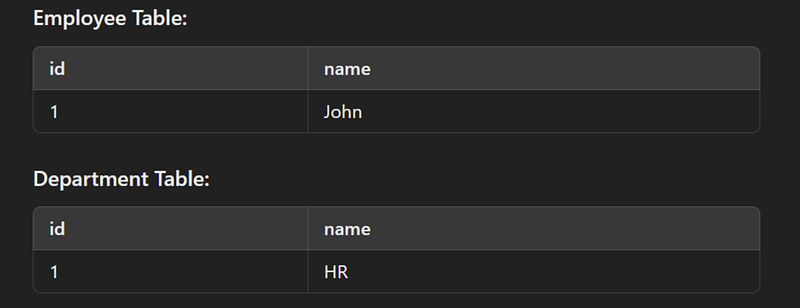
Result : Both employee and department are saved successfully.
2. For Employee error:

Result : The department Finance is saved, but the employee error is not saved due to the error.
Explanation
- In the first case, both employee and department are saved successfully.
- In the second case, the
REQUIRES_NEWpropagation ensures that even though the employee save fails, the department is saved in a separate transaction, unaffected by the employee rollback.
Using REQUIRES_NEW in Spring Boot allows parts of your process to run in separate transactions, ensuring that one transaction does not affect the other.
Example 3: NESTED Transaction Propagation
In NESTED transaction propagation, a method runs in its own transaction but is still nested within the outer transaction. If the nested transaction fails, it will roll back without affecting the outer transaction, allowing the outer transaction to complete successfully.
This is useful when you want to isolate failures within a nested transaction and avoid rolling back the outer transaction.
Example Scenario
Let’s consider an Employee Management System where we need to perform two actions:
- Save an employee.
- Save an employee’s address (nested transaction).
The address is saved in a separate transaction, which means if saving the address fails, it will roll back, but the employee’s data will still be saved.
Entity Classes :
Employee Entity
@Entity
public class Employee {
    @Id
    @GeneratedValue(strategy = GenerationType.IDENTITY)
    private Long id;
    private String name;

    // Getters and Setters
}
Address Entity
@Entity
public class Address {
    @Id
    @GeneratedValue(strategy = GenerationType.IDENTITY)
    private Long id;
    private String city;
    private Long employeeId; // FK for Employee

    // Getters and Setters
}
Repository Interfaces
@Repository
public interface EmployeeRepository extends JpaRepository<Employee, Long> {}

@Repository
public interface AddressRepository extends JpaRepository<Address, Long> {}
Service Layer
EmployeeService
@Service
public class EmployeeService {

    @Autowired
    private EmployeeRepository employeeRepository;

    @Autowired
    private AddressService addressService;

    @Transactional
    public void saveEmployee(Employee employee, Address address) {
        // Save Employee (Outer Transaction)
        employeeRepository.save(employee);

        try {
            // Save Address (Nested Transaction)
            addressService.saveAddress(address, employee.getId());
        } catch (RuntimeException e) {
            // Handle Address save failure but do not rollback the Employee save
            System.out.println("Address save failed: " + e.getMessage());
        }
    }
}
AddressService
@Service
public class AddressService {

    @Autowired
    private AddressRepository addressRepository;

    @Transactional(propagation = Propagation.NESTED)
    public void saveAddress(Address address, Long employeeId) {
        address.setEmployeeId(employeeId);

        // Simulate a failure in saving the address
        if (address.getCity().equalsIgnoreCase("InvalidCity")) {
            throw new RuntimeException("City name is invalid!");
        }

        // Save Address
        addressRepository.save(address);
    }
}
Controller
@RestController
@RequestMapping("/api/employees")
public class EmployeeController {

    @Autowired
    private EmployeeService employeeService;

    @PostMapping("/save")
    public ResponseEntity<String> saveEmployee(@RequestBody EmployeeDTO employeeDTO) {
        Employee employee = new Employee();
        employee.setName(employeeDTO.getName());

        Address address = new Address();
        address.setCity(employeeDTO.getCity());

        employeeService.saveEmployee(employee, address);

        return ResponseEntity.ok("Employee saved successfully!");
    }
}

class EmployeeDTO {
    private String name;
    private String city;

    // Getters and Setters
}
Input and Output Scenario
Input
POST request to save employee:
POST /api/employees/save
{
    "name": "John Doe",
    "city": "InvalidCity"
}
Execution Flow:
- Employee is saved successfully because the outer transaction is not affected by the inner one.
- Address fails to save due to the invalid city, but the employee’s data is already saved, and the address transaction rolls back.
Output (Console Log):
Hibernate: insert into employee (name) values (?)
Hibernate: insert into address (city, employee_id) values (?, ?)
Address save failed: City name is invalid!
Database State:
- Employee is saved in the
employeetable. - No data is saved in the
addresstable due to rollback of the nested transaction.
Input
POST request to save employee with valid data:
POST /api/employees/save
{
    "name": "Jane Doe",
    "city": "New York"
}
Output:
Both the employee and address are saved successfully.
Conclusion
Using NESTED propagation allows the nested transaction to roll back independently from the outer transaction. In this example, the employee record is still saved even if the address transaction fails. This demonstrates the isolation that NESTED propagation offers for transactional management.
Example 4 : MANDATORY Transaction Propagation
Propagation.MANDATORY is used when you want to support a current transaction but throw an exception if no transaction is currently active. This ensures that the annotated method must be executed within an existing transaction context.
If a method with Propagation.MANDATORY is called without an active transaction, Spring throws a TransactionRequiredException.
Example Scenario: Employee and Department
Requirements:
- We will create two services:
EmployeeServiceandDepartmentService. EmployeeServicewill usePropagation.REQUIRED, which will create or participate in an existing transaction.DepartmentServicewill usePropagation.MANDATORY, meaning it will expect an existing transaction and throw an exception if none exists.
- Entities
Employee.java
@Entity
public class Employee {
    @Id
    @GeneratedValue(strategy = GenerationType.IDENTITY)
    private Long id;
    private String name;

    // Getters and setters
}
Department.java
@Entity
public class Department {
    @Id
    @GeneratedValue(strategy = GenerationType.IDENTITY)
    private Long id;
    private String name;

    // Getters and setters
}
2. Repositories
EmployeeRepository.java
@Repository
public interface EmployeeRepository extends JpaRepository<Employee, Long> {
}
DepartmentRepository.java
@Repository
public interface DepartmentRepository extends JpaRepository<Department, Long> {
}
3. Services
EmployeeService.java (with REQUIRED propagation)
@Service
public class EmployeeService {

    @Autowired
    private EmployeeRepository employeeRepository;

    @Autowired
    private DepartmentService departmentService;

    @Transactional(propagation = Propagation.REQUIRED)
    public void createEmployeeWithDepartment(String employeeName, String departmentName) {
        // Create an employee
        Employee employee = new Employee();
        employee.setName(employeeName);
        employeeRepository.save(employee);

        // Call DepartmentService to create a department
        departmentService.createDepartment(departmentName);
    }
}
DepartmentService.java (with MANDATORY propagation)
@Service
public class DepartmentService {

    @Autowired
    private DepartmentRepository departmentRepository;

    @Transactional(propagation = Propagation.MANDATORY)
    public void createDepartment(String departmentName) {
        Department department = new Department();
        department.setName(departmentName);
        departmentRepository.save(department);
    }
}
4. Controller
EmployeeController.java
@RestController
@RequestMapping("/employees")
public class EmployeeController {

    @Autowired
    private EmployeeService employeeService;

    @PostMapping
    public ResponseEntity<String> createEmployee(@RequestParam String employeeName,
                                                 @RequestParam String departmentName) {
        employeeService.createEmployeeWithDepartment(employeeName, departmentName);
        return ResponseEntity.ok("Employee and Department created successfully");
    }

    @PostMapping("/department-only")
    public ResponseEntity<String> createDepartmentOnly(@RequestParam String departmentName) {
        try {
            // Directly call DepartmentService without an active transaction
            departmentService.createDepartment(departmentName);
        } catch (TransactionRequiredException e) {
            return ResponseEntity.status(HttpStatus.BAD_REQUEST).body("Transaction required: " + e.getMessage());
        }
        return ResponseEntity.ok("Department created successfully");
    }
}
Scenario 1: Creating Employee with Department
- When
/employeesendpoint is called, theEmployeeServicestarts a transaction withREQUIREDpropagation. - Inside the
EmployeeService, it callsDepartmentServicewhich hasMANDATORYpropagation. Since a transaction is already active, it will succeed.
Input:
POST /employees?employeeName=John&departmentName=HR
Output:
{
    "message": "Employee and Department created successfully"
}
Both the employee and department are created successfully as there was an active transaction when the DepartmentService was called.
Scenario 2: Creating Department without an Active Transaction
- When
/employees/department-onlyis called, it directly invokesDepartmentServicewithout a transaction context. - Since
DepartmentServicehasMANDATORYpropagation, it will throwTransactionRequiredException.
Input:
POST /employees/department-only?departmentName=Finance
Output:
{
    "message": "Transaction required: No existing transaction found for transaction marked with propagation 'mandatory'"
}
In this case, the DepartmentService could not proceed as there was no active transaction.
Conclusion:
Propagation.MANDATORYensures that the method must be executed within an existing transaction. If there’s no existing transaction, it throws an exception.
Example 5: NEVER Transaction Propagation
In Spring Boot, the NEVER propagation type specifies that the method should execute non-transactionally and should throw an exception if an active transaction exists.
Scenario Explanation
When Propagation.NEVER is used in a method, it ensures that the method never runs within a transaction. If a transaction is already active when this method is called, Spring will throw an IllegalTransactionStateException. This is useful when you explicitly want to avoid transactional behavior for certain methods, like logging or audit operations that should not be part of any ongoing transactions.
Scenario Overview:
Consider a system where we are handling employee management. The system has various operations like:
- Creating or updating employee records (which should happen within a transaction to ensure data consistency).
- Logging or audit operations (which should not be part of a transaction because we don’t want to roll back logs or audits in case of a failure).
In this system, we:
- Use transactions to ensure consistency when creating or updating employee records.
- Want to ensure no transaction exists when performing logging operations, because we don’t want the logs to be affected by the success or failure of the transaction.
- Create the Employee Entity
@Entity
public class Employee {

    @Id
    @GeneratedValue(strategy = GenerationType.IDENTITY)
    private Long id;

    private String name;
    private String department;

    // Getters and Setters
}
2. Create the Employee Repository
public interface EmployeeRepository extends JpaRepository<Employee, Long> {
}
3. Create the Employee Service with NEVER Propagation
@Service
public class EmployeeService {

    @Autowired
    private EmployeeRepository employeeRepository;

    @Transactional(propagation = Propagation.NEVER)
    public Employee createEmployeeNonTransactional(Employee employee) {
        return employeeRepository.save(employee);
    }

    @Transactional(propagation = Propagation.REQUIRED)
    public Employee createEmployeeWithTransaction(Employee employee) {
        return employeeRepository.save(employee);
    }
}- The method
createEmployeeNonTransactional()is annotated with@Transactional(propagation = Propagation.NEVER), meaning that it will throw an exception if it's called within an active transaction. - The method
createEmployeeWithTransaction()is annotated with@Transactional(propagation = Propagation.REQUIRED), meaning that it will execute within a transaction.
4. Create a Test Scenario
@RestController
@RequestMapping("/employees")
public class EmployeeController {

    @Autowired
    private EmployeeService employeeService;

    @PostMapping("/createWithTransaction")
    public ResponseEntity<Employee> createEmployeeWithTransaction(@RequestBody Employee employee) {
        Employee createdEmployee = employeeService.createEmployeeWithTransaction(employee);
        return ResponseEntity.ok(createdEmployee);
    }

    @PostMapping("/createNonTransactional")
    public ResponseEntity<Employee> createEmployeeNonTransactional(@RequestBody Employee employee) {
        Employee createdEmployee = employeeService.createEmployeeNonTransactional(employee);
        return ResponseEntity.ok(createdEmployee);
    }

    @PostMapping("/test")
    public ResponseEntity<String> testPropagation(@RequestBody Employee employee) {
        // First call will open a transaction
        employeeService.createEmployeeWithTransaction(employee);

        // This will throw an exception since there is an active transaction
        employeeService.createEmployeeNonTransactional(employee);

        return ResponseEntity.ok("Success");
    }
}
5. Input and Output Scenarios
Case 1: Calling /employees/createNonTransactional
{
    "name": "John Doe",
    "department": "HR"
}
Output:
{
    "id": 1,
    "name": "John Doe",
    "department": "HR"
}
Case 2: Calling /employees/test
Input:
{
    "name": "Jane Smith",
    "department": "IT"
}
Output:
{
    "timestamp": "2023-09-13T12:34:56.789+00:00",
    "status": 500,
    "error": "Internal Server Error",
    "message": "Existing transaction found for transaction marked with propagation 'never'",
    "path": "/employees/test"
}
Explanation:
- The first call
createEmployeeWithTransaction()starts a transaction. - The second call
createEmployeeNonTransactional()throws anIllegalTransactionStateExceptionbecausePropagation.NEVERdoesn't allow execution within an active transaction.
Conclusion
In this example, the NEVER propagation type ensures that createEmployeeNonTransactional() will throw an exception if there is already an active transaction. This behavior can be useful when you want to enforce strict non-transactional execution for specific methods, like logging or audit-related logic.
Flow of Execution:
1. Normal Transaction (Employee Creation):
When creating or updating employee records, we want this action to be handled transactionally. If something goes wrong (e.g., database failure), the entire transaction should roll back.
2. Logging Without a Transaction:
Logging actions should be performed outside the scope of a transaction, because:
- We want to log events regardless of the success or failure of the transaction.
- Rolling back logs because of a failed transaction can hide useful information.
3. Enforcing Non-Transactional Logging:
By using Propagation.NEVER on the logging method, we guarantee that if there is an ongoing transaction, the logging operation will fail and throw an exception, ensuring the method is never accidentally wrapped in a transaction.
Example Scenario Walkthrough
Step-by-Step Execution:
- User Creates an Employee:
- Endpoint
/employees/testis called to create an employee. - The system starts by calling
createEmployeeWithTransaction(), which opens a transaction. - The employee is saved in the database as part of the active transaction.
2. System Tries to Log the Operation:
- The system next calls
createEmployeeNonTransactional()to log the operation or perform some audit task. - Since
createEmployeeWithTransaction()already opened a transaction, callingcreateEmployeeNonTransactional()withPropagation.NEVERwill throw an exception because it cannot be executed within an active transaction.
3. Exception Thrown:
- The application throws an
IllegalTransactionStateExceptionwith the message:Existing transaction found for transaction marked with propagation 'never'. - The exception occurs because the
NEVERpropagation strictly enforces non-transactional behavior, and we violated that rule by trying to execute it within an ongoing transaction.
Example 6 : NOT_SUPPORTED Transaction Propagation
In Spring Boot, the NOT_SUPPORTED transaction propagation level indicates that the method should be executed non-transactionally, and if there is an active transaction, it will be suspended during the method's execution.
Here’s a clear explanation of how NOT_SUPPORTED works with an example.
Key Points of NOT_SUPPORTED:
- If there is a current transaction, it is suspended.
- The method executes without any transaction.
- No changes made within the method will be rolled back, even if an exception occurs.
Scenario:
We have two services:
EmployeeService: The main service which manages employee data, running with REQUIRED transaction propagation (default behavior).AuditService: A secondary service used to log audit entries, but we want this service to not participate in any transaction (usingNOT_SUPPORTEDpropagation).
Entities: Employee and Audit
@Entity
public class Employee {
    @Id
    @GeneratedValue(strategy = GenerationType.IDENTITY)
    private Long id;
    private String name;
    private double salary;

    // getters and setters
}

@Entity
public class Audit {
    @Id
    @GeneratedValue(strategy = GenerationType.IDENTITY)
    private Long id;
    private String action;
    private String details;

    // getters and setters
}
Repositories: EmployeeRepository and AuditRepository
@Repository
public interface EmployeeRepository extends JpaRepository<Employee, Long> {}

@Repository
public interface AuditRepository extends JpaRepository<Audit, Long> {}
Services
EmployeeService
This service manages the employee operations and runs inside a transaction.
@Service
public class EmployeeService {

    @Autowired
    private EmployeeRepository employeeRepository;

    @Autowired
    private AuditService auditService;

    @Transactional
    public Employee createEmployee(Employee employee) {
        Employee savedEmployee = employeeRepository.save(employee);

        // Call the audit service (which should run non-transactionally)
        auditService.logAudit("CREATE_EMPLOYEE", "Created employee with ID: " + savedEmployee.getId());

        // Simulate some exception to see the behavior
        if (savedEmployee.getName().equals("error")) {
            throw new RuntimeException("Exception in createEmployee");
        }

        return savedEmployee;
    }
}
AuditService
This service is used to log audit entries. We use @Transactional(propagation = Propagation.NOT_SUPPORTED) to ensure that it executes non-transactionally.
@Service
public class AuditService {

    @Autowired
    private AuditRepository auditRepository;

    @Transactional(propagation = Propagation.NOT_SUPPORTED)
    public void logAudit(String action, String details) {
        Audit audit = new Audit();
        audit.setAction(action);
        audit.setDetails(details);
        auditRepository.save(audit);
    }
}
Explanation:
EmployeeService.createEmployee()is transactional (REQUIREDpropagation).- Inside this method,
auditService.logAudit()is called, but it runs outside of the current transaction due to theNOT_SUPPORTEDpropagation. - If the
EmployeeService.createEmployee()method throws an exception, the employee creation will be rolled back, but the audit log will not be rolled back because it was executed outside of the transaction.
Testing the Scenario
Input:
- Create an employee normally.
- Create an employee with the name
"error"to simulate an exception.
Test Case 1: Normal Employee Creation
Employee emp = new Employee();
emp.setName("John Doe");
emp.setSalary(50000);
employeeService.createEmployee(emp);
Test Case 2: Employee Creation with Exception
Employee emp = new Employee();
emp.setName("error");  // This will cause an exception in createEmployee
emp.setSalary(60000);
try {
    employeeService.createEmployee(emp);
} catch (Exception e) {
    System.out.println("Exception occurred: " + e.getMessage());
}
Expected Output
Test Case 1: Normal Employee Creation
- The employee is saved.
- The audit log for the employee creation is saved.
Database state:
- Employee:
John Doeis saved. - Audit: An entry for “CREATE_EMPLOYEE” is saved with details about the employee creation.
Test Case 2: Employee Creation with Exception
- The employee is not saved because of the exception.
- The audit log is saved because
AuditServiceruns without a transaction (due toNOT_SUPPORTED).
Database state:
- Employee: No employee saved (transaction rolled back).
- Audit: An entry for “CREATE_EMPLOYEE” is still saved, even though the employee creation failed.
Summary
- The
NOT_SUPPORTEDpropagation suspends the current transaction whenlogAudit()is called, allowing it to save the audit log without being affected by the surrounding transaction. - If an exception occurs in
EmployeeService, the employee creation is rolled back, but the audit log remains because it was not part of the transaction.
This is how NOT_SUPPORTED works with a transactional context, ensuring that certain operations (like audit logging) can be performed non-transactionally.
Example 7: SUPPORTS Transaction Propagation
The SUPPORTS propagation setting means that the method will execute within a transactional context if one exists. If there is no existing transaction, it will execute non-transactionally. This is useful for methods that do not require a new transaction but can take advantage of an existing one if it is present.
Example Scenario
Consider a scenario where you have an application managing employee records. You have two services: EmployeeService and AuditService.
EmployeeService: Manages employee data and requires transactions.AuditService: Logs changes made to employee data but does not require its own transaction; it can work within an existing transaction if one is present.
- Entities
import javax.persistence.Entity;
import javax.persistence.Id;

@Entity
public class Employee {
    @Id
    private Long id;
    private String name;
    // Getters and setters
}
2. Repositories
import org.springframework.data.jpa.repository.JpaRepository;

public interface EmployeeRepository extends JpaRepository<Employee, Long> {
}
3. Services
EmployeeService.java: This service requires a transaction because it modifies employee data.
import org.springframework.beans.factory.annotation.Autowired;
import org.springframework.stereotype.Service;
import org.springframework.transaction.annotation.Propagation;
import org.springframework.transaction.annotation.Transactional;

@Service
public class EmployeeService {

    @Autowired
    private EmployeeRepository employeeRepository;

    @Autowired
    private AuditService auditService;

    @Transactional
    public void updateEmployee(Long id, String newName) {
        Employee employee = employeeRepository.findById(id).orElseThrow();
        employee.setName(newName);
        employeeRepository.save(employee);
        auditService.logChange(employee);
    }
}AuditService.java: This service uses SUPPORTS propagation and can operate within a transaction if one exists.
import org.springframework.stereotype.Service;
import org.springframework.transaction.annotation.Propagation;
import org.springframework.transaction.annotation.Transactional;

@Service
public class AuditService {

    @Transactional(propagation = Propagation.SUPPORTS)
    public void logChange(Employee employee) {
        // Code to log changes
        System.out.println("Audit log: Employee updated - " + employee.getName());
    }
}
4. Application
Here’s how you might use the EmployeeService in your application:
import org.springframework.beans.factory.annotation.Autowired;
import org.springframework.boot.CommandLineRunner;
import org.springframework.stereotype.Component;

@Component
public class AppRunner implements CommandLineRunner {

    @Autowired
    private EmployeeService employeeService;

    @Override
    public void run(String... args) throws Exception {
        // Assume an employee with ID 1 exists
        employeeService.updateEmployee(1L, "John Doe");
    }
}
Input and Output
Input:
- Assume an employee with ID
1exists in the database with the name "Jane Doe". - The
AppRunnercomponent callsupdateEmployee(1L, "John Doe").
Output:
- The employee’s name is updated to “John Doe” in the database.
- The
AuditServicelogs the change:Audit log: Employee updated - John Doe.
Explanation:
- When
updateEmployeeis called, it starts a transaction because of the@Transactionalannotation. - Within this transaction,
logChangeis called withPropagation.SUPPORTS. - Since there is an existing transaction,
logChangeexecutes within that transaction context. - If there were no existing transaction,
logChangewould execute non-transactionally.
This way, SUPPORTS propagation allows AuditService to participate in the existing transaction if present but does not enforce transaction management of its own.
Sample Input
Assume we have the following initial setup:
- Database contains an employee with ID 1:
Sample Input
Assume we have the following initial setup:
- Database contains an employee with ID 1:
- ID: 1
- Name: Jane Doe
2. Code to execute:
- The
AppRunnerclass runs the following code:
@Component
public class AppRunner implements CommandLineRunner {

    @Autowired
    private EmployeeService employeeService;

    @Override
    public void run(String... args) throws Exception {
        // Update employee with ID 1
        employeeService.updateEmployee(1L, "John Doe");
    }
}
This will call the updateEmployee method of EmployeeService to update the employee's name from "Jane Doe" to "John Doe" and trigger the AuditService to log this change.
Sample Output
- Database Update:
- After running the
AppRunnercode, the employee with ID 1 in the database will be updated as follows:
- ID: 1
- Name: John Doe
Console Output:
Since AuditService logs the change using System.out.println, you would see the following output on the console:
Audit log: Employee updated - John DoeExplanation
- Input:
- Before running
AppRunner, the employee record with ID 1 is "Jane Doe". - The
updateEmployee(1L, "John Doe")method call initiates a transaction because of@Transactionalon theEmployeeService.
During Execution:
updateEmployeeupdates the employee record and callslogChangefromAuditService.logChangeuses@Transactional(propagation = Propagation.SUPPORTS), so it operates within the existing transaction created byupdateEmployee.
Output:
- The employee’s name is successfully updated in the database.
- The
logChangemethod prints the audit log message to the console, indicating the change was made.
This demonstrates how SUPPORTS allows a method to operate within an existing transaction context but doesn’t create or require a new transaction itself.
Example 1 : Transaction Isolation : DEFAULT
Transaction isolation levels control how transactions interact with each other and can influence the behavior of data retrieval and updates. The DEFAULT isolation level uses the default isolation level of the underlying database.
For most databases, the default isolation level is READ_COMMITTED. This level ensures that any data read by a transaction is committed at the moment it is read. It avoids dirty reads but does not prevent non-repeatable reads or phantom reads.
Here’s a complete example of using the DEFAULT isolation level in a Spring Boot application:
Example Scenario
Let’s consider an application with two services: AccountService and TransferService. We want to ensure that when transferring money between accounts, the balance updates are handled correctly.
- Scenario: You have an application where users can transfer money between their accounts. When a transfer is initiated, it should update both the sender’s and receiver’s account balances.
- Create
Accountentity with JPA annotations:
package com.example.demo.entity;

import javax.persistence.Entity;
import javax.persistence.GeneratedValue;
import javax.persistence.GenerationType;
import javax.persistence.Id;

@Entity
public class Account {

    @Id
    @GeneratedValue(strategy = GenerationType.IDENTITY)
    private Long id;
    private String name;
    private Double balance;

    // Getters and Setters
}
2. Create Repositories
Create AccountRepository interface:
package com.example.demo.repository;

import com.example.demo.entity.Account;
import org.springframework.data.jpa.repository.JpaRepository;

public interface AccountRepository extends JpaRepository<Account, Long> {
}
3. Service Layer
Create AccountService with transaction management:
package com.example.demo.service;

import com.example.demo.entity.Account;
import com.example.demo.repository.AccountRepository;
import org.springframework.beans.factory.annotation.Autowired;
import org.springframework.stereotype.Service;
import org.springframework.transaction.annotation.Transactional;

@Service
public class AccountService {

    @Autowired
    private AccountRepository accountRepository;

    @Transactional
    public void transfer(Long fromAccountId, Long toAccountId, Double amount) {
        Account fromAccount = accountRepository.findById(fromAccountId).orElseThrow(() -> new RuntimeException("Account not found"));
        Account toAccount = accountRepository.findById(toAccountId).orElseThrow(() -> new RuntimeException("Account not found"));

        if (fromAccount.getBalance() < amount) {
            throw new RuntimeException("Insufficient balance");
        }

        fromAccount.setBalance(fromAccount.getBalance() - amount);
        toAccount.setBalance(toAccount.getBalance() + amount);

        accountRepository.save(fromAccount);
        accountRepository.save(toAccount);
    }
}
4. Controller Layer
Create a controller to expose the transfer endpoint:
package com.example.demo.controller;

import com.example.demo.service.AccountService;
import org.springframework.beans.factory.annotation.Autowired;
import org.springframework.web.bind.annotation.*;

@RestController
@RequestMapping("/api/accounts")
public class AccountController {

    @Autowired
    private AccountService accountService;

    @PostMapping("/transfer")
    public String transfer(@RequestParam Long fromAccountId, @RequestParam Long toAccountId, @RequestParam Double amount) {
        accountService.transfer(fromAccountId, toAccountId, amount);
        return "Transfer completed";
    }
}
5. Application Properties
Configure your database connection in application.properties:
spring.datasource.url=jdbc:h2:mem:testdb
spring.datasource.driver-class-name=org.h2.Driver
spring.datasource.username=sa
spring.datasource.password=password
spring.jpa.database-platform=org.hibernate.dialect.H2Dialect
7. Testing the Application
To test the transaction with DEFAULT isolation level, start your Spring Boot application and use a REST client (like Postman) to send a POST request to:
POST http://localhost:8080/api/accounts/transfer?fromAccountId=1&toAccountId=2&amount=100
Output
If the transfer is successful, you will receive the response:
Transfer completedDatabase State:
- The balance of account with
id=1should be reduced by 100. - The balance of account with
id=2should be increased by 100.
Explanation:
- Transaction Isolation DEFAULT: Since the default isolation level is usually
READ_COMMITTED, the transaction will ensure that only committed data is visible. If any other transaction is modifying the same data, the changes will not be visible until the transaction is committed. This ensures a consistent view of the data during the transaction.
Example 2 : Transaction Isolation : READ_COMMITTED
In Spring Boot, transaction isolation levels control the visibility of changes made by one transaction to other concurrent transactions. The READ_COMMITTED isolation level is one of the commonly used isolation levels.
Isolation Level: READ_COMMITTED
- Definition: The
READ_COMMITTEDisolation level ensures that any data read during a transaction is committed at the moment it is read. This prevents a transaction from reading uncommitted data (also known as "dirty reads"). However, it does not protect against non-repeatable reads or phantom reads. In other words, if a transaction reads a row of data, other transactions can modify or delete that data before the first transaction is complete.
Example Scenario
Consider a scenario where you have an Employee entity with a salary field. Two concurrent transactions will attempt to update the salary of the same employee.
Here’s how you can demonstrate the READ_COMMITTED isolation level in Spring Boot:
Entity Class:
import javax.persistence.Entity;
import javax.persistence.Id;
import javax.persistence.GeneratedValue;
import javax.persistence.GenerationType;

@Entity
public class Employee {
    @Id
    @GeneratedValue(strategy = GenerationType.IDENTITY)
    private Long id;
    private String name;
    private double salary;

    // Getters and Setters
}
Repository Interface:
import org.springframework.data.jpa.repository.JpaRepository;

public interface EmployeeRepository extends JpaRepository<Employee, Long> {
}
Service Class:
import org.springframework.beans.factory.annotation.Autowired;
import org.springframework.stereotype.Service;
import org.springframework.transaction.annotation.Transactional;

@Service
public class EmployeeService {

    @Autowired
    private EmployeeRepository employeeRepository;

    @Transactional(isolation = Isolation.READ_COMMITTED)
    public void updateSalary(Long employeeId, double newSalary) {
        Employee employee = employeeRepository.findById(employeeId).orElseThrow(() -> new RuntimeException("Employee not found"));
        employee.setSalary(newSalary);
        employeeRepository.save(employee);
    }
}
Controller Class:
import org.springframework.beans.factory.annotation.Autowired;
import org.springframework.web.bind.annotation.*;

@RestController
@RequestMapping("/employees")
public class EmployeeController {

    @Autowired
    private EmployeeService employeeService;

    @PutMapping("/{id}/salary")
    public void updateSalary(@PathVariable Long id, @RequestParam double salary) {
        employeeService.updateSalary(id, salary);
    }
}
Example Usage
- Create an Employee: Assume we have an employee with ID
1and a salary of50000. - Concurrent Transactions:
- Transaction 1: Update salary to
60000. - Transaction 2: Update salary to
70000.
- The two transactions will execute simultaneously, but due to the
READ_COMMITTEDisolation level, each transaction will only see committed data. However, there is no guarantee that the updates will not overwrite each other if not handled properly.
Testing
You can test this by running the application and sending concurrent requests to update the salary:
- Start the Application.
- Use Postman or cURL to send two concurrent PUT requests:
PUT /employees/1/salary?salary=60000PUT /employees/1/salary?salary=70000
Expected Output
- The final salary of the employee will be
70000, as the last transaction to commit will overwrite the changes made by the earlier transaction.
Explanation
In this scenario:
- Both transactions are reading the committed state of the
Employeedata. - Each transaction updates the
salary, and becauseREAD_COMMITTEDensures that data read is always committed, transactions are safe from dirty reads. - The last update operation will win, demonstrating how the
READ_COMMITTEDisolation level prevents dirty reads but doesn't prevent lost updates if not managed correctly.
If you need to avoid lost updates or ensure a consistent view of the data, you might consider using higher isolation levels like REPEATABLE_READ or SERIALIZABLE.
Example 3 : Transaction Isolation : REPEATABLE_READ
In the context of databases, transaction isolation levels control how transactions interact with each other. The REPEATABLE_READ isolation level ensures that if a transaction reads a row, it will see the same values if it reads that row again, even if other transactions are modifying the row.
Key Characteristics:
- Ensures that if a transaction reads a row, the data in that row will not change if the transaction re-reads it.
- Prevents non-repeatable reads, where a row might change if read multiple times within the same transaction.
- Allows for phantom reads, where new rows might appear or disappear if they match a search condition.
Example Scenario:
Imagine a banking application where a user can transfer money between accounts. We want to ensure that if a transaction reads the balance of an account, the balance remains consistent throughout the transaction, even if other transactions are modifying the balance.
1. Setup Spring Boot Project
Make sure you have a Spring Boot project with the necessary dependencies for JPA and a database.
2. Define the Entity
Create an Account entity to represent bank accounts:
import javax.persistence.Entity;
import javax.persistence.Id;
import javax.persistence.Version;

@Entity
public class Account {

    @Id
    private Long id;

    private String accountHolder;

    private Double balance;

    @Version
    private Integer version; // for optimistic locking

    // Getters and Setters
}
3. Define the Repository
Create a repository interface for accessing Account entities:
import org.springframework.data.jpa.repository.JpaRepository;

public interface AccountRepository extends JpaRepository<Account, Long> {
}
4. Service Layer with Transactional Methods
Create a service class to manage transactions:
import org.springframework.beans.factory.annotation.Autowired;
import org.springframework.stereotype.Service;
import org.springframework.transaction.annotation.Isolation;
import org.springframework.transaction.annotation.Propagation;
import org.springframework.transaction.annotation.Transactional;

@Service
public class AccountService {

    @Autowired
    private AccountRepository accountRepository;

    @Transactional(isolation = Isolation.REPEATABLE_READ)
    public void transfer(Long fromAccountId, Long toAccountId, Double amount) {
        Account fromAccount = accountRepository.findById(fromAccountId).orElseThrow();
        Account toAccount = accountRepository.findById(toAccountId).orElseThrow();

        if (fromAccount.getBalance() >= amount) {
            fromAccount.setBalance(fromAccount.getBalance() - amount);
            toAccount.setBalance(toAccount.getBalance() + amount);
            accountRepository.save(fromAccount);
            accountRepository.save(toAccount);
        }
    }
}
5. Controller Layer
Create a REST controller to expose the transfer functionality:
import org.springframework.beans.factory.annotation.Autowired;
import org.springframework.web.bind.annotation.PostMapping;
import org.springframework.web.bind.annotation.RequestParam;
import org.springframework.web.bind.annotation.RestController;

@RestController
public class AccountController {

    @Autowired
    private AccountService accountService;

    @PostMapping("/transfer")
    public String transfer(@RequestParam Long fromAccountId,
                           @RequestParam Long toAccountId,
                           @RequestParam Double amount) {
        accountService.transfer(fromAccountId, toAccountId, amount);
        return "Transfer successful";
    }
}
6. Example Scenario and Execution
Assume you have two accounts in the database:
- Account 1: ID = 1, Balance = 1000.00
- Account 2: ID = 2, Balance = 500.00
Scenario:
- Transaction Begins: The
transfermethod is invoked withfromAccountId = 1,toAccountId = 2, andamount = 200.00. - Account Read: The balance for Account 1 and Account 2 is read.
- Balance Check and Update: The balance of Account 1 is 1000.00, and Account 2 is 500.00. Since Account 1 has sufficient funds, the transfer proceeds:
- Account 1: New balance = 1000.00 - 200.00 = 800.00
- Account 2: New balance = 500.00 + 200.00 = 700.00
4. Data Consistency: Even if another transaction tries to update the balance of Account 1 during this transaction, the REPEATABLE_READ isolation level ensures that the balance of Account 1 will be consistent for this transaction.
Input:
- From Account ID: 1
- To Account ID: 2
- Amount: 200.00
Output:
- Message: “Transfer successful”
Validation:
After the transaction, querying the accounts should show:
- Account 1: Balance = 800.00
- Account 2: Balance = 700.00
This demonstrates that the REPEATABLE_READ isolation level maintains data consistency for the duration of the transaction, even if other concurrent.
Example 4 : Transaction Isolation : SERIALIZABLE
Transaction isolation level SERIALIZABLE is the highest level of isolation in a database. It ensures that transactions are executed in a manner that results in a consistent and isolated view of the database. With SERIALIZABLE, transactions are executed sequentially, and each transaction sees a snapshot of the database as it was at the start of the transaction. This prevents issues such as dirty reads, non-repeatable reads, and phantom reads.
Here’s a complete example demonstrating SERIALIZABLE isolation in a Spring Boot application using an Employee object.
Example Scenario
Imagine you have an Employee Management System where you need to ensure that two concurrent transactions do not interfere with each other. For instance, you want to update an employee’s salary while ensuring that no other transaction can modify or read the same employee’s salary until the first transaction is complete.
Entity Class: Create an Employee entity.
package com.example.demo.entity;

import javax.persistence.Entity;
import javax.persistence.Id;
import javax.persistence.GeneratedValue;
import javax.persistence.GenerationType;

@Entity
public class Employee {
    @Id
    @GeneratedValue(strategy = GenerationType.IDENTITY)
    private Long id;
    private String name;
    private double salary;

    // Getters and Setters
    public Long getId() { return id; }
    public void setId(Long id) { this.id = id; }
    public String getName() { return name; }
    public void setName(String name) { this.name = name; }
    public double getSalary() { return salary; }
    public void setSalary(double salary) { this.salary = salary; }
}
Repository Interface: Define a repository for Employee.
package com.example.demo.repository;

import com.example.demo.entity.Employee;
import org.springframework.data.jpa.repository.JpaRepository;

public interface EmployeeRepository extends JpaRepository<Employee, Long> {
}
Service Class: Implement service methods with SERIALIZABLE isolation.
package com.example.demo.service;

import com.example.demo.entity.Employee;
import com.example.demo.repository.EmployeeRepository;
import org.springframework.beans.factory.annotation.Autowired;
import org.springframework.stereotype.Service;
import org.springframework.transaction.annotation.Isolation;
import org.springframework.transaction.annotation.Transactional;

@Service
public class EmployeeService {

    @Autowired
    private EmployeeRepository employeeRepository;

    @Transactional(isolation = Isolation.SERIALIZABLE)
    public void updateSalary(Long employeeId, double newSalary) {
        Employee employee = employeeRepository.findById(employeeId)
            .orElseThrow(() -> new RuntimeException("Employee not found"));
        employee.setSalary(newSalary);
        employeeRepository.save(employee);
    }
}
Controller Class: Create a controller to test the service.
package com.example.demo.controller;

import com.example.demo.service.EmployeeService;
import org.springframework.beans.factory.annotation.Autowired;
import org.springframework.web.bind.annotation.*;

@RestController
@RequestMapping("/employees")
public class EmployeeController {

    @Autowired
    private EmployeeService employeeService;

    @PostMapping("/updateSalary")
    public void updateSalary(@RequestParam Long id, @RequestParam double salary) {
        employeeService.updateSalary(id, salary);
    }
}
Running the Example
- Initialize the Database: Use an initialization script or manually insert an
Employeerecord into the database. For instance:
INSERT INTO employee (name, salary) VALUES ('John Doe', 50000);2. Test the Isolation Level:
- Start two concurrent requests to update the salary of the same employee.
- Ensure that both requests see a consistent view of the employee’s salary due to the
SERIALIZABLEisolation level. - One request should complete and commit the changes before the second request is processed.
Example Output
Assuming you start two concurrent requests to update the salary of the employee with id = 1:
- Request 1: Update salary to
60000. - Request 2: Update salary to
70000.
With SERIALIZABLE isolation, you should observe that only one update will be committed, and the other request will wait until the first request completes. This prevents issues like lost updates or inconsistent data.
Conclusion
SERIALIZABLE isolation level provides the highest level of data consistency and is useful in scenarios where transactions need to be completely isolated from one another. However, it can also lead to reduced concurrency and potential performance bottlenecks due to its strict locking behavior. Use it judiciously based on the requirements of your application.
Example : Transaction Readonly
In Spring Boot, transactions can be configured to be read-only, which means the transaction is intended for read operations only. This configuration helps optimize performance by potentially allowing the underlying database to apply optimizations suitable for read-only access, and it also ensures that the transaction does not modify any data.
Example Scenario
Let’s say you have an application that provides employee information. You want to implement a service that retrieves employee details without allowing any modifications to the data. By marking the transaction as read-only, you ensure that the database or the persistence layer can optimize the transaction accordingly.
3. Create the Employee Entity
Create an Employee entity class:
import javax.persistence.Entity;
import javax.persistence.Id;

@Entity
public class Employee {
    @Id
    private Long id;
    private String name;
    private String department;

    // Getters and Setters
}
4. Create the Repository Interface
Define a repository for accessing Employee entities:
import org.springframework.data.jpa.repository.JpaRepository;

public interface EmployeeRepository extends JpaRepository<Employee, Long> {
}
5. Create the Service Class with Read-Only Transaction
Implement the service class and annotate the method with @Transactional(readOnly = true):
import org.springframework.beans.factory.annotation.Autowired;
import org.springframework.stereotype.Service;
import org.springframework.transaction.annotation.Transactional;

@Service
public class EmployeeService {

    @Autowired
    private EmployeeRepository employeeRepository;

    @Transactional(readOnly = true)
    public Employee getEmployeeById(Long id) {
        return employeeRepository.findById(id).orElse(null);
    }
}
6. Create the Controller Class
Implement a REST controller to expose the employee details:
import org.springframework.beans.factory.annotation.Autowired;
import org.springframework.web.bind.annotation.GetMapping;
import org.springframework.web.bind.annotation.PathVariable;
import org.springframework.web.bind.annotation.RequestMapping;
import org.springframework.web.bind.annotation.RestController;

@RestController
@RequestMapping("/employees")
public class EmployeeController {

    @Autowired
    private EmployeeService employeeService;

    @GetMapping("/{id}")
    public Employee getEmployee(@PathVariable Long id) {
        return employeeService.getEmployeeById(id);
    }
}
7. Input and Output Example
Input:
Send an HTTP GET request to http://localhost:8080/employees/1.
Output:
If the employee with ID 1 exists, you will receive a JSON response like this:
{
    "id": 1,
    "name": "John Doe",
    "department": "Engineering"
}
If the employee with ID 1 does not exist, you will receive a 404 Not Found response.
Explanation
@Transactional(readOnly = true): This annotation indicates that the methodgetEmployeeByIdis read-only. The underlying database might optimize the transaction for read operations and ensure that no data modifications occur within this transaction.- Service Layer: By marking the transaction as read-only at the service level, you ensure that all operations within this service method are optimized for read operations.
This approach helps in scenarios where you have methods that should only read data without any intention of modifying it, allowing the database to optimize query performance accordingly.
.
👏 If you found my articles useful, please consider giving it claps and sharing it with your friends and colleagues.
To read other topics
- @Formula Annotation in Spring Boot
- @AssociationOverride, @AttributeOverrides, @Embeddable, @Embedded Annotation.
- Mastering Transaction Propagation and Isolation in Spring Boot
- Spring Boot Circuit Breaker Example with Resilience4j
- One To One mapping in Spring Boot JPA
- One To Many mapping in Spring Boot JPA
- Pessimistic Locking in JPA with Spring Boot
- Optimistic Locking in JPA with Spring Boot
- Optional in Java 8
- Mastering Transaction Propagation and Isolation in Spring Boot


