
Generic Api Response and Global Exception Handling in Spring Boot
Why Care About API Response?
- Improves client-side error handling: Your frontend team will thank you.
- Enhances readability and maintainability: Future you (or your team) will appreciate the clarity.
- Simplifies debugging and logging: Spot issues quickly and efficiently.
Here’s an example pom.xml for Maven:
<dependencies>
    <!-- Spring Boot Web for building REST APIs -->
    <dependency>
        <groupId>org.springframework.boot</groupId>
        <artifactId>spring-boot-starter-web</artifactId>
    </dependency>

    <!-- Spring Boot Starter Validation -->
    <dependency>
        <groupId>org.springframework.boot</groupId>
        <artifactId>spring-boot-starter-validation</artifactId>
    </dependency>

    <!-- H2 Database (for in-memory testing) -->
    <dependency>
        <groupId>com.h2database</groupId>
        <artifactId>h2</artifactId>
        <scope>runtime</scope>
    </dependency>

    <!-- Spring Boot Starter Data JPA (for database interactions) -->
    <dependency>
        <groupId>org.springframework.boot</groupId>
        <artifactId>spring-boot-starter-data-jpa</artifactId>
    </dependency>

    <!-- MySQL Driver (if using MySQL database) -->
    <dependency>
        <groupId>mysql</groupId>
        <artifactId>mysql-connector-java</artifactId>
        <scope>runtime</scope>
    </dependency>

    <!-- Spring Boot DevTools (for development convenience, optional) -->
    <dependency>
        <groupId>org.springframework.boot</groupId>
        <artifactId>spring-boot-devtools</artifactId>
        <scope>runtime</scope>
    </dependency>

    <!-- Spring Boot Test (for unit testing, optional) -->
    <dependency>
        <groupId>org.springframework.boot</groupId>
        <artifactId>spring-boot-starter-test</artifactId>
        <scope>test</scope>
MySQL Configuration (for production or persistent storage):
# MySQL Database Configuration
spring.datasource.url=jdbc:mysql://localhost:3306/your_db_name
spring.datasource.username=root
spring.datasource.password=your_password
spring.datasource.driver-class-name=com.mysql.cj.jdbc.Driver

# JPA (Hibernate) Properties
spring.jpa.hibernate.ddl-auto=update  # Automatically creates/updates tables based on entities
spring.jpa.show-sql=true  # To print SQL queries for debugging
spring.jpa.properties.hibernate.dialect=org.hibernate.dialect.MySQL8Dialect
1. Create the Employee Entity
This is the basic employee model that we’ll use in our application.
import javax.persistence.Entity;
import javax.persistence.GeneratedValue;
import javax.persistence.GenerationType;
import javax.persistence.Id;
import javax.validation.constraints.NotNull;

@Entity
public class Employee {

    @Id
    @GeneratedValue(strategy = GenerationType.IDENTITY)
    private Long id;

    @NotNull
    private String name;

    @NotNull
    private String department;

    // Getters and Setters
    public Long getId() {
        return id;
    }

    public void setId(Long id) {
        this.id = id;
    }

    public String getName() {
        return name;
    }

    public void setName(String name) {
        this.name = name;
    }

    public String getDepartment() {
        return department;
    }

    public void setDepartment(String department) {
        this.department = department;
    }
}
2. Define ApiResponse<T>
package com.example.demo.response;

import java.util.List;

public class ApiResponse<T> {
    private boolean success;
    private String message;
    private T data;
    private List<String> errors;
    private int errorCode;
    private long timestamp;
    private String path;

    // Getters and Setters

    public boolean isSuccess() {
        return success;
    }

    public void setSuccess(boolean success) {
        this.success = success;
    }

    public String getMessage() {
        return message;
    }

    public void setMessage(String message) {
        this.message = message;
    }

    public T getData() {
        return data;
    }

    public void setData(T data) {
        this.data = data;
    }

    public List<String> getErrors() {
        return errors;
    }

    public void setErrors(List<String> errors) {
        this.errors = errors;
    }

    public int getErrorCode() {
        return errorCode;
    }

    public void setErrorCode(int errorCode) {
        this.errorCode = errorCode;
    }

    public long getTimestamp() {
        return timestamp;
    }

    public void setTimestamp(long timestamp) {
        this.timestamp = timestamp;
    }

    public String getPath() {
        return path;
    }

    public void setPath(String path) {
        this.path = path;
    }
}
ApiResponse<T> is a generic class used to standardize the structure of responses (both success and error) in a Spring Boot application. The T represents the type of data that will be returned in the response, which makes the ApiResponse flexible enough to handle different types of data.
Generic Type (T): This allows the response to include any type of data. For example, it could return an Employee object, a List<Employee>, or any other type.
Fields in ApiResponse<T>:
success: Abooleanindicating whether the request was successful or not.message: AStringmessage that describes the result (e.g., "Employee found" or "Resource not found").data: The actual response data of typeT(can be an entity, a list, or any other object).errors: A list ofStringerrors that describe what went wrong if the request failed.errorCode: An integer error code that can be used to classify different types of errors.timestamp: Alongrepresenting the time the response was generated.path: The URL path of the request, which helps in debugging.
3. Create Custom Exceptions
Here are two custom exceptions: ResourceNotFoundException and ResponseNotFoundException.
package com.example.demo.exception;

public class ResourceNotFoundException extends RuntimeException {
    public ResourceNotFoundException(String message) {
        super(message);
    }
}

public class ResponseNotFoundException extends RuntimeException {
    public ResponseNotFoundException(String message) {
        super(message);
    }
}
4. Global Exception Handler
The GlobalExceptionHandler class handles different exceptions and returns an appropriate ApiResponse<T>.
package com.example.demo.exception;

import com.example.demo.response.ApiResponse;
import com.example.demo.util.ResponseUtil;
import org.springframework.http.HttpStatus;
import org.springframework.web.bind.annotation.ExceptionHandler;
import org.springframework.web.bind.annotation.RestControllerAdvice;

import javax.servlet.http.HttpServletRequest;
import java.util.Arrays;

@RestControllerAdvice
public class GlobalExceptionHandler {

    @ExceptionHandler(Exception.class)
    public ApiResponse<Object> handleGeneralException(Exception ex, HttpServletRequest request) {
        return ResponseUtil.error(Arrays.asList(ex.getMessage()), "An unexpected error occurred", 1001, request.getRequestURI());
    }

    @ExceptionHandler(ResourceNotFoundException.class)
    public ApiResponse<Object> handleResourceNotFoundException(ResourceNotFoundException ex, HttpServletRequest request) {
        return ResponseUtil.error(Arrays.asList(ex.getMessage()), "Resource not found", 404, request.getRequestURI());
    }

    @ExceptionHandler(ResponseNotFoundException.class)
    public ApiResponse<Object> handleResponseNotFoundException(ResponseNotFoundException ex, HttpServletRequest request) {
        return ResponseUtil.error(Arrays.asList(ex.getMessage()), "Response data not found", 204, request.getRequestURI());
    }
}
@RestControllerAdvice
@RestControllerAdvice is a specialized annotation in Spring Boot used for global exception handling. It combines the functionalities of @ControllerAdvice and @ResponseBody:
@ControllerAdvice: This annotation allows you to handle exceptions across multiple controllers. It's a centralized place where you can define how to handle specific exceptions thrown by any controller in your application.@ResponseBody: This ensures that the returned data is automatically serialized into JSON or XML (based on the client's request) and sent as a response body.
@RestControllerAdvice is used to create a global exception handler that will return JSON or XML responses (instead of views or pages), making it ideal for REST APIs.
@ExceptionHandler
@ExceptionHandler is an annotation used to define the method that handles specific exceptions. When an exception is thrown by a controller, Spring will look for a method annotated with @ExceptionHandler that matches the type of exception, and that method will handle the exception instead of the default behavior (e.g., showing a server error page).
@ExceptionHandler(ResourceNotFoundException.class)tells Spring that this method will handleResourceNotFoundException.- When
ResourceNotFoundExceptionis thrown, this method returns anApiResponseobject with error details, instead of letting the exception propagate to the user as a default error page.
How They Work Together
@RestControllerAdviceallows defining exception handling logic globally for all controllers.@ExceptionHandlermethods inside the@RestControllerAdviceclass define how to handle specific exceptions likeResourceNotFoundException,Exception, etc.
This combination ensures that your application can consistently handle and format exceptions into JSON responses, improving error handling in RESTful services.
5. ResponseUtil Class
You provided this class, and it will help us generate standardized success or error responses.
package com.example.demo.util;

import com.example.demo.response.ApiResponse;

import java.util.Arrays;
import java.util.List;

public class ResponseUtil {

    public static <T> ApiResponse<T> success(T data, String message, String path) {
        ApiResponse<T> response = new ApiResponse<>();
        response.setSuccess(true);
        response.setMessage(message);
        response.setData(data);
        response.setErrors(null);
        response.setErrorCode(0); // No error
        response.setTimestamp(System.currentTimeMillis());
        response.setPath(path);
        return response;
    }

    public static <T> ApiResponse<T> error(List<String> errors, String message, int errorCode, String path) {
        ApiResponse<T> response = new ApiResponse<>();
        response.setSuccess(false);
        response.setMessage(message);
        response.setData(null);
        response.setErrors(errors);
        response.setErrorCode(errorCode);
        response.setTimestamp(System.currentTimeMillis());
        response.setPath(path);
        return response;
    }

    public static <T> ApiResponse<T> error(String error, String message, int errorCode, String path) {
        return error(Arrays.asList(error), message, errorCode, path);
    }
}
The ResponseUtil class is a utility class used to simplify the process of creating consistent ApiResponse<T> objects in a Spring Boot application. It provides reusable methods for generating success and error responses, making the controller code more concise and standardized.
Methods in ResponseUtil
success(T data, String message, String path):
Parameters:
T data: The actual data being returned (e.g., anEmployeeobject).String message: A message that describes the result (e.g., "Employee found").String path: The request URL path, useful for debugging.
Returns: A successful ApiResponse<T> object.
2. error(List<String> errors, String message, int errorCode, String path)
Parameters:
List<String> errors: A list of error messages explaining what went wrong.String message: A message describing the overall error (e.g., "Resource not found").int errorCode: An error code for further classification (e.g.,404for "not found").String path: The request URL path where the error occurred.
Returns: An ApiResponse<T> object containing the error details.
3. error(String error, String message, int errorCode, String path):
Parameters:
String error: A single error message.String message: The error message.int errorCode: The error code (e.g.,404).String path: The request URL path where the error occurred.
Returns: An ApiResponse<T> object containing the error details.
6. Employee Controller
Here’s an example controller to test the different exceptions and return the ApiResponse<T>.
import org.springframework.beans.factory.annotation.Autowired;
import org.springframework.http.ResponseEntity;
import org.springframework.web.bind.annotation.*;

@RestController
@RequestMapping("/api/employees")
public class EmployeeController {

    @Autowired
    private EmployeeService employeeService;

    @PutMapping("/{id}")
    public ResponseEntity<ApiResponse<Employee>> updateEmployee(
            @PathVariable Long id,
            @RequestBody Employee employee,
            HttpServletRequest request) {
        Employee updatedEmployee = employeeService.updateEmployee(id, employee);
        return ResponseEntity.ok(ResponseUtil.success(updatedEmployee, "Employee updated successfully", request.getRequestURI()));
    }
}
7. Write a Service Layer The service layer will contain the business logic for updating an employee:
import org.springframework.beans.factory.annotation.Autowired;
import org.springframework.stereotype.Service;
import javax.transaction.Transactional;
import java.util.Optional;

@Service
public class EmployeeService {

    @Autowired
    private EmployeeRepository employeeRepository;

    @Transactional
    public Employee updateEmployee(Long id, Employee updatedEmployee) {
        Optional<Employee> existingEmployeeOptional = employeeRepository.findById(id);

        if (existingEmployeeOptional.isPresent()) {
            Employee existingEmployee = existingEmployeeOptional.get();
            existingEmployee.setName(updatedEmployee.getName());
            existingEmployee.setDepartment(updatedEmployee.getDepartment());
            return employeeRepository.save(existingEmployee);
        } else {
            throw new ResourceNotFoundException("Employee not found with id " + id);
        }
    }
}
8. Create a Repository Interface Create an interface for data access operations:
import org.springframework.data.jpa.repository.JpaRepository;
import org.springframework.stereotype.Repository;

@Repository
public interface EmployeeRepository extends JpaRepository<Employee, Long> {
}
9. Application Entry Point
The main application class.
package com.example.demo;

import org.springframework.boot.SpringApplication;
import org.springframework.boot.autoconfigure.SpringBootApplication;

@SpringBootApplication
public class DemoApplication {
    public static void main(String[] args) {
        SpringApplication.run(DemoApplication.class, args);
    }
}
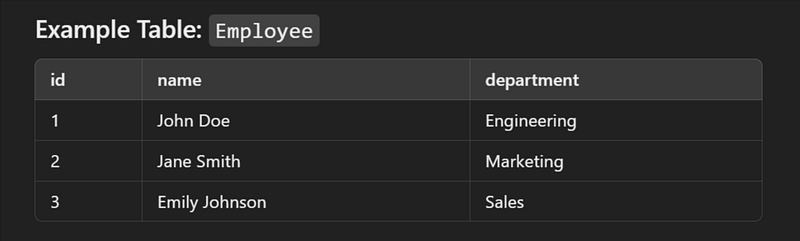
Sample SQL Schema
// Create the Employee Table

CREATE TABLE Employee (
    id BIGINT AUTO_INCREMENT PRIMARY KEY,
    name VARCHAR(100) NOT NULL,
    department VARCHAR(100) NOT NULL
);

// Insert Sample Records

INSERT INTO Employee (name, department) VALUES ('John Doe', 'Engineering');
INSERT INTO Employee (name, department) VALUES ('Jane Smith', 'Marketing');
INSERT INTO Employee (name, department) VALUES ('Emily Johnson', 'Sales');
Table
Input and Output
1. Update Employee
URL: http://localhost:8080/api/employees/{id}
Method: PUT
{
    "name": "Jane Doe",
    "department": "Marketing"
}
2. Successful Response
If the employee with the provided ID exists, you should receive a successful response.
{
    "success": true,
    "message": "Employee updated successfully",
    "data": {
        "id": 1,
        "name": "Jane Doe",
        "department": "Marketing"
    },
    "errors": null,
    "errorCode": 0,
    "timestamp": 1691740052000,
    "path": "/api/employees/1"
}
3. Error Response (Employee Not Found)
If the employee with the provided ID does not exist, you should receive an error response.
{
    "success": false,
    "message": "Resource not found",
    "data": null,
    "errors": [
        "Employee not found with id 999"
    ],
    "errorCode": 404,
    "timestamp": 1691740052000,
    "path": "/api/employees/999"
}
👏 If you found my articles useful, please consider giving it claps and sharing it with your friends and colleagues.
To read other topics
- One To One mapping in Spring Boot JPA
- One To Many mapping in Spring Boot JPA
- SOLID Principles in Java
- Java 8 Interview Questions and Answer
- Java String Interview Questions and answer
- Kafka Interview Questions and Answers
- Optional in Java 8
- Global exception handling in spring boot
- Pessimistic Locking in JPA with Spring Boot
- Optimistic Locking in JPA with Spring Boot
- Design Pattern in java
- Generic ApiResponse and Global Exception Handling in Spring Boot


