Kafka Interview Questions and Answers
1. What is Kafka? Kafka is an open-source distributed event streaming platform developed by LinkedIn and later contributed to the Apache Software Foundation. It is designed to handle high-throughput, fault-tolerant, and real-time data streaming. Kafka is widely used for building real-time data pipelines, streaming analytics, and event-driven architectures.
2. What are the benefits of using Kafka? Some of the key benefits of using Kafka include: - High throughput: Kafka can handle a large number of messages per second. - Scalability: Kafka scales horizontally to distribute the load across multiple servers. - Durability: Messages are persisted on disk, ensuring data is not lost in case of failures. - Fault tolerance: Kafka maintains replicas of data to tolerate node failures. - Real-time data streaming: It enables real-time processing and analytics of data streams. - Decoupling: Producers and Consumers are independent and not directly connected to each other. This means that the producer (which sends messages to Kafka topics) does not need to know anything about the consumers (which read messages from those topics), and vice versa. This architectural pattern enhances flexibility, scalability, and maintainability. - Extensibility: Kafka ecosystem provides various connectors and plugins for integration.
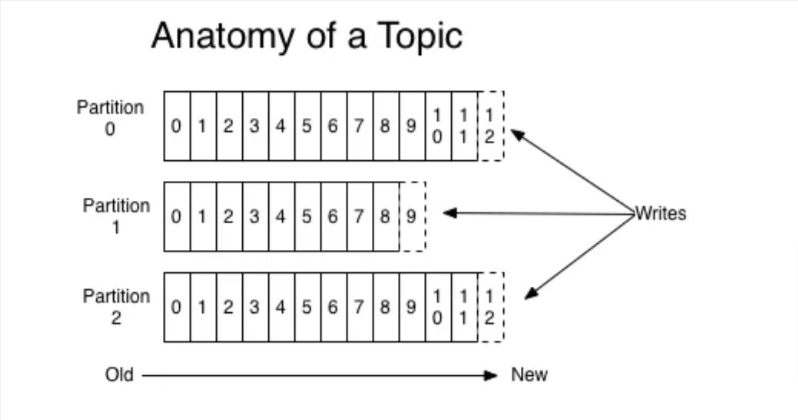
3. What are the different components of Kafka? The main components of Kafka are: - Broker: Kafka brokers are the server instances within a Kafka cluster. They serve as the gateways for producers to send data and for consumers to retrieve data. Each broker is responsible for handling data in the form of messages or events. - Producer: An application that publishes messages to Kafka topics. - Consumer: An application or service that subscribes to Kafka topics and processes the messages. - Topic: A topic is basically a storage unit where all the messages sent by the producer are stored. Generally, similar data is stored in individual topics. For example, you can have a topic named “user” where you only store the details of your users, or you can have a topic named “payments” where you only store all the payment-related details. - Partition: Partitions are a way to divide topics into smaller, more manageable segments. Each partition is an ordered, immutable sequence of records and is identified by an integer ID. Partitioning allows Kafka to scale horizontally by distributing the load across multiple brokers.
This enables high throughput and parallel processing of data. For example, a topic with a high volume of messages can be partitioned into several segments, each handled by different brokers, thus improving performance and reliability.
All the partitions in a topic would also have their own offsets.
As an example, a producer producing messages to a Kafka topic with 3 partitions would look like this:
- ZooKeeper: Although Kafka is designed to work without ZooKeeper, it relies on it for some critical operations like leader election and cluster metadata management (note that ZooKeeper is being phased out in newer Kafka versions).
4.What is a Consumer Group? A Kafka Consumer Group is a collection of consumers that work together to consume messages from one or more Kafka topics. The main purpose of a consumer group is to provide scalability and fault tolerance in message consumption.
Parallelism and Scalability:
- By using multiple consumers within a group, the message processing workload can be distributed, allowing for higher throughput and faster processing. The number of consumers in a group can be increased to scale out the consumption as needed.
Fault Tolerance:
- If a consumer fails or leaves the group, Kafka detects the failure and triggers a rebalance. The partitions that were assigned to the failed consumer are reassigned to the remaining consumers in the group. This ensures that message processing continues without interruption.
Now, let’s go through a few scenarios to better understand the above concepts
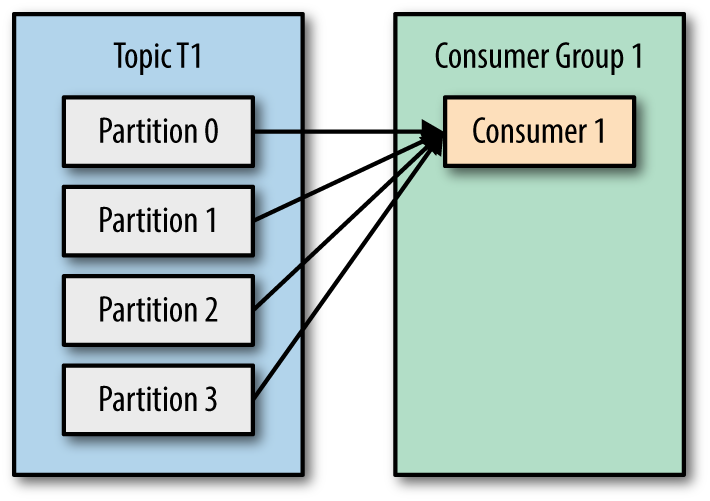
Scenario 1: Let’s say we have a topic with 4 partitions and 1 consumer group consisting of only 1 consumer. The consumer has subscribed to the TopicT1 and is assigned to consume from all the partitions. This scenario can be depicted by the picture below:
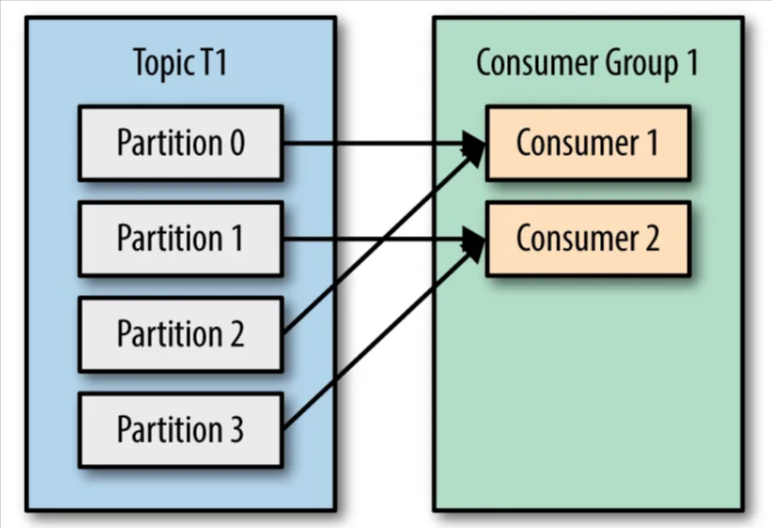
Scenario 2: Now let’s consider we have 2 consumers in our consumer group. These 2 consumers would be assigned to read from different partitions — Consumer1 assigned to read from partitions 0, 2; and Consumer2 assigned to read from partitions 1, 3.
Note: Kafka assigns the partitions of a topic to the consumer in a consumer group, so that each partition is consumed by exactly one consumer in the consumer group. Kafka guarantees that a message is only ever read by a single consumer in the consumer group.
Since the messages stored in individual partitions of the same topic are different, the two consumers would never read the same message, thereby avoiding the same messages being consumed multiple times at the consumer side. This scenario can be depicted by the picture below:
But, what if the number of consumers in a consumer group is more than the number of partitions? Check out Scenario 3
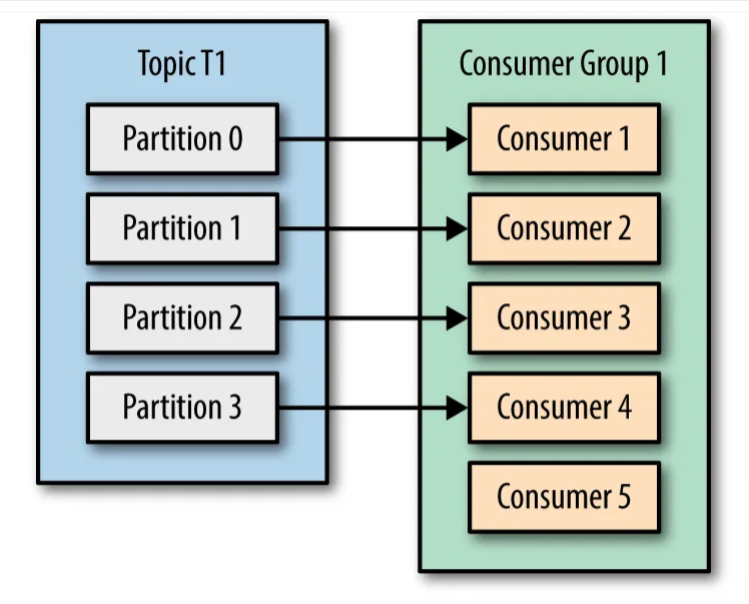
Scenario 3: Let’s say we have 5 consumers in the consumer group which is more than the number of partitions of the TopicT1, then every consumer would be assigned a single partition and the remaining consumer (Consumer5) would be left idle. This scenario can be depicted by the picture below:
Okay, and what if you want multiple consumers to read from the same partition? Check out Scenario 4
Scenario 4: If you want to assign multiple consumers to read from the same partition, then you can add these consumers to different consumer groups, and have both of these consumer groups subscribed to the TopicT1. Here, the messages from Partition0 of TopicT1 are read by Consumer1 of ConsumerGroup1 and Consumer1 of ConsumerGroup2. This scenario can be depicted by the picture below:
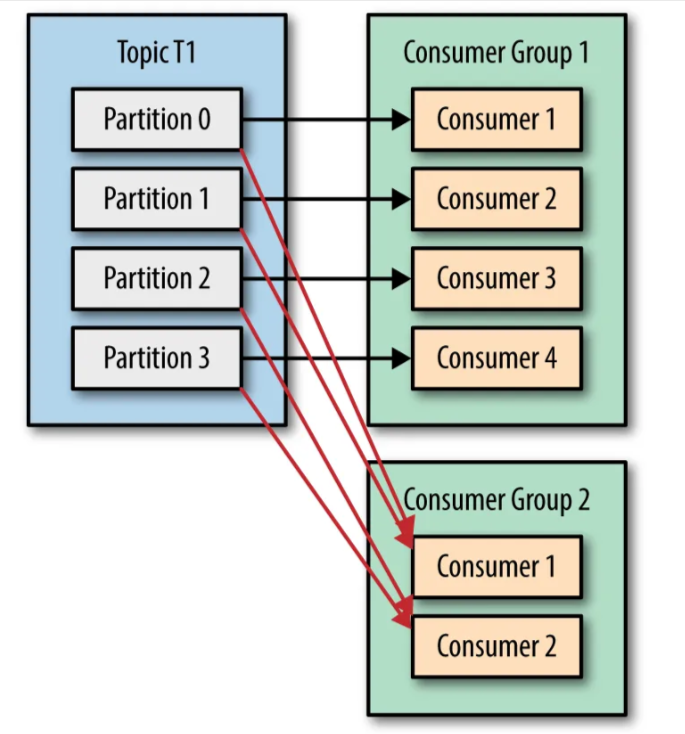
All of that seems okay, but when should you add consumers to the same consumer group VS when should you add the consumers to a different consumer group?
- If your goal is to attain a higher throughput or increase the consumption rate for a particular topic, then adding multiple consumers in the same consumer group would be the way to go. You can have at max consumers equal to the number of partitions of a topic in a consumer group, adding more consumers than the number of partitions would cause the extra consumers to remain idle, since Kafka maintains that no two partitions can be assigned to the consumer in a consumer group. When the the number of consumers consuming from a topic is equal to the number of partitions in the topic, then each consumer would be reading messages from a single topic, and the message consumption would be happening in parallel, thereby increasing the consumption rate.
- But if you have a use case where you want multiple consumers to consume the same messages of a topic, then having multiple consumer groups subscribed to the topic, and adding consumers as per your requirements to these consumer groups would be something you can make use of.
5.What is Broker? A Broker is a server which has Kafka running on it and is responsible for the communication between multiple services. Multiple brokers would form a Kafka cluster.
6.Explain the role of the offset? The offset is a sequential ID assigned to each message within a partition, enabling consumers to read messages in order. Offsets allow consumers to track their position in a partition, ensuring they can resume reading from where they left off in case of failures.
7.What is the role of the Zookeeper in Kafka? Zookeeper is a centralized service used for maintaining configuration information, naming, and synchronization. It helps in managing the Kafka brokers and ensures reliable data coordination and cluster management.
Roles of Kafka ZooKeeper?
- Metadata Management : Kafka ZooKeeper stores essential metadata about topics, partitions, and consumers within the Kafka cluster. This metadata is necessary to track where data is stored and who has consumed it.
- Leader Election : In each Kafka partition, there is one broker acting as the leader that receives and disseminates data. ZooKeeper aids in leader election and leader re-election in case of failure.
- Failure Detection : ZooKeeper is used to detect failures within the Kafka cluster, such as broker or consumer failures, enabling the cluster to respond promptly to failures.
- Cluster Coordination : ZooKeeper is used for cluster coordination tasks, including managing configurations, monitoring broker status, and facilitating administrative tasks.
How Kafka ZooKeeper Works
- Data Storage : Kafka ZooKeeper stores metadata related to the Kafka cluster, such as broker configurations, partition status, and leader election information.
- Leader Election Coordination : ZooKeeper is used to coordinate leader election for Kafka partitions within the cluster. If the current leader experiences a failure, ZooKeeper helps elect a new leader.
- Failure Detection : ZooKeeper regularly monitors the status of brokers and consumers. When ZooKeeper detects a failure, it notifies the Kafka cluster so that appropriate actions can be taken.
- Other Coordination Tasks : Besides leader election, ZooKeeper is utilized for coordinating various activities within the Kafka cluster, including metadata management, configuration changes, and cluster maintenance.
Why Kafka Needs Zookeeper 1. Broker Coordination
- Broker Registration: When a broker starts, it registers itself with Zookeeper, announcing its existence and making it visible to other brokers and clients.
- Metadata Management: Zookeeper keeps track of broker metadata, such as IP addresses and port numbers. This information is vital for producers and consumers to connect to the appropriate brokers.
2. Leader Election Kafka brokers need to be aware of each other, manage the leadership election process, and handle broker failures gracefully.
Within a Kafka cluster, a single broker serves as the active controller which is responsible for state management of partitions and replicas. For example if there are 10 brokers, there will be one broker which acts as a controller. Controller has the responsibility to maintain the leader-follower relationship across all the partitions. If a node is about to fail, message will be given(by controller) to other partition replicas in other brokers to be as a partition leaders to fulfill the responsibility of the partitions in the node that is about to fail. So when a node shuts down, new controller can be elected at any time to fulfill the duties. This controller election is done by Zookeeper.
3. Configuration Management
Zookeeper plays a vital role in managing configuration changes in a Kafka cluster. Configurations such as topic creation, deletion, partition changes, and retention policies are all stored in Zookeeper. This ensures:
- Consistency: All brokers in the Kafka cluster have a consistent view of the cluster’s configuration.
- Dynamic Updates: Configuration changes can be made dynamically without restarting the entire Kafka cluster. Zookeeper ensures that these changes propagate to all brokers.
8.What is Replication Factor? The replication factor specifies the number of copies (replicas) that will be made for each partition in a Kafka topic. These replicas are distributed across different brokers in the Kafka cluster.
Purpose: The main purposes of replication in Kafka are: a) Fault tolerance: If a broker fails, data is still available on other brokers. b) High availability: Ensures that data remains accessible even if some brokers are down. c) Improved read scalability: Allows consumers to read from different replicas.
How it works:
- When a topic is created with a replication factor of N, Kafka ensures that N copies of each partition are created and distributed across different brokers.
- One replica is designated as the leader, while others are followers (also known as in-sync replicas or ISRs).
- All write operations go to the leader replica, which then synchronizes the data with follower replicas.
- Read operations can be configured to use either the leader or any in-sync replica.
Leader and Follower Replicas:
- Leader: Handles all read and write requests for the partition.
- Followers: Passively replicate the leader and stay in sync.
- If the leader fails, one of the in-sync followers is elected as the new leader.
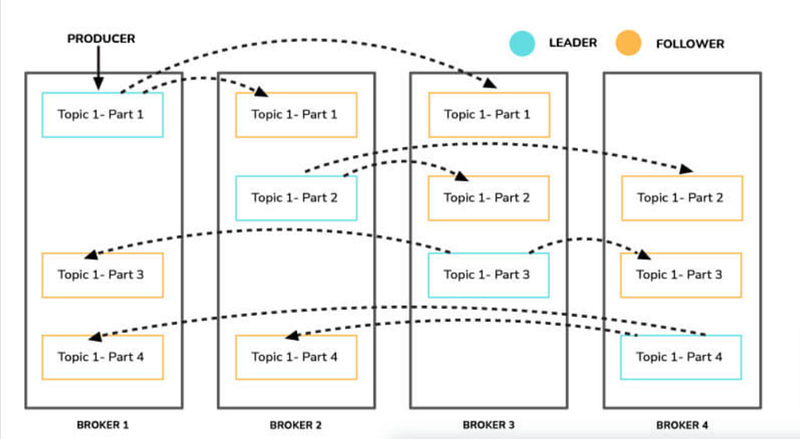
9.What is Leader and Follower? In a Kafka cluster, each partition has one leader and multiple followers. The leader handles all read and write requests for the partition, while followers replicate the data from the leader. If the leader fails, one of the followers is elected as the new leader to ensure continuous data availability. This leader-follower mechanism enhances Kafka’s fault tolerance and reliability, ensuring that data streams remain consistent and available.
Leader:
- The leader is the broker responsible for handling all read and write requests for a specific partition.
- Each partition has one leader at any given time.
- The leader manages the in-sync replicas list for its partition.
Follower:
- Followers are brokers that replicate the leader’s data for a partition.
- They don’t handle client requests directly for that partition.
- Followers stay in sync with the leader by fetching messages.
- If a leader fails, one of the in-sync followers is elected as the new leader.
10.What is ISR-In Sync Replica? ISR refers to the replicas of a partition that are “in sync” with the leader. An ISR is a follower that is synchronized with the leader.
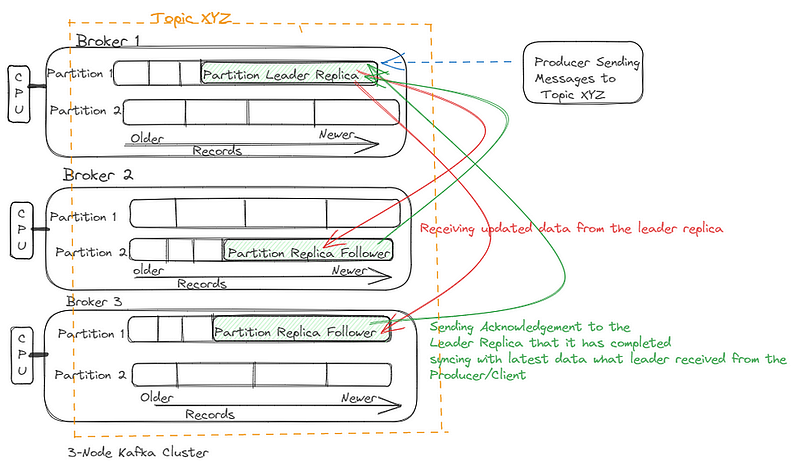
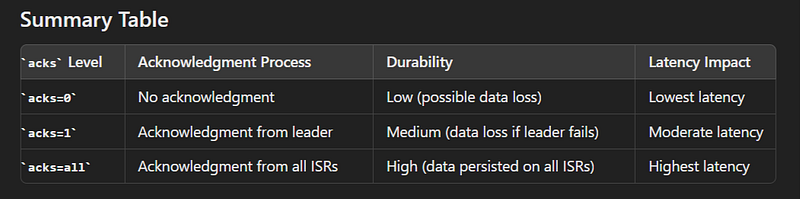
11.What is Acknowledgement? Acknowledgement(acks) determine the level of guarantee that a producer receives about the delivery of a message to Kafka brokers. There are three levels of acks:
- acks=0: The producer does not wait for any acknowledgment from the broker. It sends the message and continues. This provides the lowest latency but offers no guarantee that the message was received successfully. There is a risk of data loss if the broker fails.
- acks=1: The leader broker acknowledges the receipt of the message. The producer gets confirmation once the leader broker has written the message to its log but before it is replicated to any followers. This provides a balance between performance and durability. However, if the leader broker fails after acknowledging but before the followers have replicated the message, data loss can occur.
- acks=all (or acks=-1): The producer waits for the leader broker to receive acknowledgment from all in-sync replicas (ISRs). This provides the highest level of durability as it ensures that the message is written to the logs of all in-sync replicas. The message is guaranteed to be persisted as long as at least one in-sync replica is available. This setting can impact performance due to the overhead of waiting for acknowledgments from multiple brokers.
Example Scenario :
Assume we have a Kafka topic named example-topic with one partition. There are three brokers: Broker A (leader), Broker B (replica), and Broker C (replica).
1. acks=0
- Producer: Sends a message to the topic
example-topic. - Broker A: Receives the message but does not send any acknowledgment back to the producer.
- Producer: Continues to send other messages without waiting for any confirmation.
- Outcome: The message is sent quickly, but there is no guarantee that it has been received or stored. If Broker A fails immediately after receiving the message, the message could be lost.
2. acks=1
- Producer: Sends a message to the topic
example-topic. - Broker A: Receives the message, writes it to its local log, and sends an acknowledgment back to the producer.
- Producer: Receives the acknowledgment and continues to send other messages.
- Broker B & Broker C: Eventually replicate the message from Broker A.
- Outcome: The producer knows that the message has been received by Broker A, but if Broker A fails before the message is replicated to Broker B and Broker C, there is a risk of losing the message.
3. acks=all (or acks=-1)
- Producer: Sends a message to the topic
example-topic. - Broker A: Receives the message, writes it to its local log, and waits for acknowledgments from Broker B and Broker C.
- Broker B & Broker C: Receive the message from Broker A, write it to their local logs, and send acknowledgments back to Broker A.
- Broker A: After receiving acknowledgments from both Broker B and Broker C, sends an acknowledgment back to the producer.
- Producer: Receives the acknowledgment and continues to send other messages.
- Outcome: The message is guaranteed to be stored on all in-sync replicas (Broker A, Broker B, and Broker C). This provides the highest durability, but at the cost of increased latency because the producer has to wait for acknowledgments from multiple brokers.
12.What is Bootstrap Server? A bootstrap server is a configuration setting that the Kafka clients (producers, consumers, etc.) use to initially connect to the Kafka cluster.
When a Kafka client (e.g., a producer or consumer) starts, it needs to connect to the Kafka cluster to discover the metadata of the cluster, such as the list of brokers, topics, and partitions. The bootstrap server provides the initial connection point for the client to achieve this.
13. How can you secure Kafka? Kafka can be secured using SSL for encryption, SASL for authentication, and ACLs for authorization.
14. How do you integrate Kafka with Spring Boot? You can use the Spring Kafka library, which provides `@KafkaListener` for consumers and `KafkaTemplate` for producers.
15. How do you send a message to a Kafka topic using Spring Kafka?
Use `KafkaTemplate` to send messages.
kafkaTemplate.send("myTopic", "myMessage")16. How do you consume messages from a Kafka topic in Spring?
Use the `@KafkaListener` annotation to mark a method as a Kafka message consumer.
@KafkaListener(topics = “myTopic”)
public void consume(String message) {
// Process message
}
17. How do you batch-process messages from Kafka in Spring?
Use the `@KafkaListener` annotation with the `batchListener` property set to `true`.
@KafkaListener(topics = “myTopic”, batchListener = true)
public void consume(List<String> messages) {
// Process messages
}
What are the different types of Kafka topics? There are two main types of Kafka topics: - Regular topics: These are traditional topics where data is written to and consumed from. - Compact topics: Compact topics retain the latest value for each key, useful for maintaining a changelog of the most recent state for each key.
13.How does Kafka handle failures? Kafka uses replication to handle failures. Each partition in a topic can have multiple replicas distributed across different brokers. If a broker fails, one of the replicas automatically takes over as the new leader. This ensures that data availability and durability are maintained even in the face of failures.
14.What are the different ways to consume data from Kafka? There are two main ways to consume data from Kafka: - Pull Model: Consumers request data from Kafka at their own pace, reading messages from partitions. - Push Model: Using Kafka’s Consumer API, consumers can be configured to receive messages automatically when they are available.
15.What are the different ways to produce data to Kafka? There are various ways to produce data to Kafka: - Using Kafka’s Producer API in applications or services. - Using Kafka Connect to import data from other systems into Kafka. - Using third-party connectors to integrate with external data sources.
16.What are some of the best practices for using Kafka? Some best practices for using Kafka include: - Properly sizing and configuring hardware for Kafka brokers. - Careful consideration of topic and partition design. - Monitoring Kafka cluster health and performance. - Regularly backing up Kafka data. - Using Kafka’s consumer groups for parallel processing. - Setting retention policies to manage data storage.
17.What are some of the challenges of using Kafka? The challenges of using Kafka may include: - Setting up and managing a Kafka cluster can be complex. - Choosing the right topic and partition strategy can be critical for performance. - Monitoring and debugging distributed systems can be challenging. - Ensuring data consistency and ordering in a distributed environment can be tricky.
Some Advance Questions and answers
1. How would you configure Kafka for a high-volume application? Configuring Kafka for a high-volume application involves optimizing various parameters to handle the increased load efficiently. Here are some key configuration aspects to consider: - Broker Configuration : Adjust the `num.partitions`, `num.io.threads`, `num.network.threads`, and `log.segment.bytes` based on the hardware capabilities and expected message throughput. - Replication Factor : Increase the replication factor to ensure data durability and availability in case of node failures. - Producer Configuration : Tweak the producer settings like `batch.size`, `linger.ms`, and `compression.type` to optimize message publishing. - Consumer Configuration: Adjust consumer properties like `fetch.min.bytes`, `max.poll.records`, and `fetch.max.bytes` to optimize message consumption. - Topic Configuration: Configure topic retention policies (`retention.ms` and `retention.bytes`) and compaction (`cleanup.policy`) based on data retention and cleanup requirements. - Monitoring: Implement robust monitoring to keep track of key Kafka metrics, such as broker and topic lag, throughput, and disk usage.
2. How would you troubleshoot a Kafka issue? When troubleshooting Kafka issues, the following steps can be helpful: - Check Logs : Start by inspecting Kafka broker logs, producer logs, and consumer logs for any error messages or warning signs. - Monitor Metrics : Use monitoring tools to check cluster health and performance metrics, such as CPU usage, disk space, and network utilization. - Examine ZooKeeper : If using ZooKeeper, verify its status and check for any issues. - Review Configuration: Double-check the Kafka configuration for any misconfigurations or inconsistencies. - Test Connectivity: Ensure that network connectivity is functioning properly between brokers, producers, and consumers. - Check Hardware : Investigate hardware-related problems, such as disk failures or memory issues on Kafka servers. - Upgrade/Downgrade: If a recent change caused the issue, consider rolling back changes or upgrading to a stable version. - Community/Support: Seek help from the Kafka community or vendor support if needed.
3. How would you scale a Kafka cluster? To scale a Kafka cluster, you can follow these steps: - Horizontal Scaling: Add more brokers to the cluster to distribute the load and increase capacity. - Partitioning: Increase the number of partitions for hot topics to distribute data across brokers. - Replication: Increase the replication factor to improve fault tolerance and data availability. - Load Balancing: Use a load balancer to evenly distribute incoming traffic across brokers. - Monitoring: Keep a close eye on cluster metrics to identify bottlenecks and adjust resources accordingly.
4. How would you secure a Kafka cluster? Securing a Kafka cluster involves implementing several best practices: - Network Security: Use firewalls and network isolation to restrict access to Kafka brokers. - Authentication: Configure authentication mechanisms like SSL/TLS or SASL to authenticate clients and brokers. - Authorization : Implement proper authorization mechanisms (ACLs) to control access to topics and operations. - Encryption: Enable data encryption in transit and at rest to protect sensitive data. - Secure ZooKeeper: If using ZooKeeper, secure it with appropriate authentication and authorization. - Kerberos Integration: For enterprise environments, consider integrating Kafka with Kerberos for centralized authentication. - Regular Updates: Keep Kafka and related components up to date with the latest security patches. - Monitoring: Implement monitoring and auditing to detect and respond to security-related events.
5. How would you use Kafka for real-time analytics? To use Kafka for real-time analytics, you can follow this general approach: - Data Ingestion: Ingest data from various sources (e.g., logs, databases, applications) into Kafka topics using producers. - Stream Processing: Set up stream processing applications using frameworks like Apache Kafka Streams or Apache Flink to perform real-time analytics on the data. - Data Transformation: Process and transform the data in real-time to extract relevant information. - Data Storage: Optionally, persist processed data in a database or data warehouse for further analysis or reporting. - Data Visualization: Use visualization tools to create real-time dashboards and reports for insights.
6. How would you use Kafka for event streaming? Event streaming with Kafka involves the following steps: - Event Producers: Applications or services generate events and publish them to Kafka topics using Kafka producers. - Event Consumers: Applications or services subscribe to specific topics and consume events using Kafka consumers. - Event Processing: Events can be processed in real-time using stream processing frameworks or batch processing for offline analytics. - Event Sourcing: Kafka can be used for event sourcing, where all changes to an application’s state are captured as a sequence of events in Kafka topics. - Event-Driven Architecture: Applications can be designed in an event-driven architecture, where different components communicate through events, enabling loose coupling and scalability. - Microservices Integration: Kafka is often used to facilitate communication and data synchronization between microservices in distributed systems.


