Java String Interview Questions and answer
If you like this post, Please clap for it
Topics and Questions are Covered
- What is a String in Java
- What is Immutable String in Java?
- String Literals
- String Objects
- Comparing Strings:
==vsequals() - What is String Pool?
- String manipulation [ length(), charAt(), substring(), concat(), indexOf(), toUpperCase(), toLowerCase(), trim(), equals(), contains(), replace(), valueOf() ]
- Difference between isEmpty() and isBlank() methods in java?
- StringBuilder
- StringBuffer
- Difference between StringBuilder and StringBuffer in Java
- What is StringTokenizer in Java?
- What is the superclass of string class in Java?
- Why Java uses the concept of string literal?
- How are String literals cleared from String constant pool?
- What is the use of toString() method in Java?
- What is the purpose of intern() method in Java?
- Is it possible to convert String to Int and vice versa in Java?
- What is Stringjoiner in Java 8?
- Java String to Date Example
- How do you remove all white spaces from a string in Java?
- How do you convert a character array to a string in Java?
- How do you remove the last character from a string in Java?
- How do you remove the first character from a string in Java?
- difference between
String,StringBuffer, andStringBuilder. When would you use each one? - Explain the
split()method in theStringclass and provide an example of its usage. - How do you reverse a given string in java?
- How do you print duplicate characters from a string in java?
- How do you check if two strings are anagrams of each other in java?
- How do you check if a string contains only digits in java?
- How do you count a number of vowels and consonants in a given string?
- How do you print the first non-repeated character from a string?
- How do you reverse words in a given sentence without using any library method?
- How do you check if a given string is a palindrome?
- how to remove the duplicate character from String?
- How to find the maximum occurring character in given String?
- How do you remove a given character from String in java?
What is a String in Java? A String in Java is an immutable sequence of characters. It’s a special kind of object that represents textual data.
What is Immutable String in Java? String objects are immutable. once a String object is created, its value cannot be changed.
String originalString = "What is ";
originalString.concat("immutability?");
In this example, if you print the string named originalString on the screen, the result you will get is just “What is ”. Although a string with the value ‘What is immutability?’ is created, the originalString doesn’t point this value.
If the final value is assigned to the ‘originalString’ as in the example below, then the originalString will print ‘What is immutability?’ to the console.
String originalString = "What is ";
originalString = originalString.concat("immutability?");
However, in this case, we haven’t actually modified the string. In this code, when the concat() method is called, a new string object is created and this new string object has the value “What is immutability?”. Then, the reference of this new string object is assigned to the variable named originalString. In other words, the originalString variable now points to a different string object, and the initial “What is ” value is no longer referenced and will be eventually cleaned up by the garbage collector.
String Literals String literals are strings that are directly specified in the code, enclosed in double quotes. When a string literal is created, it is interned by the JVM, meaning it is stored in a special area of memory called the string pool. If another string literal with the same content is created, it will reference the same memory location in the string pool, thus saving memory.
String str1 = "Hello";
String str2 = "Hello";
System.out.println(str1 == str2); // true, because of interning
String Objects
String objects, on the other hand, are created using the new keyword. Every time a new string object is created using new, it is allocated a new memory location in the heap, even if the content is identical to an existing string.
String str1 = new String("Hello");
String str2 = new String("Hello");
System.out.println(str1 == str2); // false, because they are different objects
Comparing Strings: == vs equals()
==Operator: This operator checks if two references point to the same memory location.equals()Method: This method checks if two strings have the same content, regardless of their memory locations.
- Memory Allocation:
- String literals are stored in the string pool.
- String objects created with
neware stored in the heap.
2. Comparison:
==compares memory locations, not content.equals()compares the content of the strings.
What is String Pool? String Pool is a special storage area for storing texts. This pool is located in Java Heap Memory.
Whenever a developer is creating a string, that string object will occupy some space in the heap memory. In order to prevent that JVM performs some steps. When creating a new string literal, JVM first checks that literal in the String Pool. If it finds that literal, it returns a reference to that instance. When the literal is not present, a new string object takes place in String Pool.
When the strings are created as literal they will be automatically saved in String Pool, but if they are created with new keyword, they will be in the Heap, but not in the String Pool. The String Pool concept is as follows;
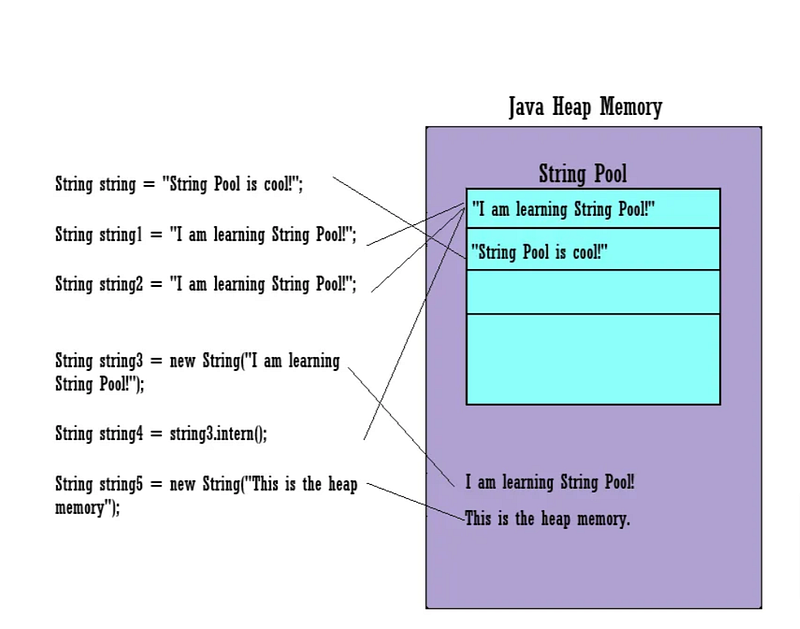
As seen in the picture, the strings created with the literal are located in the String Pool, while the strings created with the new keyword are located in the heap memory outside the String Pool. The intern() method in the String class is a method used in the String Pool concept. This method is being used to add a string object to the String Pool or retrieve it from the String Pool. If a string already exists in the String Pool, the intern() method returns the reference to the same string object. However, if that string does not exist in the String Pool, the intern() method adds this string to the String Pool and returns its reference.
In conclusion, String Pool in Java is an important mechanism used to manage texts and optimize memory usage. The immutability of string objects and the memory savings of the String Pool increase the performance of Java programming.
Example :
import java.util.*;

public class StringInternExample
{
    public static void main(String args[])
    {
        //it will store in the string pool
        String str1 = "Python";
        String str2 = "Data Science";
        //it returns the reference of the pooled instance i.e. str1
        //it will not take place in the string pool
        String str3 = "Python";
        String str4 = "C";
        //store in Java heap
        String str5 = new String ("Java");
        //store in Java heap
        String str6 = new String ("C++");
        //store in Java heap
        String str7 = new String ("Data Science");
        //it will not take place in Java heap
        //it will store in string pool
        String str8 = new String ("C").intern();
        //returns false
        System.out.println((str1 == str5)+", Strings are not equal.");
        //returns false because str2 occupies space in string pool and str7 occupies space in Java heap
        System.out.println((str2 == str7)+", Strings are not equal.");
        //it returns true because we have invoked the intern() method and the String C is already present in the string pool
        System.out.println((str4 == str8)+", Strings are equal.");
    }
}
Output
Output:

false, Strings are not equal.
false, Strings are not equal.
true, Strings are equal.
String manipulation in java
length(): Returns the length of the string.
String str = "Hello";
int length = str.length(); // 5
charAt(int index): Returns the character at the specified index.
char ch = str.charAt(1); // 'e'substring(int beginIndex, int endIndex): Returns a new string that is a substring of the original string.
String sub = str.substring(1, 4); // "ell"concat(String str): Concatenates the specified string to the end of the current string.
String greeting = "Hello".concat(", World!"); // "Hello, World!"indexOf(String str): Returns the index within the string of the first occurrence of the specified substring.
int index = str.indexOf("e"); // 1toUpperCase()andtoLowerCase(): Convert the string to uppercase or lowercase.
String upper = str.toUpperCase(); // "HELLO"
String lower = str.toLowerCase(); // "hello"trim(): Removes whitespace from both ends of the string.
String spaced = "   Hello   ";
String trimmed = spaced.trim(); // "Hello"
equals() : The equals() method compares two strings and returns true if they are equal. It is used to check if two strings are the same
String str1 = "Hello World";
String str2 = "Hello World";
boolean result = str1.equals(str2);
System.out.println("Strings are equal: " + result);

//Output: Strings are equal: true
contains() : The contains() method checks if a string contains a specified character sequence. It is used to check if a string contains a particular substring.
String str = "Hello World";
boolean result = str.contains("Hello");
System.out.println("String contains 'Hello': " + result);

//Output: String contains 'Hello': true
replace() : The replace() method replaces a character or a sequence of characters in a string with another character or sequence. It is used to replace a character or a substring with another string.
String str = "Hello World";
String replacedStr = str.replace("World", "Java");
System.out.println("Replaced string is: " + replacedStr);

//Output: Replaced string is: Hello JavavalueOf() : The valueOf() method converts a given data type to its corresponding string representation. It is used to convert other data types to a string.
int num = 10;
String str = String.valueOf(num);
System.out.println("String value is: " + str);

// Output: String value is: 10
Difference between isEmpty() and isBlank() methods in java?
isEmpty() and isBlank() are two different methods used for checking the content of strings, and they have distinct purposes.
isBlank() is a method introduced in the String class as part of Java 11. It is used to check if a string is empty or contains only white spaces or escape sequence characters.
- isBlank() returns true if your string is empty.
- isBlank() returns true if the string contains whitespaces
- isBlank() returns true if it contains escape sequence characters only.
- isBlank() returns false if the length of the string is not zero
String name = "";      // an empty string
String name = "   ";   // a string with spaces
String name = "\t\t";  // a string with tabs
String name = "100bitdarsh"; // a non-empty string

System.out.println("isBlank Example:");
System.out.println(name.isBlank()); // true
System.out.println(name.isBlank()); // true
System.out.println(name.isBlank()); // true
System.out.println(name.isBlank()); // false
the isEmpty() method is also a method in the String class. It's used to check whether a string is empty or not. A string is considered empty if its length is 0, meaning it contains no characters.
- isEmpty() returns true if the length of the string is zero
- isEmpty() returns false if the length of the string is not zero
String name = "";      // an empty string
String name = "100bitdarsh"; // a non-empty string

System.out.println("isEmpty Example:");
System.out.println(name.isEmpty()); // true
System.out.println(name.isEmpty()); // false
Difference between StringBuilder and StringBuffer in Java?StringBuilder
This is an unsynchronized, mutable sequence of characters. It is designed for single-threaded scenarios where performance is crucial. With StringBuilder, you can append, insert or delete characters within the same object, avoiding the need to create multiple intermediate string objects. Good for dynamic string construction and concatenation.
Example : StringBuilder
public class StringBuilderExample {
    public static void main(String[] args) {
        StringBuilder sentenceBuilder = new StringBuilder();

        sentenceBuilder.append("This");
        sentenceBuilder.append(" is");
        sentenceBuilder.append(" a");
        sentenceBuilder.append(" StringBuilder");
        sentenceBuilder.append(" example.");

        String sentence = sentenceBuilder.toString();
        System.out.println(sentence);
    }
}

// Output:
// This is a StringBuilder example.
StringBuffer
Similar to StringBuilder, StringBuffer also provides mutable sequences of characters. However, unlike StringBuilder, StringBuffer is synchronized, making it thread-safe. This means that multiple threads can manipulate a StringBuffer object concurrently without causing data corruption. However, this thread safety comes at the cost of some performance.
Example : StringBuffer
public class ReverseStringBufferExample {
    public static void main(String[] args) {
        String originalString = "Hello, world!";
        StringBuffer reversedBuffer = new StringBuffer(originalString);

        reversedBuffer.reverse();
        String reversedString = reversedBuffer.toString();

        System.out.println("Original: " + originalString);
        System.out.println("Reversed: " + reversedString);
    }
}

// Output:

// Original: Hello, world!
// Reversed: !dlrow ,olleH
What is StringTokenizer in Java?
StringTokenizer is a legacy class in Java that is used to split a string into tokens. A token is a single unit of the string, typically separated by a delimiter. The class is part of the java.util package.
Methods:
hasMoreTokens(): Checks if there are more tokens available.nextToken(): Returns the next token.countTokens(): Returns the number of remaining tokens.hasMoreElements(): Equivalent tohasMoreTokens().nextElement(): Equivalent tonextToken().
import java.util.StringTokenizer;

public class Example {
    public static void main(String[] args) {
        String str = "This is an example string.";
        StringTokenizer st = new StringTokenizer(str);

        while (st.hasMoreTokens()) {
            System.out.println(st.nextToken());
        }
    }
}

// output

This
is
an
example
string.
Example 2 :
import java.util.StringTokenizer;

public class StringTokenizerExample {
    public static void main(String[] args) {
        // String to be tokenized
        String str = "Java is fun; let's learn it.";

        // Create a StringTokenizer with space and semicolon as delimiters
        StringTokenizer st = new StringTokenizer(str, " ;");

        // Iterate through the tokens
        while (st.hasMoreTokens()) {
            // Print each token
            System.out.println(st.nextToken());
        }
    }
}

// output
Java
is
fun
let's
learn
it.
What is the superclass of string class in Java? Object class is the superclass of string. String class extends object class.
Why Java uses the concept of string literal? Java uses string literal concept to make it more memory efficient because no new object will create if it already exists in the constant pool.
How are String literals cleared from String constant pool? It is the responsibility of garbage collector to clear string object from the string constant pool.
What is the use of toString() method in Java? The toString() method of String class returns the string representation of any object. Java compiler internally calls toString() method on the object if you print any object.
What is the purpose of intern() method in Java? The purpose of intern() method is to add the unique copy of the string object to the string constant pool manually. When we create a string using a new keyword, JVM stores it in the heap memory and also store the unique copy of that string object in the string pool using the intern() method.
Is it possible to convert String to Int and vice versa in Java? Yes, it is possible to convert string to int and vice versa. We can convert string to an integer using parseInt() and valueOf() methods of the Integer class.
Also, we can convert an integer to string using valueOf() method of Java String class. Look at the source code that demonstrates the string to integer and integer to string conversion.
public class Conversion {
public static void main(String[] args)
{
 String str = "1456";
 int num = 9878;

// Converting string to int using Integer.parseInt() method
   int n1 = Integer.parseInt(str);
// Converting string to int using Integer.valueOf() method
   int n2 = Integer.valueOf(str);

   System.out.println("Converting String into Integer:");
   System.out.println("Using Integer.parseInt() method: " +n1);
   System.out.println("Using the Integer.valueOf() method : " +n2);

   System.out.println();
// Converting integer to string using String.valueOf() method
   String s = String.valueOf(num);
   System.out.println("Converting Integer to String:");
   System.out.println("Using the String.valueOf() method : "+s);
 }
}

// Output:
     Converting String into Integer:
     Using Integer.parseInt() method: 1456
     Using the Integer.valueOf() method : 1456
What is Stringjoiner in Java 8? StringJoiner is a new class added in Java 8. It joins (or concatenates) Strings separated by a delimiter and having a prefix and suffix.
import java.util.StringJoiner;
public class StringJoiner {
public static void main(String[] args)
{
  StringJoiner strJoiner = new StringJoiner(",", "[", "]");
    strJoiner.add("Red");
    strJoiner.add("Green");
    strJoiner.add("Blue");
  System.out.println(strJoiner);
 }
}

// Output:
      [Red,Green,Blue]
The above code creates a StringJoiner. It uses comma symbol (,) as delimiter and square brackets ([ ]) as prefix and suffix. Then, it calls add() method with some string values.
Java String to Date Example
import java.text.SimpleDateFormat;
import java.util.Date;
public class StringToDateExample1 {
public static void main(String[] args)throws Exception {
    String sDate1="31/12/1998";
    Date date1=new SimpleDateFormat("dd/MM/yyyy").parse(sDate1);
    System.out.println(sDate1+"\t"+date1);
}
}

// output
31/12/1998 Thu Dec 31 00:00:00 IST 1998
How do you remove all white spaces from a string in Java?
String str = "hello world";

str = str.replaceAll("\\s", "");

System.out.println(str);

// Output:

helloworld
How do you convert a character array to a string in Java?
Using the String constructor:
public class Main {
    public static void main(String[] args) {
        char[] charArray = {'H', 'e', 'l', 'l', 'o'};
        String str = new String(charArray);
        System.out.println(str);  // Output: Hello
    }
}
Using String.valueOf() method:
public class Main {
    public static void main(String[] args) {
        char[] charArray = {'W', 'o', 'r', 'l', 'd'};
        String str = String.valueOf(charArray);
        System.out.println(str);  // Output: World
    }
}
How do you remove the last character from a string in Java?
String str = "Hello World!";

String newStr = str.substring(0, str.length() - 1);

System.out.println(newStr);

// Output:
Hello World
How do you remove the first character from a string in Java?
String str = "example";

str = str.substring(1);

System.out.println(str); // Output: "xample"
Explain the difference between String, StringBuffer, and StringBuilder. When would you use each one?
String
Stringobjects are immutable, meaning once created, their values cannot be changed. Any operation that appears to modify aStringactually creates a newStringobject.- Because of immutability, operations like concatenation (
+operator) or substring creation can be inefficient, especially when performed repeatedly on large strings. Stringis thread-safe due to its immutability.- Use
Stringwhen you need an immutable sequence of characters, or when you don’t expect frequent modifications to the string.
StringBuffer
StringBufferis mutable, meaning its value can be modified after creation without creating a new object.StringBufferprovides thread safety through synchronized methods, which means it can be safer to use in multithreaded environments.StringBufferis less efficient thanStringBuilderbecause its methods are synchronized, which introduces some overhead.- Use
StringBufferwhen you need a mutable sequence of characters and thread safety is a concern.
StringBuilder
StringBuilderis also mutable likeStringBuffer, but it is not synchronized.- Because it is not synchronized,
StringBuilderis generally faster thanStringBuffer. - However,
StringBuilderis not thread-safe, meaning if multiple threads access the sameStringBuilderinstance concurrently, you may encounter issues like data corruption. - Use
StringBuilderwhen you need a mutable sequence of characters and thread safety is not a concern, or when performance is critical and you’re confident about the single-threaded nature of your application.
In summary:
- Use
Stringwhen you need an immutable sequence of characters. - Use
StringBufferwhen you need a mutable sequence of characters and thread safety is a concern. - Use
StringBuilderwhen you need a mutable sequence of characters and thread safety is not a concern, or when performance is critical.
Explain the split() method in the String class and provide an example of its usage.
public class SplitExample {
    public static void main(String[] args) {
        // Original string
        String str = "apple,banana,orange,grape";
       // Splitting the string using comma as the delimiter
              String[] fruits = str.split(",");
              // Displaying the substrings
              for (String fruit : fruits) {
                  System.out.println(fruit);
              }
          }
      }

// output
apple
banana
orange
grape
How do you reverse a given string in java?
Using a for loop:
public class ReverseString {
    public static void main(String[] args) {
        String original = "Hello World!";
        String reversed = "";

        for (int i = original.length() - 1; i >= 0; i--) {
            reversed += original.charAt(i);
        }

        System.out.println("Reversed String: " + reversed);
    }
}
Using StringBuilder or StringBuffer:
public class ReverseString {
    public static void main(String[] args) {
        String original = "Hello World!";
        StringBuilder sb = new StringBuilder(original);
        String reversed = sb.reverse().toString();

        System.out.println("Reversed String: " + reversed);
    }
}
Using character array:
public class ReverseString {
    public static void main(String[] args) {
        String original = "Hello World!";
        char[] charArray = original.toCharArray();
        String reversed = "";

        for (int i = charArray.length - 1; i >= 0; i--) {
            reversed += charArray[i];
        }

        System.out.println("Reversed String: " + reversed);
    }
}
How do you print duplicate characters from a string in java?
import java.util.HashMap;
import java.util.Map;

public class DuplicateCharacters {
    public static void main(String[] args) {
        String input = "programming";
        printDuplicateCharacters(input);
    }

    public static void printDuplicateCharacters(String str) {
        // Create a HashMap to store the count of each character
        Map<Character, Integer> charCountMap = new HashMap<>();

        // Convert the string to a char array
        char[] chars = str.toCharArray();

        // Count the occurrences of each character
        for (char c : chars) {
            charCountMap.put(c, charCountMap.getOrDefault(c, 0) + 1);
        }

        // Print characters that appear more than once
        System.out.println("Duplicate characters in the string:");
        for (Map.Entry<Character, Integer> entry : charCountMap.entrySet()) {
            if (entry.getValue() > 1) {
                System.out.println(entry.getKey() + " : " + entry.getValue());
            }
        }
    }
}
output
Duplicate characters in the string:
r : 2
g : 2
m : 2
How do you check if two strings are anagrams of each other in java? Anagrams are words or phrases formed by rearranging the letters of another word or phrase, typically using all the original letters exactly once.
Examples of Anagrams:
- “Listen” and “Silent”: Both words use the same letters and are rearranged versions of each other.
- “Dormitory” and “Dirty room”: By rearranging the letters and ignoring spaces, both form anagrams.
- “The eyes” and “They see”: These phrases have the same letters rearranged to form different phrases.
- “Astronomer” and “Moon starer”: The letters in “Astronomer” can be rearranged to spell “Moon starer.”
import java.util.Arrays;

public class AnagramCheck {
    public static boolean areAnagrams(String str1, String str2) {
        // Remove spaces and convert to lowercase
        str1 = str1.replaceAll("\\s", "").toLowerCase();
        str2 = str2.replaceAll("\\s", "").toLowerCase();

        // Check if lengths are different, return false immediately
        if (str1.length() != str2.length()) {
            return false;
        }

        // Convert to char arrays and sort
        char[] charArray1 = str1.toCharArray();
        char[] charArray2 = str2.toCharArray();

        Arrays.sort(charArray1);
        Arrays.sort(charArray2);

        // Compare sorted arrays
        return Arrays.equals(charArray1, charArray2);
    }

    public static void main(String[] args) {
        String str1 = "Listen";
        String str2 = "Silent";

        if (areAnagrams(str1, str2)) {
            System.out.println(str1 + " and " + str2 + " are anagrams.");
        } else {
            System.out.println(str1 + " and " + str2 + " are not anagrams.");
        }
    }
}

//output
Listen and Silent are anagrams.
How do you check if a string contains only digits in java
// Using String.matches() with a Regular Expression:

String str = "12345";
boolean isDigits = str.matches("\\d+");
System.out.println(isDigits); // true if all characters are digits


// Using Character.isDigit() in a Loop:

String str = "12345";
boolean isDigits = true;
for (char c : str.toCharArray()) {
    if (!Character.isDigit(c)) {
        isDigits = false;
        break;
    }
}
System.out.println(isDigits); // true if all characters are digits
How do you count a number of vowels and consonants in a given string?
public class VowelConsonantCounter {
    public static void main(String[] args) {
        String input = "Hello, World!"; // Replace with your input string
        countVowelsAndConsonants(input);
    }

    public static void countVowelsAndConsonants(String str) {
        int vowelCount = 0;
        int consonantCount = 0;
        str = str.toLowerCase(); // Convert to lower case to handle both cases

        for (char c : str.toCharArray()) {
            if (Character.isLetter(c)) { // Check if the character is a letter
                if (isVowel(c)) {
                    vowelCount++;
                } else {
                    consonantCount++;
                }
            }
        }

        System.out.println("Vowels: " + vowelCount);
        System.out.println("Consonants: " + consonantCount);
    }

    public static boolean isVowel(char c) {
        return "aeiou".indexOf(c) != -1; // Check if the character is a vowel
    }
}

//output
Vowels: 3
Consonants: 7
How do you print the first non-repeated character from a string?
import java.util.HashMap;

public class FirstNonRepeatedChar {
    public static void main(String[] args) {
        String input = "swiss";
        char result = findFirstNonRepeatedChar(input);

        if (result != 0) {
            System.out.println("The first non-repeated character is: " + result);
        } else {
            System.out.println("All characters are repeated.");
        }
    }

    public static char findFirstNonRepeatedChar(String str) {
        HashMap<Character, Integer> charCountMap = new HashMap<>();

        // Populate the HashMap with character counts
        for (char c : str.toCharArray()) {
            charCountMap.put(c, charCountMap.getOrDefault(c, 0) + 1);
        }

        // Find the first non-repeated character
        for (char c : str.toCharArray()) {
            if (charCountMap.get(c) == 1) {
                return c;
            }
        }

        // Return 0 if no non-repeated character is found
        return 0;
    }
}
using java 8
import java.util.Map;
import java.util.function.Function;
import java.util.stream.Collectors;

public class FirstNonRepeatedCharJava8 {
    public static void main(String[] args) {
        String input = "swiss";
        char result = findFirstNonRepeatedChar(input);

        if (result != 0) {
            System.out.println("The first non-repeated character is: " + result);
        } else {
            System.out.println("All characters are repeated.");
        }
    }

    public static char findFirstNonRepeatedChar(String str) {
        // Create a map with character counts
        Map<Character, Long> charCountMap = str.chars()
                .mapToObj(c -> (char) c)
                .collect(Collectors.groupingBy(Function.identity(), Collectors.counting()));

        // Find the first non-repeated character
        return str.chars()
                .mapToObj(c -> (char) c)
                .filter(c -> charCountMap.get(c) == 1)
                .findFirst()
                .orElse((char) 0);
    }
}
How do you reverse words in a given sentence without using any library method?
public class ReverseWords {
    public static void main(String[] args) {
        String sentence = "Hello world this is Java";
        String reversedSentence = reverseWords(sentence);
        System.out.println(reversedSentence); // Output: "Java is this world Hello"
    }

    public static String reverseWords(String sentence) {
        // Split the sentence into words
        String[] words = sentence.split(" ");

        // Reverse the order of words
        for (int i = 0; i < words.length / 2; i++) {
            String temp = words[i];
            words[i] = words[words.length - 1 - i];
            words[words.length - 1 - i] = temp;
        }

        // Join the words back into a sentence
        StringBuilder reversedSentence = new StringBuilder();
        for (String word : words) {
            reversedSentence.append(word).append(" ");
        }

        // Trim the trailing space and return the result
        return reversedSentence.toString().trim();
    }
}

// output
Java is this world Hello
How do you check if a given string is a palindrome?
public class PalindromeChecker {
    public static void main(String[] args) {
        String input = "A man, a plan, a canal, Panama";
        System.out.println(isPalindrome(input));
    }

    public static boolean isPalindrome(String s) {
        // Convert the string to lowercase
        String cleaned = s.replaceAll("[^a-zA-Z0-9]", "").toLowerCase();

        // Check if the cleaned string equals its reverse
        return cleaned.equals(new StringBuilder(cleaned).reverse().toString());
    }
}

// output
true
how to remove the duplicate character from String?
import java.util.HashSet;
import java.util.Set;

public class RemoveDuplicates {
    public static void main(String[] args) {
        String input = "programming";
        String result = removeDuplicateCharacters(input);
        System.out.println(result); // Output: progamin
    }

    public static String removeDuplicateCharacters(String str) {
        Set<Character> seen = new HashSet<>();
        StringBuilder sb = new StringBuilder();

        for (char c : str.toCharArray()) {
            if (!seen.contains(c)) {
                seen.add(c);
                sb.append(c);
            }
        }

        return sb.toString();
    }
}

// output
progamin
How to find the maximum occurring character in given String?
import java.util.HashMap;
import java.util.Map;

public class MaxOccurringCharacter {
    public static char findMaxOccurringChar(String str) {
        if (str == null || str.isEmpty()) {
            throw new IllegalArgumentException("String is null or empty");
        }

        // Create a frequency map
        Map<Character, Integer> frequencyMap = new HashMap<>();

        // Populate the frequency map
        for (char c : str.toCharArray()) {
            frequencyMap.put(c, frequencyMap.getOrDefault(c, 0) + 1);
        }

        // Find the character with the maximum frequency
        char maxChar = '\0';
        int maxCount = 0;

        for (Map.Entry<Character, Integer> entry : frequencyMap.entrySet()) {
            if (entry.getValue() > maxCount) {
                maxCount = entry.getValue();
                maxChar = entry.getKey();
            }
        }

        return maxChar;
    }

    public static void main(String[] args) {
        String input = "example string";
        char maxChar = findMaxOccurringChar(input);
        System.out.println("The maximum occurring character is: " + maxChar);
    }
}

// output
The maximum occurring character is: e
How do you remove a given character from String in java?
public class Main {
    public static void main(String[] args) {
        String originalString = "Hello, World!";
        char charToRemove = 'o';

        // Remove all occurrences of the specified character
        String newString = originalString.replace(Character.toString(charToRemove), "");

        System.out.println(newString); // Prints: Hell, Wrld!
    }
}

// output
Hell, Wrld!


