
Spring Boot Profiles
Organizing your configuration decentralized
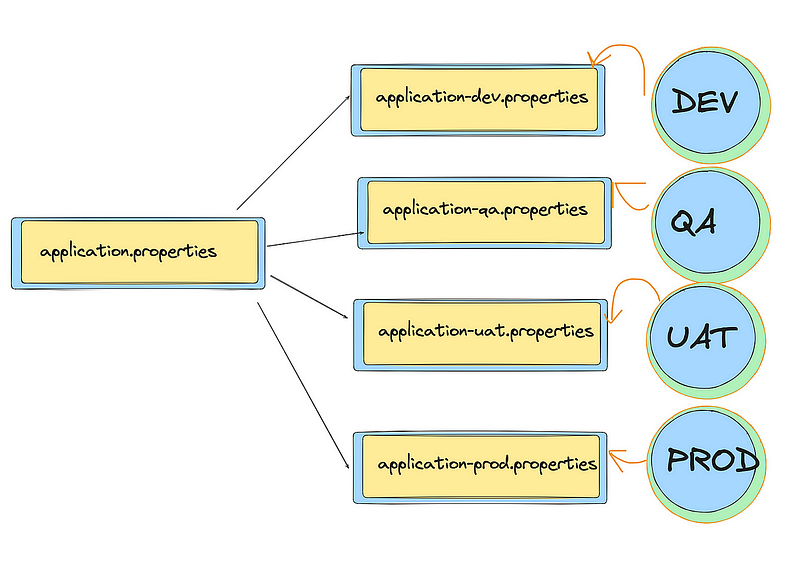
Spring Boot Profiles is a feature that allows you to customize your application’s behavior for different environments, such as development, testing, staging, and production. Profiles enable you to have different configurations, beans, and even code paths based on the active profile.
Purpose of Profiles
Profiles help you manage different configurations for different environments without changing the codebase. This is particularly useful for managing settings like database connections, logging levels, and other environment-specific configurations.
Example Scenario
Suppose you have a simple Spring Boot application that needs different configurations for development and production environments. For example, the application connects to different databases in these environments.
Steps to Implement Profiles
- Create Application Properties Files
Create two configuration files: application-dev.properties for the development profile and application-prod.properties for the production profile.
src/main/resources/application-dev.properties:
app.name=Development Application
db.url=jdbc:mysql://localhost:3306/dev_db
db.username=dev_user
db.password=dev_passsrc/main/resources/application-prod.properties:
app.name=Production Application
db.url=jdbc:mysql://prod-host:3306/prod_db
db.username=prod_user
db.password=prod_pass
Create a Configuration Class
Create a configuration class to load properties based on the active profile.
src/main/java/com/example/config/AppConfig.java:
package com.example.config;

import org.springframework.beans.factory.annotation.Value;
import org.springframework.context.annotation.Bean;
import org.springframework.context.annotation.Configuration;
import org.springframework.context.annotation.Profile;

@Configuration
public class AppConfig {

    @Value("${app.name}")
    private String appName;

    @Value("${db.url}")
    private String dbUrl;

    @Value("${db.username}")
    private String dbUsername;

    @Value("${db.password}")
    private String dbPassword;

    @Bean
    public String appInfo() {
        return String.format("App Name: %s, DB URL: %s", appName, dbUrl);
    }

    @Bean
    public DatabaseConfig databaseConfig() {
        return new DatabaseConfig(dbUrl, dbUsername, dbPassword);
    }
}
@Configuration
- Purpose: Indicates that the class contains one or more
@Beanmethods and can be used by the Spring IoC container as a source of bean definitions. - Usage: It tells Spring that the class should be processed to generate Spring Beans. Essentially, it marks a class as a configuration class that contains bean definitions and configuration settings.
In the example, AppConfig is annotated with @Configuration, which means it provides configuration details for the Spring application context.
@Bean
- Purpose: Indicates that a method produces a bean to be managed by the Spring container. The method’s return value is registered as a bean within the Spring application context.
- Usage: You use this annotation on a method to define a Spring Bean. The method name is typically used as the bean name unless explicitly specified otherwise.
In this example, appInfo() is a bean method that creates a String bean with application information. The @Bean annotation tells Spring to manage this method’s return value as a bean.
@Value
- Purpose: Injects values into fields, methods, or constructor parameters from a property source, such as application properties or YAML files.
- Usage: It is used to inject property values directly into fields or method parameters. You can use it to inject configuration values defined in properties files or environment variables.
In this example, @Value("${app.name}") injects the value of the app.name property from the properties file into the appName field. If app.name is defined in the properties file as Development Application, then appName will be set to "Development Application".
src/main/java/com/example/config/DatabaseConfig.java:
package com.example.config;

public class DatabaseConfig {
    private String url;
    private String username;
    private String password;

    public DatabaseConfig(String url, String username, String password) {
        this.url = url;
        this.username = username;
        this.password = password;
    }

    // Getters and setters
}
Set Active Profile
You can set the active profile in application.properties or override it at runtime.
src/main/resources/application.properties:
spring.profiles.active=devYou can also set the profile via command-line arguments when running the application:
java -jar myapp.jar --spring.profiles.active=prodCreate a REST Controller
Create a REST controller to expose the configuration values.
src/main/java/com/example/controller/ConfigController.java:
package com.example.controller;

import com.example.config.DatabaseConfig;
import org.springframework.beans.factory.annotation.Autowired;
import org.springframework.web.bind.annotation.GetMapping;
import org.springframework.web.bind.annotation.RequestMapping;
import org.springframework.web.bind.annotation.RestController;

@RestController
@RequestMapping("/config")
public class ConfigController {

    @Autowired
    private DatabaseConfig databaseConfig;

    @GetMapping
    public String getConfig() {
        return String.format("DB URL: %s, Username: %s",
            databaseConfig.getUrl(),
            databaseConfig.getUsername());
    }
}
Testing the Application
To test the application, you can run it with different profiles and verify the output.
- Test for Development Profile:
java -jar myapp.jar --spring.profiles.active=devExpected Output:
DB URL: jdbc:mysql://localhost:3306/dev_db, Username: dev_user
2. Test for Production Profile:
java -jar myapp.jar --spring.profiles.active=prodExpected Output:
DB URL: jdbc:mysql://prod-host:3306/prod_db, Username: prod_user
Summary
- Configuration Files: Define different configurations for each profile.
- Configuration Class: Load properties based on the active profile.
- Active Profile: Set the active profile in
application.propertiesor via command-line arguments. - Testing: Run the application with different profiles to ensure correct configurations are loaded.
This approach allows you to manage configurations cleanly and switch between different environments easily.
👏 If you found my articles useful, please consider giving it claps and sharing it with your friends and colleagues.
To read other topics
- Mastering Transaction Propagation and Isolation in Spring Boot
- @Formula Annotation in Spring Boot
- @AssociationOverride, @AttributeOverrides, @Embeddable, @Embedded Annotation.
- One To One mapping in Spring Boot JPA
- One To Many mapping in Spring Boot JPA
- SOLID Principles in Java
- Java 8 Interview Questions and Answer
- Java String Interview Questions and answer
- Kafka Interview Questions and Answers
- Optional in Java 8
- Global exception handling in spring boot
- Pessimistic Locking in JPA with Spring Boot
- Optimistic Locking in JPA with Spring Boot
- Design Pattern in java
- Generic ApiResponse and Global Exception Handling in Spring Boot
- Garbage Collection in Java
- JVM Architecture
- How the JIT Compiler Enhances Java Performance: An In-Depth Explanation